warning light TOYOTA TUNDRA HYBRID 2023 Workshop Manual
[x] Cancel search | Manufacturer: TOYOTA, Model Year: 2023, Model line: TUNDRA HYBRID, Model: TOYOTA TUNDRA HYBRID 2023Pages: 618, PDF Size: 13.67 MB
Page 243 of 618
2434-5. Using the driving support systems
Owners Manual_USA_M0C052_en
4
Driving
WARNING
●This vehicle has Automatic
Trailer Detection feature that
can detect certain trailers under
certain conditions. After trailer is
detected, lane centering func-
tion will be disabled. In certain
conditions, there is a possibility
of falsely detecting trailer when
there is no actual trailer. In that
case, lane centering function
will be disabled. To activate lane
centering function, turn power
switch to off and then turn it on
again.
●Following scenes has possibility
of false detection of trailer:
Crowded environments such as
parking lots or camping
grounds, closely following vehi-
cles such traffic jam, drive
through, parallel parking, etc.
●Do not use the lane centering
system and steering assist func-
tion when the vehicle is lifted
unless using a Toyota official lift
up kit up to 4 in. (101 mm),
including tire height. Aftermar-
ket lift kits may degrade system
performance.
■Situations unsuitable for LTA
system
In the following situations, use the
LTA switch to turn the system off.
Failure to do so may lead to an
accident, resulting in death or
serious injury.
●Vehicle is driven on a road sur-
face which is slippery due to
rainy weather, fallen snow,
freezing, etc.
●Vehicle is driven on a snow-cov-
ered road.
●White (yellow) lines are difficult
to see due to rain, snow, fog,
dust, etc.
●Vehicle is driven in a temporary
lane or restricted lane due to
construction work.
●Vehicle is driven in a construc-
tion zone.
●A spare tire, tire chains, etc.,
are equipped.
●When the tires have been
excessively worn, or when the
tire inflation p ressure is low.
●When your vehicles is towing a
trailer or another vehicle, except
when the followin g condition is
met.
• When the other vehicle is a trailer properly attached and
connected to Toyota’s official
TBC ECU. ( P.181)
●When the vehicle is lifted up,
except in the following cases.
• When using a Toyota official lift kit up to 4 in. (101 mm), includ-
ing tire height. Aftermarket lift
kits may degrade system perfor-
mance.
■Preventing LTA system mal-
functions and operations per-
formed by mistake
●Do not modify the headlights or
place stickers, etc., on the sur-
face of the lights.
●Do not modify the suspension,
etc. If the suspension, etc.,
needs to be replaced, contact
your Toyota dealer.
●Do not install or place anything
on the hood or grille. Also, do
not install a gr ille guard (bull
bars, kangaroo bar, etc.).
●If your windshield needs
repairs, contact your Toyota
dealer.
Page 245 of 618
2454-5. Using the driving support systems
Owners Manual_USA_M0C052_en
4
Driving
WARNING
●The vehicle is driven in an area
without white (yellow) lines,
such as in front of a tollgate or
checkpoint, or at an intersec-
tion, etc.
●The white (yellow) lines are
cracked, “Botts’ dots”, “Raised
pavement marker” or stones are
present.
●The white (yello w) lines cannot
be seen or are difficult to see
due to sand, etc.
●The vehicle is driven on a road
surface that is wet due to rain,
puddles, etc.
●The traffic li nes are yellow
(which may be more difficult to
recognize than lines that are
white).
●The white (yellow) lines cross
over a curb, etc.
●The vehicle is driven on a bright
surface, such as concrete.
●The vehicle is driven on a sur-
face that is bright due to
reflected light, etc.
●The vehicle is driven in an area
where the brightness changes
suddenly, such as at the
entrances and exits of tunnels,
etc.
●Light from the h eadlights of an
oncoming vehicle, the sun, etc.,
enters the camera.
●The vehicle is driven on a slope.
●The vehicle is driven on a road
which tilts left or right, or a wind-
ing road.
●The vehicle is driven on an
unpaved or rough road.
●The traffic lane is excessively
narrow or wide.
●The vehicle is extremely tilted
due to carrying heavy luggage
or having improper tire pres-
sure.
●The distance to the preceding
vehicle is extremely short.
●The vehicle is moving up and
down a large amount due to
road conditions during driving
(poor roads or road seams).
●When driving in a tunnel or at
night with the headlights off or
when a headlight is dim due to
its lens being dir ty or it being
misaligned.
●The vehicle is struck by a cross-
wind.
●The vehicle is affected by wind
from a vehicle driven in a
nearby lane.
●The vehicle has just changed
lanes or crossed an intersec-
tion.
●Tires which differ by structure,
manufacturer, brand or tread
pattern are used.
●When tires of a size other than
specified are installed.
●Snow tires, etc., are equipped.
●The vehicle is b eing driven at
extremely high speeds.
●When your vehicles is towing a
trailer or another vehicle, except
when the followin g condition is
met.
• When the other vehicle is a trailer properly attached and
connected to Toyota’s official
TBC ECU. ( P.181)
Page 259 of 618
2594-5. Using the driving support systems
Owners Manual_USA_M0C052_en
4
Driving
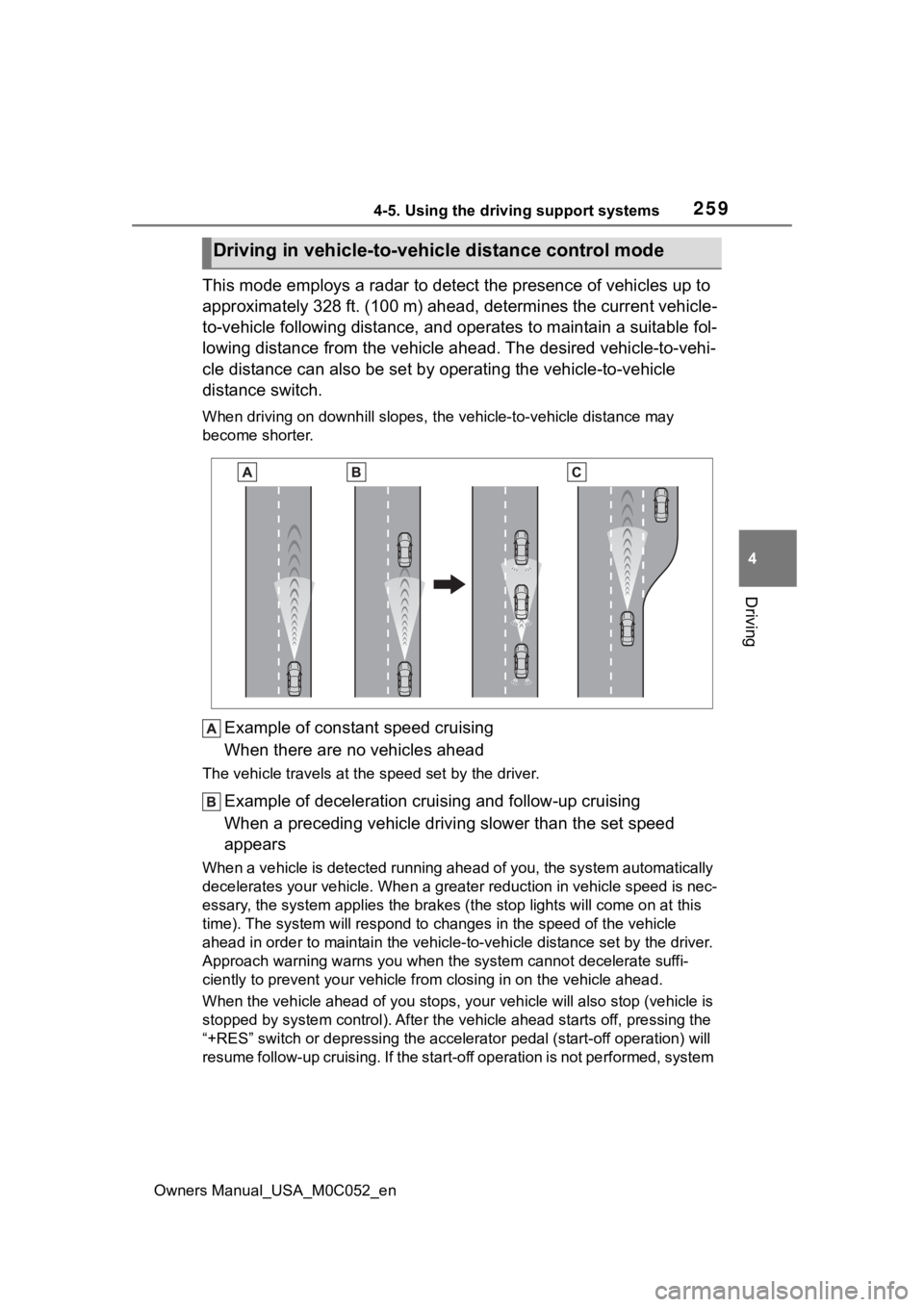
This mode employs a radar to detect the presence of vehicles up to
approximately 328 ft. (100 m) ahead, determines the current veh icle-
to-vehicle following distance, and operates to maintain a suitable fol-
lowing distance from the vehicle ahead. The desired vehicle-to- vehi-
cle distance can also be set by operating the vehicle-to-vehicl e
distance switch.
When driving on downhill slopes, t he vehicle-to-vehicle distance may
become shorter.
Example of constant speed cruising
When there are no vehicles ahead
The vehicle travels at the speed set by the driver.
Example of deceleration crui sing and follow-up cruising
When a preceding vehicle driving slower than the set speed
appears
When a vehicle is detected runni ng ahead of you, the system automatically
decelerates your vehicle. When a greater reduction in vehicle s peed is nec-
essary, the system applies the brakes (the stop lights will come on at this
time). The system will respond to changes in the speed of the vehicle
ahead in order to maintain the vehicle-to-vehicle distance set by the driver.
Approach warning warns you when the system cannot decelerate suffi-
ciently to prevent your vehicle from closing in on the vehicle ahead.
When the vehicle ahead of you st ops, your vehicle will also stop (vehicle is
stopped by system control). Afte r the vehicle ahead starts off, pressing the
“+RES” switch or depressing the accelerator pedal (start-off operation) will
resume follow-up cruising. If the start-off operation is not pe rformed, system
Driving in vehicle-to-vehicle distance control mode
Page 268 of 618
2684-5. Using the driving support systems
Owners Manual_USA_M0C052_en
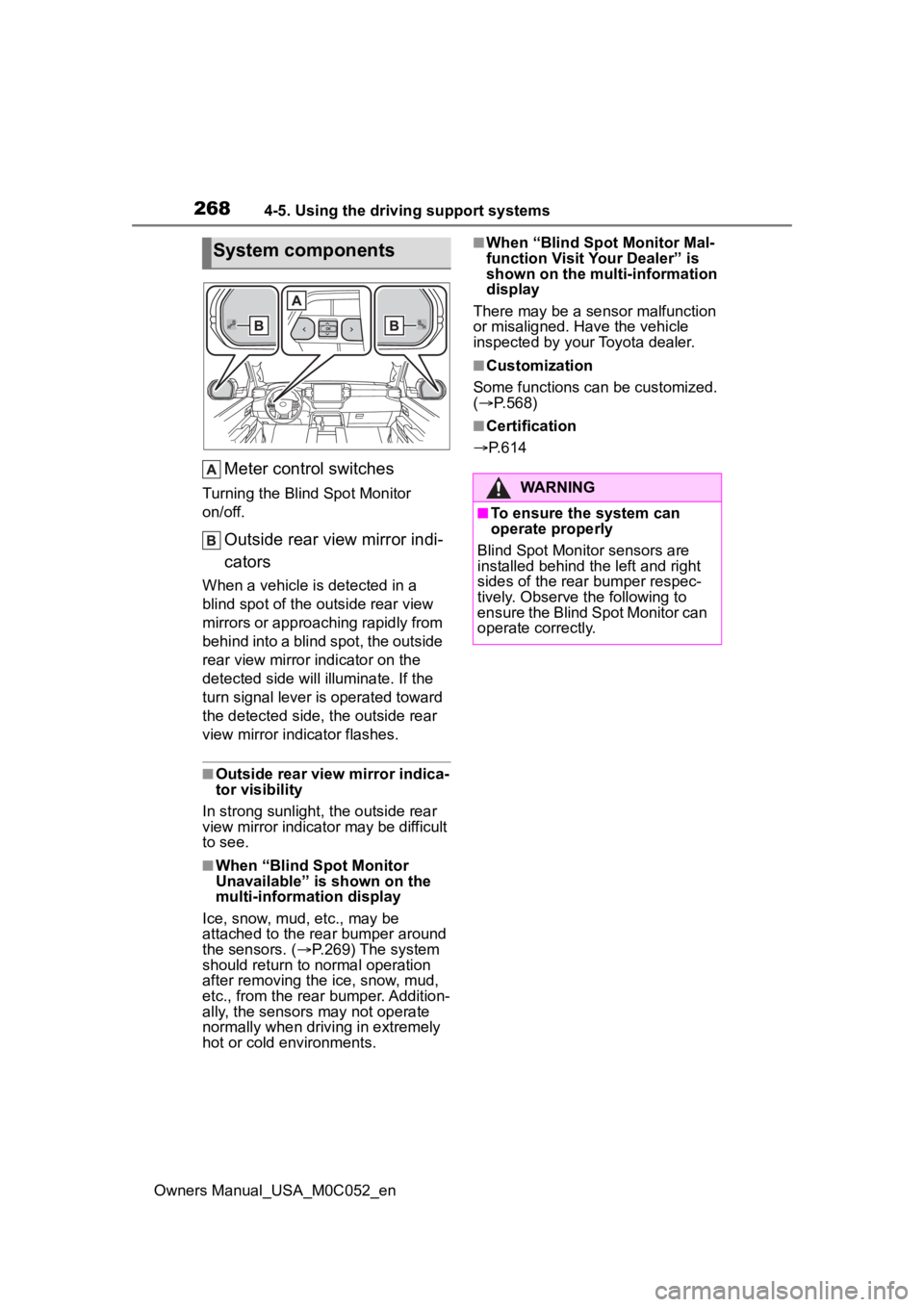
Meter control switches
Turning the Blind Spot Monitor
on/off.
Outside rear view mirror indi-
cators
When a vehicle is detected in a
blind spot of the outside rear view
mirrors or approaching rapidly from
behind into a blind spot, the outside
rear view mirror indicator on the
detected side will illuminate. If the
turn signal lever is operated toward
the detected side, the outside rear
view mirror indicator flashes.
■Outside rear view mirror indica-
tor visibility
In strong sunlight, the outside rear
view mirror indicato r may be difficult
to see.
■When “Blind Spot Monitor
Unavailable” is shown on the
multi-information display
Ice, snow, mud, etc., may be
attached to the rear bumper around
the sensors. ( P.269) The system
should return to normal operation
after removing the ice, snow, mud,
etc., from the rear bumper. Addition-
ally, the sensors may not operate
normally when driving in extremely
hot or cold environments.
■When “Blind Spot Monitor Mal-
function Visit Your Dealer” is
shown on the multi-information
display
There may be a sensor malfunction
or misaligned. Have the vehicle
inspected by your Toyota dealer.
■Customization
Some functions can be customized.
( P.568)
■Certification
P.614
System components
WARNING
■To ensure the system can
operate properly
Blind Spot Monitor sensors are
installed behind the left and right
sides of the rear bumper respec-
tively. Observe the following to
ensure the Blind Spot Monitor can
operate correctly.
Page 269 of 618
2694-5. Using the driving support systems
Owners Manual_USA_M0C052_en
4
Driving
■Turning the Blind Spot Mon-
itor on/off
Use the meter control switches
to turn on/off the function.
( P.96)
1 Press or to select .
2 Press or to select “
BSM” and then press .
When the BSM function is disabled,
the BSM OFF indicator ( P.89) illu-
minates. (Each time the power
switch is turned off then changed to
ON, the Blind Spot Monitor will be
enabled automatically.)
■Setting the trailer type
Use the meter control switches
to select the trailer type.
( P.96)
1 Press or to select .
WARNING
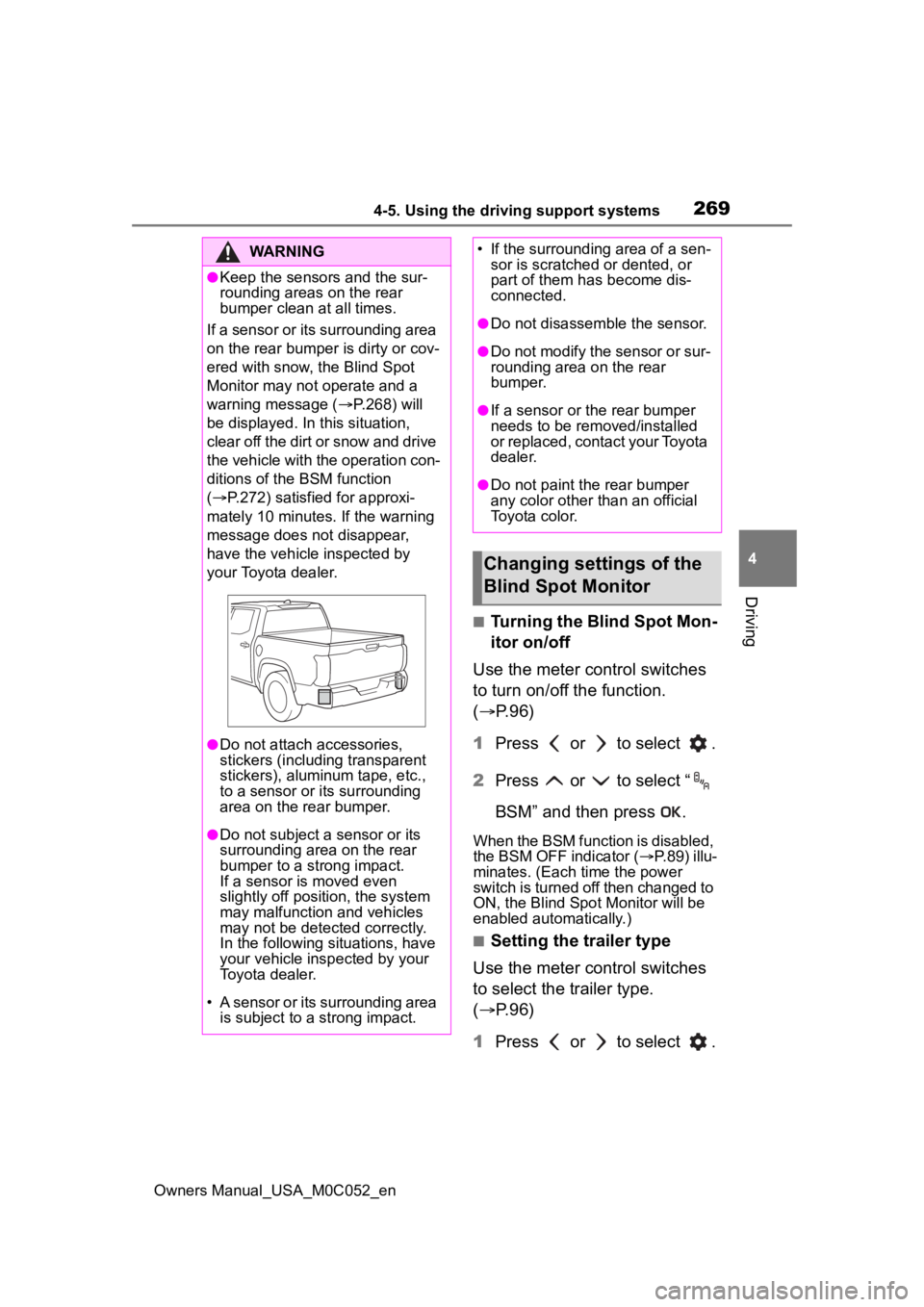
●Keep the sensors and the sur-
rounding areas on the rear
bumper clean at all times.
If a sensor or its surrounding area
on the rear bumper is dirty or cov-
ered with snow, the Blind Spot
Monitor may not operate and a
warning message ( P.268) will
be displayed. In this situation,
clear off the dirt or snow and drive
the vehicle with the operation con-
ditions of the BSM function
( P.272) satisfied for approxi-
mately 10 minutes. If the warning
message does not disappear,
have the vehicle inspected by
your Toyota dealer.
●Do not attach accessories,
stickers (including transparent
stickers), aluminum tape, etc.,
to a sensor or its surrounding
area on the rear bumper.
●Do not subject a sensor or its
surrounding area on the rear
bumper to a strong impact.
If a sensor is moved even
slightly off position, the system
may malfunction and vehicles
may not be detected correctly.
In the following si tuations, have
your vehicle inspected by your
Toyota dealer.
• A sensor or its surrounding area is subject to a strong impact.
• If the surrounding area of a sen- sor is scratched or dented, or
part of them h as become dis-
connected.
●Do not disassemble the sensor.
●Do not modify the sensor or sur-
rounding area on the rear
bumper.
●If a sensor or the rear bumper
needs to be removed/installed
or replaced, contact your Toyota
dealer.
●Do not paint the rear bumper
any color other t han an official
Toyota color.
Changing settings of the
Blind Spot Monitor
Page 276 of 618
2764-5. Using the driving support systems
Owners Manual_USA_M0C052_en
■The system can be operated
when
●The power switch is in ON.
●Intuitive parking assist function is
on.
●The vehicle speed is less than
about 6 mph (10 km/h).
●A shift position other than P is
selected.
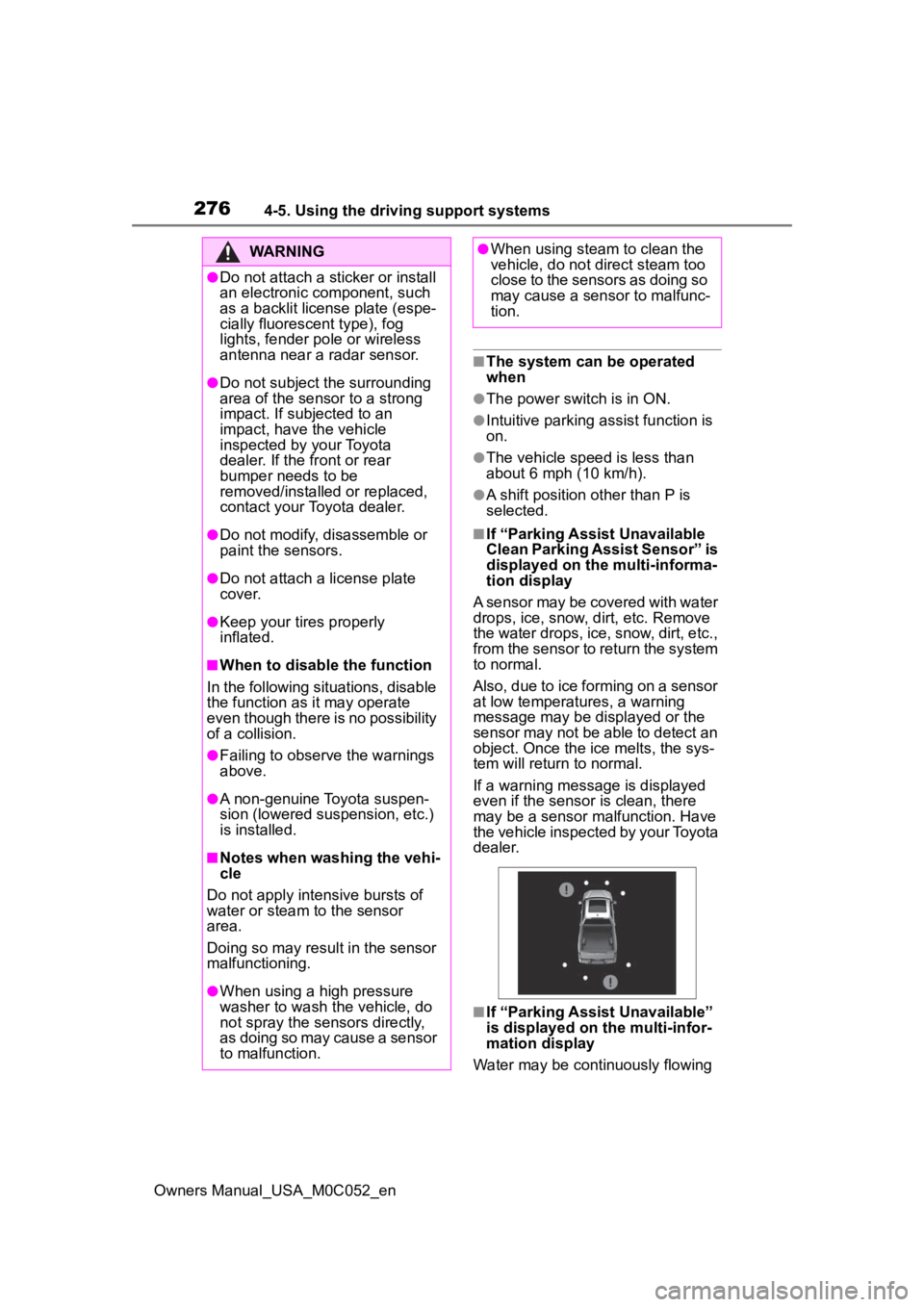
■If “Parking Assist Unavailable
Clean Parking Assist Sensor” is
displayed on the multi-informa-
tion display
A sensor may be covered with water
drops, ice, snow, dirt, etc. Remove
the water drops, ice, snow, dirt, etc.,
from the sensor to return the system
to normal.
Also, due to ice forming on a sensor
at low temperatures, a warning
message may be displayed or the
sensor may not be able to detect an
object. Once the ice melts, the sys-
tem will return to normal.
If a warning message is displayed
even if the sensor i s clean, there
may be a sensor malfunction. Have
the vehicle inspected by your Toyota
dealer.
■If “Parking Assist Unavailable”
is displayed on the multi-infor-
mation display
Water may be continuously flowing
WARNING
●Do not attach a sticker or install
an electronic component, such
as a backlit license plate (espe-
cially fluorescent type), fog
lights, fender pole or wireless
antenna near a radar sensor.
●Do not subject the surrounding
area of the sensor to a strong
impact. If subjected to an
impact, have the vehicle
inspected by your Toyota
dealer. If the fr ont or rear
bumper needs to be
removed/installed or replaced,
contact your Toyota dealer.
●Do not modify, disassemble or
paint the sensors.
●Do not attach a license plate
cover.
●Keep your tires properly
inflated.
■When to disable the function
In the following situations, disable
the function as it may operate
even though there is no possibility
of a collision.
●Failing to observe the warnings
above.
●A non-genuine Toyota suspen-
sion (lowered suspension, etc.)
is installed.
■Notes when washing the vehi-
cle
Do not apply intensive bursts of
water or steam to the sensor
area.
Doing so may result in the sensor
malfunctioning.
●When using a high pressure
washer to wash the vehicle, do
not spray the sensors directly,
as doing so may cause a sensor
to malfunction.
●When using steam to clean the
vehicle, do not direct steam too
close to the sensors as doing so
may cause a sensor to malfunc-
tion.
Page 293 of 618
2934-5. Using the driving support systems
Owners Manual_USA_M0C052_en
4
Driving
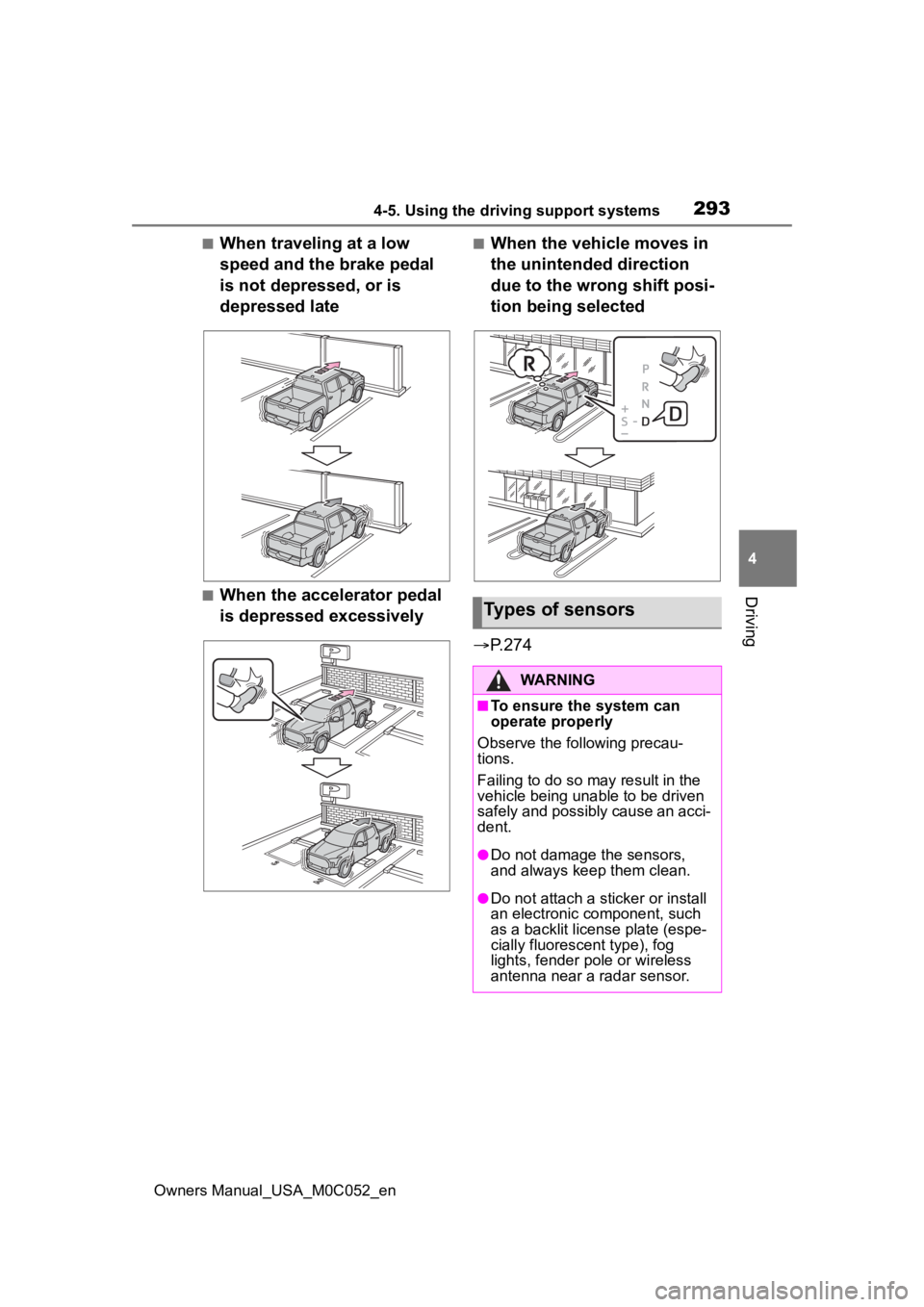
■When traveling at a low
speed and the brake pedal
is not depressed, or is
depressed late
■When the accelerator pedal
is depressed excessively
■When the vehicle moves in
the unintended direction
due to the wrong shift posi-
tion being selected
P.274
Types of sensors
WARNING
■To ensure the system can
operate properly
Observe the following precau-
tions.
Failing to do so may result in the
vehicle being unable to be driven
safely and possibly cause an acci-
dent.
●Do not damage the sensors,
and always keep them clean.
●Do not attach a sticker or install
an electronic component, such
as a backlit licen se plate (espe-
cially fluorescent type), fog
lights, fender po le or wireless
antenna near a radar sensor.
Page 310 of 618
3104-5. Using the driving support systems
Owners Manual_USA_M0C052_en
WARNING
●Do not use the panoramic view
monitor system in the following
cases:
• On icy or slick road surfaces, or in snow
• When using tire chains or emer- gency tires
• When the front door or the tail- gate is not closed completely
• On roads that are not flat or straight, such as curves or
slopes
• If the suspension has been modified or tires of a size other
than specified are installed
●In low temperatures, the screen
may darken or the image may
become faint. The image could
distort when the vehicle is mov-
ing, or you may become unable
to see the image on the screen.
Be sure to visually check all
around the vehicle both directly
and using the mirrors before
proceeding.
●If the tire sizes are changed, the
position of the guide lines dis-
played on the screen may
change.
●The camera uses a special lens.
The distances between objects
and pedestrians that appear in
the image displayed on the
screen will differ from the actual
distances. ( P.335)
●When an aftermarket part is
installed in the display area of
the screen.
NOTICE
●In panoramic view/moving
view/see-through view, the sys-
tem combines images taken
from the front, back, left and
right side cameras into a single
image. There are limits to the
range and content that can be
displayed. Familiarize yourself
with the characteristics of the
panoramic view monitor system
before using it.
●Image clarity may decline at the
four corners of t he panoramic
view/moving view/see-through
view. However, this is not a mal-
function, as these are the
regions along the border of
each camera image where the
images are combined.
●Depending on lighting condi-
tions near each of the cameras,
bright and dark patches may
appear on the panoramic
view/moving view/see-through
view.
●The panoramic view/moving
view/see-through view display
does not extend higher than the
installation pos ition and image
capture range o f each camera.
●There are blind spots around
the vehicle. Accordingly, there
are regions not displayed in
panoramic view.
●Three-dimensional objects dis-
played in wide fr ont view, rear
view or side view may not be
displayed in panoramic
view/moving view/see-through
view.
Page 362 of 618
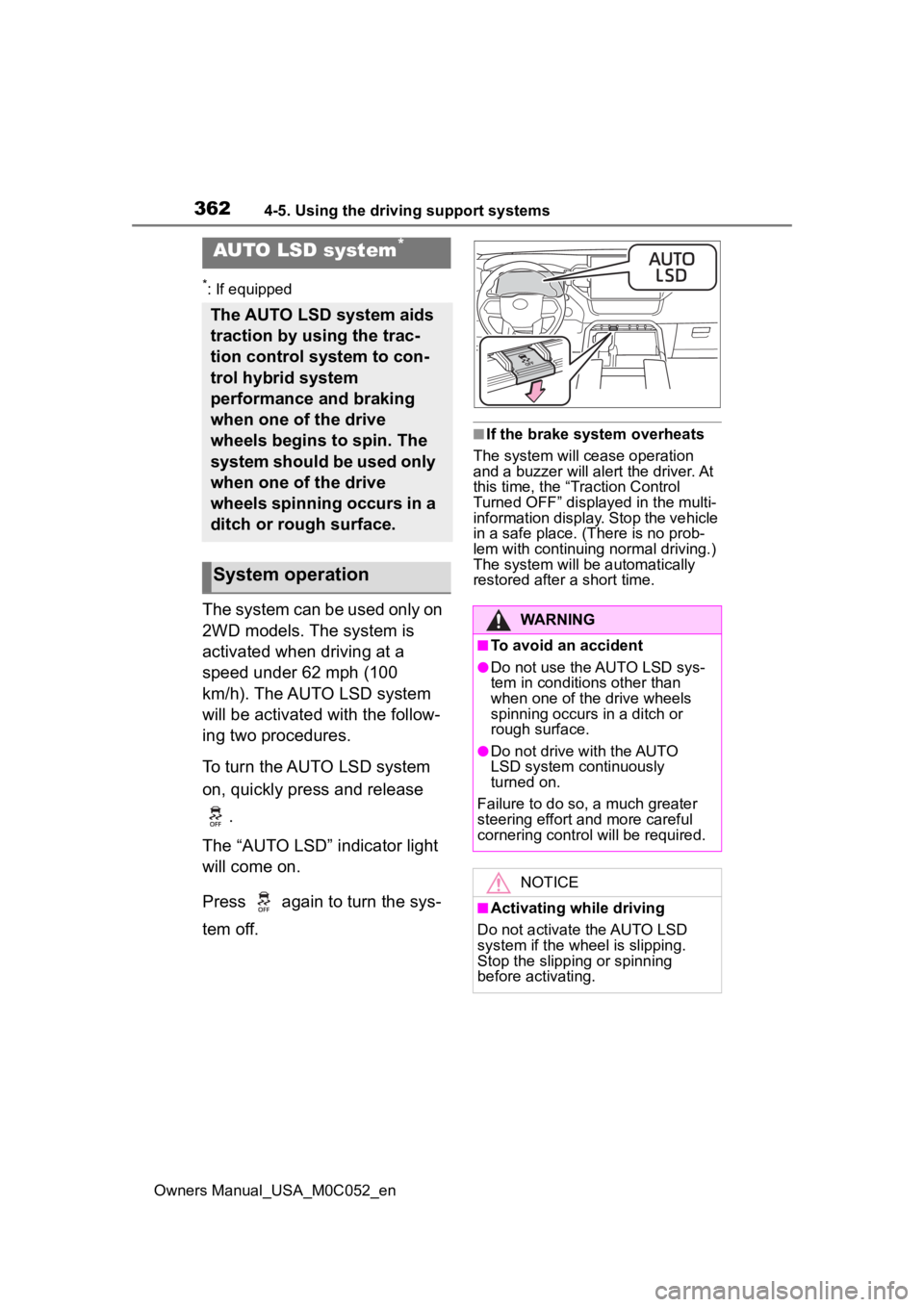
3624-5. Using the driving support systems
Owners Manual_USA_M0C052_en
*: If equipped
The system can be used only on
2WD models. The system is
activated when driving at a
speed under 62 mph (100
km/h). The AUTO LSD system
will be activated with the follow-
ing two procedures.
To turn the AUTO LSD system
on, quickly press and release .
The “AUTO LSD” indicator light
will come on.
Press again to turn the sys-
tem off.
■If the brake system overheats
The system will cease operation
and a buzzer will alert the driver. At
this time, the “T raction Control
Turned OFF” displayed in the multi-
information display. Stop the vehicle
in a safe place. (There is no prob-
lem with continuing normal driving.)
The system will be automatically
restored after a short time.
AUTO LSD system*
The AUTO LSD system aids
traction by using the trac-
tion control system to con-
trol hybrid system
performance and braking
when one of the drive
wheels begins to spin. The
system should be used only
when one of the drive
wheels spinning occurs in a
ditch or rough surface.
System operation
WARNING
■To avoid an accident
●Do not use the AUTO LSD sys-
tem in conditions other than
when one of the drive wheels
spinning occurs in a ditch or
rough surface.
●Do not drive with the AUTO
LSD system continuously
turned on.
Failure to do so, a much greater
steering effort an d more careful
cornering control will be required.
NOTICE
■Activating while driving
Do not activate the AUTO LSD
system if the wh eel is slipping.
Stop the slipping or spinning
before activating.
Page 367 of 618

3674-5. Using the driving support systems
Owners Manual_USA_M0C052_en
4
Driving
approximately 6 mph (10 km/h).
• With the rear d ifferential is
unlocked: when the vehicle speed
exceeds approximately 15 mph
(25 km/h).
■When the Crawl Control sys-
tem is operated continuously
●If Crawl Control is used continu-
ously for a long time, the brake
system overheats . In this case, a
buzzer will sou nd, a message
stating a malfunction will be dis-
played on the multi-information
display, and the Crawl Control
indicator will flash and then go off.
In this event, as Crawl Control will
be temporarily inoperable, stop
the vehicle immediately in a safe
place, and allow the brake system
to cool down suffi ciently until the
message goes off. (In the mean-
time, normal driving is possible.)
●If Crawl Control is used continu-
ously for a long time, the auto-
matic transmission overheats. In
this case, a buzzer will sound, the
system will be temporarily can-
celed, and a message stating a
malfunction may be displayed on
the multi-informat ion display. In
this event, stop th e vehicle in a
safe place until the message goes
off.
■Sounds and vibrations caused
by the Crawl Control system
●A sound may be heard from the
hybrid system compartment when
the hybrid system is started or just
after the vehicle begins to move.
This sound does not indicate that
a malfunction has occurred in
Crawl Control system.
●Either of the following conditions
may occur when the Crawl Control
system is operating. None of
these are indicators that a mal-
function has occurred.
• Vibrations may be felt through the vehicle body and steering.
• A motor sound may be heard after
the vehicle comes to a stop.
■When there is a malfunction in
the system
Warning lights and/or warning mes-
sages will tu rn on. (P.501, 511)