warning light TOYOTA TUNDRA HYBRID 2023 Repair Manual
[x] Cancel search | Manufacturer: TOYOTA, Model Year: 2023, Model line: TUNDRA HYBRID, Model: TOYOTA TUNDRA HYBRID 2023Pages: 618, PDF Size: 13.67 MB
Page 371 of 618
3714-5. Using the driving support systems
Owners Manual_USA_M0C052_en
4
Driving
*: If equipped
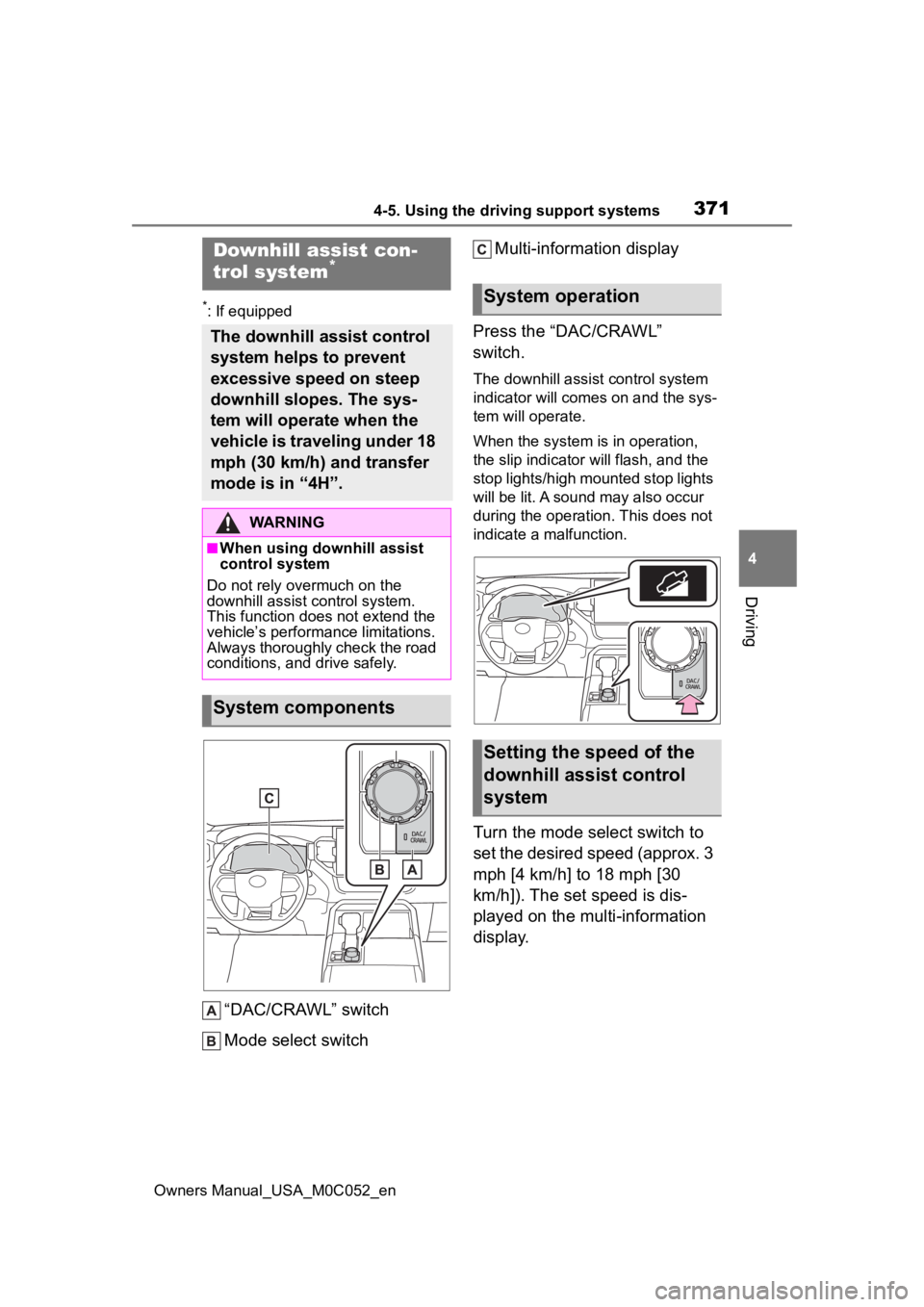
“DAC/CRAWL” switch
Mode select switch Multi-information display
Press the “DAC/CRAWL”
switch.
The downhill assist control system
indicator will comes on and the sys-
tem will operate.
When the system is in operation,
the slip indicator will flash, and the
stop lights/high mounted stop lights
will be lit. A sound may also occur
during the operation. This does not
indicate a malfunction.
Turn the mode select switch to
set the desired speed (approx. 3
mph [4 km/h] to 18 mph [30
km/h]). The set speed is dis-
played on the multi-information
display.
Downhill assist con-
trol system*
The downhill assist control
system helps to prevent
excessive speed on steep
downhill slopes. The sys-
tem will operate when the
vehicle is traveling under 18
mph (30 km/h) and transfer
mode is in “4H”.
WARNING
■When using downhill assist
control system
Do not rely overmuch on the
downhill assist control system.
This function does not extend the
vehicle’s performance limitations.
Always thoroughly check the road
conditions, and drive safely.
System components
System operation
Setting the speed of the
downhill assist control
system
Page 373 of 618
3734-5. Using the driving support systems
Owners Manual_USA_M0C052_en
4
Driving
system indicator switches to steadily
illuminated after a short while and
the system will become available.
■Sounds and vibrations caused
by the downhill assist control
system
●A sound may be heard from the
hybrid system compartment when
the hybrid system is started or just
after the vehicle begins to move.
This sound does not indicate that
a malfunction has occurred in
downhill assist control system.
●Either of the following conditions
may occur when the downhill
assist control system is operating.
None of these are indicators that a
malfunction has occurred.
• Vibrations may be felt through the vehicle body and steering.
• A motor sound may be heard after the vehicle comes to a stop.
■System malfunction
In the following ca ses, have your
vehicle checked by your Toyota
dealer.
●The downhill assist control system
indicator does not come on when
the “DAC/CRAWL” switch is
pressed.
●The slip indicator light comes on.
■ECB (Electronically Con-
trolled Brake System)
The electronically controlled
system generates braking force
corresponding to the brake
operation
■ABS (Anti-lock Brake Sys-
tem)
Helps to prevent wheel lock
when the brakes are applied
suddenly, or if the brakes are
applied while driving on a slip-
pery road surface, or in off-road
conditions (such as rough
roads, sand and mud)
The ABS operates in synchroni-
zation with the Multi-terrain
Select
■Brake assist
Generates an increased level of
braking force after the brake
pedal is depressed when the
WARNING
■The system may not operate
on the following surfaces,
which may lead to an acci-
dent causing death or serious
injury
●Slippery surfaces such as wet
or muddy roads
●Icy surface
●Very bumpy and rough roads
Driving assist systems
To keep driving safety and
performance, the following
systems operate automati-
cally in response to various
driving situations. Be
aware, however, that these
systems are supplementary
and should not be relied
upon too heavily when oper-
ating the vehicle.
Summary of the driving
assist systems
Page 375 of 618
3754-5. Using the driving support systems
Owners Manual_USA_M0C052_en
4
Driving
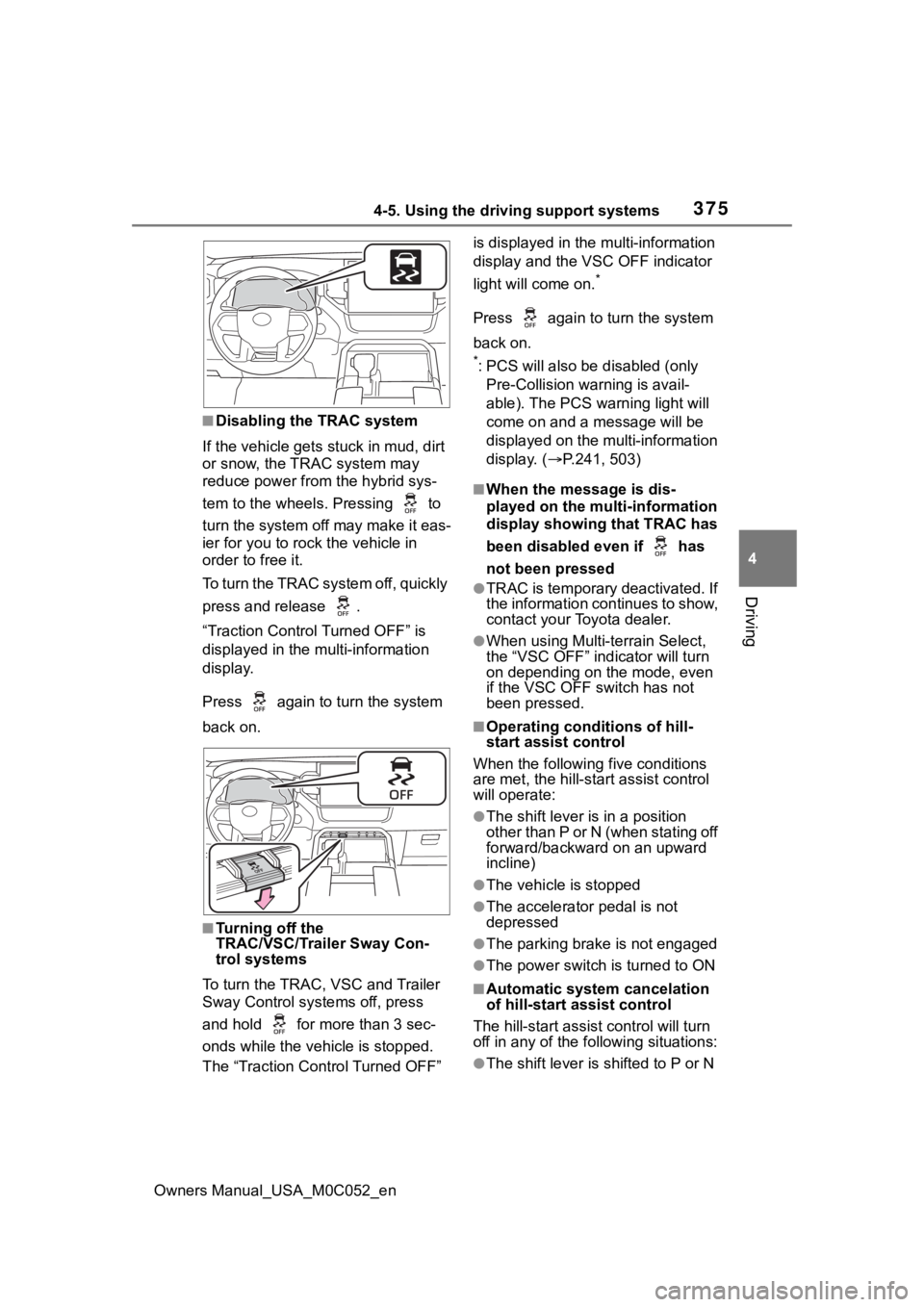
■Disabling the TRAC system
If the vehicle gets stuck in mud, dirt
or snow, the TRAC system may
reduce power from the hybrid sys-
tem to the wheels. Pressing to
turn the system off may make it eas-
ier for you to rock the vehicle in
order to free it.
To turn the TRAC system off, quickly
press and release .
“Traction Control Turned OFF” is
displayed in the multi-information
display.
Press again to t urn the system
back on.
■Turning off the
TRAC/VSC/Trailer Sway Con-
trol systems
To turn the TRAC, VSC and Trailer
Sway Control systems off, press
and hold for more than 3 sec-
onds while the vehicle is stopped.
The “Traction Control Turned OFF” is displayed in the
multi-information
display and the VSC OFF indicator
light will come on.
*
Press again to turn the system
back on.
*: PCS will also be disabled (only
Pre-Collision warning is avail-
able). The PCS warning light will
come on and a message will be
displayed on the multi-information
display. ( P.241, 503)
■When the message is dis-
played on the multi-information
display showing that TRAC has
been disabled even if has
not been pressed
●TRAC is temporary deactivated. If
the information continues to show,
contact your Toyota dealer.
●When using Multi-terrain Select,
the “VSC OFF” indicator will turn
on depending on the mode, even
if the VSC OFF switch has not
been pressed.
■Operating conditions of hill-
start assist control
When the following five conditions
are met, the hill-star t assist control
will operate:
●The shift lever is in a position
other than P or N (when stating off
forward/backward on an upward
incline)
●The vehicle is stopped
●The accelerator pedal is not
depressed
●The parking brake is not engaged
●The power switch is turned to ON
■Automatic system cancelation
of hill-start assist control
The hill-start assist control will turn
off in any of the fo llowing situations:
●The shift lever is shifted to P or N
Page 377 of 618
3774-5. Using the driving support systems
Owners Manual_USA_M0C052_en
4
Driving
●The accelerator pedal is
depressed a large amount
WARNING
■The ABS does not operate
effectively when
●The limits of tire gripping perfor-
mance have been exceeded
(such as excessively worn tires
on a snow covered road).
●The vehicle hydroplanes while
driving at high speed on wet or
slick roads.
■Stopping distance when the
ABS is operating may exceed
that of normal conditions
The ABS is not designed to
shorten the vehicle’s stopping dis-
tance. Always maintain a safe dis-
tance from the vehicle in front of
you, especially in the following sit-
uations:
●When driving on d irt, gravel or
snow-covered roads
●When driving with tire chains
●When driving over bumps in the
road
●When driving over roads with
potholes or uneven surfaces
■TRAC/VSC may not operate
effectively when
Directional control and power may
not be achievable while driving on
slippery road surfaces, even if the
TRAC/VSC system is operating.
Drive the vehicle carefully in con-
ditions where stability and power
may be lost.
■Hill-start assist control does
not operate effectively when
●Do not overly rely on hill-start
assist control. Hill-start assist
control may not operate effec-
tively on steep inclines and
roads covered with ice.
●Unlike the parking brake, hill-
start assist control is not
intended to hold the vehicle sta-
tionary for an extended period
of time. Do not attempt to use
hill-start assist control to hold
the vehicle on an incline, as
doing so may lead to an acci-
dent.
■When the TRAC/VSC/Trailer
Sway Control is activated
The slip indicator light flashes.
Always drive carefully. Reckless
driving may cause an accident.
Exercise particula r care when the
indicator light flashes.
■When the TRAC/VSC/Trailer
Sway Control systems are
turned off
Be especially careful and drive at
a speed appropriate to the road
conditions. As these are the sys-
tems to help ensure vehicle stabil-
ity and driving force, do not turn
the TRAC/VSC/Trailer Sway Con-
trol systems off unless necessary.
Trailer Sway Control is part of the
VSC system and will not operate
if VSC is turned off or experiences
a malfunction.
Page 381 of 618
3814-5. Using the driving support systems
Owners Manual_USA_M0C052_en
4
Driving
8 For confirmation, repeat
steps 6 and 7 until desired
“gain” setting is reached (just
below point of trailer wheel
lock-up).
■When setting the “gain”
Wheel lock-up occurs when the
trailer wheel squeals or tire smoke
occurs. Trailer wheels may not lock-
up while driving heavily loaded
trailer. During this case, adjust the
Trailer “gain” to the highest allow-
able setting for the towing condition.
■When disconnecting and recon-
necting 12-volt battery termi-
nals
The “gain” setting data will be reset.
■Trailer Sway Control Function
Helps suppress trailer sway at an
early stage by using the trailer brake
control system to operate the trailer
brakes.
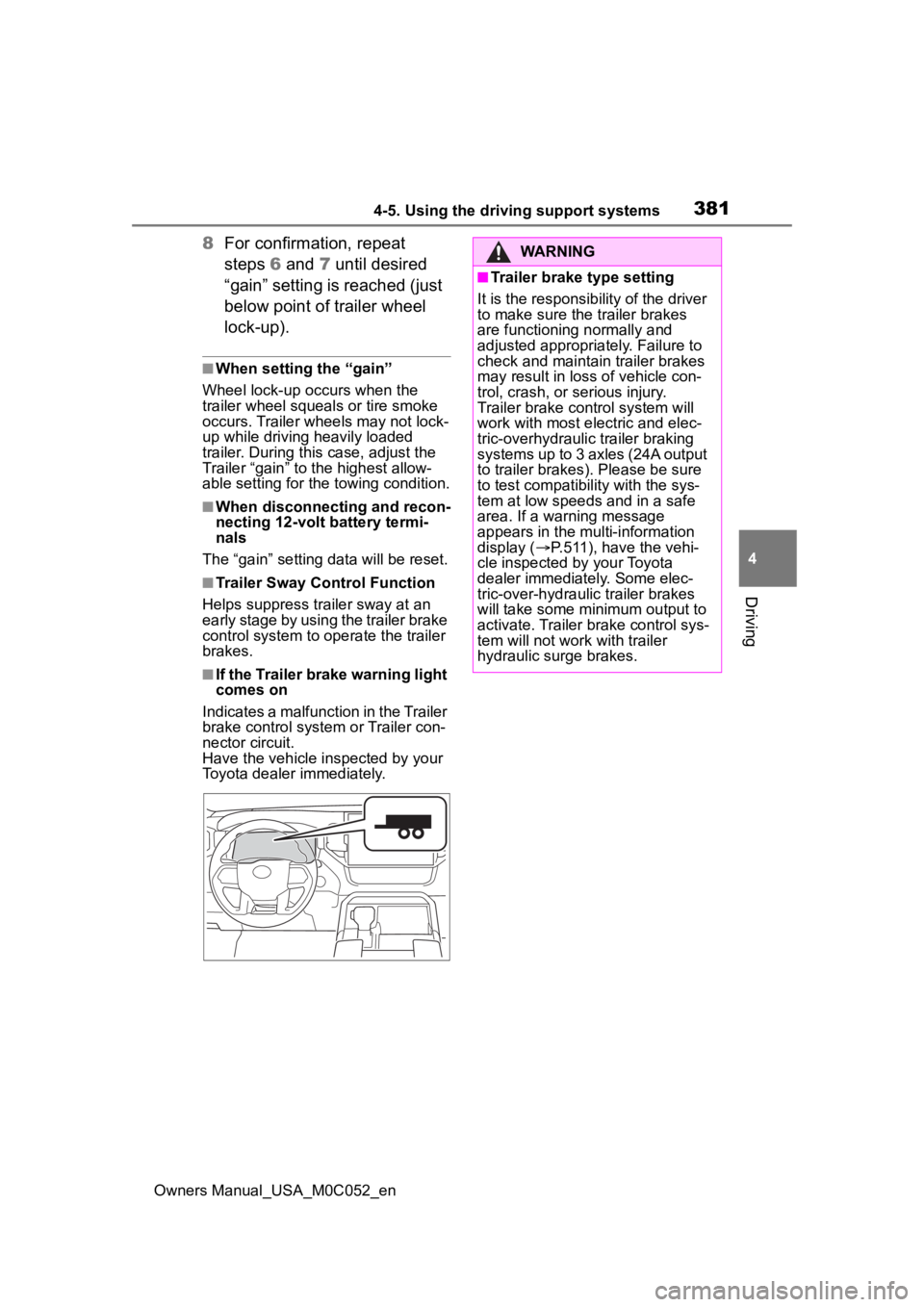
■If the Trailer brake warning light
comes on
Indicates a malfunction in the Trailer
brake control system or Trailer con-
nector circuit.
Have the vehicle inspected by your
Toyota dealer immediately.
WARNING
■Trailer brake type setting
It is the responsibility of the driver
to make sure the trailer brakes
are functioning normally and
adjusted appropriately. Failure to
check and maintain trailer brakes
may result in loss of vehicle con-
trol, crash, or serious injury.
Trailer brake control system will
work with most electric and elec-
tric-overhydraulic trailer braking
systems up to 3 axles (24A output
to trailer brakes). Please be sure
to test compatibility with the sys-
tem at low speeds and in a safe
area. If a warning message
appears in the multi-information
display ( P.511), have the vehi-
cle inspected by your Toyota
dealer immediately. Some elec-
tric-over-hydraulic trailer brakes
will take some minimum output to
activate. Trailer brake control sys-
tem will not work with trailer
hydraulic surge brakes.
Page 386 of 618
3864-5. Using the driving support systems
Owners Manual_USA_M0C052_en
WARNING
■Cautions regarding the use of
the system
In order for this system to perform
as designed, the vehicle must be
driven safely and the driver must
control the speed to keep it within
operating parameters and to
avoid a collision.
As there is a limit to the degree of
control performance that this sys-
tem can provide, do not overly
rely on this system. The driver is
always responsible for paying
attention to the vehicle’s sur-
roundings and driving safely. This
system does not control braking
(or steering when in Guidance
mode). Driver needs to control
vehicle speed, control braking,
(and steering when in Guidance
mode,) and stop the vehicle to
avoid any collision. Failure to fol-
low this warning could result in
property damage, serious injury
or death.
■When using the Trailer
Backup Guide
For proper system performance,
observe the following precautions.
Failure to do so may lead to an
accident resulting in property
damage, serious injury, or death.
●Keep the tailgat e fully latched.
●Keep the rear camera clean at
all times.
●Do not change the installation
position or direction of the rear
camera or remove it.
●Do not modify the trailer hitch
light. (→P.386)
●Make sure nothing can obstruct
the rear camera view of the
trailer.
The system is designed to oper-
ate in various weather and lighting
conditions and on different ground
surfaces (asphalt , grass, gravel,
etc.), however performance can
still be affected by various envi-
ronmental factors (e.g. shadow
passing over the tr ailer or dimin-
ished contrast between trailer and
the ground leading to trailer
detection being lost, etc.) so
always drive carefully, remain
alert and aware of your surround-
ings, and do not overly rely on the
system.
Page 395 of 618
3954-6. Driving tips
Owners Manual_USA_M0C052_en
4
Driving
Perform the following according
to the driving conditions:
Do not try to forcibly open a
window or move a wiper that
is frozen. Pour warm water
over the frozen area to melt
the ice. Wipe away the water
immediately to prevent it from
freezing.
To ensure proper operation of
the climate control system
fan, remove any snow that
has accumulated on the air
inlet vents in front of the wind-
shield.
Check for and remove any
excess ice or snow that may
have accumulated on the
exterior lights, vehicle’s roof,
chassis, around the tires or on
the brakes.
Remove any snow or mud
from the bottom of your shoes
before getting in the vehicle. Accelerate the vehicle slowly,
keep a safe distance between
you and the vehicle ahead, and
drive at a reduced speed suit-
able to road conditions.
Park the vehicle and move
the shift lever to P without set-
ting the parking brake. The
parking brake may freeze up,
preventing it from being
released. If the vehicle is
parked without setting the
parking brake, make sure to
block the wheels.
Failure to do so may be dan-
gerous because it may cause
the vehicle to move unexpect-
edly, possibly leading to an
accident.
When the parking brake is in auto-
matic mode, release the parking
brake after shifting the shift lever to
P. ( P.206)
If the vehicle is parked without
setting the parking brake,
confirm that the shift lever
cannot be moved out of P
*.
*: The shift lever will be locked if it is
attempted to be shifted from P to
any other position without
depressing the brake pedal. If the
shift lever can be shifted from P,
there may be a problem with the
shift lock system. Have the vehi-
cle inspected by your Toyota
NOTICE
■Repairing or replacing snow
tires
Request repairs or replacement of
snow tires from Toyota dealers or
legitimate tire retailers.
This is because the removal and
attachment of snow tires affects
the operation of the tire pressure
warning valves and transmitters.
Before driving the vehicle
When driving the vehicle
When parking the vehicle
Page 411 of 618
4135-3. Using the storage features
Owners Manual_USA_M0C052_en
5
Interior features
5-3.Using the storage features
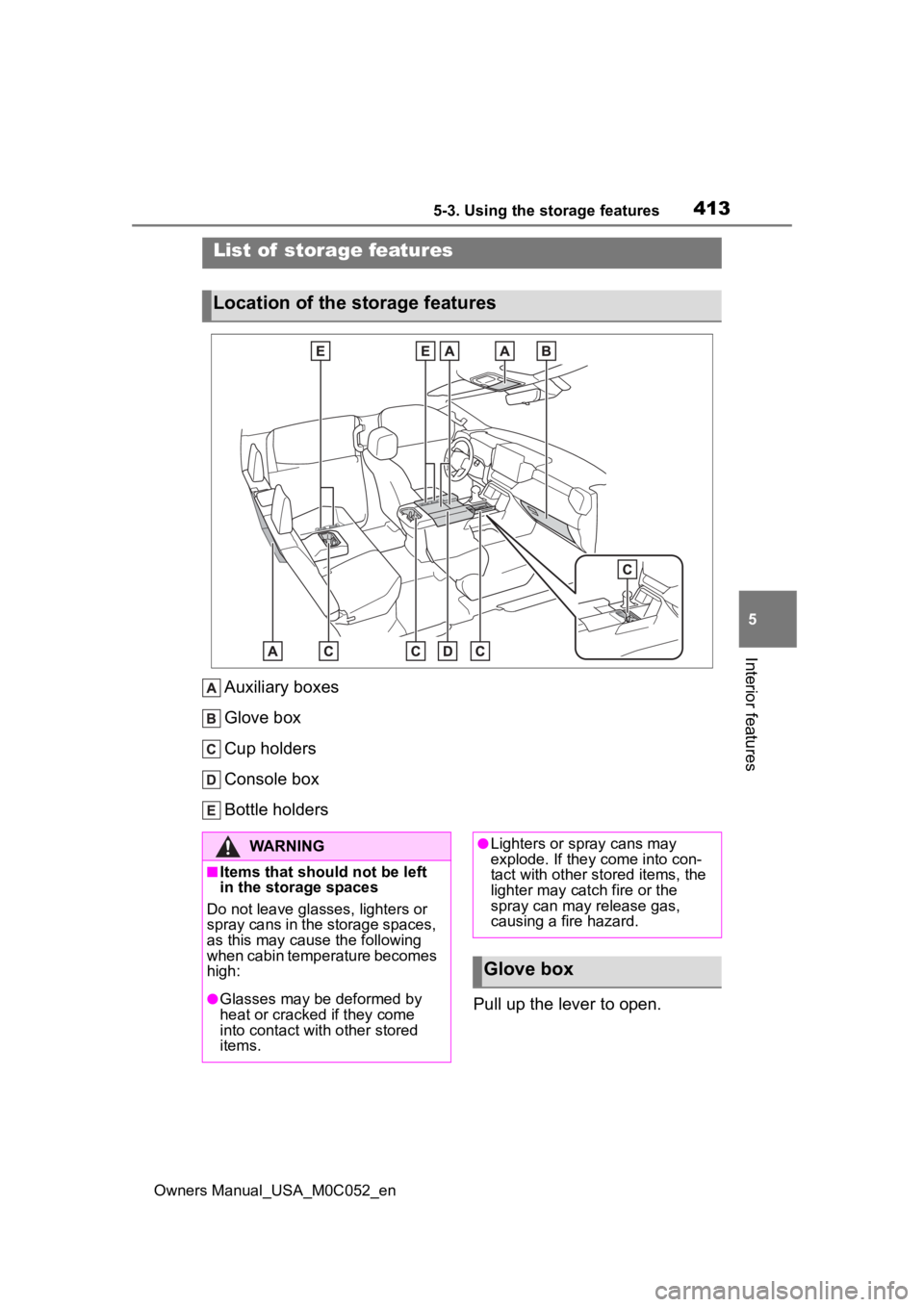
Auxiliary boxes
Glove box
Cup holders
Console box
Bottle holders Pull up the lever to open.
List of storage features
Location of the storage features
WARNING
■Items that should not be left
in the storage spaces
Do not leave glasses, lighters or
spray cans in the storage spaces,
as this may cau se the following
when cabin temperature becomes
high:
●Glasses may be deformed by
heat or cracked if they come
into contact with other stored
items.
●Lighters or spray cans may
explode. If they come into con-
tact with other stored items, the
lighter may catch fire or the
spray can may release gas,
causing a fire hazard.
Glove box
Page 442 of 618
4446-1. Maintenance and care
Owners Manual_USA_M0C052_en
WARNING
●PKSB
NOTICE
■To prevent paint deteriora-
tion and corrosion on the
body and components (alumi-
num wheels, etc.)
●Wash the vehicle immediately in
the following cases:
• After driving near the sea coast
• After driving on salted roads
• If coal tar or tre e sap is present
on the paint surface
• If dead insects, insect droppings or bird droppings are present on
the paint surface
• After driving in an area contami- nated with soot, oily smoke,
mine dust, iron powder or chem-
ical substances
• If the vehicle becomes heavily soiled with dust or mud
• If liquids such as benzene and gasoline are spilled on the paint
surface
●If the paint is chipped or
scratched, have it repaired
immediately.
●To prevent the wheels from cor-
roding, remove any dirt and
store in a place with low humid-
ity when storing the wheels.
■Cleaning the exterior lights
●Wash carefully. Do not use
organic substances or scrub
with a hard brush.
This may damage the surfaces
of the lights.
●Do not apply wax to the sur-
faces of the lights.
Wax may cause damage to the
lenses.
■When using an automatic car
wash (vehicles with rain-
sensing windshield wipers)
Set the wiper switch to the off
position.
If the wiper switch is in “AUTO”,
the wipers may operate and the
wiper blades may be damaged.
■When using a high pressure
car wash
●When washing the vehicle, do
not spray the camera or its sur-
rounding area directly with a
high pressure washer. Shock
applied from high pressure
water may cause the device to
not operate normally.
●Do not spray water directly on
the radar which is equipped
behind the grill. Otherwise it
may cause the device to be
damaged.
●Do not bring the nozzle tip close
to boots (rubber or resin manu-
factured cover), connectors or
the following parts. The parts
may be damaged if they come
into contact with high-pressure
water.
• Traction related parts
• Steering parts
• Suspension parts
• Brake parts
●Keep the cleaning nozzle at
least 11.9 in. (30 cm) away from
the vehicle body. Otherwise
resin section, s uch as moldings
and bumpers, may be deformed
and damaged.
Also, do not continuously hold the
nozzle in the same place.
Page 444 of 618
4466-1. Maintenance and care
Owners Manual_USA_M0C052_en
WARNING
■Water in the vehicle
Do not get any of the SRS compo-
nents or wiring in the vehicle inte-
rior wet. ( P. 3 6 )
An electrical malfunction may
cause the airbags to deploy or not
function properly, resulting in
death or serious injury.
■Cleaning the interior (espe-
cially instrument panel)
Do not use a polis h wax or polish
cleaner. The instrument panel
may reflect off the windshield,
obstructing the dr iver’s view and
leading to an accident, resulting in
death or serious injury.
NOTICE
■Cleaning detergents
●Do not use the following types
of detergent, as they may dis-
color the vehicle interior or
cause streaks or damage to
painted surfaces:
• Areas other than the seats and steering wheel: Organic sub-
stances such as benzene or
gasoline, alkaline or acidic solu-
tions, dye, and bleach
• Seats: Alkaline or acidic solu- tions, such as thinner, benzene,
and alcohol
• Steering wheel: Organic sub- stances, such as thinner, and
cleaner that contains alcohol
●Do not use a polish wax or pol-
ish cleaner. The instrument
panel’s or other interior part’s
painted surface may be dam-
aged.
■Preventing damage to leather
surfaces
Observe the following precautions
to avoid damage to and deteriora-
tion of leather surfaces:
●Remove any dust or dirt from
leather surfaces immediately.
●Do not expose the vehicle to
direct sunlight for extended peri-
ods of time. Park the vehicle in
the shade, especially during
summer.
●Do not place items made of
vinyl, plastic, or containing wax
on the upholstery, as they may
stick to the leather surface if the
vehicle interior heats up signifi-
cantly.
■Water on the floor
Do not wash the v ehicle floor with
water.
Vehicle systems such as the
audio system may be damaged if
water comes into contact with
electrical components such as the
audio system above or under the
floor of the vehicle. Water may
also cause the body to rust.
■When cleaning the inside of
the windshield
Do not allow glass cleaner to con-
tact the lens. Also, do not touch
the lens. ( P.225)
■Cleaning the inside of the
back window
●Do not use a gla ss cleaner to
clean the back window, as this
may cause damage to the back
window defogger heater wires
or antenna. Use a cloth damp-
ened with lukewarm water to
gently wipe the window clean.
Wipe the window in strokes run-
ning parallel to the heater wires
or antenna.