audio TOYOTA VENZA 2010 Owners Manual (in English)
[x] Cancel search | Manufacturer: TOYOTA, Model Year: 2010, Model line: VENZA, Model: TOYOTA VENZA 2010Pages: 26, PDF Size: 1.4 MB
Page 3 of 26
1
OVERVIEW
FEATURES/OPERATIONS
SAFETY AND EMERGENCY FEATURES
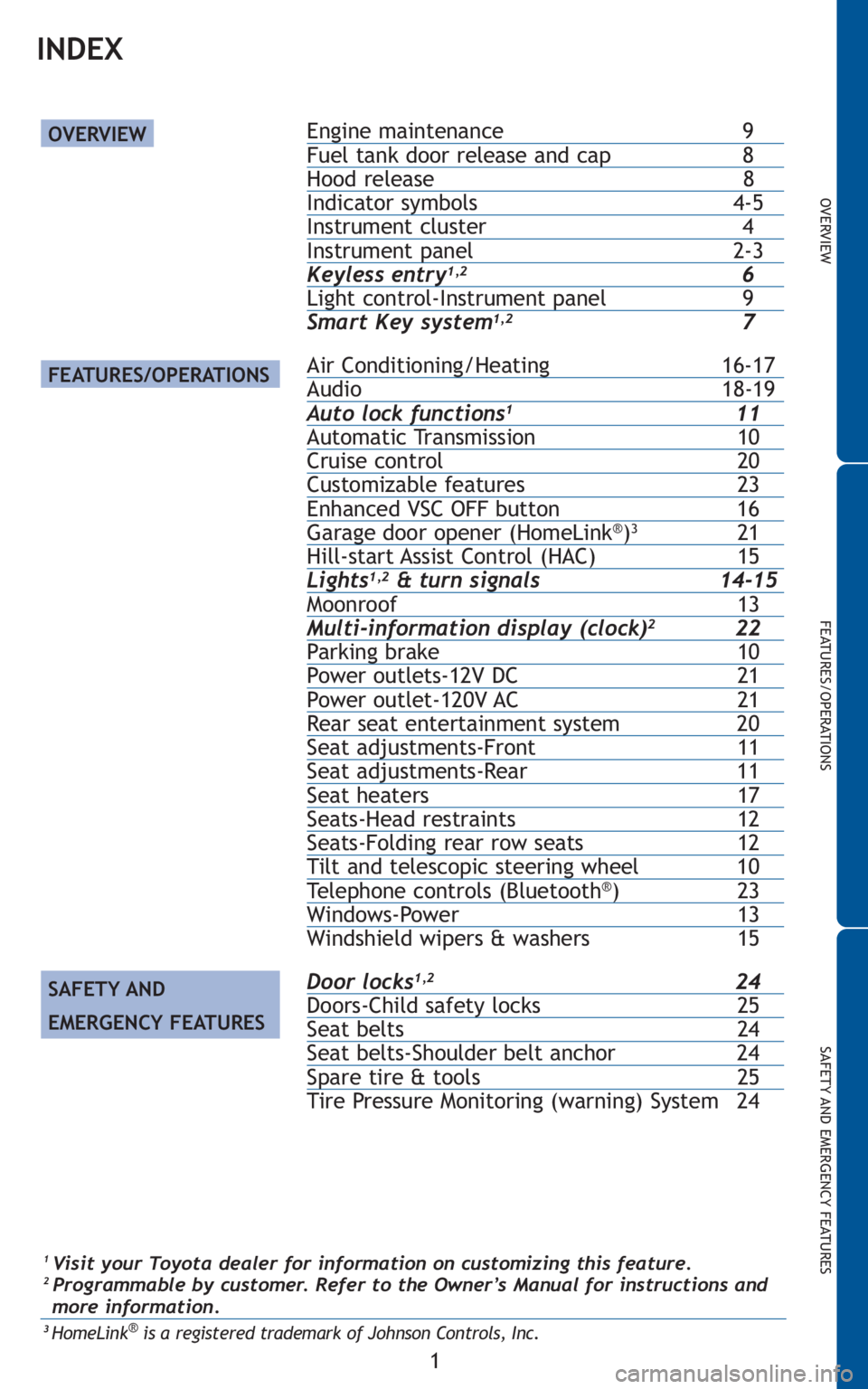
INDEX
Engine maintenance 9Fuel tank door release and cap 8Hood release 8Indicator symbols 4-5Instrument cluster 4Instrument panel 2-3Keyless entry1,26Light control-Instrument panel 9
Smart Key system1,27
Air Conditioning/Heating 16-17Audio 18-19Auto lock functions111Automatic Transmission 10Cruise control 20Customizable features 23Enhanced VSC OFF button 16Garage door opener (HomeLink®)321Hill-start Assist Control (HAC) 15Lights1,2& turn signals 14-15Moonroof 13Multi-information display (clock)222Parking brake 10Power outlets-12V DC 21Power outlet-120V AC 21Rear seat entertainment system 20Seat adjustments-Front 11Seat adjustments-Rear 11Seat heaters 17Seats-Head restraints 12Seats-Folding rear row seats 12Tilt and telescopic steering wheel 10Telephone controls (Bluetooth®)23Windows-Power 13
Windshield wipers & washers 15
Door locks1,224Doors-Child safety locks 25Seat belts 24Seat belts-Shoulder belt anchor 24Spare tire & tools 25
Tire Pressure Monitoring (warning) System 24
OVERVIEW
FEATURES/OPERATIONS
SAFETY AND
EMERGENCY FEATURES
1Visit your Toyota dealer for information on customizing this feature.2 Programmable by customer. Refer to the Owner’s Manual for instructions and
more information.
3HomeLink®is a registered trademark of Johnson Controls, Inc.
Page 4 of 26
2
OVERVIEW
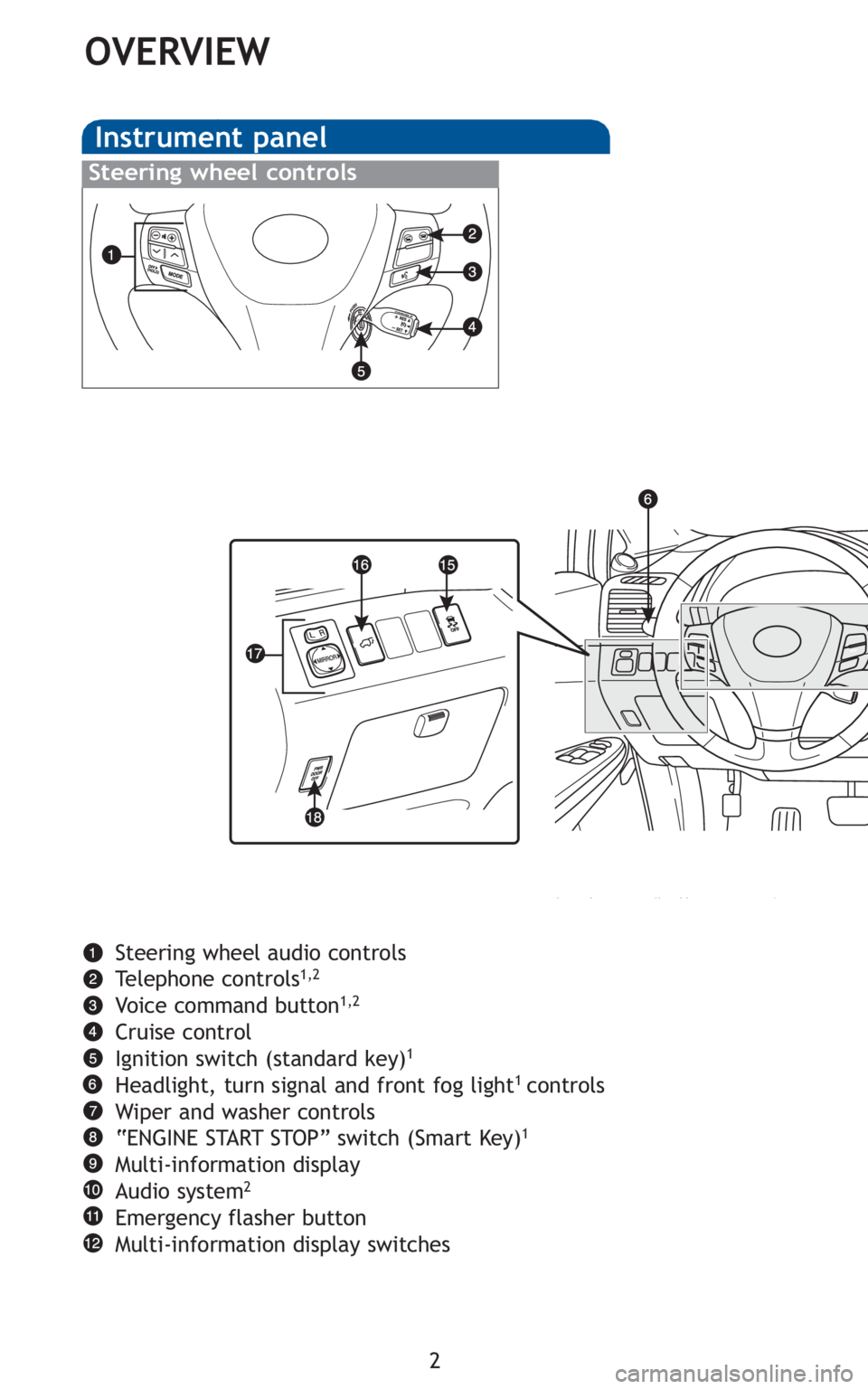
Instrument panel
Steering wheel audio controls
Telephone controls1,2
Voice command button1,2
Cruise control
Ignition switch (standard key)1
Headlight, turn signal and front fog light1 controls
Wiper and washer controls
“ENGINE START STOP” switch (Smart Key)
1
Multi-information display
Audio system2
Emergency flasher button
Multi-information display switches
Steering wheel controls
Page 20 of 26
18
FEATURES/OPERATIONS
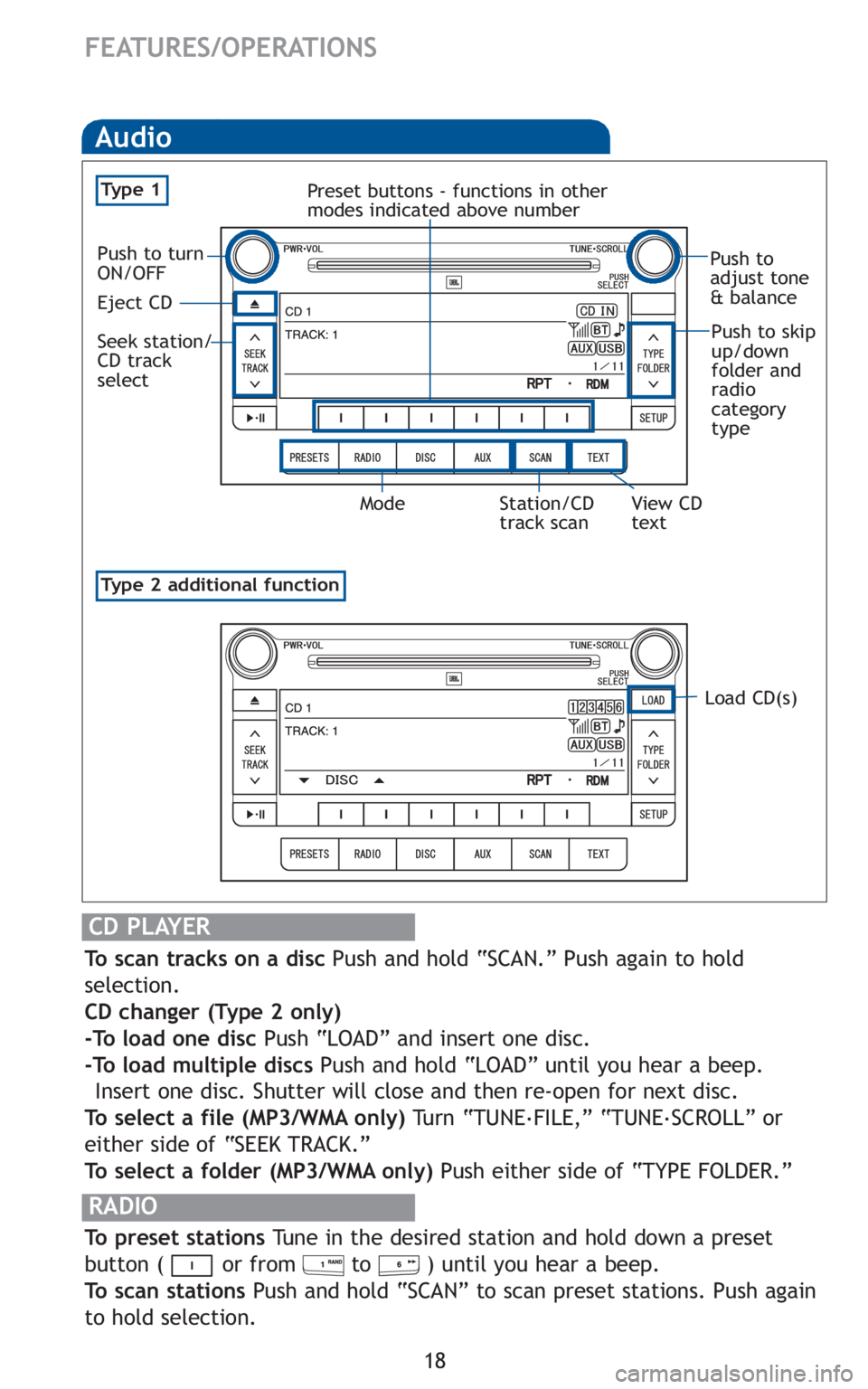
Audio
RADIO
To preset stations Tune in the desired station and hold down a preset
button ( or from to ) until you hear a beep.
To scan stations Push and hold “SCAN” to scan preset stations. Push again
to hold selection.
CD PLAYER
To scan tracks on a disc Push and hold “SCAN.” Push again to hold
selection.
CD changer (Type 2 only)
-To load one disc Push “LOAD” and insert one disc.
-To load multiple discs Push and hold “LOAD” until you hear a beep.
Insert one disc. Shutter will close and then re-open for next disc.
To select a file (MP3/WMA only) Tu r n “ T U N E.
FILE,” “TUNE.
SCROLL” or
either side of “SEEK TRACK.”
To select a folder (MP3/WMA only) Push either side of “TYPE FOLDER.”
Type 2 additional function
Audio
Ty p e 1
Load CD(s)
Push to
adjust tone
& balance
Push to skip
up/down
folder and
radio
category
type
Station/CD
track scan Mode View CD
text Preset buttons - functions in other
modes indicated above number
Eject CD
Seek station/
CD track
select
Push to turn
ON/OFF
Page 21 of 26
19
OVERVIEW
FEATURES/OPERATIONS
SAFETY AND EMERGENCY FEATURES
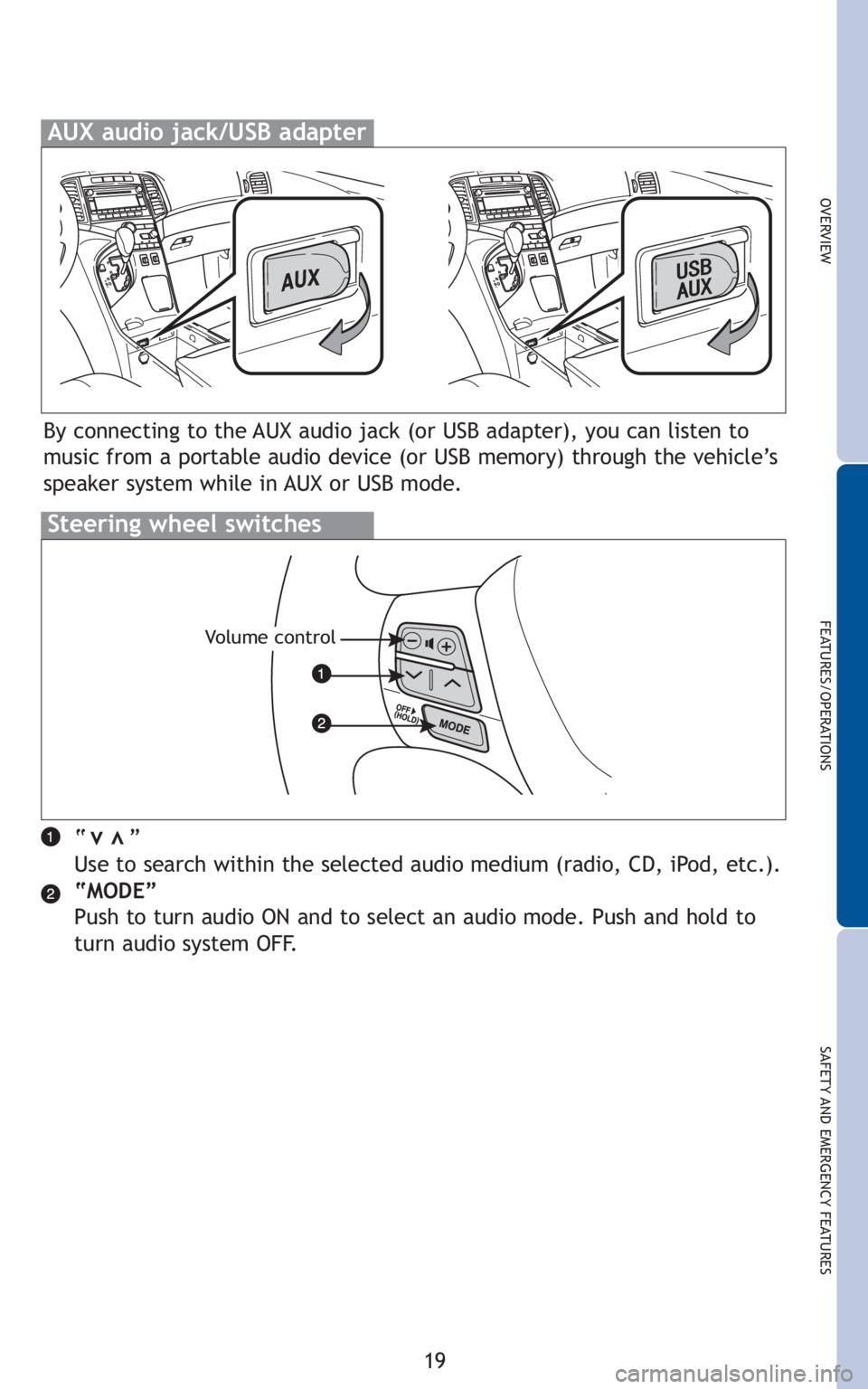
“ ”
Use to search within the selected audio medium (radio, CD, iPod, etc.).
“MODE”
Push to turn audio ON and to select an audio mode. Push and hold to
turn audio system OFF.vv
AUX audio jack/USB adapter
Steering wheel switches
Volume control
By connecting to the AUX audio jack (or USB adapter), you can listen to
music from a portable audio device (or USB memory) through the vehicle’s
speaker system while in AUX or USB mode.
Page 22 of 26
20
FEATURES/OPERATIONS
Cruise control
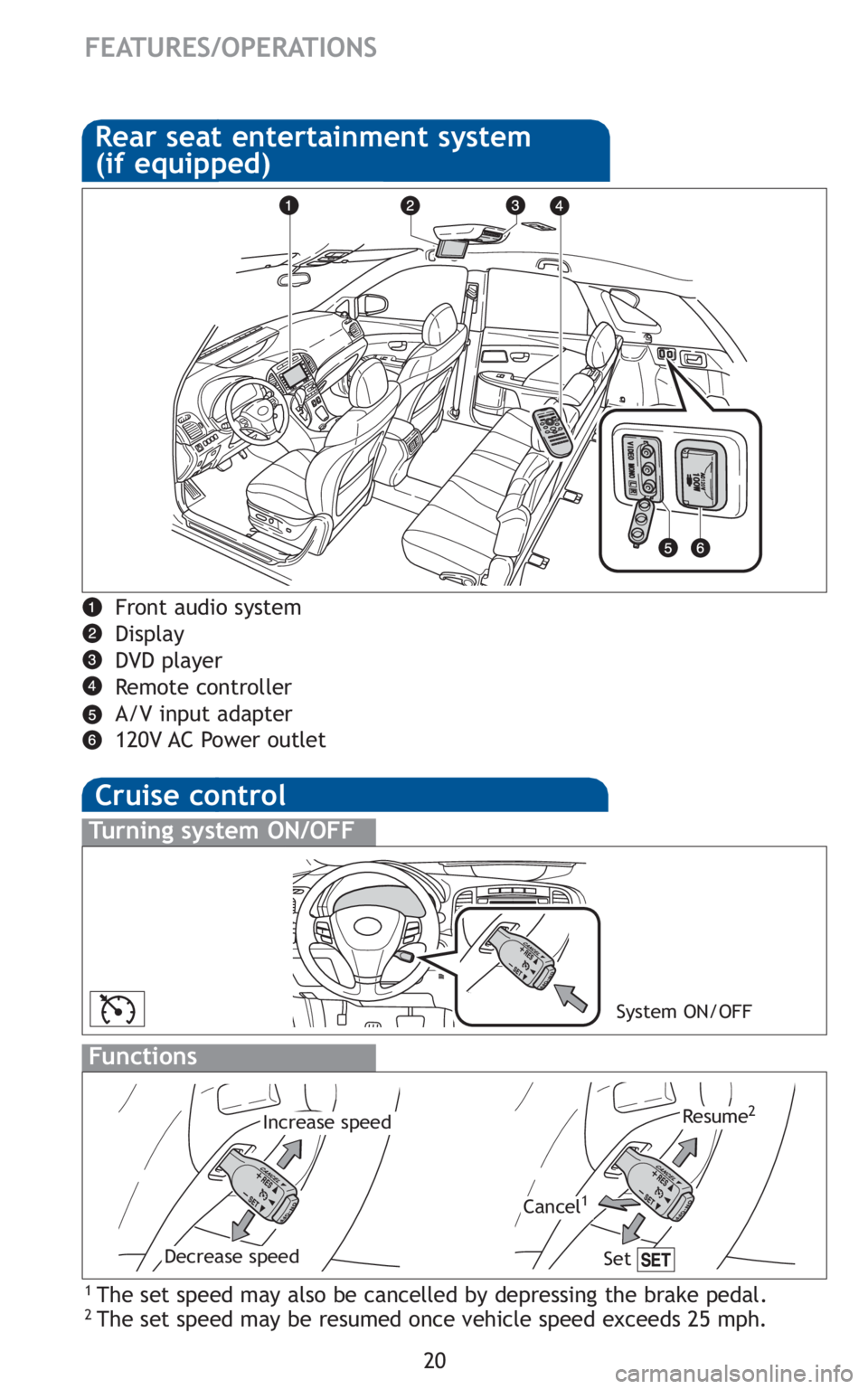
1 The set speed may also be cancelled by depressing the brake pedal.2 The set speed may be resumed once vehicle speed exceeds 25 mph.
Turning system ON/OFF
Functions
System ON/OFF
Increase speed
Decrease speed
Cancel1
Resume2
Rear seat entertainment system
(if equipped)
Front audio system
Display
DVD player
Remote controller
A/V input adapter
120V AC Power outlet
Set
Page 25 of 26
23
OVERVIEW
FEATURES/OPERATIONS
SAFETY AND EMERGENCY FEATURES
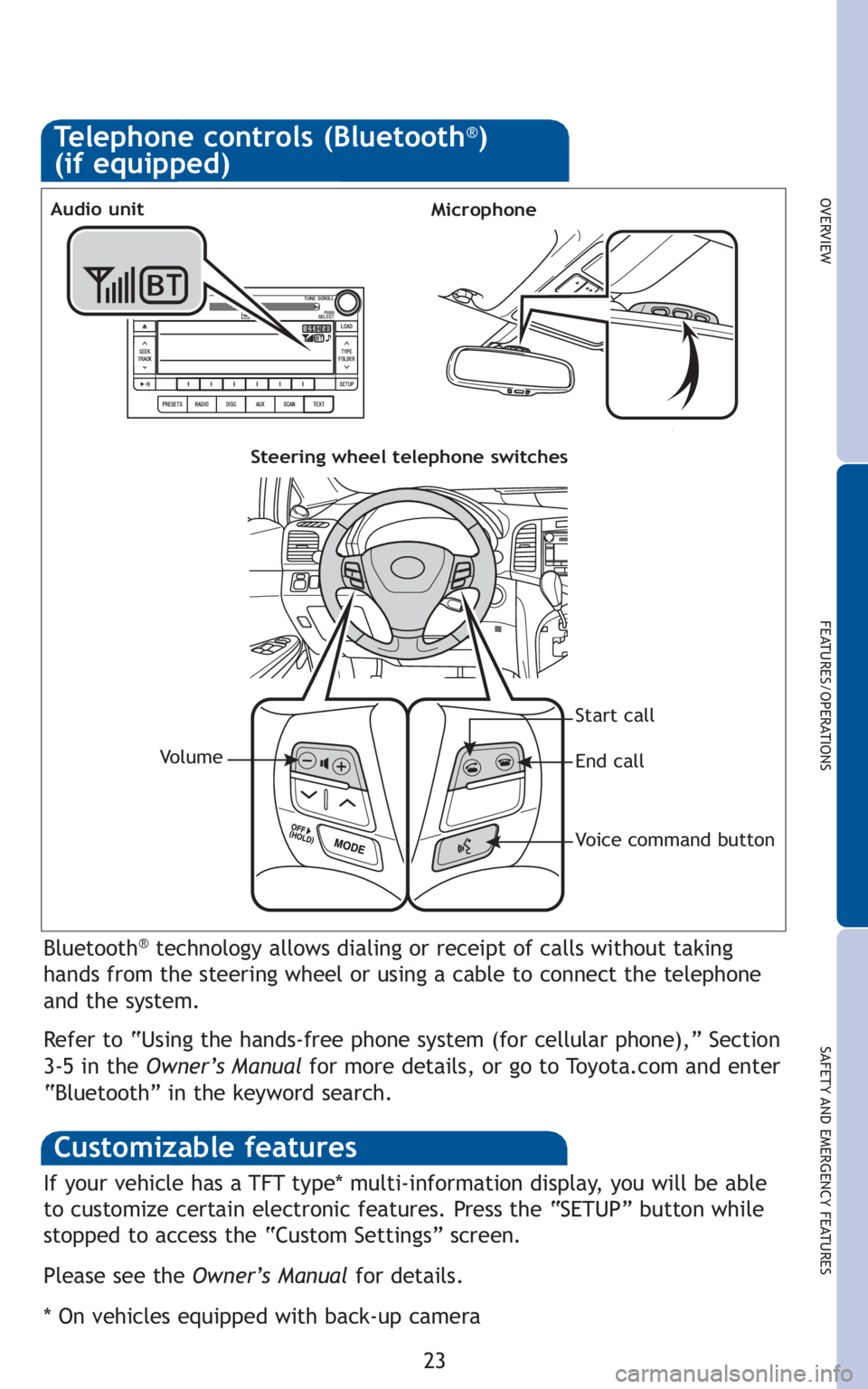
Bluetooth®technology allows dialing or receipt of calls without taking
hands from the steering wheel or using a cable to connect the telephone
and the system.
Refer to “Using the hands-free phone system (for cellular phone),” Section
3-5 in the Owner’s Manualfor more details, or go to Toyota.com and enter
“Bluetooth” in the keyword search.
Telephone controls (Bluetooth®)
(if equipped)
MicrophoneAudio unit
Steering wheel telephone switches
Start call
End call
Voice command button Vo l u m e
Customizable features
If your vehicle has a TFT type* multi-information display, you will be able
to customize certain electronic features. Press the “SETUP” button while
stopped to access the “Custom Settings” screen.
Please see the Owner’s Manualfor details.
* On vehicles equipped with back-up camera