display TOYOTA VENZA 2013 Accessories, Audio & Navigation (in English)
[x] Cancel search | Manufacturer: TOYOTA, Model Year: 2013, Model line: VENZA, Model: TOYOTA VENZA 2013Pages: 363, PDF Size: 5.62 MB
Page 7 of 363
7
1
2
3
4
5
6
7
8
9
VENZA (US) NAVI 73011U
12.02.24 10:18
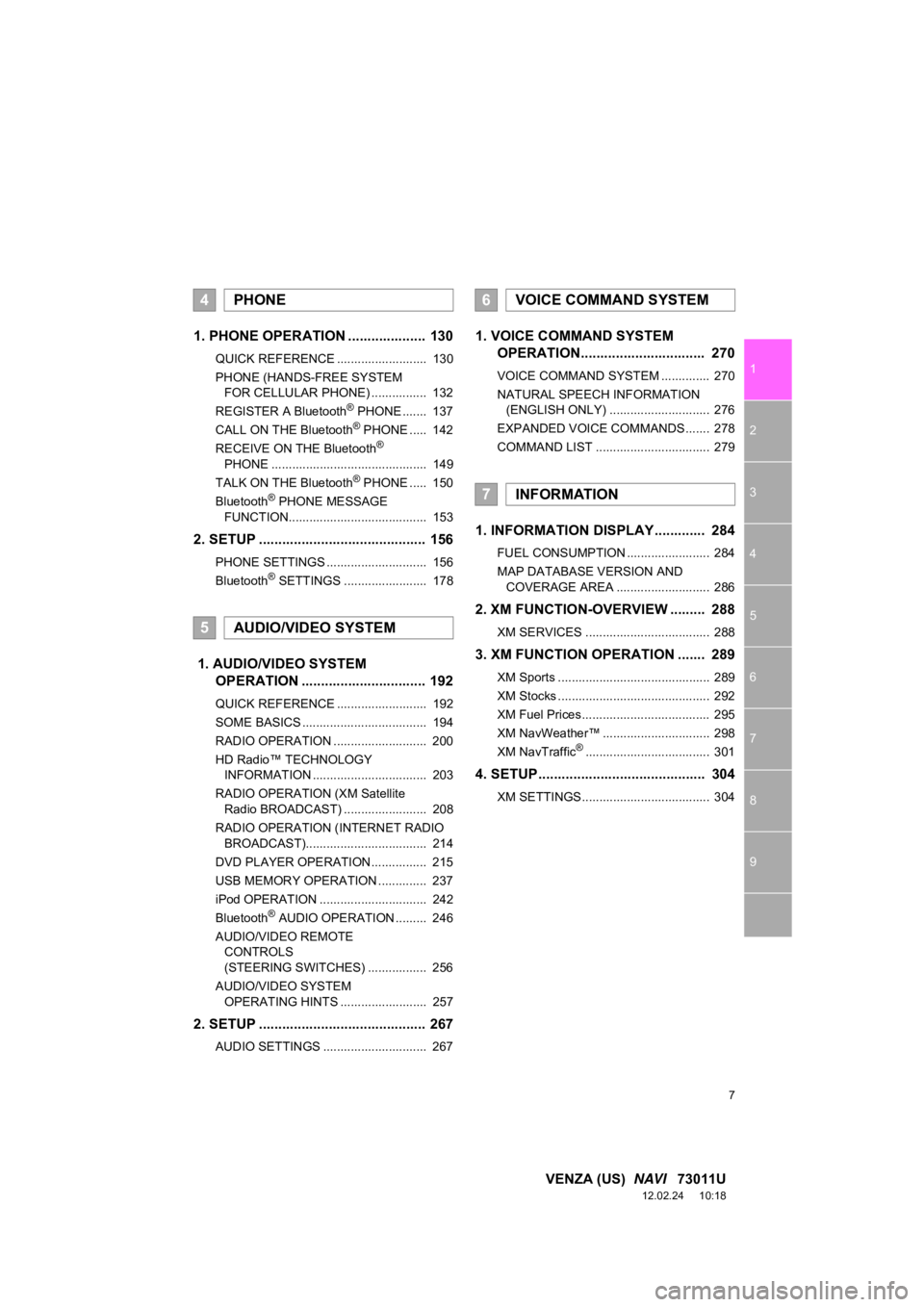
1. PHONE OPERATION .................... 130
QUICK REFERENCE .......................... 130
PHONE (HANDS-FREE SYSTEM
FOR CELLULAR PHONE) ................ 132
REGISTER A Bluetooth
® PHONE ....... 137
CALL ON THE Bluetooth® PHONE ..... 142
RECEIVE ON THE Bluetooth®
PHONE ............................................. 149
TALK ON THE Bluetooth
® PHONE ..... 150
Bluetooth® PHONE MESSAGE
FUNCTION........................................ 153
2. SETUP ........................................... 156
PHONE SETTINGS ............................. 156
Bluetooth® SETTINGS ........................ 178
1. AUDIO/VIDEO SYSTEM OPERATION ................................ 192
QUICK REFERENCE .......................... 192
SOME BASICS .................................... 194
RADIO OPERATION ........................... 200
HD Radio™ TECHNOLOGY
INFORMATION ................................. 203
RADIO OPERATION (XM Satellite Radio BROADCAST) ........................ 208
RADIO OPERATION (INTERNET RADIO BROADCAST)................................... 214
DVD PLAYER OPERATION................ 215
USB MEMORY OPERATION .............. 237
iPod OPERATION ............................... 242
Bluetooth
® AUDIO OPERATION ......... 246
AUDIO/VIDEO REMOTE CONTROLS
(STEERING SWITCHES) ................. 256
AUDIO/VIDEO SYSTEM OPERATING HINTS ......................... 257
2. SETUP ........................................... 267
AUDIO SETTINGS .............................. 267
1. VOICE COMMAND SYSTEM OPERATION................................ 270
VOICE COMMAND SYSTEM .............. 270
NATURAL SPEECH INFORMATION
(ENGLISH ONLY) ............................. 276
EXPANDED VOICE COMMANDS ....... 278
COMMAND LIST ................................. 279
1. INFORMATION DISPLAY ............. 284
FUEL CONSUMPTION ........................ 284
MAP DATABASE VERSION AND COVERAGE AREA ........................... 286
2. XM FUNCTION-O VERVIEW ......... 288
XM SERVICES .................................... 288
3. XM FUNCTION OPERATION ....... 289
XM Sports ............................................ 289
XM Stocks ............................................ 292
XM Fuel Prices..................................... 295
XM NavWeather™ ............................... 298
XM NavTraffic
®.................................... 301
4. SETUP ........................................... 304
XM SETTINGS..................................... 304
4PHONE
5AUDIO/VIDEO SYSTEM
6VOICE COMMAND SYSTEM
7INFORMATION
Page 10 of 363
10
VENZA (US) NAVI 73011U
12.02.17 09:43
1. NAVIGATION OPERATION
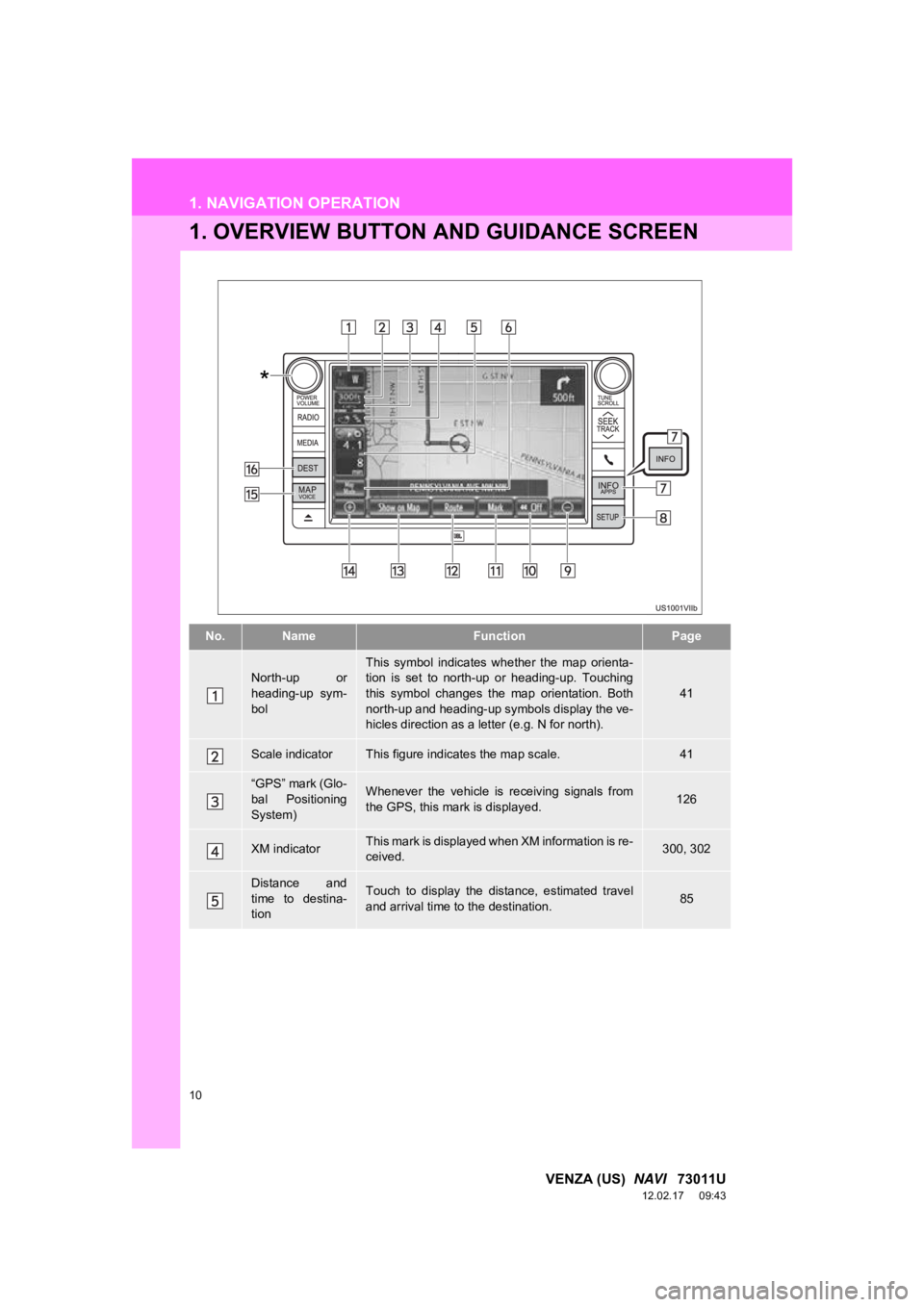
1. OVERVIEW BUTTON AND GUIDANCE SCREEN
No.NameFunctionPage
North-up or
heading-up sym-
bolThis symbol indicates whether the map orienta-
tion is set to north-up or heading-up. Touching
this symbol changes the map orientation. Both
north-up and heading-up symbols display the ve-
hicles direction as a letter (e.g. N for north).
41
Scale indicatorThis figure indicates the map scale.41
“GPS” mark (Glo-
bal Positioning
System)Whenever the vehicle is receiving signals from
the GPS, this mark is displayed.126
XM indicatorThis mark is displayed when XM information is re-
ceived.300, 302
Distance and
time to destina-
tionTouch to display the distance, estimated travel
and arrival time to the destination.85
*
Page 11 of 363
11
1. NAVIGATION OPERATION
1
QUICK GUIDE
VENZA (US) NAVI 73011U
12.02.17 09:43
*: Press and hold the “POWER/VOLUME” knob for 3 seconds or more to turn off the screen and
restart the navigation system. Do this when t he vehicle-mounted device response is extremely
slow.
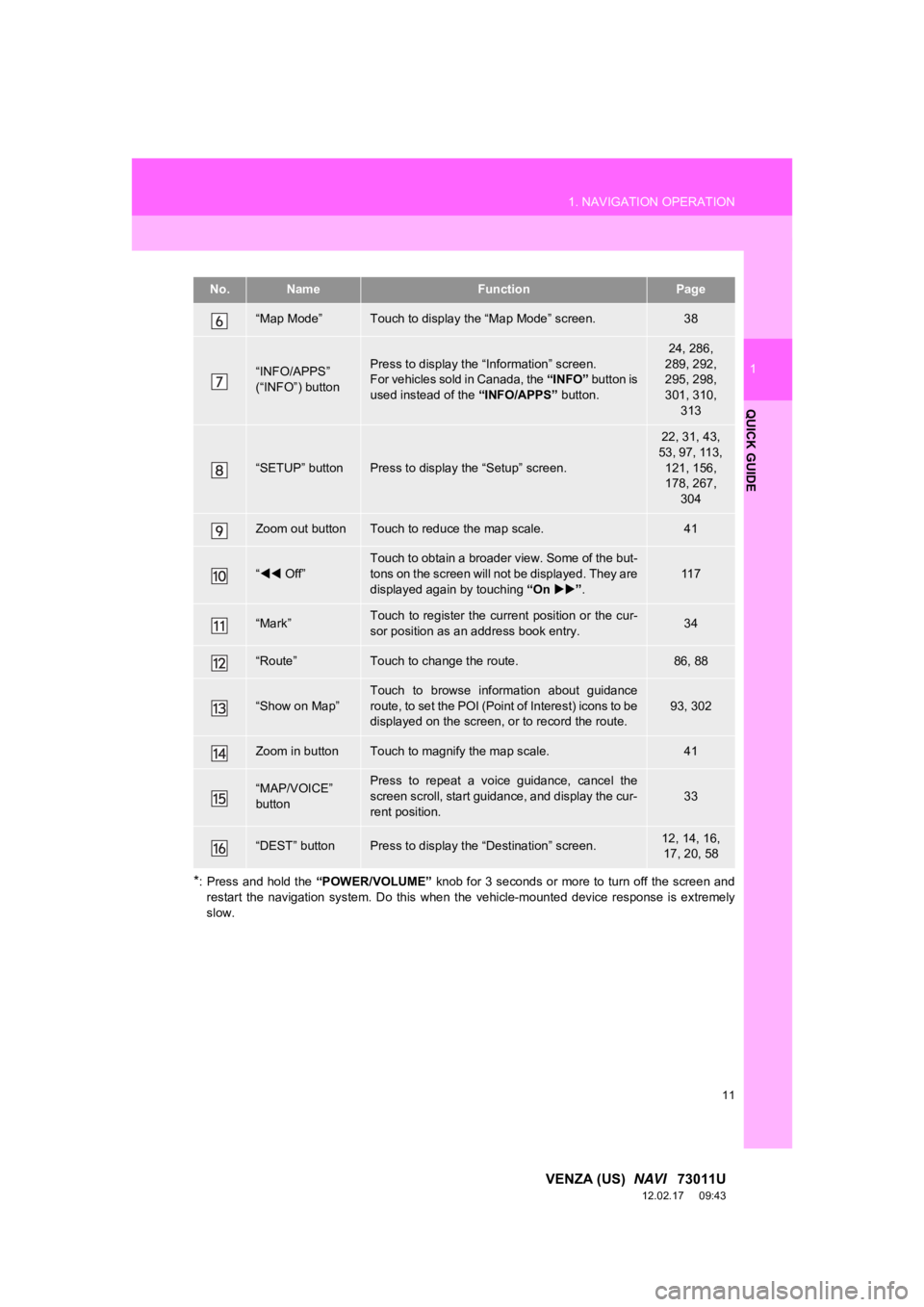
“Map Mode”Touch to display the “Map Mode” screen.38
“INFO/APPS”
(“INFO”) buttonPress to display the “Information” screen.
For vehicles sold in Canada, the “INFO” button is
used instead of the “INFO/APPS” button.
24, 286,
289, 292,
295, 298,
301, 310, 313
“SETUP” buttonPress to display the “Setup” screen.
22, 31, 43,
53, 97, 113, 121, 156,
178, 267, 304
Zoom out buttonTouch to reduce the map scale.41
“ Off”
Touch to obtain a broader view. Some of the but-
tons on the screen will not be displayed. They are
displayed again by touching “On” .
11 7
“Mark”Touch to register the current position or the cur-
sor position as an address book entry.34
“Route”Touch to change the route.86, 88
“Show on Map”Touch to browse information about guidance
route, to set the POI (Point of Interest) icons to be
displayed on the screen, or to record the route.93, 302
Zoom in buttonTouch to magnify the map scale.41
“MAP/VOICE”
buttonPress to repeat a voice guidance, cancel the
screen scroll, start guidance, and display the cur-
rent position.
33
“DEST” buttonPress to display the “Destination” screen.12, 14, 16,
17, 20, 58
No.NameFunctionPage
Page 12 of 363
12
1. NAVIGATION OPERATION
VENZA (US) NAVI 73011U
12.02.17 09:43
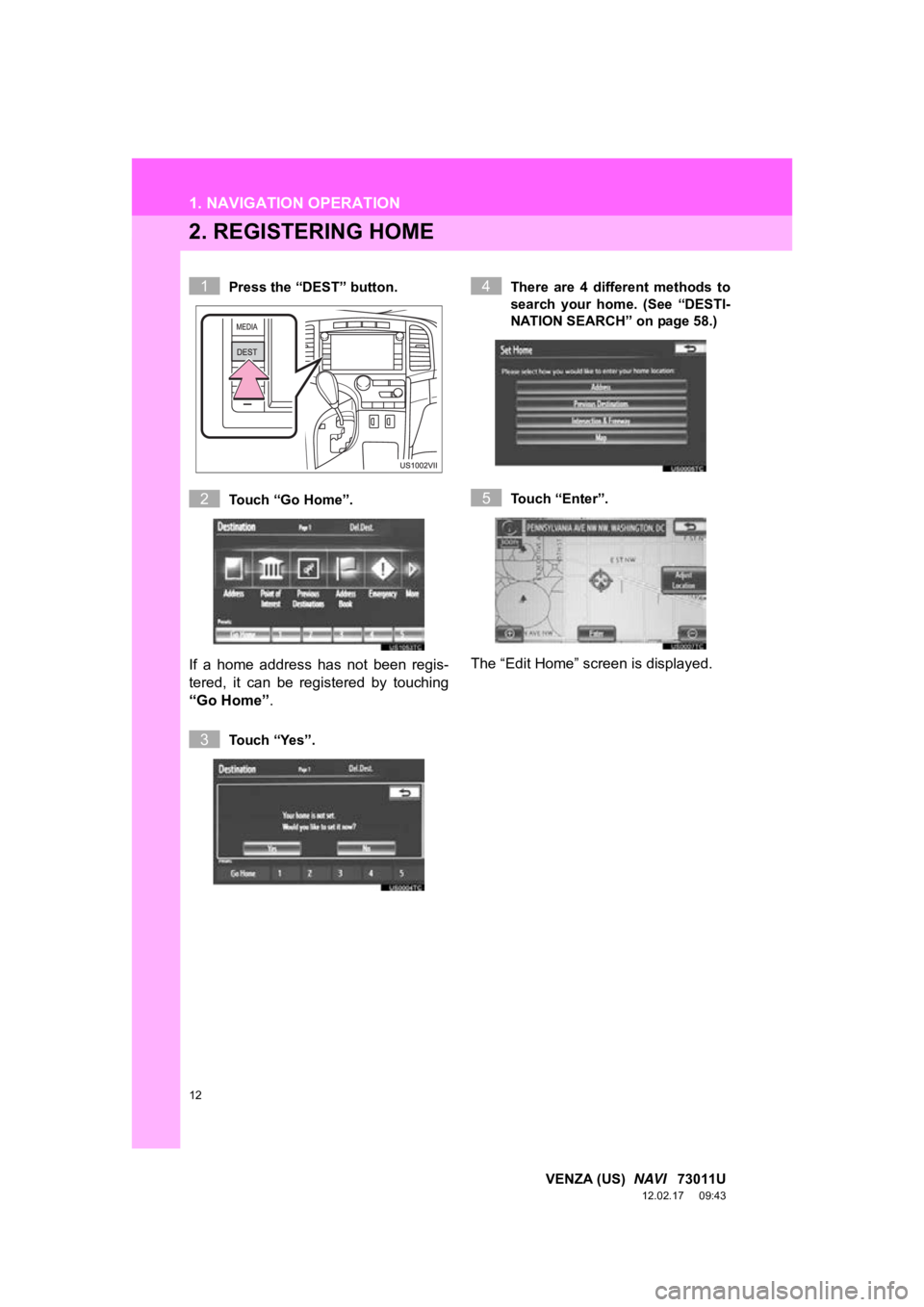
2. REGISTERING HOME
Press the “DEST” button.
Touch “Go Home”.
If a home address has not been regis-
tered, it can be registered by touching
“Go Home”.
Touch “Yes”. There are 4 different methods to
search your home. (See “DESTI-
NATION SEARCH” on page 58.)
Touch “Enter”.
The “Edit Home” screen is displayed.
1
2
3
4
5
Page 14 of 363
14
1. NAVIGATION OPERATION
VENZA (US) NAVI 73011U
12.02.17 09:43
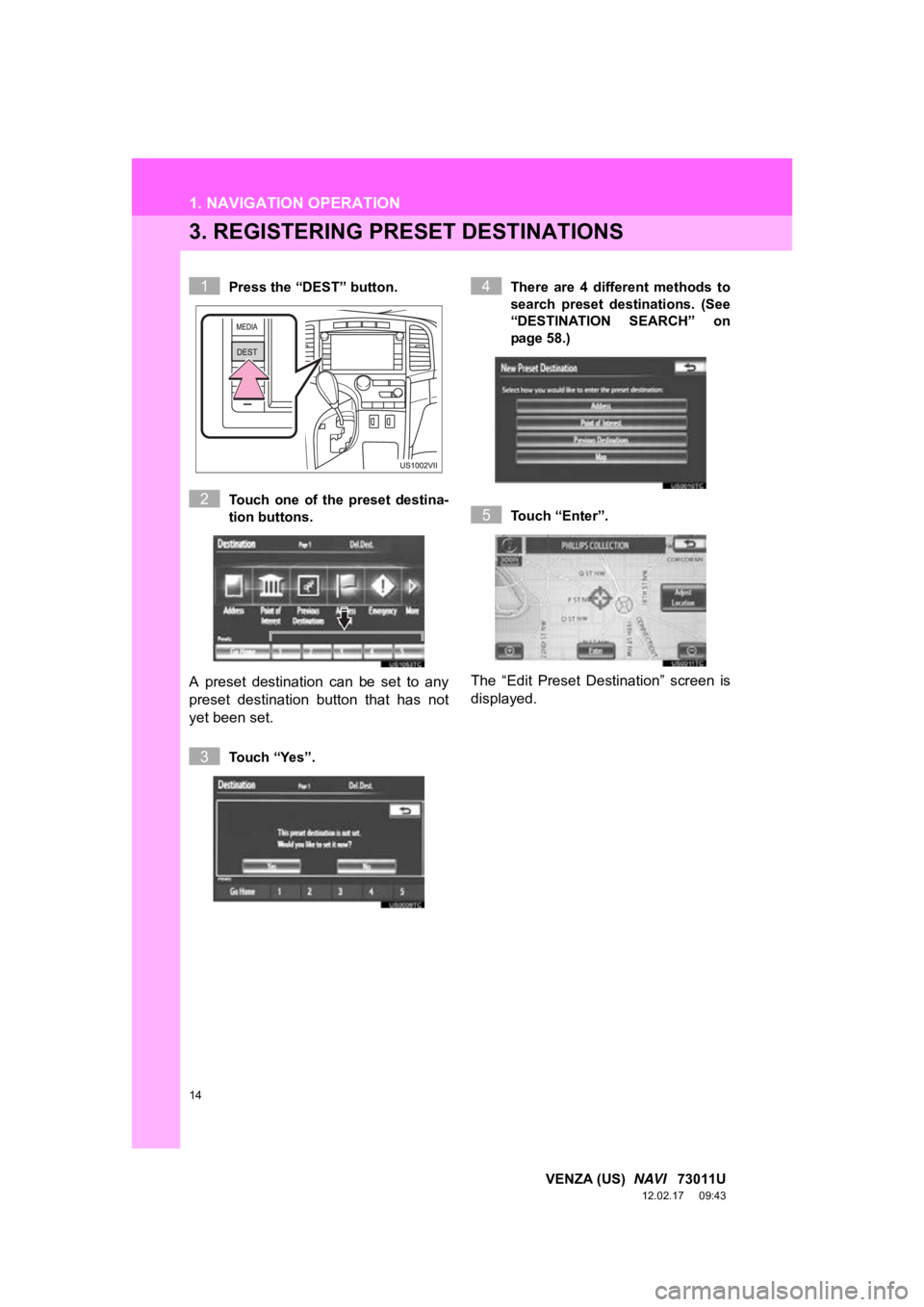
3. REGISTERING PRESET DESTINATIONS
Press the “DEST” button.
Touch one of the preset destina-
tion buttons.
A preset destination can be set to any
preset destination button that has not
yet been set.
Touch “Yes”. There are 4 different methods to
search preset destinations. (See
“DESTINATION SEARCH” on
page 58.)
Touch “Enter”.
The “Edit Preset Destination” screen is
displayed.
1
2
3
4
5
Page 16 of 363
16
1. NAVIGATION OPERATION
VENZA (US) NAVI 73011U
12.02.17 09:43
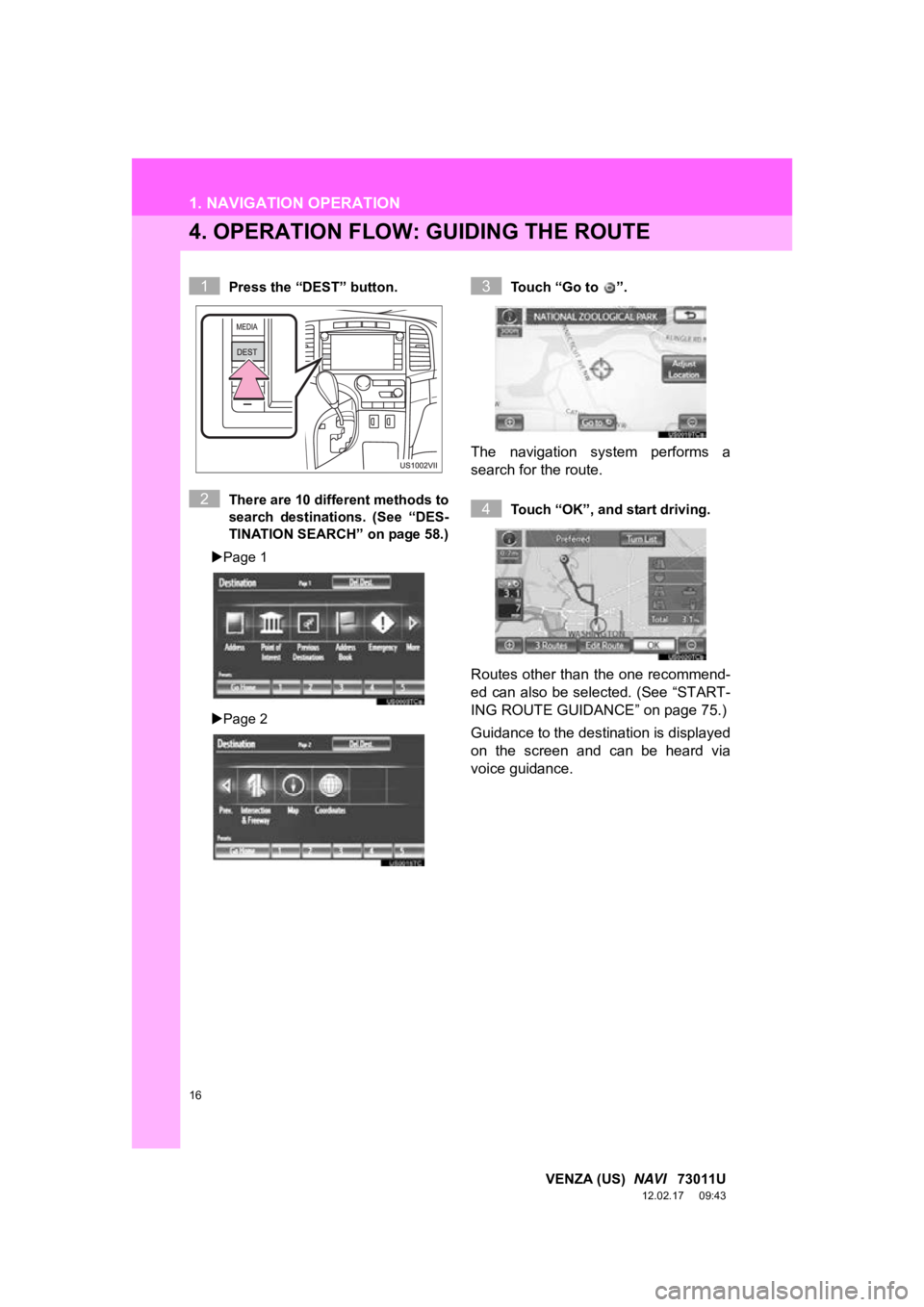
4. OPERATION FLOW: GUIDING THE ROUTE
Press the “DEST” button.
There are 10 different methods to
search destinations. (See “DES-
TINATION SEARCH” on page 58.)
Page 1
Page 2 Touch “Go to ”.
The navigation system performs a
search for the route.
Touch “OK”, and start driving.
Routes other than the one recommend-
ed can also be selected. (See “START-
ING ROUTE GUIDANCE” on page 75.)
Guidance to the destination is displayed
on the screen and can be heard via
voice guidance.
1
2
3
4
Page 17 of 363
17
1. NAVIGATION OPERATION
1
QUICK GUIDE
VENZA (US) NAVI 73011U
12.02.17 09:43
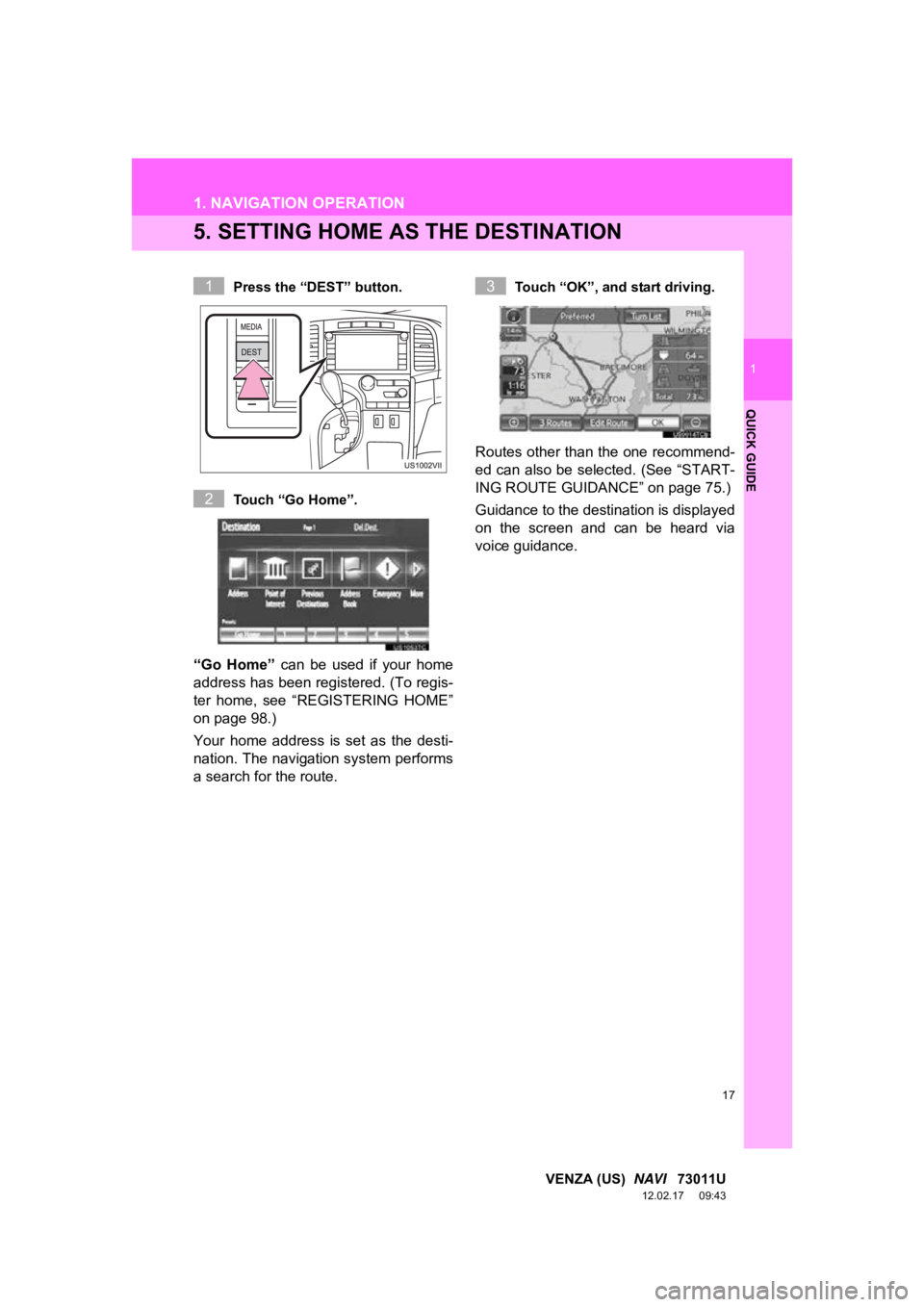
5. SETTING HOME AS THE DESTINATION
Press the “DEST” button.
Touch “Go Home”.
“Go Home” can be used if your home
address has been registered. (To regis-
ter home, see “REGISTERING HOME”
on page 98.)
Your home address is set as the desti-
nation. The navigation system performs
a search for the route.
Touch “OK”, and start driving.
Routes other than the one recommend-
ed can also be selected. (See “START-
ING ROUTE GUIDANCE” on page 75.)
Guidance to the destination is displayed
on the screen and can be heard via
voice guidance.
1
2
3
Page 18 of 363
18
VENZA (US) NAVI 73011U
12.02.17 09:43
2. FUNCTION INDEX
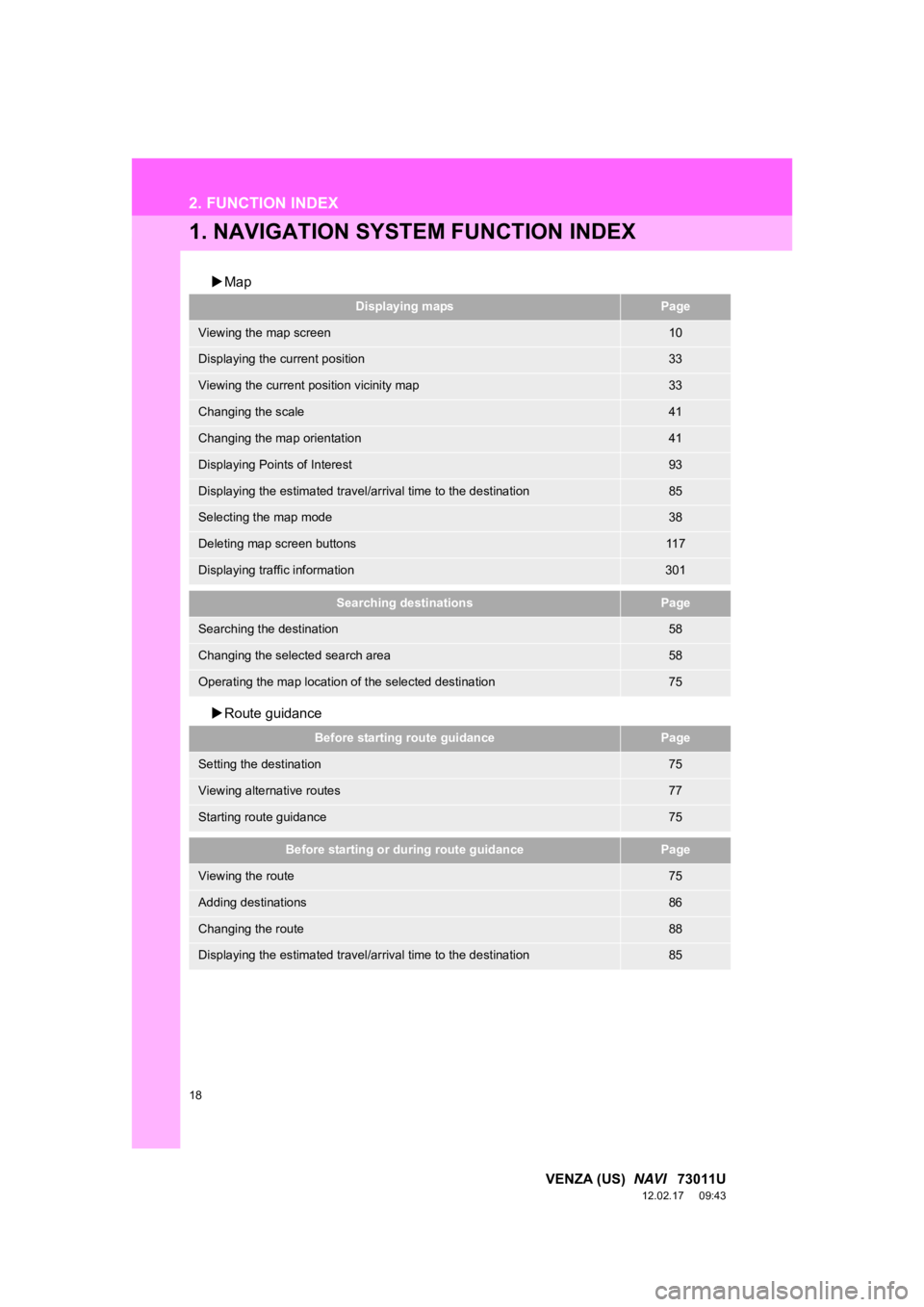
1. NAVIGATION SYSTEM FUNCTION INDEX
Map
Route guidance
Displaying mapsPage
Viewing the map screen10
Displaying the current position33
Viewing the current position vicinity map33
Changing the scale41
Changing the map orientation41
Displaying Points of Interest93
Displaying the estimated travel/arrival time to the destination85
Selecting the map mode38
Deleting map screen buttons11 7
Displaying traffic information301
Searching destinationsPage
Searching the destination58
Changing the selected search area58
Operating the map location of the selected destination75
Before starting route guidancePage
Setting the destination75
Viewing alternative routes77
Starting route guidance75
Before starting or during route guidancePage
Viewing the route75
Adding destinations86
Changing the route88
Displaying the estimated travel/arrival time to the destination85
Page 19 of 363
19
2. FUNCTION INDEX
1
QUICK GUIDE
VENZA (US) NAVI 73011U
12.02.17 09:43
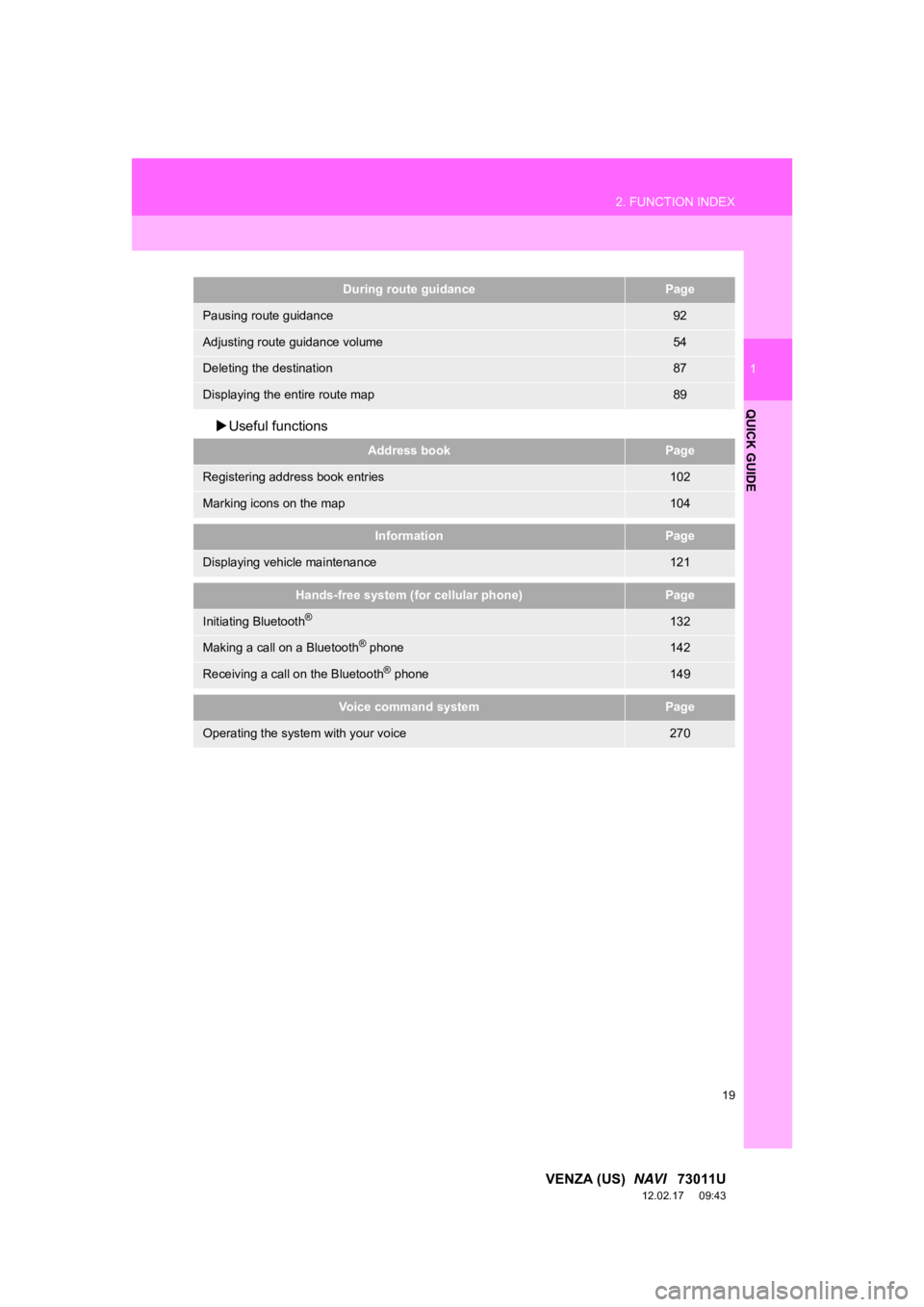
Useful functions
During route guidancePage
Pausing route guidance92
Adjusting route guidance volume54
Deleting the destination87
Displaying the entire route map89
Address bookPage
Registering address book entries102
Marking icons on the map104
InformationPage
Displaying vehicle maintenance121
Hands-free system (for cellular phone)Page
Initiating Bluetooth®132
Making a call on a Bluetooth® phone142
Receiving a call on the Bluetooth® phone149
Voice command systemPage
Operating the system with your voice270
Page 20 of 363
20
VENZA (US) NAVI 73011U
12.02.17 09:43
3. QUICK REFERENCE
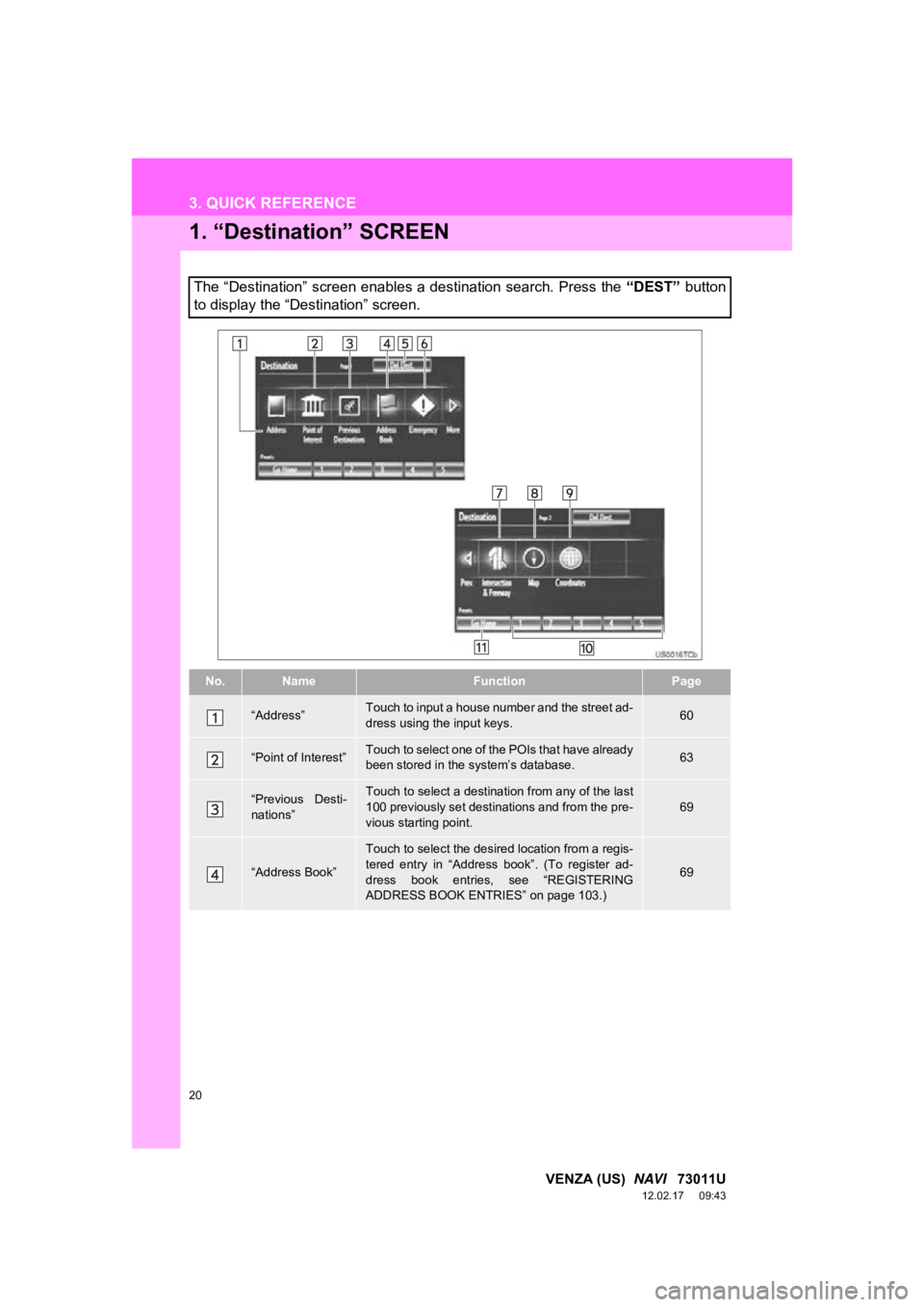
1. “Destination” SCREEN
The “Destination” screen enables a destination search. Press the “DEST” button
to display the “Destination” screen.
No.NameFunctionPage
“Address”Touch to input a house number and the street ad-
dress using the input keys.60
“Point of Interest”Touch to select one of the POIs that have already
been stored in the system’s database.63
“Previous Desti-
nations”Touch to select a destination from any of the last
100 previously set destinations and from the pre-
vious starting point.69
“Address Book”
Touch to select the desired location from a regis-
tered entry in “Address book”. (To register ad-
dress book entries, see “REGISTERING
ADDRESS BOOK ENTRIES” on page 103.)
69