service TOYOTA VENZA 2013 Accessories, Audio & Navigation (in English)
[x] Cancel search | Manufacturer: TOYOTA, Model Year: 2013, Model line: VENZA, Model: TOYOTA VENZA 2013Pages: 363, PDF Size: 5.62 MB
Page 7 of 363
7
1
2
3
4
5
6
7
8
9
VENZA (US) NAVI 73011U
12.02.24 10:18
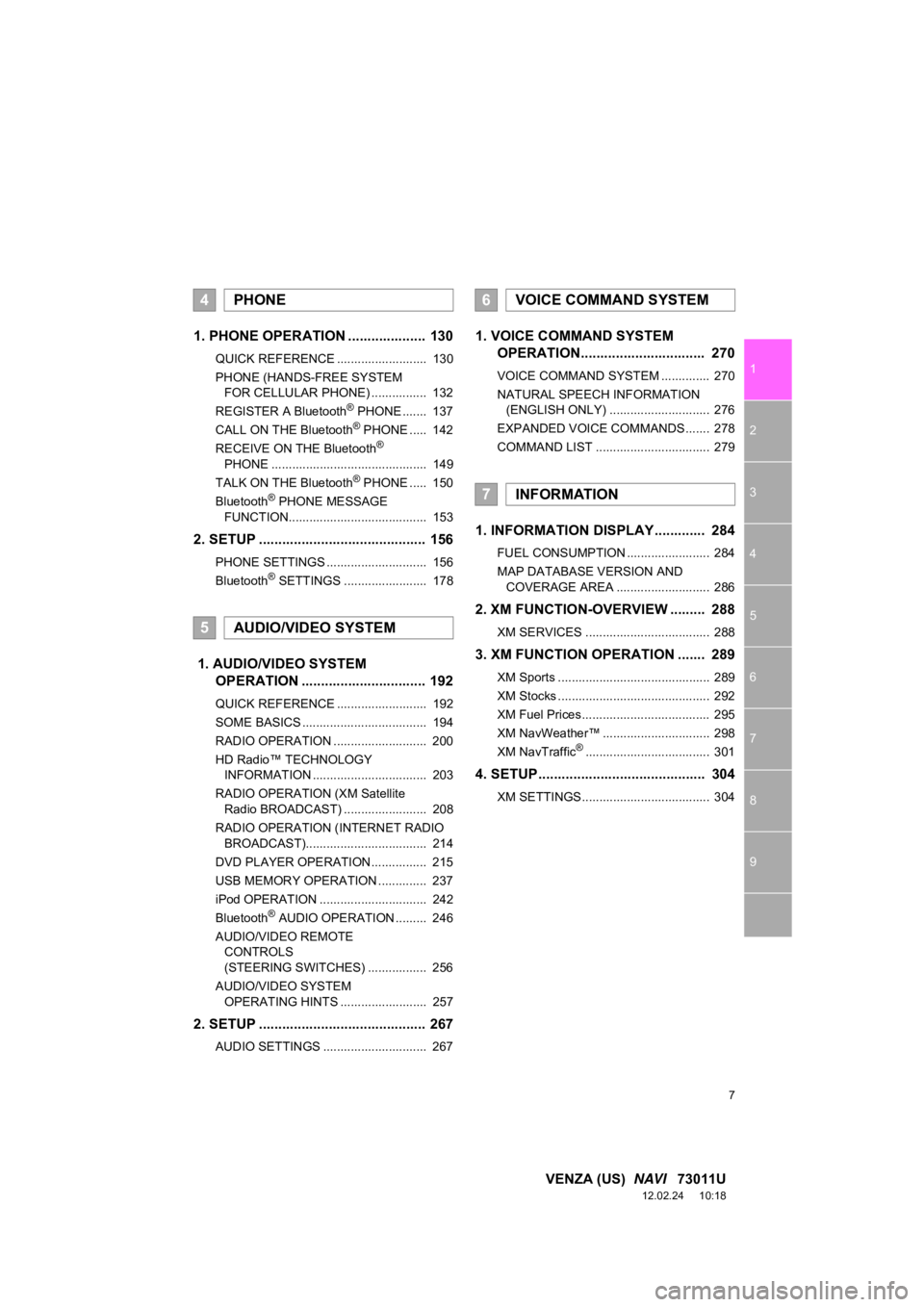
1. PHONE OPERATION .................... 130
QUICK REFERENCE .......................... 130
PHONE (HANDS-FREE SYSTEM
FOR CELLULAR PHONE) ................ 132
REGISTER A Bluetooth
® PHONE ....... 137
CALL ON THE Bluetooth® PHONE ..... 142
RECEIVE ON THE Bluetooth®
PHONE ............................................. 149
TALK ON THE Bluetooth
® PHONE ..... 150
Bluetooth® PHONE MESSAGE
FUNCTION........................................ 153
2. SETUP ........................................... 156
PHONE SETTINGS ............................. 156
Bluetooth® SETTINGS ........................ 178
1. AUDIO/VIDEO SYSTEM OPERATION ................................ 192
QUICK REFERENCE .......................... 192
SOME BASICS .................................... 194
RADIO OPERATION ........................... 200
HD Radio™ TECHNOLOGY
INFORMATION ................................. 203
RADIO OPERATION (XM Satellite Radio BROADCAST) ........................ 208
RADIO OPERATION (INTERNET RADIO BROADCAST)................................... 214
DVD PLAYER OPERATION................ 215
USB MEMORY OPERATION .............. 237
iPod OPERATION ............................... 242
Bluetooth
® AUDIO OPERATION ......... 246
AUDIO/VIDEO REMOTE CONTROLS
(STEERING SWITCHES) ................. 256
AUDIO/VIDEO SYSTEM OPERATING HINTS ......................... 257
2. SETUP ........................................... 267
AUDIO SETTINGS .............................. 267
1. VOICE COMMAND SYSTEM OPERATION................................ 270
VOICE COMMAND SYSTEM .............. 270
NATURAL SPEECH INFORMATION
(ENGLISH ONLY) ............................. 276
EXPANDED VOICE COMMANDS ....... 278
COMMAND LIST ................................. 279
1. INFORMATION DISPLAY ............. 284
FUEL CONSUMPTION ........................ 284
MAP DATABASE VERSION AND COVERAGE AREA ........................... 286
2. XM FUNCTION-O VERVIEW ......... 288
XM SERVICES .................................... 288
3. XM FUNCTION OPERATION ....... 289
XM Sports ............................................ 289
XM Stocks ............................................ 292
XM Fuel Prices..................................... 295
XM NavWeather™ ............................... 298
XM NavTraffic
®.................................... 301
4. SETUP ........................................... 304
XM SETTINGS..................................... 304
4PHONE
5AUDIO/VIDEO SYSTEM
6VOICE COMMAND SYSTEM
7INFORMATION
Page 8 of 363

8
VENZA (US) NAVI 73011U
12.02.24 10:18
1. ENTUNE-OVERVIEW .................... 306
ENTUNE SERVICE ............................. 306
BEFORE USING ENTUNE .................. 308
2. ENTUNE OPERATION .................. 310
ACTIVATING “APPS” .......................... 310
LINKING “APPS” AND
NAVIGATION LOCAL
FUNCTION ........................................ 313
INPUTTING KEYWORD OPERATION ..................................... 315
1. REAR VIEW MONITOR SYSTEM ........ ............................ ... 318
REAR VIEW MONITOR SYSTEM ....... 318
REAR VIEW MONITOR SYSTEM
PRECAUTIONS ................................ 322
THINGS YOU SHOULD KNOW .......... 327
ALPHABETICAL INDEX ................... 330
8APPS
9PERIPHERAL MONITORING
SYSTEM
INDEX
Page 21 of 363
21
3. QUICK REFERENCE
1
QUICK GUIDE
VENZA (US) NAVI 73011U
12.02.17 09:43
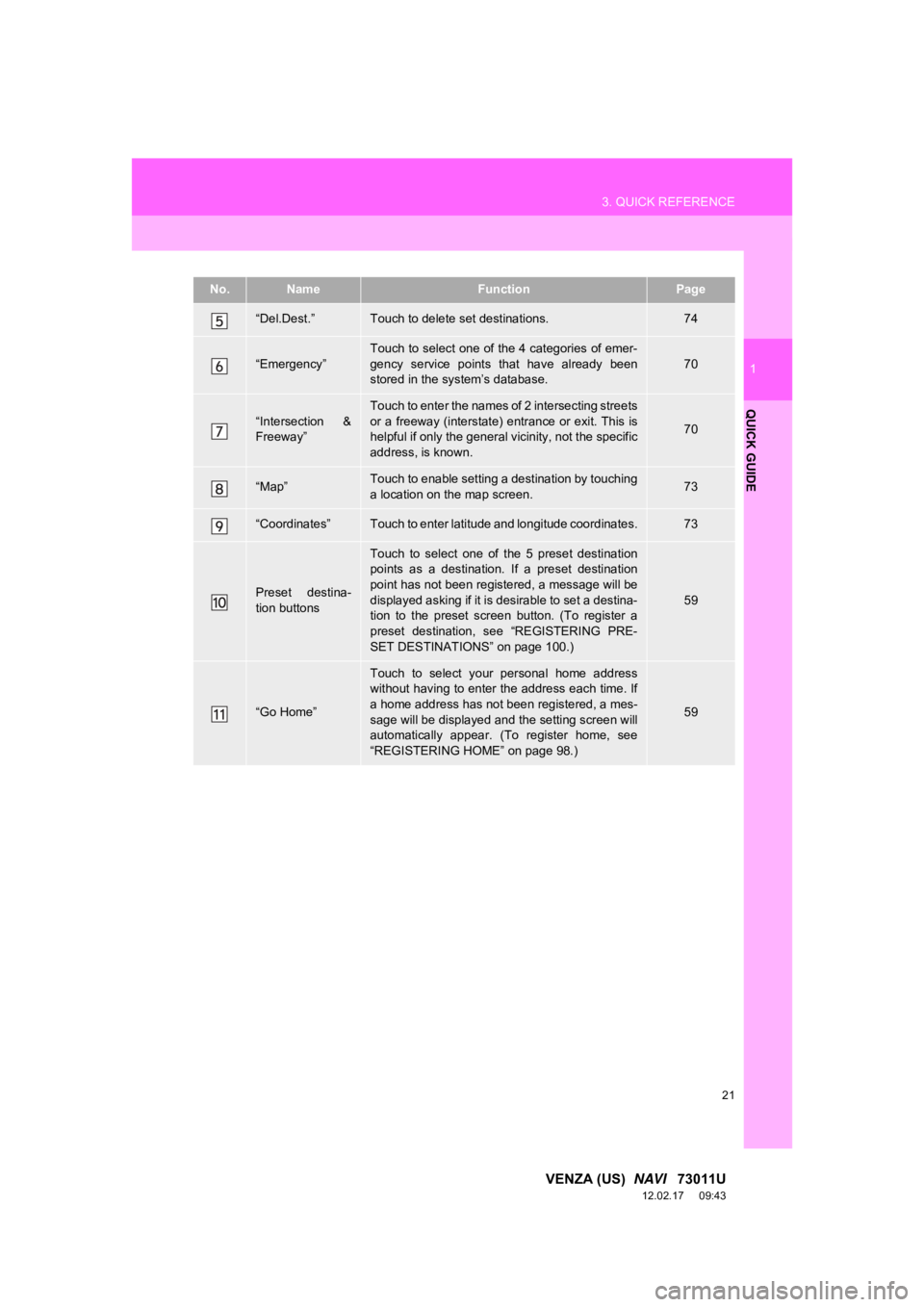
“Del.Dest.”Touch to delete set destinations.74
“Emergency”
Touch to select one of the 4 categories of emer-
gency service points that have already been
stored in the system’s database.
70
“Intersection &
Freeway”
Touch to enter the names of 2 intersecting streets
or a freeway (interstate) entrance or exit. This is
helpful if only the general vicinity, not the specific
address, is known.
70
“Map”Touch to enable setting a destination by touching
a location on the map screen.73
“Coordinates”Touch to enter latitude and longitude coordinates.73
Preset destina-
tion buttons
Touch to select one of the 5 preset destination
points as a destination. If a preset destination
point has not been registered, a message will be
displayed asking if it is desirable to set a destina-
tion to the preset screen button. (To register a
preset destination, see “REGISTERING PRE-
SET DESTINATIONS” on page 100.)
59
“Go Home”
Touch to select your personal home address
without having to enter the address each time. If
a home address has not been registered, a mes-
sage will be displayed and the setting screen will
automatically appear. (To register home, see
“REGISTERING HOME” on page 98.)
59
No.NameFunctionPage
Page 121 of 363
121
4. SETUP
3
NAVIGATION SYSTEM
VENZA (US) NAVI 73011U
12.02.17 09:43
2. VEHICLE SETTINGS
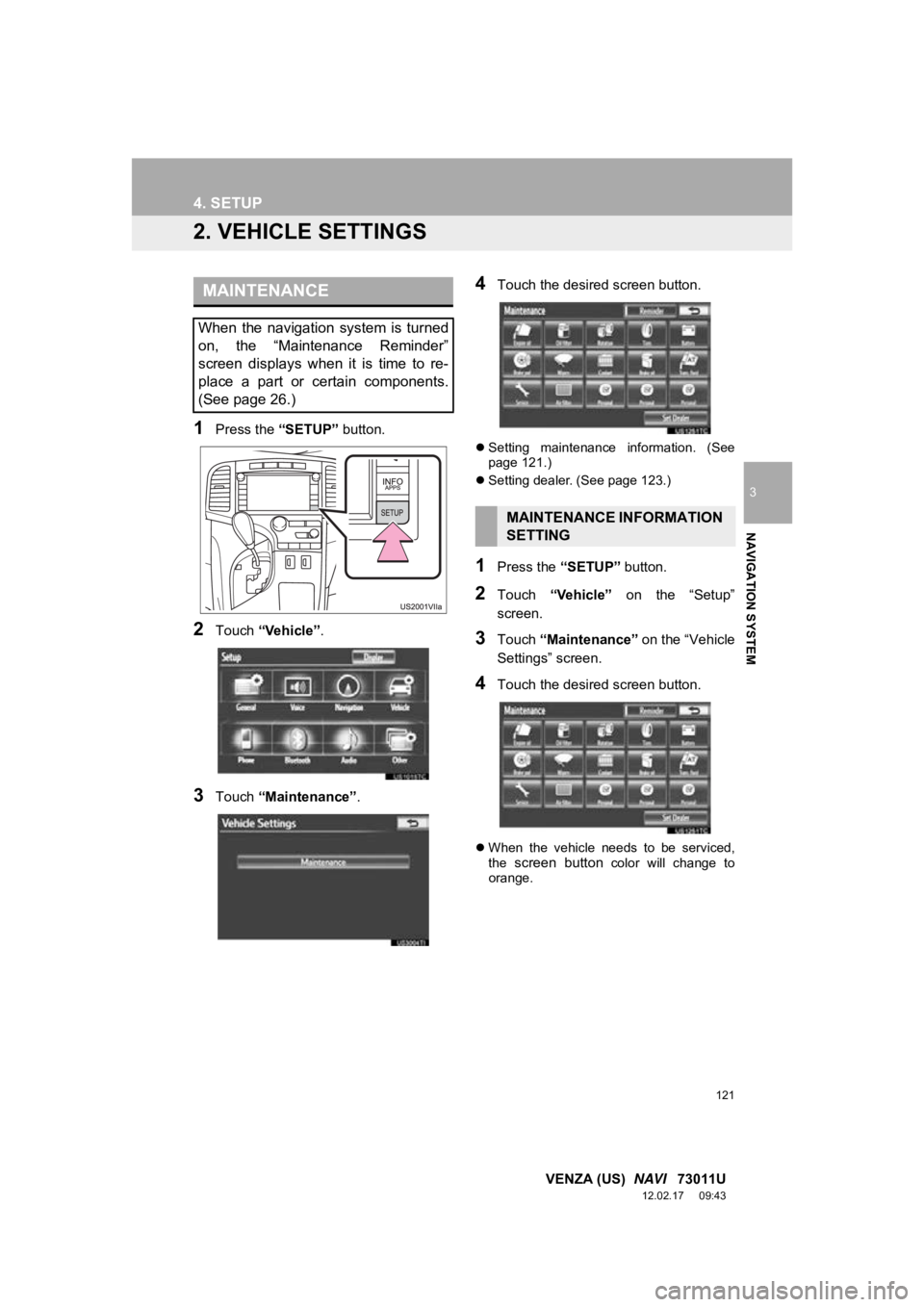
1Press the “SETUP” button.
2Touch “Vehicle”.
3Touch “Maintenance” .
4Touch the desired screen button.
Setting maintenance information. (See
page 121.)
Setting dealer. (See page 123.)
1Press the “SETUP” button.
2Touch “Vehicle” on the “Setup”
screen.
3Touch “Maintenance” on the “Vehicle
Settings” screen.
4Touch the desired screen button.
When the vehicle needs to be serviced,
the screen button color will change to
orange.
MAINTENANCE
When the navigation system is turned
on, the “Maintenance Reminder”
screen displays when it is time to re-
place a part or certain components.
(See page 26.)
MAINTENANCE INFORMATION
SETTING
Page 122 of 363
122
4. SETUP
VENZA (US) NAVI 73011U
12.02.17 09:43
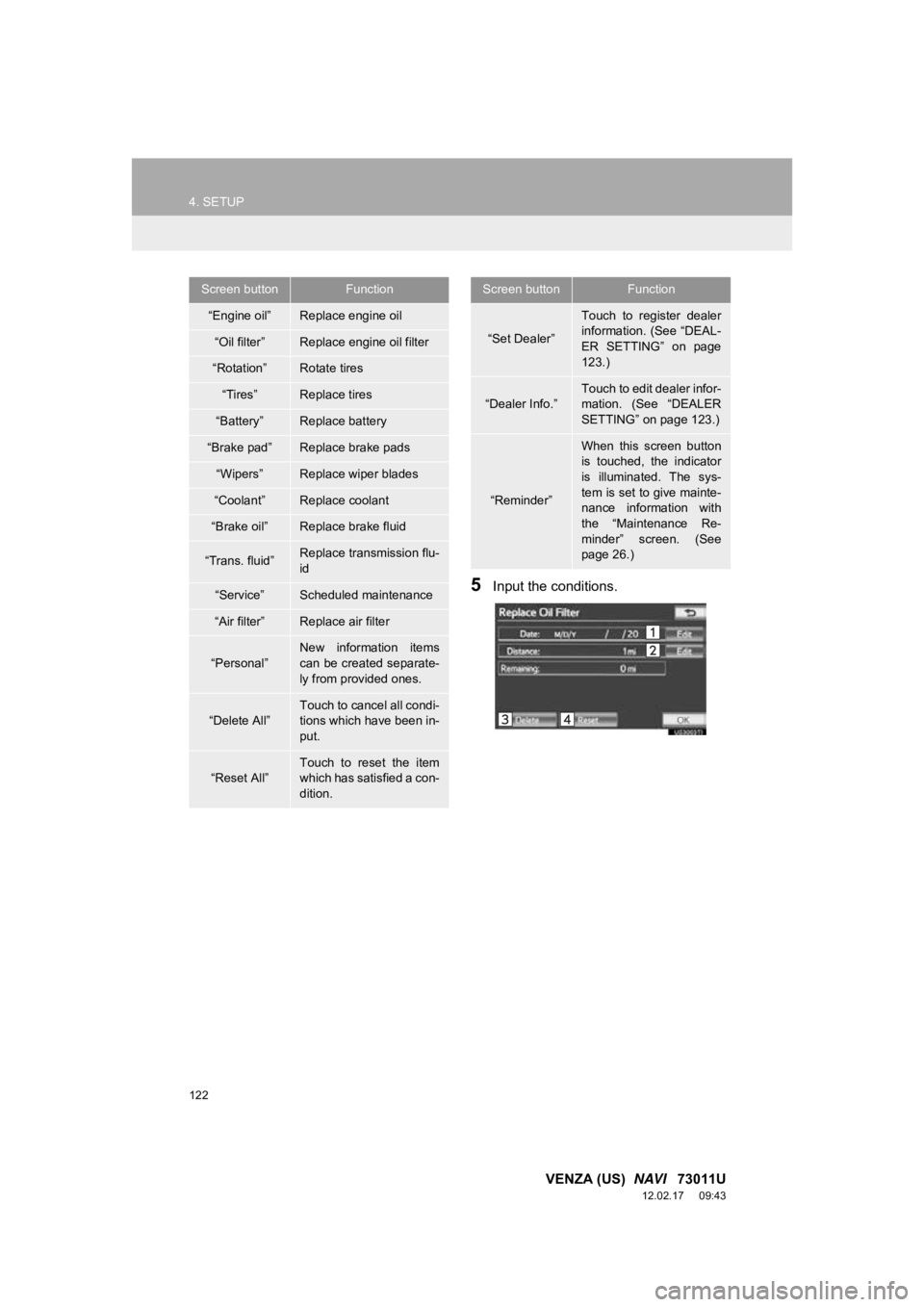
5Input the conditions.
Screen buttonFunction
“Engine oil”Replace engine oil
“Oil filter”Replace engine oil filter
“Rotation”Rotate tires
“Tires”Replace tires
“Battery”Replace battery
“Brake pad”Replace brake pads
“Wipers”Replace wiper blades
“Coolant”Replace coolant
“Brake oil”Replace brake fluid
“Trans. fluid”Replace transmission flu-
id
“Service”Scheduled maintenance
“Air filter”Replace air filter
“Personal”
New information items
can be created separate-
ly from provided ones.
“Delete All”
Touch to cancel all condi-
tions which have been in-
put.
“Reset All”Touch to reset the item
which has satisfied a con-
dition.
“Set Dealer”
Touch to register dealer
information. (See “DEAL-
ER SETTING” on page
123.)
“Dealer Info.”
Touch to edit dealer infor-
mation. (See “DEALER
SETTING” on page 123.)
“Reminder”
When this screen button
is touched, the indicator
is illuminated. The sys-
tem is set to give mainte-
nance information with
the “Maintenance Re-
minder” screen. (See
page 26.)
Screen buttonFunction
Page 131 of 363
131
1. PHONE OPERATION
4
PHONE
VENZA (US) NAVI 73011U
12.02.17 09:43
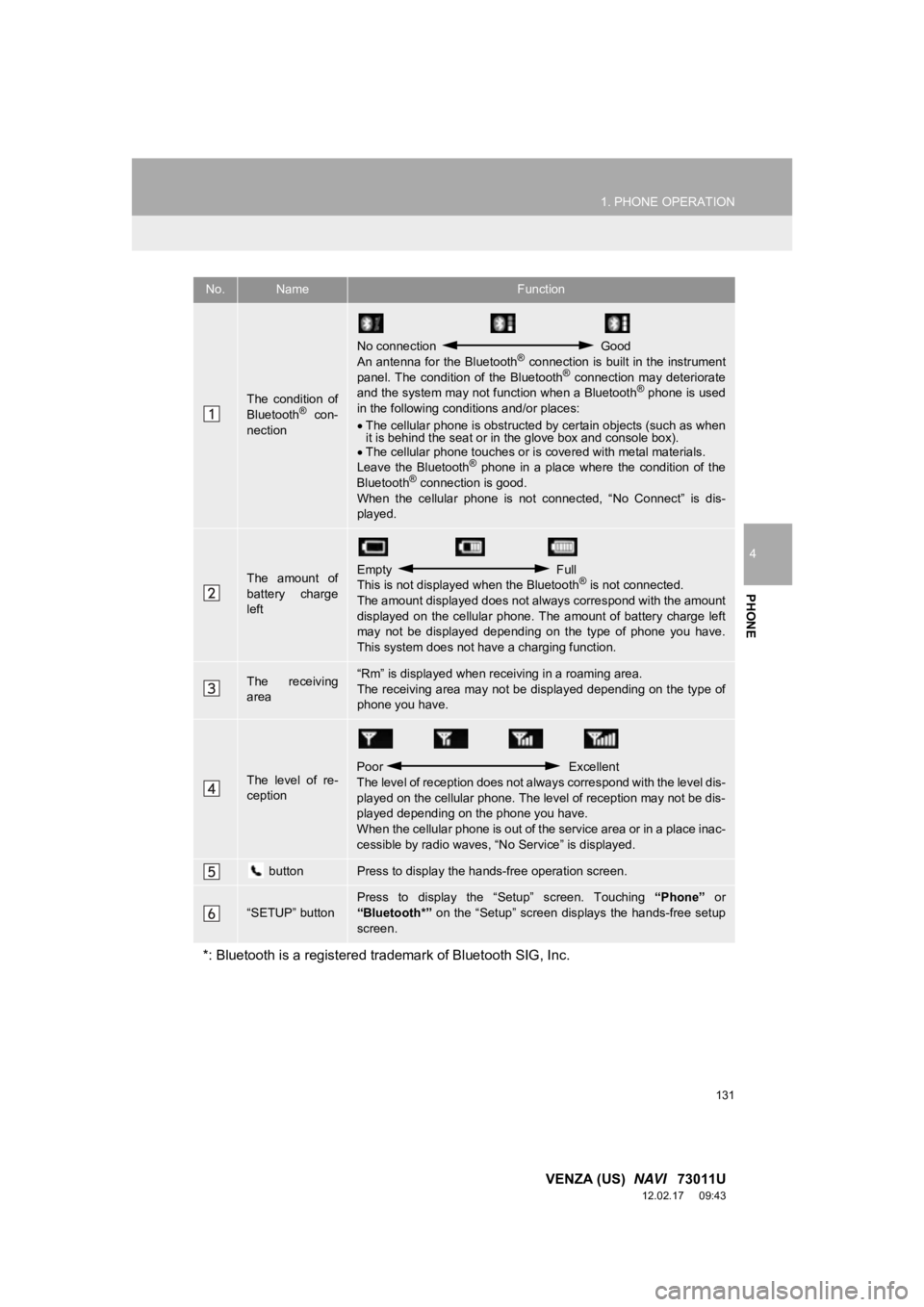
No.NameFunction
The condition of
Bluetooth® con-
nection
No connection Good
An antenna for the Bluetooth® connection is built in the instrument
panel. The condition of the Bluetooth® connection may deteriorate
and the system may not function when a Bluetooth® phone is used
in the following condi tions and/or places:
The cellular phone is obstructed by certain objects (such as when
it is behind the seat or in the glove box and console box).
The cellular phone touches or is covered with metal materials.
Leave the Bluetooth
® phone in a place where the condition of the
Bluetooth® connection is good.
When the cellular phone is not connected, “No Connect” is dis-
played.
The amount of
battery charge
leftEmpty Full
This is not displayed when the Bluetooth® is not connected.
The amount displayed does not al ways correspond with the amount
displayed on the cellular phone. The amount of battery charge left
may not be displayed depending on the type of phone you have.
This system does not have a charging function.
The receiving
area“Rm” is displayed when receiving in a roaming area.
The receiving area may not be displayed depending on the type of
phone you have.
The level of re-
ception
Poor Excellent
The level of reception does not always correspond with the level dis-
played on the cellular phone. The level of reception may not be dis-
played depending on the phone you have.
When the cellular phone is out of t he service area or in a place inac-
cessible by radio waves, “N o Service” is displayed.
buttonPress to display the hands-free operation screen.
“SETUP” button
Press to display the “Setup” screen. Touching “Phone” or
“Bluetooth*” on the “Setup” screen displays the hands-free setup
screen.
*: Bluetooth is a registered tr ademark of Bluetooth SIG, Inc.
Page 132 of 363
132
1. PHONE OPERATION
VENZA (US) NAVI 73011U
12.02.17 09:43
2. PHONE (HANDS-FREE SYSTEM FOR CELLULAR PHONE)
*: This profile is necessary when using
Entune. (See “ENTUNE SERVICE” on
page 306.)
The hands-free system enables calls
to be made and received without hav-
ing to take your hands off the steering
wheel.
This system supports Bluetooth
®.
Bluetooth
® is a wireless data system
that enables cellular phones to be used
without being connected by a cable or
placed in a cradle.
The operating procedure of the phone
is explained here.
For registering and setting of the phone,
see “PHONE SETTINGS” on page 156
and “Bluetooth
® SETTINGS” on page
178.
CAUTION
● While driving, do not use a cellular
phone or connect the Bluetooth® phone.
NOTICE
●Do not leave your cellular phone in the
vehicle. The temperature inside may rise
to a level that could damage the phone.
INFORMATION
●If your cellular phone does not support
Bluetooth®, this system cannot function.
● In the following conditions, the system
may not function:
• The cellular phone is turned off.
• The current position is outside the
communication area.
• The cellular phone is not connected.
• The cellular phone has a low battery.
● When using Bluetooth
® audio and
hands-free at the same time, the follow-
ing problems may occur:
• The Bluetooth
® connection may be
cut.
• Noise may be heard on the Bluetooth
®
audio playback.
● This system supports the following ser-
vices:
•Bluetooth
® Specification
Ver.1.1 or higher
(Recommended: Ver.2.1 + EDR or
higher)
•Profiles HFP (Hands Free Profile)
Ver.1.0 or higher
(Recommended: Ver.1.5 or higher)
OPP (Object Push Profile)
Ver.1.1 or higher
PBAP (Phone Book Access Profile)
Ver.1.0 or higher
MAP (Message Access Profile)
Ver.1.0 or higher
SPP (Serial Port Profile)
Ver.1.1 or higher*
Page 148 of 363
148
1. PHONE OPERATION
VENZA (US) NAVI 73011U
12.02.17 09:43
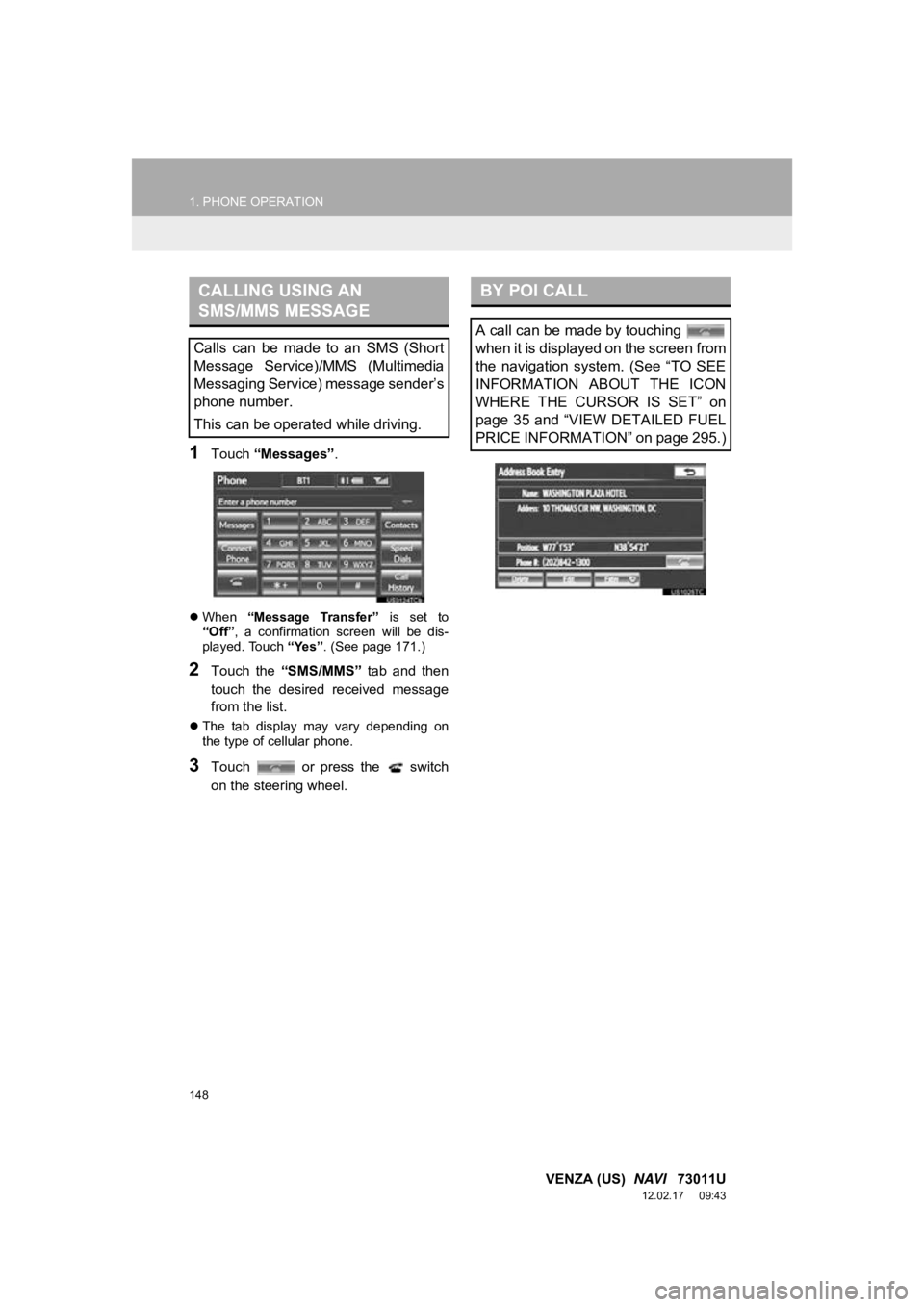
1Touch “Messages” .
When “Message Transfer” is set to
“Off” , a confirmation screen will be dis-
played. Touch “Yes”. (See page 171.)
2Touch the “SMS/MMS” tab and then
touch the desired received message
from the list.
The tab display may vary depending on
the type of cellular phone.
3Touch or press the switch
on the steering wheel.
CALLING USING AN
SMS/MMS MESSAGE
Calls can be made to an SMS (Short
Message Service)/MMS (Multimedia
Messaging Service) message sender’s
phone number.
This can be operated while driving.
BY POI CALL
A call can be made by touching
when it is displayed on the screen from
the navigation system. (See “TO SEE
INFORMATION ABOUT THE ICON
WHERE THE CURSOR IS SET” on
page 35 and “VIEW DETAILED FUEL
PRICE INFORMATION” on page 295.)
Page 151 of 363
151
1. PHONE OPERATION
4
PHONE
VENZA (US) NAVI 73011U
12.02.17 09:43
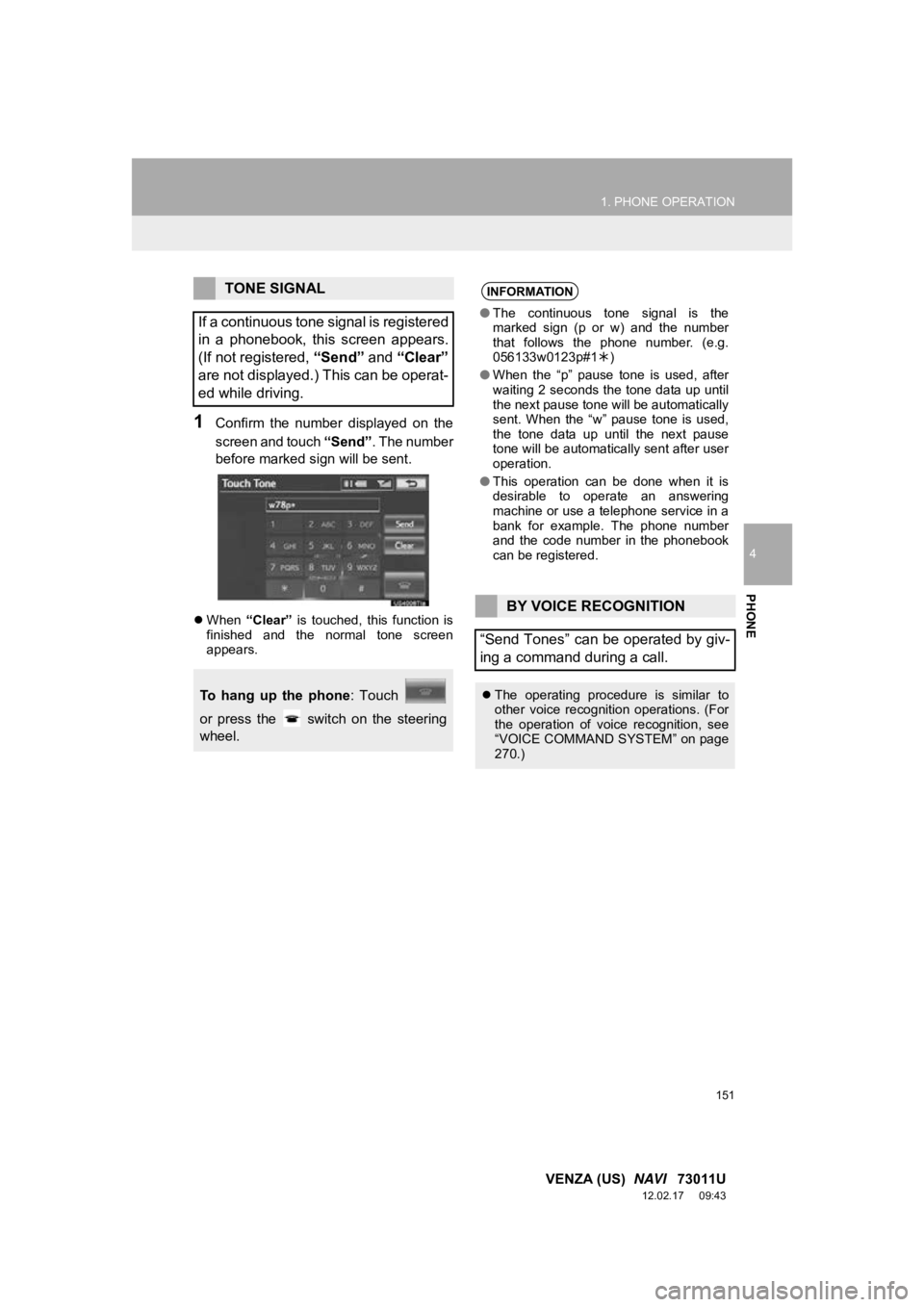
1Confirm the number displayed on the
screen and touch “Send”. The number
before marked sign will be sent.
When “Clear” is touched, this function is
finished and the normal tone screen
appears.
TONE SIGNAL
If a continuous tone signal is registered
in a phonebook, this screen appears.
(If not registered, “Send” and “Clear”
are not displayed.) This can be operat-
ed while driving.
To hang up the phone : Touch
or press the switch on the steering
wheel.
INFORMATION
● The continuous tone signal is the
marked sign (p or w) and the number
that follows the phone number. (e.g.
056133w0123p#1 )
● When the “p” pause tone is used, after
waiting 2 seconds the tone data up until
the next pause tone will be automatically
sent. When the “w” pause tone is used,
the tone data up until the next pause
tone will be automatically sent after user
operation.
● This operation can be done when it is
desirable to operate an answering
machine or use a telephone service in a
bank for example. The phone number
and the code number in the phonebook
can be registered.
BY VOICE RECOGNITION
“Send Tones” can be operated by giv-
ing a command during a call.
The operating procedure is similar to
other voice recognition operations. (For
the operation of voice recognition, see
“VOICE COMMAND SYSTEM” on page
270.)
Page 206 of 363
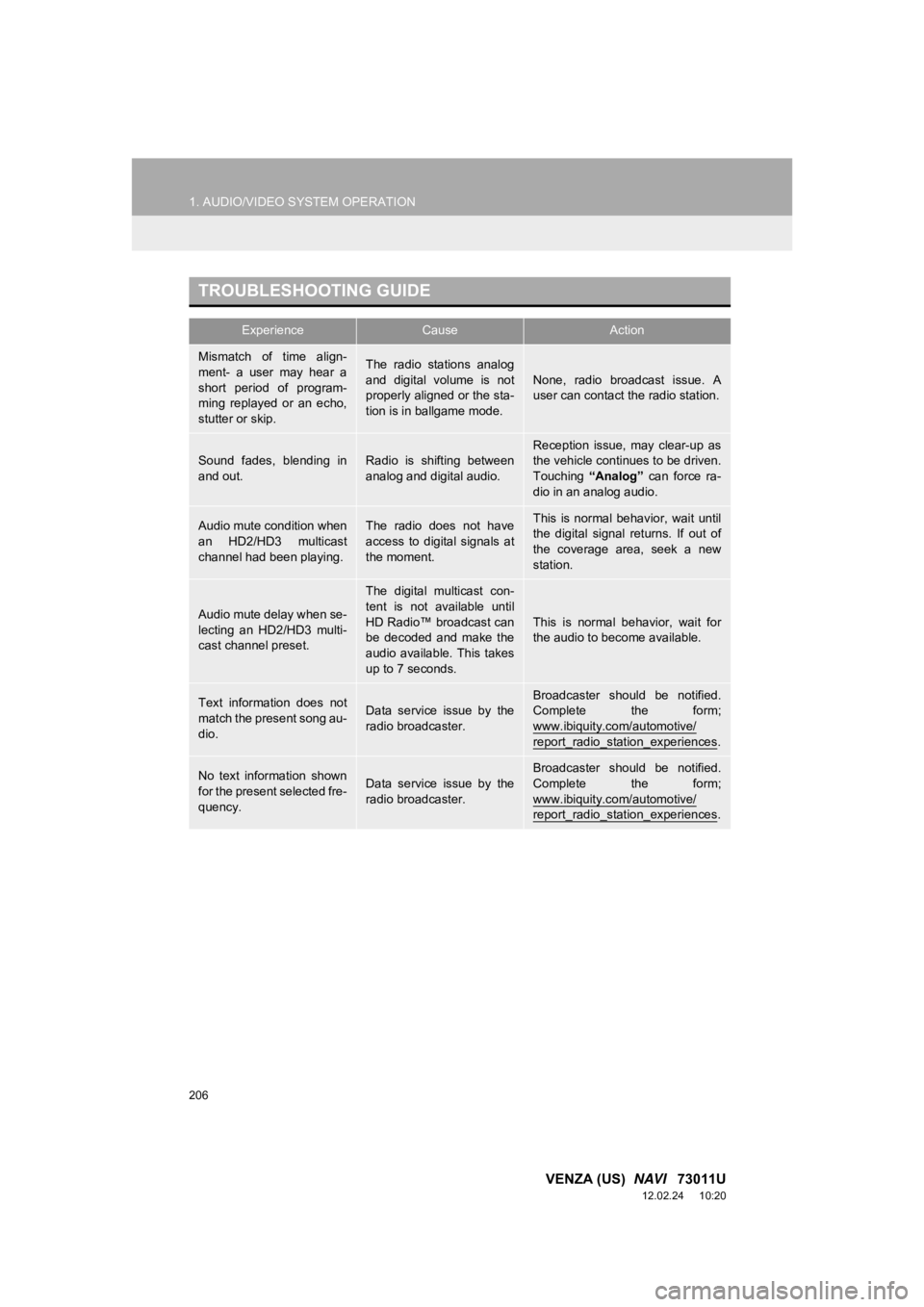
206
1. AUDIO/VIDEO SYSTEM OPERATION
VENZA (US) NAVI 73011U
12.02.24 10:20
TROUBLESHOOTING GUIDE
ExperienceCauseAction
Mismatch of time align-
ment- a user may hear a
short period of program-
ming replayed or an echo,
stutter or skip.The radio stations analog
and digital volume is not
properly aligned or the sta-
tion is in ballgame mode.None, radio broadcast issue. A
user can contact the radio station.
Sound fades, blending in
and out.Radio is shifting between
analog and digital audio.
Reception issue, may clear-up as
the vehicle continues to be driven.
Touching “Analog” can force ra-
dio in an analog audio.
Audio mute condition when
an HD2/HD3 multicast
channel had been playing.The radio does not have
access to digital signals at
the moment.This is normal behavior, wait until
the digital signal returns. If out of
the coverage area, seek a new
station.
Audio mute delay when se-
lecting an HD2/HD3 multi-
cast channel preset.
The digital multicast con-
tent is not available until
HD Radio™ broadcast can
be decoded and make the
audio available. This takes
up to 7 seconds.
This is normal behavior, wait for
the audio to become available.
Text information does not
match the present song au-
dio.Data service issue by the
radio broadcaster.Broadcaster should be notified.
Complete the form;
www.ibiquity.com/automotive/
report_radio_station_experiences.
No text information shown
for the present selected fre-
quency.Data service issue by the
radio broadcaster.
Broadcaster should be notified.
Complete the form;
www.ibiquity.com/automotive/
report_radio_station_experiences.