ad blue TOYOTA VENZA 2015 Accessories, Audio & Navigation (in English)
[x] Cancel search | Manufacturer: TOYOTA, Model Year: 2015, Model line: VENZA, Model: TOYOTA VENZA 2015Pages: 281, PDF Size: 6.02 MB
Page 8 of 281

TABLE OF CONTENTS
8
VENZA_Navi+MM_OM73022U_(U)
14.04.30 16:39
1. BASIC FUNCTION........................... 12
OVERVIEW BUTTONS ......................... 12
“Apps” SCREEN .................................... 14
HOME SCREEN .................................... 16
2. QUICK REFERENCE....................... 20
“Setup” SCREEN ................................... 20
3. NAVIGATION OPERATION ............ 22
REGISTERING HOME .......................... 22
REGISTERING PRESET DESTINATIONS .................................. 24
OPERATION FLOW: GUIDING THE ROUTE ....................... 26
SETTING HOME AS THE DESTINATION .................................... 27
4. FUNCTION INDEX .. ......................... 28
FUNCTION INDEX ................................ 28
1. BASIC INFORMATION
BEFORE OPERATION .................. 32
INITIAL SCREEN ................................... 32
TOUCH SCREEN GESTURES ............. 34
TOUCH SCREEN OPERATION ............ 35
HOME SCREEN OPERATION .............. 36
ENTERING LETTERS AND
NUMBERS/LIST SCREEN
OPERATION ....................................... 37
SCREEN ADJUSTMENT ....................... 40
2. Bluetooth® SETTINGS.................... 42
REGISTERING/CONNECTING Bluetooth® DEVICE............................. 42
SETTING Bluetooth® DETAILS ............. 46
3. OTHER SETTINGS ......................... 54
GENERAL SETTINGS ........................... 54
VOICE SETTINGS ................................. 60
DRIVER SETTINGS ............................... 61
MAINTENANCE ..................................... 62
1. BASIC OPERATION ....................... 68
QUICK REFERENCE ............................. 68
SOME BASICS....................................... 70
2. RADIO OPERATION ....................... 75
AM/FM RADIO ....................................... 75
XM Satellite Radio .................................. 85
INTERNET RADIO ................................. 91
3. MEDIA OPERATION ....................... 92
CD .......................................................... 92
USB MEMORY ....................................... 95
iPod ........................................................ 99
Bluetooth
® AUDIO................................ 103
AUX ...................................................... 108
4. AUDIO REMOTE CONTROLS...... 110
STEERING SWITCHES ....................... 110
5. SETUP ........................................... 113
AUDIO SETTINGS ............................... 113
6. TIPS FOR OPERATING THE AUDIO SYSTEM ............ .............. 115
OPERATING INFORMATION .............. 115
1QUICK GUIDE
2BASIC FUNCTION
3AUDIO SYSTEM
Page 9 of 281
9
VENZA_Navi+MM_OM73022U_(U)
14.04.30 16:39
1
2
3
4
5
6
7
8
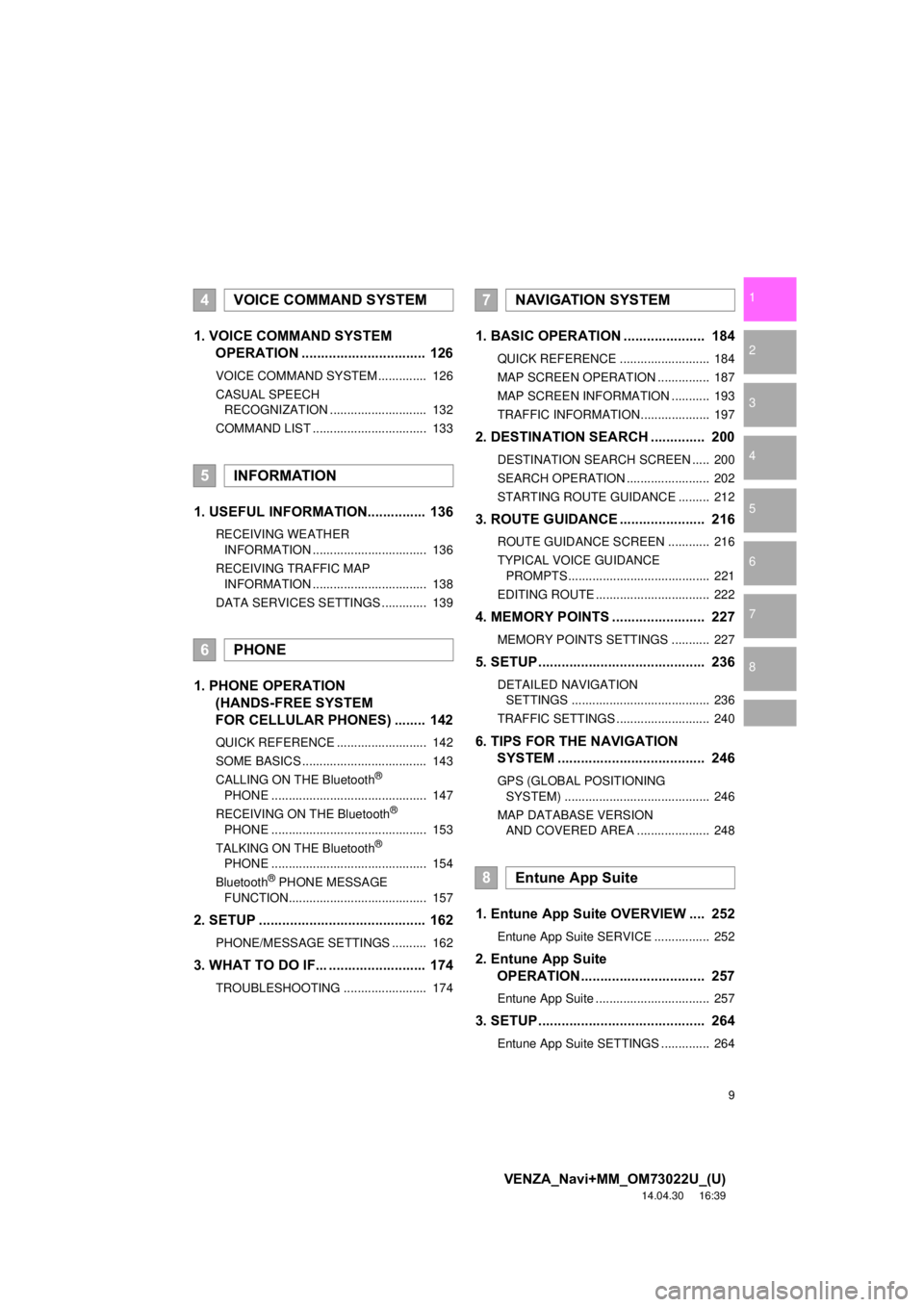
1. VOICE COMMAND SYSTEM OPERATION ................................ 126
VOICE COMMAND SYSTEM .............. 126
CASUAL SPEECH
RECOGNIZATION ............................ 132
COMMAND LIST ................................. 133
1. USEFUL INFORMATION............... 136
RECEIVING WEATHER INFORMATION ................................. 136
RECEIVING TRAFFIC MAP INFORMATION ................................. 138
DATA SERVICES SETTINGS ............. 139
1. PHONE OPERATION (HANDS-FREE SYSTEM
FOR CELLULAR PHONES) ........ 142
QUICK REFERENCE .......................... 142
SOME BASICS .................................... 143
CALLING ON THE Bluetooth
®
PHONE ............................................. 147
RECEIVING ON THE Bluetooth
®
PHONE ............................................. 153
TALKING ON THE Bluetooth
®
PHONE ............................................. 154
Bluetooth
® PHONE MESSAGE
FUNCTION........................................ 157
2. SETUP ........................................... 162
PHONE/MESSAGE SETTINGS .......... 162
3. WHAT TO DO IF... ......................... 174
TROUBLESHOOTING ........................ 174
1. BASIC OPERATION ..................... 184
QUICK REFERENCE .......................... 184
MAP SCREEN OPERATION ............... 187
MAP SCREEN INFORMATION ........... 193
TRAFFIC INFORMATION .................... 197
2. DESTINATION SEARCH .............. 200
DESTINATION SEARCH SCREEN ..... 200
SEARCH OPERATION ........................ 202
STARTING ROUTE GUIDANCE ......... 212
3. ROUTE GUIDANCE ................... ... 216
ROUTE GUIDANCE SCREEN ............ 216
TYPICAL VOICE GUIDANCE
PROMPTS ......................................... 221
EDITING ROUTE ................................. 222
4. MEMORY POINTS ........................ 227
MEMORY POINTS SETTINGS ........... 227
5. SETUP........................................... 236
DETAILED NAVIGATION SETTINGS ........................................ 236
TRAFFIC SETTINGS ........................... 240
6. TIPS FOR THE NAVIGATION SYSTEM ....... ............................ ... 246
GPS (GLOBAL POSITIONING
SYSTEM) .......................................... 246
MAP DATABASE VERSION AND COVERED AREA ..................... 248
1. Entune App Suite OVERVIEW .... 252
Entune App Suite SERVICE ................ 252
2. Entune App Suite OPERATION................................ 257
Entune App Suite ................................. 257
3. SETUP........................................... 264
Entune App Suite SETTINGS .............. 264
4VOICE COMMAND SYSTEM
5INFORMATION
6PHONE
7NAVIGATION SYSTEM
8Entune App Suite
Page 13 of 281
13
1. BASIC FUNCTION
VENZA_Navi+MM_OM73022U_(U)
14.04.30 16:39
QUICK GUIDE
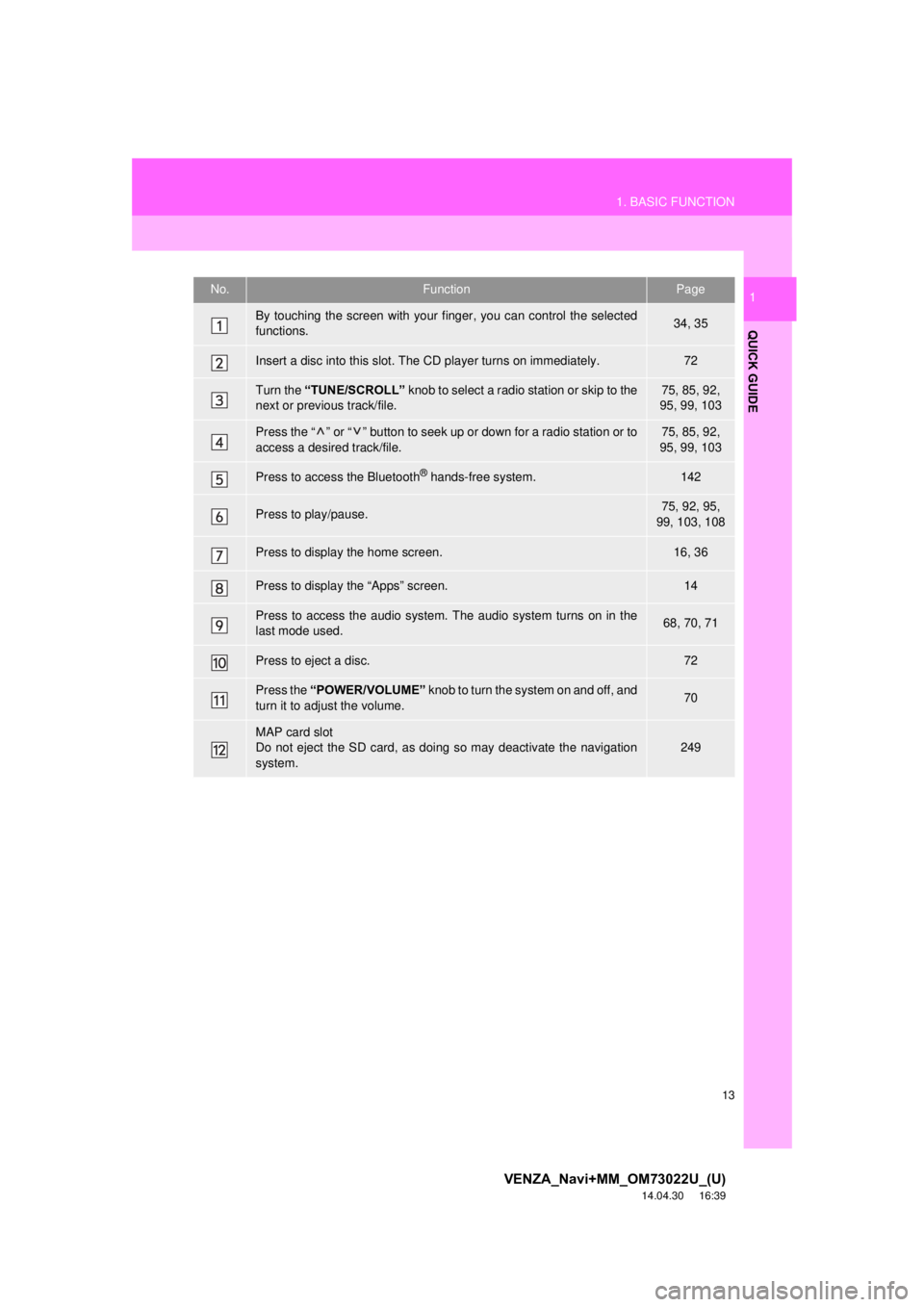
1No.FunctionPage
By touching the screen with your finger, you can control the selected
functions.34, 35
Insert a disc into this slot. The CD player turns on immediately.72
Turn the “TUNE/SCROLL” knob to select a radio station or skip to the
next or previous track/file.75, 85, 92,
95, 99, 103
Press the “ ” or “ ” button to seek up or down for a radio station or to
access a desired track/file.75, 85, 92,
95, 99, 103
Press to access the Bluetooth® hands-free system.142
Press to play/pause.75, 92, 95,
99, 103, 108
Press to display the home screen.16, 36
Press to display the “Apps” screen.14
Press to access the audio system. The audio system turns on in the
last mode used.68, 70, 71
Press to eject a disc.72
Press the “POWER/VOLUME” knob to turn the system on and off, and
turn it to adjust the volume.70
MAP card slot
Do not eject the SD card, as doing so may deactivate the navigation
system.
249
Page 17 of 281
17
1. BASIC FUNCTION
VENZA_Navi+MM_OM73022U_(U)
14.04.30 16:39
QUICK GUIDE
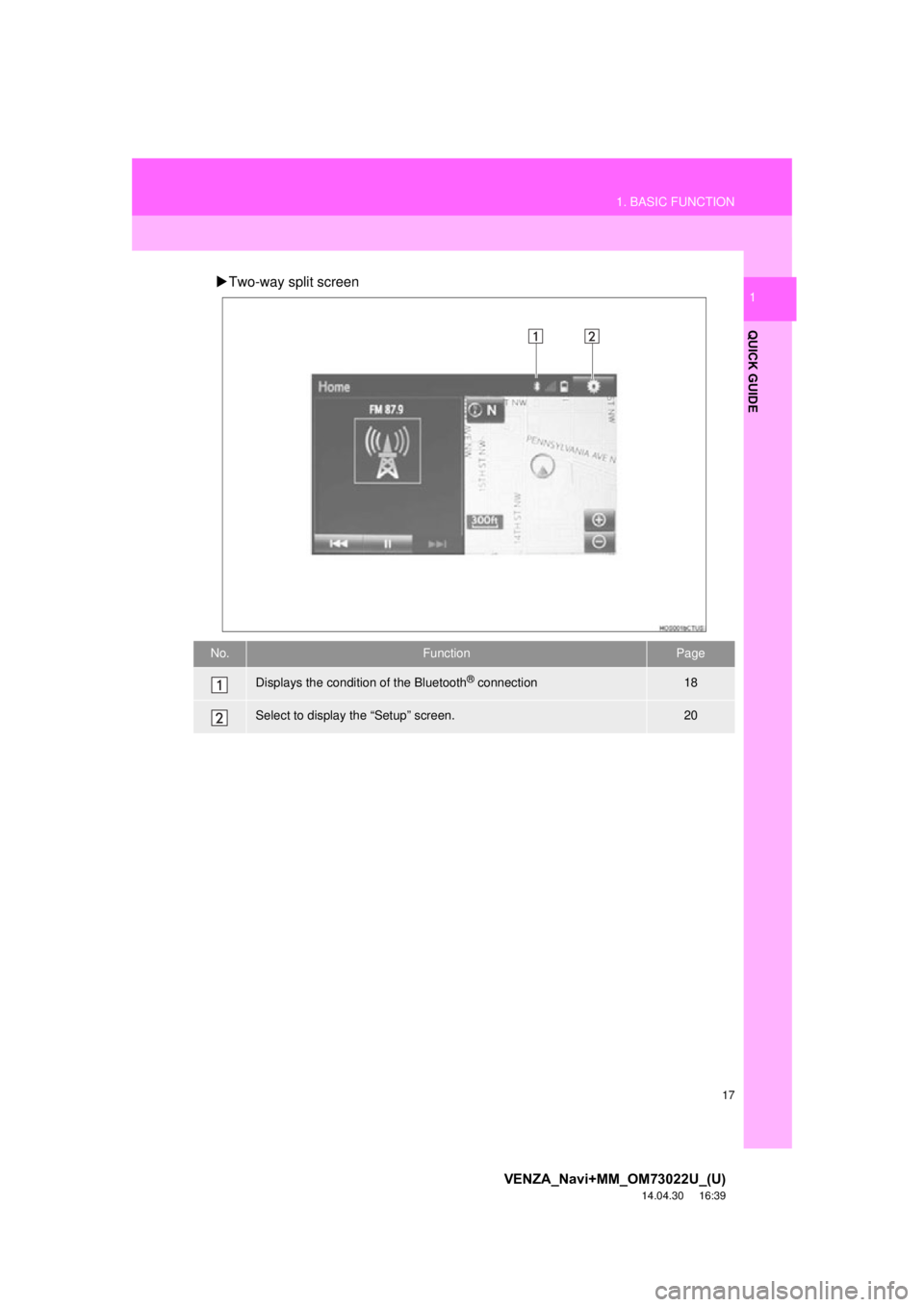
1Two-way split screen
No.FunctionPage
Displays the condition of the Bluetooth® connection18
Select to display the “Setup” screen.20
Page 18 of 281
18
1. BASIC FUNCTION
VENZA_Navi+MM_OM73022U_(U)
14.04.30 16:39
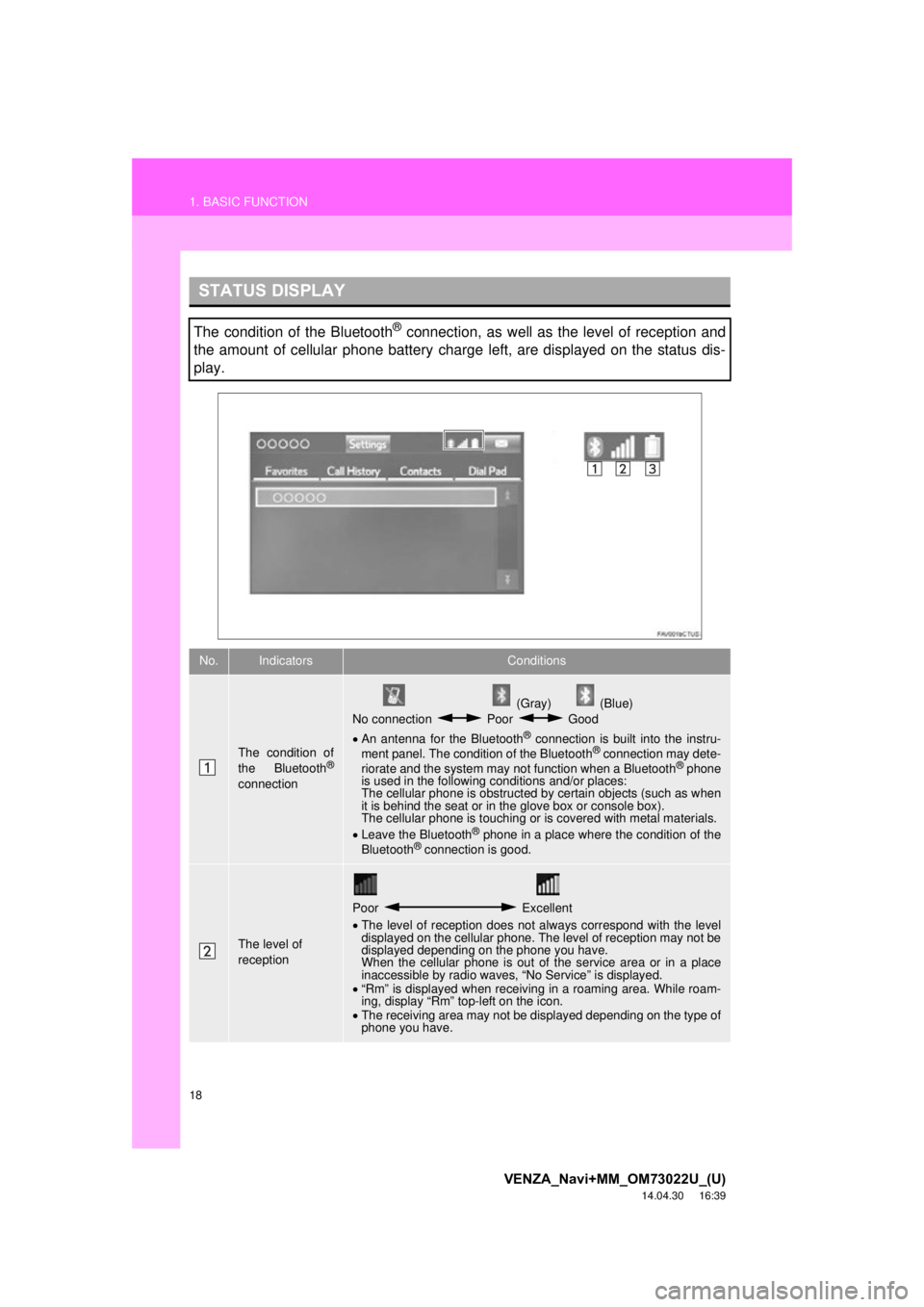
STATUS DISPLAY
The condition of the Bluetooth® connection, as well as the level of reception and
the amount of cellular phone battery charge left, are displayed on the status dis-
play.
No.IndicatorsConditions
The condition of
the Bluetooth®
connection
(Gray) (Blue)
No connection Poor Good
An antenna for the Bluetooth
® connection is built into the instru-
ment panel. The condition of the Bluetooth® connection may dete-
riorate and the system may not function when a Bluetooth® phone
is used in the following conditions and/or places:
The cellular phone is obstructed by certain objects (such as when
it is behind the seat or in the glove box or console box).
The cellular phone is touching or is covered with metal materials.
Leave the Bluetooth
® phone in a place where the condition of the
Bluetooth® connection is good.
The level of
reception
Poor Excellent
The level of reception does not always correspond with the level
displayed on the cellular phone. The level of reception may not be
displayed depending on the phone you have.
When the cellular phone is out of the service area or in a place
inaccessible by radio waves, “No Service” is displayed.
“Rm” is displayed when receiving in a roaming area. While roam-
ing, display “Rm” top-left on the icon.
The receiving area may not be displayed depending on the type of
phone you have.
Page 19 of 281
19
1. BASIC FUNCTION
VENZA_Navi+MM_OM73022U_(U)
14.04.30 16:39
QUICK GUIDE
1
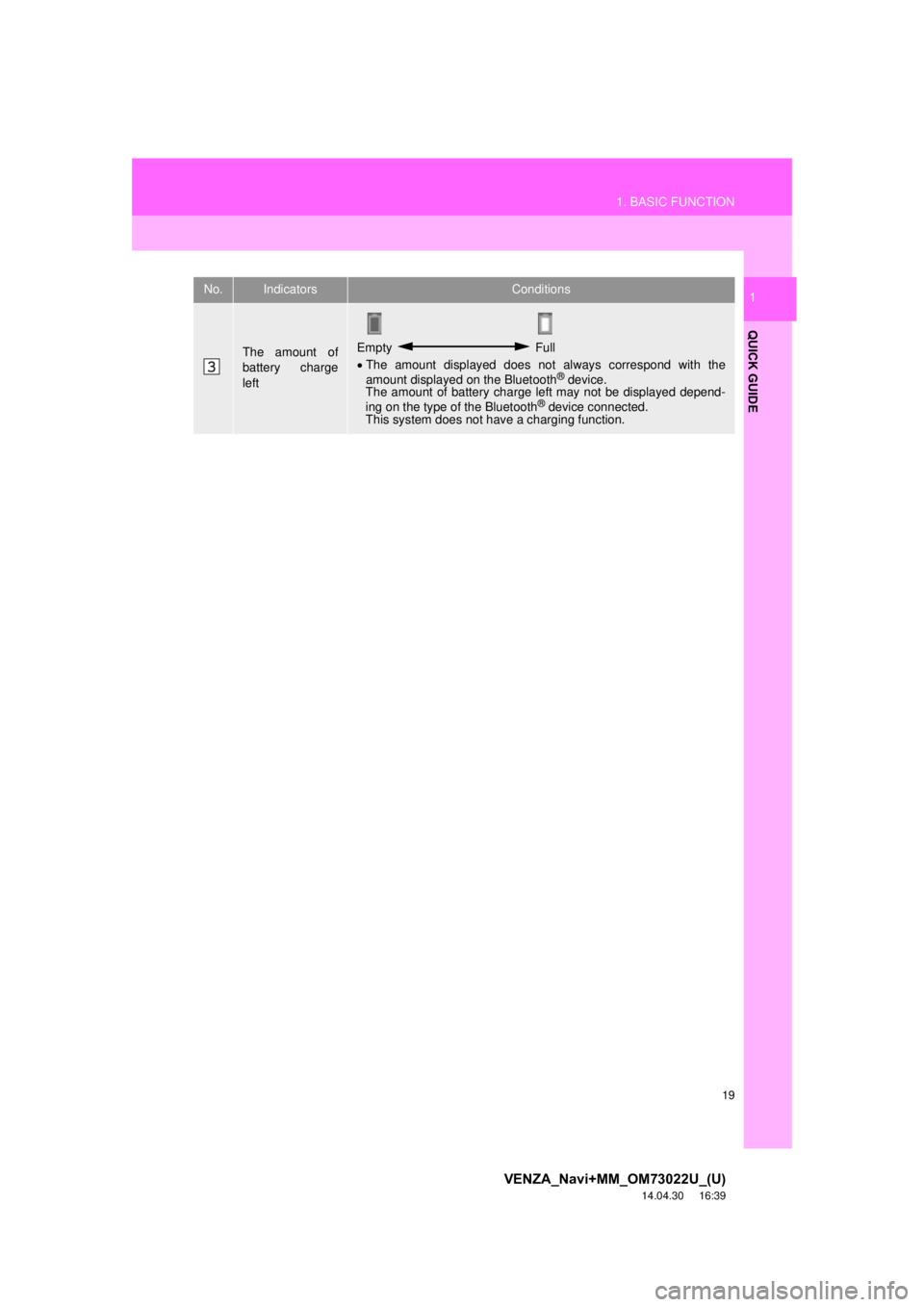
The amount of
battery charge
leftEmpty Full
The amount displayed does not always correspond with the
amount displayed on the Bluetooth
® device.
The amount of battery charge left may not be displayed depend-
ing on the type of the Bluetooth
® device connected.
This system does not have a charging function.
No.IndicatorsConditions
Page 21 of 281
21
2. QUICK REFERENCE
VENZA_Navi+MM_OM73022U_(U)
14.04.30 16:39
QUICK GUIDE
1No.FunctionPage
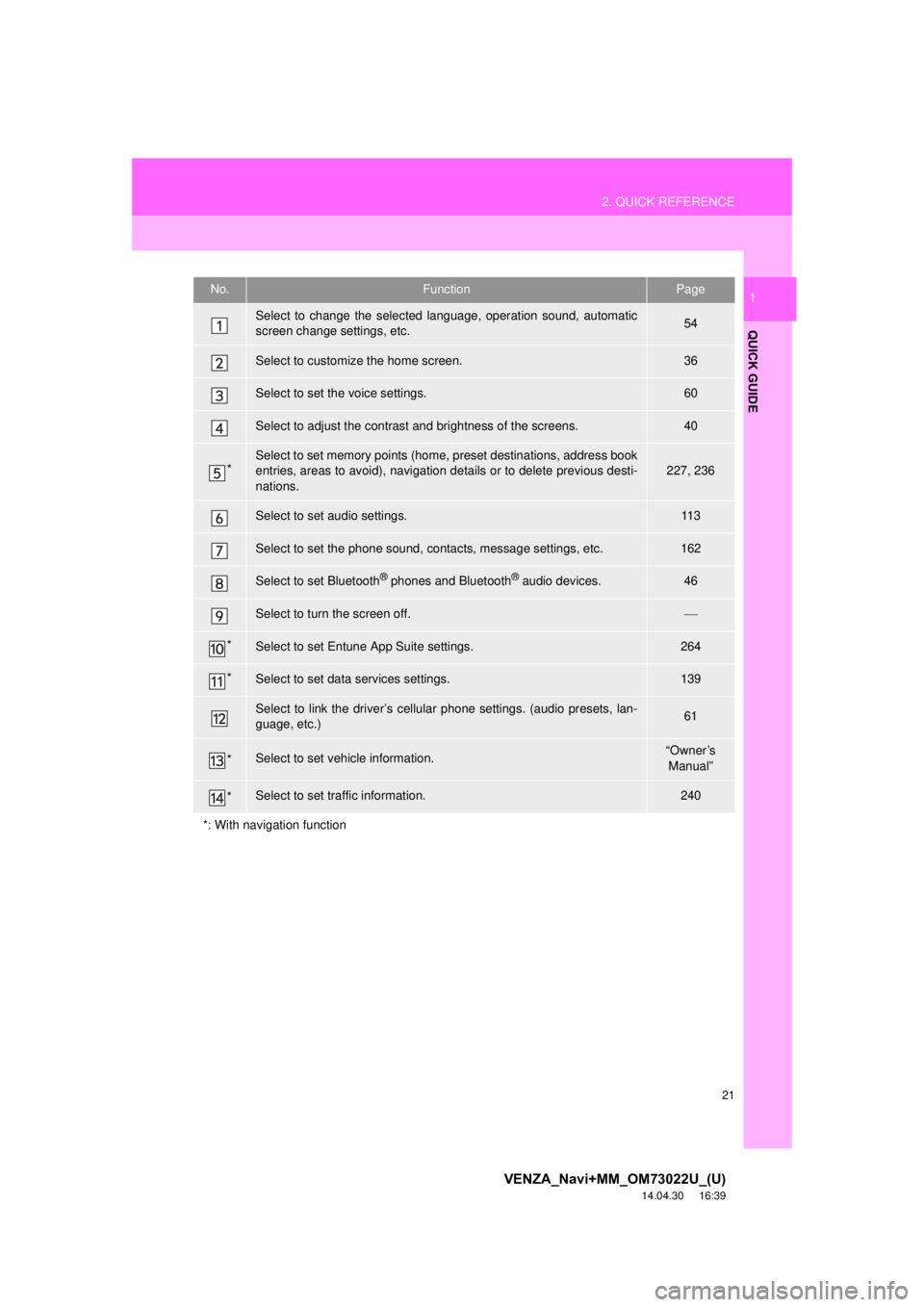
Select to change the selected language, operation sound, automatic
screen change settings, etc.54
Select to customize the home screen.36
Select to set the voice settings.60
Select to adjust the contrast and brightness of the screens.40
*Select to set memory points (home, preset destinations, address book
entries, areas to avoid), navigation details or to delete previous desti-
nations.227, 236
Select to set audio settings.11 3
Select to set the phone sound, contacts, message settings, etc.162
Select to set Bluetooth® phones and Bluetooth® audio devices.46
Select to turn the screen off.
*Select to set Entune App Suite settings.264
*Select to set data services settings.139
Select to link the driver’s cellular phone settings. (audio presets, lan-
guage, etc.)61
*Select to set vehicle information.“Owner’s Manual”
*Select to set traffic information.240
*: With navigation function
Page 29 of 281
29
4. FUNCTION INDEX
VENZA_Navi+MM_OM73022U_(U)
14.04.30 16:39
QUICK GUIDE
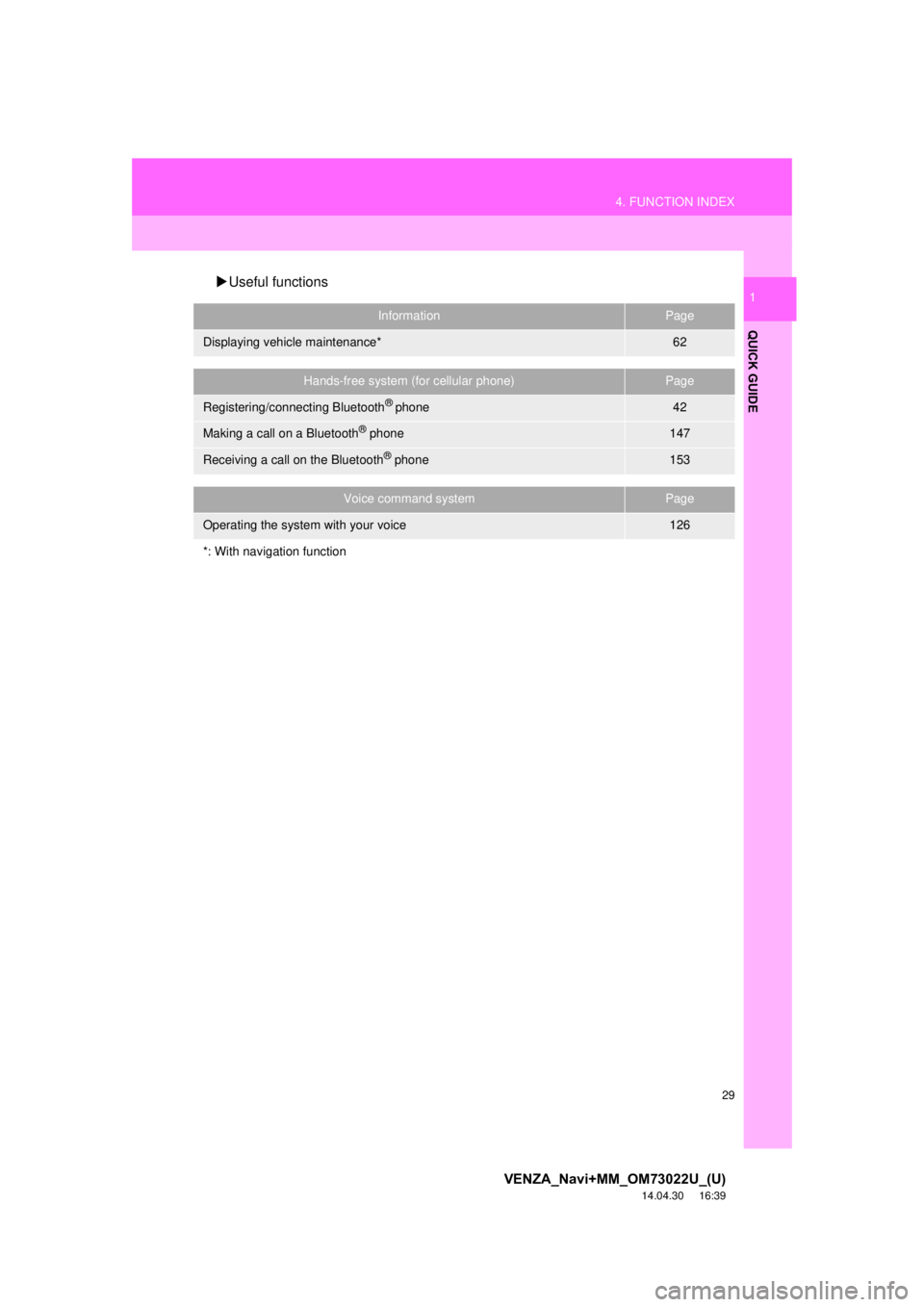
1Useful functions
InformationPage
Displaying vehicle maintenance*62
Hands-free system (for cellular phone)Page
Registering/connecting Bluetooth® phone42
Making a call on a Bluetooth® phone147
Receiving a call on the Bluetooth® phone153
Voice command systemPage
Operating the system with your voice126
*: With navigation function
Page 31 of 281
2
31
VENZA_Navi+MM_OM73022U_(U)
14.04.30 16:39
1
2
3
4
5
6
7
8
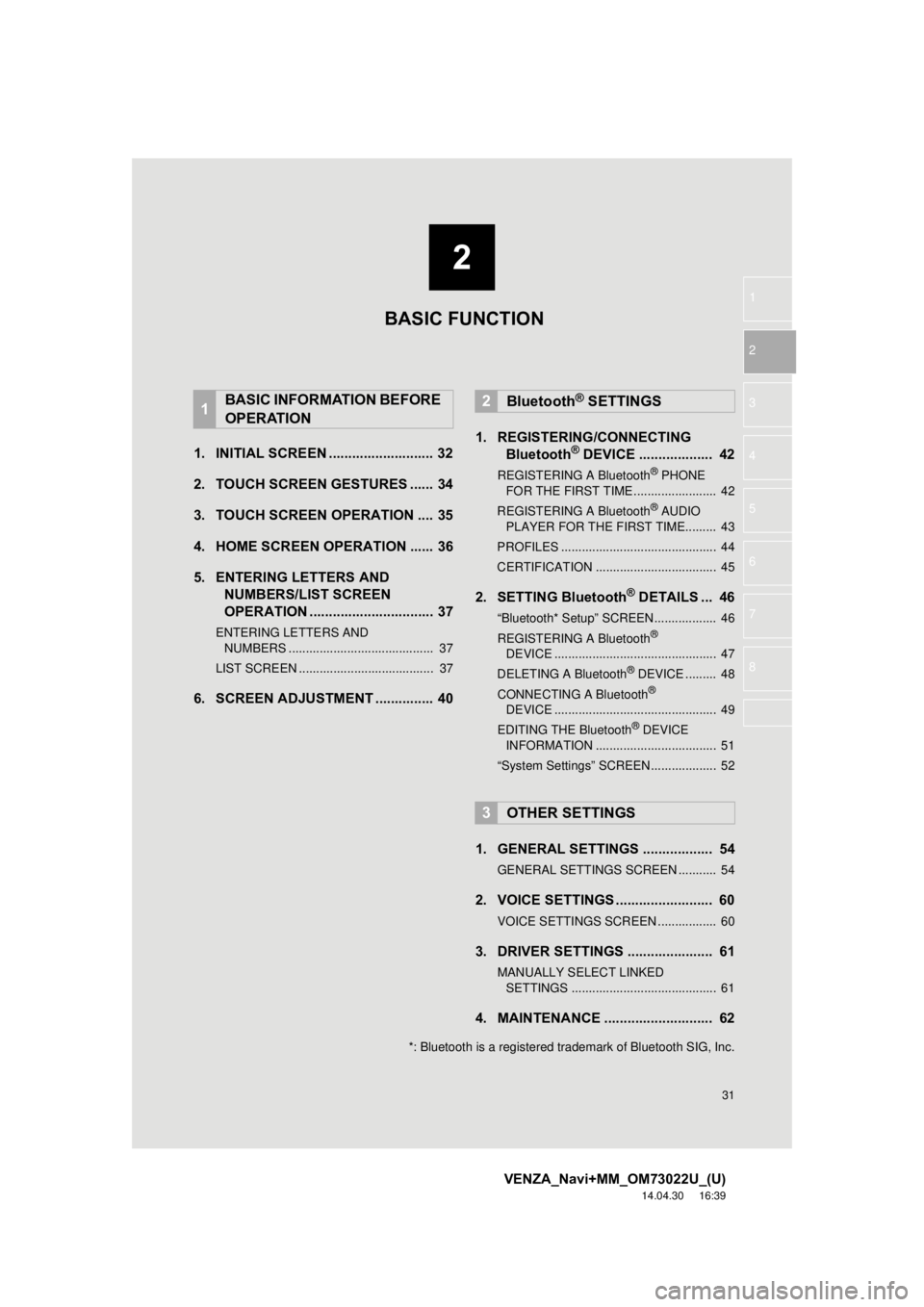
1. INITIAL SCREEN ........................... 32
2. TOUCH SCREEN GESTURES ...... 34
3. TOUCH SCREEN OPERATION .... 35
4. HOME SCREEN OPERATION ...... 36
5. ENTERING LETTERS AND NUMBERS/LIST SCREEN
OPERATION ................................ 37
ENTERING LETTERS AND
NUMBERS .......................................... 37
LIST SCREEN ....................................... 37
6. SCREEN ADJUSTMENT ............... 40 1. REGISTERING/CONNECTING
Bluetooth
® DEVICE ................... 42
REGISTERING A Bluetooth® PHONE
FOR THE FIRST TIME ........................ 42
REGISTERING A Bluetooth
® AUDIO
PLAYER FOR THE FIRST TIME......... 43
PROFILES ............................................. 44
CERTIFICATION ................................... 45
2. SETTING Bluetooth® DETAILS ... 46
“Bluetooth* Setup” SCREEN.................. 46
REGISTERING A Bluetooth®
DEVICE ............................................... 47
DELETING A Bluetooth
® DEVICE ......... 48
CONNECTING A Bluetooth®
DEVICE ............................................... 49
EDITING THE Bluetooth
® DEVICE
INFORMATION ................................... 51
“System Settings” SCREEN................... 52
1. GENERAL SETTINGS .................. 54
GENERAL SETTINGS SCREEN ........... 54
2. VOICE SETTINGS ......................... 60
VOICE SETTINGS SCREEN ................. 60
3. DRIVER SETTINGS ...................... 61
MANUALLY SELECT LINKED SETTINGS .......................................... 61
4. MAINTENANCE ............................ 62
1BASIC INFORMATION BEFORE
OPERATION2Bluetooth® SETTINGS
3OTHER SETTINGS
BASIC FUNCTION
*: Bluetooth is a registered trademark of Bluetooth SIG, Inc.
Page 42 of 281
42
VENZA_Navi+MM_OM73022U_(U)
14.12.04 15:06
2. Bluetooth® SETTINGS
1. REGISTERING/CONNECTING Bluetooth® DEVICE
1Turn the Bluetooth® connection setting
of your cellular phone on.
This function is not available when
Bluetooth® connection setting of your cel-
lular phone is set to off.
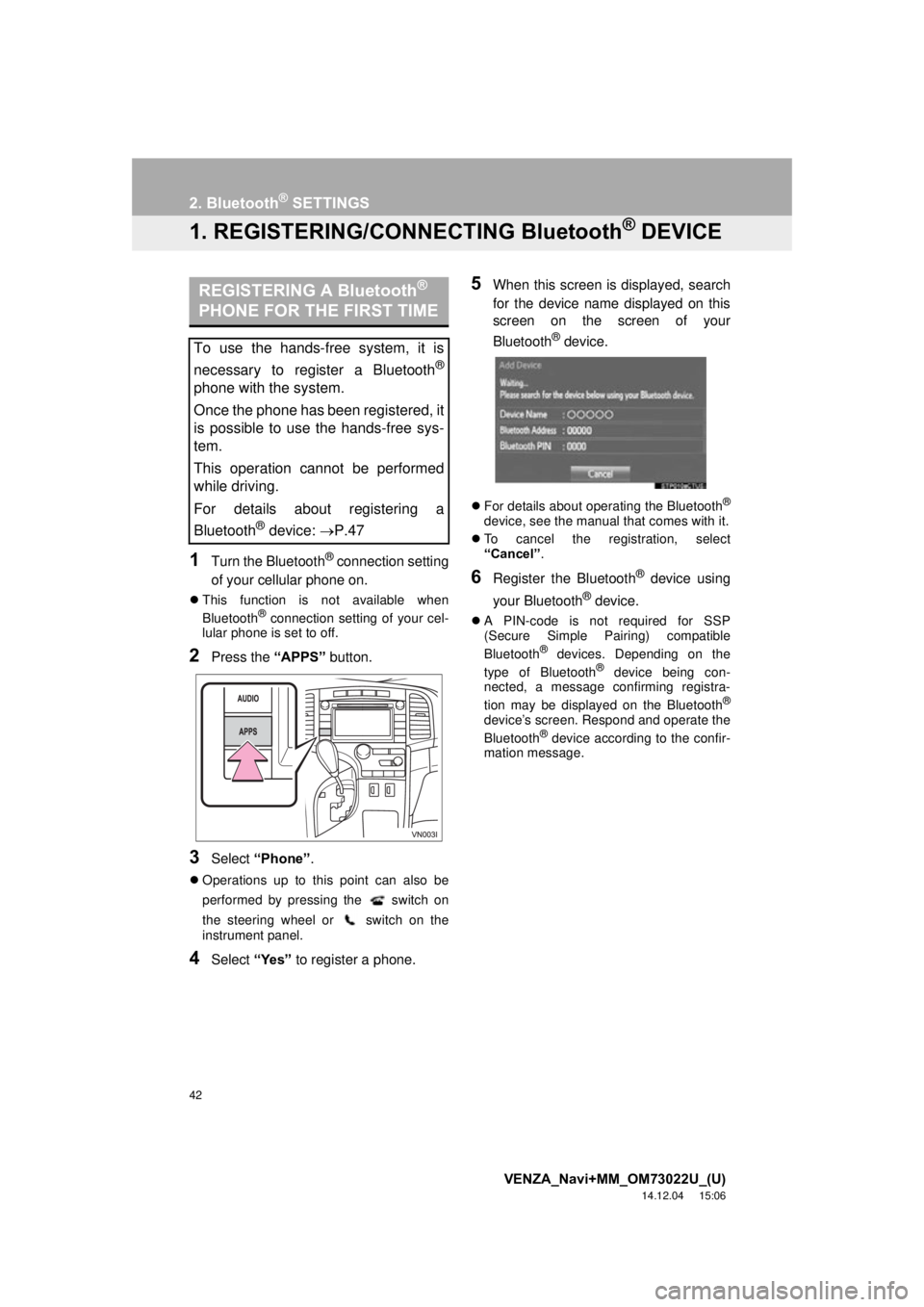
2Press the “APPS” button.
3Select “Phone” .
Operations up to this point can also be
performed by pressing the switch on
the steering wheel or switch on the
instrument panel.
4Select “Yes” to register a phone.
5When this screen is displayed, search
for the device name displayed on this
screen on the screen of your
Bluetooth
® device.
For details about operating the Bluetooth®
device, see the manual that comes with it.
To cancel the registration, select
“Cancel” .
6Register the Bluetooth® device using
your Bluetooth
® device.
A PIN-code is not required for SSP
(Secure Simple Pairing) compatible
Bluetooth
® devices. Depending on the
type of Bluetooth® device being con-
nected, a message confirming registra-
tion may be displayed on the Bluetooth
®
device’s screen. Respond and operate the
Bluetooth® device according to the confir-
mation message.
REGISTERING A Bluetooth®
PHONE FOR THE FIRST TIME
To use the hands-free system, it is
necessary to register a Bluetooth
®
phone with the system.
Once the phone has been registered, it
is possible to use the hands-free sys-
tem.
This operation cannot be performed
while driving.
For details about registering a
Bluetooth
® device: P.47