lock TOYOTA VENZA 2016 Owners Manual
[x] Cancel search | Manufacturer: TOYOTA, Model Year: 2016, Model line: VENZA, Model: TOYOTA VENZA 2016Pages: 688, PDF Size: 18.51 MB
Page 308 of 688
3083-1. Using the air cond itioning system and defogger
VENZA_OM_OM73030U_(U) Using the automatic mode
Press . The air conditioning system will begin to operate. In outside air or
recirculated air mode, air outlets, fan speed and air conditioning on/
off are automatically adjusted according to the temperature setting.
“AUTO” will be displayed on the multi-information display, along with
the temperature setting. The settings that are automatically adjusted
by the system are not displayed. When only “AUTO” and the temper-
ature settings are displayed, may be pressed a second
time to temporarily display all system settings.
Turn the temperature control dial clockwise (warm) or coun-
terclockwise (cool). The temperature for the driver’s and front passenger’s seats can be
set separately.
■ Automatic mode indicator
If the fan speed setting or air fl ow modes are operated, the auto-
matic mode indicator goes off. However, automatic mode for func-
tions other than that operated is maintained. STEP 1
STEP 2
Page 309 of 688
3093-1. Using the air condit ioning system and defogger
3
Interior features
VENZA_OM_OM73030U_(U) Adjusting the settings
■ Adjusting the temperature setting
Turn the temperature control dial clockwise (warm) or counter-
clockwise (cool). The air conditioning system switches between dual and simulta-
neous modes each time is pressed.
Each temperature setting will be displayed on the multi-information
display.
Dual mode: The temperature for the driver’s seat and front passen-
ger’s seats can be set separately.
SYNC mode: Only (driver’s side) can be used to adjust
the temperature for all seats.
In SYNC mode, only one temperature setting will be displayed on
the multi-information display.
Page 315 of 688
3153-1. Using the air condit ioning system and defogger
3
Interior features
VENZA_OM_OM73030U_(U) ■ When outside temperature r eaches approximately 32°F (0°C)
The air conditioning system may not operate even when is pressed.
■ Ventilation and air conditioning odors
● To let fresh air in, set the air conditioning system to the outside air mode.
● During use, various odors from inside and outside the vehicle may enter
into and accumulate in the air conditioning system. This may then cause
odor to be emitted from the vents.
● To reduce potential odors from occurring:
• It is recommended that the air conditioning system be set to outside air
mode prior to turning the vehicle off.
• The start timing of the blower may be delayed for a short period of time
immediately after the air conditioning system is started in the automatic
mode. Air flows to the feet for a certain period of time when the air starts
to flow.
CAUTION■ To prevent the windshield from fogging up
Do not use during cool air operation in extremely humid weather. The
difference between the temperature of the outside air and that of the wind-
shield can cause the outer surface of the windshield to fog up, blocking your
vision.
NOTICE■ To prevent battery discharge
Do not leave the air conditioning system on longer than necessary when the
engine is stopped.
Page 430 of 688
430
VENZA_OM_OM73030U_(U) 3-3. Using the interior lights
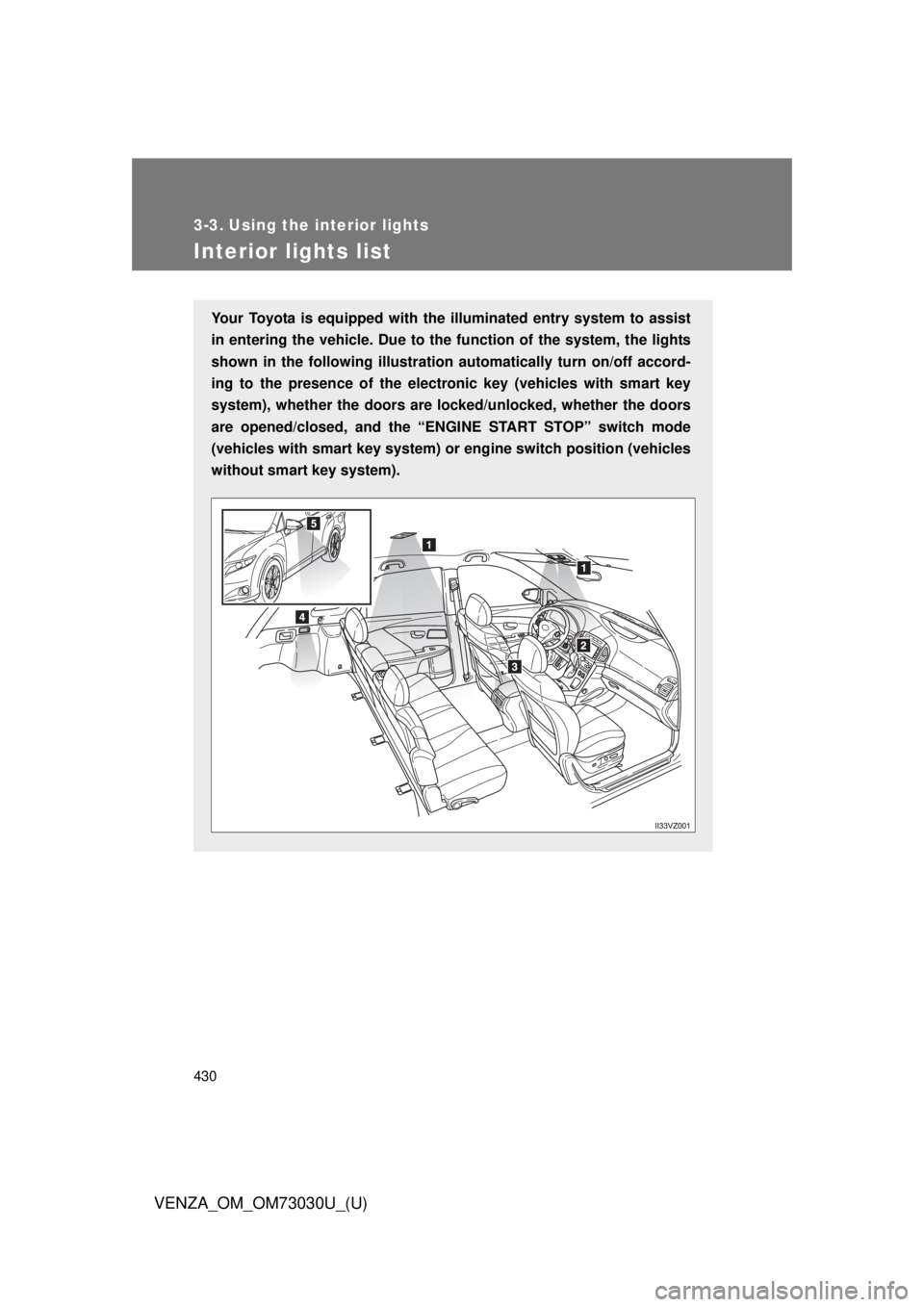
Interior lights list Your Toyota is equipped with th e illuminated entry system to assist
in entering the vehicle. Due to th e function of the system, the lights
shown in the following illustration automatically turn on/off accord-
ing to the presence of the electro nic key (vehicles with smart key
system), whether the doors are lo cked/unlocked, whether the doors
are opened/closed, and the “ENG INE START STOP” switch mode
(vehicles with smart key system) or engine switch position (vehicles
without smart key system).
Page 436 of 688
4363-4. Using the storage features
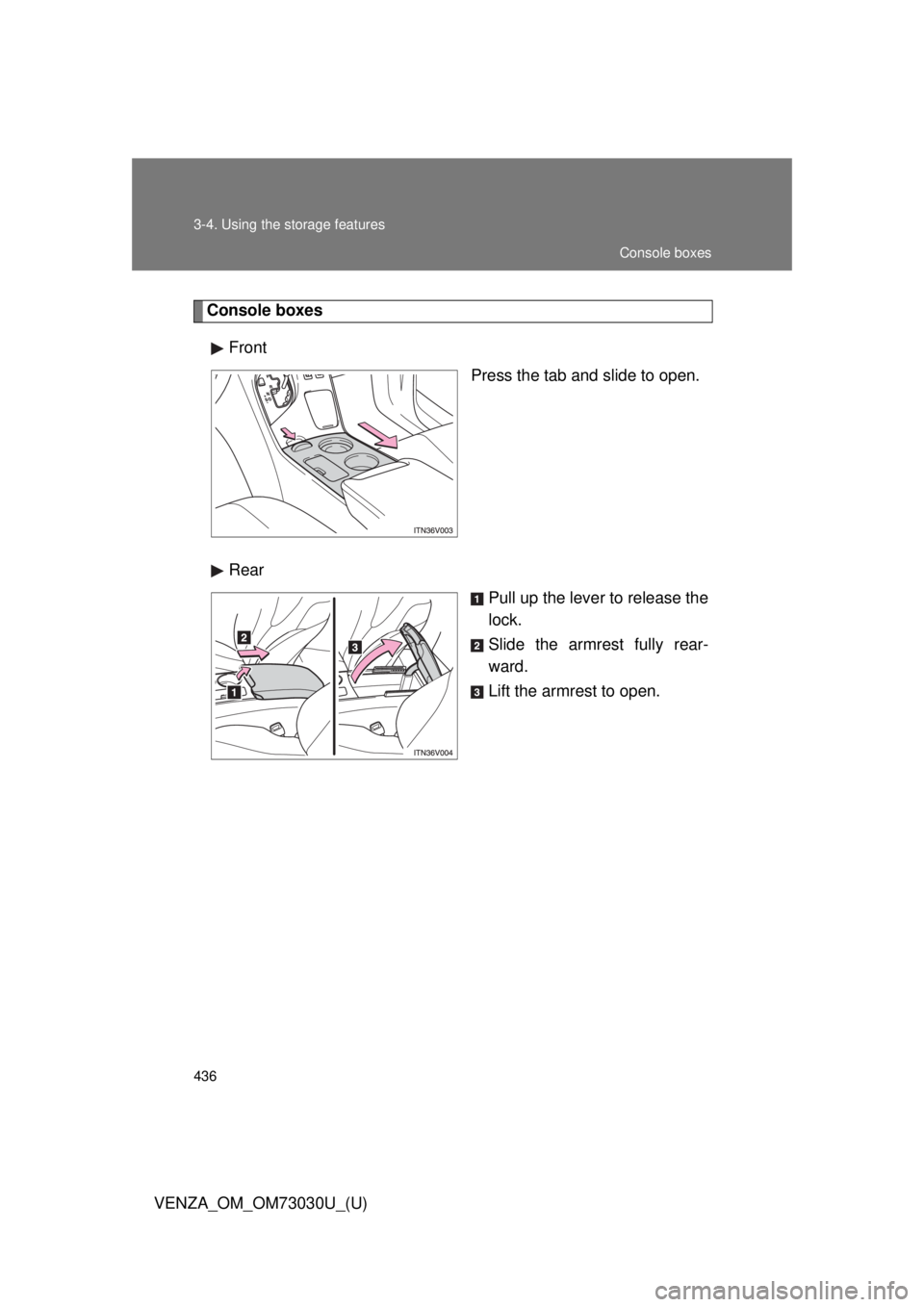
VENZA_OM_OM73030U_(U) Console boxes
Front
Press the tab and slide to open.
Rear
Pull up the lever to release the
lock.
Slide the armrest fully rear-
ward.
Lift the armrest to open. Console boxes
Page 457 of 688
4573-5. Other interior features
3
Interior features
VENZA_OM_OM73030U_(U) Garage door opener The garage door opener (HomeLink
Universal Transceiver) is manufac-
tured under license from HomeLink
.
Programming HomeLink ®
(for U.S.A. owners)To ensure correct programming into the HomeLink ®
, install a new bat-
tery in the hand-held transmitter prior to programming. Failure to
install a new battery into the hand-h eld transmitter will affect both the
range and accuracy of the HomeLink ®
in your vehicle.
The battery side of the hand-held transmitter must be pointed away
from the HomeLink ®
during the programming process.
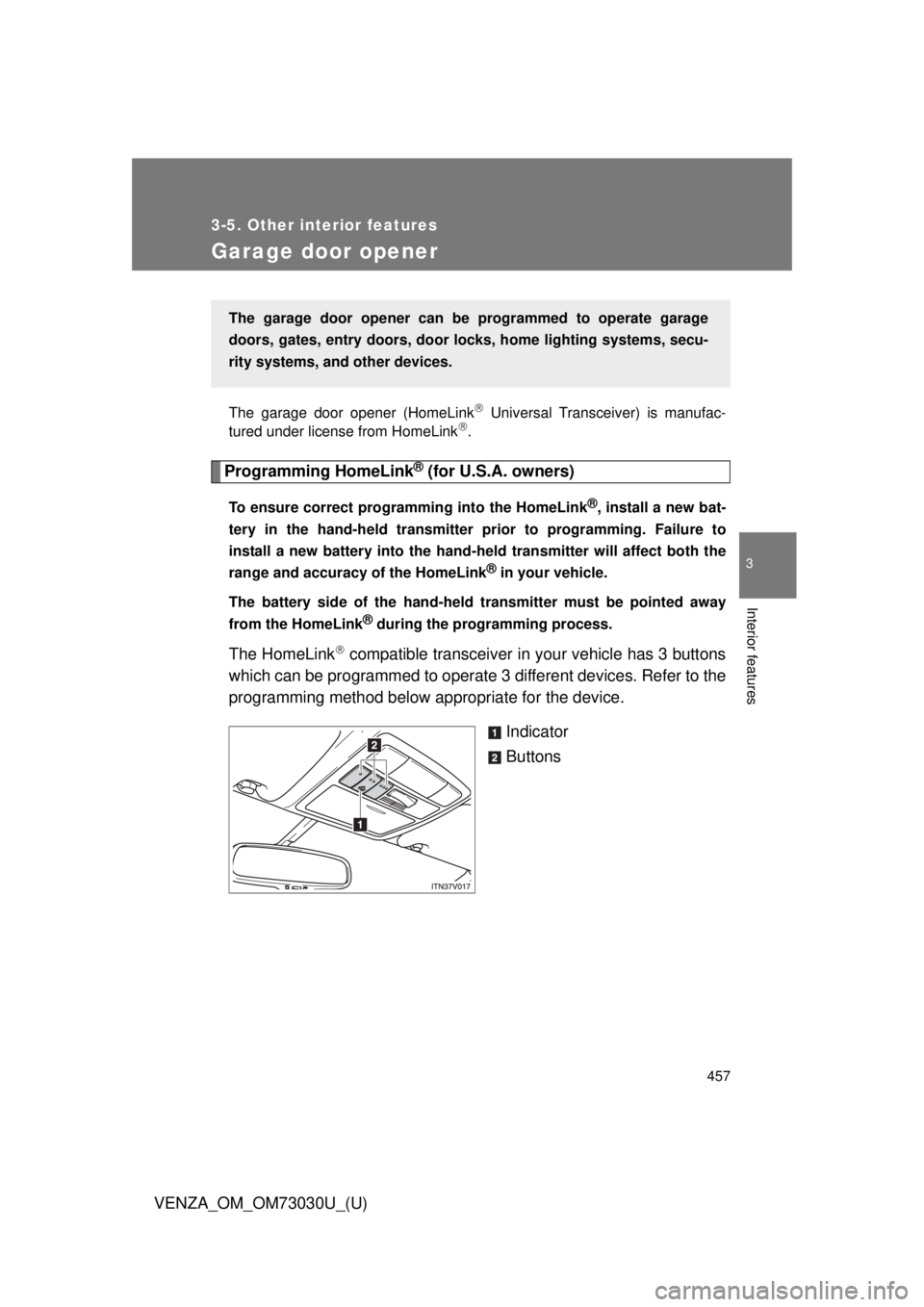
The HomeLink
compatible transceiver in your vehicle has 3 buttons
which can be programmed to operate 3 different devices. Refer to the
programming method below appropriate for the device.
Indicator
ButtonsThe garage door opener can be programmed to operate garage
doors, gates, entry do ors, door locks, home lighting systems, secu-
rity systems, and other devices.
Page 461 of 688
4613-5. Other interior features
3
Interior features
VENZA_OM_OM73030U_(U) ■ Programming an entry gate (f or U.S.A. owners)/Programming
all devices in the Canadian market
Place your transmitter 1 to 3 in. (25 to 75 mm) away from the
surface of the HomeLink
.Keep the HomeLink
indicator light in view while programming.
Press and hold the selected HomeLink
button.
Repeatedly press and releas e (cycle) the device’s remote
control button for two seconds each until step 4 is completed.
When the indicator light on the HomeLink
compatible trans-
ceiver starts to flash rapidly, release the buttons.
Test the operation of the HomeLink
by pressing the newly
programmed button. Check to see if the gate/device operates
correctly.
Repeat the steps above to program another device for each of
the remaining HomeLink
buttons.
■ Programming other devices
To program other devices such as home security systems, home
door locks or lighting, contact your authorized Toyota dealer for
assistance.
■ Reprogramming a button
The individual HomeLink
buttons cannot be erased but can be
reprogrammed. To reprogram a bu tton, follow the “Programming”
instructions. STEP 1
STEP 2
STEP 3
STEP 4
STEP 5
STEP 6
Page 466 of 688
4663-5. Other interior features
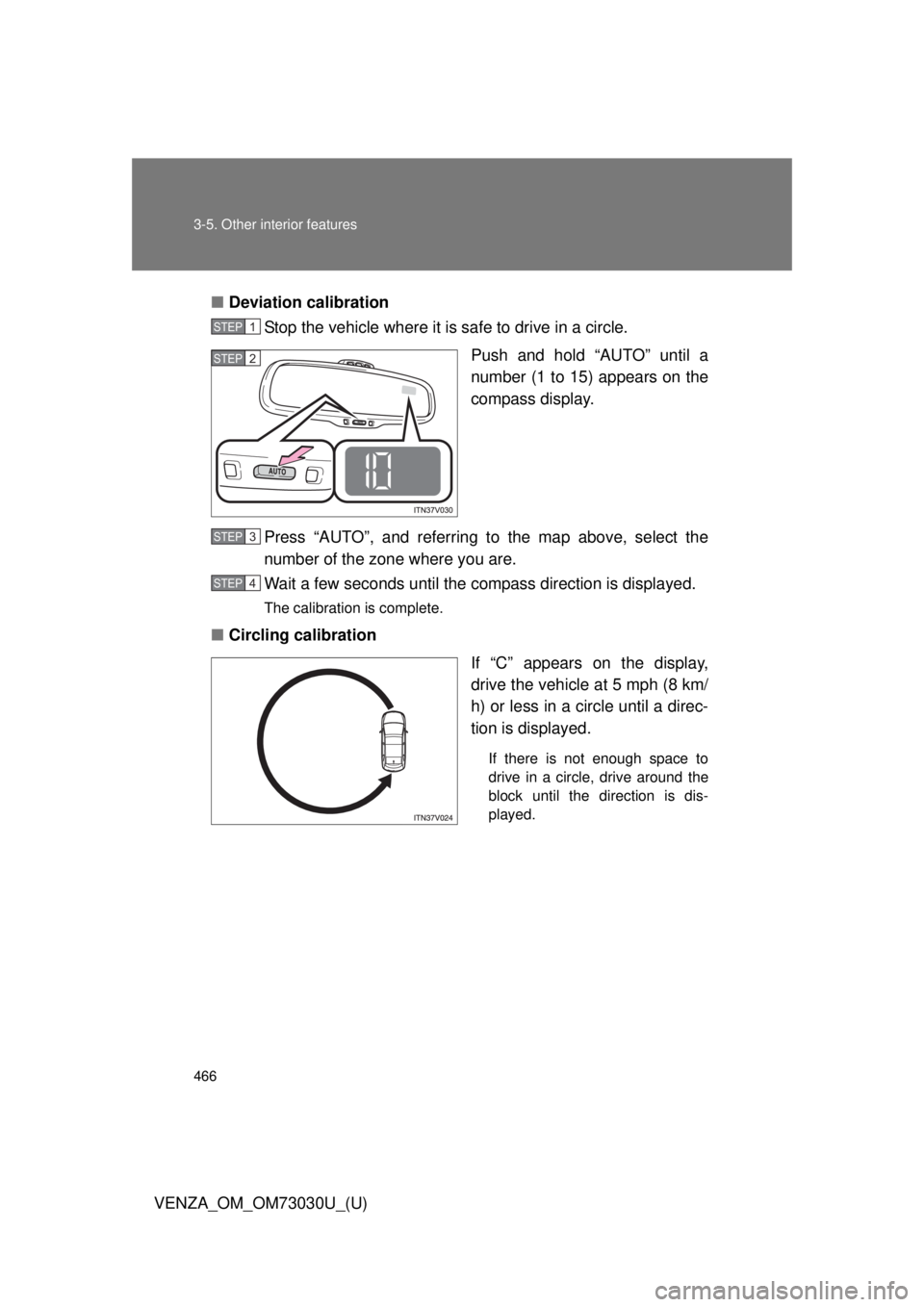
VENZA_OM_OM73030U_(U) ■ Deviation calibration
Stop the vehicle where it is safe to drive in a circle.
Push and hold “AUTO” until a
number (1 to 15) appears on the
compass display.
Press “AUTO”, and referring to the map above, select the
number of the zone where you are.
Wait a few seconds until the compass direction is displayed. The calibration is complete.
■ Circling calibration
If “C” appears on the display,
drive the vehicle at 5 mph (8 km/
h) or less in a circle until a direc-
tion is displayed. If there is not enough space to
drive in a circle, drive around the
block until the direction is dis-
played.STEP 1
STEP 2
STEP 3
STEP 4
Page 472 of 688
4724-1. Maintenance and care
VENZA_OM_OM73030U_(U) NOTICE■ If the windshield washer nozzle become blocked
Contact your Toyota dealer. Do not try to clear it with a pin or other object.
This may damage the nozzle.
■ Cleaning the exterior lights
● Wash carefully. Do not use organic substances or scrub with a hard brush.
This may damage the surfaces of the lights.
● Do not apply wax on the surface of the lights.
Wax may cause damage to the lenses.
■ To prevent damage to the windshield wiper arms
When lifting the wiper arms away from the windshield, pull the driver side
wiper arm upward first, and repeat for the passenger side. When returning
the wipers to their original position, do so from the passenger side first.
■ When using a high pressure car wash
Do not bring the nozzle tip close to boots (rubber or resin manufactured
cover), connectors or the following parts. The parts may be damaged if they
come into contact with high-pressure water.
● Traction related parts
● Steering parts
● Suspension parts
● Brake parts
Page 477 of 688
4774-2. Maintenance
4
Maintenance and care
VENZA_OM_OM73030U_(U) ■ Resetting the maintenance required reminder light (U.S.A. only)
After the required maintenance is preformed according to the maintenance
schedule, please reset the reminder light.
To reset the reminder light, follow the procedures described below:
Switch the display to the trip meter A when the engine is running.
( P. 189)
Vehicles with smart key system:
Turn the “ENGINE START STOP” switch off.
Vehicles without smart key system:
Turn the engine switch to the “LOCK” position.
Vehicles with smart key system:
While pressing the trip meter reset button, set the “ENGINE START
STOP” switch to IGNITION ON mode (but do not start the engine
because otherwise the reset mode will be canceled). Continue to
press and hold the trip meter reset button until the trip meter dis-
plays “000000”.
Vehicles without smart key system:
While pressing the trip meter reset button, set the engine switch to
“ON” position (but do not start the engine because otherwise the
reset mode will be canceled). Continue to press and hold the trip
meter reset button until the trip meter displays “000000”.
■ Allow inspection and repairs to be performed by a Toyota dealer
● Toyota technicians are well-trained specialists and are kept up to date
with the latest service information. They are well informed about the
operations of all systems on your vehicle.
● Keep a copy of the repair order. It proves that the maintenance that has
been performed is under warranty coverage. If any problem should arise
while your vehicle is under warranty, your Toyota dealer will promptly
take care of it. STEP 1
STEP 2
STEP 3