key TOYOTA VENZA 2016 Owner's Manual
[x] Cancel search | Manufacturer: TOYOTA, Model Year: 2016, Model line: VENZA, Model: TOYOTA VENZA 2016Pages: 688, PDF Size: 18.51 MB
Page 43 of 688
431-2. Opening, closing and locking the doors
1
Before driving
VENZA_OM_OM73030U_(U) ■ If the smart key system does not operate properly
● Locking and unlocking the doors: Use the mechanical key. ( P. 595)
● Starting the engine ( P. 596)
■ When the electronic key battery is fully depleted
P. 523
■ Customization
Settings (e.g. smart key system) can be changed.
(Customizable features P. 645)
■ Certification for the smart key system
For vehicles sold in the U.S.A.
FCC ID: HYQ14ACX FCC ID: HYQ14ADF
FCC ID: HYQ13CZD FCC ID: HYQ13CZE
NOTE:
This device complies with part 15 of the FCC Rules. Operation is subject
to the following two conditions: (1) This device may not cause harmful
interference, and (2) this device must accept any interference received,
including interference that may cause undesired operation.
FCC WARNING:
Changes or modifications not expressly approved by the party responsi-
ble for compliance could void the user’s authority to operate the equip-
ment.
Page 44 of 688
441-2. Opening, closing and locking the doors
VENZA_OM_OM73030U_(U) For vehicles sold in Canada
NOTE:
Operation is subject to the following two conditions: (1) this device may
not cause interference, and (2) this device must accept any interference,
including interference that may cause undesired operation of the device.
CAUTION■ Caution regarding interfer ence with electronic devices
● People with implantable cardiac pacemakers, cardiac resynchronization
therapy-pacemakers or implantable ca rdioverter defibrillators should keep
away from the smart key system antennas. ( P. 33)
The radio waves may affect the operation of such devices. If necessary,
the entry function can be disabled. Ask your Toyota dealer for details, such
as the frequency of radio waves and timing of the emitted radio waves.
Then, consult your doctor to see if you should disable the entry function.
● Users of any electrical medical device other than implantable cardiac
pacemakers, cardiac resynchronizati on therapy-pacemakers or implant-
able cardioverter defibrillators should consult the manufacturer of the
device for information about its operation under the influence of radio
waves. Radio waves could have unexpected effects on the operation of
such medical devices.
Ask your Toyota dealer for details for disabling the smart key system.
Page 45 of 688
45 1
1-2. Opening, closing and locking the doors
Before driving
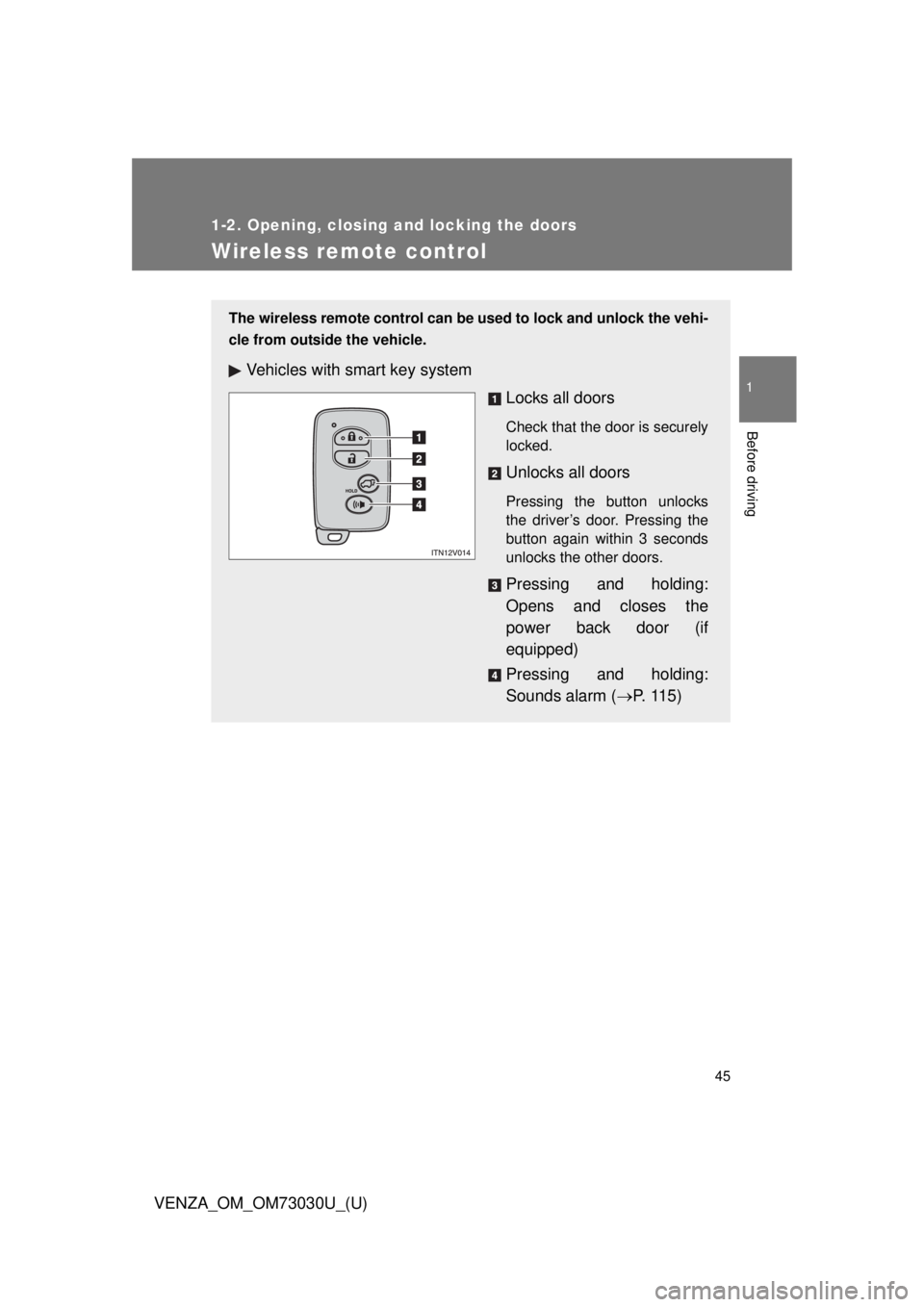
VENZA_OM_OM73030U_(U) Wireless remote control The wireless remote control can be used to lock and unlock the vehi-
cle from outside the vehicle.
Vehicles with smart key system
Locks all doors Check that the door is securely
locked.
Unlocks all doors Pressing the button unlocks
the driver’s door. Pressing the
button again within 3 seconds
unlocks the other doors.
Pressing and holding:
Opens and closes the
power back door (if
equipped)
Pressing and holding:
Sounds alarm ( P. 1 1 5 )
Page 46 of 688
461-2. Opening, closing and locking the doors
VENZA_OM_OM73030U_(U) ■ Operation signals
Doors: A buzzer sounds and the emergency flashers flash to indicate that
the doors have been locked/unlocked. (Locked: Once; Unlocked:
Tw i c e )
Back door: A buzzer sounds and the emergency flashers flash twice to indi-
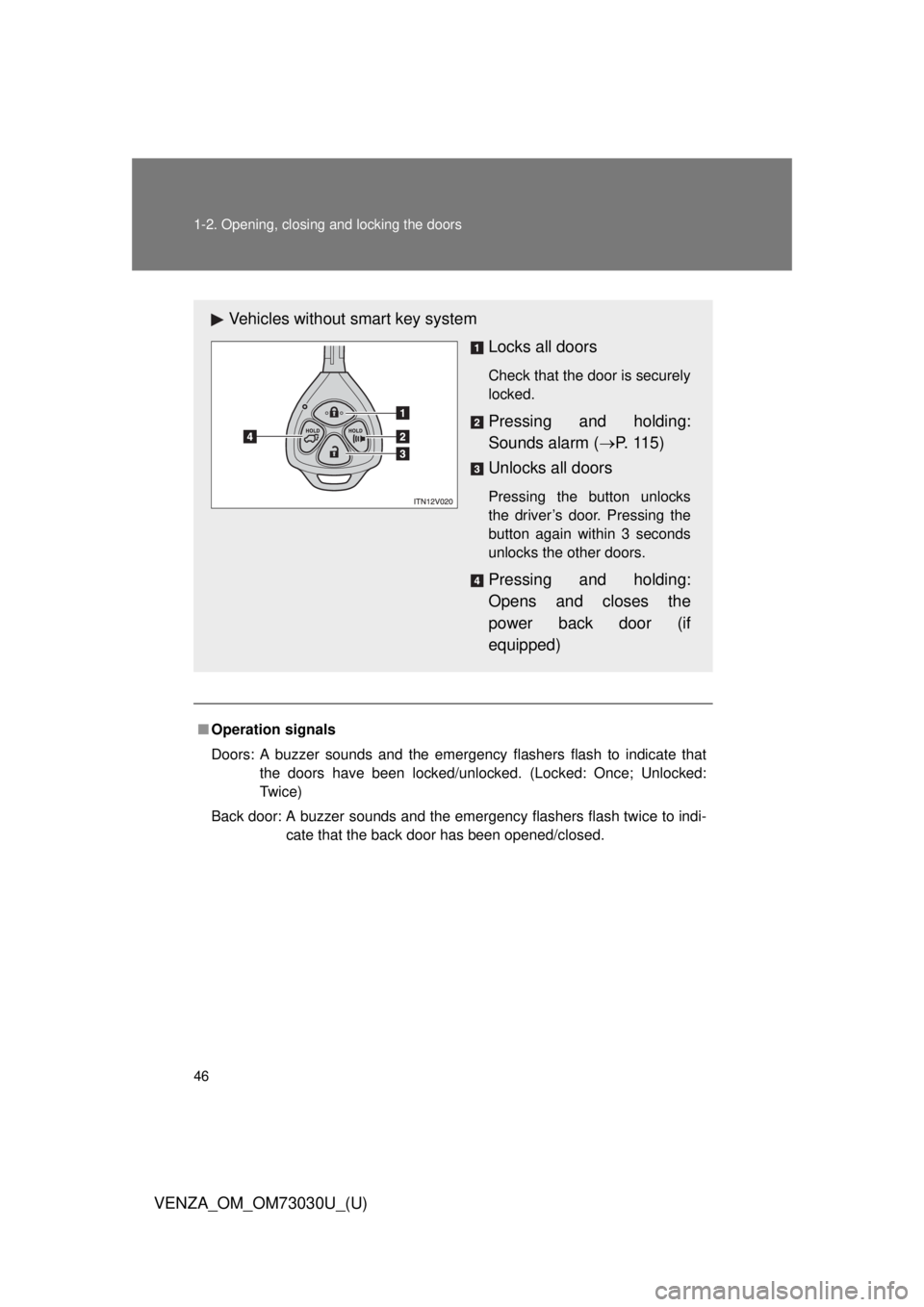
cate that the back door has been opened/closed.Vehicles without smart key system
Locks all doors Check that the door is securely
locked.
Pressing and holding:
Sounds alarm ( P. 1 1 5 )
Unlocks all doors Pressing the button unlocks
the driver’s door. Pressing the
button again within 3 seconds
unlocks the other doors.
Pressing and holding:
Opens and closes the
power back door (if
equipped)
Page 47 of 688
471-2. Opening, closing and locking the doors
1
Before driving
VENZA_OM_OM73030U_(U) ■ Door lock buzzer
If a door or back door is not fully closed, a buzzer sounds continuously for 10
seconds if an attempt to lock the door is made. Fully close the door to stop
the buzzer, and lock the vehicle once more.
■ Security feature
P. 4 0
■ Alarm
Using the wireless remote control to lock the door will set the alarm system.
( P. 112)
■ Key battery depletion
Vehicles with smart key system
P. 3 7
Vehicles without smart key system
The standard battery life is 1 to 2 years. (The battery becomes depleted
even if the key is not used.) If the wireless remote control function does
not operate, the battery may be depleted. Replace the battery when nec-
essary. ( P. 524)
■ If the wireless remote control does not operate properly
Vehicles with smart key system
Locking and unlocking the doors: Use the mechanical key. ( P. 595)
Vehicles without smart key system
Locking and unlocking the doors: Use the key. ( P. 50)
Page 48 of 688
481-2. Opening, closing and locking the doors
VENZA_OM_OM73030U_(U) ■ Conditions affecting operation
Vehicles with smart key system
P. 3 5
Vehicles without smart key system
The wireless remote control function may not operate normally in the fol-
lowing situations.
● Near a TV tower, radio station, el ectric power plant, airport or other
facility that generates strong radio waves
● When carrying a portable radio, cellular phone or other wireless com-
munication device
● When multiple wireless keys are in the vicinity
● When the wireless key has come into contact with, or is covered by a
metallic object
● When a wireless key (that emits radio waves) is being used nearby
● When the wireless key has been left near an electrical appliance such
as a personal computer
■ Customization
Settings (e.g. 2-step unlocking function) can be changed.
(Customizable features P. 645)
■ Reversing the operation of the power back door (if equipped)
Pressing the wireless remote control switch again while the power back door
is operating will cause the operation to reverse. However, the reverse opera-
tion cannot be performed for the first second after automatic operation starts,
even if the wireless remote control switch is pressed again.
Page 50 of 688
501-2. Opening, closing and locking the doors
VENZA_OM_OM73030U_(U)Side doors The vehicle can be locked and unlocked using the entry function,
wireless remote control, key or door lock switch.
■ Entry function (vehicles with smart key system)
P. 3 0
■ Wireless remote control
P. 4 5
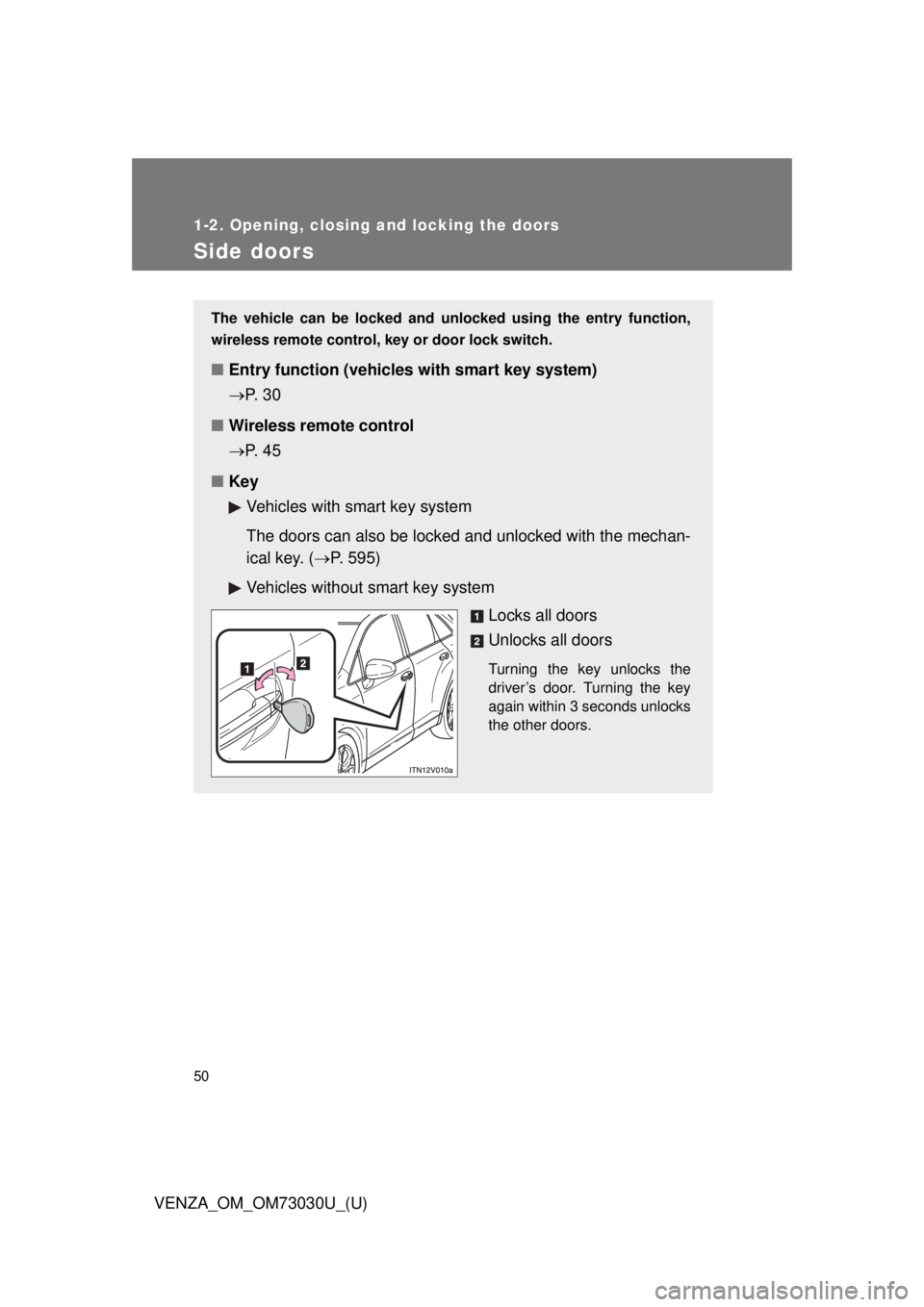
■ Key
Vehicles with smart key system
The doors can also be locked and unlocked with the mechan-
ical key. ( P. 595)
Vehicles without smart key system
Locks all doors
Unlocks all doors Turning the key unlocks the
driver’s door. Turning the key
again within 3 seconds unlocks
the other doors.
Page 52 of 688

521-2. Opening, closing and locking the doors
VENZA_OM_OM73030U_(U) Locking the driver’s doors from the outside without a key
Move the inside lock button to the lock position.
Close the door.
Vehicles with smart key system
The door cannot be locked if the “ENGINE START STOP” switch is
in ACCESSORY or IGNITION ON mode, or the electronic key is
left inside the vehicle. Depending on the position of the electronic key, the key may not be
detected correctly and the door may be locked.
Vehicles without smart key system
The door cannot be locked if either front door is open and the key
is in the engine switch.
Rear door child-protector lock
The door cannot be opened from
inside the vehicle when the lock
is set.
Unlock
Lock These locks can be set to prevent
children from opening the rear
doors. Push down on each rear
door switch to lock both rear
doors. STEP 1
STEP 2
Page 54 of 688

541-2. Opening, closing and locking the doors
VENZA_OM_OM73030U_(U) Vehicles with smart key system:
Close all the doors and switch the “ENGINE START STOP”
switch to IGNITION ON mode. (Perform within 20 sec-
onds.)
Vehicles without smart key system:
Close all the doors and switch the engine switch to the “ON”
position. (Perform within 20 seconds.)
Shift the shift lever to “P” or “N”,
press and hold the driver’s door
lock switch (
or ) for about 5
seconds then release. The shift lever and switch posi-
tions corresponding to the
desired function to be set are
shown as follows.
Use the same procedure to can-
cel the function.
When the setting or canceling operation is complete, all doors are
locked and then unlocked. STEP 1
STEP2
STEP2
STEP 2
Function Shift lever
position Driver’s door lock
switch position
Shift position linked door lock-
ing function
“P”
Shift position linked door
unlocking function
Speed linked door locking func-
tion
“N”
Driver’s door linked door unlock-
ing function
Page 55 of 688
551-2. Opening, closing and locking the doors
1
Before driving
VENZA_OM_OM73030U_(U) ■ Impact detection door lock release system
In the event that the vehicle is subject to a strong impact, all the doors are
unlocked.
Depending on the force of the impact or the type of accident, however, the
system may not operate.
■ Customization
Settings (e.g. unlocking function using a key) can be changed.
(Customizable features P. 645)
CAUTION■ To prevent an accident
Observe the following precautions while driving the vehicle.
Failing to do so may result in a door opening and an occupant falling out,
resulting in death or serious injury.
● Always use a seat belt.
● Always lock all doors.
● Ensure that all doors are properly closed.
● Do not pull the inside handle of the doors while driving.
The doors may be opened and the passengers are thrown out of the vehi-
cle and it may result in death or serious injury.
Be especially careful for the front doors, as the doors may be opened even
if the inside lock buttons are in locked position.
● Set the rear door child-protector locks when children are seated in the rear
seat.