display TOYOTA VENZA 2016 Owner's Guide
[x] Cancel search | Manufacturer: TOYOTA, Model Year: 2016, Model line: VENZA, Model: TOYOTA VENZA 2016Pages: 688, PDF Size: 18.51 MB
Page 211 of 688
2112-2. Instrument cluster
2
When driving
VENZA_OM_OM73030U_(U) ■ Resetting the data
Selecting “Clear” will reset the trip information data.
■ Cruising range
Displays the estimated maximum distance that can be driven with the quan-
tity of fuel remaining.
This distance is computed based on your average fuel consumption. As a
result, the actual distance that can be driven may differ from that displayed.
Page 235 of 688
2352-4. Using other driving systems
2
When driving
VENZA_OM_OM73030U_(U) Intuitive parking assist
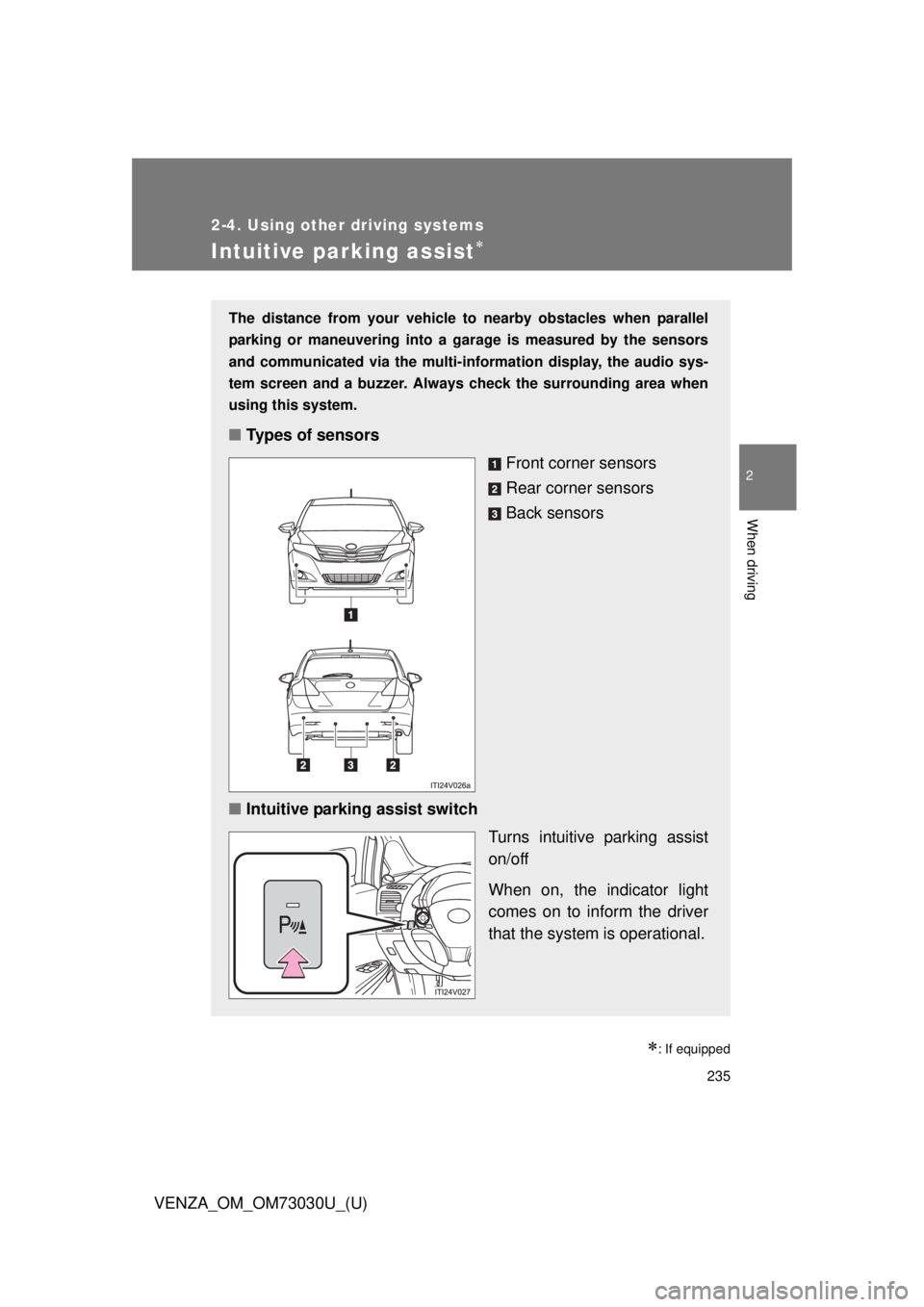
: If equippedThe distance from your vehicle to nearby obstacles when parallel
parking or maneuvering into a ga rage is measured by the sensors
and communicated via the multi-in formation display, the audio sys-
tem screen and a buzzer. Always check the surrounding area when
using this system.
■ Types of sensors
Front corner sensors
Rear corner sensors
Back sensors
■ Intuitive parking assist switch
Turns intuitive parking assist
on/off
When on, the indicator light
comes on to inform the driver
that the system is operational.
Page 236 of 688
2362-4. Using other driving systems
VENZA_OM_OM73030U_(U) Display
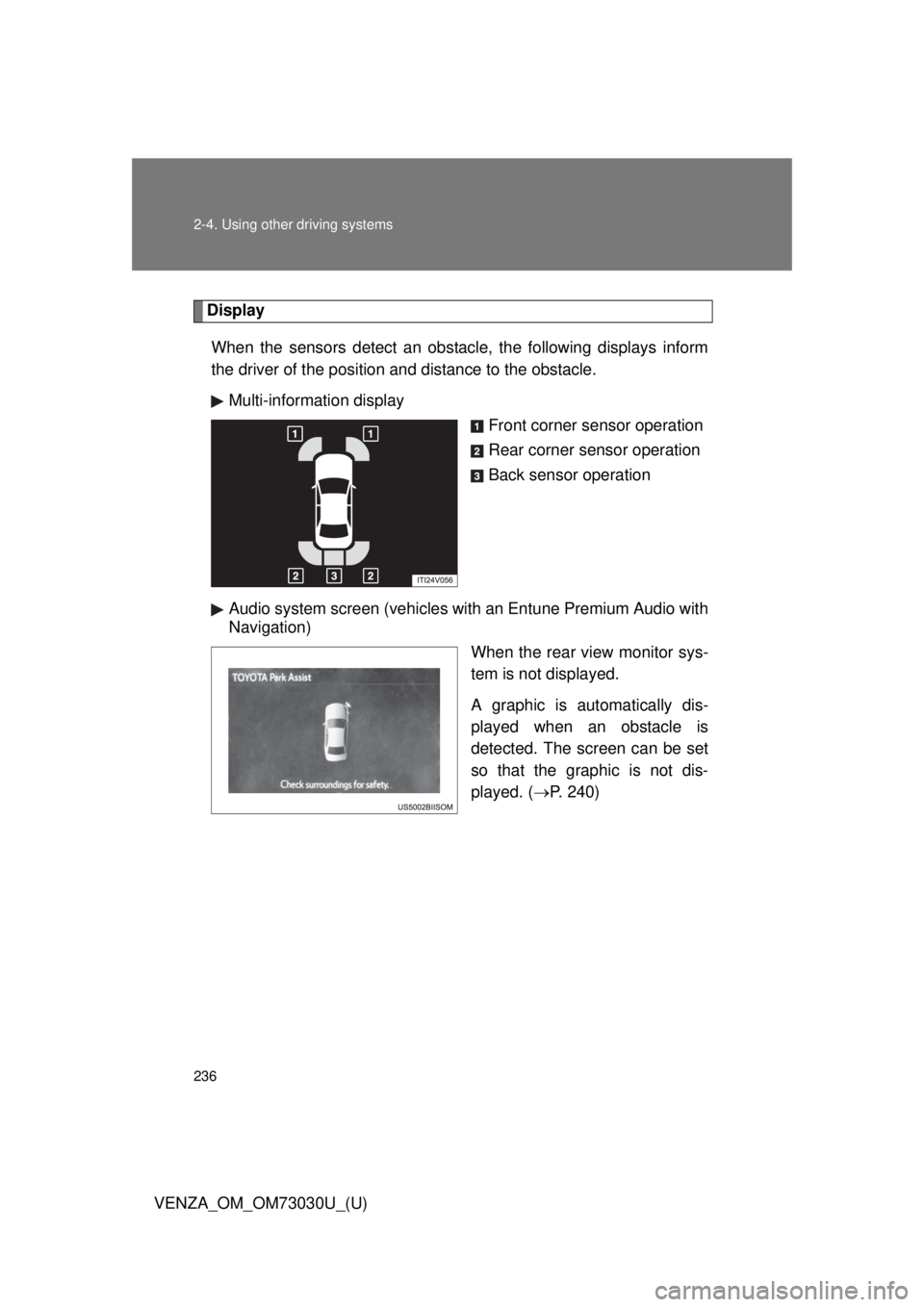
When the sensors detect an obstacle, the following displays inform
the driver of the position and distance to the obstacle.
Multi-information display
Front corner sensor operation
Rear corner sensor operation
Back sensor operation
Audio system screen (vehicles with an Entune Premium Audio with
Navigation)
When the rear view monitor sys-
tem is not displayed.
A graphic is automatically dis-
played when an obstacle is
detected. The screen can be set
so that the graphic is not dis-
played. ( P. 240)
Page 237 of 688
2372-4. Using other driving systems
2
When driving
VENZA_OM_OM73030U_(U) The distance display and buzzer
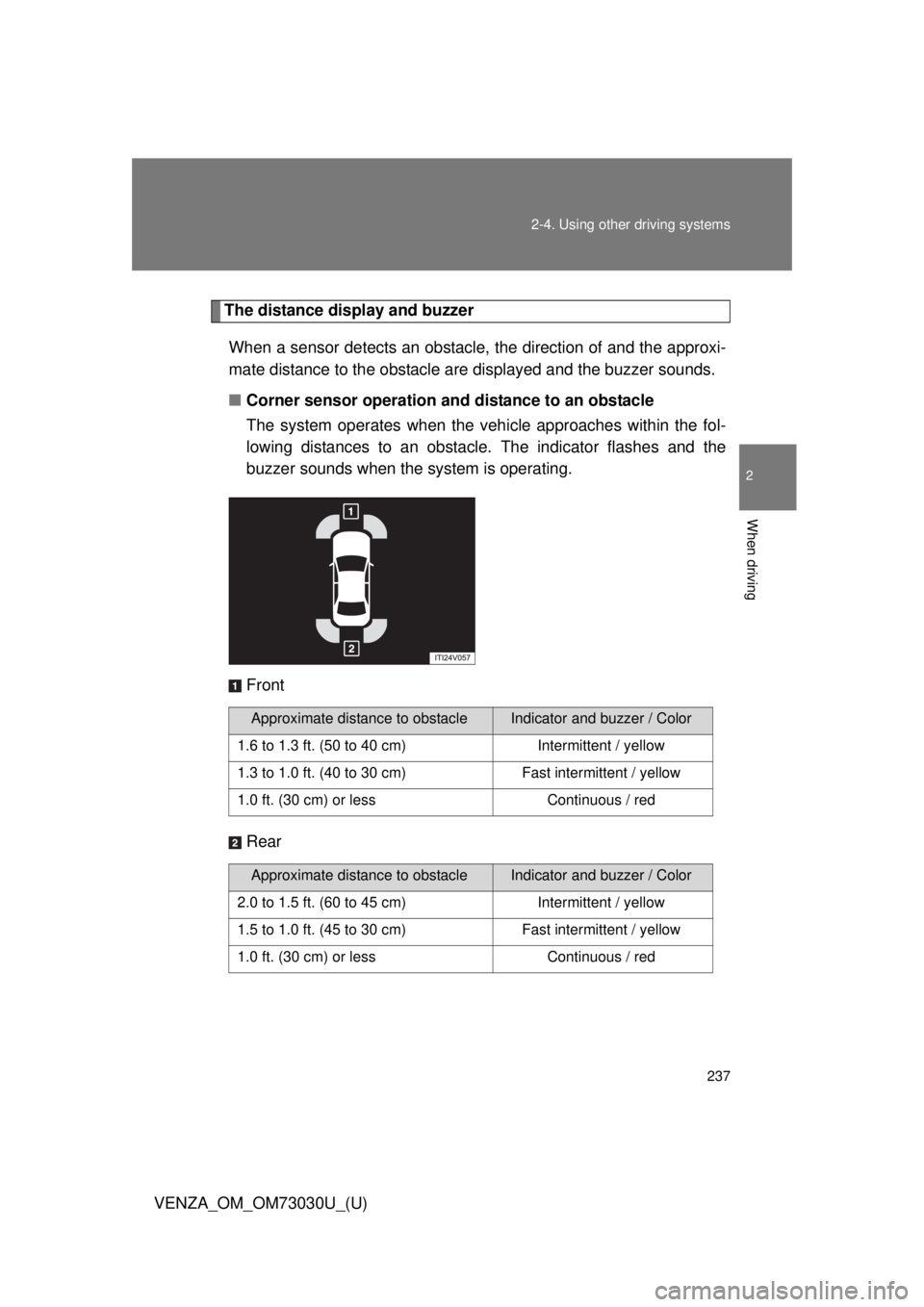
When a sensor detects an obstacle, the direction of and the approxi-
mate distance to the obstacle are displayed and the buzzer sounds.
■ Corner sensor operation and distance to an obstacle
The system operates when the vehi cle approaches within the fol-
lowing distances to an obstacle. The indicator flashes and the
buzzer sounds when the system is operating.
Front
Rear Approximate distance to obstacle Indicator and buzzer / Color
1.6 to 1.3 ft. (50 to 40 cm) Intermittent / yellow
1.3 to 1.0 ft. (40 to 30 cm) Fast intermittent / yellow
1.0 ft. (30 cm) or less Continuous / red
Approximate distance to obstacle Indicator and buzzer / Color
2.0 to 1.5 ft. (60 to 45 cm) Intermittent / yellow
1.5 to 1.0 ft. (45 to 30 cm) Fast intermittent / yellow
1.0 ft. (30 cm) or less Continuous / red
Page 240 of 688
2402-4. Using other driving systems
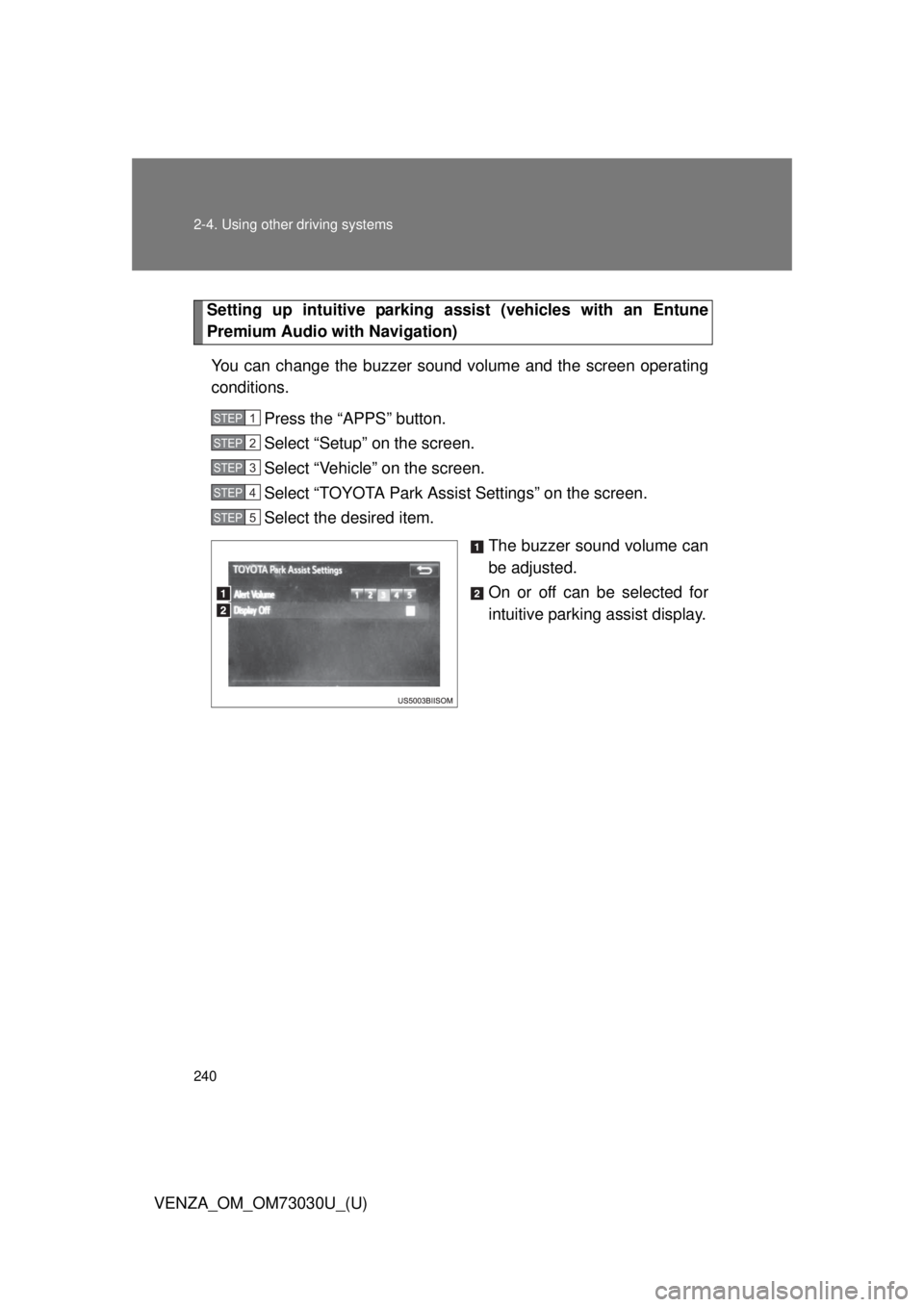
VENZA_OM_OM73030U_(U) Setting up intuitive parking assi st (vehicles with an Entune
Premium Audio with Navigation)
You can change the buzzer sound volume and the screen operating
conditions.
Press the “APPS” button.
Select “Setup” on the screen.
Select “Vehicle” on the screen.
Select “TOYOTA Park Assist Settings” on the screen.
Select the desired item.
The buzzer sound volume can
be adjusted.
On or off can be selected for
intuitive parking assist display.STEP 1
STEP 2
STEP 3
STEP 4
STEP 5
Page 241 of 688
2412-4. Using other driving systems
2
When driving
VENZA_OM_OM73030U_(U) ■ Sensor detection information
● Certain vehicle conditions and the surrounding environment may affect
the ability of the sensor to correctly detect obstacles. Particular instances
where this may occur are listed below.
• There is dirt, snow or ice on the sensor.
• A sensor is frozen.
• A sensor is covered in any way.
• The vehicle is leaning considerably to one side.
• On an extremely bumpy road, on an incline, on gravel, or on grass.
• The vicinity of the vehicle is noisy due to vehicle horns, motorcycle
engines, air brakes of large vehicles, or other loud noises producing
ultrasonic waves.
• There is another vehicle equipped with parking assist sensors in the
vicinity.
• The sensor is coated with a sheet of spray or heavy rain.
• The vehicle is equipped with a fender pole or wireless antenna.
• The bumper or sensor receives a strong impact.
• The vehicle is approaching a tall or curved curb.
• In harsh sunlight or intense cold weather.
• A non-genuine Toyota suspension (lowered suspension etc.) is
installed.
In addition to the examples above, there are instances in which, because of
their shapes, signs and other objects may be judged by the sensor to be
closer than they are.
● The shape of the obstacle may prevent the sensor from detecting it. Pay
particular attention to the following obstacles:
• Wires, fences, ropes, etc.
• Cotton, snow and other materials that absorb sound waves
• Sharply-angled objects
• Low obstacles
• Tall obstacles with upper sections projecting outwards in the direction
of your vehicle
■ If the display flashes and a message is displayed
P. 578
Page 243 of 688
2432-4. Using other driving systems
2
When driving
VENZA_OM_OM73030U_(U) Rear view monitor system
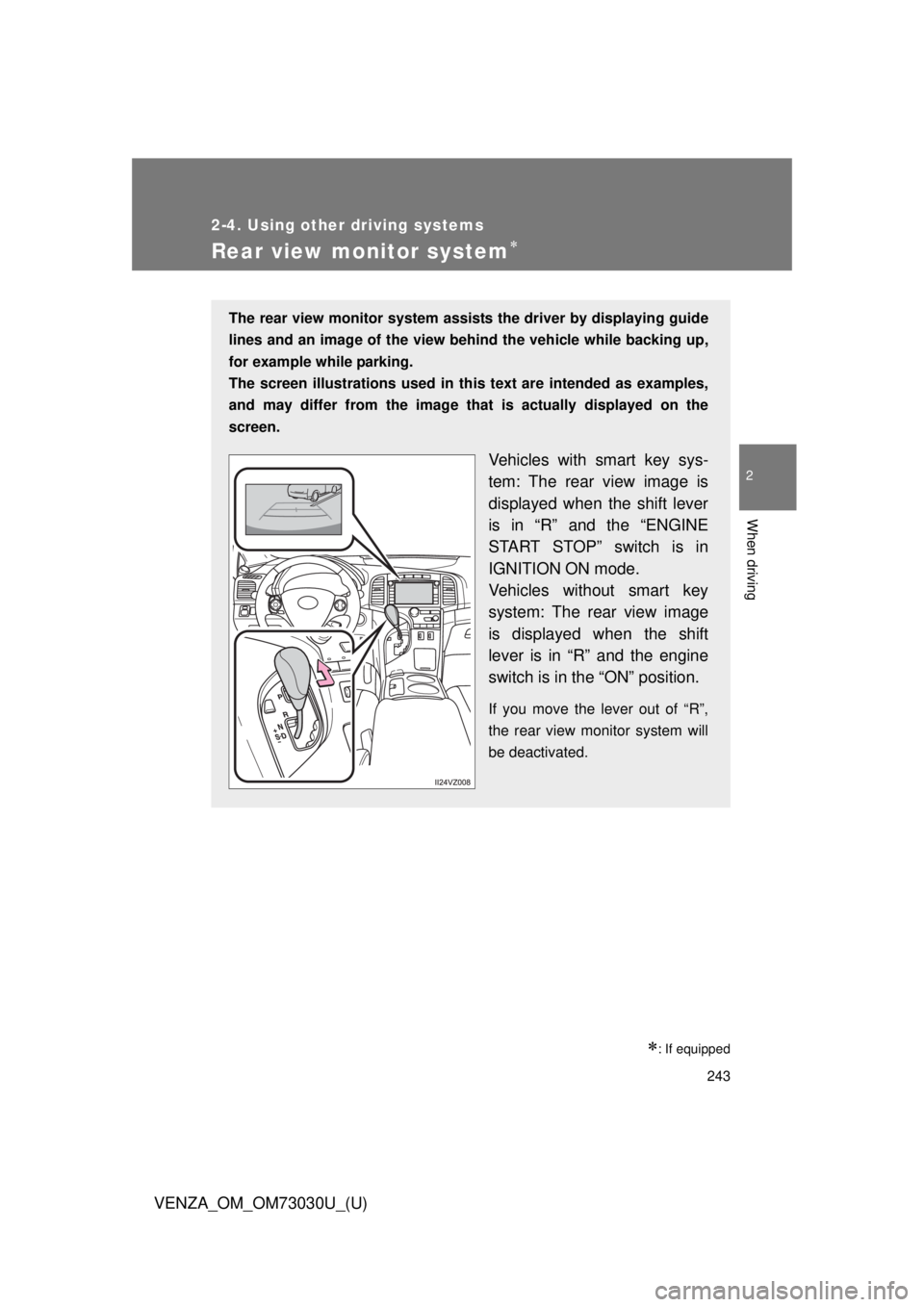
: If equippedThe rear view monitor system assists the driver by displaying guide
lines and an image of the view behind the vehicle while backing up,
for example while parking.
The screen illustrations used in this text are intended as examples,
and may differ from th e image that is actually displayed on the
screen.
Vehicles with smart key sys-
tem: The rear view image is
displayed when the shift lever
is in “R” and the “ENGINE
START STOP” switch is in
IGNITION ON mode.
Vehicles without smart key
system: The rear view image
is displayed when the shift
lever is in “R” and the engine
switch is in the “ON” position. If you move the lever out of “R”,
the rear view monitor system will
be deactivated.
Page 244 of 688
2442-4. Using other driving systems
VENZA_OM_OM73030U_(U) Screen description
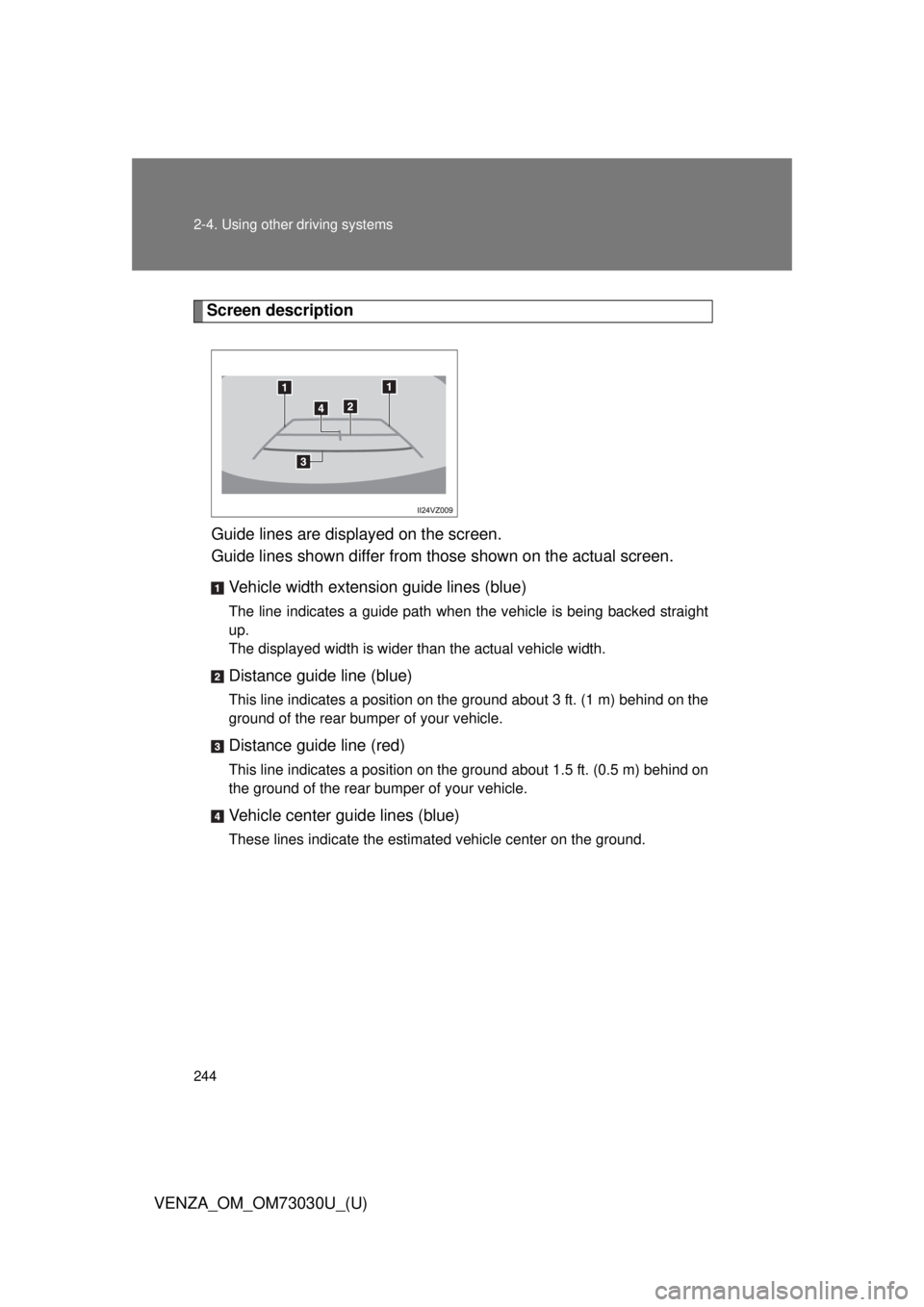
Guide lines are displayed on the screen.
Guide lines shown differ from those shown on the actual screen.
Vehicle width extension guide lines (blue) The line indicates a guide path when the vehicle is being backed straight
up.
The displayed width is wider than the actual vehicle width.
Distance guide line (blue) This line indicates a position on the ground about 3 ft. (1 m) behind on the
ground of the rear bumper of your vehicle.
Distance guide line (red) This line indicates a position on the ground about 1.5 ft. (0.5 m) behind on
the ground of the rear bumper of your vehicle.
Vehicle center guide lines (blue) These lines indicate the estimated vehicle center on the ground.
Page 245 of 688
2452-4. Using other driving systems
2
When driving
VENZA_OM_OM73030U_(U) Rear view monitor system precautions
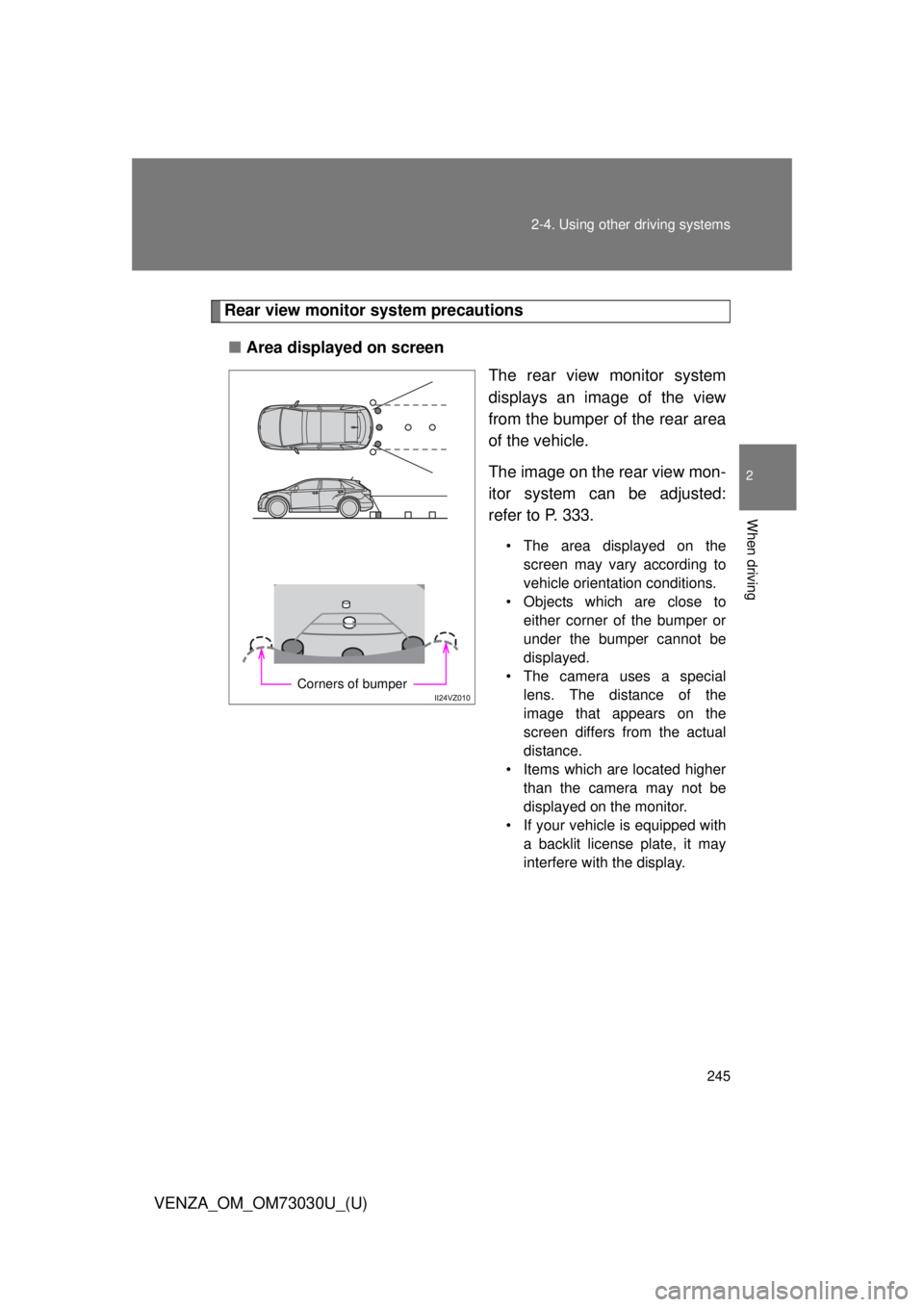
■ Area displayed on screen
The rear view monitor system
displays an image of the view
from the bumper of the rear area
of the vehicle.
The image on the rear view mon-
itor system can be adjusted:
refer to P. 333. • The area displayed on the
screen may vary according to
vehicle orientation conditions.
• Objects which are close to
either corner of the bumper or
under the bumper cannot be
displayed.
• The camera uses a special
lens. The distance of the
image that appears on the
screen differs from the actual
distance.
• Items which are located higher
than the camera may not be
displayed on the monitor.
• If your vehicle is equipped with
a backlit license plate, it may
interfere with the display.Corners of bumper
Page 253 of 688
2532-4. Using other driving systems
2
When driving
VENZA_OM_OM73030U_(U) CAUTION■ When using the rear view monitor system
The rear view monitor system is a supplemental device intended to assist
the driver when backing up. When backing up, be sure to check visually
behind and all around the vehicle before proceeding.
Observe the following precautions to avoid an accident that could result in
death or serious injuries.
● Never depend on the rear view monitor system entirely when backing up.
The image and the position of the guide lines displayed on the screen may
differ from the actual state.
Use caution, just as you would when backing up any vehicle.
● Be sure to back up slowly, depressing the brake pedal to control vehicle
speed.
● When and how much to turn the steering wheel will vary according to traf-
fic conditions, road surface conditions, vehicle condition, etc. when park-
ing. It is necessary to be fully aware of this before using the rear view
monitor system.
● When parking, be sure to check that the parking space will accommodate
your vehicle before maneuvering into it.
● Do not use the rear view monitor system in the following cases:
• On icy or slick road surfaces, or in snow
• When using tire chains or the compact spare tire
• When the back door is not closed completely
• On roads that are not flat or straight, such as curves or slopes.