display TOYOTA VENZA 2016 Service Manual
[x] Cancel search | Manufacturer: TOYOTA, Model Year: 2016, Model line: VENZA, Model: TOYOTA VENZA 2016Pages: 688, PDF Size: 18.51 MB
Page 254 of 688

2542-4. Using other driving systems
VENZA_OM_OM73030U_(U) CAUTION● In low temperatures, the screen may darken or the image may become
faint. The image could distort when the vehicle is moving, or you may
become unable to see the image on the screen. Be sure to check direct
visually and with the mirrors all around the vehicle before proceeding.
● If the tire sizes are changed, the position of the guide lines displayed on
the screen may change.
● The camera uses a special lens. The distances between objects and
pedestrians that appear in the image displayed on the screen will differ
from the actual distances. ( P. 247)
Page 304 of 688
304
VENZA_OM_OM73030U_(U) 3-1. Using the air conditioning
system and defogger
Automatic air conditioning
system ........................... 306
Rear window defogger ..... 316
3-2. Using the audio system
(Entune Audio)
Audio system types .......... 318
Audio system ................... 320
Steering wheel audio
switches ......................... 323
USB Port/AUX Port .......... 325
Basic Audio
Operations ..................... 326
Setup menu...................... 329
General settings ............... 330
Audio settings .................. 332
Display settings ................ 333
Voice settings................... 335 Selecting the audio
source ............................ 336
List screen operation........ 337
Optimal use of the audio
system ........................... 339
Radio operation................ 340
CD player operation ......... 343
Listening to an iPod ......... 350
Listening to a
USB memory device ...... 356
Using the AUX port .......... 362
Preparations to use
wireless
communication ............... 363
Registering a Bluetooth ®
audio player for
the first time ................... 366
Registering a Bluetooth ®
phone for
the first time ................... 367
Registering a Bluetooth ®
device ............................ 368
Connecting a Bluetooth ®
device ............................ 370
Page 305 of 688
Interior features
3
305
VENZA_OM_OM73030U_(U) Displaying a Bluetooth ®
device details ................. 373
Detailed Bluetooth ®
system settings .............. 375
Listening to Bluetooth ®
Audio.............................. 377
Using a Bluetooth ®
Phone ............................ 379
Making a call .................... 382
Receiving a call ................ 386
Speaking on the phone .... 387
Bluetooth ®
phone
message function........... 391
Using the steering wheel
switches ......................... 396
Bluetooth ®
phone
settings .......................... 397
Contact/Call History
Settings .......................... 399
What to do if...
(Troubleshooting)........... 411
Bluetooth ®
........................ 419
Voice command
system ........................... 426 3-3. Using the interior lights
Interior lights list ............... 430
• Personal/interior light
main switch .................... 431
• Personal/interior lights
and luggage
compartment light .......... 432
3-4. Using the storage features
List of storage features .... 434
• Glove box....................... 435
• Console boxes ............... 436
• Overhead console .......... 438
• Cup holders ................... 439
• Bottle holders ................. 441
• Auxiliary boxes ............... 442
3-5. Other interior features
Sun visors ........................ 445
Vanity mirror..................... 446
Power outlets ................... 447
Seat heaters..................... 449
Armrest ............................ 451
Assist grips
(folding type) .................. 452
Floor mats ........................ 453
Luggage compartment
features .......................... 455
Garage door opener......... 457
Compass .......................... 464
Page 307 of 688
3073-1. Using the air condit ioning system and defogger
3
Interior features
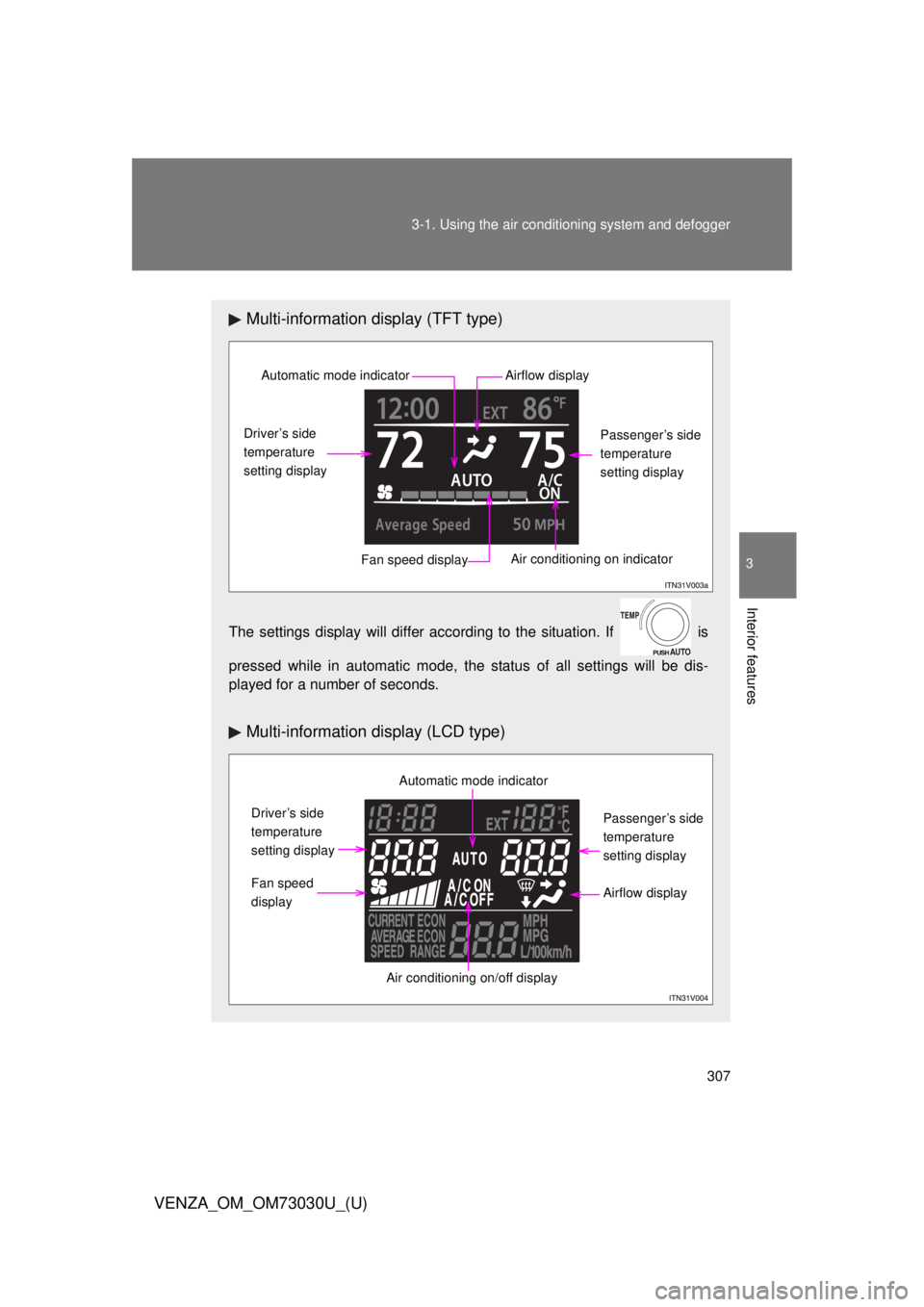
VENZA_OM_OM73030U_(U) Multi-information display (TFT type)
The settings display will differ according to the situation. If is
pressed while in automatic mode, the status of all settings will be dis-
played for a number of seconds.
Multi-information display (LCD type)Automatic mode indicator
Driver’s side
temperature
setting display
Fan speed display Air conditioning on indicator Passenger’s side
temperature
setting displayAirflow display
Automatic mode indicator
Driver’s side
temperature
setting display
Fan speed
display
Air conditioning on/off display Passenger’s side
temperature
setting display
Airflow display
Page 308 of 688
3083-1. Using the air cond itioning system and defogger
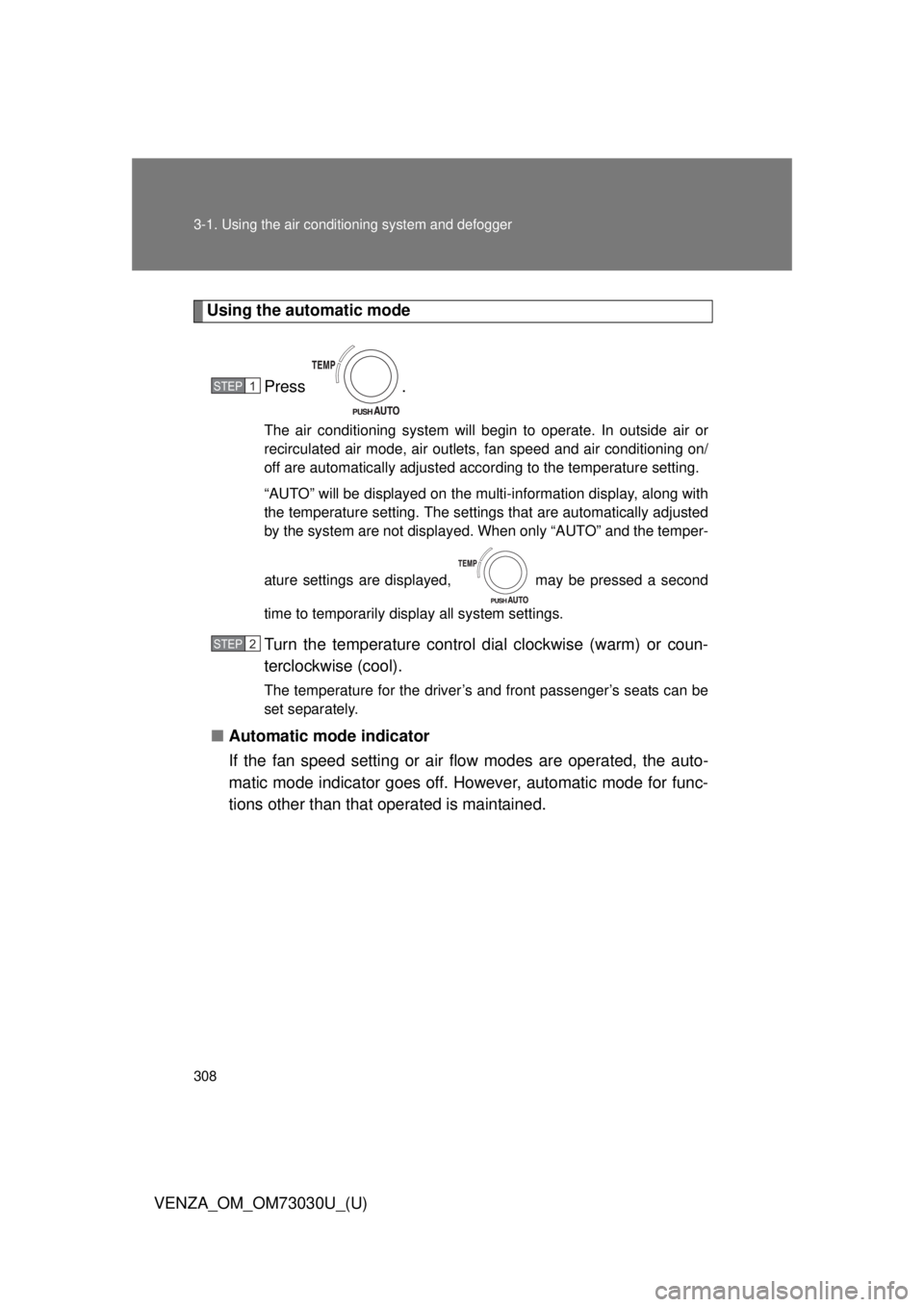
VENZA_OM_OM73030U_(U) Using the automatic mode
Press . The air conditioning system will begin to operate. In outside air or
recirculated air mode, air outlets, fan speed and air conditioning on/
off are automatically adjusted according to the temperature setting.
“AUTO” will be displayed on the multi-information display, along with
the temperature setting. The settings that are automatically adjusted
by the system are not displayed. When only “AUTO” and the temper-
ature settings are displayed, may be pressed a second
time to temporarily display all system settings.
Turn the temperature control dial clockwise (warm) or coun-
terclockwise (cool). The temperature for the driver’s and front passenger’s seats can be
set separately.
■ Automatic mode indicator
If the fan speed setting or air fl ow modes are operated, the auto-
matic mode indicator goes off. However, automatic mode for func-
tions other than that operated is maintained. STEP 1
STEP 2
Page 309 of 688
3093-1. Using the air condit ioning system and defogger
3
Interior features
VENZA_OM_OM73030U_(U) Adjusting the settings
■ Adjusting the temperature setting
Turn the temperature control dial clockwise (warm) or counter-
clockwise (cool). The air conditioning system switches between dual and simulta-
neous modes each time is pressed.
Each temperature setting will be displayed on the multi-information
display.
Dual mode: The temperature for the driver’s seat and front passen-
ger’s seats can be set separately.
SYNC mode: Only (driver’s side) can be used to adjust
the temperature for all seats.
In SYNC mode, only one temperature setting will be displayed on
the multi-information display.
Page 310 of 688
3103-1. Using the air cond itioning system and defogger
VENZA_OM_OM73030U_(U) ■ Adjusting the fan speed
Press “ ” (increase) or “ ” (decrease) on .The fan speed is shown on the display. (7 levels)
Pressing the button while in automatic mode will place the fan speed
into manual mode. “AUTO” will turn off, and the fan speed setting will
be displayed. The air outlet setting will remain in automatic mode.
Press to turn the fan off.
The air conditioning system display will go blank to indicate that the
system is off. If the system is in outside air mode, some outlet airflow
may still exist.
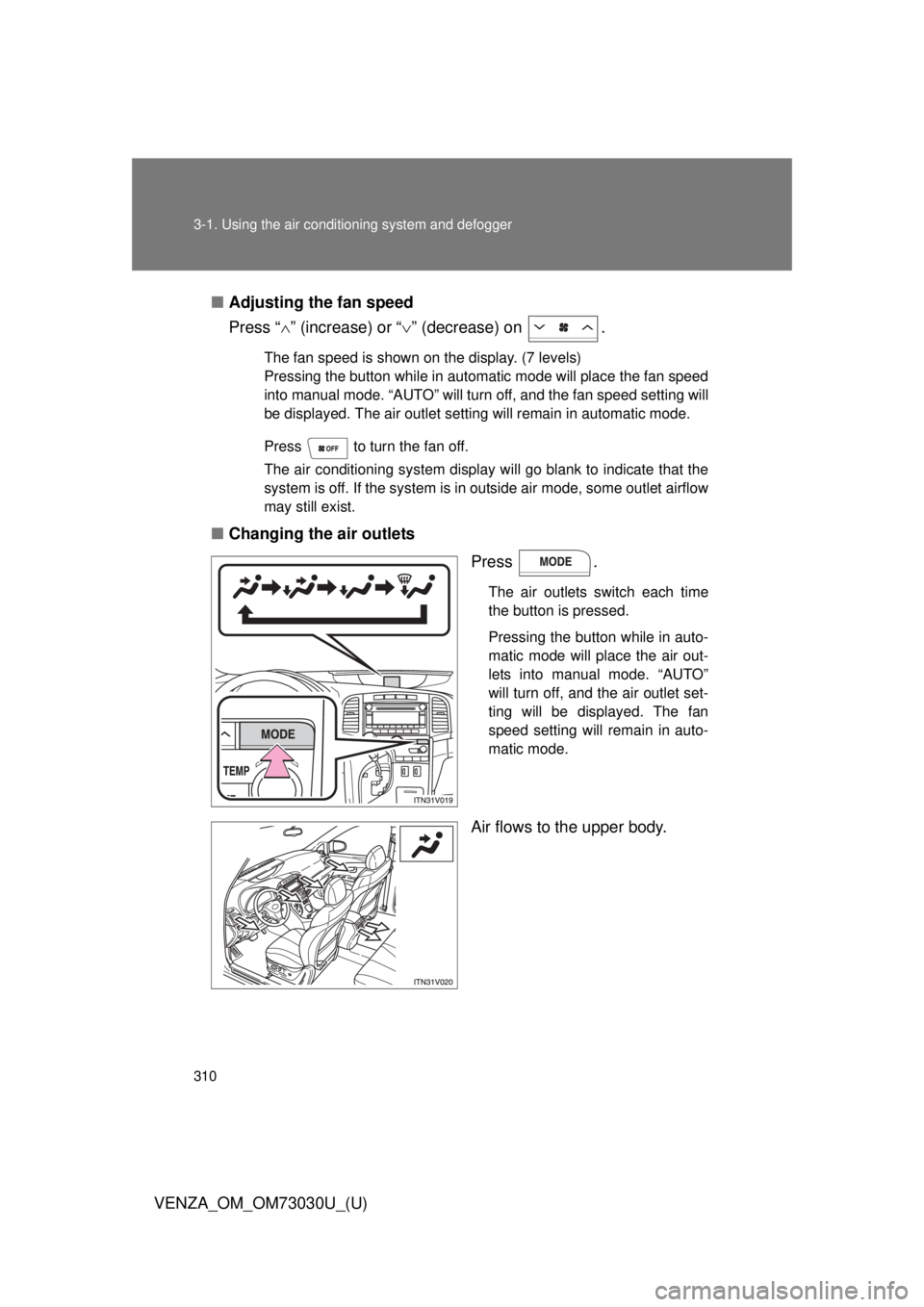
■ Changing the air outlets
Press . The air outlets switch each time
the button is pressed.
Pressing the button while in auto-
matic mode will place the air out-
lets into manual mode. “AUTO”
will turn off, and the air outlet set-
ting will be displayed. The fan
speed setting will remain in auto-
matic mode.
Air flows to the upper body.
Page 320 of 688
3203-2. Using the audio system (Entune Audio)
VENZA_OM_OM73030U_(U)Audio system
: If equippedOperations such as listening to audio, using the hands-free phone,
confirming vehicle information and changing audio system settings
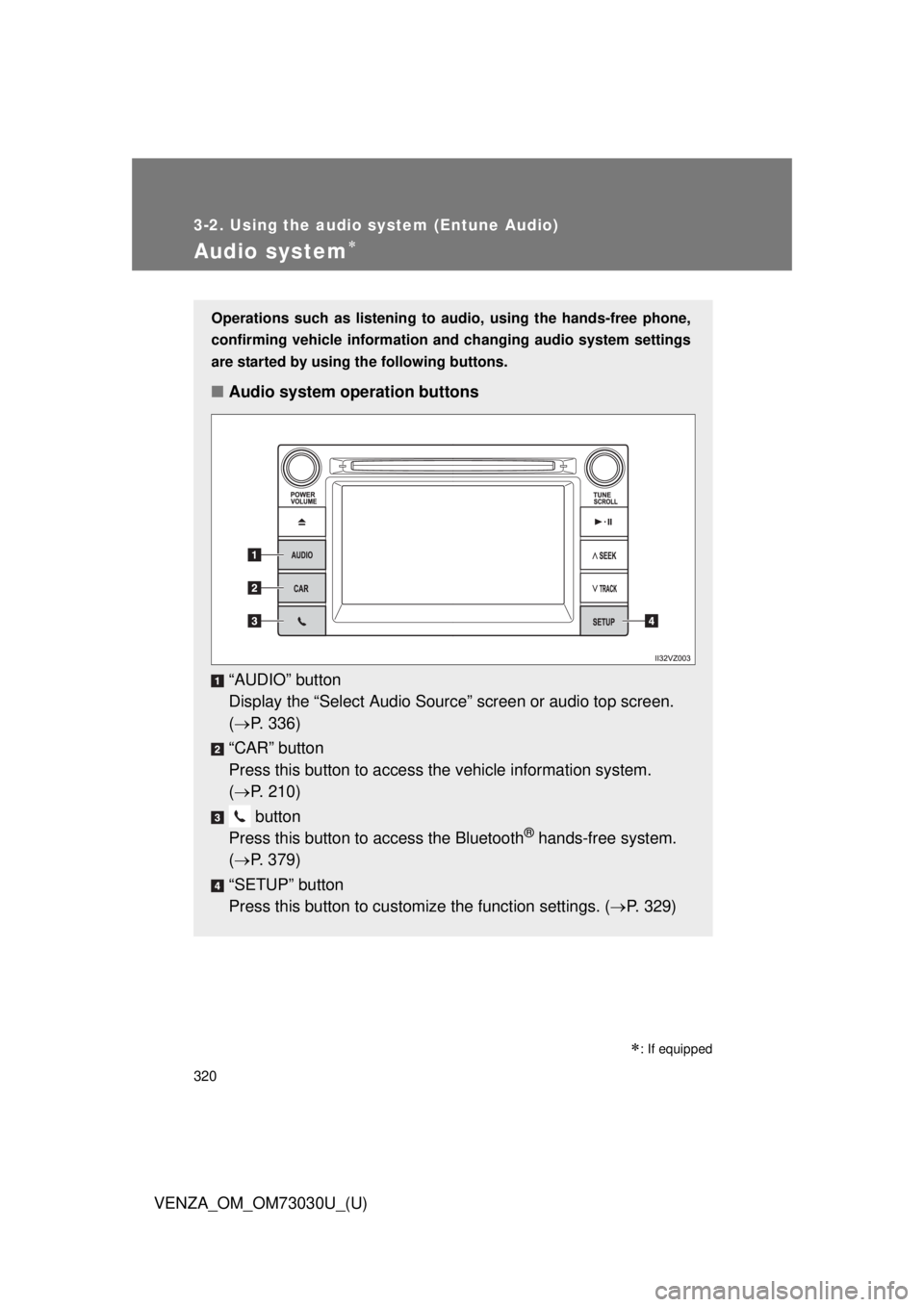
are started by using the following buttons.
■ Audio system operation buttons
“AUDIO” button
Display the “Select A udio Source” screen or audio top screen.
( P. 336)
“CAR” button
Press this button to access the vehicle information system.
( P. 210)
button
Press this button to access the Bluetooth ®
hands-free system.
( P. 379)
“SETUP” button
Press this button to customize the function settings. ( P. 329)
Page 321 of 688
3213-2. Using the audio system (Entune Audio)
VENZA_OM_OM73030U_(U) 3
Interior features Operating the touch screen
By touching the screen with your finger, you can control the audio
system, etc.
■ Touch
Quickly touch and release once.
● Changing and selecting various settings
■ Drag
* Touch the screen with your finger, and move the screen to the
desired position.
● Scrolling the lists
■ Flick
* Touch the screen with your finger and quickly move the screen by
flicking your finger.
● Moving the list screen (list screen limit)
* : The above operations may not be performed on all screens.
■ When using the touch screen
● If the screen is cold, the display may be dark, or the system may seem to
be operating slightly slower than normal.
● The screen may seem dark and hard to see when viewed through sun-
glasses. Change your angle of viewing, adjust the display on the “Display
Settings” screen ( P. 333) or remove your sunglasses.
Page 323 of 688
3233-2. Using the audio system (Entune Audio)
VENZA_OM_OM73030U_(U) 3
Interior features
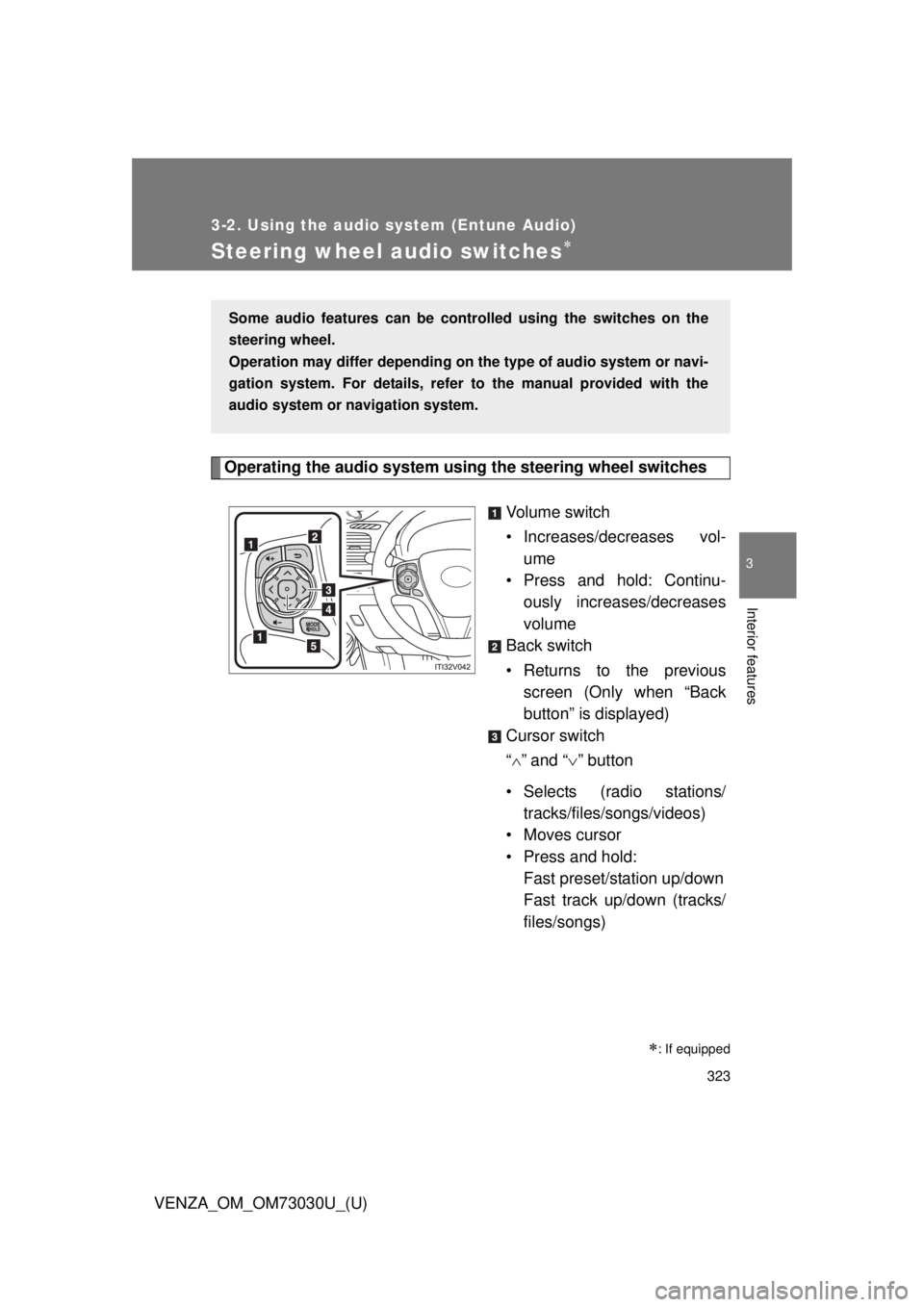
Steering wheel audio switches
Operating the audio system using the steering wheel switches
Volume switch
• Increases/dec reases vol-
ume
• Press and hold: Continu-
ously increases/decreases
volume
Back switch
• Returns to the previous
screen (Only when “Back
button” is displayed)
Cursor switch
“ ” and “ ” button
• Selects (radio stations/
tracks/files/songs/videos)
• Moves cursor
• Press and hold:
Fast preset/station up/down
Fast track up/down (tracks/
files/songs)
: If equippedSome audio features can be contro lled using the switches on the
steering wheel.
Operation may differ depending on th e type of audio system or navi-
gation system. For details, refer to the manual provided with the
audio system or navigation system.