Refuel TOYOTA VENZA HYBRID 2021 Owners Manual (in English)
[x] Cancel search | Manufacturer: TOYOTA, Model Year: 2021, Model line: VENZA HYBRID, Model: TOYOTA VENZA HYBRID 2021Pages: 548, PDF Size: 18.43 MB
Page 1 of 548

VENZA_OM_OM48K18U_(U)
1
2
3
4
5
6
7
8
9
Pictorial indexSearch by illustration
For safety
and securityMake sure to read through them
(Main topics: Child seat, theft deterrent system)
Vehicle status
information and
indicatorsReading driving-related information
(Main topics: Meters, multi-information display)
Before driving
Opening and closing the doors and windows,
adjustment before driving
(Main topics: Keys, doors, seats)
Driving
Operations and advice which are necessary for
driving
(Main topics: Starting hybrid system, refueling)
Interior featuresUsage of the interior features
(Main topics: Air conditioner, storage features)
Maintenance
and careCaring for your vehicle and maintenance
procedures
(Main topics: Interior and exterior, light bulbs)
When trouble
arisesWhat to do in case of malfunction and emergency
(Main topics: 12-volt battery discharge, flat tire)
Vehicle
specificationsVehicle specifications, customizable features
(Main topics: Fuel, oil, tire inflation pressure)
For ownersReporting safety defects for U.S. owners, and seat
belt, SRS airbag and headlight aim instructions for
Canadian owners
IndexSearch by symptom
Search alphabetically
Page 3 of 548
3TABLE OF CONTENTS
1
2
3
4
5
6
7
8
9
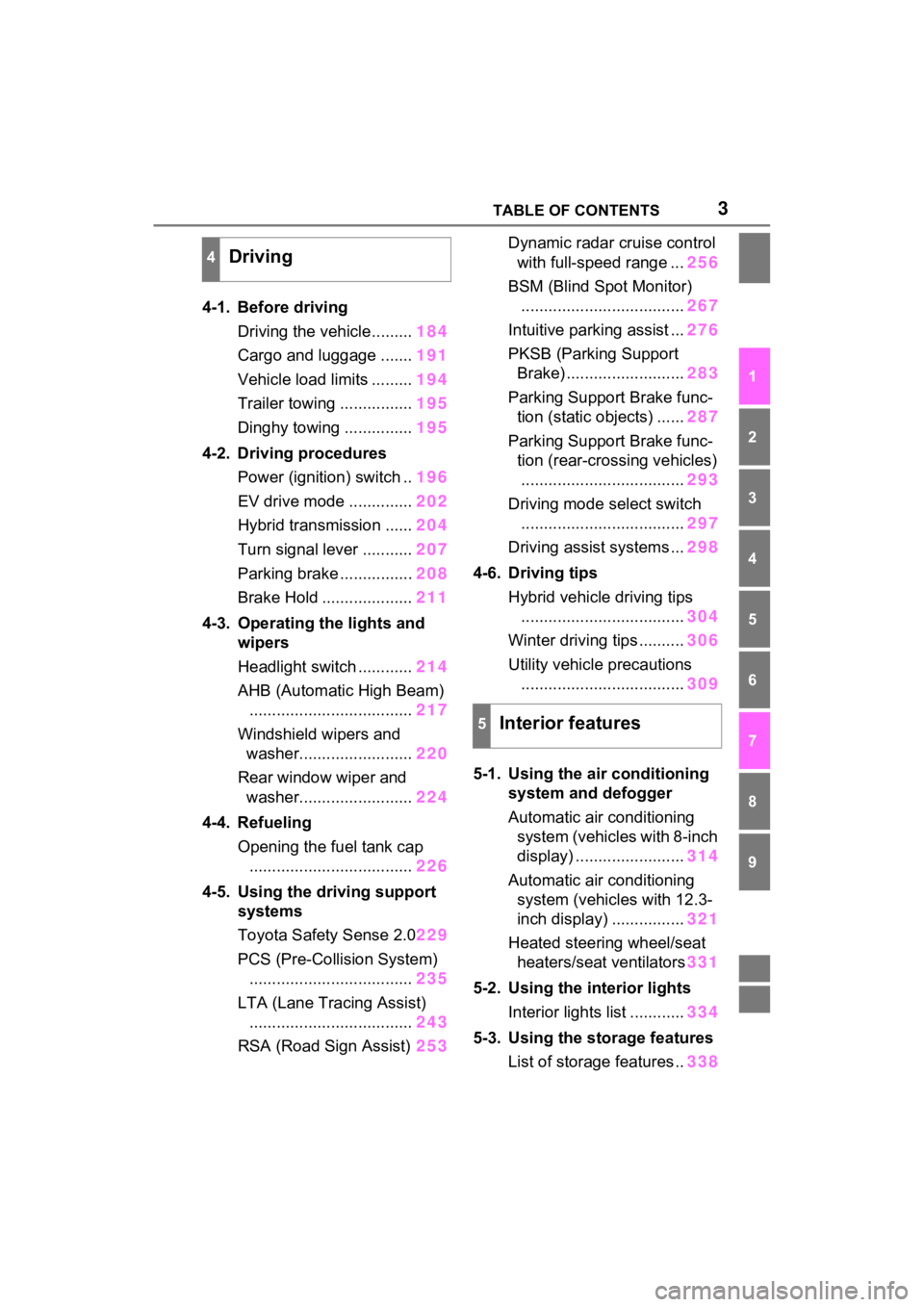
4-1. Before drivingDriving the vehicle......... 184
Cargo and luggage ....... 191
Vehicle load limits ......... 194
Trailer towing ................ 195
Dinghy towing ............... 195
4-2. Driving procedures Power (ignition) switch .. 196
EV drive mode .............. 202
Hybrid transmission ...... 204
Turn signal lever ........... 207
Parking brake ................ 208
Brake Hold .................... 211
4-3. Operating the lights and wipers
Headlight switch ............ 214
AHB (Automatic High Beam) .................................... 217
Windshield wipers and washer......................... 220
Rear window wiper and washer......................... 224
4-4. Refueling Opening the fuel tank cap.................................... 226
4-5. Using the driving support
systems
Toyota Safety Sense 2.0 229
PCS (Pre-Collision System) .................................... 235
LTA (Lane Tracing Assist) .................................... 243
RSA (Road Sign Assist) 253Dynamic radar cruise control
with full-speed range ... 256
BSM (Blind Spot Monitor) .................................... 267
Intuitive parking assist ... 276
PKSB (Parking Support Brake) .......................... 283
Parking Support Brake func- tion (static objects) ...... 287
Parking Support Brake func- tion (rear-crossing vehicles).................................... 293
Driving mode s elect switch
.................................... 297
Driving assist systems ... 298
4-6. Driving tips Hybrid vehicle driving tips.................................... 304
Winter driving tips .......... 306
Utility vehicle precautions .................................... 309
5-1. Using the ai r conditioning
system and defogger
Automatic air conditioning system (vehicles with 8-inch
display) ........................ 314
Automatic air conditioning system (vehicl es with 12.3-
inch display) ................ 321
Heated steering wheel/seat heater s/sea
t ventilators331
5-2. Using the interior lights Interior lights list ............ 334
5-3. Using the storage features List of storage features .. 338
4Driving
5Interior features
Page 15 of 548
15Pictorial index
To prevent freezing (windshield wiper de-icer)*...........P.319, 329
Precautions against car wash
(Rain-sensing windshield wipers)
*.......................................P.371
Replacing the wiper insert .................................... ...............P.421
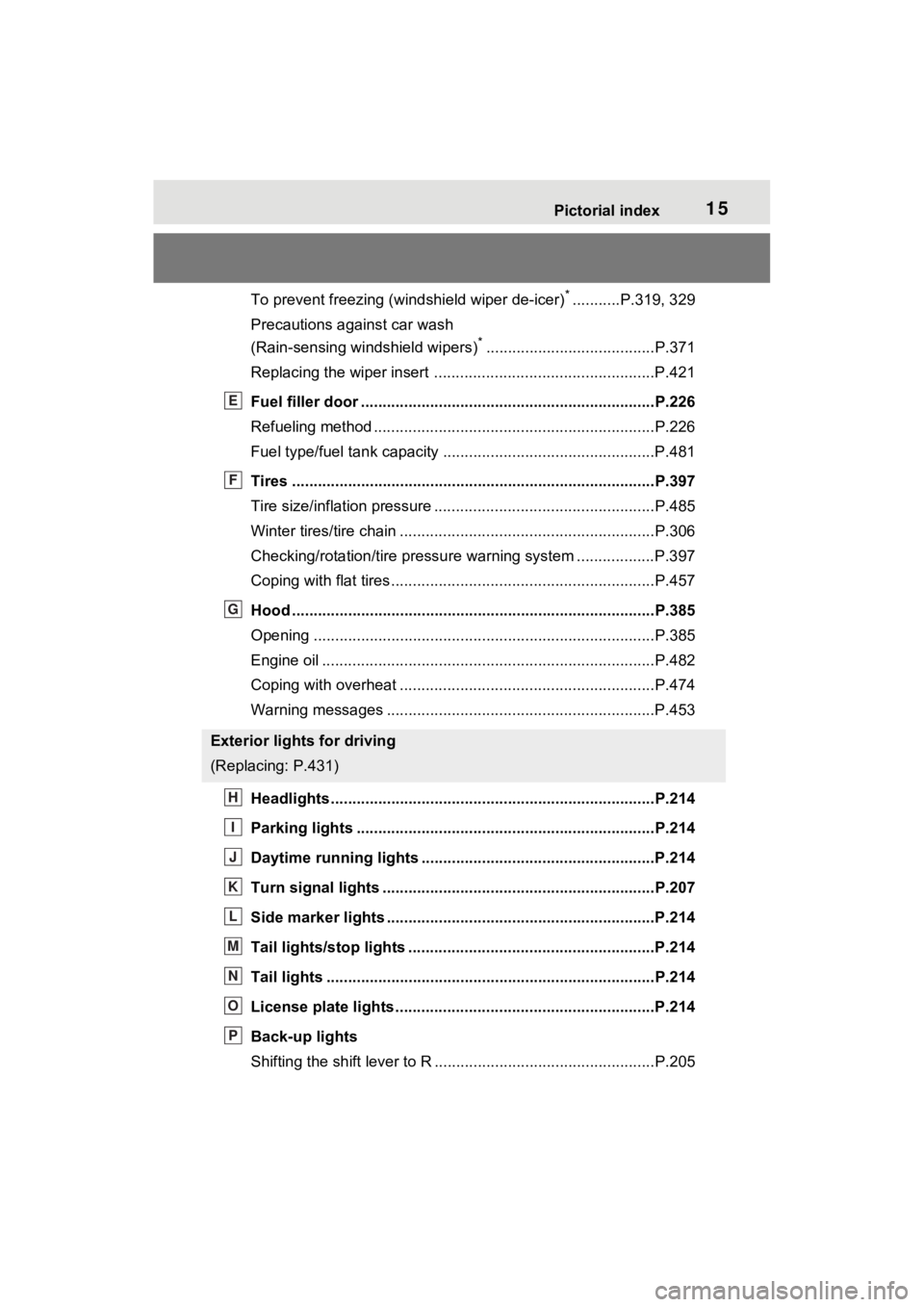
Fuel filler door ............................................... .....................P.226
Refueling method ............................................... ..................P.226
Fuel type/fuel tan k capacity .................................................P.481
Tires ....................................................................................P.397
Tire size/inflation pressure ................................... ................P.485
Winter tires/tire chain ........................................ ...................P.306
Checking/rotation/tire pressur e warning system ..................P.397
Coping with flat tires......................................... ....................P.457
Hood ....................................................................................P.385
Opening ........................................................ .......................P.385
Engine oil ..................................................... ........................P.482
Coping with overheat ........................................... ................P.474
Warning messages ..............................................................P.453
Headlights..................................................... ......................P.214
Parking lights .....................................................................P.214
Daytime running lights .. ....................................................P.214
Turn signal lights ...............................................................P.207
Side marker lights ............................................. .................P.214
Tail lights/stop lights ........................................ .................P.214
Tail lights .................................................... ........................P.214
License plate lights........................................... .................P.214
Back-up lights
Shifting the shift lever to R ...................................................P.205
Exterior lights for driving
(Replacing: P.431)
E
F
G
H
I
J
K
L
M
N
O
P
Page 74 of 548
731-4. Hybrid system
1
For safety and security
■Running out of fuel
When the vehicle has run out of fuel
and the hybrid system cannot be
started, refuel th e vehicle with at
least enough gasoline to make the
low fuel level warning light ( P.448)
go off. If there is only a small
amount of fuel, th e hybrid system
may not be able to start. (The stan-
dard amount of fuel is about 2.3 gal.
[8.8 L, 1.9 Imp.gal.], when the vehi-
cle is on a level surface. This value
may vary when the vehicle is on a
slope. Add extra fuel when the vehi-
cle is inclined.)
■Electromagnetic waves
●High voltage parts and cables on
hybrid vehicles incorporate elec-
tromagnetic shielding, and there-
fore emit approximately the same
amount of electromagnetic waves
as conventional gasoline pow-
ered vehicles or home electronic
appliances.
●Your vehicle may cause sound
interference in so me third party-
produced radio parts.
■Hybrid battery (tr action battery)
The hybrid battery (traction battery)
has a limited service life. The lifes-
pan of the hybrid battery (traction
battery) can change in accordance
with driving style and driving condi-
tions.
■Starting the hybrid system in an
extremely cold environment
When the hybrid battery (traction
battery) is extremely cold (below
approximately -22°F [-30°C]) under
the influence of t he outside tem-
perature, it may no t be possible to
start the hybrid system. In this case,
try to start the hyb rid system again
after the temperature of the hybrid
battery increases due to the outside
temperature increase etc.
WARNING
■High voltage precautions
This vehicle has high voltage DC
and AC systems as well as a 12-
volt system. DC and AC high volt-
age is very dangerous and can
cause severe burns and electric
shock that may result in death or
serious injury.
●Never touch, disassemble,
remove or replace the high volt-
age parts, cables or their con-
nectors.
●The hybrid system will become
hot after starting as the system
uses high voltage. Be careful of
both the high voltage and the
high temperature, and always
obey the warning labels
attached to the vehicle.
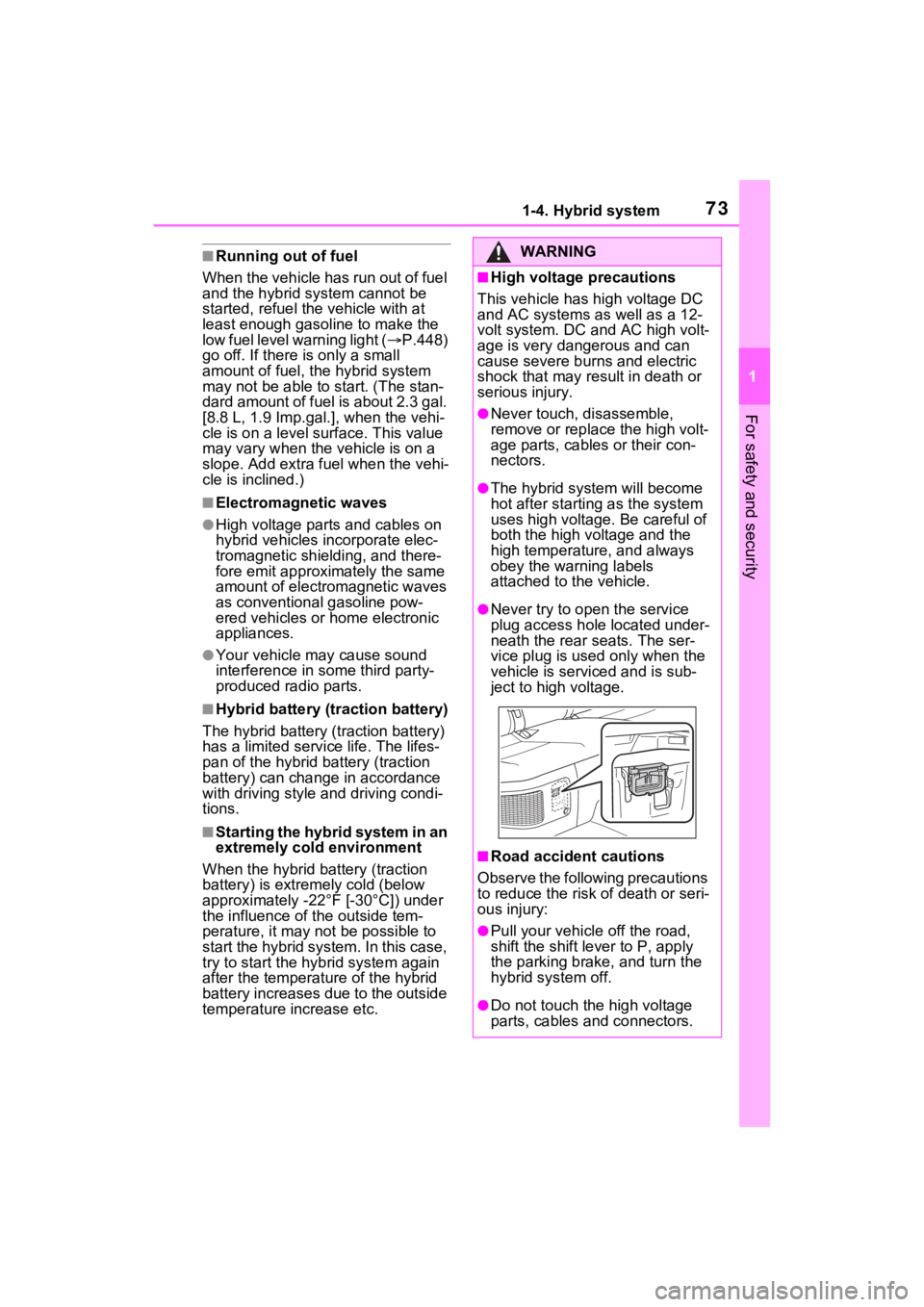
●Never try to open the service
plug access hole located under-
neath the rear seats. The ser-
vice plug is used only when the
vehicle is serviced and is sub-
ject to high voltage.
■Road accident cautions
Observe the following precautions
to reduce the risk of death or seri-
ous injury:
●Pull your vehicle off the road,
shift the shift le ver to P, apply
the parking brake, and turn the
hybrid system off.
●Do not touch the high voltage
parts, cables and connectors.
Page 98 of 548
972-1. Instrument cluster
2
Vehicle status information and indicators
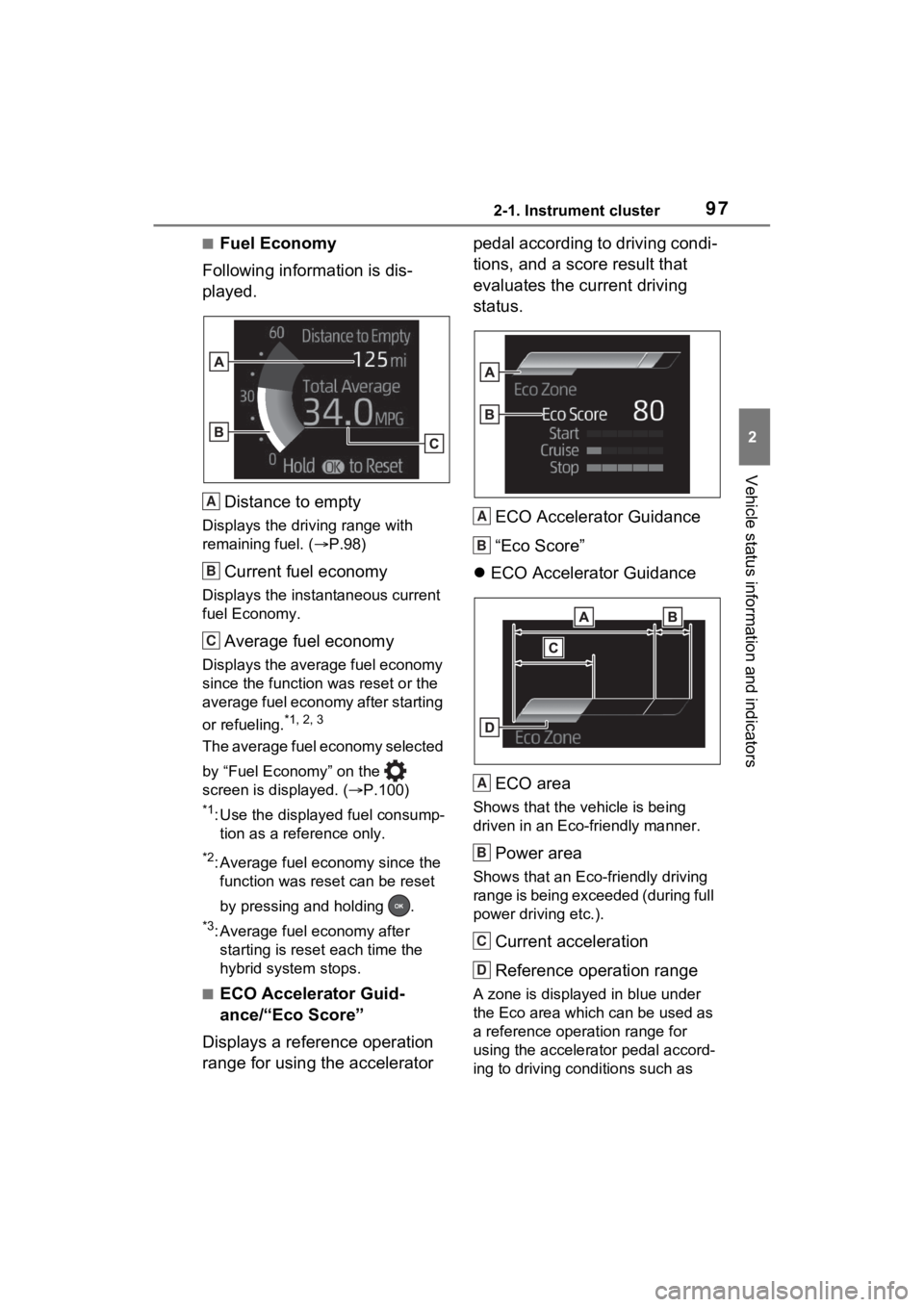
■Fuel Economy
Following information is dis-
played.
Distance to empty
Displays the driving range with
remaining fuel. ( P.98)
Current fuel economy
Displays the instantaneous current
fuel Economy.
Average fuel economy
Displays the average fuel economy
since the function was reset or the
average fuel economy after starting
or refueling.
*1, 2, 3
The average fuel economy selected
by “Fuel Economy” on the
screen is displayed. ( P.100)
*1: Use the displayed fuel consump-
tion as a reference only.
*2: Average fuel economy since the function was reset can be reset
by pressing and holding .
*3: Average fuel economy after starting is reset each time the
hybrid system stops.
■ECO Accelerator Guid-
ance/“Eco Score”
Displays a reference operation
range for using the accelerator pedal according to driving condi-
tions, and a score result that
evaluates the current driving
status.
ECO Accelerator Guidance
“Eco Score”
ECO Accelerator Guidance
ECO area
Shows that the vehicle is being
driven in an Eco-friendly manner.
Power area
Shows that an Eco-friendly driving
range is being exceeded (during full
power driving etc.).
Current acceleration
Reference operation range
A zone is displayed in blue under
the Eco area which can be used as
a reference operation range for
using the accelerator pedal accord-
ing to driving conditions such as
A
B
C
A
B
A
B
C
D
Page 100 of 548
992-1. Instrument cluster
2
Vehicle status information and indicators
The percent traveled using only
electric motor power after starting
the hybrid system is displayed.
*
*
: It is reset each time the hybrid system stops.
■Distance to empty
●This distance is computed based
on your averag e fuel consump-
tion. As a result, the actual dis-
tance that can be driven may
differ from tha t displayed.
●When only a small amount of fuel
is added to the tank, the display
may not be updated. When refuel-
ing, turn the power switch off. If
the vehicle is refueled without
turning the power switch off, the
display may not be updated.
●When “Refuel” is displayed, the
remaining fuel amount is low and
the distance that can be driven
with the remaining fuel cannot be
calculated.
Refuel immediately.
■ECO Accelerator Guid-
ance/“Eco Score” will not oper-
ate when
The ECO Accelerator Guid-
ance/“Eco Score” will not operate in
the following situations:
●The Hybrid System Indicator is not
operating.
●The vehicle is being driven using
the dynamic radar cruise control
with full-speed range.
■Driving support system
information display
Select to display the operational
status of the following systems:
LTA (Lane Tracing Assist) (
P.243)
RSA (Road Sign Assist) (if
equipped) ( P.253)
Dynamic radar cruise control
with full-speed range
( P.256)
Select to enable selection of an
audio source or track on the dis-
play.
■Drive information
2 items that are selected using
the “Drive Info Items” setting
(average speed, distance and
total time) can be displayed ver-
tically.
The displayed information
changes according to the “Drive
Info Type” setting (since the sys-
tem was started or between
resets). ( P.100)
Use the displayed information as a
reference only.
Following items will be displayed.
“Trip”
• “Average Speed”: Displays the
average vehicle speed since
hybrid system start
*
• “Distance”: Displ ays the distance
driven since hybrid system start
*
• “Total Time”: Displays the
Driving support system
information display
Audio system-linked dis-
play
Vehicle information dis-
play
Page 108 of 548
1072-1. Instrument cluster
2
Vehicle status information and indicators
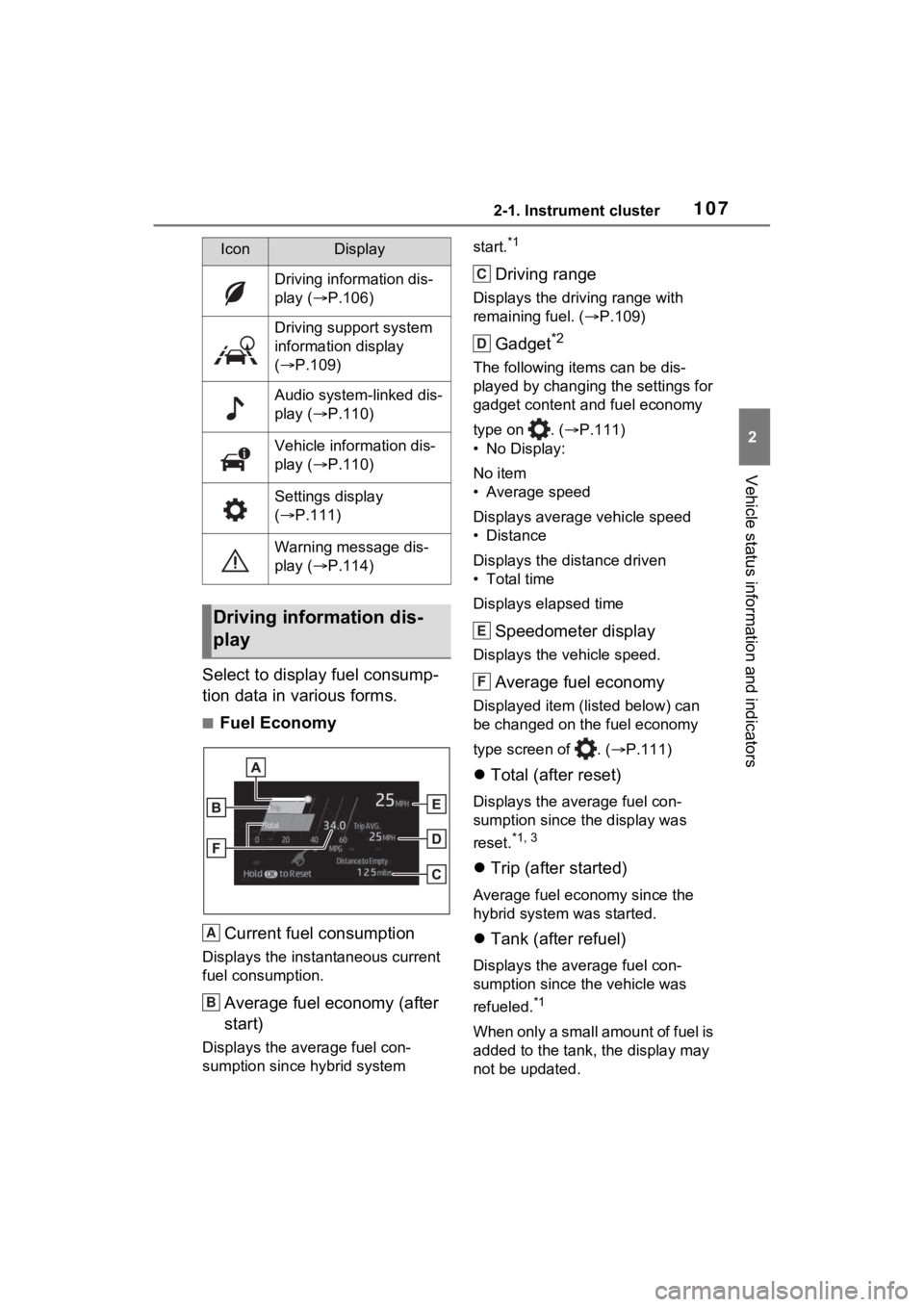
Select to display fuel consump-
tion data in various forms.
■Fuel EconomyCurrent fuel consumption
Displays the instantaneous current
fuel consumption.
Average fuel economy (after
start)
Displays the average fuel con-
sumption since hybrid system start.
*1
Driving range
Displays the driving range with
remaining fuel. (
P.109)
Gadget*2
The following items can be dis-
played by changing the settings for
gadget content and fuel economy
type on . ( P.111)
• No Display:
No item
• Average speed
Displays average vehicle speed
• Distance
Displays the distance driven
• Total time
Displays elapsed time
Speedometer display
Displays the vehicle speed.
Average fuel economy
Displayed item (listed below) can
be changed on the fuel economy
type screen of . ( P.111)
Total (after reset)
Displays the average fuel con-
sumption since t he display was
reset.
*1, 3
Trip (after started)
Average fuel economy since the
hybrid system was started.
Tank (after refuel)
Displays the average fuel con-
sumption since the vehicle was
refueled.
*1
When only a small amount of fuel is
added to the tank, the display may
not be updated.
IconDisplay
Driving information dis-
play ( P.106)
Driving support system
information display
( P.109)
Audio system-linked dis-
play ( P.110)
Vehicle information dis-
play ( P.110)
Settings display
( P.111)
Warning message dis-
play ( P.114)
Driving information dis-
play
A
B
C
D
E
F
Page 109 of 548
1082-1. Instrument cluster
When refueling, turn the power
switch off. If the vehicle is refueled
without turning the power switch
off, the display may not be updated.
*1: Use the displayed fuel consump-
tion as a reference only.
*2: The default setting is no display.
*3: This display can be reset by
pressing and holding while it
is displayed.
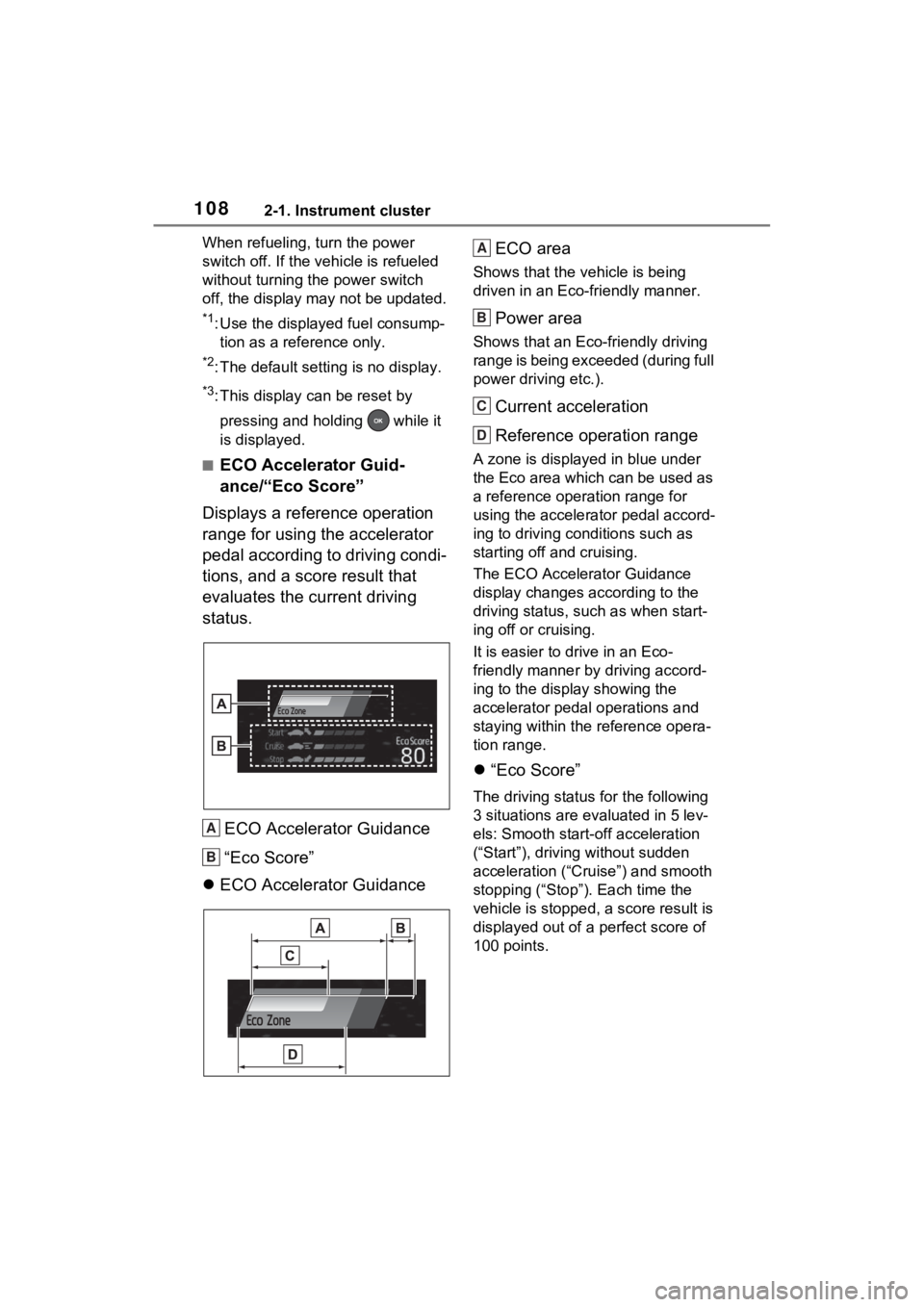
■ECO Accelerator Guid-
ance/“Eco Score”
Displays a reference operation
range for using the accelerator
pedal according to driving condi-
tions, and a score result that
evaluates the current driving
status.
ECO Accelerator Guidance
“Eco Score”
ECO Accelerator Guidance ECO area
Shows that the vehicle is being
driven in an Eco-friendly manner.
Power area
Shows that an Eco-friendly driving
range is being exceeded (during full
power driving etc.).
Current acceleration
Reference operation range
A zone is displayed
in blue under
the Eco area which can be used as
a reference operation range for
using the accelerator pedal accord-
ing to driving conditions such as
starting off and cruising.
The ECO Accelerator Guidance
display changes according to the
driving status, such as when start-
ing off or cruising.
It is easier to drive in an Eco-
friendly manner by driving accord-
ing to the display showing the
accelerator pedal operations and
staying within the reference opera-
tion range.
“Eco Score”
The driving status for the following
3 situations are evaluated in 5 lev-
els: Smooth start-off acceleration
(“Start”), driving without sudden
acceleration (“Cruise”) and smooth
stopping (“Stop”). Each time the
vehicle is stopped, a score result is
displayed out of a perfect score of
100 points.
A
B
A
B
C
D
Page 111 of 548
1102-1. Instrument cluster
tion. As a result, the actual dis-
tance that can be driven may
differ from that displayed.
●When only a small amount of fuel
is added to the tank, the display
may not be updated. When refuel-
ing, turn the power switch off. If
the vehicle is refueled without
turning the power switch off, the
display may not be updated.
●When “Refuel” is displayed, the
remaining fuel amount is low and
the distance that can be driven
with the remaining fuel cannot be
calculated.
Refuel immediately.
■ECO Accelerator Guid-
ance/“Eco Score” will not oper-
ate when
The ECO Accelerator Guid-
ance/“Eco Score” will not operate in
the following situations:
●The Hybrid System Indicator is not
operating.
●The vehicle is being driven using
the dynamic radar cruise control
with full-speed range.
■Driving support system
information display
Select to display the operational
status of the following systems:
LTA (Lane Tracing Assist)
( P.243)
RSA (Road Sign Assist) (if
equipped) ( P.253)
Dynamic radar cruise control
with full-speed range
( P.256) Select to display the following
navigation system-linked infor-
mation.
Route guidance to destination
Compass display (heading-up
display)
■Route guidance to destination
display
When the route guidance to destina-
tion display is enabled on the head-
up display (if equipped), it will not be
displayed on the multi-information
display. ( P.117)
Select to enable selection of an
audio source or track on the dis-
play.
■Energy monitor
P.120
■Tire pressure
P.400
Driving support system
information display
Navigation system-linked
display (if equipped)
Audio system-linked dis-
play
Vehicle information dis-
play
Page 184 of 548
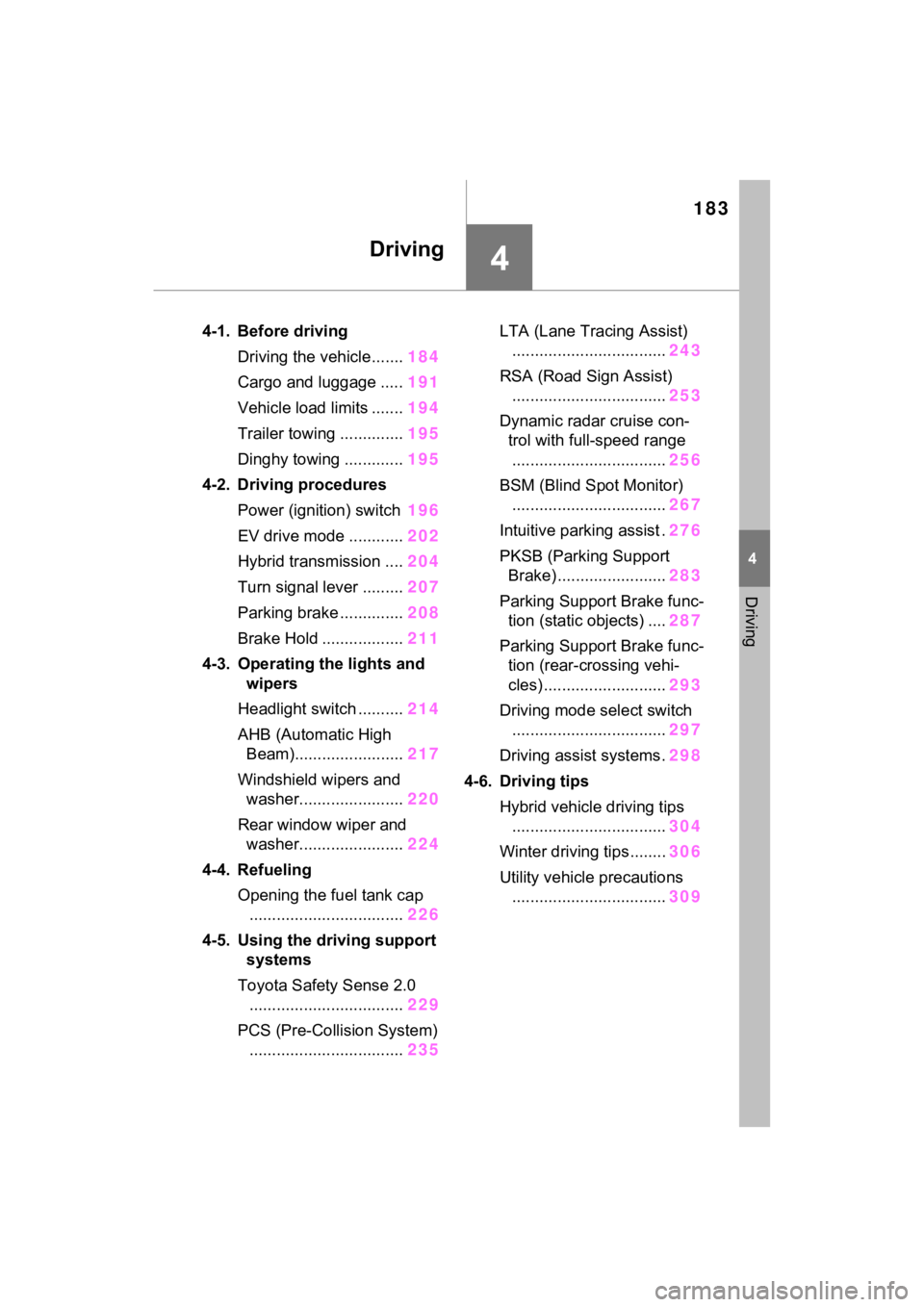
183
4
4
Driving
Driving
4-1. Before drivingDriving the vehicle....... 184
Cargo and luggage ..... 191
Vehicle load limits ....... 194
Trailer towing .............. 195
Dinghy towing ............. 195
4-2. Driving procedures Power (ignition) switch 196
EV drive mode ............ 202
Hybrid transmission .... 204
Turn signal lever ......... 207
Parking brake .............. 208
Brake Hold .................. 211
4-3. Operating the lights and wipers
Headlight switch .......... 214
AHB (Automatic High Beam)........................ 217
Windshield wipers and washer....................... 220
Rear window wiper and washer....................... 224
4-4. Refueling Opening the fuel tank cap.................................. 226
4-5. Using the driving support
systems
Toyota Safety Sense 2.0 .................................. 229
PCS (Pre-Collision System) .................................. 235LTA (Lane Tracing Assist)
.................................. 243
RSA (Road Sign Assist) .................................. 253
Dynamic radar cruise con- trol with full-speed range
.................................. 256
BSM (Blind Spot Monitor) .................................. 267
Intuitive parking assist . 276
PKSB (Parking Support Brake) ........................ 283
Parking Support Brake func- tion (static objects) .... 287
Parking Support Brake func- tion (rear-crossing vehi-
cles) ........................... 293
Driving mode select switch .................................. 297
Driving assist systems. 298
4-6. Driving tips Hybrid vehicle driving tips.................................. 304
Winter driving tips........ 306
Utility vehicle precautions .................................. 309