park assist TOYOTA VENZA HYBRID 2021 Owners Manual (in English)
[x] Cancel search | Manufacturer: TOYOTA, Model Year: 2021, Model line: VENZA HYBRID, Model: TOYOTA VENZA HYBRID 2021Pages: 548, PDF Size: 18.43 MB
Page 3 of 548
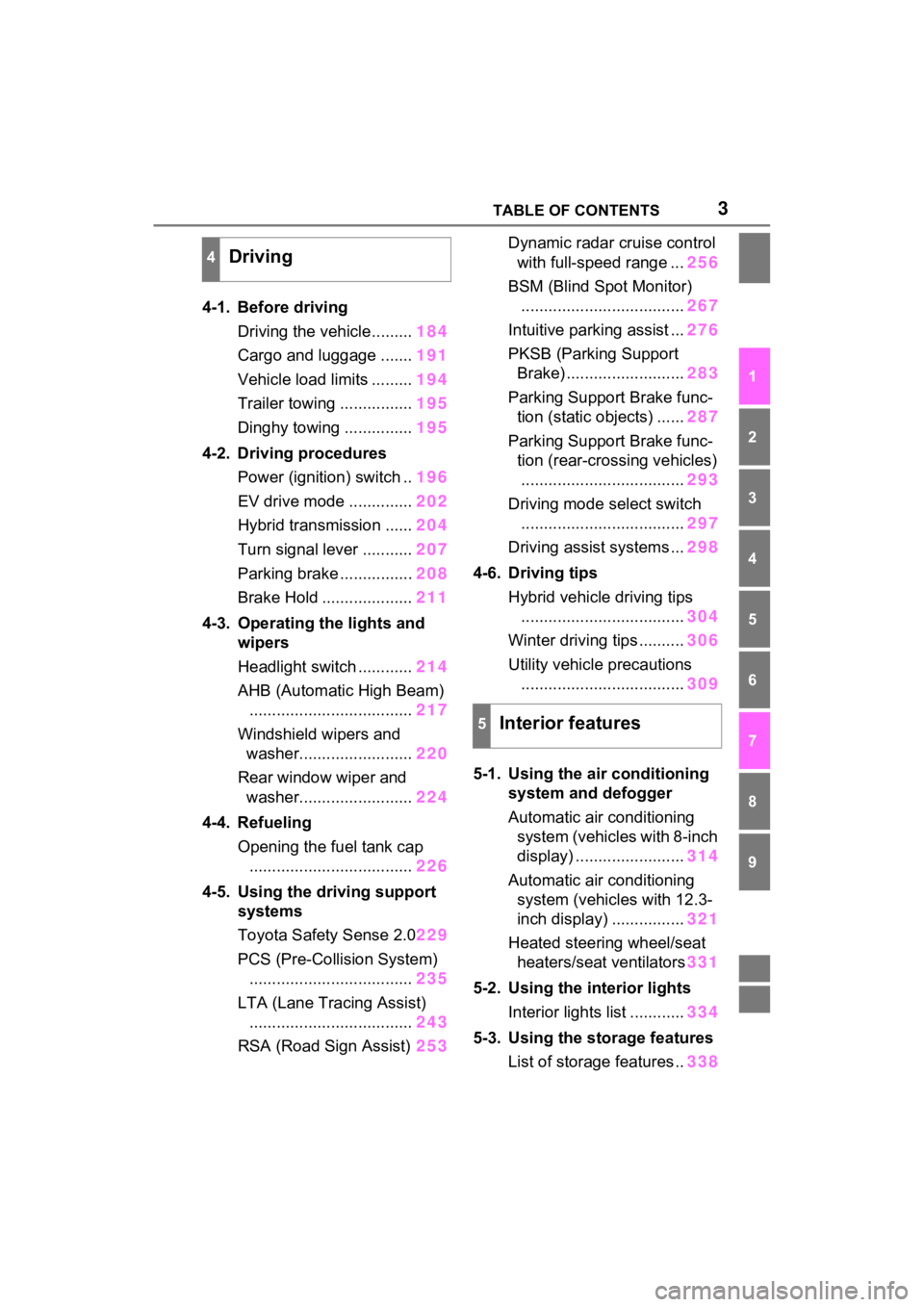
3TABLE OF CONTENTS
1
2
3
4
5
6
7
8
9
4-1. Before drivingDriving the vehicle......... 184
Cargo and luggage ....... 191
Vehicle load limits ......... 194
Trailer towing ................ 195
Dinghy towing ............... 195
4-2. Driving procedures Power (ignition) switch .. 196
EV drive mode .............. 202
Hybrid transmission ...... 204
Turn signal lever ........... 207
Parking brake ................ 208
Brake Hold .................... 211
4-3. Operating the lights and wipers
Headlight switch ............ 214
AHB (Automatic High Beam) .................................... 217
Windshield wipers and washer......................... 220
Rear window wiper and washer......................... 224
4-4. Refueling Opening the fuel tank cap.................................... 226
4-5. Using the driving support
systems
Toyota Safety Sense 2.0 229
PCS (Pre-Collision System) .................................... 235
LTA (Lane Tracing Assist) .................................... 243
RSA (Road Sign Assist) 253Dynamic radar cruise control
with full-speed range ... 256
BSM (Blind Spot Monitor) .................................... 267
Intuitive parking assist ... 276
PKSB (Parking Support Brake) .......................... 283
Parking Support Brake func- tion (static objects) ...... 287
Parking Support Brake func- tion (rear-crossing vehicles).................................... 293
Driving mode s elect switch
.................................... 297
Driving assist systems ... 298
4-6. Driving tips Hybrid vehicle driving tips.................................... 304
Winter driving tips .......... 306
Utility vehicle precautions .................................... 309
5-1. Using the ai r conditioning
system and defogger
Automatic air conditioning system (vehicles with 8-inch
display) ........................ 314
Automatic air conditioning system (vehicl es with 12.3-
inch display) ................ 321
Heated steering wheel/seat heater s/sea
t ventilators331
5-2. Using the interior lights Interior lights list ............ 334
5-3. Using the storage features List of storage features .. 338
4Driving
5Interior features
Page 84 of 548
832-1. Instrument cluster
2
Vehicle status information and indicators
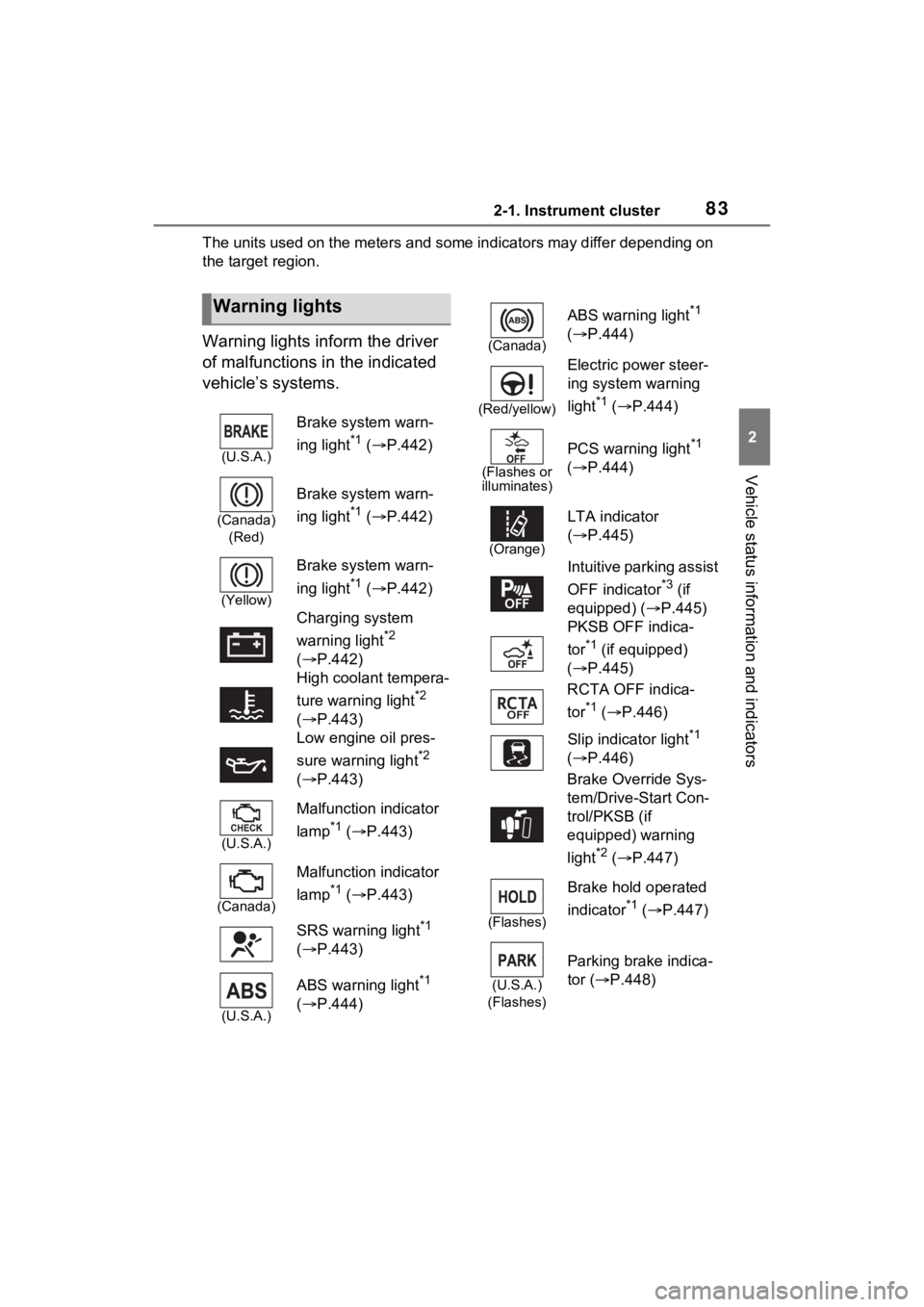
The units used on the meters and some indicators may differ depending on
the target region.
Warning lights inform the driver
of malfunctions in the indicated
vehicle’s systems.
Warning lights
(U.S.A.)
Brake system warn-
ing light
*1 ( P.442)
(Canada)
(Red)
Brake system warn-
ing light
*1 ( P.442)
(Yellow)
Brake system warn-
ing light
*1 ( P.442)
Charging system
warning light
*2
( P.442)
High coolant tempera-
ture warning light
*2
( P.443)
Low engine oil pres-
sure warning light
*2
( P.443)
(U.S.A.)
Malfunction indicator
lamp
*1 ( P.443)
(Canada)
Malfunction indicator
lamp
*1 ( P.443)
SRS warning light
*1
( P.443)
(U.S.A.)
ABS warning light*1
( P.444)
(Canada)
ABS warning light*1
( P.444)
(Red/yellow)
Electric power steer-
ing system warning
light
*1 ( P.444)
(Flashes or
illuminates)
PCS warning light*1
( P.444)
(Orange)
LTA indicator
( P.445)
Intuitive parking assist
OFF indicator
*3 (if
equipped) ( P.445)
PKSB OFF indica-
tor
*1 (if equipped)
( P.445)
RCTA OFF indica-
tor
*1 ( P.446)
Slip indicator light
*1
( P.446)
Brake Override Sys-
tem/Drive-Start Con-
trol/PKSB (if
equipped) warning
light
*2 ( P.447)
(Flashes)
Brake hold operated
indicator
*1 ( P.447)
(U.S.A.)
(Flashes)
Parking brake indica-
tor ( P.448)
Page 85 of 548
842-1. Instrument cluster
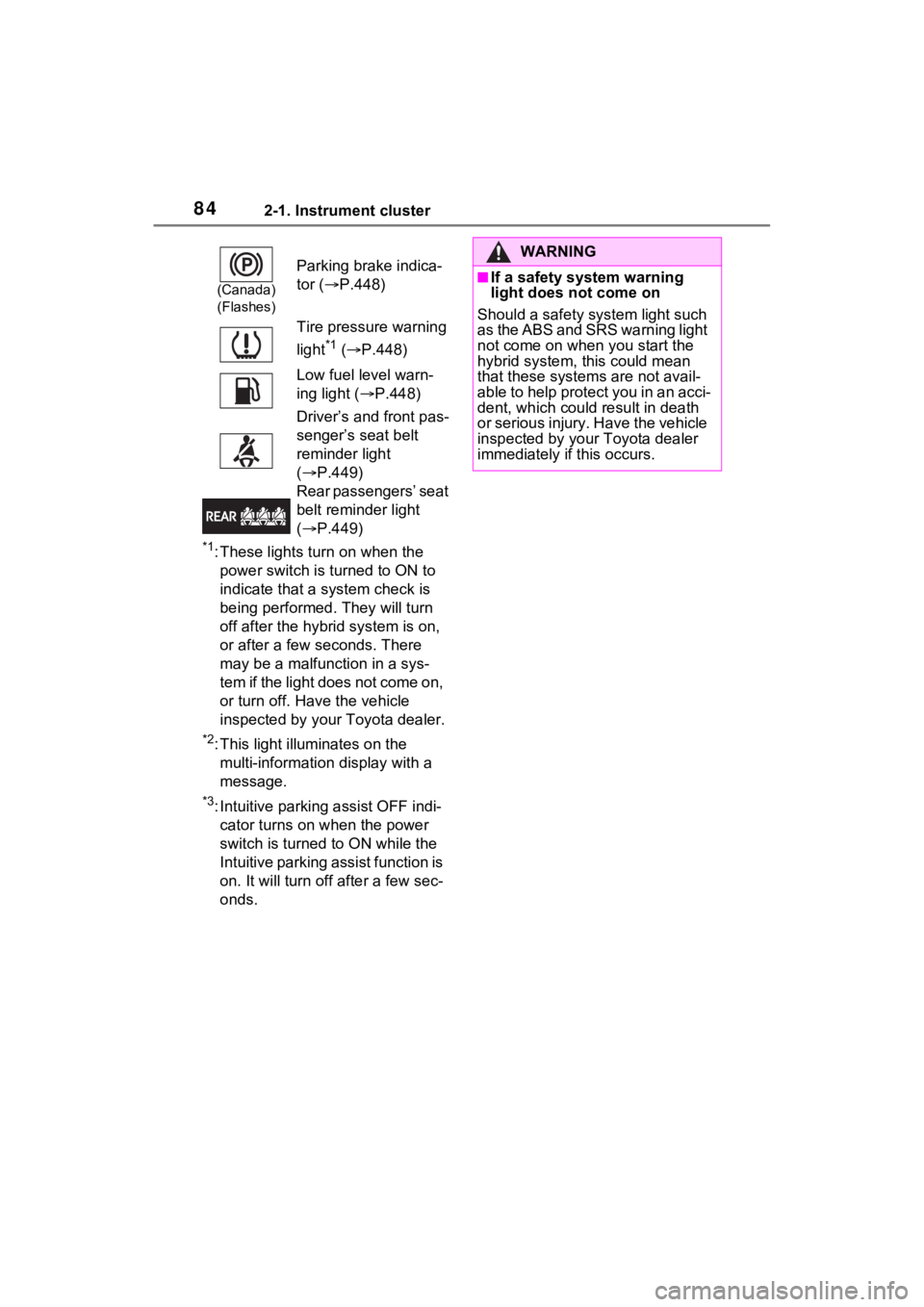
*1: These lights turn on when the power switch is turned to ON to
indicate that a system check is
being performed. They will turn
off after the hybr id system is on,
or after a few seconds. There
may be a malfunction in a sys-
tem if the light does not come on,
or turn off. Have the vehicle
inspected by your Toyota dealer.
*2: This light illuminates on the multi-informatio n display with a
message.
*3: Intuitive parking assist OFF indi- cator turns on when the power
switch is turned to ON while the
Intuitive parking assist function is
on. It will turn off after a few sec-
onds.
(Canada)
(Flashes)
Parking brake indica-
tor ( P.448)
Tire pressure warning
light
*1 ( P.448)
Low fuel level warn-
ing light ( P.448)
Driver’s and front pas-
senger’s seat belt
reminder light
( P.449)
Rear passengers’ seat
belt reminder light
( P.449)
WARNING
■If a safety system warning
light does not come on
Should a safety system light such
as the ABS and SRS warning light
not come on when you start the
hybrid system, this could mean
that these system s are not avail-
able to help protect you in an acci-
dent, which could result in death
or serious injury. Have the vehicle
inspected by your Toyota dealer
immediately if this occurs.
Page 86 of 548
852-1. Instrument cluster
2
Vehicle status information and indicators
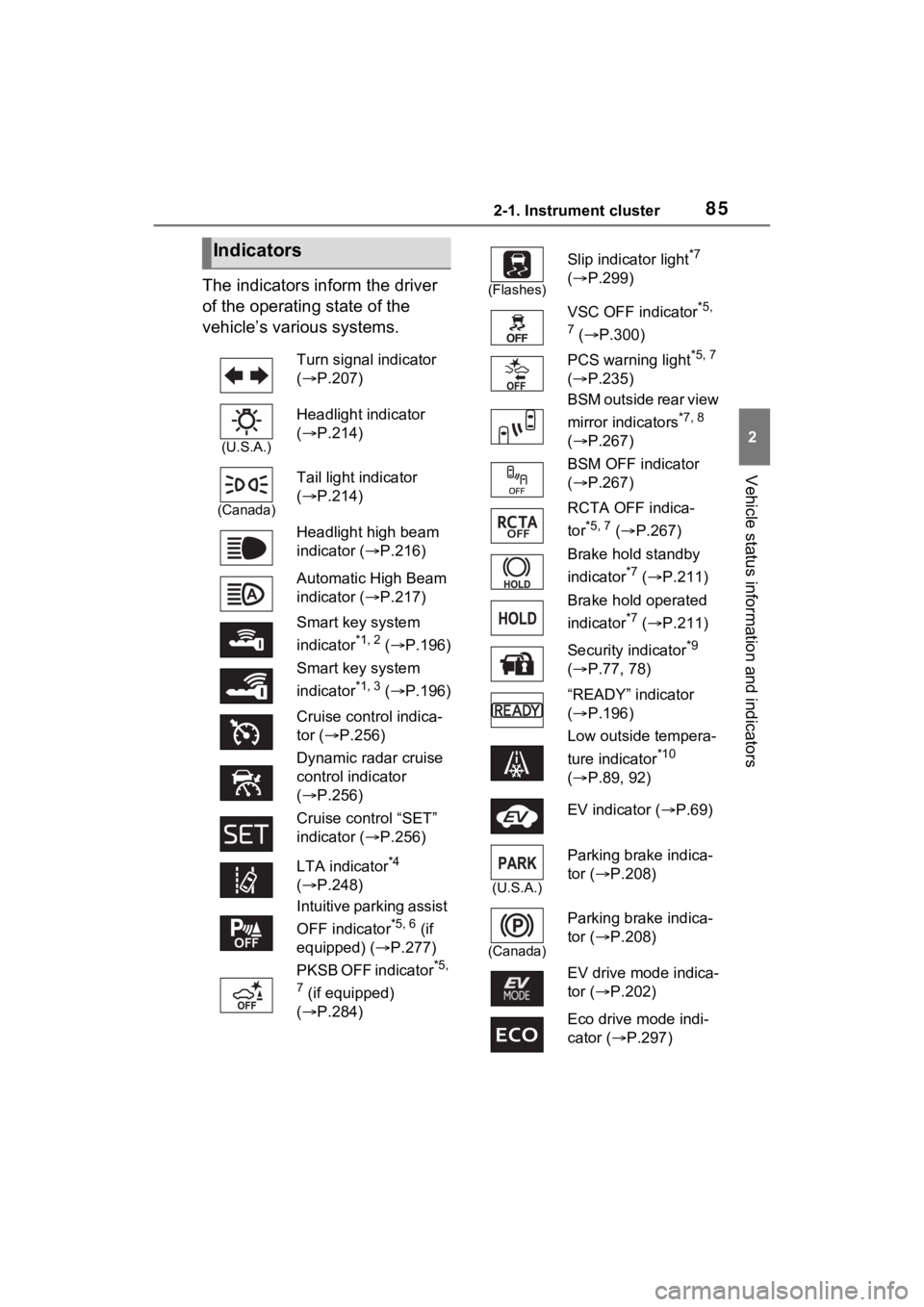
The indicators inform the driver
of the operating state of the
vehicle’s various systems.
Indicators
Turn signal indicator
( P.207)
(U.S.A.)
Headlight indicator
( P.214)
(Canada)
Tail light indicator
( P.214)
Headlight high beam
indicator ( P.216)
Automatic High Beam
indicator ( P.217)
Smart key system
indicator
*1, 2 ( P.196)
Smart key system
indicator
*1, 3 ( P.196)
Cruise control indica-
tor ( P.256)
Dynamic radar cruise
control indicator
( P.256)
Cruise control “SET”
indicator ( P.256)
LTA indicator
*4
( P.248)
Intuitive parking assist
OFF indicator
*5, 6 (if
equipped) ( P.277)
PKSB OFF indicator
*5,
7
(if equipped)
( P.284)
(Flashes)
Slip indicator light*7
( P.299)
VSC OFF indicator
*5,
7
( P.300)
PCS warning light
*5, 7
( P.235)
BSM outside rear view
mirror indicators
*7, 8
( P.267)
BSM OFF indicator
( P.267)
RCTA OFF indica-
tor
*5, 7 ( P.267)
Brake hold standby
indicator
*7 ( P.211)
Brake hold operated
indicator
*7 ( P.211)
Security indicator
*9
( P.77, 78)
“READY” indicator
( P.196)
Low outside tempera-
ture indicator
*10
( P.89, 92)
EV indicator ( P.69)
(U.S.A.)
Parking brake indica-
tor ( P.208)
(Canada)
Parking brake indica-
tor (P.208)
EV drive mode indica-
tor ( P.202)
Eco drive mode indi-
cator (P.297)
Page 87 of 548

862-1. Instrument cluster
*1: This light illuminates on the multi-informatio n display with a
message.
*2: Vehicles with 4.2-inch display
*3: Vehicles with 7-inch display
*4: Depending on the operating con- ditions of the system, the color
and state (illuminated/blinking) of
the indicator change.
*5: The light comes on when the system is turned off.
*6: Intuitive parking assist OFF indi-cator turns on when the power
switch is turned to ON while the
Intuitive parking assist function is
on. It will turn off after a few sec-
onds.
*7: These lights turn on when the power switch is turned to ON to
indicate that a system check is
being performed. They will turn
off after the hybr id system is on,
or after a few seconds. There
may be a malfunction in a sys-
tem if the lights do not turn on, or
turn off. Have the vehicle
inspected by your Toyota dealer.
*8: This light illumi nates on the out-
side rear view mirrors.
*9: This light illuminates on the over- head console panel.
*10: When the outside temperature is approximately 37°F (3°C) or
lower, the indicator will flash for
approximately 10 seconds, then
stay on.
■BSM (Blind Spot Monitor) out-
side rear view mirror indicators
In order to confirm operation, the
BSM outside rear view mirror indica-
tors illuminate in the turning the
BSM function/RCTA function on
( P.268).
If the system is functioning correctly,
the BSM outside rear view mirror
indicators will turn off after a few
seconds.
If the BSM outside rear view mirror
indicators do not illuminate or do not
turn off, there may be a malfunction
in the system. If this occurs, have
the vehicle inspected by your
Toyota dealer.
Sport mode indicator
(
P.297)
“AIR BAG ON/OFF”
indicator
*7, 9 ( P.41)
Page 102 of 548
1012-1. Instrument cluster
2
Vehicle status information and indicators
screen is displayed, select the
setting or desired value (time,
etc.) with .
3 After changing the settings,
press of the meter control
switches.
■ LTA (Lane Tracing
Assist) ( P.243)
Select to set up the following
items.
“Lane Center”
Select to enable/disable the lane
centering function.
“Steering Assist”
Select to enable/d isable steering
wheel assistance.
“Alert”
Select to set the alert type.
“Sensitivity”
Select to set the warning sensitivity.
“Sway Warning”
Select to enable/disable the vehicle
sway warning.
“Sway Sensitivity”
Select to set the vehicle sway warn-
ing sensitivity.
■ PCS (Pre-Collision Sys-
tem) ( P.235)
Select to set up the following
items.
PCS on/off
Select to enable/disable the pre-
collision system.
“Sensitivity”
Select to change the pre-collision
warning timing.
■ BSM (Blind Spot Moni-
tor) ( P.267)
Select to set up the following
items.
BSM (Blind Spot Monitor)
on/off
Select to enable/disable the BSM
system.
“Brightness”
Select to switch the brightness of
the outside rear view mirror indica-
tors. ( P.267)
“Sensitivity”
Select to change the alert timing for
an approaching vehicle.
■ (Intuitive parking
assist) (if equipped)
( P.276)
Select to set up the following
items.
Intuitive parking assist on/off
Select to enable/d isable the Intui-
tive parking assist.
“Volume”
Select to set the volume of the
buzzer which sounds when the
Intuitive parking assist is operated.
■RCTA (Rear Cross Traffic
Alert) ( P.267)
RCTA (Rear Cross Traffic
Alert) on/off
Select to enable /disable the RCTA
system.
“Volume”
Page 103 of 548
1022-1. Instrument cluster
Select to change the RCTA buzzer
volume.
■ PKSB (Parking Sup-
port Brake System) (if
equipped) ( P.283)
Select to enable/disable the
Parking Support Brake function.
■ RSA (Road Sign
Assist) (if equipped)
( P.253)
Select to set up the following
items.
Road Sign Assist on/off
Select to enable/disable the RSA
(Road Sign Assist).
“Notification method”
Select to change e ach notification
method used to notify the driver
when the system recognizes
excess speed and no-entry sign.
“Notification Level”
Select to change e ach notification
level used to notify the driver when
the system recognizes a speed limit
sign.
■Vehicle Settings
PBD (Power Back Door)
( P.137)
Select to set up the following items.
• System settings
Select to enable/disable the power
back door system.
• “Hands Free” (if equipped)
Select to enable/disable the Hands
Free Power Back Door operation.
• “Opening Adjustment” Select the open position when
power back door is fully open.
•“Volume”
Select to set the volume of the
buzzer which sounds when the
power back door system operates.
“TPWS setting” (Tire Pres-
sure Warning System)
( P.400)
• “Setting Pressure”
Select to initialize the tire pressure
warning system.
• “Identify Wheel”
Select to register the ID codes of
the tire pressure se nsors to the tire
pressure warning system.
• “Setting Unit”
Select to change the units of mea-
sure displayed.
Rear Seat Reminder
( P.133)
Select to enable/disable the rear
seat reminder function.
“Scheduled Maintenance”
( P.378)
Select to reset the scheduled main-
tenance information (message indi-
cating maintenance is required and
distance until the next mainte-
nance) after all ma intenance is per-
formed.
Oil Maintenance
Select to reset the Oil maintenance.
( P.390)
■ Settings
“Language”
Select to change the language on
Page 112 of 548
1112-1. Instrument cluster
2
Vehicle status information and indicators
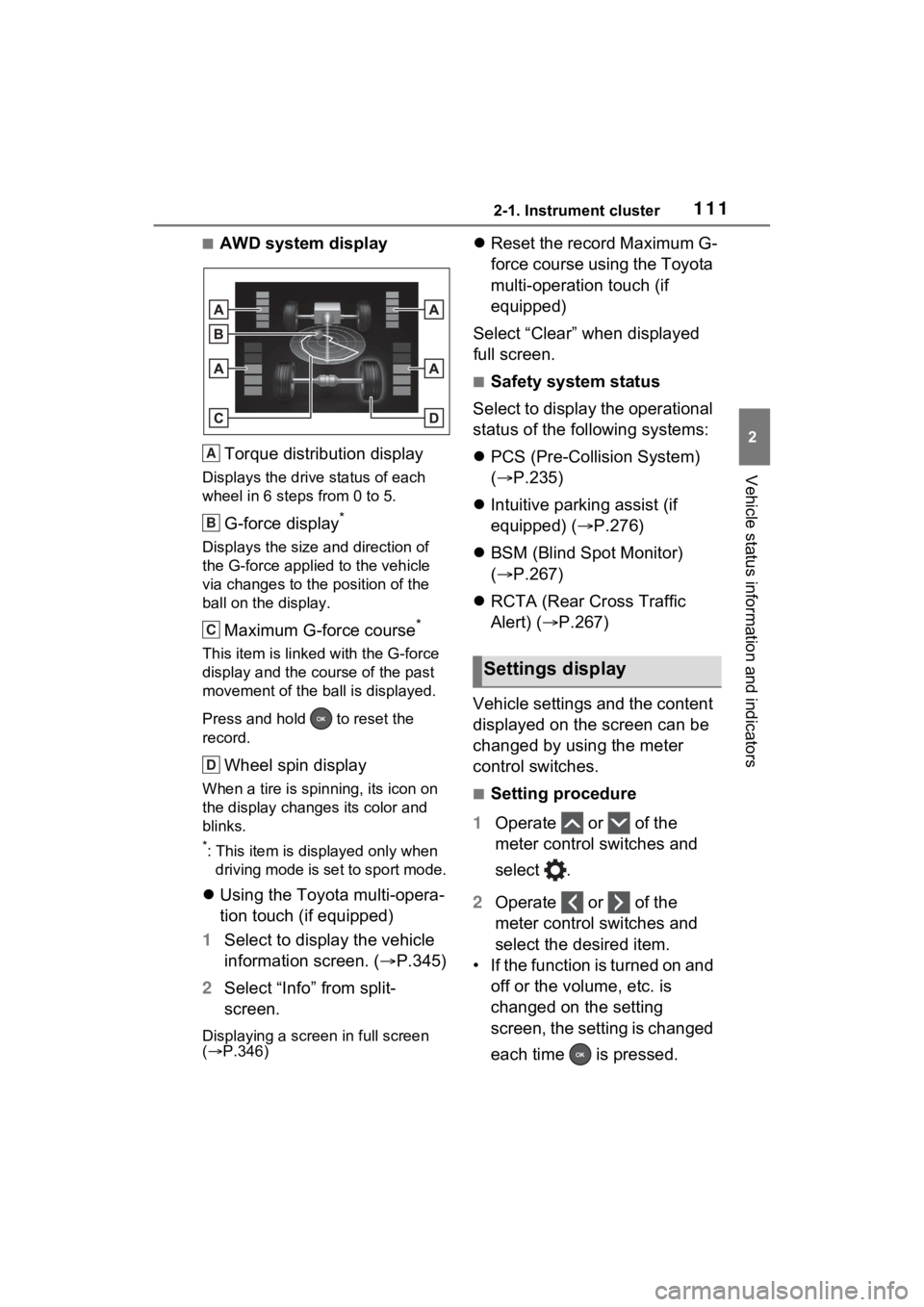
■AWD system displayTorque distribution display
Displays the drive status of each
wheel in 6 steps from 0 to 5.
G-force display*
Displays the size and direction of
the G-force applie d to the vehicle
via changes to the position of the
ball on the display.
Maximum G-force course*
This item is linke d with the G-force
display and the course of the past
movement of the ball is displayed.
Press and hold to reset the
record.
Wheel spin display
When a tire is spin ning, its icon on
the display change s its color and
blinks.
*: This item is displayed only when driving mode is set to sport mode.
Using the Toyota multi-opera-
tion touch (if equipped)
1 Select to display the vehicle
information screen. ( P.345)
2 Select “Info” from split-
screen.
Displaying a screen in full screen
( P.346)
Reset the record Maximum G-
force course using the Toyota
multi-operation touch (if
equipped)
Select “Clear” when displayed
full screen.
■Safety system status
Select to display the operational
status of the following systems:
PCS (Pre-Colli sion System)
( P.235)
Intuitive parking assist (if
equipped) ( P.276)
BSM (Blind Spot Monitor)
( P.267)
RCTA (Rear Cross Traffic
Alert) ( P.267)
Vehicle settings and the content
displayed on the screen can be
changed by using the meter
control switches.
■Setting procedure
1 Operate or of the
meter control switches and
select .
2 Operate or of the
meter control switches and
select the desired item.
• If the function is turned on and off or the volume, etc. is
changed on the setting
screen, the setting is changed
each time is pressed.
A
B
C
D
Settings display
Page 113 of 548
1122-1. Instrument cluster
• For functions that allow oper-ation contents, display con-
tents, etc., of function to be
selected, the setting screen is
displayed by pressing and
holding . When the setting
screen is displayed, select the
setting or desired value (time,
etc.) with .
3 After changing the settings,
press of the meter control
switches.
■ LTA (Lane Tracing
Assist) ( P.243)
Select to set up the following
items.
“Lane Center”
Select to enable/disable the lane
centering function.
“Steering Assist”
Select to enable/d isable steering
wheel assistance.
“Alert”
Select to set the alert type.
“Sensitivity”
Select to set the warning sensitivity.
“Sway Warning”
Select to enable/disable the vehicle
sway warning.
“Sway Sensitivity”
Select to set the vehicle sway warn-
ing sensitivity.
■ PCS (Pre-Collision Sys-
tem) ( P.235)
Select to set up the following items.
PCS on/off
Select to enable/disable the pre-
collision system.
“Sensitivity”
Select to change the pre-collision
warning timing.
■ BSM (Blind Spot Moni-
tor) ( P.267)
Select to set up the following
items.
BSM (Blind Spot Monitor)
on/off
Select to enable/disable the BSM
system.
“Brightness”
Select to switch the brightness of
the outside rear view mirror indica-
tors. ( P.267)
“Sensitivity”
Select to change the alert timing for
an approaching vehicle.
■ (Intuitive parking
assist) (if equipped)
( P.276)
Select to set up the following
items.
Intuitive parking assist on/off
Select to enable/d isable the Intui-
tive parking assist.
“Volume”
Select to set the volume of the
buzzer which sounds when the
Intuitive parking assist is operated.
Page 114 of 548
1132-1. Instrument cluster
2
Vehicle status information and indicators
■RCTA (Rear Cross Traffic
Alert) (P.267)
RCTA (Rear Cross Traffic
Alert) on/off
Select to enable/disable the RCTA
system.
“Volume”
Select to change t he RCTA buzzer
volume.
■ PKSB (Parking Sup-
port Brake System) (if
equipped) ( P.283)
Select to enable/disable the
Parking Support Brake function.
■HUD (Head-up display) (if
equipped) ( P.117)
Select to change the head-up
display setting.
■ RSA (Road Sign
Assist) (if equipped)
( P.253)
Select to set up the following
items.
Road Sign Assist on/off
Select to enable/disable the RSA
(Road Sign Assist).
“Notification method”
Select to change e ach notification
method used to notify the driver
when the system recognizes
excess speed and no-entry sign.
“Notification Level”
Select to change e ach notification
level used to notify the driver when
the system recognizes a speed limit
sign.
■ Vehicle Settings
PBD (Power Back Door)
( P.137)
Select to set up t he following items.
• System settings
Select to enable/disable the power
back door system.
• “Hands Free” (if equipped)
Select to enable/d isable the Hands
Free Power Back Door operation.
• “Opening Adjustment”
Select the open position when
power back door is fully open.
•“Volume”
Select to set the volume of the
buzzer which sounds when the
power back door system operates.
“TPWS setting” (Tire Pres-
sure Warning System)
( P.400)
• “Setting Pressure”
Select to initialize the tire pressure
warning system.
• “Identify Wheel”
Select to register the ID codes of
the tire pressure se nsors to the tire
pressure warning system.
• “Setting Unit”
Select to change the units of mea-
sure displayed.
Rear Seat Reminder
( P.133)
Select to enable/disable the rear
seat reminder function.
“Scheduled Maintenance”
( P.378)