DRIVING TOYOTA VERSO 2011 Owners Manual
[x] Cancel search | Manufacturer: TOYOTA, Model Year: 2011, Model line: VERSO, Model: TOYOTA VERSO 2011Pages: 588, PDF Size: 31.32 MB
Page 287 of 588
287 2-5. Driving information
2
When driving
VERSO_WE_OM64524E
Break-in schedule
Toyota recommends that vehicles fitted with new power train components
should not be used for towing trailers for the first 800 km (500 miles).
Maintenance
Maintenance must be performed more frequently when using the vehicle
for towing due to the greater weight burden placed on the vehicle com-
pared to normal driving.
Retighten all bolts securing the hitching ball and bracket after towing for
approximately 1000 km (600 miles).
Safety checks before towing
Check that the maximum load limit for the towing hitch/bracket and hitch
ball is not exceeded. Bear in mind that the coupling weight of the trailer
will add to the load exerted on the vehicle. Also make sure that the total
load exerted on the vehicle is within the range of the weight limits.
(P. 283)
Ensure that the trailer load is secure.
Supplementary outside rear view mirrors should be added to the vehicle
if the traffic behind cannot be clearly seen with standard mirrors. Adjust
the extending arms of these mirrors on both sides of the vehicle so that
they always provide maximum visibility of the road behind.
NOTICE
When the rear bumper strengthening material is aluminum
Ensure the steel bracket part does not come directly in contact with that
area.
When steel and aluminum come into contact, there is a reaction similar to
corrosion, which will weaken the section concerned which may result in
damage. Apply a rust inhibitor to parts that will come in contact when attach-
ing a steel bracket.
Page 288 of 588
288 2-5. Driving information
VERSO_WE_OM64524E
Guidance
Your vehicle will handle differently when towing a trailer. In order to
avoid accident, death or serious injury, keep the following in mind
when towing:
Checking connections between trailer and lights
Stop the vehicle and check the operation of the connection
between the trailer and lights after driving for a brief period as well
as before setting off.
Practicing driving with a coupled trailer
Get the feel for turning, stopping and reversing with the trailer
coupled by practicing in an area with no or light traffic.
When reversing with a coupled trailer, hold the section of the
steering wheel nearest to you and rotate clockwise to turn the
trailer left or counterclockwise to turn right. Always rotate gradu-
ally to prevent steering error. Have someone guide you when
reversing to lessen the risk of accident.
Increasing vehicle-to-vehicle distance
At a speed of 10 km/h (6 mph), the distance to the vehicle running
ahead of you should be equivalent to or greater than the combined
length of your vehicle and trailer. Avoid sudden braking that may
cause skidding. Otherwise, the vehicle may spin out of control.
This is especially true when driving on wet or slippery road sur-
faces.
Sudden acceleration/steering input/cornering
Executing sharp turns when towing may result in the trailer collid-
ing with your vehicle. Decelerate well in advance when approach-
ing turns and take them slowly and carefully to avoid sudden
braking.
Page 289 of 588
289 2-5. Driving information
2
When driving
VERSO_WE_OM64524EImportant points regarding turning
The wheels of the trailer will travel closer to the inside of the curve
than the wheels of the vehicle. To make allowance for this, take the
turns wider than you would normally.
Important points regarding stability
Vehicle movement resulting from uneven road surfaces and strong
crosswinds will affect handling. The vehicle may also be rocked by
passing buses or large trucks. Frequently check behind when mov-
ing alongside such vehicles. As soon as such vehicle movement
occurs, immediately start to decelerate smoothly by slowly apply-
ing the brakes. Always steer the vehicle straight ahead while brak-
ing.
Passing other vehicles
Consider the total combined length of your vehicle and trailer, and
ensure that the vehicle-to-vehicle distance is sufficient before exe-
cuting lane changes.
Transmission information
Multidrive or automatic transmission
To maintain engine braking efficiency, when using engine brak-
ing, do not use the transmission in “D”. Transmission shift gear
position must be in “4” in the 7-speed sport sequential shiftmatic
mode (Multidrive) (P. 196) or the “M” mode (automatic trans-
mission) (P. 202).
Manual transmission
To maintain engine braking efficiency, when using engine brak-
ing, do not use the transmission in “5” and “6” gear. (P. 209)
When towing a trailer, check the engine coolant temperature
warning light (Red)
Towing a loaded trailer up a long steep incline in temperatures
exceeding 30C (85F) may result in the engine overheating.
If the engine coolant temperature warning light (Red) flashes or
comes on, turn the air conditioning off immediately and stop the
vehicle in a safe place. (P. 532)
Page 290 of 588
290 2-5. Driving information
VERSO_WE_OM64524EWhen parking the vehicle
Always place wheel chocks under the wheels of both the vehicle
and trailer. Firmly set the parking brake and shift the shift lever to
“P” for Multidrive or automatic transmission, and “1” or “R” for man-
ual transmission.
CAUTION
Follow all the instructions described in this section.
Failure to do so could cause an accident resulting in death or serious injury.
Trailer towing precautions
When towing, make sure that none of the weight limits are exceeded.
(P. 283)
Before descending hills or long declines
Reduce speed and downshift. However, never downshift suddenly while
descending steep or long downhill grades.
Operation of the brake
Do not hold the brake pedal depressed often or for long periods.
Doing so may result in the brake overheating or reduce braking effects.
To avoid accident or injury
Do not exceed 100 km/h (62 mph) or the posted towing speed limit, which-
ever is lower.
Do not use cruise control when you are towing.
Vehicles with a compact spare tire: Do not tow if your vehicle has a com-
pact spare tire installed.
Page 296 of 588
296 3-1. Using the air conditioning system and defogger
VERSO_WE_OM64524E
Using the system in recirculated air mode
The windows will fog up more easily if the recirculated air mode is used for
an extended period.
When outside air temperature approaches 0°C (32°F) (vehicles with air
conditioning system)
The air conditioning system may not operate even when is pressed.
When is selected for the air outlets used
For your driving comfort, air flowing to the feet may be warmer than air flow-
ing to the upper body depending on the position of the temperature adjust-
ment dial.
Air conditioning odors
During use, various odors from inside and outside the vehicle may enter
into and accumulate in the air conditioning system. This may then cause
odor to be emitted from the vents.
To reduce potential odors from occurring:
It is recommended that the air conditioning system be set to outside air
mode prior to turning the vehicle off.
CAUTION
To prevent the windshield from fogging up
Do not set the air outlet selection dial to during cool air operation in
extremely humid weather. The difference between the temperature of the
outside air and that of the windshield can cause the outer surface of the
windshield to fog up, blocking your vision.
NOTICE
To prevent battery discharge
Do not leave the air conditioning system on longer than necessary when the
engine is stopped.
Page 302 of 588
302 3-1. Using the air conditioning system and defogger
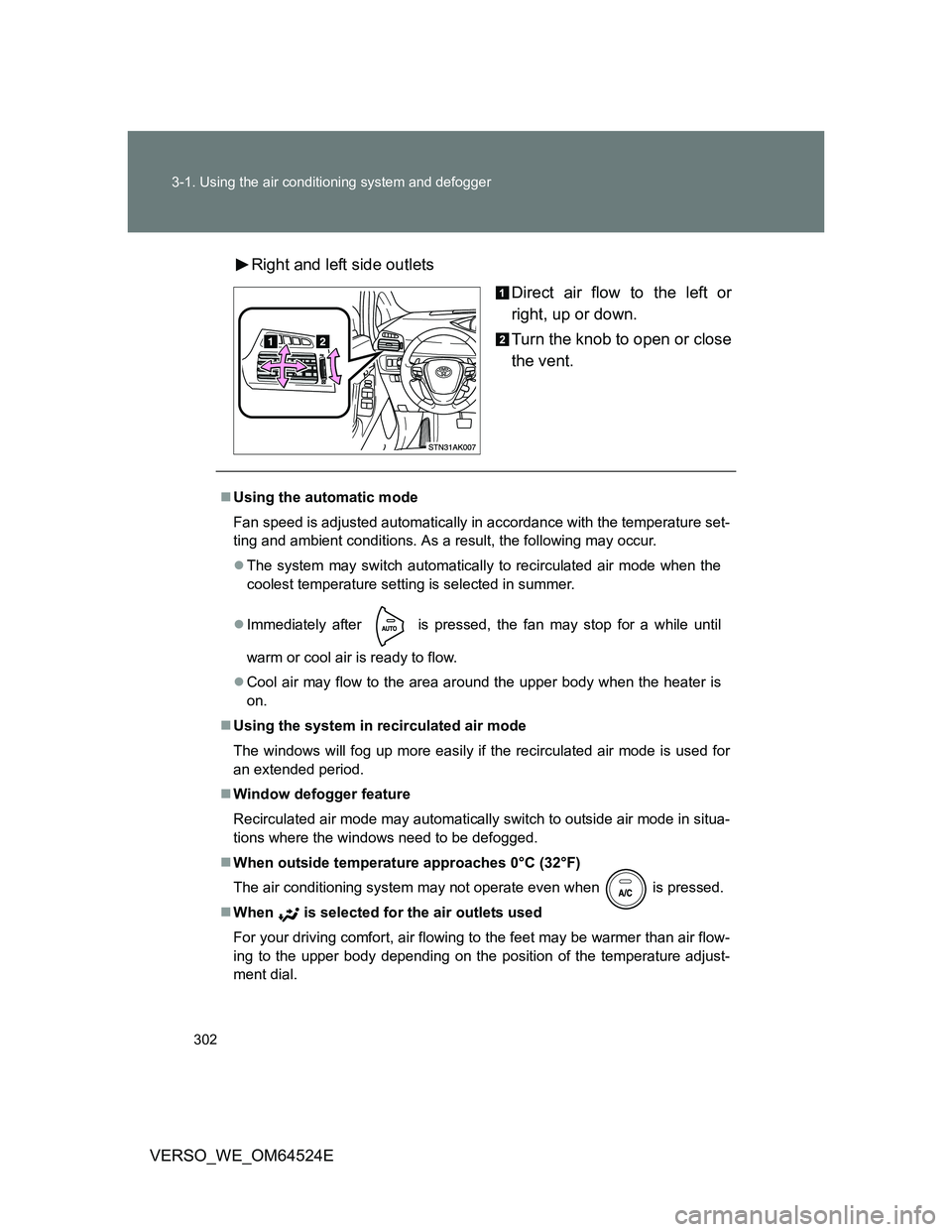
VERSO_WE_OM64524ERight and left side outlets
Direct air flow to the left or
right, up or down.
Turn the knob to open or close
the vent.
Using the automatic mode
Fan speed is adjusted automatically in accordance with the temperature set-
ting and ambient conditions. As a result, the following may occur.
The system may switch automatically to recirculated air mode when the
coolest temperature setting is selected in summer.
Immediately after
is pressed, the fan may stop for a while until
warm or cool air is ready to flow.
Cool air may flow to the area around the upper body when the heater is
on.
Using the system in recirculated air mode
The windows will fog up more easily if the recirculated air mode is used for
an extended period.
Window defogger feature
Recirculated air mode may automatically switch to outside air mode in situa-
tions where the windows need to be defogged.
When outside temperature approaches 0°C (32°F)
The air conditioning system may not operate even when
is pressed.
When is selected for the air outlets used
For your driving comfort, air flowing to the feet may be warmer than air flow-
ing to the upper body depending on the position of the temperature adjust-
ment dial.
Page 318 of 588
318 3-2. Using the audio system
VERSO_WE_OM64524E
Reception sensitivity
Maintaining perfect radio reception at all times is difficult due to the con-
tinually changing position of the antenna, differences in signal strength
and surrounding objects, such as trains, transmitters, etc.
When is used, automatic station selection and automatic register-
ing of stations may not be possible.
The radio antenna is mounted on the rear roof.
The antenna can be removed from the base by turning it.
Digital Audio Broadcast (DAB) radio
The optional radio antenna and tuner are necessary for the use of Digital
Audio Broadcast (DAB) radio.
NOTICE
To prevent damage, remove the antenna in the following cases
The antenna will touch the ceiling of a garage.
A cover will be put on the roof.
When driving through an automatic car wash.
Any other cases where there is a risk of touching surrounding parts.
Page 335 of 588
335 3-2. Using the audio system
3
Interior features
VERSO_WE_OM64524E
CAUTION
Caution while driving
Do not connect iPod or operate the controls.
NOTICE
To prevent damage to iPod
Do not leave iPod in the vehicle. The temperature inside the vehicle may
become high, resulting in damage to the iPod.
Do not push down on or apply unnecessary pressure to the iPod while it is
connected as this may damage the iPod or its terminal.
Do not insert foreign objects into the port as this may damage the iPod or
its terminal.
Page 341 of 588
341 3-2. Using the audio system
3
Interior features
VERSO_WE_OM64524E
MP3 and WMA playback
• When a device containing MP3 or WMA files is connected, all files in
the USB memory are checked. Once the file check is finished, the first
MP3 or WMA file is played. To make the file check finish more quickly,
we recommend that you do not include any files other than MP3 or
WMA files or create any unnecessary folders.
• When the USB memory is connected and the audio source is changed
to USB memory mode, the USB memory will start playing the first file in
the first folder. If the same device is removed and reinserted (and the
contents have not been changed), the USB memory will resume play
from the same point in which it was last used.
Extensions
If the file extensions .mp3 and .wma are used for files other than MP3 and
WMA files, they will be skipped (not played).
Playback
• To play MP3 files with steady sound quality, we recommend a fixed bit
rate of at least 128 kbps and a sampling frequency of 44.1 kHz.
• There is a wide variety of freeware and other encoding software for
MP3 and WMA files on the market, and depending on the status of the
encoding and the file format, poor sound quality or noise at the start of
playback may result. In some cases, playback may not be possible at
all.
• Microsoft, Windows, and Windows Media are registered trademarks of
Microsoft Corporation in the U.S.A. and other countries.
CAUTION
Caution while driving
Do not connect USB memory or operate the controls.
Page 344 of 588
344 3-2. Using the audio system
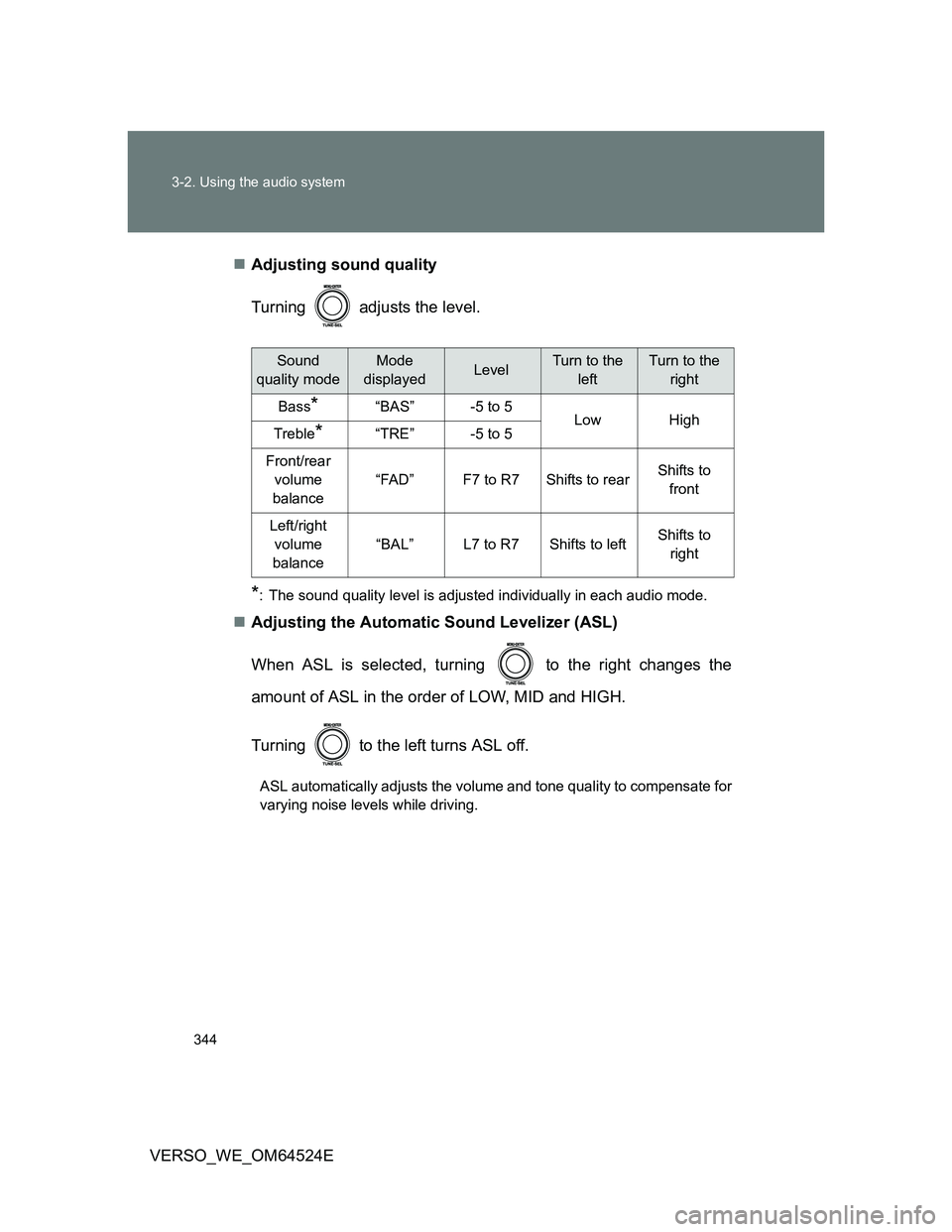
VERSO_WE_OM64524EAdjusting sound quality
Turning adjusts the level.
*: The sound quality level is adjusted individually in each audio mode.
Adjusting the Automatic Sound Levelizer (ASL)
When ASL is selected, turning to the right changes the
amount of ASL in the order of LOW, MID and HIGH.
Turning to the left turns ASL off.
ASL automatically adjusts the volume and tone quality to compensate for
varying noise levels while driving.
Sound
quality modeMode
displayedLevelTurn to the
leftTurn to the
right
Bass*“BAS”-5 to 5LowHighTreble*“TRE”-5 to 5
Front/rear
volume
balance
“FAD”F7 to R7Shifts to rearShifts to
front
Left/right
volume
balance
“BAL”L7 to R7Shifts to leftShifts to
right