window TOYOTA VERSO 2012 Owner's Guide
[x] Cancel search | Manufacturer: TOYOTA, Model Year: 2012, Model line: VERSO, Model: TOYOTA VERSO 2012Pages: 588, PDF Size: 31.32 MB
Page 296 of 588
296 3-1. Using the air conditioning system and defogger
VERSO_WE_OM64524E
Using the system in recirculated air mode
The windows will fog up more easily if the recirculated air mode is used for
an extended period.
When outside air temperature approaches 0°C (32°F) (vehicles with air
conditioning system)
The air conditioning system may not operate even when is pressed.
When is selected for the air outlets used
For your driving comfort, air flowing to the feet may be warmer than air flow-
ing to the upper body depending on the position of the temperature adjust-
ment dial.
Air conditioning odors
During use, various odors from inside and outside the vehicle may enter
into and accumulate in the air conditioning system. This may then cause
odor to be emitted from the vents.
To reduce potential odors from occurring:
It is recommended that the air conditioning system be set to outside air
mode prior to turning the vehicle off.
CAUTION
To prevent the windshield from fogging up
Do not set the air outlet selection dial to during cool air operation in
extremely humid weather. The difference between the temperature of the
outside air and that of the windshield can cause the outer surface of the
windshield to fog up, blocking your vision.
NOTICE
To prevent battery discharge
Do not leave the air conditioning system on longer than necessary when the
engine is stopped.
Page 302 of 588
302 3-1. Using the air conditioning system and defogger
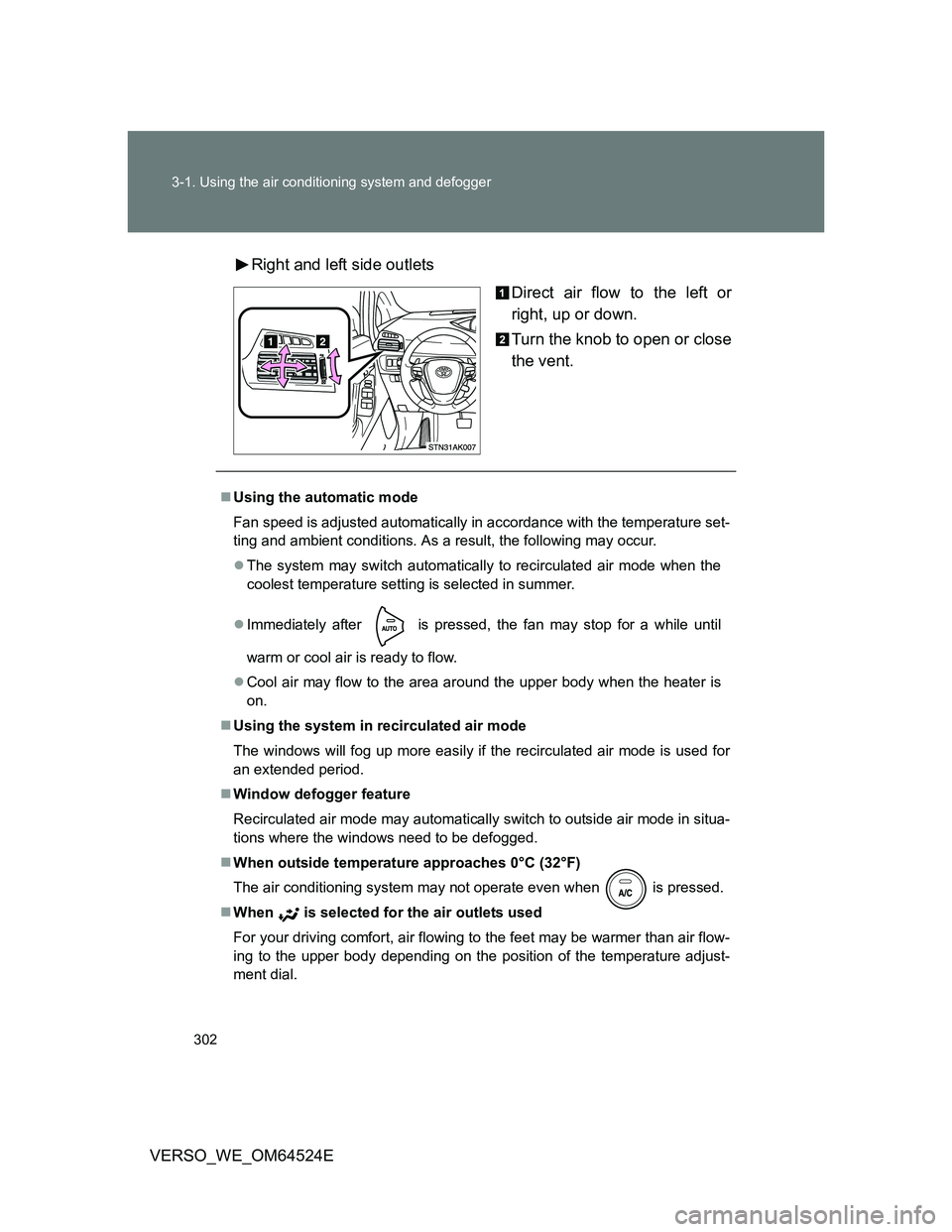
VERSO_WE_OM64524ERight and left side outlets
Direct air flow to the left or
right, up or down.
Turn the knob to open or close
the vent.
Using the automatic mode
Fan speed is adjusted automatically in accordance with the temperature set-
ting and ambient conditions. As a result, the following may occur.
The system may switch automatically to recirculated air mode when the
coolest temperature setting is selected in summer.
Immediately after
is pressed, the fan may stop for a while until
warm or cool air is ready to flow.
Cool air may flow to the area around the upper body when the heater is
on.
Using the system in recirculated air mode
The windows will fog up more easily if the recirculated air mode is used for
an extended period.
Window defogger feature
Recirculated air mode may automatically switch to outside air mode in situa-
tions where the windows need to be defogged.
When outside temperature approaches 0°C (32°F)
The air conditioning system may not operate even when
is pressed.
When is selected for the air outlets used
For your driving comfort, air flowing to the feet may be warmer than air flow-
ing to the upper body depending on the position of the temperature adjust-
ment dial.
Page 306 of 588
306
3-1. Using the air conditioning system and defogger
VERSO_WE_OM64524E
Rear window and outside rear view mirror defoggers
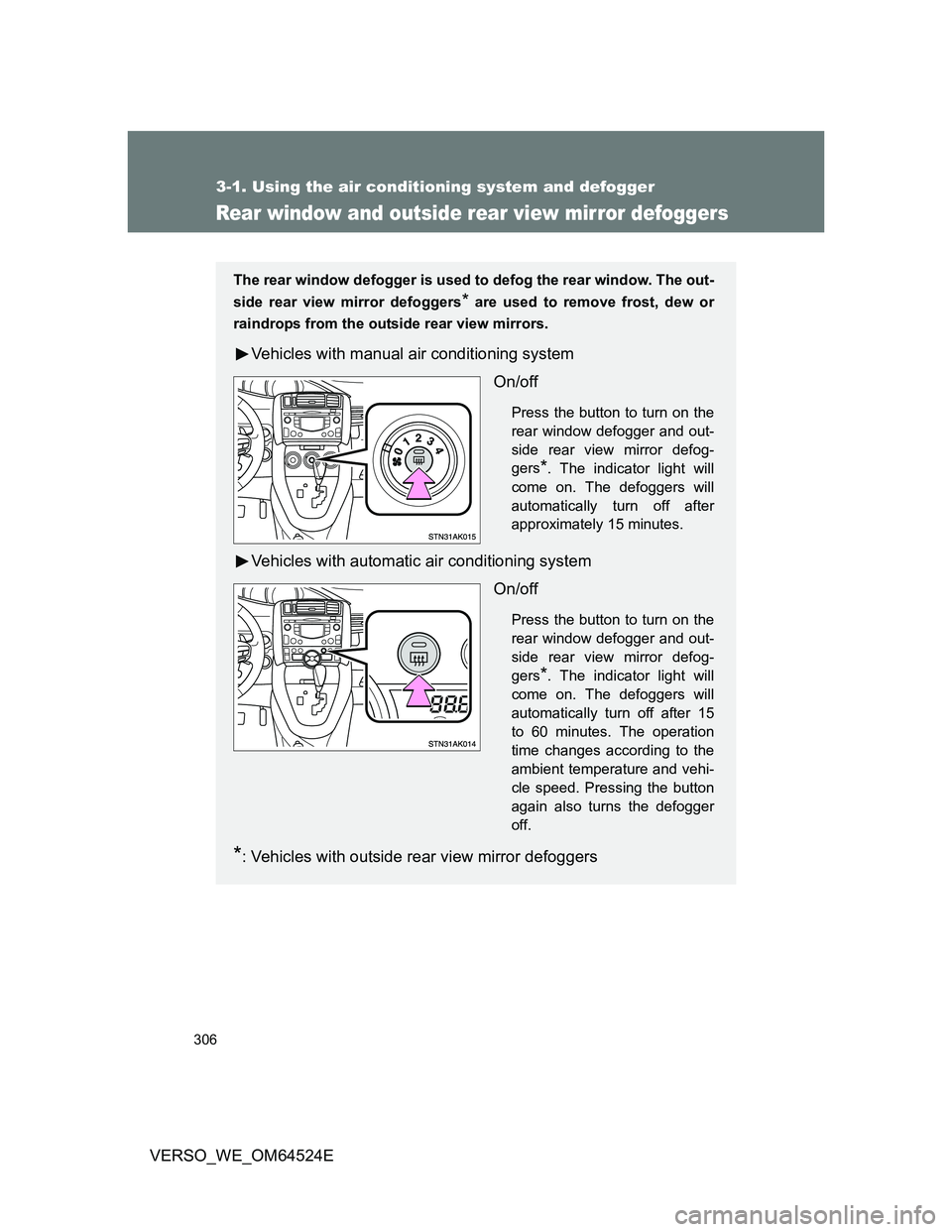
The rear window defogger is used to defog the rear window. The out-
side rear view mirror defoggers
* are used to remove frost, dew or
raindrops from the outside rear view mirrors.
Vehicles with manual air conditioning system
On/off
Press the button to turn on the
rear window defogger and out-
side rear view mirror defog-
gers
*. The indicator light will
come on. The defoggers will
automatically turn off after
approximately 15 minutes.
Vehicles with automatic air conditioning system
On/off
Press the button to turn on the
rear window defogger and out-
side rear view mirror defog-
gers
*. The indicator light will
come on. The defoggers will
automatically turn off after 15
to 60 minutes. The operation
time changes according to the
ambient temperature and vehi-
cle speed. Pressing the button
again also turns the defogger
off.
*: Vehicles with outside rear view mirror defoggers
Page 307 of 588
307 3-1. Using the air conditioning system and defogger
3
Interior features
VERSO_WE_OM64524E
The rear window and outside rear view mirror defoggers can be oper-
ated when
Vehicles without smart entry & start system
The engine switch is in the “ON” position.
Vehicles with smart entry & start system
The “ENGINE START STOP” switch is in IGNITION ON mode.
CAUTION
When the outside rear view mirror defoggers are on (if equipped)
Do not touch the rear view mirror surfaces, as they can become very hot and
burn you.
Page 327 of 588
327 3-2. Using the audio system
3
Interior features
VERSO_WE_OM64524E
MP3 and WMA files
MP3 (MPEG Audio LAYER3) is a standard audio compression format.
Files can be compressed to approximately 1/10 of their original size by using
MP3 compression.
WMA (Windows Media Audio) is a Microsoft audio compression format.
This format compresses audio data to a size smaller than that of the MP3
format.
There is a limit to the MP3 and WMA file standards and to the media/formats
recorded by them that can be used.
MP3 file compatibility
• Compatible standards
MP3 (MPEG1 LAYER3, MPEG2 LSF LAYER3)
• Compatible sampling frequencies
MPEG1 LAYER3: 32, 44.1, 48 (kHz)
MPEG2 LSF LAYER3: 16, 22.05, 24 (kHz)
• Compatible bit rates
MPEG1 LAYER3: 64, 80, 96, 112, 128, 160, 192, 224, 256, 320 (kbps)
MPEG2 LSF LAYER3: 64, 80, 96, 112, 128, 144, 160 (kbps)
*:Compatible with VBR
• Compatible channel modes: stereo, joint stereo, dual channel and
monaural
WMA file compatibility
• Compatible standards
WMA Ver. 7, 8, 9
• Compatible sampling frequencies
32, 44.1, 48 (kHz)
• Compatible bit rates
Ver. 7, 8: CBR 48, 64, 80, 96, 128, 160, 192 (kbps)
Ver. 9: CBR 48, 64, 80, 96, 128, 160, 192, 256, 320 (kbps)
*:Only compatible with 2-channel playback
Compatible media
Media that can be used for MP3 and WMA playback are CD-Rs and CD-
RWs.
Playback in some instances may not be possible, depending on the status
of the CD-R or CD-RW. Playback may not be possible or the audio may
jump if the disc is scratched or marked with fingerprints.
Page 329 of 588
329 3-2. Using the audio system
3
Interior features
VERSO_WE_OM64524E
Extensions
If the file extensions .mp3 and .wma are used for files other than MP3 and
WMA files, they will be mistakenly recognized and played as MP3 and
WMA files. This may result in large amounts of interference and damage
to the speakers.
Playback
• To play MP3 file with steady sound quality, we recommend a fixed bit
rate of 128 kbps and a sampling frequency of 44.1 kHz.
• CD-R or CD-RW playback may not be possible in some instances,
depending on the characteristics of the disc.
• There is a wide variety of freeware and other encoding software for
MP3 and WMA files on the market, and depending on the status of the
encoding and the file format, poor sound quality or noise at the start of
playback may result. In some cases, playback may not be possible at
all.
• When files other than MP3 or WMA files are recorded on a disc, it may
take more time to recognize the disc and in some cases, playback may
not be possible at all.
• Microsoft, Windows, and Windows Media are the registered trade-
marks of Microsoft Corporation in the U.S. and other countries.
NOTICE
CDs and adapters that cannot be used (P. 322)
CD player precautions (P. 323)
Page 339 of 588
339 3-2. Using the audio system
3
Interior features
VERSO_WE_OM64524E
USB memory
Compatible devices
USB memory that can be used for MP3 and WMA playback
Compatible device formats
The following device formats can be used:
• USB communication formats: USB2.0 FS (12 mbps)
• File formats: FAT16/32 (Windows)
• Correspondence class: Mass storage class
MP3 and WMA files written in any format other than those listed above
may not play correctly, and their file names and folder names may not be
displayed correctly.
Items related to standards and limitations are as follows:
• Maximum directory hierarchy: 8 levels
• Maximum number of folders in a device: 999 (including the root)
• Maximum number of files in a device: 65025
• Maximum number of files per folder: 255
MP3 and WMA files
MP3 (MPEG Audio LAYER 3) is a standard audio compression format.
Files can be compressed to approximately 1/10 of their original size using
MP3 compression.
WMA (Windows Media Audio) is a Microsoft audio compression format.
This format compresses audio data to a size smaller than that of the MP3
format.
There is a limit to the MP3 and WMA file standards that can be used and
to the media/formats on which the files are recorded.
Page 341 of 588
341 3-2. Using the audio system
3
Interior features
VERSO_WE_OM64524E
MP3 and WMA playback
• When a device containing MP3 or WMA files is connected, all files in
the USB memory are checked. Once the file check is finished, the first
MP3 or WMA file is played. To make the file check finish more quickly,
we recommend that you do not include any files other than MP3 or
WMA files or create any unnecessary folders.
• When the USB memory is connected and the audio source is changed
to USB memory mode, the USB memory will start playing the first file in
the first folder. If the same device is removed and reinserted (and the
contents have not been changed), the USB memory will resume play
from the same point in which it was last used.
Extensions
If the file extensions .mp3 and .wma are used for files other than MP3 and
WMA files, they will be skipped (not played).
Playback
• To play MP3 files with steady sound quality, we recommend a fixed bit
rate of at least 128 kbps and a sampling frequency of 44.1 kHz.
• There is a wide variety of freeware and other encoding software for
MP3 and WMA files on the market, and depending on the status of the
encoding and the file format, poor sound quality or noise at the start of
playback may result. In some cases, playback may not be possible at
all.
• Microsoft, Windows, and Windows Media are registered trademarks of
Microsoft Corporation in the U.S.A. and other countries.
CAUTION
Caution while driving
Do not connect USB memory or operate the controls.
Page 388 of 588
388
VERSO_WE_OM64524E
4-1. Maintenance and care
Cleaning and protecting the vehicle exterior
Automatic car washes
Fold the mirrors and remove the antenna before washing the vehicle.
Brushes used in automatic car washes may scratch the vehicle surface
and harm your vehicle’s paint.
Vehicles with rain-sensing windshield wipers: Turn the wipers off before
washing the vehicle. (P. 246)
High pressure car washes
Do not allow the nozzles of the car wash to come within close proximity
of the windows.
Before using car wash, check that the fuel filler door on your vehicle is
closed properly.
Perform the following to protect the vehicle and maintain it in prime
condition.
Working from top to bottom, liberally apply water to the vehicle
body, wheel wells and underside of the vehicle to remove any
dirt and dust.
Wash the vehicle body using a sponge or soft cloth, such as a
chamois.
For hard-to-remove marks, use car wash soap and rinse thor-
oughly with water.
Wipe away any water.
Wax the vehicle when the waterproof coating deteriorates.
If water does not bead on a clean surface, apply wax when the vehicle
body is cool.
Page 391 of 588
391 4-1. Maintenance and care
4
Maintenance and care
VERSO_WE_OM64524E
NOTICE
Handling of the camera (vehicles with rear view monitor system)
As the camera has a water proof construction, do not detach, disassemble
or modify it. This may cause incorrect operation.
If the camera lens becomes dirty, it cannot transmit a clear image. If water
droplets, snow, or mud adhere to the lens, rinse with water and wipe with a
soft cloth. If the lens is extremely dirty, wash it with a mild cleanser and
rinse.
Do not allow organic solvent, car wax, window cleaner or glass coat to
adhere to the camera. If this happens, wipe it off as soon as possible.
When washing the vehicle, do not apply intensive bursts of water to the
camera or camera area. Doing so may result in the camera malfunction-
ing.