change time TOYOTA VERSO 2016 User Guide
[x] Cancel search | Manufacturer: TOYOTA, Model Year: 2016, Model line: VERSO, Model: TOYOTA VERSO 2016Pages: 664, PDF Size: 62.24 MB
Page 290 of 664
290
2-5. Using other driving systems
VERSO_EE_OM64590E
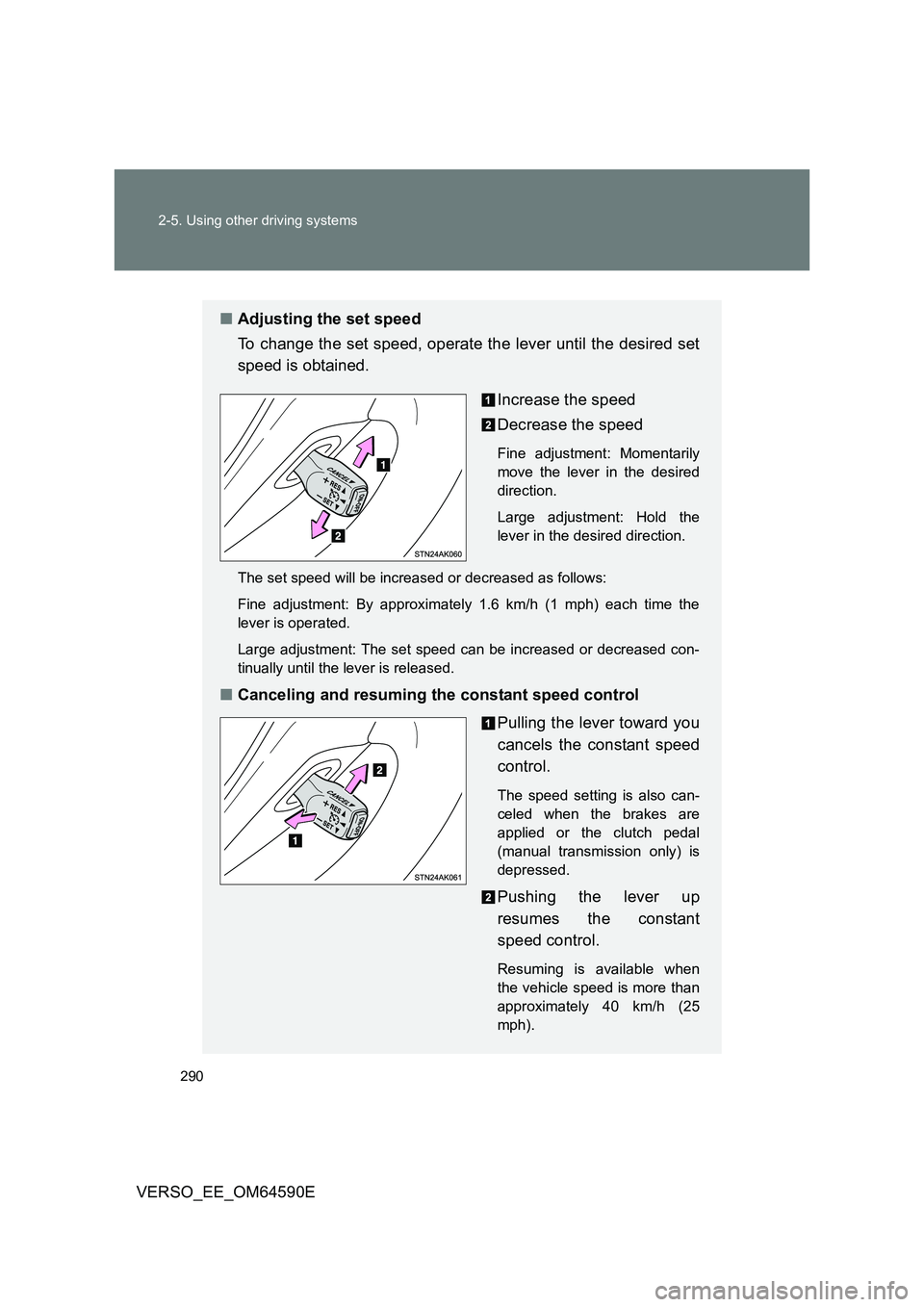
■ Adjusting the set speed
To change the set speed, operate the lever until the desired set
speed is obtained.
Increase the speed
Decrease the speed
Fine adjustment: Momentarily
move the lever in the desired
direction.
Large adjustment: Hold the
lever in the desired direction.
The set speed will be increased or decreased as follows:
Fine adjustment: By approximately 1.6 km/h (1 mph) each time the
lever is operated.
Large adjustment: The set speed can be increased or decreased con-
tinually until the lever is released.
■ Canceling and resuming the constant speed control
Pulling the lever toward you
cancels the constant speed
control.
The speed setting is also can-
celed when the brakes are
applied or the clutch pedal
(manual transmission only) is
depressed.
Pushing the lever up
resumes the constant
speed control.
Resuming is available when
the vehicle speed is more than
approximately 40 km/h (25
mph).
Page 376 of 664
376
3-2. Using the audio system
VERSO_EE_OM64590E
Selecting a folder
■ Selecting folders one at a time
Press “ ” or “” on to select the desired folder.
■ Selecting a folder and file from folder list
Press .
The folder list will be displayed.
Turn and press to select a folder and a file.
To return to the previous display, press .
To exit, press .
■ Returning to the first folder
Press and hold “ ” on until you hear a beep.
Selecting files
Turn or press “ ” or “” on to select the desired file.
Fast-forwarding and reversing files
To fast-forward or reverse, press and hold “” or “ ” on .
Random playback
Pressing (Random) changes modes in the following order:
Folder random USB random Off
Page 385 of 664
385
3-2. Using the audio system
3
Interior features
VERSO_EE_OM64590E
Using the steering wheel audio switches
Turning on the power
Press when the audio system is turned off.
Changing the audio source
Press when the audio system is turned on. The audio source
changes as follows each time is pressed. If a mode cannot be
used, it will be skipped.
AM FMCD modeiPod or USB memory*AUX*
*: If equipped
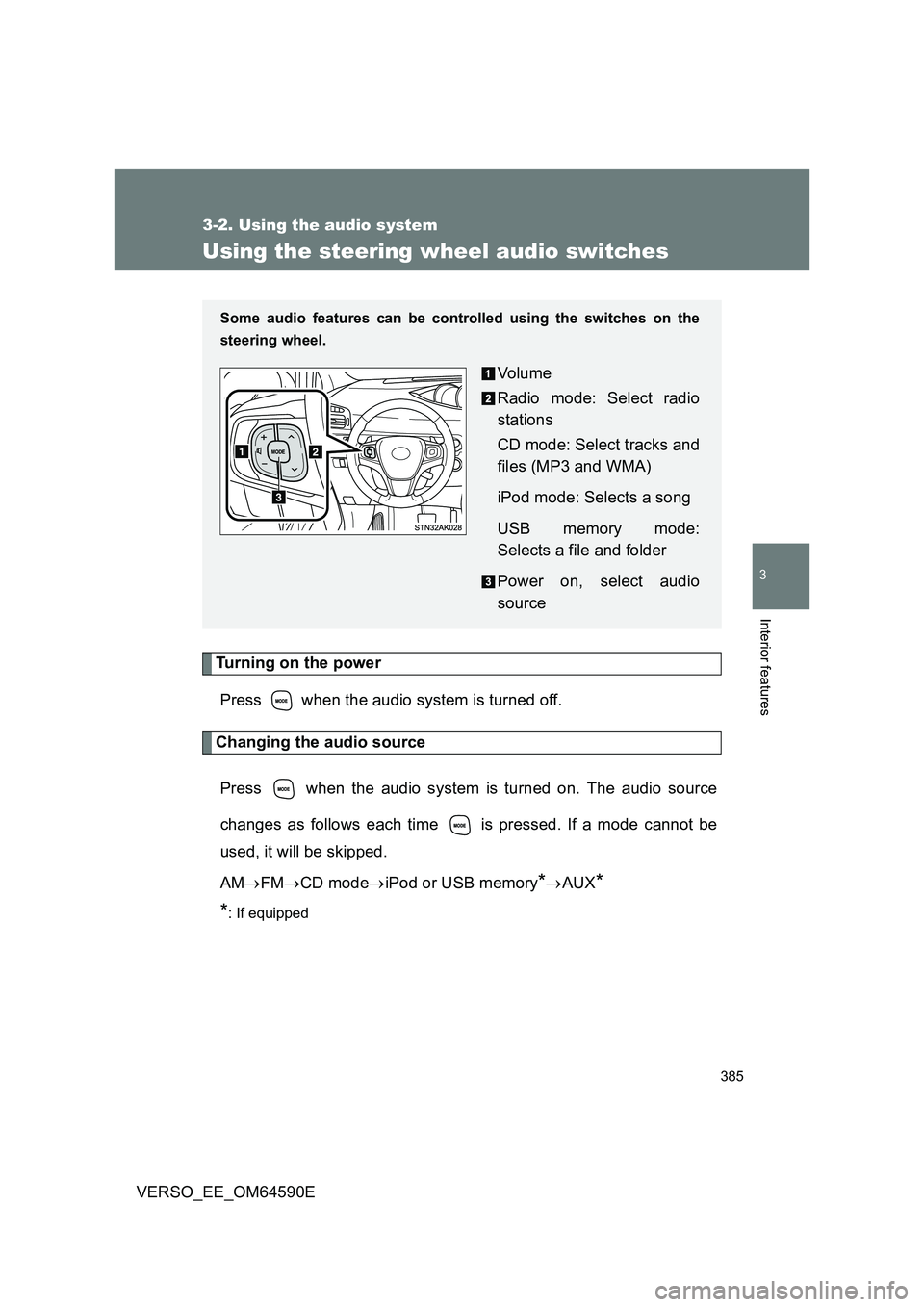
Some audio features can be cont rolled using the switches on the
steering wheel.
Vo lu m e
Radio mode: Select radio
stations
CD mode: Select tracks and
files (MP3 and WMA)
iPod mode: Selects a song
USB memory mode:
Selects a file and folder
Power on, select audio
source
Page 391 of 664
391
3-3. Using the interior lights
3
Interior features
VERSO_EE_OM64590E
■ Illuminated entry system
Vehicles without smart entry & start system
The lights automatically turn on/off according to the engine switch posi-
tion, whether the doors are locked/ unlocked, and whether the doors are
open/closed.
Vehicles with smart entry & start system
The lights automatically turn on/off according to “ENGINE START STOP”
switch mode, the presence of the electronic key, whether the doors are
locked/unlocked, and whether the doors are open/closed.
■ To prevent battery discharge
Vehicles without smart entry & start system
If the interior lights remain on when the engine switch is turned off, the
lights will go off automatically after 20 minutes.
Vehicles with smart entry & start system
If the interior lights remain on when the “ENGINE START STOP” switch
is turned off, the lights will go off automatically after 20 minutes.
■ Customization that can be configured at any authorized Toyota dealer
or repairer, or another duly qualified and equipped professional
Settings (e.g. The time elapsed before lights turn off) can be changed.
(Customizable features P. 640)
Personal/interior lights
Page 450 of 664
450
4-3. Do-it-yourself maintenance
VERSO_EE_OM64590E
■ Engine oil consumption
A certain amount of engine oil will be consumed while driving. In the follow-
ing situations, oil consumption may increase, and engine oil may need to be
refilled in between oil maintenance intervals.
● When the engine is new, for example directly after purchasing the vehicle
or after replacing the engine
● If low quality oil or oil of an inappropriate viscosity is used
● When driving at high engine speeds or with a heavy load, when towing,
or when driving while accelerating or decelerating frequently
● When leaving the engine idling for a long time, or when driving frequently
through heavy traffic
The oil maintenance interval is variable and depending on the vehicle usage
condition.
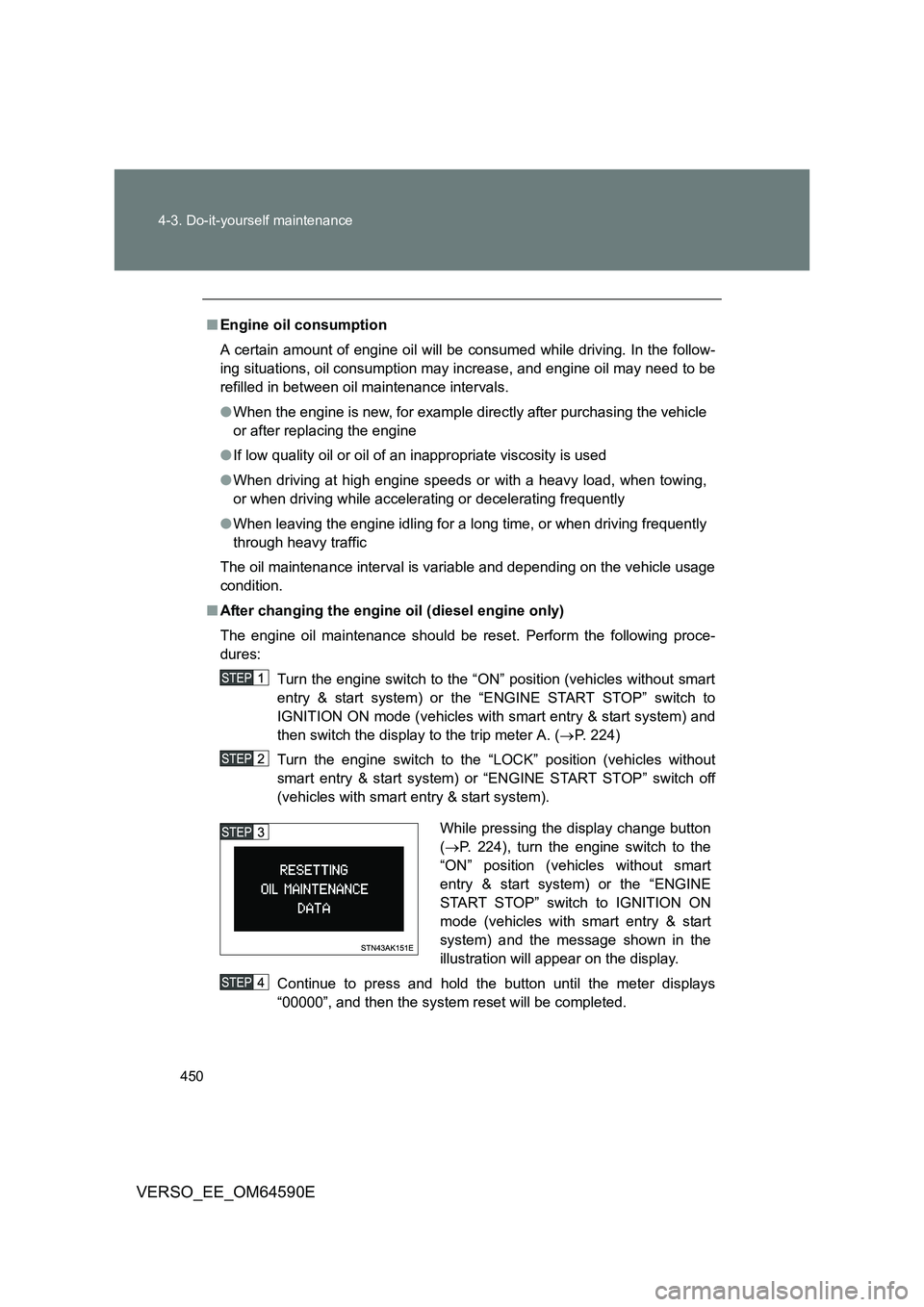
■ After changing the engine oil (diesel engine only)
The engine oil maintenance should be reset. Perform the following proce-
dures:
Turn the engine switch to the “ON” position (vehicles without smart
entry & start system) or the “ENGINE START STOP” switch to
IGNITION ON mode (vehicles with smart entry & start system) and
then switch the display to the trip meter A. ( P. 224)
Turn the engine switch to the “LOCK” position (vehicles without
smart entry & start system) or “ENGINE START STOP” switch off
(vehicles with smart entry & start system).
Continue to press and hold the button until the meter displays
“00000”, and then the system reset will be completed.
While pressing the display change button
( P. 224), turn the engine switch to the
“ON” position (vehicles without smart
entry & start system) or the “ENGINE
START STOP” switch to IGNITION ON
mode (vehicles with smart entry & start
system) and the message shown in the
illustration will appear on the display.
Page 602 of 664
602
5-2. Steps to take in an emergency
VERSO_EE_OM64590E
■ Stopping the engine
Shift the shift lever to “P” (Multidrive) or “N” (manual transmission) and press
the “ENGINE START STOP” switch as you normally do when stopping the
engine.
■ Replacing the key battery
As the above procedure is the temporary measure, it is recommended that
the electronic key battery be replaced immediately when the battery
depletes. ( P. 481)
■ Alarm (if equipped)
Using the mechanical key to lock the doors will not set the alarm system.
If a door is unlocked using the mechanical key when the alarm system is set,
the alarm may be triggered. ( P. 137)
■ Changing “ENGINE START STOP” switch modes
Multidrive
Within 10 seconds of the buzzer sounding, release the brake pedal and
press the “ENGINE START STOP” switch.
The engine does not start and modes will be changed each time the
switch is pressed. ( P. 204)
Manual transmission
Within 10 seconds of the buzzer sounding, release the clutch pedal and
press the “ENGINE START STOP” switch.
The engine does not start and modes will be changed each time the
switch is pressed. ( P. 204)
Page 640 of 664
640
VERSO_EE_OM64590E
6-2. Customization
Customizable features
Customizable Features
Vehicles with Navigation/Multimedia system: Settings that can be
changed using the Navigation/Multimedia system
When customizing vehicle features, ensure that the vehicle is
parked in a safe place with the shift lever in “P” (Multidrive) or “N”
(manual transmission) and the parking brake set.
Press the “SETUP” button on the navigation system or multimedia
system.
Select “Vehicle” on the “Setup” screen and select “Vehicle custom-
isation”, or select “General” on the “Setup” screen.
Various setting can be changed. Refer to the list of settings that
can be changed for details.
Settings that can be changed by any authorized Toyota dealer or
repairer, or another duly qualified and equipped professional for
further details
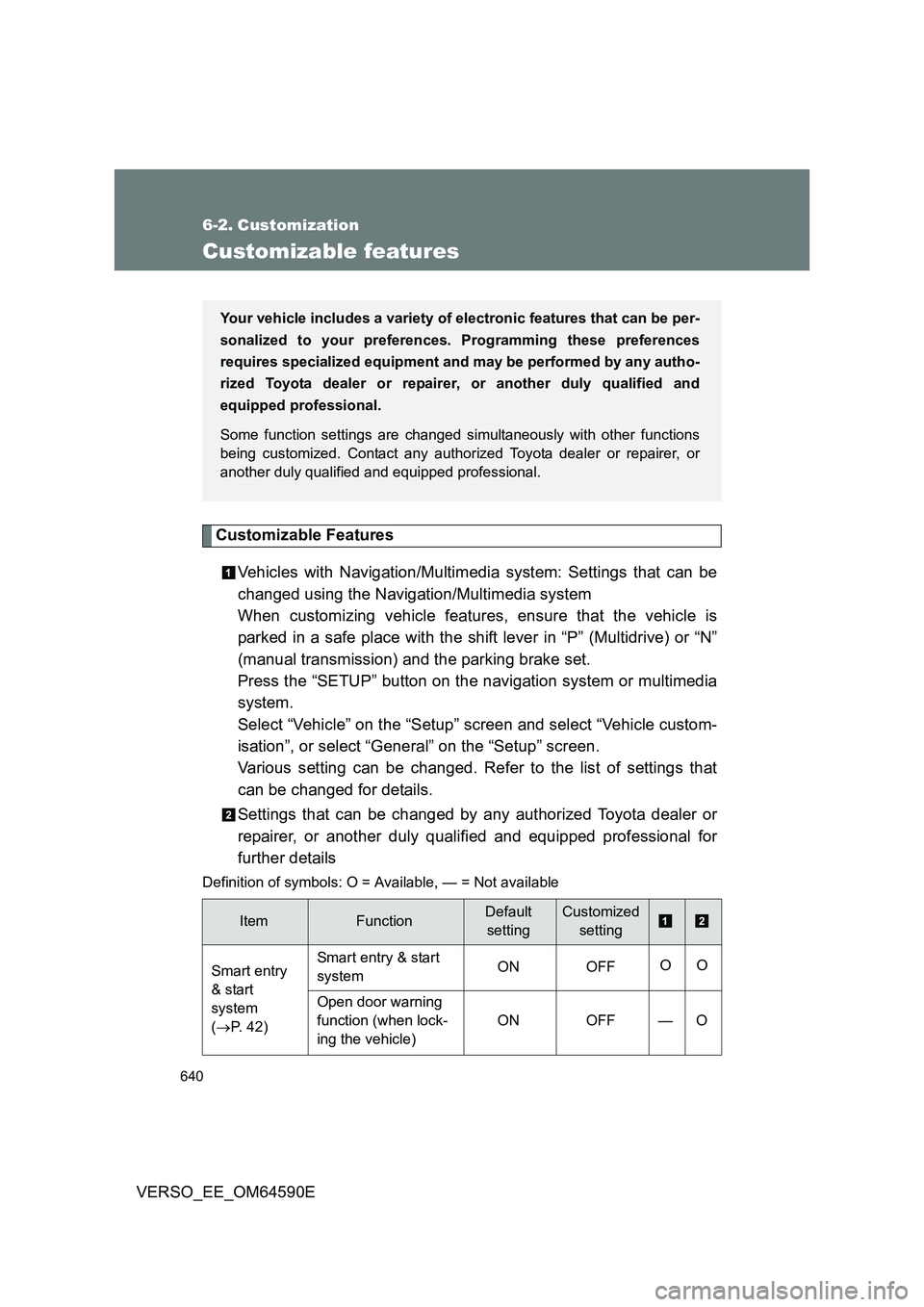
Definition of symbols: O = Av ailable, — = Not available
ItemFunctionDefault
setting
Customized
setting
Smart entry
& start
system
( P. 42)
Smart entry & start
system ON OFF OO
Open door warning
function (when lock-
ing the vehicle)
ON OFF — O
Your vehicle includes a variety of electronic features that can be per-
sonalized to your preferences. Programming these preferences
requires specialized equipment and may be performed by any autho-
rized Toyota dealer or repairer, or another duly qualified and
equipped professional.
Some function settings are changed simultaneously with other functions
being customized. Contact any authorized Toyota dealer or repairer, or
another duly qualified and equipped professional.