warning lights TOYOTA VERSO 2016 Owners Manual
[x] Cancel search | Manufacturer: TOYOTA, Model Year: 2016, Model line: VERSO, Model: TOYOTA VERSO 2016Pages: 664, PDF Size: 62.24 MB
Page 3 of 664
1
2
3
4
5
6
3
VERSO_EE_OM64590E
2-2. Instrument cluster
Gauges and meters ............ 222
Indicators and warning
lights ................................. 227
Multi-information display ..... 232
Fuel consumption
information ........................ 244
2-3. Operating the lights and
wipers
Headlight switch.................. 248
Fog light switch ................... 254
Windshield wipers and
washer .............................. 255
Rear window wiper and
washer .............................. 260
2-4. Toyota Safety Sense
Toyota Safety Sense .......... 261
PCS (Pre-Collision
System) ............................ 267
LDA (Lane Departure
Alert) ................................. 278
Automatic High Beam ......... 283
2-5. Using other driving systems
Cruise control...................... 289
Speed limiter ....................... 293
Toyota parking
assist-sensor .................... 296
Stop & Start system ............ 304
Driving assist systems ........ 311
2-6. Driving information
Cargo and luggage............. 317
Winter driving tips............... 320
Trailer towing...................... 324
3-1. Using the air conditioning
system and defogger
Manual air conditioning
system.............................. 334
Automatic air conditioning
system.............................. 340
Power heater ...................... 347
Rear window and outside
rear view mirror
defoggers ......................... 349
3-2. Using the audio system
Audio system types ............ 351
Using the radio ................... 353
Using the CD player ........... 357
Playing back MP3 and
WMA discs ....................... 362
Operating an iPod .............. 368
Operating
a USB memory................. 375
Optimal use of the audio
system.............................. 382
Using the AUX port ............ 384
Using the steering wheel
audio switches ................. 385
3Interior features
Page 183 of 664
2When driving
183
VERSO_EE_OM64590E
2-1. Driving procedures
Driving the vehicle ............ 184
Engine (ignition) switch
(vehicles without smart
entry & start system)....... 198
Engine (ignition) switch
(vehicles with smart
entry & start system)....... 202
Multidrive .......................... 208
Manual transmission......... 214
Turn signal lever ............... 218
Parking brake ................... 219
Horn .................................. 221
2-2. Instrument cluster
Gauges and meters .......... 222
Indicators and warning
lights ............................... 227
Multi-information display ... 232
Fuel consumption
information ...................... 244
2-3. Operating the lights and
wipers
Headlight switch ............... 248
Fog light switch ................. 254
Windshield wipers and
washer ............................ 255
Rear window wiper and
washer ............................ 260
2-4. Toyota Safety Sense
Toyota Safety Sense ........ 261
PCS (Pre-Collision
System) .......................... 267
LDA (Lane Departure
Alert) ............................... 278
Automatic High Beam ....... 283
2-5. Using other driving systems
Cruise control.................... 289
Speed limiter ..................... 293
Toyota parking
assist-sensor .................. 296
Stop & Start system .......... 304
Driving assist systems ...... 311
2-6. Driving information
Cargo and luggage ........... 317
Winter driving tips ............. 320
Trailer towing .................... 324
Page 226 of 664
226
2-2. Instrument cluster
VERSO_EE_OM64590E
Instrument cluster light control
The brightness of the instrument cluster lights, for when the head-
light switch is on, can be adjusted 5 brightness levels.
Press the display change button.
The button is pressed several times and the brightness control
screen appears.
When the button is pushed for more than 1 second, each second
the screen brightness changes. When the button is released, the
suitable brightness is selected.
The illumination level will be set automatically 10 seconds after the
switch was last pressed.
Pressing the display change button before the 10 seconds have
passed will also set the illumination level.
NOTICE
■ To prevent damage to the engine and its components
● Do not let the indicator needle of the tachometer enter the red zone, which
indicates the maximum engine speed.
● The engine may be overheating if the high engine coolant temperature
warning light (Red) flashes or comes on. In this case, immediately stop the
vehicle in a safe place, and check the engine after it has cooled com-
pletely. ( P. 607)
Page 227 of 664
227
2-2. Instrument cluster
2
When driving
VERSO_EE_OM64590E
Indicators and war ning lights
The indicator and warning lights on the instrument cluster and cen-
ter panel inform the driver of the status of the vehicle’s various sys-
tems.
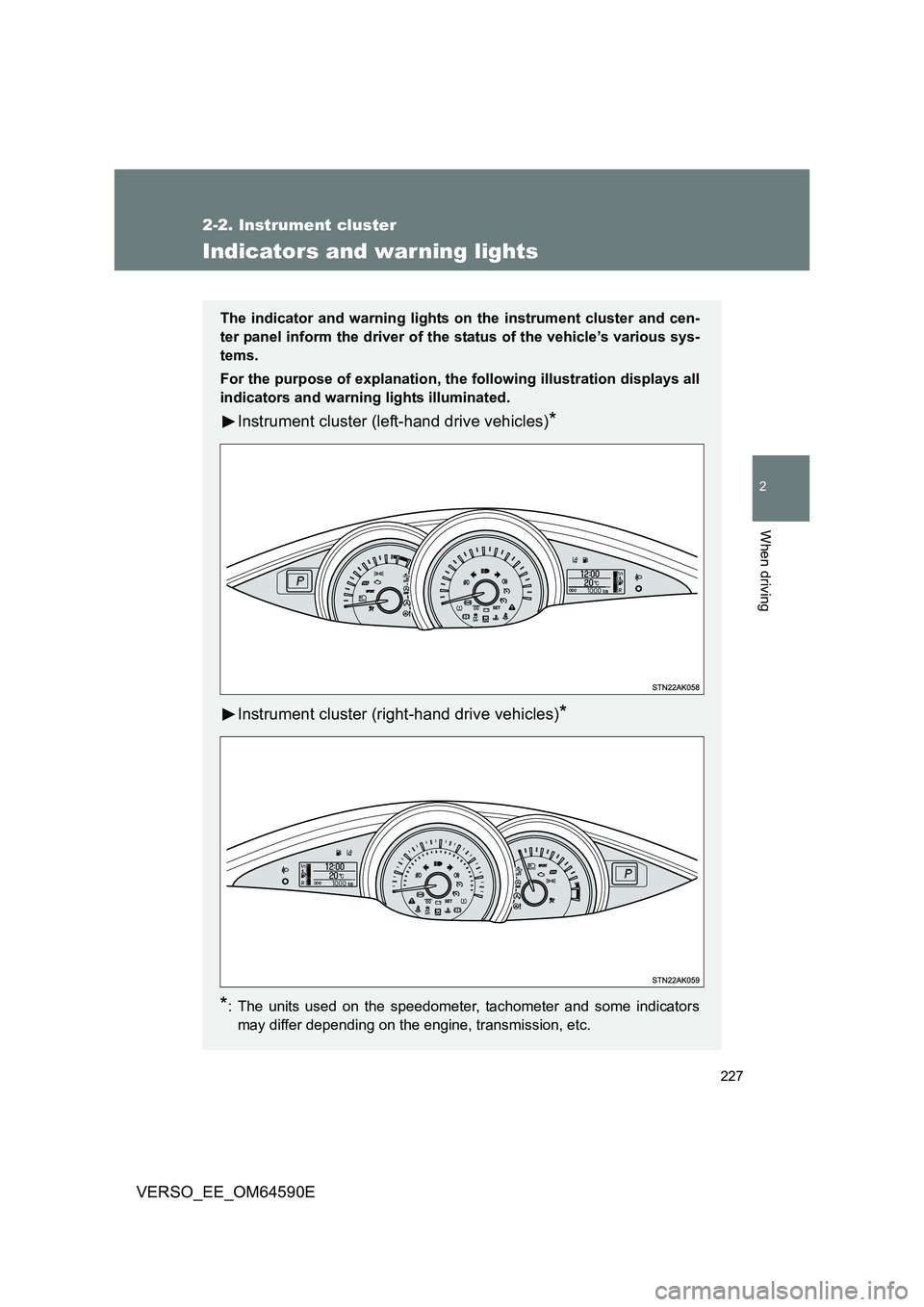
For the purpose of explanation, the following illustration displays all
indicators and warning lights illuminated.
Instrument cluster (left-hand drive vehicles)*
Instrument cluster (right-hand drive vehicles)*
*: The units used on the speedometer, tachometer and some indicators
may differ depending on the engine, transmission, etc.
Page 231 of 664
231
2-2. Instrument cluster
2
When driving
VERSO_EE_OM64590E
WARNING
■ If a safety system warning light does not come on
Should a safety system light such as ABS and the SRS airbag warning light
not come on when you start the engine, this could mean that these systems
are not available to help protect you in an accident, which could result in
death or serious injury. Have the vehicle inspected by any authorized Toyota
dealer or repairer, or another duly qualified and equipped professional imme-
diately if this occurs.
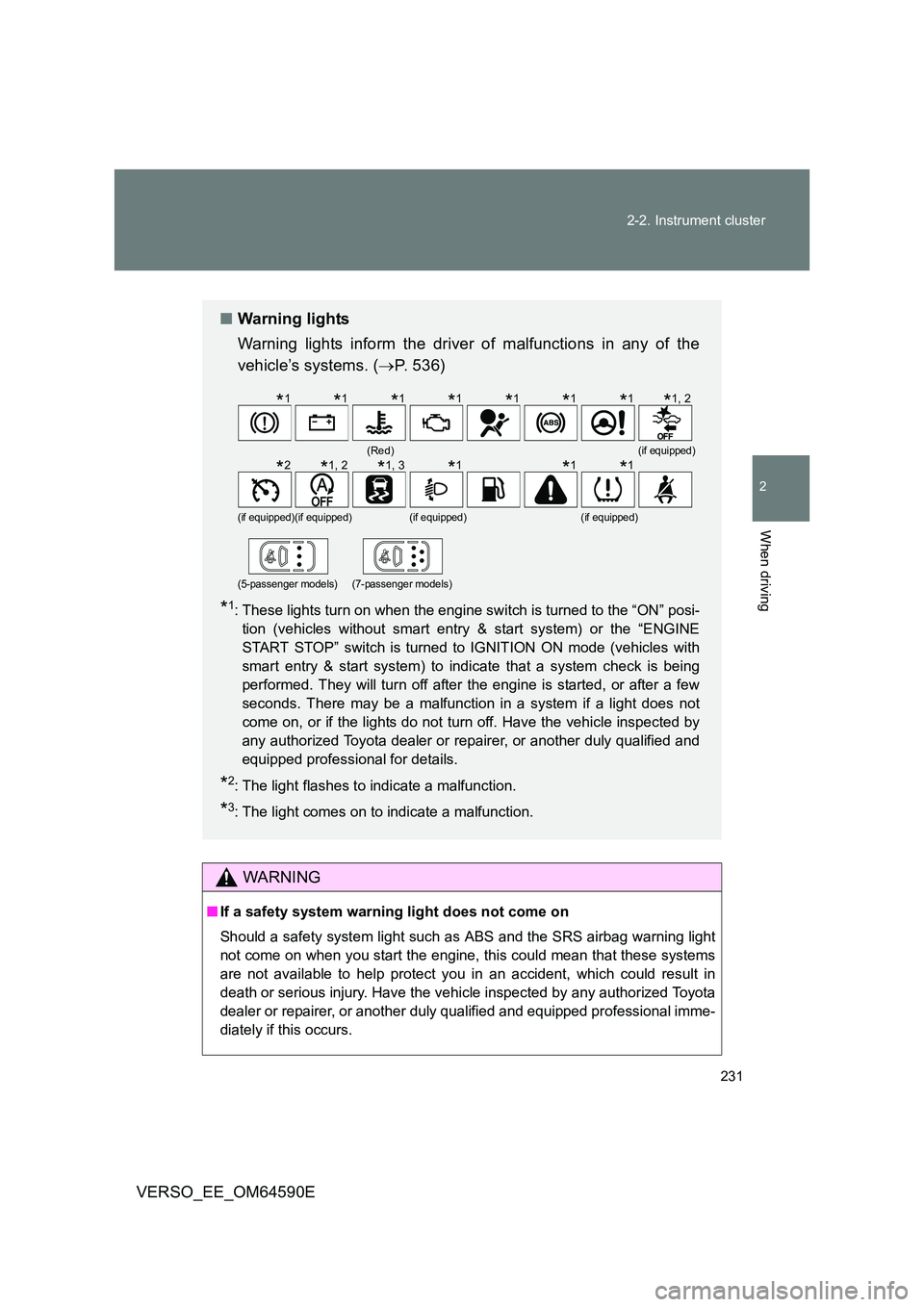
■ Warning lights
Warning lights inform the driver of malfunctions in any of the
vehicle’s systems. ( P. 536)
*1: These lights turn on when the engine switch is turned to the “ON” posi-
tion (vehicles without smart entry & start system) or the “ENGINE
START STOP” switch is turned to IGNITION ON mode (vehicles with
smart entry & start system) to indicate that a system check is being
performed. They will turn off after the engine is started, or after a few
seconds. There may be a malfunction in a system if a light does not
come on, or if the lights do not turn off. Have the vehicle inspected by
any authorized Toyota dealer or repairer, or another duly qualified and
equipped professional for details.
*2: The light flashes to indicate a malfunction.
*3: The light comes on to indicate a malfunction.
(Red)(if equipped)
(if equipped)(if equipped)(if equipped)(if equipped)
(5-passenger models)(7-passenger models)
*1*1*1*1*1*1*1*1, 2
*2*1, 2*1, 3*1*1*1
Page 259 of 664
259
2-3. Operating the lights and wipers
2
When driving
VERSO_EE_OM64590E
● Vehicles with smart entry & start system:
If the wiper switch is turned to the position while the “ENGINE
START STOP” switch is in IGNITION ON mode, the wiper will operate
once to show that AUTO mode is activated.
If the wiper sensitivity is adjusted to higher, the wiper may operate once to
indicate the change of sensitivity.
● If the temperature of the raindrop sensor is 85°C (185°F) or higher, or
-40°C (-40°F) or lower, automatic operation may not occur. In this case,
operate the wipers in any mode other than AUTO.
■ If no windshield washer fluid sprays
Check that the washer nozzles are not blocked and if there is washer fluid in
the windshield washer fluid reservoir.
WARNING
■ Caution regarding the use of windshield wipers in AUTO mode
The windshield wipers may operate unexpectedly if the sensor is touched or
the windshield is subject to vibration in AUTO mode. Take care that your fin-
gers or anything else do not become caught in the windshield wipers.
■ Caution regarding the use of washer fluid
When it is cold, do not use the washer fluid until the windshield becomes
warm. The fluid may freeze on the winds hield and cause low visibility. This
may lead to an accident, resulting in death or serious injury.
NOTICE
■ When the windshield is dry
Do not use the wipers, as they may damage the windshield.
■ When the washer fluid tank is empty
Do not use the washer when the washer fluid tank is empty. This may cause
the washer fluid pump to overheat.
■ When there is no windshield washer fluid spray from the nozzle
Damage to the washer fluid pump may be caused if the lever is pulled
toward you and held continually.
Page 282 of 664
282
2-4. Toyota Safety Sense
VERSO_EE_OM64590E
■ When changing the tires
Depending on the tires used, sufficient performance may not be maintain-
able.
■ Warning messages for the LDA system
Warning messages are used to indicate a system malfunction or to inform
the driver of the need for caution while driving.
WARNING
■ Before using the LDA system
Do not rely solely on the LDA system. The LDA system does not drive the
vehicle automatically, nor does it reduce the amount of care you need to
take. As such, the driver must always assume full responsibility for under-
standing his/her surroundings, for operating the steering wheel to correct the
driving line, and for driving safely.
Inappropriate or negligent driving could lead to an accident.
■ To avoid operating the LDA by mistake
Switch the LDA system off using the LDA switch when not in use.
NOTICE
■ To prevent damage to or incorrect operation of the LDA system
● Do not modify the headlights or attach stickers to the surface of the lights.
● Do not modify the suspension. If your suspension needs repairs, contact
any authorized Toyota dealer or repairer, or another duly qualified and
equipped professional.
● Do not install or place anything on the hood or the grille. Also, do not install
a grille guard (bull bars, kangaroo bar etc.).
Page 287 of 664
287
2-4. Toyota Safety Sense
2
When driving
VERSO_EE_OM64590E
● High beam may be turned on or off when unexpected by the driver.
● In the situations below, the system may not be able to correctly detect the
surrounding brightness levels, and may flash or expose nearby pedestri-
ans to the high beam. Therefore, you should consider turning the high
beams on or off manually rather than relying on the Automatic High
Beam system.
• In bad weather (rain, snow, fog, sandstorms, etc.)
• The windshield is obscured by fog, mist, ice, dirt, etc.
• The windshield is cracked or damaged.
• The front sensor is deformed or dirty.
• The front sensor temperature is extremely high.
• Surrounding brightness levels are equal to those of headlights, tail
lights or fog lights.
• Vehicles ahead have headlights or tail lights that are either switched
off, dirty, are changing color, or are not aimed properly.
• When driving through an area of intermittently changing brightness and
darkness.
• When frequently and repeatedly driving ascending/descending roads,
or roads with rough, bumpy or uneven surfaces (such as stone-paved
roads, gravel tracks, etc.).
• When frequently and repeatedly taking curves or driving on a winding
road.
• There is a highly reflective object ahead of the vehicle, such as a sign
or a mirror.
• The back of a vehicle ahead is highly reflective, such as a container on
a truck.
• The vehicle’s headlights are damaged or dirty.
• The vehicle is listing or tilting, due to a flat tire, a trailer being towed,
etc.
• The driver believes that the high beam may be causing problems or
distress to other drivers or pedestrians nearby.
■ If a warning message of the Automatic High Beam is displayed...
It may indicate a malfunction in the system. Contact any authorized Toyota
dealer or repairer, or another duly qualified and equipped professional.
Page 308 of 664
308
2-5. Using other driving systems
VERSO_EE_OM64590E
■ The Stop & Start system protection feature
Vehicles without smart entry & start system
When an excessively loud sound is bei ng projected by the audio system,
the audio system may be automatically cut off in order to maintain power
for the Stop & Start system function.
If this occurs, turning the engine switch to the “LOCK” position then to the
“ACC” or “ON” position re-enables the audio system.
Vehicles with smart entry & start system
When an excessively loud sound is bei ng projected by the audio system,
the audio system may be automatically cut off in order to maintain power
for the Stop & Start system function.
If this occurs, turning the “ENGINE START STOP” switch off then to
ACCESSORY mode or IGNITION ON mode re-enables the audio system.
■ Steering wheel operation
When the engine is stopped by the Stop & Start system, the steering wheel
may become heavier than when driving.
■ Hood
If the hood is opened while the engine is stopped by the Stop & Start system,
the engine cannot be restarted by the Stop & Start system or by the auto-
matic engine start function. Restart the engine with the engine switch opera-
tion. ( P. 198, 202)
Even if the hood is closed after the engine is started with the hood open, the
Stop & Start system will not operate. Close the hood, turn the engine switch
off, wait 30 seconds or more, and then start the engine.
■ When to use the Stop & Start system
Use the Stop & Start system when stopping the vehicle temporarily at red
lights, intersections, etc. When stopp ing the vehicle for a longer period of
time, turn off the engine completely.
■ Stop & Start system warning buzzer
If the engine is stopped by the Stop & Start system and the following action
is performed, a buzzer will sound and the Stop & Start indicator will flash.
This indicates that the engine is only stopped by the Stop & Start system, not
that the engine has been turned off completely.
The shift lever is shifted to a position other than “N” with the clutch pedal
released.
Page 522 of 664
522
4-3. Do-it-yourself maintenance
VERSO_EE_OM64590E
WARNING
■ Replacing light bulbs
● Turn off the lights. Do not attempt to replace the bulb immediately after
turning off the lights.
The bulbs become very hot and may cause burns.
● Do not touch the glass portion of the light bulb with bare hands.
When it is unavoidable to hold the gl ass portion, use and hold with a clean
dry cloth to avoid getting moisture and oils on the bulb.
Also, if the bulb is scratched or dropped, it may blow out or crack.
● Fully install light bulbs and any parts used to secure them. Failing to do so
may result in heat damage, fire, or water entering the headlight unit. This
may damage the headlights or cause condensation to build up on the lens.
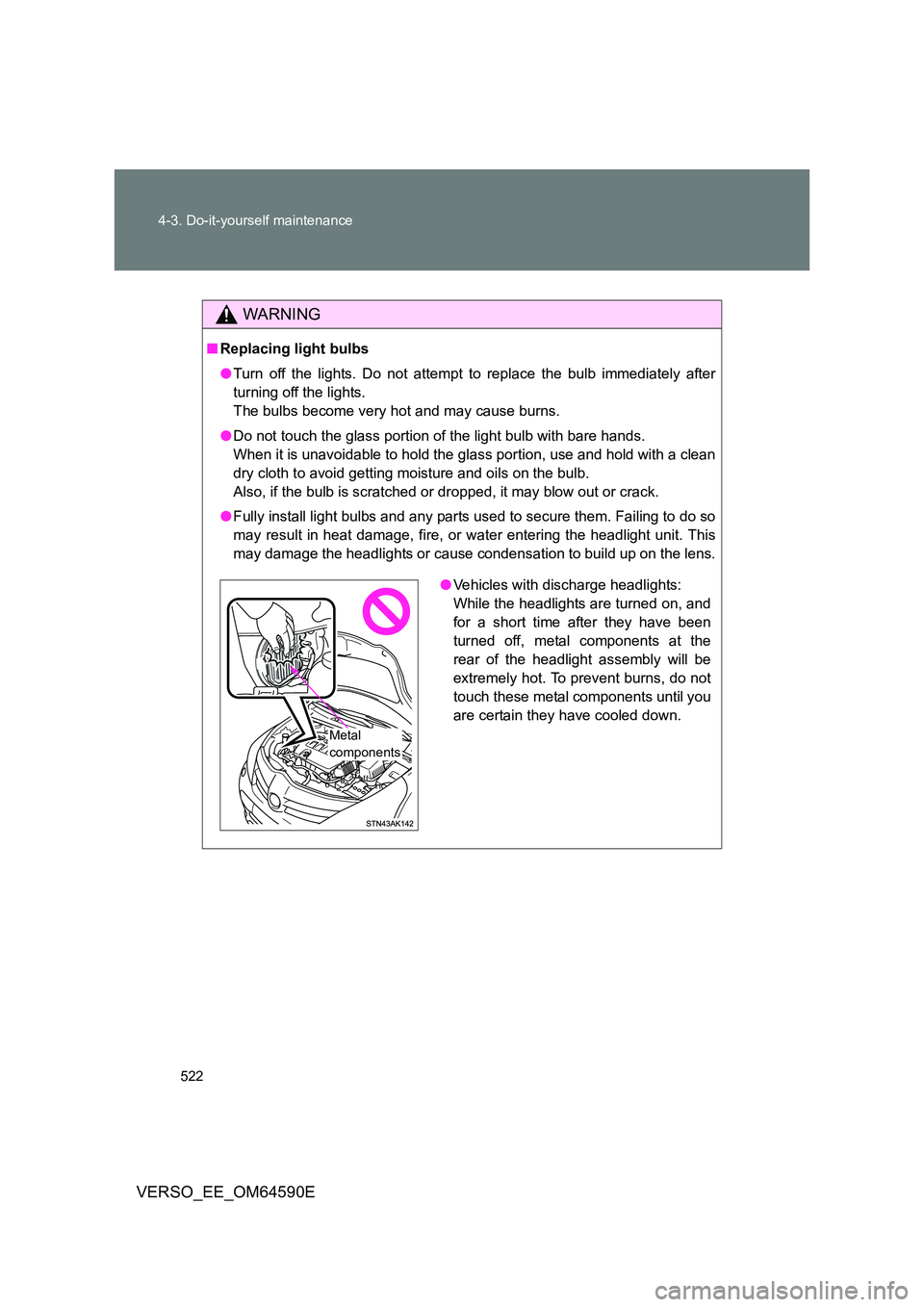
● Vehicles with discharge headlights:
While the headlights are turned on, and
for a short time after they have been
turned off, metal components at the
rear of the headlight assembly will be
extremely hot. To prevent burns, do not
touch these metal components until you
are certain they have cooled down.
Metal
components