phone TOYOTA VERSO 2017 Owners Manual
[x] Cancel search | Manufacturer: TOYOTA, Model Year: 2017, Model line: VERSO, Model: TOYOTA VERSO 2017Pages: 668, PDF Size: 49.7 MB
Page 9 of 668
9
VERSO_EE_OM64517E
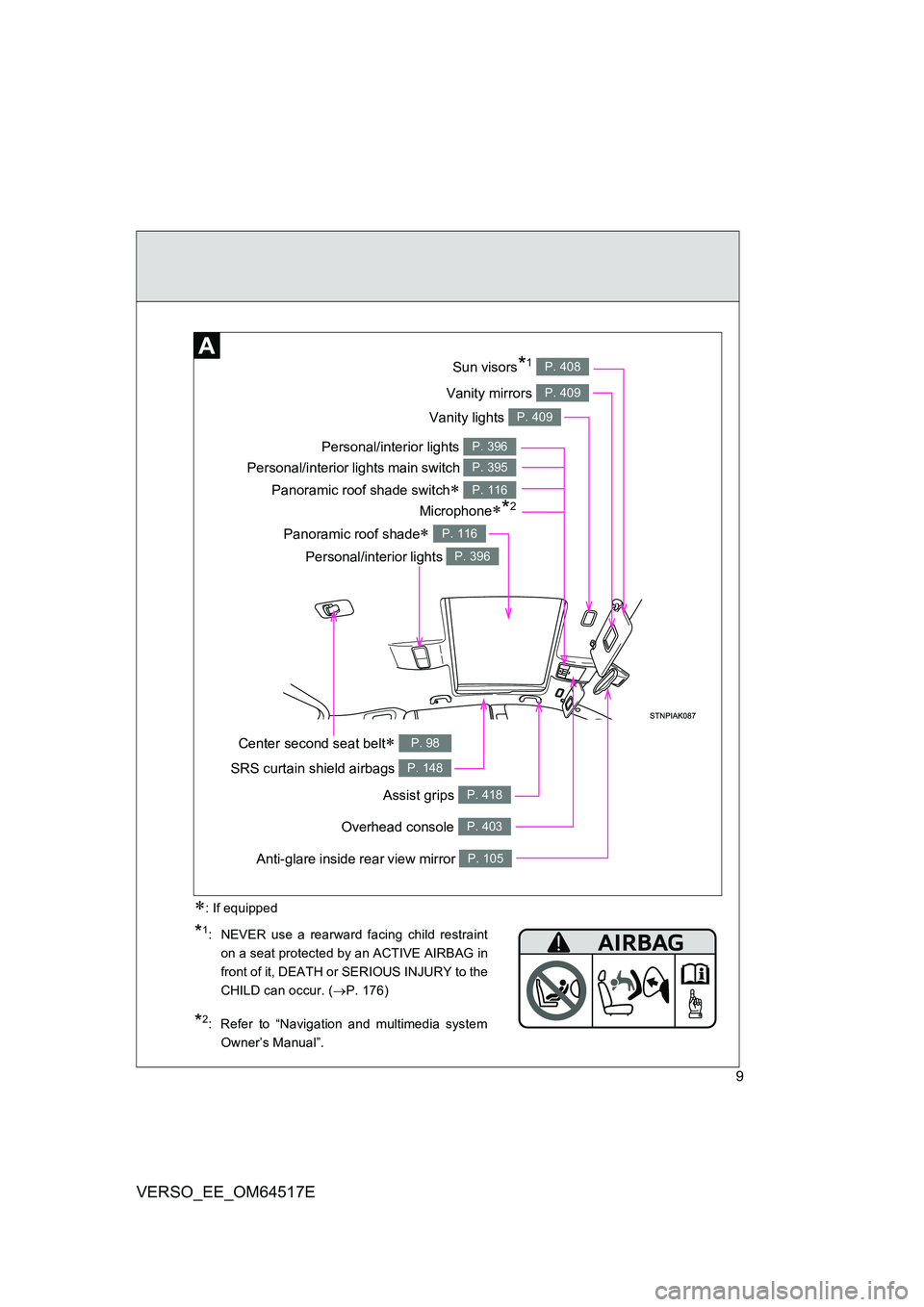
Vanity lights P. 409
Panoramic roof shade switch P. 116
Vanity mirrors P. 409
Sun visors*1 P. 408
SRS curtain shield airbags P. 148
Overhead console P. 403
Personal/interior lights P. 396
Personal/interior lights P. 396
Personal/interior lights main switch P. 395
Anti-glare inside rear view mirror P. 105
Center second seat belt P. 98
Microphone*2
Assist grips P. 418
Panoramic roof shade P. 116
*1: NEVER use a rearward facing child restraint
on a seat protected by an ACTIVE AIRBAG in
front of it, DEATH or SERIOUS INJURY to the
CHILD can occur. ( P. 176)
*2: Refer to “Navigation and multimedia system
Owner’s Manual”.
: If equipped
Page 18 of 668
18
VERSO_EE_OM64517E
Pictorial indexInstrument panel
(left-hand drive vehicles)
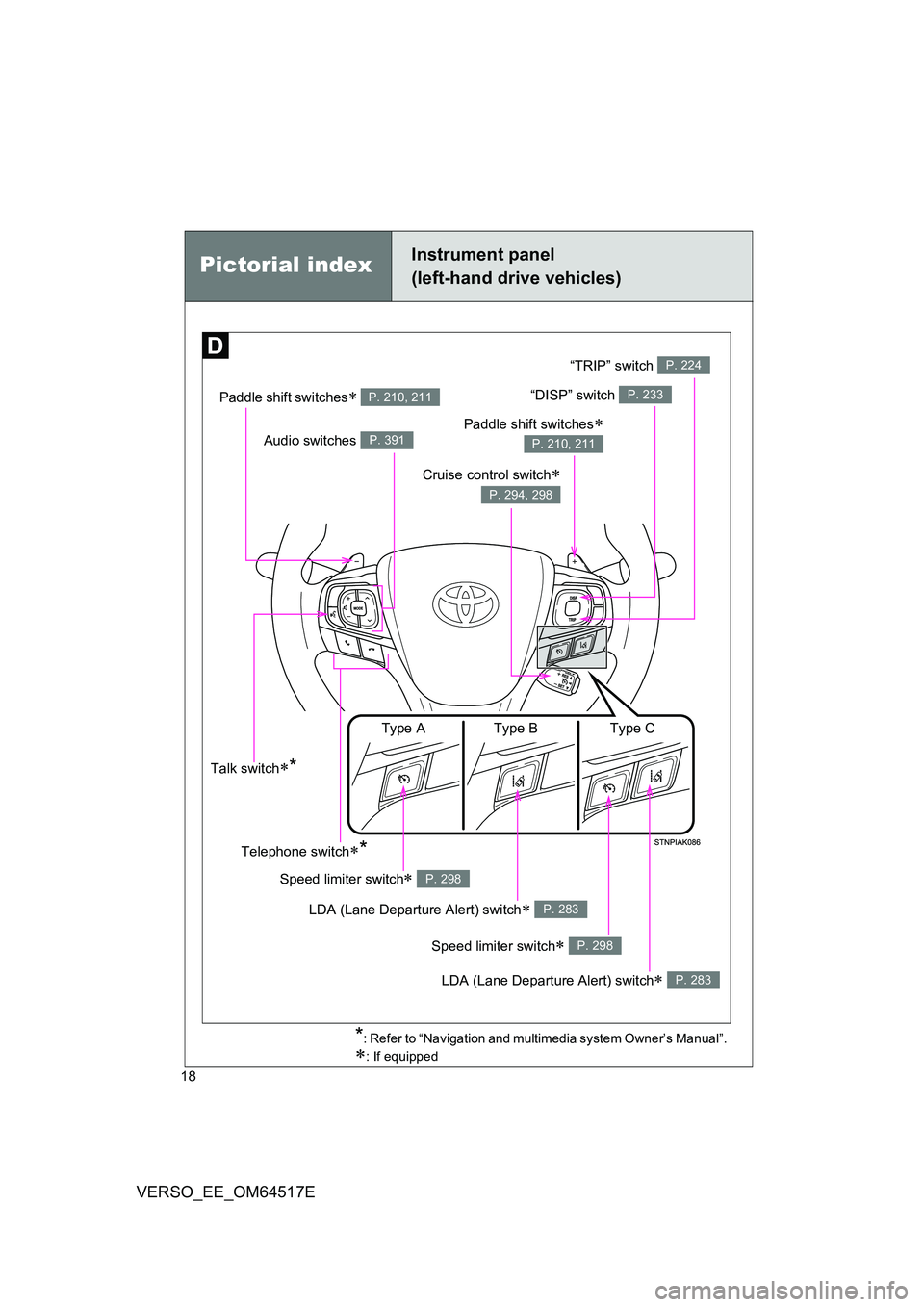
Paddle shift switches P. 210, 211“DISP” switch P. 233
Audio switches P. 391
Cruise control switch
P. 294, 298
Talk switch*
*: Refer to “Navigation and multimedia system Owner’s Manual”.
: If equipped
Telephone switch*
Paddle shift switches
P. 210, 211
LDA (Lane Departure Alert) switch P. 283
Speed limiter switch P. 298
Speed limiter switch P. 298
LDA (Lane Departure Alert) switch P. 283
Type A Type B Type C
“TRIP” switch P. 224
Page 20 of 668
20
VERSO_EE_OM64517E
Pictorial indexInterior
(right-hand drive vehicles)
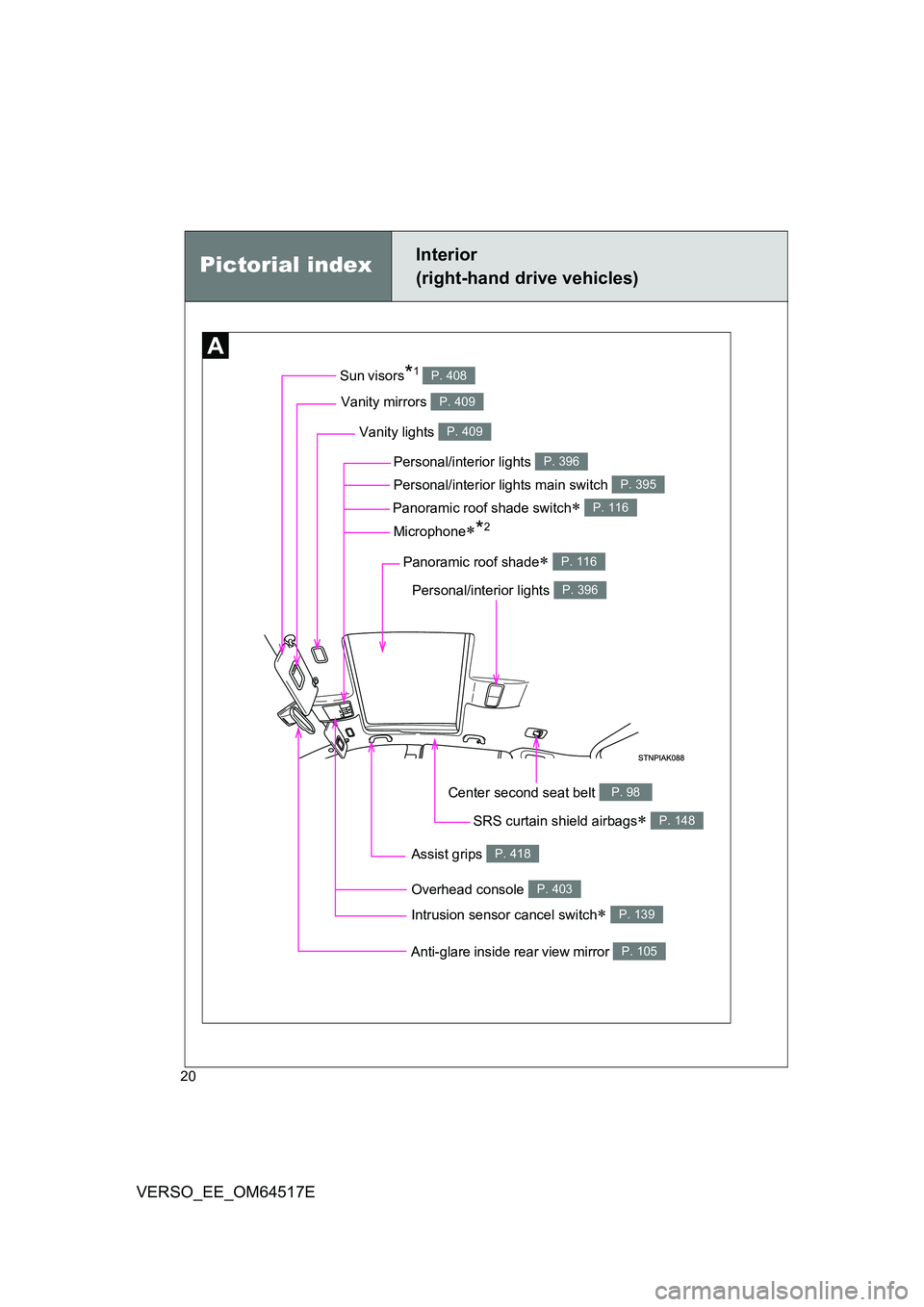
Vanity lights P. 409
Panoramic roof shade switch P. 116
Vanity mirrors P. 409
Sun visors*1 P. 408
SRS curtain shield airbags P. 148
Overhead console P. 403
Personal/interior lights P. 396
Personal/interior lights P. 396
Personal/interior lights main switch P. 395
Anti-glare inside rear view mirror P. 105
Center second seat belt P. 98
Microphone*2
Assist grips P. 418
Intrusion sensor cancel switch P. 139
Panoramic roof shade P. 116
Page 28 of 668
28
VERSO_EE_OM64517E
Instrument panel
(right-hand drive vehicles)Pictorial index
*: Refer to “Navigation and multimedia system Owner’s Manual”.
: If equipped
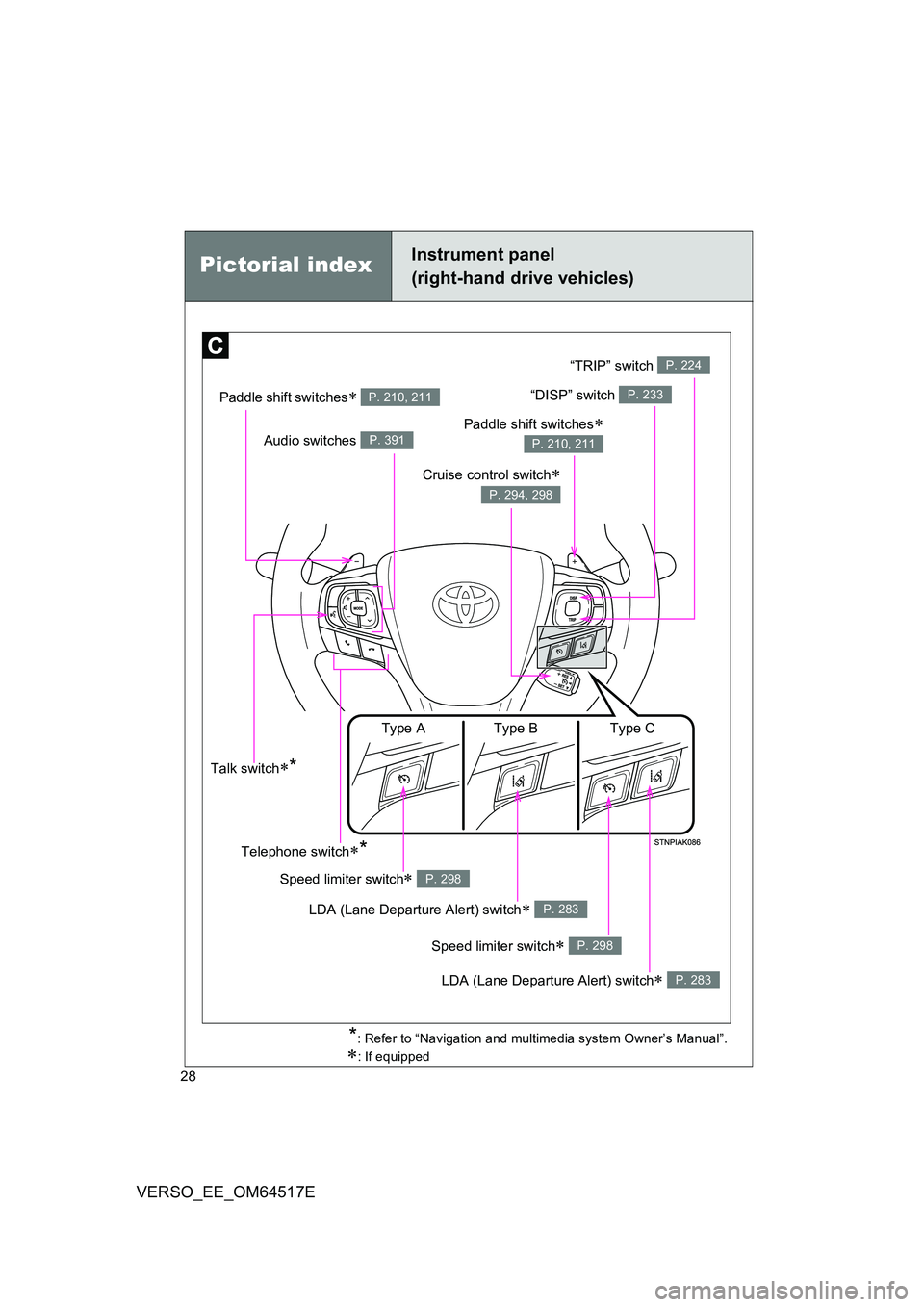
Paddle shift switches P. 210, 211
Audio switches P. 391
Talk switch*
Telephone switch*
LDA (Lane Departure Alert) switch P. 283
Speed limiter switch P. 298
Speed limiter switch P. 298
LDA (Lane Departure Alert) switch P. 283
Type A Type B Type C
“DISP” switch P. 233
Cruise control switch
P. 294, 298
Paddle shift switches
P. 210, 211
“TRIP” switch P. 224
Page 34 of 668
34
VERSO_EE_OM64517E
WARNING
■General precautions while driving
Driving under the influence: Never drive your vehicle when under the influ-
ence of alcohol or drugs that have impair ed your ability to operate your vehi-
cle. Alcohol and certain drugs delay reaction time, impair judgment and
reduce coordination, which could lead to an accident that could result in
death or serious injury.
Defensive driving: Always drive defensively. Anticipate mistakes that other
drivers or pedestrians might make and be ready to avoid accidents.
Driver distraction: Always give your full attention to driving. Anything that dis-
tracts the driver, such as adjusting controls, talking on a cellular phone or
reading can result in a collision with resulting death or serious injury to you,
your occupants or others.
■ General precautions regarding children’s safety
Never leave children unattended in the vehicle, and never allow children to
have or use the key.
Children may be able to start the vehicle or shift the vehicle into neutral.
There is also a danger that children may injure themselves by playing with
the cigarette lighter, the windows, or other features of the vehicle. In addi-
tion, heat build-up or extremely cold temperatures inside the vehicle can be
fatal to children.
Your vehicle contains batteries and/or accumulators. Do not discard
them into the environment but cooperate with separate collection
(Directive 2006/66/EC).
Page 47 of 668
47
1-2. Opening, closing and locking the doors
1
Before driving
VERSO_EE_OM64517E
■ Electronic key battery depletion
● The standard battery life is 1 to 2 years.
● If the battery becomes low, an alarm will sound in the cabin when the
engine stops. ( P. 560)
● Since the electronic key receives radio waves all the time, the key battery
will be depleted even when the electronic key is not being used. If any of
the following problems occurs, it is assumed that the key battery has
been depleted. Replace it with a new battery.
• The smart entry & start system or wireless remote control does not
work
• The operating range has narrowed
• The electronic key LED light does not come on
● To prevent the electronic key battery from being depleted significantly, do
not place the key within 1 m (3 ft.) of the following electrical appliances,
which produce magnetism.
•TVs
• Personal computers
• Mobile and cordless phones, and their battery chargers
• Lamps
• Induction cookers
■ To operate the system properly
Make sure to carry the electronic key when operating the system.
■ Note for electronic key operation
● Do not get the electronic key too close to the vehicle when operating the
system from the outside of the vehicle. Depending on the position and
holding conditions of t he electronic key, the key may not be detected cor-
rectly and the system may not operate properly. (The alarm may go off
accidentally, or the door lock prevention may not function.)
● Even when the electronic key is within the effective range (detection
areas), the system may not operate properly in the following cases.
• When locking or unlocking the doors, the electronic key is too close to
a door window or door handle, near the ground, or in a high place.
• The electronic key is on the instrument panel, interior floor, or in a door
pocket, or inside the glove box.
Page 63 of 668
63
1-2. Opening, closing and locking the doors
1
Before driving
VERSO_EE_OM64517E
NOTICE
■ Conditions affecting operation
The smart entry & start system uses weak radio waves. In the following situ-
ations, the communication between the electronic key and the vehicle may
be affected, preventing the smart entry & start system and wireless remote
control from operating properly. (Way of coping P. 606)
● When the electronic key battery is depleted
● Near a TV tower, electric power plant, gas station, radio station, large dis-
play, airport or other facility that gener ates strong radio waves or electrical
noise
● When a portable radio, cellular phone, cordless phone or other wireless
communication device is in the vicinity
● When the electronic key has come into contact with, or is covered by a
metallic object, such as the following
• Cards on which metal sheets such as foil are attached
• Cigarette boxes in which foil is used
• Metallic wallets or bags
• Coins
• Hot packs or pocket warmers
• Optical media such as CDs and DVDs
● When other wireless keys that emit radio waves are used in the vicinity
● When carrying the electronic key together with the following devices
• Another vehicle’s electronic key or a wireless key that emits radio
waves
• Personal computers or PDAs
• Digital audio players
• Hand-held game consoles
● If window tint with a metallic content or metallic objects are attached to the
rear window
Page 66 of 668
66
1-2. Opening, closing and locking the doors
VERSO_EE_OM64517E
■ Conditions affecting operation
Vehicles without smart entry & start system
The wireless remote control function may not operate normally in the fol-
lowing situations.
● Near a TV tower, radio station, electric power plant, airport or other
facility that generates strong radio waves
● When carrying a portable radio, cellular phone or other wireless com-
munication device
● When multiple wireless keys are in the vicinity
● When the wireless key has come into contact with, or is covered by a
metallic object
● When a wireless key (that emits radio waves) is being used nearby
● When the wireless key has been left near an electrical appliance such
as a personal computer
● When the wireless key battery is depleted
● If window tint with a metallic content or metallic objects are attached to
the rear window
Vehicles with smart entry & start system
P. 6 3
■ Customization that can be configured at any authorized Toyota dealer
or repairer, or another duly qua lified and equipped professional
Settings (e.g. wireless remote control system) can be changed.
(Customizable features P. 646)
Page 358 of 668
358
3-2. Using the audio system
VERSO_EE_OM64517E
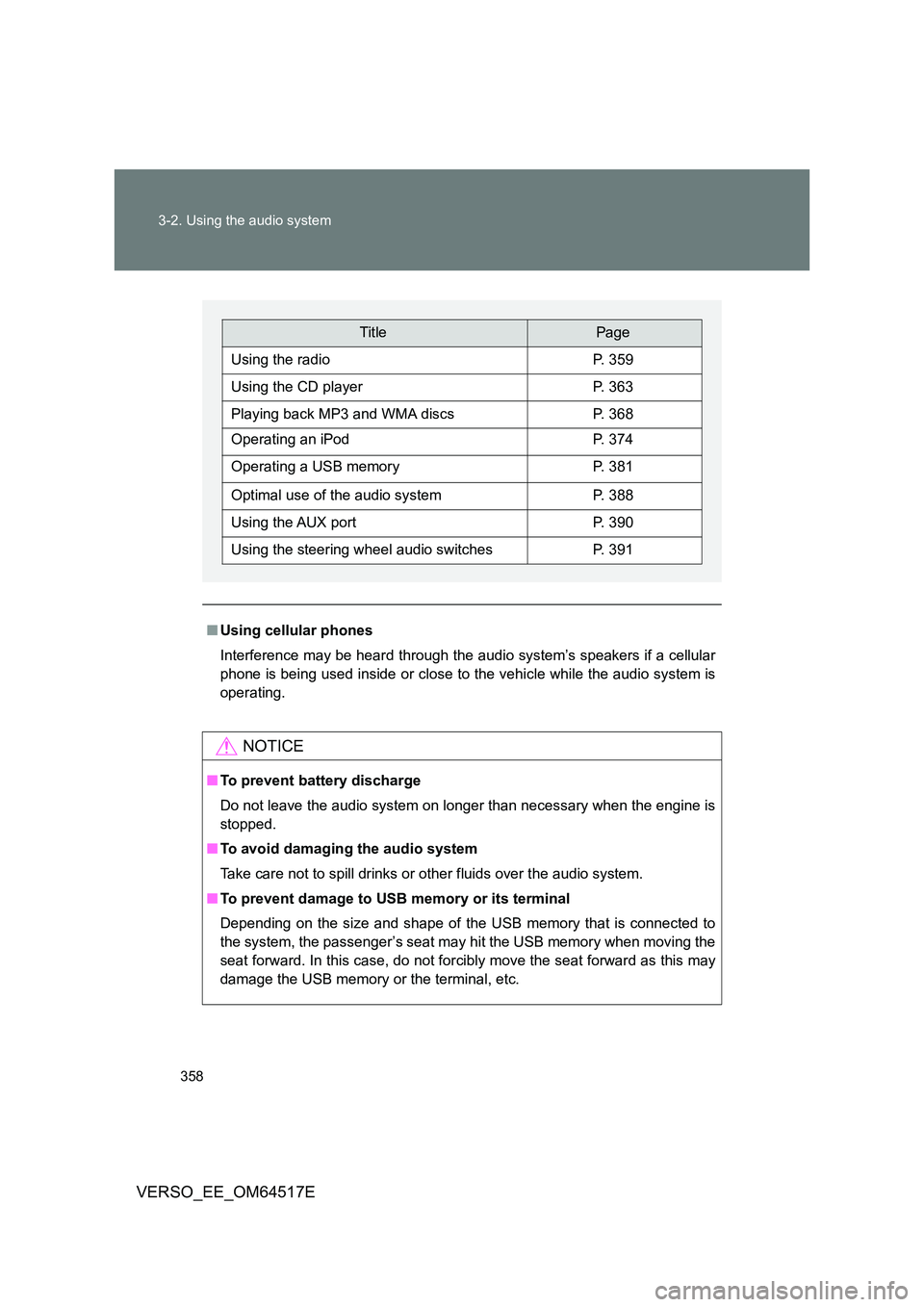
■ Using cellular phones
Interference may be heard through the audio system’s speakers if a cellular
phone is being used inside or close to the vehicle while the audio system is
operating.
NOTICE
■ To prevent battery discharge
Do not leave the audio system on longer than necessary when the engine is
stopped.
■ To avoid damaging the audio system
Take care not to spill drinks or other fluids over the audio system.
■ To prevent damage to USB memory or its terminal
Depending on the size and shape of the USB memory that is connected to
the system, the passenger’s seat may hit the USB memory when moving the
seat forward. In this case, do not forcibly move the seat forward as this may
damage the USB memory or the terminal, etc.
TitlePage
Using the radioP. 359
Using the CD playerP. 363
Playing back MP3 and WMA discsP. 368
Operating an iPodP. 374
Operating a USB memoryP. 381
Optimal use of the audio systemP. 388
Using the AUX portP. 390
Using the steering wheel audio switchesP. 391
Page 379 of 668
379
3-2. Using the audio system
3
Interior features
VERSO_EE_OM64517E
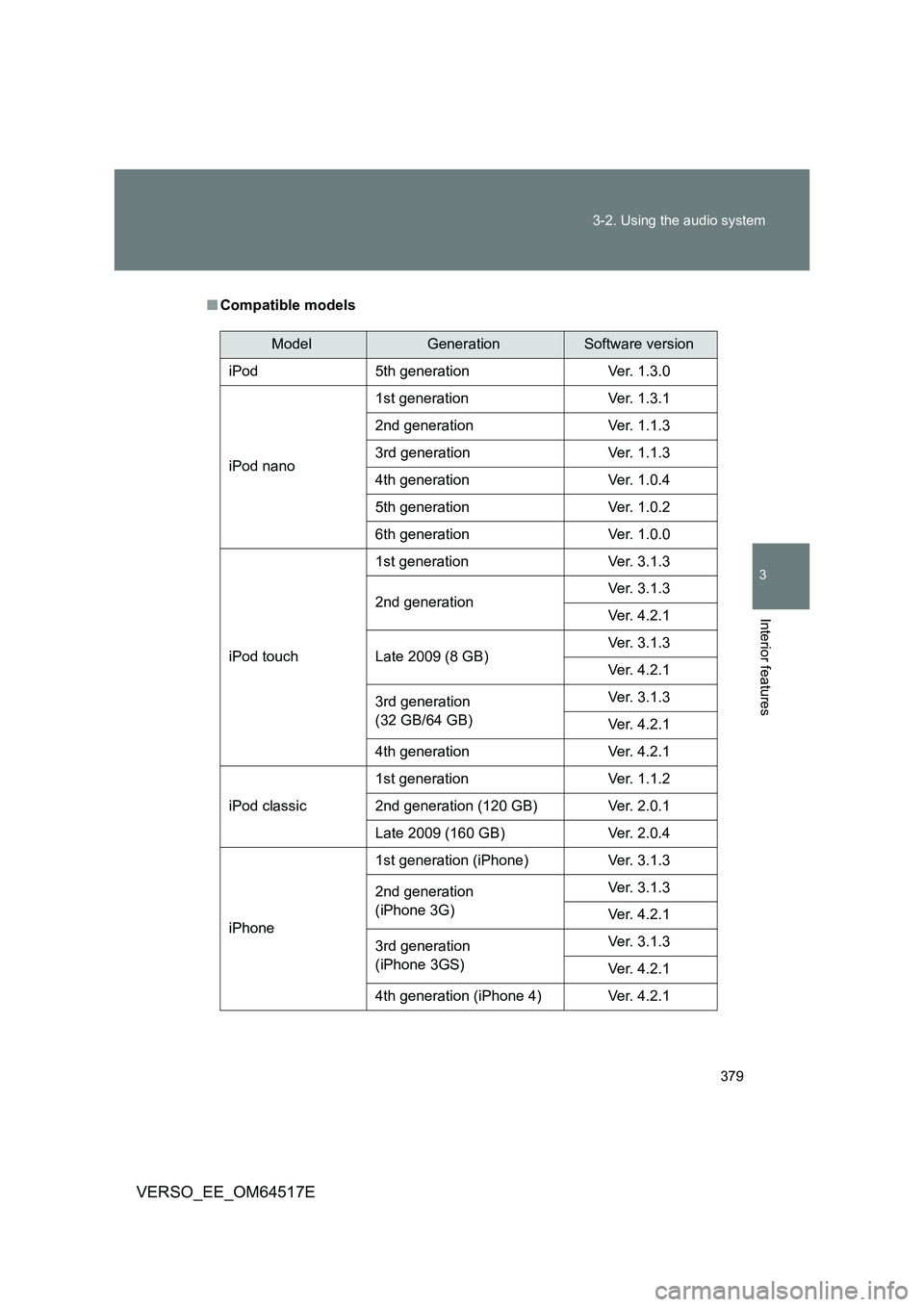
■ Compatible models
ModelGenerationSoftware version
iPod 5th generation Ver. 1.3.0
iPod nano
1st generation Ver. 1.3.1
2nd generation Ver. 1.1.3
3rd generation Ver. 1.1.3
4th generation Ver. 1.0.4
5th generation Ver. 1.0.2
6th generation Ver. 1.0.0
iPod touch
1st generation Ver. 3.1.3
2nd generation Ver. 3.1.3
Ver. 4.2.1
Late 2009 (8 GB) Ver. 3.1.3
Ver. 4.2.1
3rd generation
(32 GB/64 GB)
Ver. 3.1.3
Ver. 4.2.1
4th generation Ver. 4.2.1
iPod classic
1st generation Ver. 1.1.2
2nd generation (120 GB) Ver. 2.0.1
Late 2009 (160 GB) Ver. 2.0.4
iPhone
1st generation (iPhone) Ver. 3.1.3
2nd generation
(iPhone 3G)
Ver. 3.1.3
Ver. 4.2.1
3rd generation
(iPhone 3GS)
Ver. 3.1.3
Ver. 4.2.1
4th generation (iPhone 4) Ver. 4.2.1