display TOYOTA VERSO S 2011 Owners Manual
[x] Cancel search | Manufacturer: TOYOTA, Model Year: 2011, Model line: VERSO S, Model: TOYOTA VERSO S 2011Pages: 664, PDF Size: 160.56 MB
Page 292 of 664
2924-5. Opening, closing the windows and moon roof
direction, and hold it there for
approximately 4 seconds or more.
6 Pull and hold the power window switch in the one-touch closing direction again. After the side win-
dow is completely closed, continue holding the switch for a further 1 sec-ond or more.
If you release the switch while the side window is moving, start again from the beginning.
If the side window reverses and cannot be fully closed or opened, have the vehi-cle inspected by any authorized Toyota
retailer or Toyota authorized repairer, or any reliable repairer.
■Door lock linked power window operation
●The power windows can be opened
and closed using the mechanical key.*
( P.605)
●The power windows can be opened
and closed using the wireless remote
control.* ( P.205)
●Vehicles with alarm: The alarm may be triggered if the alarm is set and the
power window is closed using the door lock linked power window opera-tion function. ( P.78)*: These settings must be customized at
any authorized Toyota retailer or
Toyota authorized repairer, or any reli-
able repairer.
■Power window open reminder func-
tion
The buzzer sounds and a message is shown on the multi-information display
when the power switch is turned to OFF and the driver’s door is opened with the power windows open.
■Customization
Settings (e.g. linked door lock operation) can be changed. (Customizable fea-tures: P.636)
WARNING
Observe the following precautions. Failing to do so may result in death or
serious injury.
■Closing the power windows
●The driver is responsible for all the power window operations, including the operation for the passengers. In
order to prevent accidental opera- tion, especially by a child, do not let a child operate the power windows.
It is possible for children and other passengers to have body parts caught in the power window. Also,
when riding with a child, it is recom- mended to use the window lock switch. ( P.293)
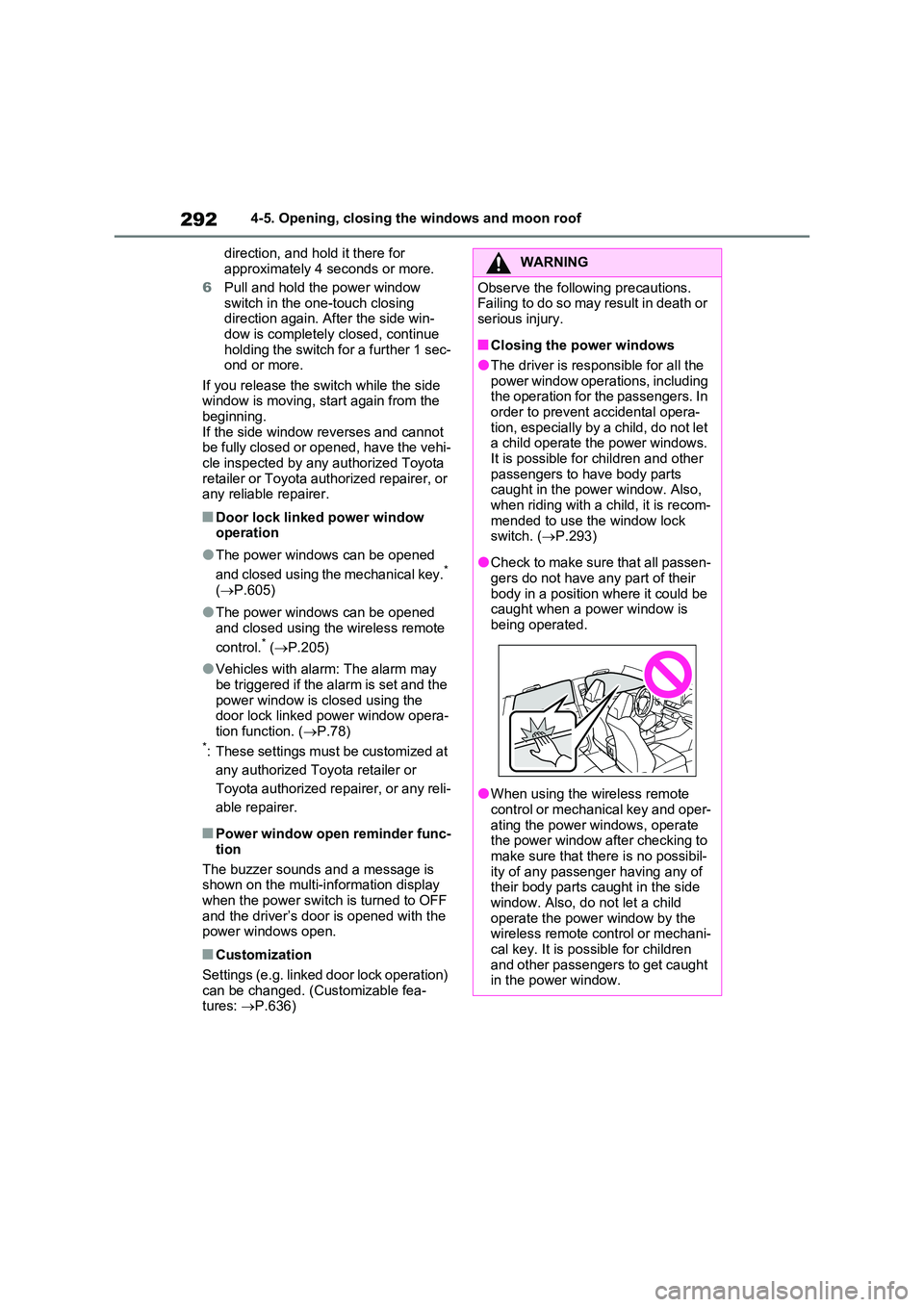
●Check to make sure that all passen- gers do not have any part of their
body in a position where it could be caught when a power window is being operated.
●When using the wireless remote control or mechanical key and oper-
ating the power windows, operate the power window after checking to make sure that there is no possibil-
ity of any passenger having any of their body parts caught in the side window. Also, do not let a child
operate the power window by the wireless remote control or mechani-cal key. It is possible for children
and other passengers to get caught in the power window.
Page 296 of 664
2964-5. Opening, closing the windows and moon roof
panoramic moon roof or electronic
sunshade closes and reopens. The panoramic moon roof and electronic
sunshade will start to close.*
4 Check that the panoramic moon roof
and electronic sunshade are fully closed and release the switch.*: If the switch is released at the incor-
rect time, the procedure will have to
be performed again from the begin-
ning.
If the panoramic moon roof or electronic
sunshade does not fully close even after performing the above procedure cor-rectly, have the vehicle inspected by any
authorized Toyota retailer or Toyota authorized repairer, or any reliable repairer.
■Panoramic moon roof open
reminder function
A buzzer sounds and a message is shown on the multi-information display
when the power switch is turned to OFF and the driver’s door is opened with the panoramic moon roof open.
■Customization
Settings (e.g. linked door lock operation) can be changed. (Customizable fea-tures: P.636)
WARNING
Observe the following precautions. Failure to do so may result in death or serious injury.
■Opening and closing the elec-tronic sunshade
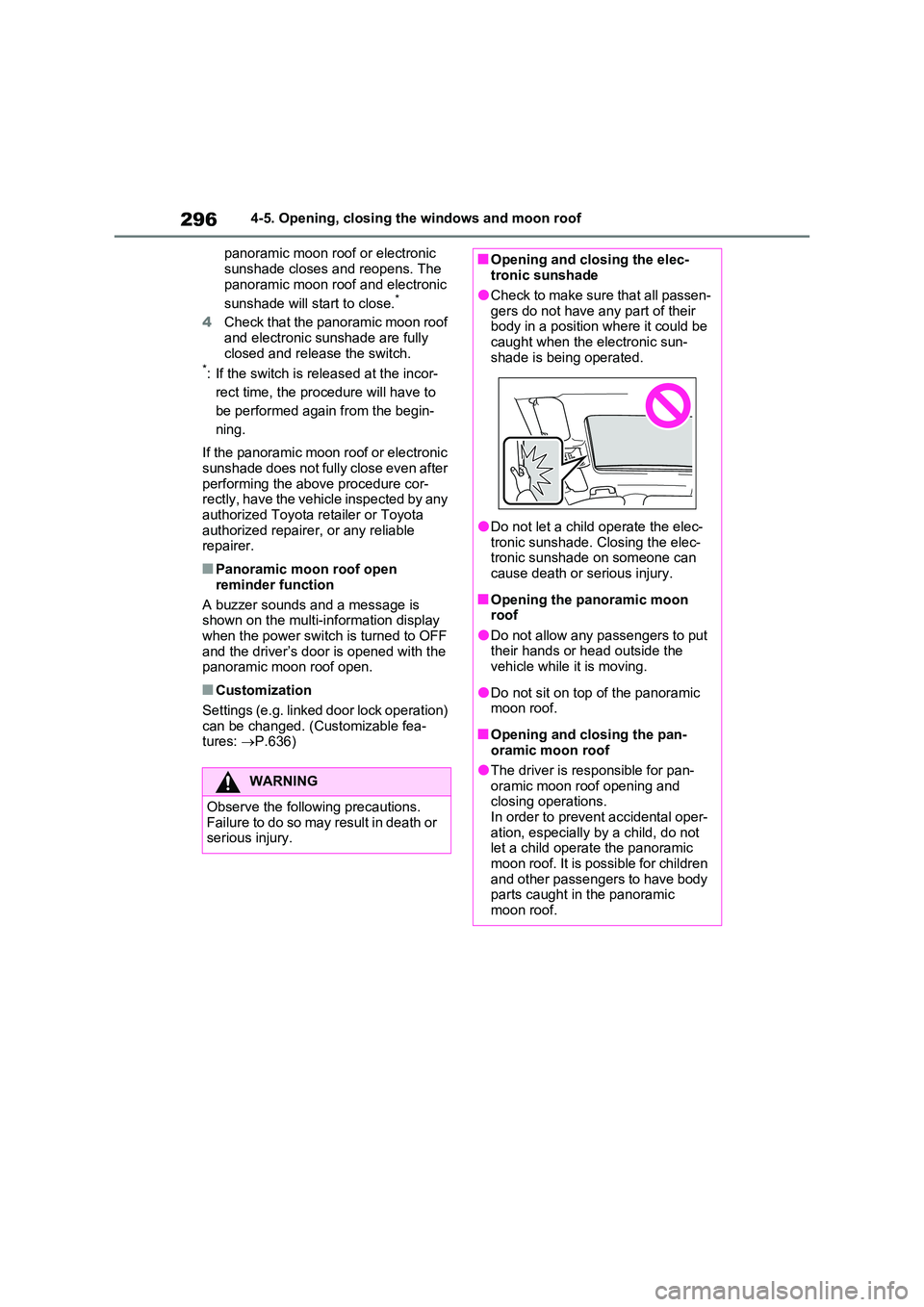
●Check to make sure that all passen-
gers do not have any part of their body in a position where it could be caught when the electronic sun-
shade is being operated.
●Do not let a child operate the elec-
tronic sunshade. Closing the elec- tronic sunshade on someone can cause death or serious injury.
■Opening the panoramic moon roof
●Do not allow any passengers to put their hands or head outside the vehicle while it is moving.
●Do not sit on top of the panoramic moon roof.
■Opening and closing the pan-oramic moon roof
●The driver is responsible for pan-oramic moon roof opening and closing operations.
In order to prevent accidental oper- ation, especially by a child, do not let a child operate the panoramic
moon roof. It is possible for children and other passengers to have body parts caught in the panoramic
moon roof.
Page 301 of 664
301
5 5-1. Before driving
Driving
■Driving in the rain
●Drive carefully when it is raining,
because visibility will be reduced, the
windows may become fogged-up, and
the road could be slippery.
●Drive carefully when it starts to rain,
as the road surface could be espe-
cially slippery.
●Refrain from high speeds when driv-
ing on an expressway in the rain,
because there may be a layer of water
between the tires and the road sur-
face, preventing the steering and
brakes from operating properly.
■ECO Accelerator Guidance
(P.182)
It is easier to drive in an Eco-friendly
manner by driving while referring to the
ECO Accelerator Guidance display.
Also, by using the ECO Accelerator
Guidance it is easier to increase the
“Eco Score” evaluation.
●When starting off: While staying within
the ECO Accelerator Guidance range,
gradually depress the accelerator
pedal and accelerate to the desired
speed. If excessive acceleration is
avoided, the “Start” score will
increase.
●When driving: After accelerating to the
desired speed, release the accelera-
tor pedal and drive at a stable speed
within the ECO Accelerator Guidance
range. By keeping the vehicle within
the ECO Accelerator Guidance range,
the “Cruise” score will increase.
●When stopping: When stopping the
vehicle, early releasing the accelera-
tor pedal will cause the “Stop” score to
increase.
■Restraining the hybrid system out-
put (Brake Override System)
●When the accelerator and brake ped-
als are depressed at the same time,
the hybrid system output may be
restrained.
●A warning message is displayed on
the multi-information display and head-up display (if equipped) while
the system is operating. (P.574)
■Restraining sudden start (Drive-
Start Control)
●When the following unusual operation
is performed, the hybrid system output
may be restrained.
• When the shift lever is shifted from R
to D, D to R, N to R, P to D
*, or P to R*
(D includes S) with the accelerator
pedal depressed, a warning message
appears on the multi-information dis-
play and head-up display (if
equipped). If a warning message is
shown on the multi-information dis-
play, read the message and follow the
instructions.
• When the accelerator pedal is
depressed too much while the vehicle
is in reverse.
*: Depending on the situation, the shift
lever may not be changed.
●While Drive-Start Control is being acti-
vated, your vehicle may have trouble
escaping from the mud or fresh snow.
In such case, deactivate TRC
(P.439) to cancel Drive-Start Con-
trol so that the vehicle may be able to
escape from the mud or fresh snow.
●Drive-Start Control does not work
when Trail Mode is turned on.
■Breaking in your new Toyota
To extend the life of the vehicle, observ-
ing the following precautions is recom-
mended:
●For the first 300 km (200 miles):
Avoid sudden stops.
●For the first 800 km (500 miles):
Do not tow a trailer.
●For the first 1000 km (600 miles):
• Do not drive at extremely high
speeds.
• Avoid sudden acceleration.
• Do not drive continuously in low
gears.
• Do not drive at a constant speed for
extended periods.
Page 317 of 664
317
5 5-2. Driving procedures
Driving
5-2.Driving pro cedu res
1Check that the AC charging
cable is disconnected. (P.135)
2Pull the parking brake switch to
check that the parking brake is
set. (P.326)
The parking brake indicator will come
on.
3Check that the shift lever is set
in P.
4Firmly depress the brake pedal.
and a message will be dis-
played on the multi-information display.
If it is not displayed, the hybrid system
cannot be started.
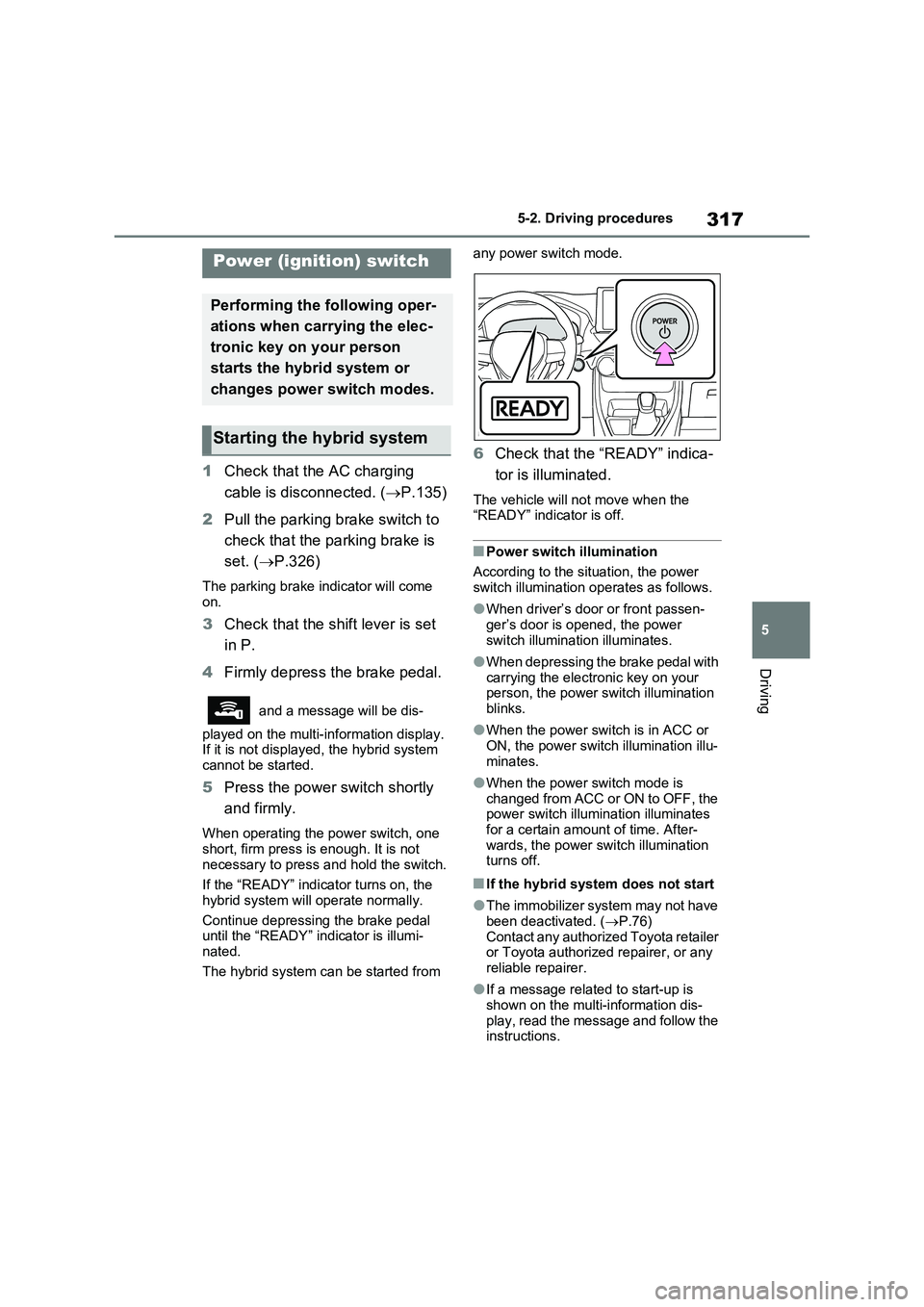
5Press the power switch shortly
and firmly.
When operating the power switch, one
short, firm press is enough. It is not
necessary to press and hold the switch.
If the “READY” indicator turns on, the
hybrid system will operate normally.
Continue depressing the brake pedal
until the “READY” indicator is illumi-
nated.
The hybrid system can be started from any power switch mode.
6Check that the “READY” indica-
tor is illuminated.
The vehicle will not move when the
“READY” indicator is off.
■Power switch illumination
According to the situation, the power
switch illumination operates as follows.
●When driver’s door or front passen-
ger’s door is opened, the power
switch illumination illuminates.
●When depressing the brake pedal with
carrying the electronic key on your
person, the power switch illumination
blinks.
●When the power switch is in ACC or
ON, the power switch illumination illu-
minates.
●When the power switch mode is
changed from ACC or ON to OFF, the
power switch illumination illuminates
for a certain amount of time. After-
wards, the power switch illumination
turns off.
■If the hybrid system does not start
●The immobilizer system may not have
been deactivated. (P.76)
Contact any authorized Toyota retailer
or Toyota authorized repairer, or any
reliable repairer.
●If a message related to start-up is
shown on the multi-information dis-
play, read the message and follow the
instructions.
Power (ignition) switch
Performing the following oper-
ations when carrying the elec-
tronic key on your person
starts the hybrid system or
changes power switch modes.
Starting the hybrid system
Page 318 of 664
3185-2. Driving procedures
■When the ambient temperature is
low, such as during winter driving
conditions
●When starting the hybrid system, the
flashing time of the “READY” indicator
may be long. Leave the vehicle as it is
until the “READY” indicator is steady
on, as steady means the vehicle is
able to move.
●When the hybrid battery (traction bat-
tery) is extremely cold (below approxi-
mately -30°C [-22°F]) under the
influence of the outside temperature, it
may not be possible to start the hybrid
system. In this case, try to start the
hybrid system again after the tem-
perature of the hybrid battery
increases due to the outside tempera-
ture increase etc.
■Sounds and vibrations specific to a
hybrid vehicle
P.91
■If the 12-volt battery is discharged
The hybrid system cannot be started
using the smart entry & start system.
Refer to P.606 to restart the hybrid sys-
tem.
■Electronic key battery depletion
P.202
■Conditions affecting operation
P.225
■Note for the entry function
P.225
■Steering lock function
●After turning the power switch to OFF
and opening and closing the doors,
the steering wheel will be locked due
to the steering lock function. Operat-
ing the power switch again automati-
cally cancels the steering lock.
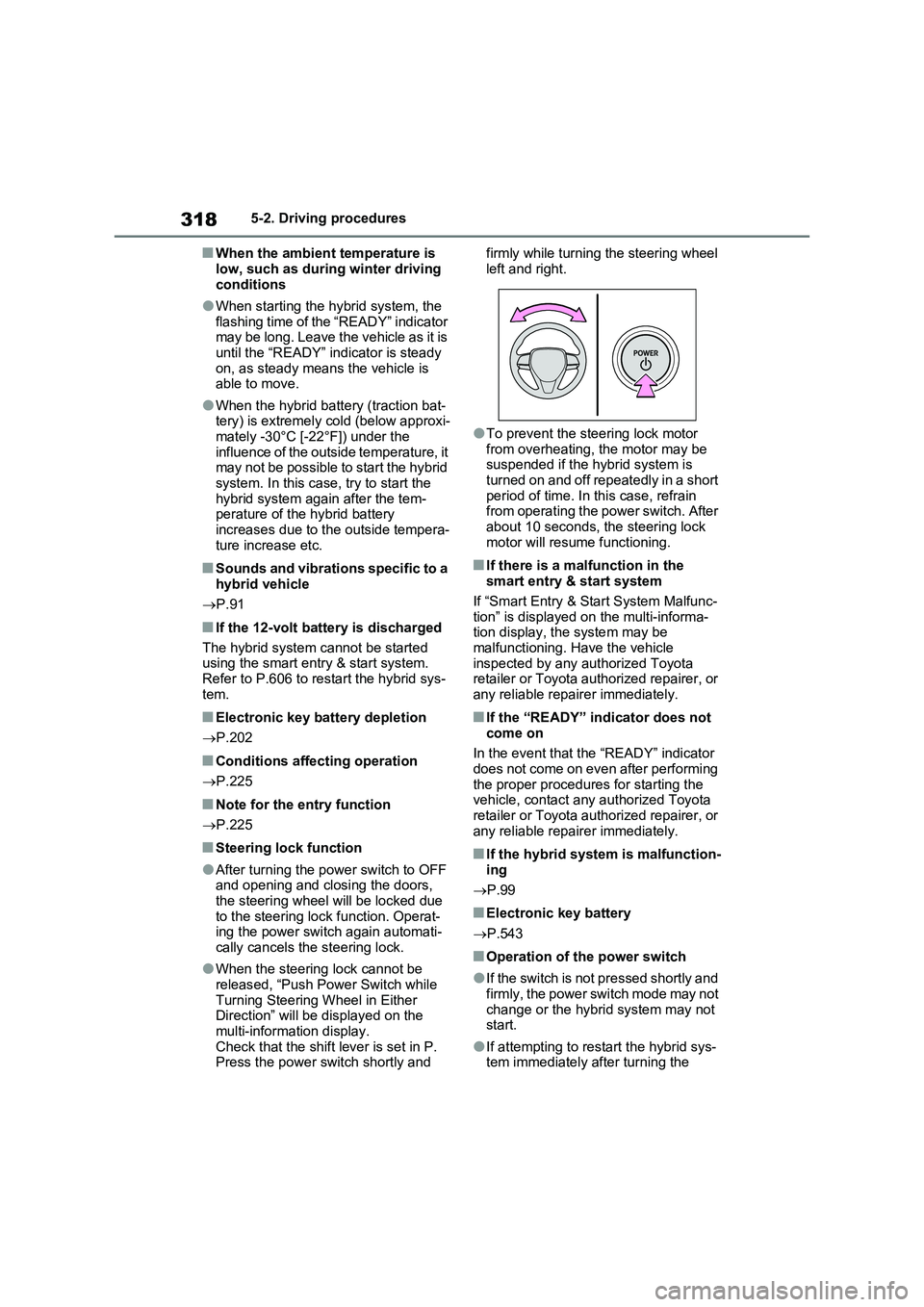
●When the steering lock cannot be
released, “Push Power Switch while
Turning Steering Wheel in Either
Direction” will be displayed on the
multi-information display.
Check that the shift lever is set in P.
Press the power switch shortly and firmly while turning the steering wheel
left and right.
●To prevent the steering lock motor
from overheating, the motor may be
suspended if the hybrid system is
turned on and off repeatedly in a short
period of time. In this case, refrain
from operating the power switch. After
about 10 seconds, the steering lock
motor will resume functioning.
■If there is a malfunction in the
smart entry & start system
If “Smart Entry & Start System Malfunc-
tion” is displayed on the multi-informa-
tion display, the system may be
malfunctioning. Have the vehicle
inspected by any authorized Toyota
retailer or Toyota authorized repairer, or
any reliable repairer immediately.
■If the “READY” indicator does not
come on
In the event that the “READY” indicator
does not come on even after performing
the proper procedures for starting the
vehicle, contact any authorized Toyota
retailer or Toyota authorized repairer, or
any reliable repairer immediately.
■If the hybrid system is malfunction-
ing
P.99
■Electronic key battery
P.543
■Operation of the power switch
●If the switch is not pressed shortly and
firmly, the power switch mode may not
change or the hybrid system may not
start.
●If attempting to restart the hybrid sys-
tem immediately after turning the
Page 319 of 664
319
5
5-2. Driving procedures
Driving
power switch to OFF, the hybrid sys-
tem may not start in some cases. After turning the power switch to OFF, please wait a few seconds before
restarting the hybrid system.
■Customization
If the smart entry & start system has been deactivated in a customized set-
ting, refer to P.605.
1 Stop the vehicle completely.
2 If the parking brake is in manual
mode, set the parking brake.
( P.326)
Check the parking brake indicator is
illuminated.
3 Shift the shift lever to P.
4 Press the power switch shortly
and firmly.
The hybrid system will stop, and the meter display will be extinguished.
Release the shift lever when pressing the power switch.
5 Release the brake pedal and
check that “ACCESSORY” or
“IGNITION ON” is not shown on
the multi-information display.
WARNING
■When starting the hybrid system
Always start the hybrid system while
sitting in the driver’s seat. Do not depress the accelerator pedal while starting the hybrid system under any
circumstances. Doing so may cause an accident resulting in death or serious injury.
■Caution while driving
If hybrid system failure occurs while
the vehicle is moving, do not lock or open the doors until the vehicle reaches a safe and complete stop.
Activation of the steering lock in this circumstance may lead to an acci-dent, resulting in death or serious
injury.
NOTICE
■When starting the hybrid system
If the hybrid system becomes difficult to start, have your vehicle checked by
any authorized Toyota retailer or Toyota authorized repairer, or any reliable repairer immediately.
■Symptoms indicating a malfunc-tion with the power switch
If the power switch seems to be oper- ating somewhat differently than usual, such as the switch sticking slightly,
there may be a malfunction. Contact any authorized Toyota retailer or Toyota authorized repairer, or any
reliable repairer immediately.
Stopping the hybrid system
WARNING
■Stopping the hybrid system in an emergency
●If you want to stop the hybrid sys-tem in an emergency while driving the vehicle, press and hold the
power switch for more than 2 sec- onds, or press it briefly 3 times or more in succession. ( P.560)
However, do not touch the power switch while driving except in an emergency. Turning the hybrid sys-
tem off while driving will not cause a loss of steering or braking control. However, power assist for the
steering wheel may be lost making it difficult to steer smoothly before stopping the vehicle depending on
the remaining charge in the 12-volt battery or usage conditions. In this situation, you should pull over and
stop the vehicle as soon as it is safe to do so.
Page 320 of 664
3205-2. Driving procedures
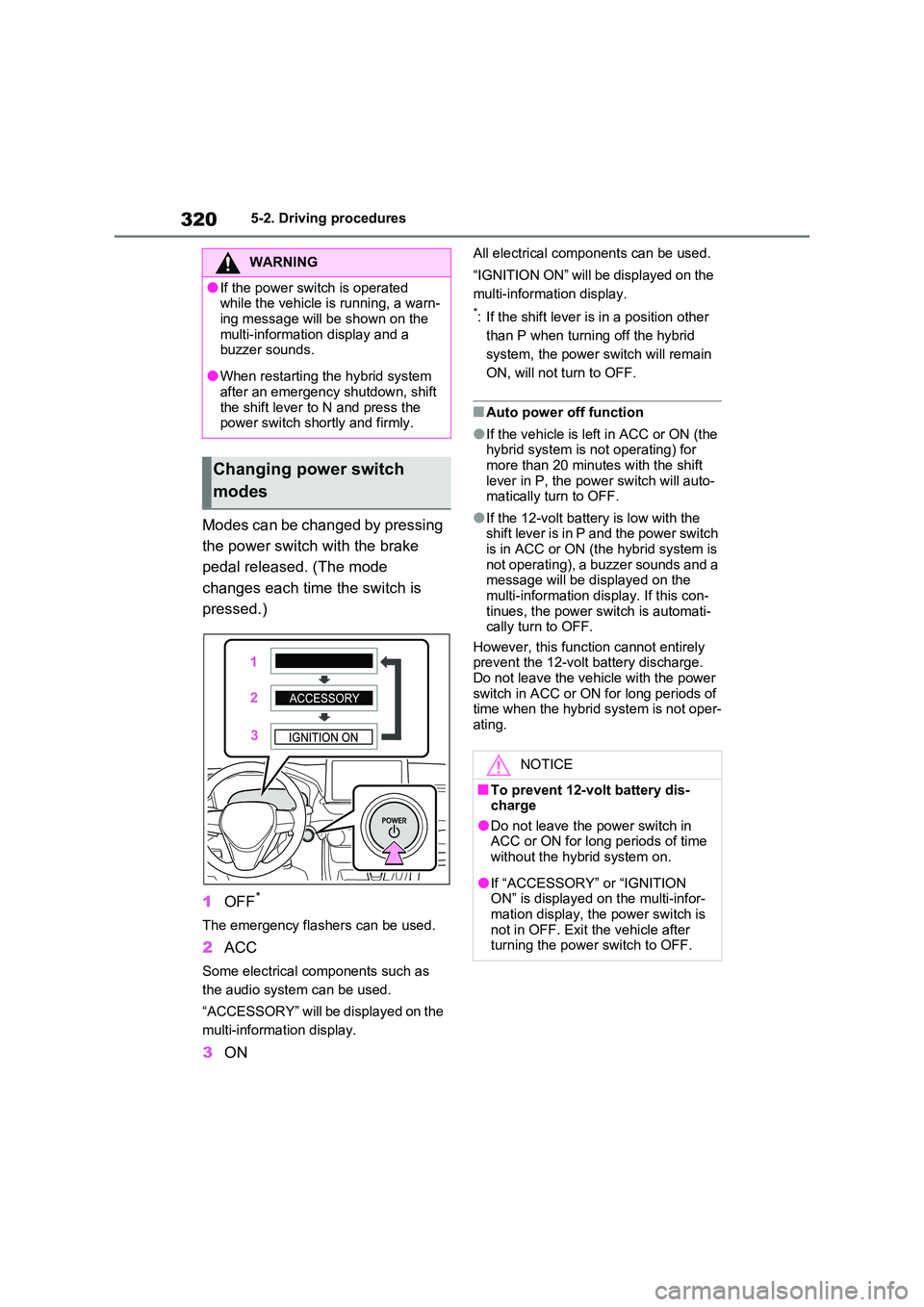
Modes can be changed by pressing
the power switch with the brake
pedal released. (The mode
changes each time the switch is
pressed.)
1 OFF*
The emergency flashers can be used.
2ACC
Some electrical components such as
the audio system can be used.
“ACCESSORY” will be displayed on the
multi-information display.
3 ON
All electrical components can be used.
“IGNITION ON” will be displayed on the
multi-information display.
*: If the shift lever is in a position other
than P when turning off the hybrid
system, the power switch will remain
ON, will not turn to OFF.
■Auto power off function
●If the vehicle is left in ACC or ON (the hybrid system is not operating) for
more than 20 minutes with the shift lever in P, the power switch will auto-matically turn to OFF.
●If the 12-volt battery is low with the shift lever is in P and the power switch
is in ACC or ON (the hybrid system is not operating), a buzzer sounds and a message will be displayed on the
multi-information display. If this con- tinues, the power switch is automati-cally turn to OFF.
However, this function cannot entirely prevent the 12-volt battery discharge. Do not leave the vehicle with the power
switch in ACC or ON for long periods of time when the hybrid system is not oper-ating.
WARNING
●If the power switch is operated while the vehicle is running, a warn-
ing message will be shown on the multi-information display and a buzzer sounds.
●When restarting the hybrid system after an emergency shutdown, shift
the shift lever to N and press the power switch shortly and firmly.
Changing power switch
modes
NOTICE
■To prevent 12-volt battery dis- charge
●Do not leave the power switch in ACC or ON for long periods of time without the hybrid system on.
●If “ACCESSORY” or “IGNITION ON” is displayed on the multi-infor-
mation display, the power switch is not in OFF. Exit the vehicle after turning the power switch to OFF.
Page 321 of 664
321
5
5-2. Driving procedures
Driving
If the hybrid system is stopped with
the shift lever in a position other
than P, the power switch will not be
turned to OFF but instead be turned
to ACC. Perform the following pro-
cedure to turn the switch to OFF:
1 Check that the parking brake is
set.
2 Shift the shift lever to P.
3 Check that “IGNITION ON” is
displayed on the multi-informa-
tion display and press the power
switch shortly and firmly.
4 Check that “ACCESSORY” or
“IGNITION ON” on the multi-
information display is off.
*1: To improve fuel efficiency and
reduce noise, shift the shift lever to
D for normal driving.
*2: Vehicles with paddle shift switches
only: Selecting shift ranges in the D
position allows suitable use of
engine braking. ( P.323)
*3: By selecting shift ranges using S
mode, you can control accelerating
force and engine braking force.
■When driving with dynamic radar cruise control with full-speed range or cruise control activated (if
equipped)
Even when performing the following actions with the intent of enabling
engine braking, engine braking will not activate because dynamic radar cruise control with full-speed range, or cruise
control will not be canceled.
●While driving in D or S mode, down-
When stopping the hybrid
system with the shift lever in
a position other than P
NOTICE
■To prevent 12-volt battery dis-
charge
Do not stop the hybrid system when the shift lever is in a position other
than P. If the hybrid system is stopped in another shift lever position, the power switch will not be turned to
OFF but instead remain ON. If the vehicle is left in ON, 12-volt battery discharge may occur.
Hybrid transmission
Select the shift position
depending on your purpose
and situation.
Shift position purpose and
functions
Shift
positionObjective or function
PParking the vehicle/start-
ing the hybrid system
RReversing
NNeutral
DNormal driving*1, 2
SS mode driving*3
Page 324 of 664
3245-2. Driving procedures
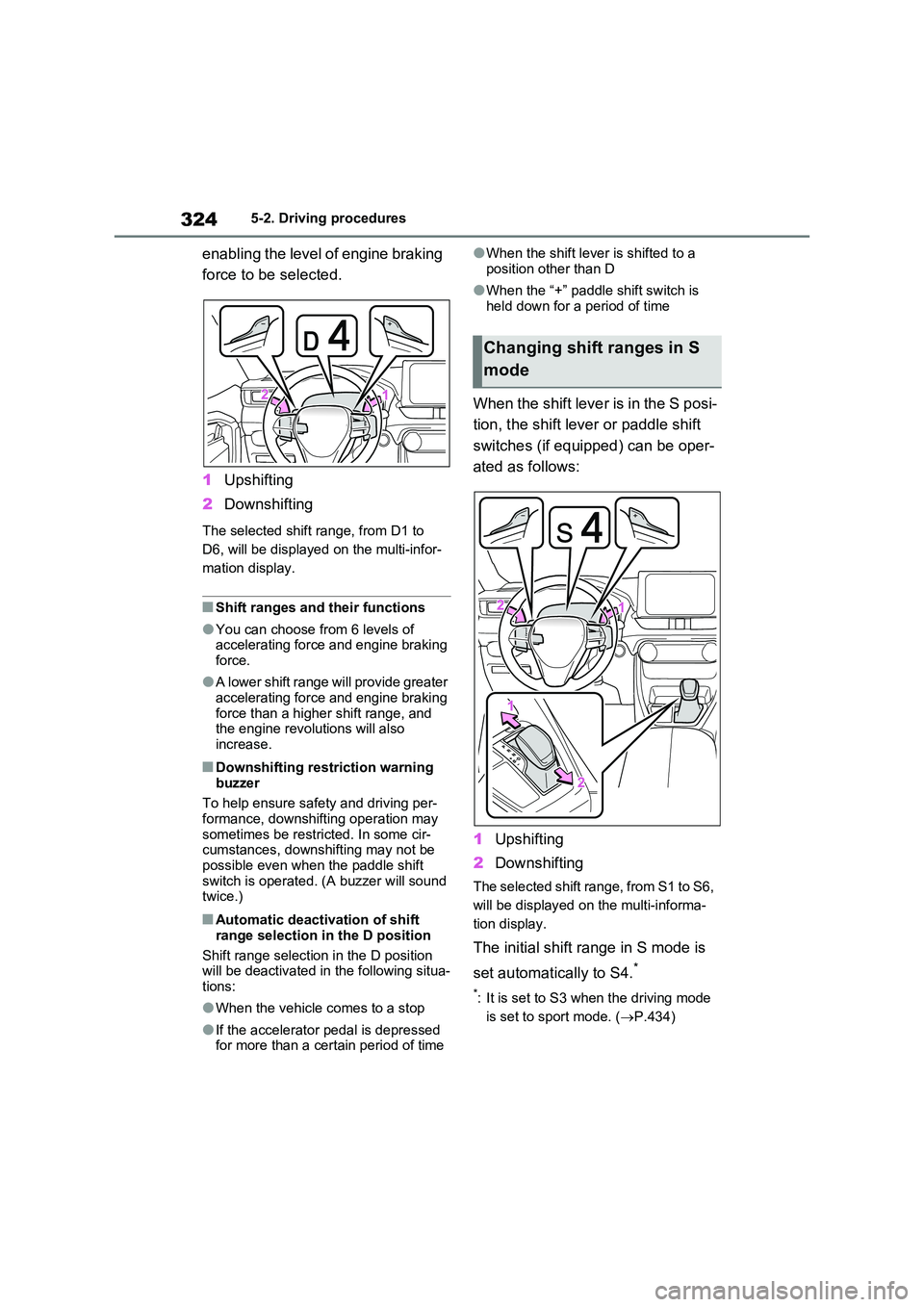
enabling the level of engine braking
force to be selected.
1 Upshifting
2 Downshifting
The selected shift range, from D1 to
D6, will be displayed on the multi-infor-
mation display.
■Shift ranges and their functions
●You can choose from 6 levels of accelerating force and engine braking force.
●A lower shift range will provide greater accelerating force and engine braking
force than a higher shift range, and the engine revolutions will also increase.
■Downshifting restriction warning
buzzer
To help ensure safety and driving per- formance, downshifting operation may
sometimes be restricted. In some cir- cumstances, downshifting may not be possible even when the paddle shift
switch is operated. (A buzzer will sound twice.)
■Automatic deactivation of shift
range selection in the D position
Shift range selection in the D position will be deactivated in the following situa-
tions:
●When the vehicle comes to a stop
●If the accelerator pedal is depressed for more than a certain period of time
●When the shift lever is shifted to a
position other than D
●When the “+” paddle shift switch is
held down for a period of time
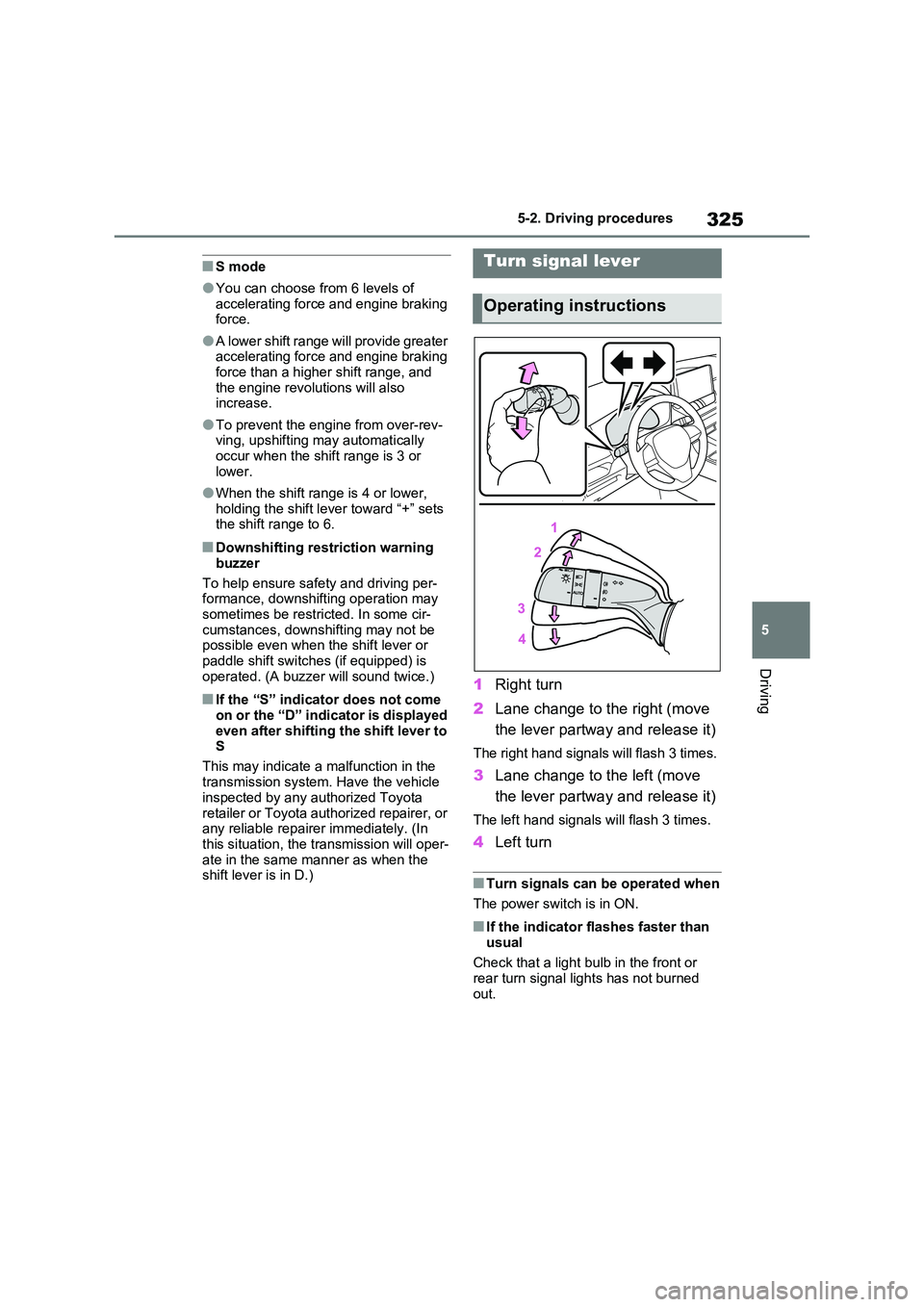
When the shift lever is in the S posi-
tion, the shift lever or paddle shift
switches (if equipped) can be oper-
ated as follows:
1 Upshifting
2 Downshifting
The selected shift range, from S1 to S6,
will be displayed on the multi-informa-
tion display.
The initial shift range in S mode is
set automatically to S4.*
*: It is set to S3 when the driving mode
is set to sport mode. ( P.434)
Changing shift ranges in S
mode
Page 325 of 664
325
5
5-2. Driving procedures
Driving
■S mode
●You can choose from 6 levels of accelerating force and engine braking force.
●A lower shift range will provide greater accelerating force and engine braking
force than a higher shift range, and the engine revolutions will also increase.
●To prevent the engine from over-rev-ving, upshifting may automatically
occur when the shift range is 3 or lower.
●When the shift range is 4 or lower, holding the shift lever toward “+” sets the shift range to 6.
■Downshifting restriction warning
buzzer
To help ensure safety and driving per- formance, downshifting operation may
sometimes be restricted. In some cir- cumstances, downshifting may not be possible even when the shift lever or
paddle shift switches (if equipped) is operated. (A buzzer will sound twice.)
■If the “S” indicator does not come on or the “D” indicator is displayed
even after shifting the shift lever to S
This may indicate a malfunction in the
transmission system. Have the vehicle inspected by any authorized Toyota
retailer or Toyota authorized repairer, or any reliable repairer immediately. (In this situation, the transmission will oper-
ate in the same manner as when the shift lever is in D.)
1 Right turn
2 Lane change to the right (move
the lever partway and release it)
The right hand signals will flash 3 times.
3 Lane change to the left (move
the lever partway and release it)
The left hand signals will flash 3 times.
4 Left turn
■Turn signals can be operated when
The power switch is in ON.
■If the indicator flashes faster than
usual
Check that a light bulb in the front or rear turn signal lights has not burned
out.
Turn signal lever
Operating instructions