warning TOYOTA VERSO S 2011 Owners Manual
[x] Cancel search | Manufacturer: TOYOTA, Model Year: 2011, Model line: VERSO S, Model: TOYOTA VERSO S 2011Pages: 664, PDF Size: 160.56 MB
Page 278 of 664
2784-4. Adjusting the steering wheel and mirrors
4-4.Adjusting the steering whe el an d mirrors
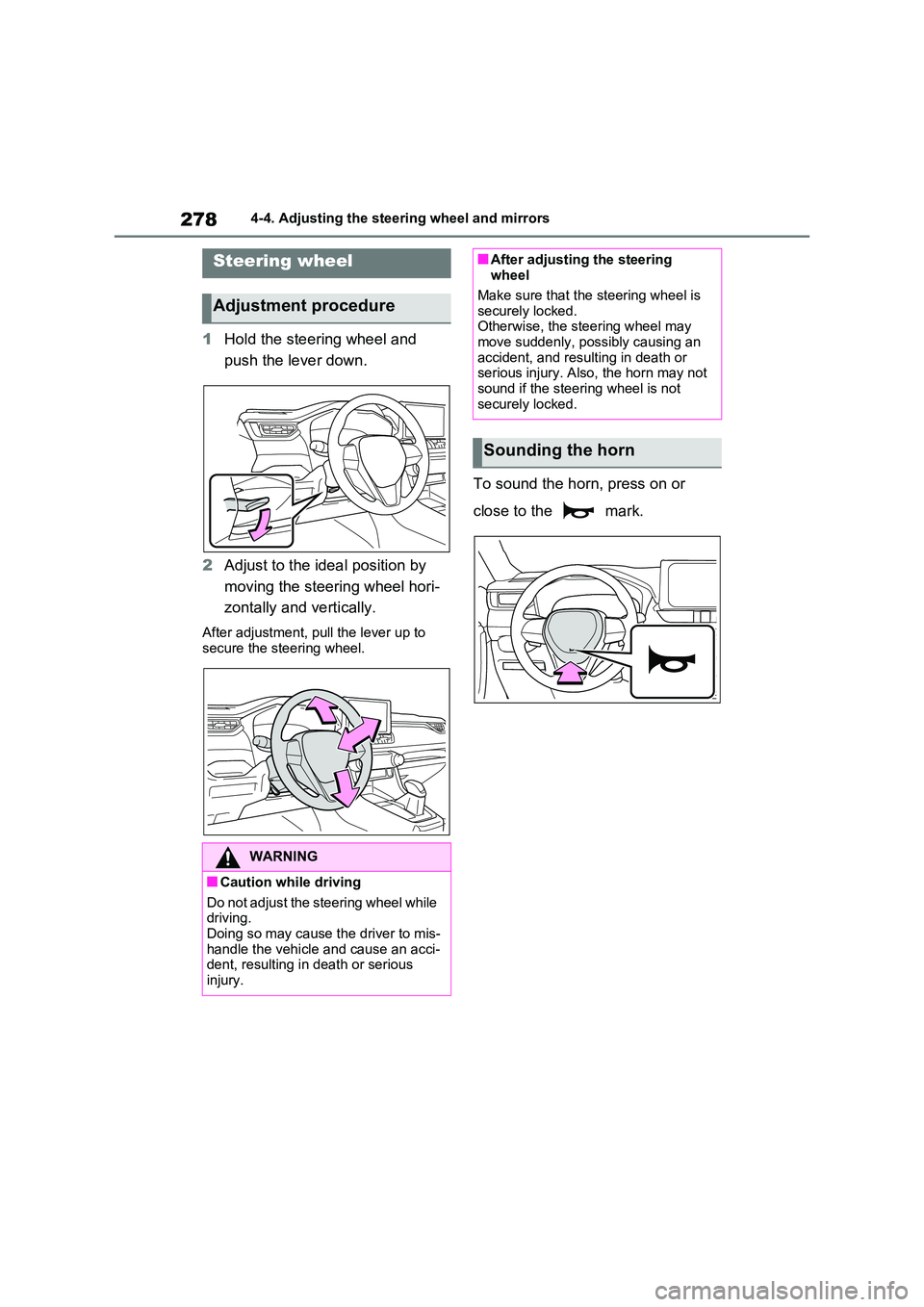
1Hold the steering wheel and
push the lever down.
2 Adjust to the ideal position by
moving the steering wheel hori-
zontally and vertically.
After adjustment, pull the lever up to
secure the steering wheel.
To sound the horn, press on or
close to the mark.
Steering wheel
Adjustment procedure
WARNING
■Caution while driving
Do not adjust the steering wheel while driving.Doing so may cause the driver to mis-
handle the vehicle and cause an acci- dent, resulting in death or serious injury.
■After adjusting the steering wheel
Make sure that the steering wheel is
securely locked. Otherwise, the steering wheel may move suddenly, possibly causing an
accident, and resulting in death or serious injury. Also, the horn may not sound if the steering wheel is not
securely locked.
Sounding the horn
Page 279 of 664
279
4
4-4. Adjusting the steering wheel and mirrors
Before driving
*: If equipped
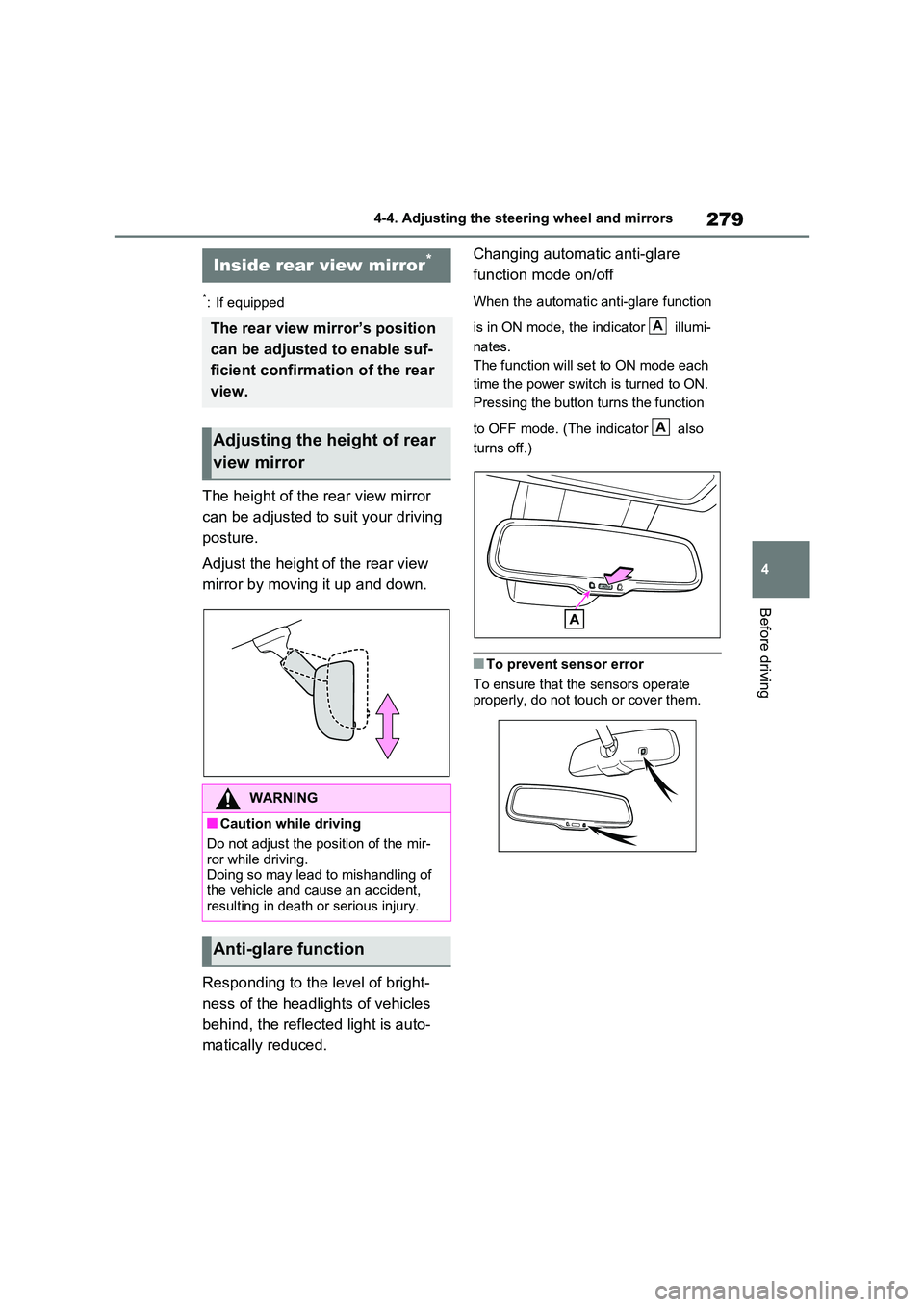
The height of the rear view mirror
can be adjusted to suit your driving
posture.
Adjust the height of the rear view
mirror by moving it up and down.
Responding to the level of bright-
ness of the headlights of vehicles
behind, the reflected light is auto-
matically reduced.
Changing automatic anti-glare
function mode on/off
When the automatic anti-glare function
is in ON mode, the indicator illumi-
nates.
The function will set to ON mode each
time the power switch is turned to ON.
Pressing the button turns the function
to OFF mode. (The indicator also
turns off.)
■To prevent sensor error
To ensure that the sensors operate
properly, do not touch or cover them.
Inside rear view mirror*
The rear view mirror’s position
can be adjusted to enable suf-
ficient confirmation of the rear
view.
Adjusting the height of rear
view mirror
WARNING
■Caution while driving
Do not adjust the position of the mir- ror while driving.Doing so may lead to mishandling of
the vehicle and cause an accident, resulting in death or serious injury.
Anti-glare function
A
A
Page 280 of 664
2804-4. Adjusting the steering wheel and mirrors
*: If equipped
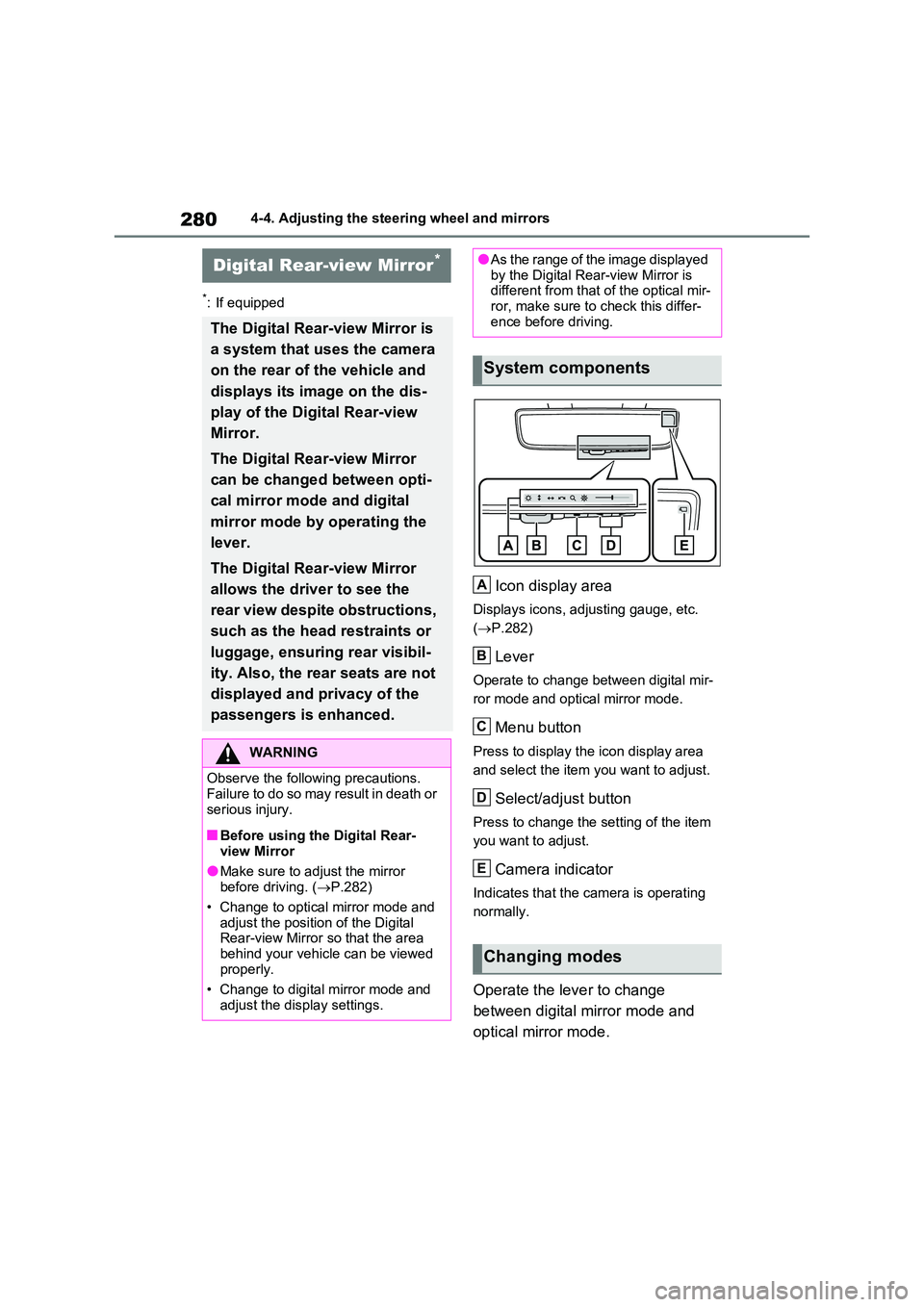
Icon display area
Displays icons, adjusting gauge, etc.
( P.282)
Lever
Operate to change between digital mir-
ror mode and optical mirror mode.
Menu button
Press to display the icon display area
and select the item you want to adjust.
Select/adjust button
Press to change the setting of the item
you want to adjust.
Camera indicator
Indicates that the camera is operating
normally.
Operate the lever to change
between digital mirror mode and
optical mirror mode.
Digital Rear-view Mirror*
The Digital Rear-view Mirror is
a system that uses the camera
on the rear of the vehicle and
displays its image on the dis-
play of the Digital Rear-view
Mirror.
The Digital Rear-view Mirror
can be changed between opti-
cal mirror mode and digital
mirror mode by operating the
lever.
The Digital Rear-view Mirror
allows the driver to see the
rear view despite obstructions,
such as the head restraints or
luggage, ensuring rear visibil-
ity. Also, the rear seats are not
displayed and privacy of the
passengers is enhanced.
WARNING
Observe the following precautions. Failure to do so may result in death or
serious injury.
■Before using the Digital Rear-
view Mirror
●Make sure to adjust the mirror before driving. ( P.282)
• Change to optical mirror mode and adjust the position of the Digital Rear-view Mirror so that the area
behind your vehicle can be viewed properly.
• Change to digital mirror mode and
adjust the display settings.
●As the range of the image displayed by the Digital Rear-view Mirror is different from that of the optical mir-
ror, make sure to check this differ- ence before driving.
System components
Changing modes
A
B
C
D
E
Page 283 of 664
283
4
4-4. Adjusting the steering wheel and mirrors
Before driving
ror mode and the optical mirror
mode.
When using the digital mirror
mode
P.282
When using the optical mirror
mode
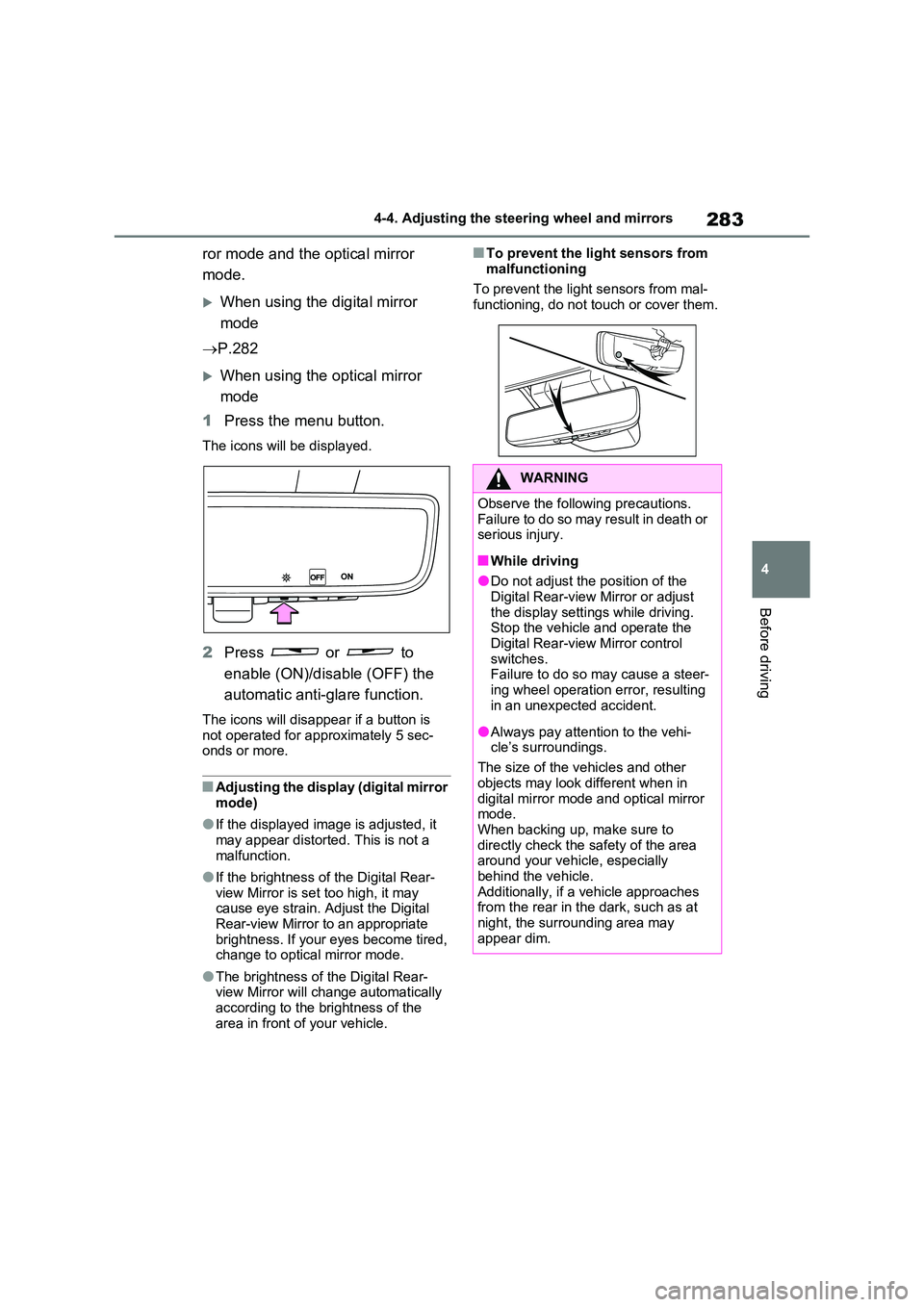
1 Press the menu button.
The icons will be displayed.
2Press or to
enable (ON)/disable (OFF) the
automatic anti-glare function.
The icons will disappear if a button is not operated for approximately 5 sec-onds or more.
■Adjusting the display (digital mirror mode)
●If the displayed image is adjusted, it may appear distorted. This is not a
malfunction.
●If the brightness of the Digital Rear-
view Mirror is set too high, it may cause eye strain. Adjust the Digital Rear-view Mirror to an appropriate
brightness. If your eyes become tired, change to optical mirror mode.
●The brightness of the Digital Rear-view Mirror will change automatically according to the brightness of the
area in front of your vehicle.
■To prevent the light sensors from
malfunctioning
To prevent the light sensors from mal- functioning, do not touch or cover them.
WARNING
Observe the following precautions.Failure to do so may result in death or serious injury.
■While driving
●Do not adjust the position of the
Digital Rear-view Mirror or adjust the display settings while driving.Stop the vehicle and operate the
Digital Rear-view Mirror control switches. Failure to do so may cause a steer-
ing wheel operation error, resulting in an unexpected accident.
●Always pay attention to the vehi-cle’s surroundings.
The size of the vehicles and other
objects may look different when in digital mirror mode and optical mirror mode.
When backing up, make sure to directly check the safety of the area around your vehicle, especially
behind the vehicle. Additionally, if a vehicle approaches from the rear in the dark, such as at
night, the surrounding area may appear dim.
Page 284 of 664
2844-4. Adjusting the steering wheel and mirrors
■Cleaning the mirror surface
If the mirror surface is dirty, the
image on the display may be diffi-
cult to see.
Clean the mirror surface gently
using a soft dry cloth.
■Cleaning the camera
If the camera lens is dirty, the dis-
played image may not be clear. In
this case, clean it with a soft cloth
dampened with water or a swab.
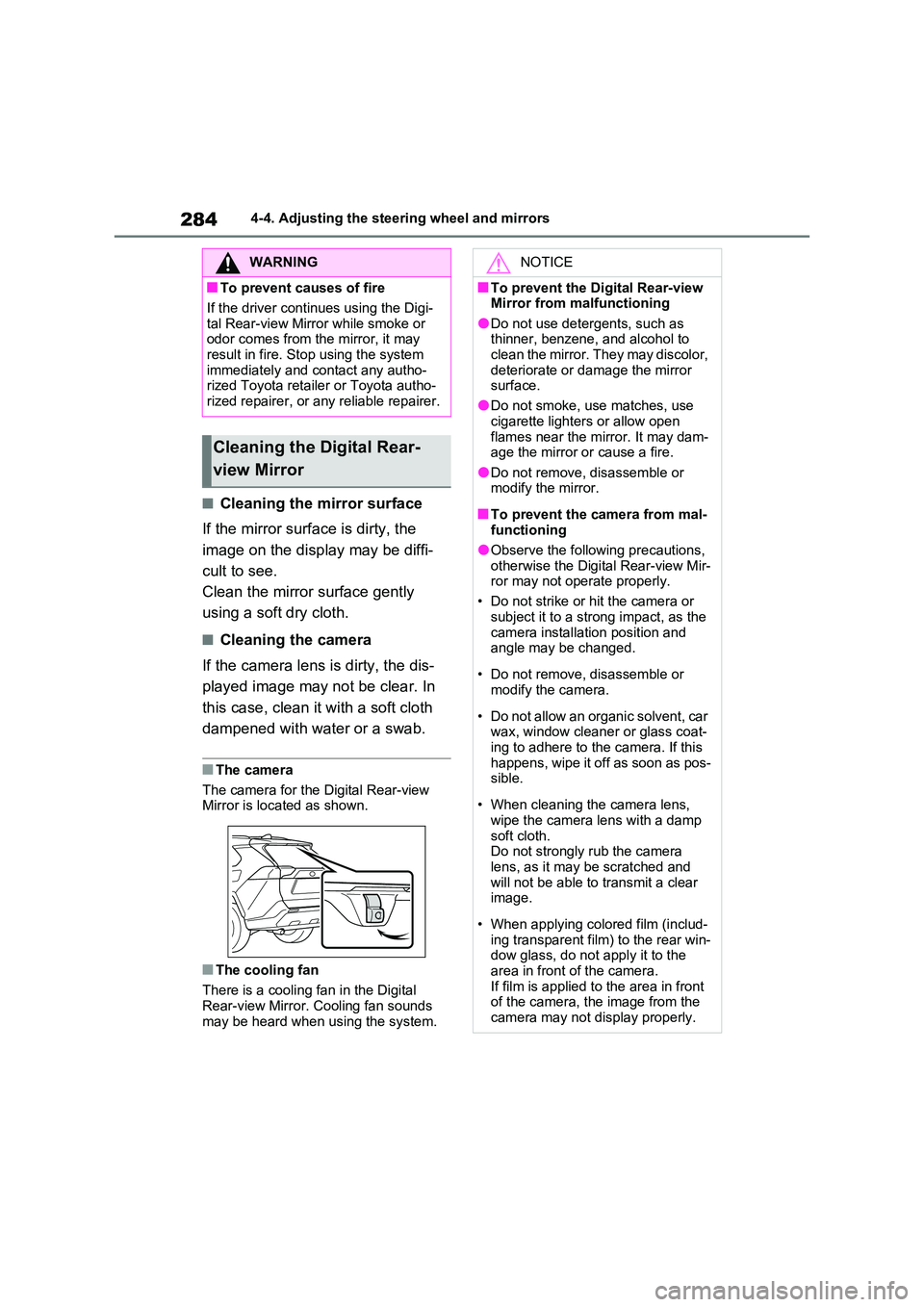
■The camera
The camera for the Digital Rear-view Mirror is located as shown.
■The cooling fan
There is a cooling fan in the Digital
Rear-view Mirror. Cooling fan sounds may be heard when using the system.
WARNING
■To prevent causes of fire
If the driver continues using the Digi-
tal Rear-view Mirror while smoke or odor comes from the mirror, it may result in fire. Stop using the system
immediately and contact any autho- rized Toyota retailer or Toyota autho-rized repairer, or any reliable repairer.
Cleaning the Digital Rear-
view Mirror
NOTICE
■To prevent the Digital Rear-view Mirror from malfunctioning
●Do not use detergents, such as thinner, benzene, and alcohol to clean the mirror. They may discolor,
deteriorate or damage the mirror surface.
●Do not smoke, use matches, use
cigarette lighters or allow open flames near the mirror. It may dam-age the mirror or cause a fire.
●Do not remove, disassemble or modify the mirror.
■To prevent the camera from mal-functioning
●Observe the following precautions,
otherwise the Digital Rear-view Mir- ror may not operate properly.
• Do not strike or hit the camera or
subject it to a strong impact, as the camera installation position and angle may be changed.
• Do not remove, disassemble or modify the camera.
• Do not allow an organic solvent, car wax, window cleaner or glass coat-
ing to adhere to the camera. If this happens, wipe it off as soon as pos-sible.
• When cleaning the camera lens, wipe the camera lens with a damp
soft cloth. Do not strongly rub the camera lens, as it may be scratched and
will not be able to transmit a clear image.
• When applying colored film (includ- ing transparent film) to the rear win-dow glass, do not apply it to the
area in front of the camera. If film is applied to the area in front of the camera, the image from the
camera may not display properly.
Page 289 of 664
289
4
4-4. Adjusting the steering wheel and mirrors
Before driving
■Defogging the mirrors
The outside rear view mirrors can be
cleared using the mirror defoggers. Turn on the rear window defogger to turn on the outside rear view mirror defoggers.
( P.454)
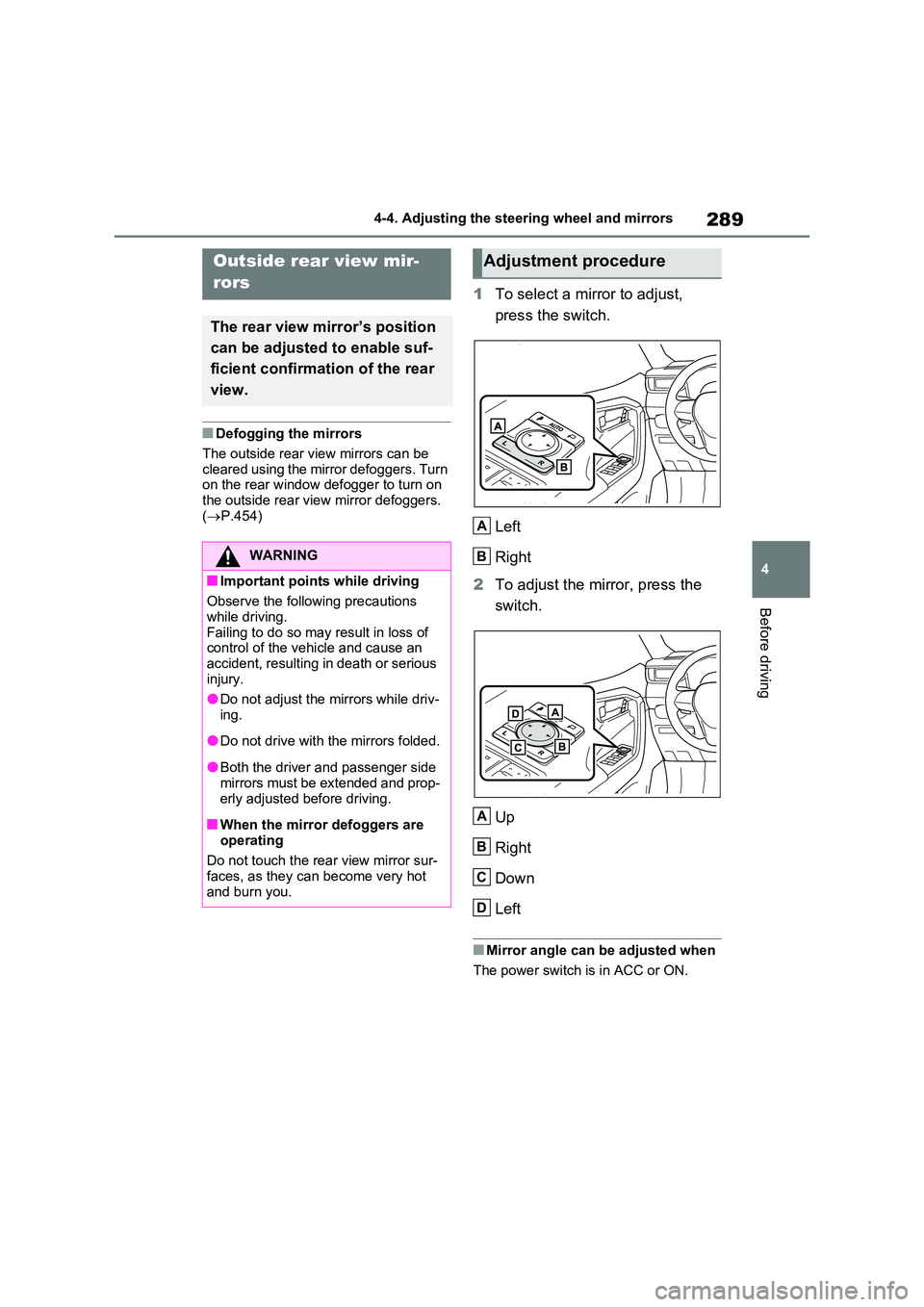
1To select a mirror to adjust,
press the switch.
Left
Right
2 To adjust the mirror, press the
switch.
Up
Right
Down
Left
■Mirror angle can be adjusted when
The power switch is in ACC or ON.
Outside rear view mir-
rors
The rear view mirror’s position
can be adjusted to enable suf-
ficient confirmation of the rear
view.
WARNING
■Important points while driving
Observe the following precautions
while driving. Failing to do so may result in loss of control of the vehicle and cause an
accident, resulting in death or serious injury.
●Do not adjust the mirrors while driv-
ing.
●Do not drive with the mirrors folded.
●Both the driver and passenger side mirrors must be extended and prop-
erly adjusted before driving.
■When the mirror defoggers are
operating
Do not touch the rear view mirror sur- faces, as they can become very hot
and burn you.
Adjustment procedure
A
B
A
B
C
D
Page 290 of 664
2904-4. Adjusting the steering wheel and mirrors
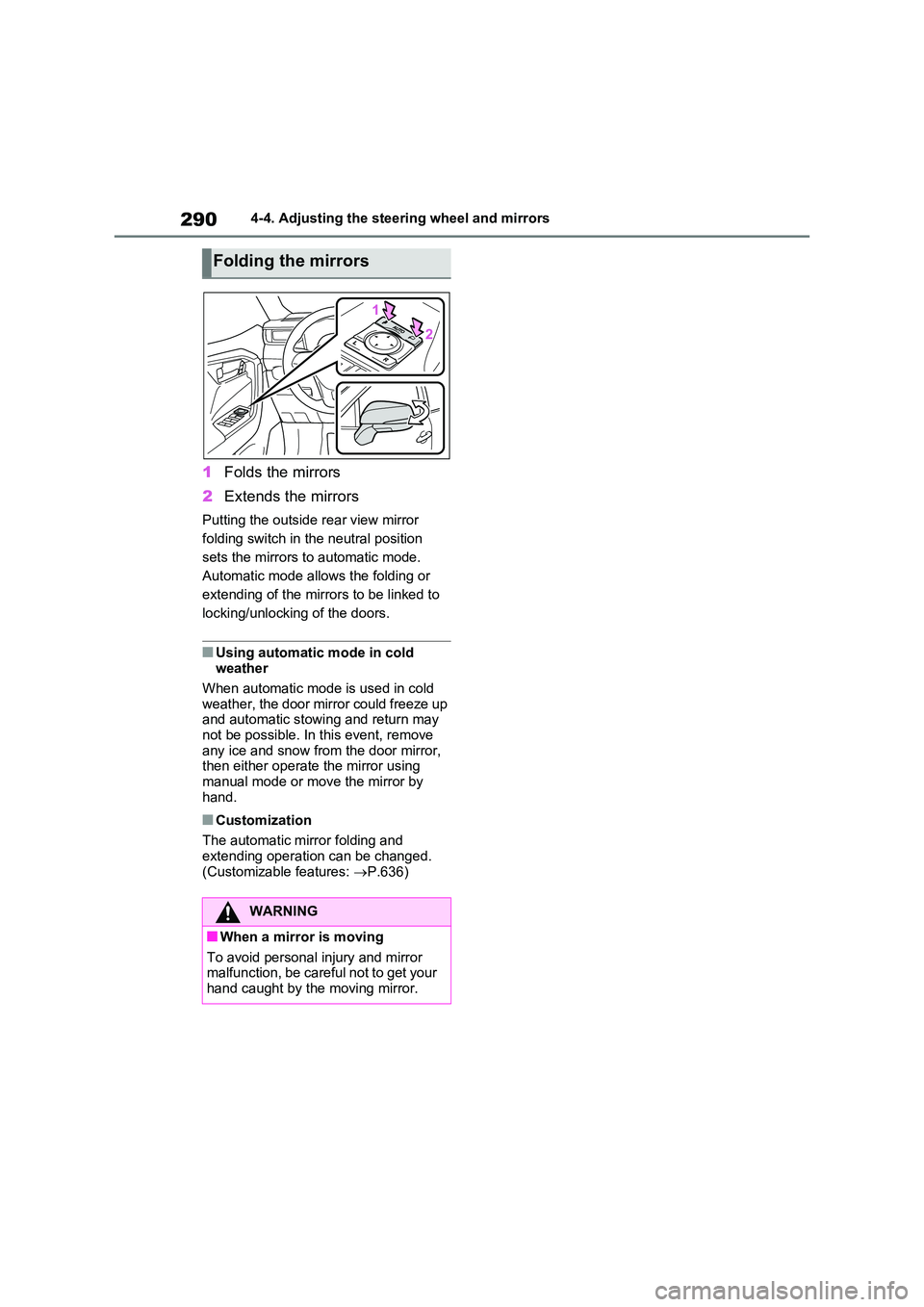
1Folds the mirrors
2 Extends the mirrors
Putting the outside rear view mirror
folding switch in the neutral position
sets the mirrors to automatic mode.
Automatic mode allows the folding or
extending of the mirrors to be linked to
locking/unlocking of the doors.
■Using automatic mode in cold weather
When automatic mode is used in cold
weather, the door mirror could freeze up and automatic stowing and return may not be possible. In this event, remove
any ice and snow from the door mirror, then either operate the mirror using manual mode or move the mirror by
hand.
■Customization
The automatic mirror folding and extending operation can be changed.
(Customizable features: P.636)
Folding the mirrors
WARNING
■When a mirror is moving
To avoid personal injury and mirror malfunction, be careful not to get your hand caught by the moving mirror.
Page 292 of 664
2924-5. Opening, closing the windows and moon roof
direction, and hold it there for
approximately 4 seconds or more.
6 Pull and hold the power window switch in the one-touch closing direction again. After the side win-
dow is completely closed, continue holding the switch for a further 1 sec-ond or more.
If you release the switch while the side window is moving, start again from the beginning.
If the side window reverses and cannot be fully closed or opened, have the vehi-cle inspected by any authorized Toyota
retailer or Toyota authorized repairer, or any reliable repairer.
■Door lock linked power window operation
●The power windows can be opened
and closed using the mechanical key.*
( P.605)
●The power windows can be opened
and closed using the wireless remote
control.* ( P.205)
●Vehicles with alarm: The alarm may be triggered if the alarm is set and the
power window is closed using the door lock linked power window opera-tion function. ( P.78)*: These settings must be customized at
any authorized Toyota retailer or
Toyota authorized repairer, or any reli-
able repairer.
■Power window open reminder func-
tion
The buzzer sounds and a message is shown on the multi-information display
when the power switch is turned to OFF and the driver’s door is opened with the power windows open.
■Customization
Settings (e.g. linked door lock operation) can be changed. (Customizable fea-tures: P.636)
WARNING
Observe the following precautions. Failing to do so may result in death or
serious injury.
■Closing the power windows
●The driver is responsible for all the power window operations, including the operation for the passengers. In
order to prevent accidental opera- tion, especially by a child, do not let a child operate the power windows.
It is possible for children and other passengers to have body parts caught in the power window. Also,
when riding with a child, it is recom- mended to use the window lock switch. ( P.293)
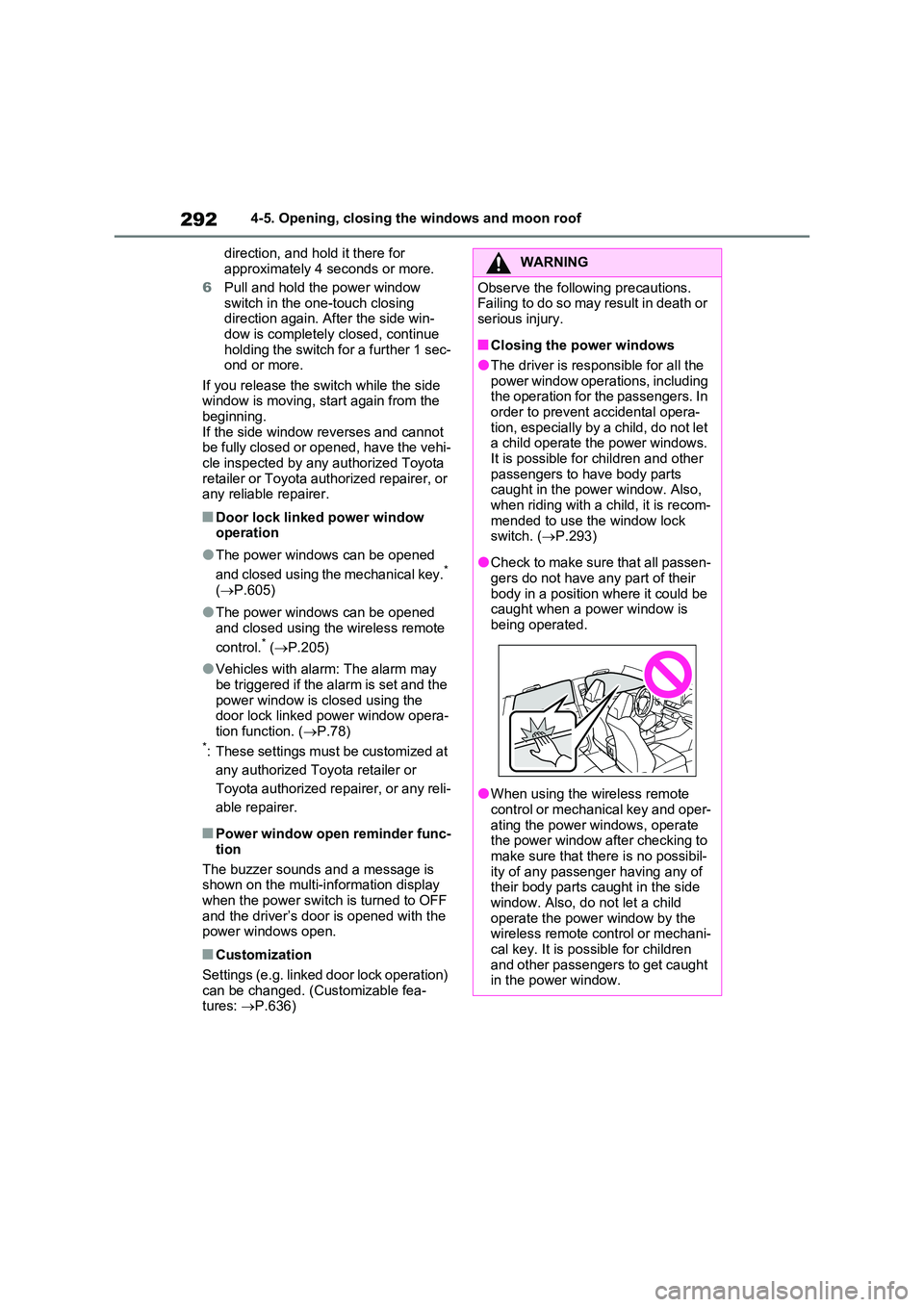
●Check to make sure that all passen- gers do not have any part of their
body in a position where it could be caught when a power window is being operated.
●When using the wireless remote control or mechanical key and oper-
ating the power windows, operate the power window after checking to make sure that there is no possibil-
ity of any passenger having any of their body parts caught in the side window. Also, do not let a child
operate the power window by the wireless remote control or mechani-cal key. It is possible for children
and other passengers to get caught in the power window.
Page 293 of 664
293
4
4-5. Opening, closing the windows and moon roof
Before driving
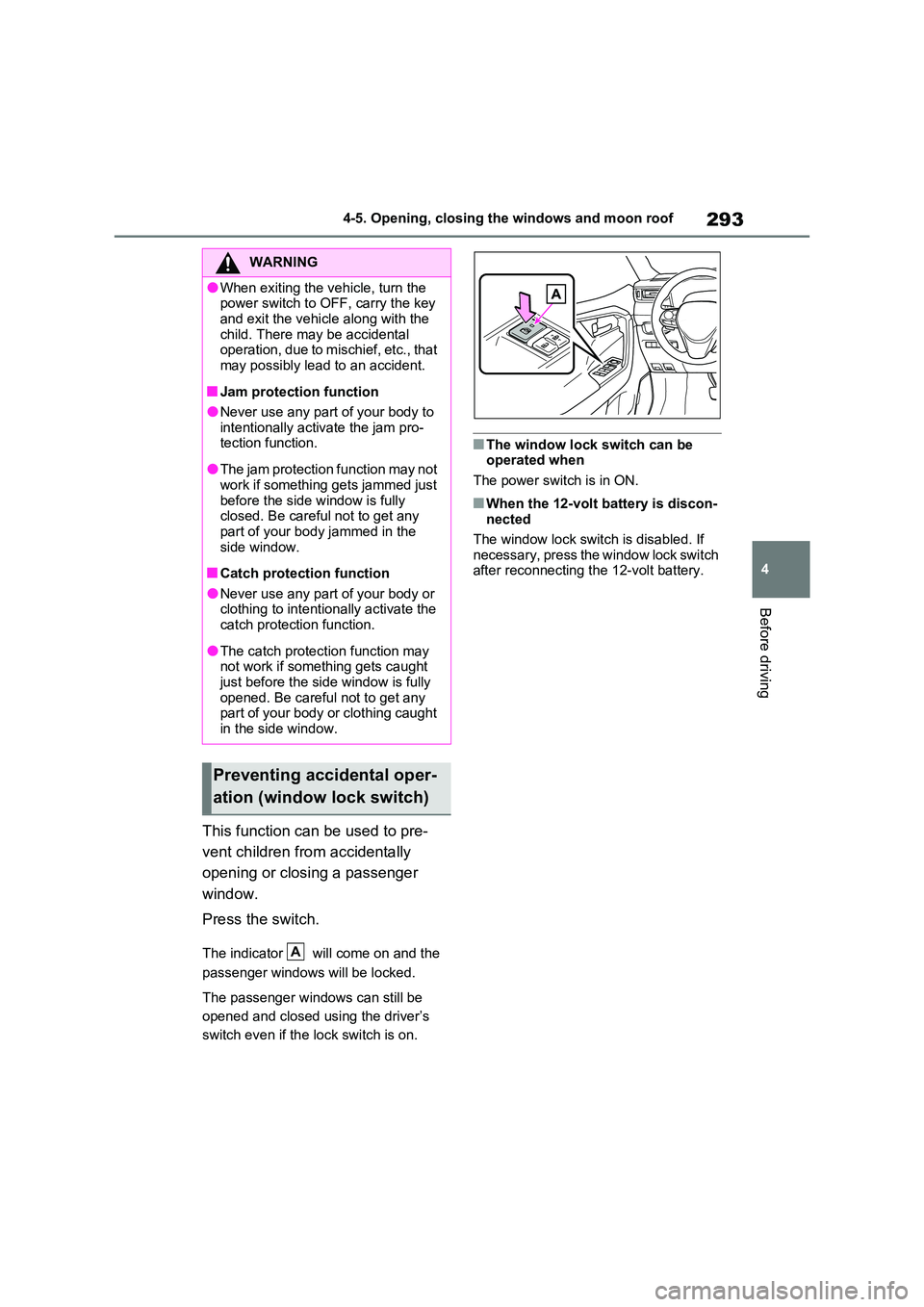
This function can be used to pre-
vent children from accidentally
opening or closing a passenger
window.
Press the switch.
The indicator will come on and the
passenger windows will be locked.
The passenger windows can still be
opened and closed using the driver’s
switch even if the lock switch is on.
■The window lock switch can be operated when
The power switch is in ON.
■When the 12-volt battery is discon- nected
The window lock switch is disabled. If
necessary, press the window lock switch after reconnecting the 12-volt battery.
WARNING
●When exiting the vehicle, turn the power switch to OFF, carry the key
and exit the vehicle along with the child. There may be accidental operation, due to mischief, etc., that
may possibly lead to an accident.
■Jam protection function
●Never use any part of your body to intentionally activate the jam pro-tection function.
●The jam protection function may not work if something gets jammed just
before the side window is fully closed. Be careful not to get any part of your body jammed in the
side window.
■Catch protection function
●Never use any part of your body or clothing to intentionally activate the catch protection function.
●The catch protection function may not work if something gets caught
just before the side window is fully opened. Be careful not to get any part of your body or clothing caught
in the side window.
Preventing accidental oper-
ation (window lock switch)
A
Page 296 of 664
2964-5. Opening, closing the windows and moon roof
panoramic moon roof or electronic
sunshade closes and reopens. The panoramic moon roof and electronic
sunshade will start to close.*
4 Check that the panoramic moon roof
and electronic sunshade are fully closed and release the switch.*: If the switch is released at the incor-
rect time, the procedure will have to
be performed again from the begin-
ning.
If the panoramic moon roof or electronic
sunshade does not fully close even after performing the above procedure cor-rectly, have the vehicle inspected by any
authorized Toyota retailer or Toyota authorized repairer, or any reliable repairer.
■Panoramic moon roof open
reminder function
A buzzer sounds and a message is shown on the multi-information display
when the power switch is turned to OFF and the driver’s door is opened with the panoramic moon roof open.
■Customization
Settings (e.g. linked door lock operation) can be changed. (Customizable fea-tures: P.636)
WARNING
Observe the following precautions. Failure to do so may result in death or serious injury.
■Opening and closing the elec-tronic sunshade
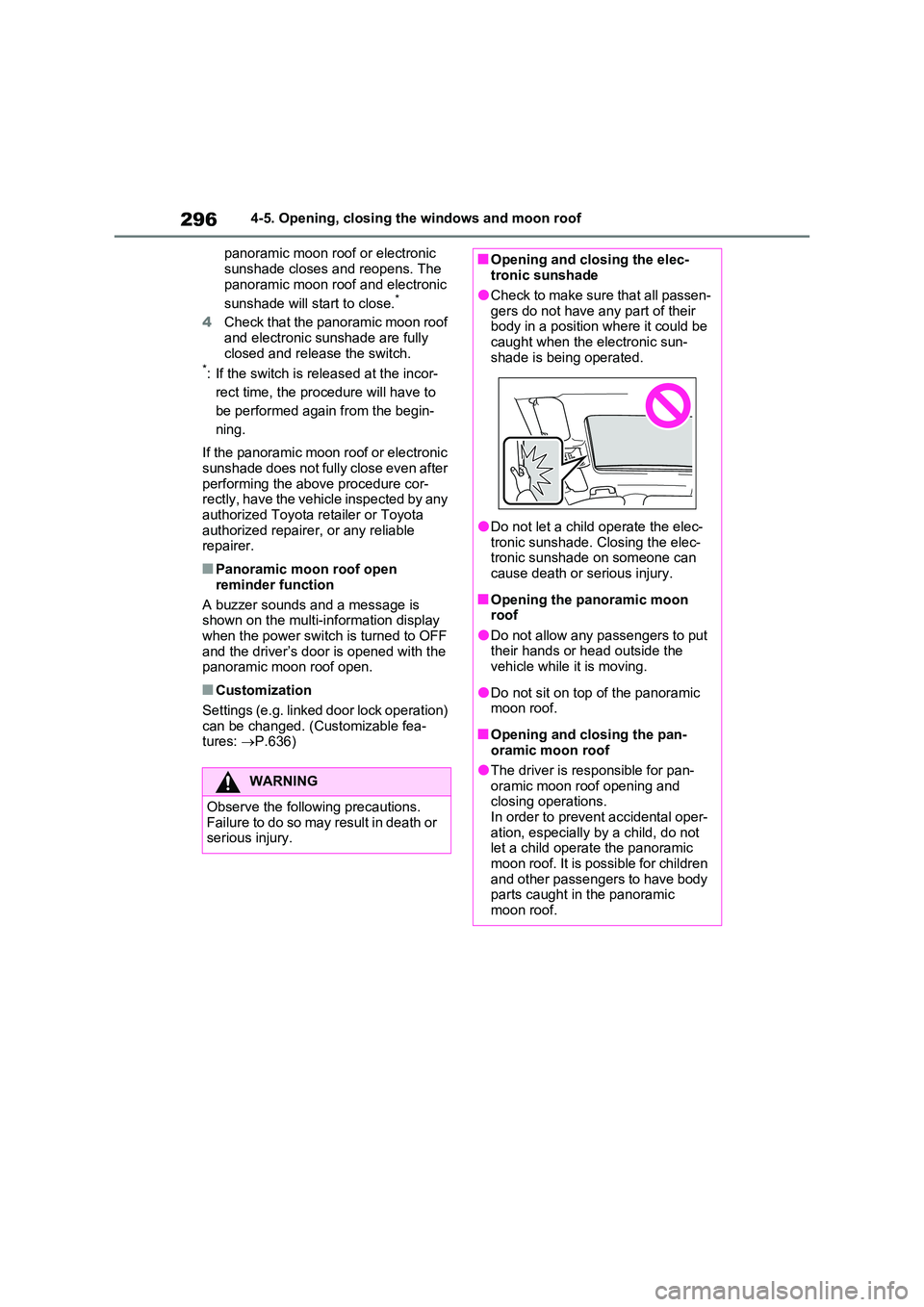
●Check to make sure that all passen-
gers do not have any part of their body in a position where it could be caught when the electronic sun-
shade is being operated.
●Do not let a child operate the elec-
tronic sunshade. Closing the elec- tronic sunshade on someone can cause death or serious injury.
■Opening the panoramic moon roof
●Do not allow any passengers to put their hands or head outside the vehicle while it is moving.
●Do not sit on top of the panoramic moon roof.
■Opening and closing the pan-oramic moon roof
●The driver is responsible for pan-oramic moon roof opening and closing operations.
In order to prevent accidental oper- ation, especially by a child, do not let a child operate the panoramic
moon roof. It is possible for children and other passengers to have body parts caught in the panoramic
moon roof.