stop start TOYOTA VERSO S 2011 User Guide
[x] Cancel search | Manufacturer: TOYOTA, Model Year: 2011, Model line: VERSO S, Model: TOYOTA VERSO S 2011Pages: 664, PDF Size: 160.56 MB
Page 103 of 664
103
2 2-1. Plug-in hybrid system
Plug-in hybrid system
■When starting off, depress the
accelerator pedal smoothly to
accelerate
As a guide, accelerate up to
approximately 20 km/h (12mph) in
the first 5 seconds.
Electrical and fuel efficiency can be
improved just by using the ECO
Accelerator Guidance displayed on
the multi-information display and
taking care to start off gently.
(P.182)
When the driving mode is set to Eco
drive mode, depressing the accelerator
pedal generates smooth torque that
makes it easier to operate the accelera-
tor gently.
■Maintain sufficient vehicle-to-
vehicle distance and do not
accelerate or decelerate
unnecessarily
Try to maintain a fixed speed while
driving. Driving at a short vehicle-
to-vehicle distance will result in
repeating wasteful acceleration and
deceleration, which will worsen the
electrical and fuel efficiency.
■Release the accelerator pedal
early before stopping the vehi-
cle, such as at a traffic light
The regenerative brake will operate
to convert the kinetic energy of the
vehicle into electrical energy, which
will charge the hybrid battery (trac-
tion battery).
The regeneration status can be
checked from the Hybrid System
Indicator. (P.177)When the brake pedal is depressed
lightly during deceleration, the
regeneration amount increases,
enabling more electrical energy to
be recovered.
If the brake pedal is depressed too
strongly, the recovered amount indica-
tor will reach the maximum level and
the upper limit of the recoverable
energy will be exceeded. Therefore, be
sure to operate the brake pedal early.
■Use the air conditioning sys-
tem appropriately, and also
utilize the heated steering
wheel (if equipped) and seat
heaters
In EV mode, the vehicle is cooled
and heated by electrical energy.
(Except in extremely cold tempera-
tures of approximately -10°C (14°F)
or less.)
Preventing excessive cooling or
heating of the vehicle will reduce
power consumption and improve
electrical efficiency.
The heated steering wheel (if
equipped) and seat heaters are effi-
cient heating device that directly
warm the body using less electric
power.
When used together with the air condi-
tioning system, a low temperature set-
ting can be used to improve electrical
and fuel efficiency.
■Check the tire pressure
If the tire pressure is lower than the
specified value, it will worsen the
electrical and fuel efficiency.
Page 122 of 664
1222-2. Charging
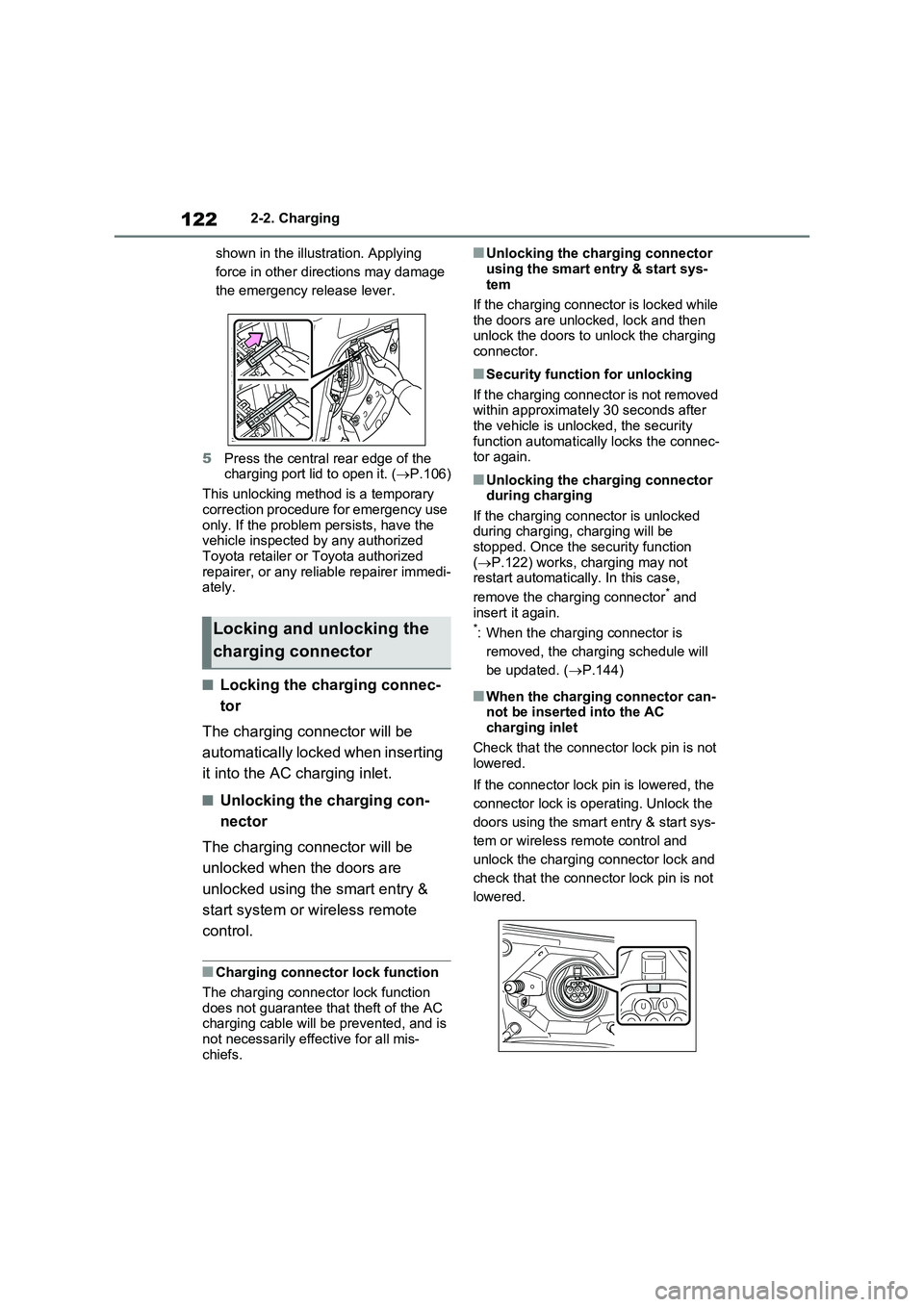
shown in the illustration. Applying
force in other directions may damage
the emergency release lever.
5Press the central rear edge of the
charging port lid to open it. (P.106)
This unlocking method is a temporary
correction procedure for emergency use
only. If the problem persists, have the
vehicle inspected by any authorized
Toyota retailer or Toyota authorized
repairer, or any reliable repairer immedi-
ately.
■Locking the charging connec-
tor
The charging connector will be
automatically locked when inserting
it into the AC charging inlet.
■Unlocking the charging con-
nector
The charging connector will be
unlocked when the doors are
unlocked using the smart entry &
start system or wireless remote
control.
■Charging connector lock function
The charging connector lock function
does not guarantee that theft of the AC
charging cable will be prevented, and is
not necessarily effective for all mis-
chiefs.
■Unlocking the charging connector
using the smart entry & start sys-
tem
If the charging connector is locked while
the doors are unlocked, lock and then
unlock the doors to unlock the charging
connector.
■Security function for unlocking
If the charging connector is not removed
within approximately 30 seconds after
the vehicle is unlocked, the security
function automatically locks the connec-
tor again.
■Unlocking the charging connector
during charging
If the charging connector is unlocked
during charging, charging will be
stopped. Once the security function
(P.122) works, charging may not
restart automatically. In this case,
remove the charging connector
* and
insert it again.
*: When the charging connector is
removed, the charging schedule will
be updated. (P.144)
■When the charging connector can-
not be inserted into the AC
charging inlet
Check that the connector lock pin is not
lowered.
If the connector lock pin is lowered, the
connector lock is operating. Unlock the
doors using the smart entry & start sys-
tem or wireless remote control and
unlock the charging connector lock and
check that the connector lock pin is not
lowered.
Locking and unlocking the
charging connector
Page 129 of 664
129
2 2-2. Charging
Plug-in hybrid system
■Hybrid battery (traction bat-
tery) warming control (Green-
land only)
This control operates after the AC
charging cable remains connected
to the vehicle for 3 days and “Bat-
tery Heater” automatically stops. It
automatically insulates the hybrid
battery (traction battery) in
extremely low temperatures.
This control stops 31 days after
the AC charging cable is con-
nected, even if it is still con-
nected to the vehicle.
When this control operates,
charging schedule settings are
ignored and charging starts.
■“Battery Cooler”
When the hybrid battery (traction
battery) is hot and the AC charging
cable is connected to the vehicle,
this function cools the hybrid bat-
tery (traction battery) before
charging is carried out.
“Battery Cooler” will operate when
the “Battery Cooler” of the
“Charging Settings” on the multi-
information display is on. (P.187)
■Traction battery heating and cool-
ing system (“Battery Heater” and
“Battery Cooler”)
●The system operates when the hybrid
battery (traction battery) is below or
above a certain temperature.
●The system may operate when
charging is not being performed.
●When the charging schedule is used
(P.144), this function will operate according to the charging schedule.
■“Battery Heater”
●When “Battery Heater” is operating,
the charging indicator illuminates.
●When the AC charging cable is
removed from the vehicle or remains
connected to the vehicle for approxi-
mately 3 days, the system automati-
cally stops.
●When “Battery Heater” is operating
during charging, the charging time
may be longer than normal.
●If the outside temperature becomes
high while “Battery Heater” is operat-
ing, charging may complete earlier
than the “Departure” time set.
(P.144)
●When the traction battery is almost
completely charged, “Battery Cooler”
may not be implemented.
●When the following operations are
performed while “Battery Heater” is
operating, the hybrid battery (traction
battery) heating operation stops.
• The shift lever is changed to any posi-
tion other than P
• The Remote Air Conditioning System
is operated (P.460)
●“Battery Heater” may operate even
when the hybrid battery (traction bat-
tery) is fully charged depending on the
temperature of the hybrid battery
(traction battery).
• The remaining charge of the hybrid
battery (traction battery) decreases
when “Battery Heater” operates. The
charging operation may start again to
charge the hybrid battery (traction bat-
tery).
• “Charging Stopped Due to Pulled
Charging Connector” may be shown
when the charging connector is
removed while recharging. (P.160)
■“Battery Cooler”
●The charging indicator is illuminated
while “Battery Cooler” is on standby or
operating.
●“Battery Cooler” is implemented for a
Page 132 of 664
1322-2. Charging
where charging cannot be per-
formed occurs.
When a message is displayed, follow
the instructions displayed on the
screen. ( P.160)
■Multi-information display during charging
If approximately 100 seconds elapse
after the power switch is turned to ON during charging, the power switch will automatically turn off and the display will
disappear.
■Safety functions
●The hybrid system will not start while the AC charging cable is attached to the vehicle, even if the power switch is
operated.
●If the AC charging cable is connected
while the “READY” indicator is illumi- nated, the hybrid system will stop automatically and driving will not be
possible.
Things to know before
charging
Make sure to read the follow-
ing precautions before con-
necting the AC charging cable
to the vehicle and charging the
hybrid battery (traction bat-
tery).
WARNING
■Caution when charging
People with implantable cardiac pace-
makers or cardiac resynchronization therapy-pacemakers should not carry out the charging procedure. Ask
someone else to do it.
●Do not approach the charger and
AC charging cable while charging. Charging procedure may affect the operation of such devices.
●Do not remain in the vehicle during charging.
Charging procedure may affect the operation of such devices.
●Do not enter the vehicle even to take something out of the luggage compartment.
Charging procedure may affect the operation of such devices.
Page 136 of 664
1362-2. Charging
P.133
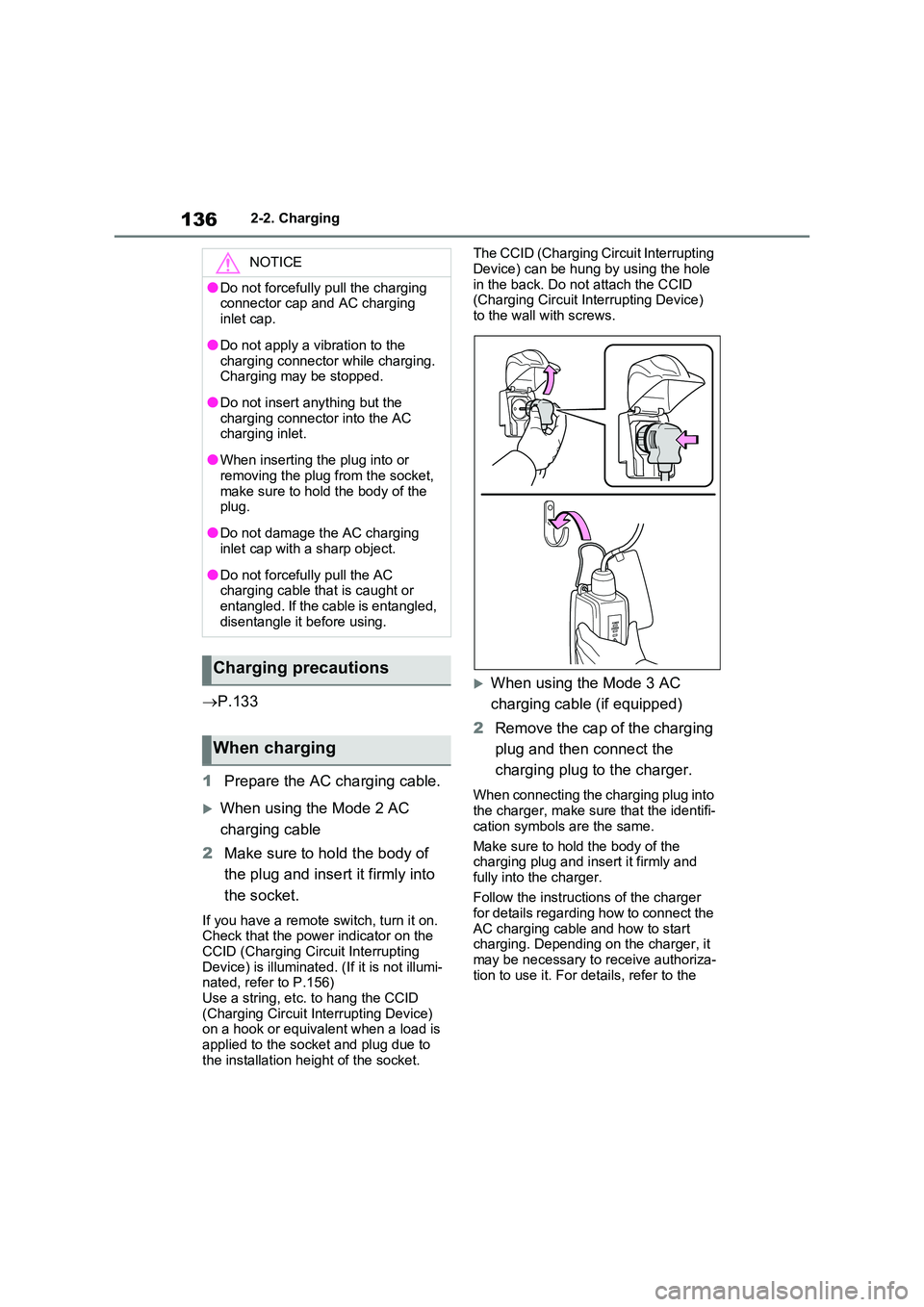
1 Prepare the AC charging cable.
When using the Mode 2 AC
charging cable
2 Make sure to hold the body of
the plug and insert it firmly into
the socket.
If you have a remote switch, turn it on. Check that the power indicator on the
CCID (Charging Circuit Interrupting Device) is illuminated. (If it is not illumi-nated, refer to P.156)
Use a string, etc. to hang the CCID (Charging Circuit Interrupting Device) on a hook or equivalent when a load is
applied to the socket and plug due to the installation height of the socket.
The CCID (Charging Circuit Interrupting
Device) can be hung by using the hole in the back. Do not attach the CCID (Charging Circuit Interrupting Device)
to the wall with screws.
When using the Mode 3 AC
charging cable (if equipped)
2 Remove the cap of the charging
plug and then connect the
charging plug to the charger.
When connecting the charging plug into the charger, make sure that the identifi-
cation symbols are the same.
Make sure to hold the body of the charging plug and insert it firmly and
fully into the charger.
Follow the instructions of the charger for details regarding how to connect the
AC charging cable and how to start charging. Depending on the charger, it may be necessary to receive authoriza-
tion to use it. For details, refer to the
NOTICE
●Do not forcefully pull the charging connector cap and AC charging
inlet cap.
●Do not apply a vibration to the
charging connector while charging. Charging may be stopped.
●Do not insert anything but the charging connector into the AC charging inlet.
●When inserting the plug into or removing the plug from the socket,
make sure to hold the body of the plug.
●Do not damage the AC charging inlet cap with a sharp object.
●Do not forcefully pull the AC charging cable that is caught or entangled. If the cable is entangled,
disentangle it before using.
Charging precautions
When charging
Page 138 of 664
1382-2. Charging
the charging connector is not locked.
*
*
: If the charging connector is not firmly
inserted, locking operation will be
performed several times.
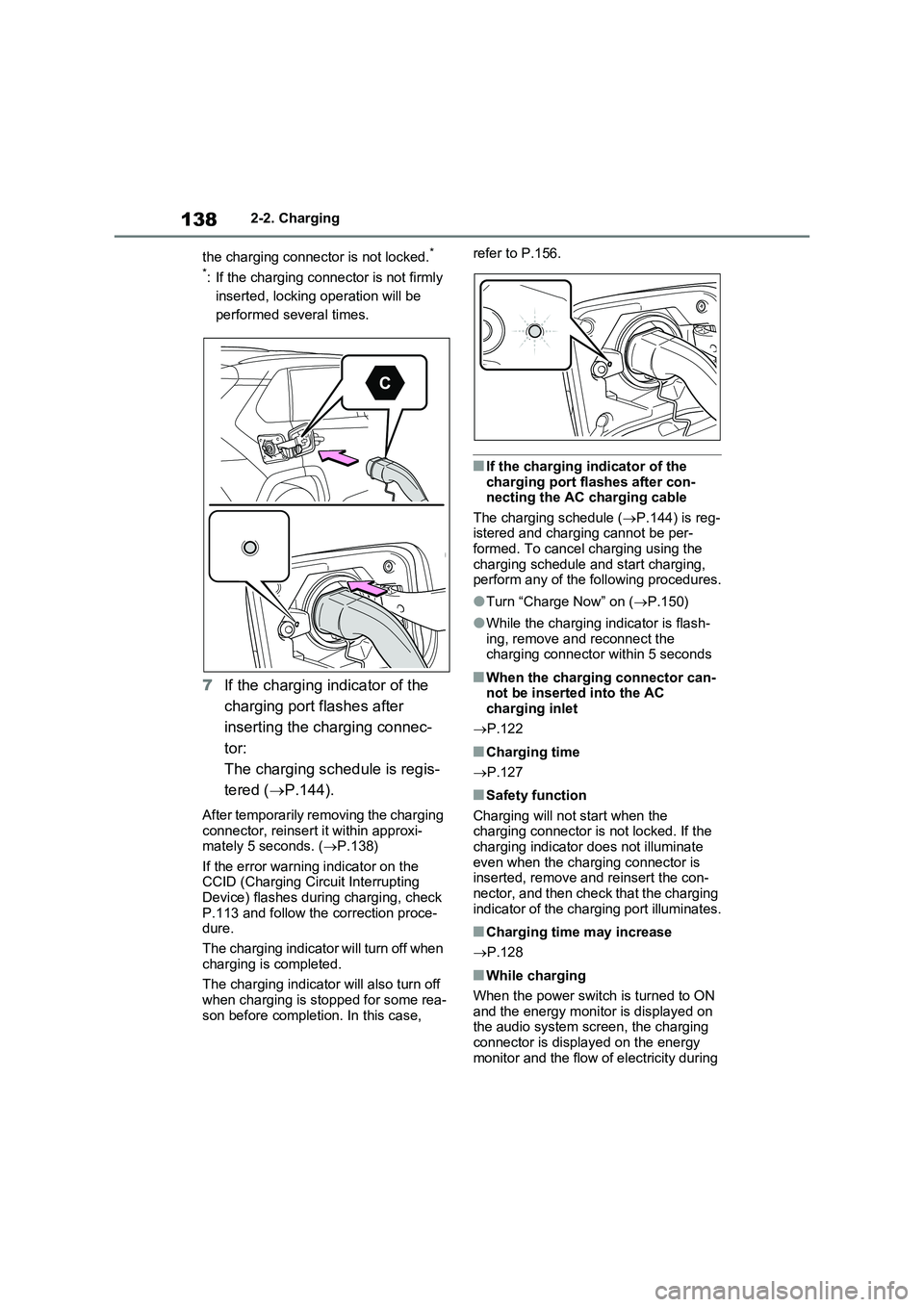
7If the charging indicator of the
charging port flashes after
inserting the charging connec-
tor:
The charging schedule is regis-
tered (P.144).
After temporarily removing the charging
connector, reinsert it within approxi-
mately 5 seconds. (P.138)
If the error warning indicator on the
CCID (Charging Circuit Interrupting
Device) flashes during charging, check
P.113 and follow the correction proce-
dure.
The charging indicator will turn off when
charging is completed.
The charging indicator will also turn off
when charging is stopped for some rea-
son before completion. In this case, refer to P.156.
■If the charging indicator of the
charging port flashes after con-
necting the AC charging cable
The charging schedule (P.144) is reg-
istered and charging cannot be per-
formed. To cancel charging using the
charging schedule and start charging,
perform any of the following procedures.
●Turn “Charge Now” on (P.150)
●While the charging indicator is flash-
ing, remove and reconnect the
charging connector within 5 seconds
■When the charging connector can-
not be inserted into the AC
charging inlet
P.122
■Charging time
P.127
■Safety function
Charging will not start when the
charging connector is not locked. If the
charging indicator does not illuminate
even when the charging connector is
inserted, remove and reinsert the con-
nector, and then check that the charging
indicator of the charging port illuminates.
■Charging time may increase
P.128
■While charging
When the power switch is turned to ON
and the energy monitor is displayed on
the audio system screen, the charging
connector is displayed on the energy
monitor and the flow of electricity during
Page 139 of 664
139
2
2-2. Charging
Plug-in hybrid system
charging is displayed ( P.195).
■Charging at a public charging sta-
tion with authentication function
When a door is unlocked during charging, the charging connector is
unlocked and charging will be stopped. In this case, the charging station authentication is canceled and charging
may not be able to restart. Reconnect the charging connector and perform authentication for the charging station.
■Protection function of AC charging
inlet overheating (vehicles with 6.6 kW onboard traction battery char-ger)
By installing a temperature sensor to the AC charging inlet, prevents parts from melting when the temperature rises due
to foreign matter entering the charging connector. When a certain temperature increase is detected, charging is
stopped immediately and a message is displayed on the multi-information dis-play. After the temperature has
decreased, charging resumes by per- forming the operation to start charging again.
WARNING
■When charging
Observe the following precautions.
Failure to do so may cause an unex-
pected accident, resulting in death or serious injury.
●Connect to a power source suitable
for charging. ( P.124)
●Check that the AC charging cable,
plug and socket are free of foreign matter.
●Before charging, check that the AC charging inlet is not deformed, damaged or corroded, and check
that the inlet is free of foreign mat- ter such as dirt, snow and ice. If there is dirt or dust in these areas,
remove completely before inserting the charging connector.
●Before inserting the charging plug into the charger, make sure there is no dirt or dust on the terminal
areas. If there is dirt or dust in these areas, remove completely before inserting the charging plug.
●Do not get the terminals of the AC charging inlet wet.
●Only use sockets where the plug can be securely inserted.
●Do not bundle or wind the AC charging cable while charging, as
doing so may result in overheating.
●Do not touch the terminals of the
charging connector and AC charging inlet with a sharp metal objects (needles etc.) or hands, or
short them with foreign objects.
●When charging outdoors, make
sure to connect to a rain-tight socket for outdoor use. Ensure the rain-tight cover closes completely. If
the rain-tight cover cannot be closed, install a rain-tight cover that will close.
●In order to stop charging at the charging station, follow the instruc-
tions of the charger.
●If any heat, smoke, odors, noise or
other abnormalities are noticed during charging, stop charging immediately.
●Do not insert the plug if the socket is submerged in water or snow.
●When charging while it is raining or snowing, do not connect or discon-
nect the plug if your hands are wet. Also, do not get the plug or outlet wet.
●Do not charge the vehicle during a lightning storm.
●Prevent the AC charging cable from being caught in the door or back
door.
Page 140 of 664
1402-2. Charging
WARNING
●Do not let the wheels on the AC charging cable, plug, charging con-
nector and CCID (Charging Circuit Interrupting Device).
●Firmly insert the plug into the socket.
●Do not use an extension cord and converting adaptor.
●Close the hood before using the charging system.The cooling fan may start operating
suddenly. Touching or getting close to rotating parts such as the fan may cause your hands or clothes
(especially a necktie or scarf) to become caught and result in a seri-ous injury.
●After connecting the charging cable, confirm that it is not wound
around anything.
●If the power indicator on the CCID
(Charging Circuit Interrupting Device) does not illuminate after plugging the AC charging cable into
the socket-outlet, unplug it immedi- ately.
■If the error warning indicator on the CCID (Charging Circuit Inter-rupting Device) illuminates or
flashes during charging
There may be an electrical leakage in the power source path, or there may
be a malfunction in the AC charging cable or CCID (Charging Circuit Inter-rupting Device). Refer to P.112 and
follow the correction procedure. If the error warning indicator does not turn off even after performing the correc-
tion procedure, immediately stop charging, remove the AC charging cable and contact any authorized
Toyota retailer or Toyota authorized repairer, or any reliable repairer. Con-tinuing to charge the vehicle in that
condition may lead to unforeseen accidents or serious injury.
■Onboard traction battery charger
The onboard traction battery charger is located under the rear seats. Make
sure to observe the following precau- tions regarding the onboard traction battery charger. Failure to observe
these precautions may result in death or serious injury such as burns and electric shocks.
●The onboard traction battery char-ger is hot during charging. Do not touch the onboard traction battery
charger, as doing so may result in burns.
●Do not disassemble, repair or mod-ify the onboard traction battery charger. When the onboard traction
battery charger needs to be repaired, consult any authorized Toyota retailer or Toyota authorized
repairer, or any reliable repairer.
Page 152 of 664
1522-2. Charging
the settings are confirmed
●The vehicle starts off
●A display with a higher priority than that of the charging schedule setting is shown
■“Next Event”
After charging completes, the “Next Event” displayed on the multi-informa-tion display will not change until the AC
charging cable is removed, even after charging is performed according to the “Next Event” schedule.
■To return to original setting after
changing “Next Event” setting
Turning the setting of “Charge Now” on and then off can return the setting of
“Next Event” to its original setting.
■When “Next Event” is changed while charging
●When the charging mode is “Depar-ture”, the current charging is inter-rupted or continued depending on the
remaining time until the charging is completed.
●When the charging mode is “Start”, the current charging is interrupted, the next charging will start at the set time.
■When the power switch is turned
off
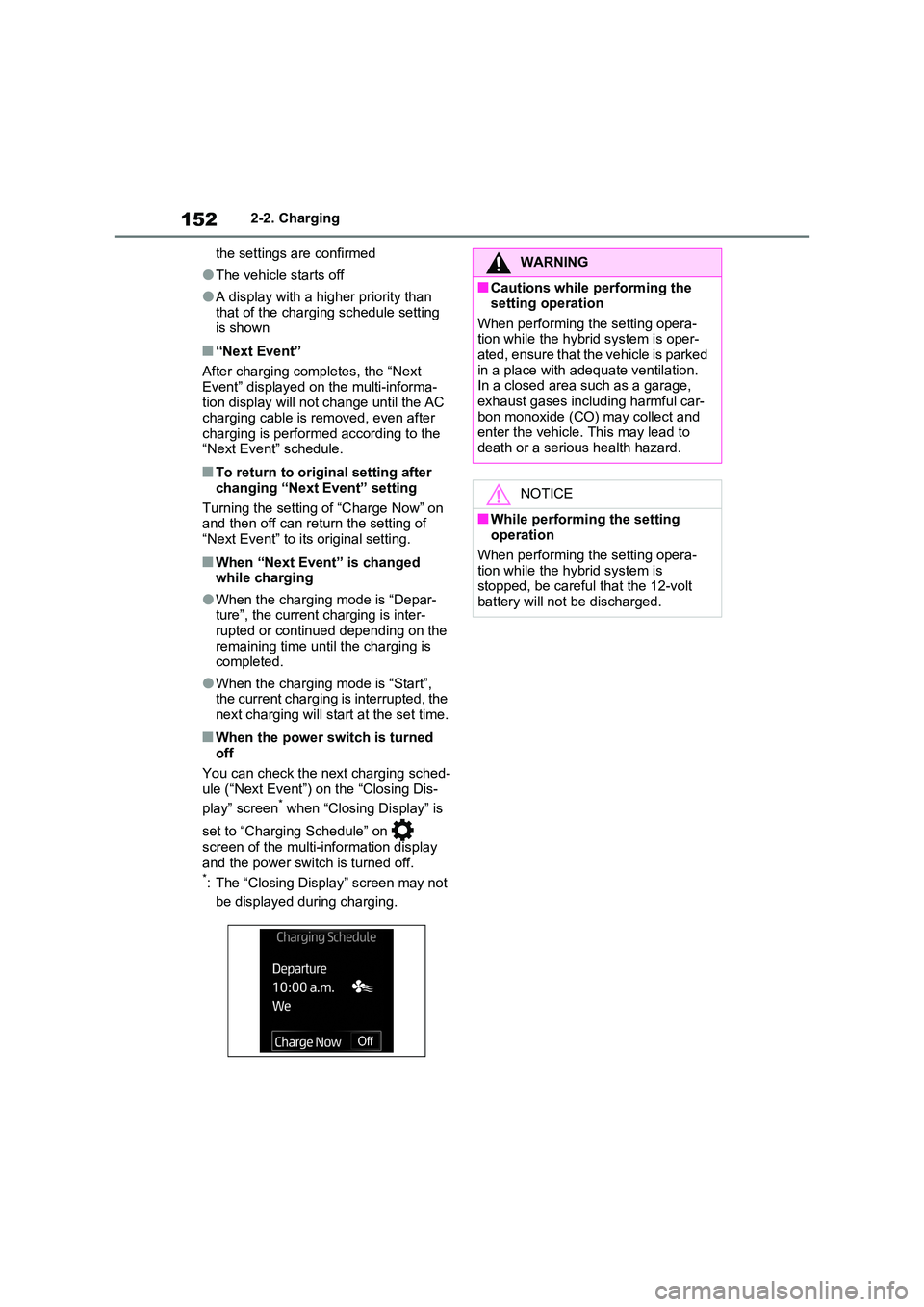
You can check the next charging sched- ule (“Next Event”) on the “Closing Dis-
play” screen* when “Closing Display” is
set to “Charging Schedule” on
screen of the multi-information display
and the power switch is turned off.*: The “Closing Display” screen may not
be displayed during charging.
WARNING
■Cautions while performing the setting operation
When performing the setting opera- tion while the hybrid system is oper-ated, ensure that the vehicle is parked
in a place with adequate ventilation. In a closed area such as a garage, exhaust gases including harmful car-
bon monoxide (CO) may collect and enter the vehicle. This may lead to death or a serious health hazard.
NOTICE
■While performing the setting operation
When performing the setting opera- tion while the hybrid system is stopped, be careful that the 12-volt
battery will not be discharged.
Page 153 of 664
153
2 2-2. Charging
Plug-in hybrid system
1Connect the AC charging cable
to the vehicle and start charging
2Turn the power switch on during
charging
The setting screen of “My Room Mode”
is displayed automatically on the multi-
information display.
3Press or of the meter
control switches, select “Yes”,
and then press .
“My Room Mode” starts and systems
such as the air conditioning system and
audio system can be used inside the
vehicle.
When not using “My Room Mode”,
select “No”, and then press .
To stop “My Room Mode”, turn the power switch off.
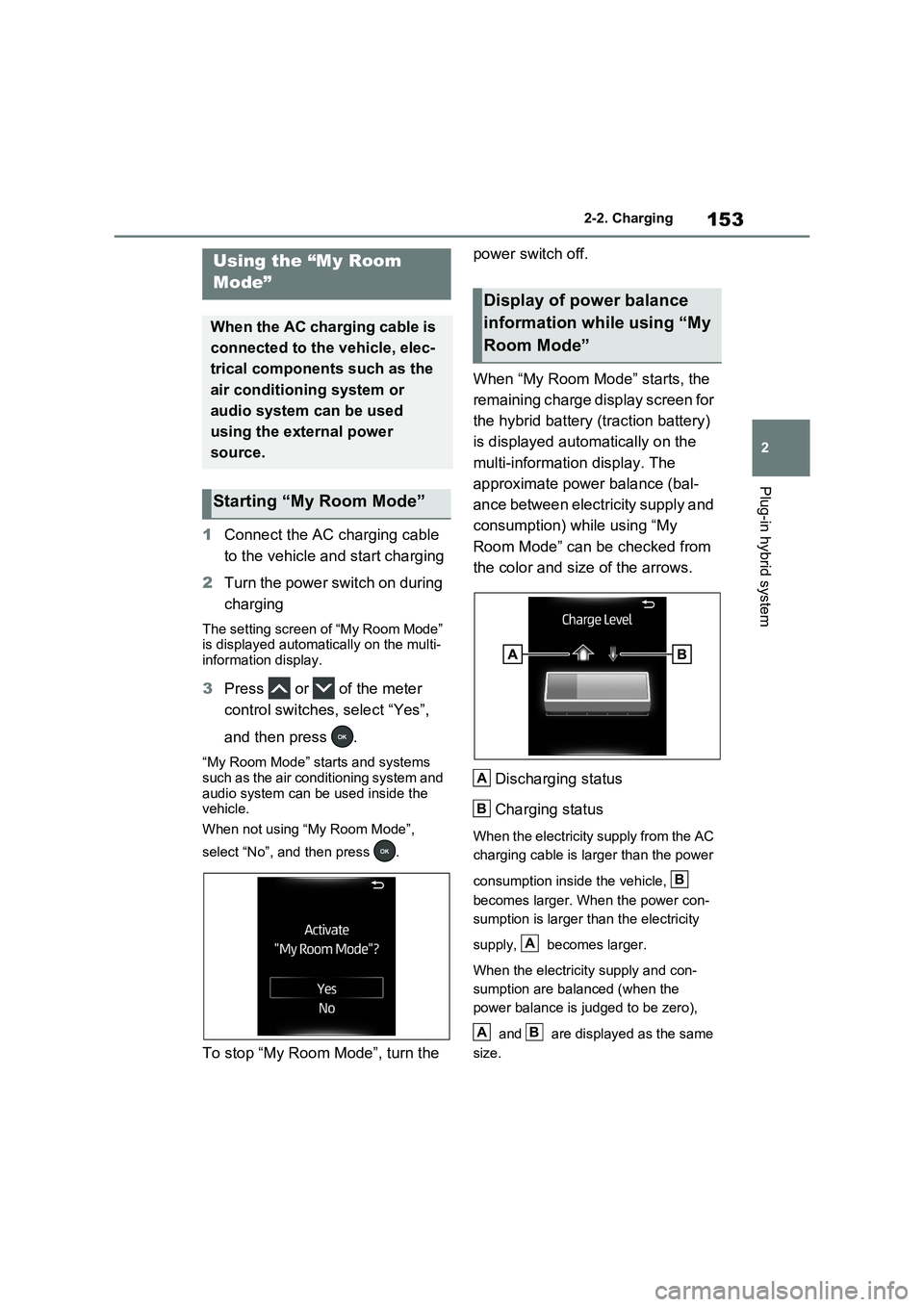
When “My Room Mode” starts, the
remaining charge display screen for
the hybrid battery (traction battery)
is displayed automatically on the
multi-information display. The
approximate power balance (bal-
ance between electricity supply and
consumption) while using “My
Room Mode” can be checked from
the color and size of the arrows.
Discharging status
Charging status
When the electricity supply from the AC
charging cable is larger than the power
consumption inside the vehicle,
becomes larger. When the power con-
sumption is larger than the electricity
supply, becomes larger.
When the electricity supply and con-
sumption are balanced (when the
power balance is judged to be zero),
and are displayed as the same
size.
Using the “My Room
Mode”
When the AC charging cable is
connected to the vehicle, elec-
trical components such as the
air conditioning system or
audio system can be used
using the external power
source.
Starting “My Room Mode”
Display of power balance
information while using “My
Room Mode”
A
B
B
A
AB