stop start TOYOTA VERSO S 2011 Owner's Guide
[x] Cancel search | Manufacturer: TOYOTA, Model Year: 2011, Model line: VERSO S, Model: TOYOTA VERSO S 2011Pages: 664, PDF Size: 160.56 MB
Page 202 of 664
2024-1. Key information
4-1.Key info rmation
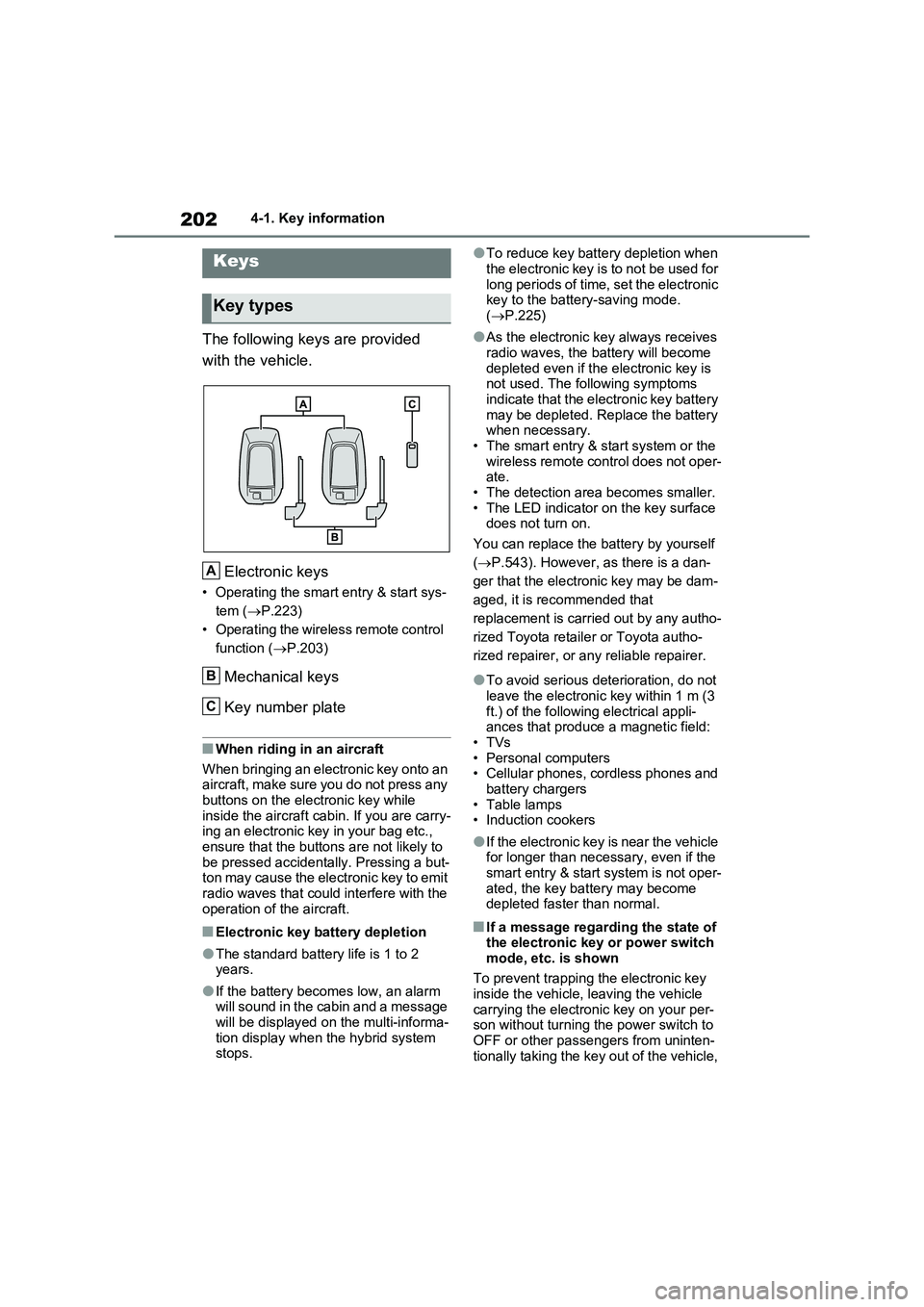
The following keys are provided
with the vehicle.
Electronic keys
• Operating the smart entry & start sys-
tem ( P.223)
• Operating the wireless remote control
function ( P.203)
Mechanical keys
Key number plate
■When riding in an aircraft
When bringing an electronic key onto an aircraft, make sure you do not press any
buttons on the electronic key while inside the aircraft cabin. If you are carry-ing an electronic key in your bag etc.,
ensure that the buttons are not likely to be pressed accidentally. Pressing a but-ton may cause the electronic key to emit
radio waves that could interfere with the operation of the aircraft.
■Electronic key battery depletion
●The standard battery life is 1 to 2 years.
●If the battery becomes low, an alarm will sound in the cabin and a message will be displayed on the multi-informa-
tion display when the hybrid system stops.
●To reduce key battery depletion when
the electronic key is to not be used for long periods of time, set the electronic key to the battery-saving mode.
( P.225)
●As the electronic key always receives
radio waves, the battery will become depleted even if the electronic key is not used. The following symptoms
indicate that the electronic key battery may be depleted. Replace the battery when necessary.
• The smart entry & start system or the wireless remote control does not oper-ate.
• The detection area becomes smaller. • The LED indicator on the key surface does not turn on.
You can replace the battery by yourself
( P.543). However, as there is a dan-
ger that the electronic key may be dam-
aged, it is recommended that
replacement is carried out by any autho-
rized Toyota retailer or Toyota autho-
rized repairer, or any reliable repairer.
●To avoid serious deterioration, do not leave the electronic key within 1 m (3
ft.) of the following electrical appli- ances that produce a magnetic field:•TVs
• Personal computers • Cellular phones, cordless phones and battery chargers
•Table lamps • Induction cookers
●If the electronic key is near the vehicle for longer than necessary, even if the smart entry & start system is not oper-
ated, the key battery may become depleted faster than normal.
■If a message regarding the state of the electronic key or power switch
mode, etc. is shown
To prevent trapping the electronic key inside the vehicle, leaving the vehicle
carrying the electronic key on your per- son without turning the power switch to OFF or other passengers from uninten-
tionally taking the key out of the vehicle,
Keys
Key types
A
B
C
Page 206 of 664
2064-2. Opening, closing and locking the doors
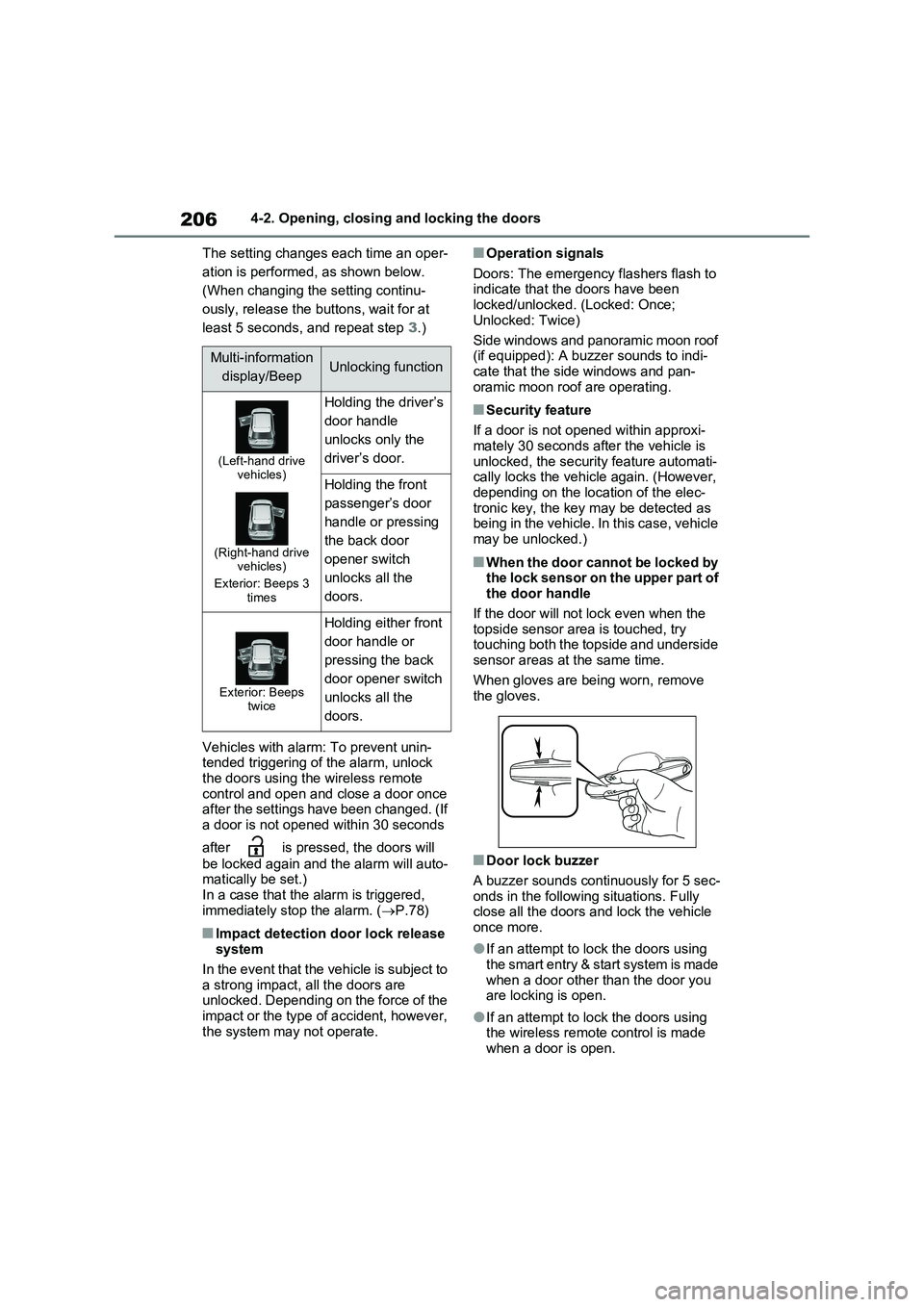
The setting changes each time an oper-
ation is performed, as shown below.
(When changing the setting continu-
ously, release the buttons, wait for at
least 5 seconds, and repeat step 3.)
Vehicles with alarm: To prevent unin-
tended triggering of the alarm, unlock
the doors using the wireless remote
control and open and close a door once
after the settings have been changed. (If
a door is not opened within 30 seconds
after is pressed, the doors will
be locked again and the alarm will auto-
matically be set.)
In a case that the alarm is triggered,
immediately stop the alarm. (P.78)
■Impact detection door lock release
system
In the event that the vehicle is subject to
a strong impact, all the doors are
unlocked. Depending on the force of the
impact or the type of accident, however,
the system may not operate.
■Operation signals
Doors: The emergency flashers flash to
indicate that the doors have been
locked/unlocked. (Locked: Once;
Unlocked: Twice)
Side windows and panoramic moon roof
(if equipped): A buzzer sounds to indi-
cate that the side windows and pan-
oramic moon roof are operating.
■Security feature
If a door is not opened within approxi-
mately 30 seconds after the vehicle is
unlocked, the security feature automati-
cally locks the vehicle again. (However,
depending on the location of the elec-
tronic key, the key may be detected as
being in the vehicle. In this case, vehicle
may be unlocked.)
■When the door cannot be locked by
the lock sensor on the upper part of
the door handle
If the door will not lock even when the
topside sensor area is touched, try
touching both the topside and underside
sensor areas at the same time.
When gloves are being worn, remove
the gloves.
■Door lock buzzer
A buzzer sounds continuously for 5 sec-
onds in the following situations. Fully
close all the doors and lock the vehicle
once more.
●If an attempt to lock the doors using
the smart entry & start system is made
when a door other than the door you
are locking is open.
●If an attempt to lock the doors using
the wireless remote control is made
when a door is open.
Multi-information
display/BeepUnlocking function
(Left-hand drive
vehicles)
(Right-hand drive
vehicles)
Exterior: Beeps 3
times
Holding the driver’s
door handle
unlocks only the
driver’s door.
Holding the front
passenger’s door
handle or pressing
the back door
opener switch
unlocks all the
doors.
Exterior: Beeps
twice
Holding either front
door handle or
pressing the back
door opener switch
unlocks all the
doors.
Page 217 of 664
217
4 4-2. Opening, closing and locking the doors
Before driving
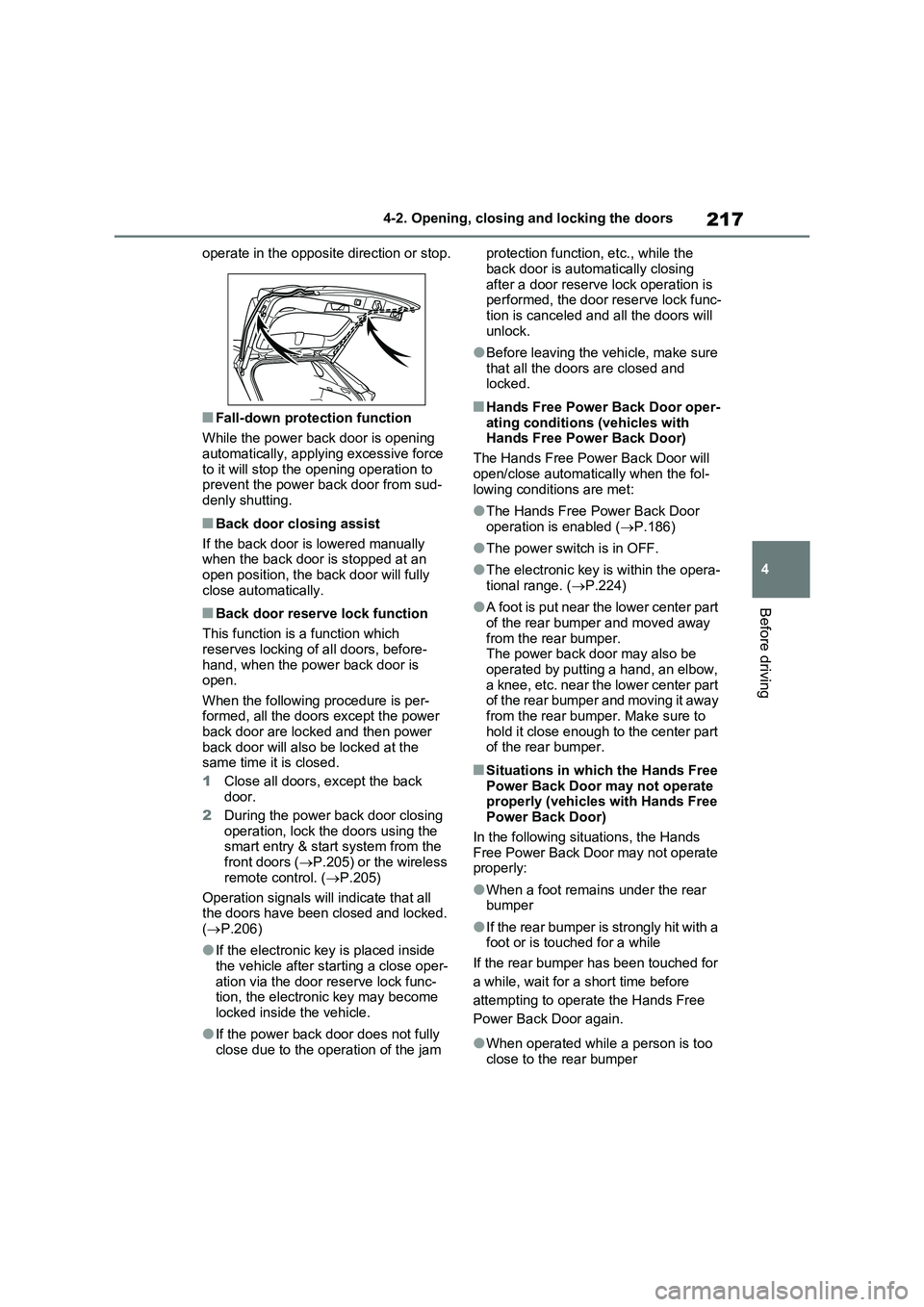
operate in the opposite direction or stop.
■Fall-down protection function
While the power back door is opening
automatically, applying excessive force
to it will stop the opening operation to
prevent the power back door from sud-
denly shutting.
■Back door closing assist
If the back door is lowered manually
when the back door is stopped at an
open position, the back door will fully
close automatically.
■Back door reserve lock function
This function is a function which
reserves locking of all doors, before-
hand, when the power back door is
open.
When the following procedure is per-
formed, all the doors except the power
back door are locked and then power
back door will also be locked at the
same time it is closed.
1Close all doors, except the back
door.
2During the power back door closing
operation, lock the doors using the
smart entry & start system from the
front doors (P.205) or the wireless
remote control. (P.205)
Operation signals will indicate that all
the doors have been closed and locked.
(P.206)
●If the electronic key is placed inside
the vehicle after starting a close oper-
ation via the door reserve lock func-
tion, the electronic key may become
locked inside the vehicle.
●If the power back door does not fully
close due to the operation of the jam protection function, etc., while the
back door is automatically closing
after a door reserve lock operation is
performed, the door reserve lock func-
tion is canceled and all the doors will
unlock.
●Before leaving the vehicle, make sure
that all the doors are closed and
locked.
■Hands Free Power Back Door oper-
ating conditions (vehicles with
Hands Free Power Back Door)
The Hands Free Power Back Door will
open/close automatically when the fol-
lowing conditions are met:
●The Hands Free Power Back Door
operation is enabled (P.186)
●The power switch is in OFF.
●The electronic key is within the opera-
tional range. (P.224)
●A foot is put near the lower center part
of the rear bumper and moved away
from the rear bumper.
The power back door may also be
operated by putting a hand, an elbow,
a knee, etc. near the lower center part
of the rear bumper and moving it away
from the rear bumper. Make sure to
hold it close enough to the center part
of the rear bumper.
■Situations in which the Hands Free
Power Back Door may not operate
properly (vehicles with Hands Free
Power Back Door)
In the following situations, the Hands
Free Power Back Door may not operate
properly:
●When a foot remains under the rear
bumper
●If the rear bumper is strongly hit with a
foot or is touched for a while
If the rear bumper has been touched for
a while, wait for a short time before
attempting to operate the Hands Free
Power Back Door again.
●When operated while a person is too
close to the rear bumper
Page 220 of 664
2204-2. Opening, closing and locking the doors
WARNING
●If the operating conditions of the power back door are no longer met,
a buzzer may sound and the back door may stop opening or closing. The back door then has to be oper-
ated manually. Take extra care when on an incline, as the back door may open or close abruptly.
●On an incline, the back door may suddenly shut after it opens. Make
sure the back door is fully open and secure.
●In the following situations, the power back door may detect an abnormality and automatic opera-
tion may be stopped. In this case, the back door has to be operated manually. Take extra care when on
an incline, as the back door may open or close abruptly.
• When the back door contacts an
obstacle
• When the 12-volt battery voltage suddenly drops, such as when the
power switch is turned to ON or the hybrid system is started during automatic operation
●If a bicycle carrier or similar heavy object is attached to the back door,
the power back door may not oper- ate, causing itself to malfunction, or the back door may suddenly shut
again after being opened, causing someone’s hands, head or neck to be caught and injured. When
installing an accessory part to the back door, using a genuine Toyota part is recommended.
■Jam protection function
Observe the following precautions.
Failure to do so may cause death or serious injury.
●Never use any part of your body to
intentionally activate the jam pro- tection function.
●The jam protection function may not work if something gets caught just before the back door fully closes.
Be careful not to catch fingers or anything else.
●The jam protection function may not work depending on the shape of the object that is caught. Be careful not
to catch fingers or anything else.
■Hands Free Power Back Door (if
equipped)
Observe the following precautions when operating the Hands Free
Power Back Door. Failure to do so may cause death or serious injury.
●Check the safety of the surrounding area to make sure there are no obstacles or anything that could
cause any of your belongings to get caught.
●When putting your foot near the lower center part of the rear bumper and moving it from the rear bumper,
be careful not to touch the exhaust pipes until they have cooled down sufficiently, as touching hot exhaust
pipes can cause burns.
●Do not leave the electronic key
within the effective range (detection area) of the luggage compartment.
Page 223 of 664
223
4
4-2. Opening, closing and locking the doors
Before driving
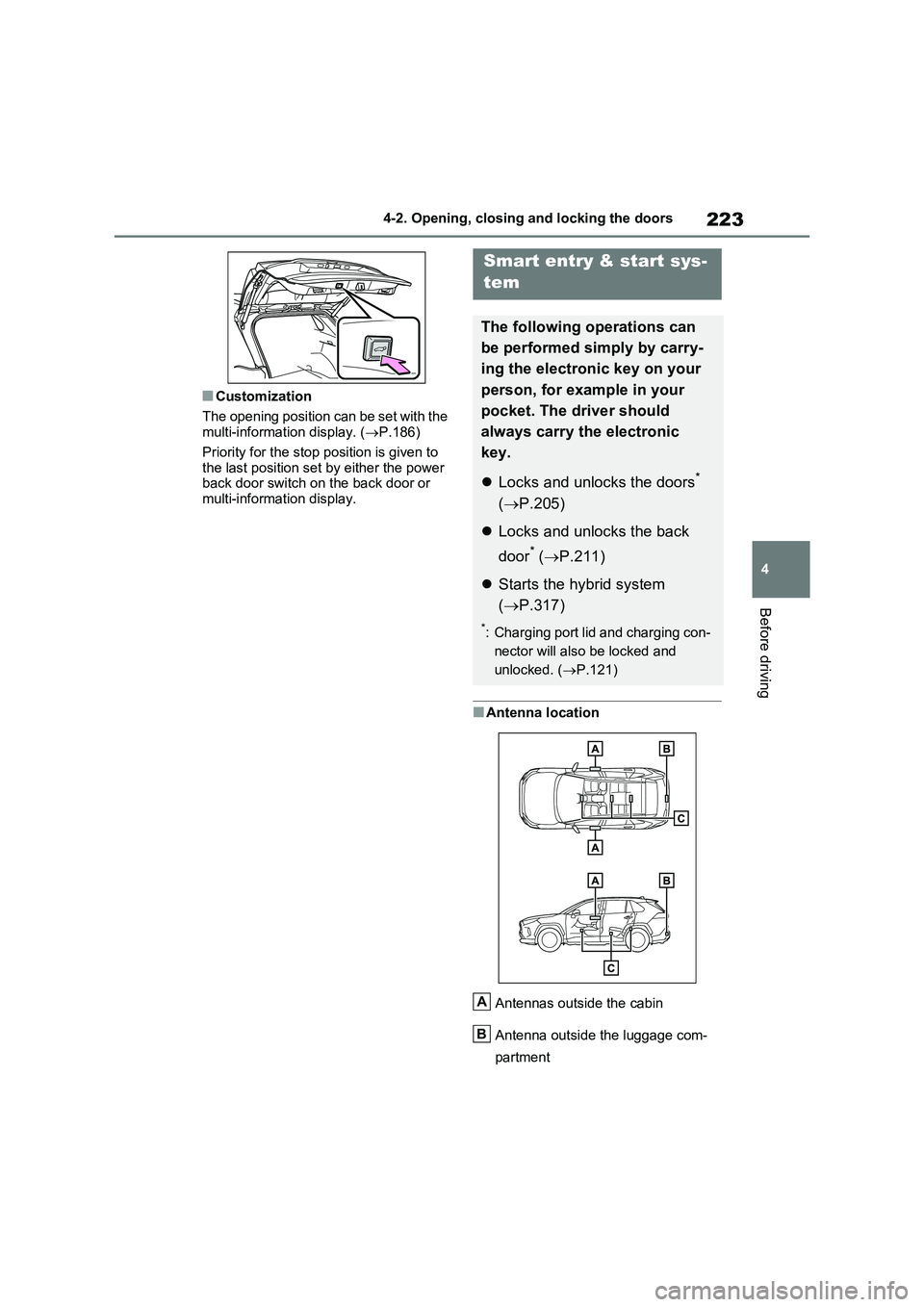
■Customization
The opening position can be set with the multi-information display. ( P.186)
Priority for the stop position is given to
the last position set by either the power back door switch on the back door or multi-information display.
■Antenna location
Antennas outside the cabin
Antenna outside the luggage com-
partment
Smart entry & start sys-
tem
The following operations can
be performed simply by carry-
ing the electronic key on your
person, for example in your
pocket. The driver should
always carry the electronic
key.
Locks and unlocks the doors*
( P.205)
Locks and unlocks the back
door* ( P.211)
Starts the hybrid system
( P.317)
*: Charging port lid and charging con-
nector will also be locked and
unlocked. ( P.121)
A
B
Page 225 of 664
225
4
4-2. Opening, closing and locking the doors
Before driving
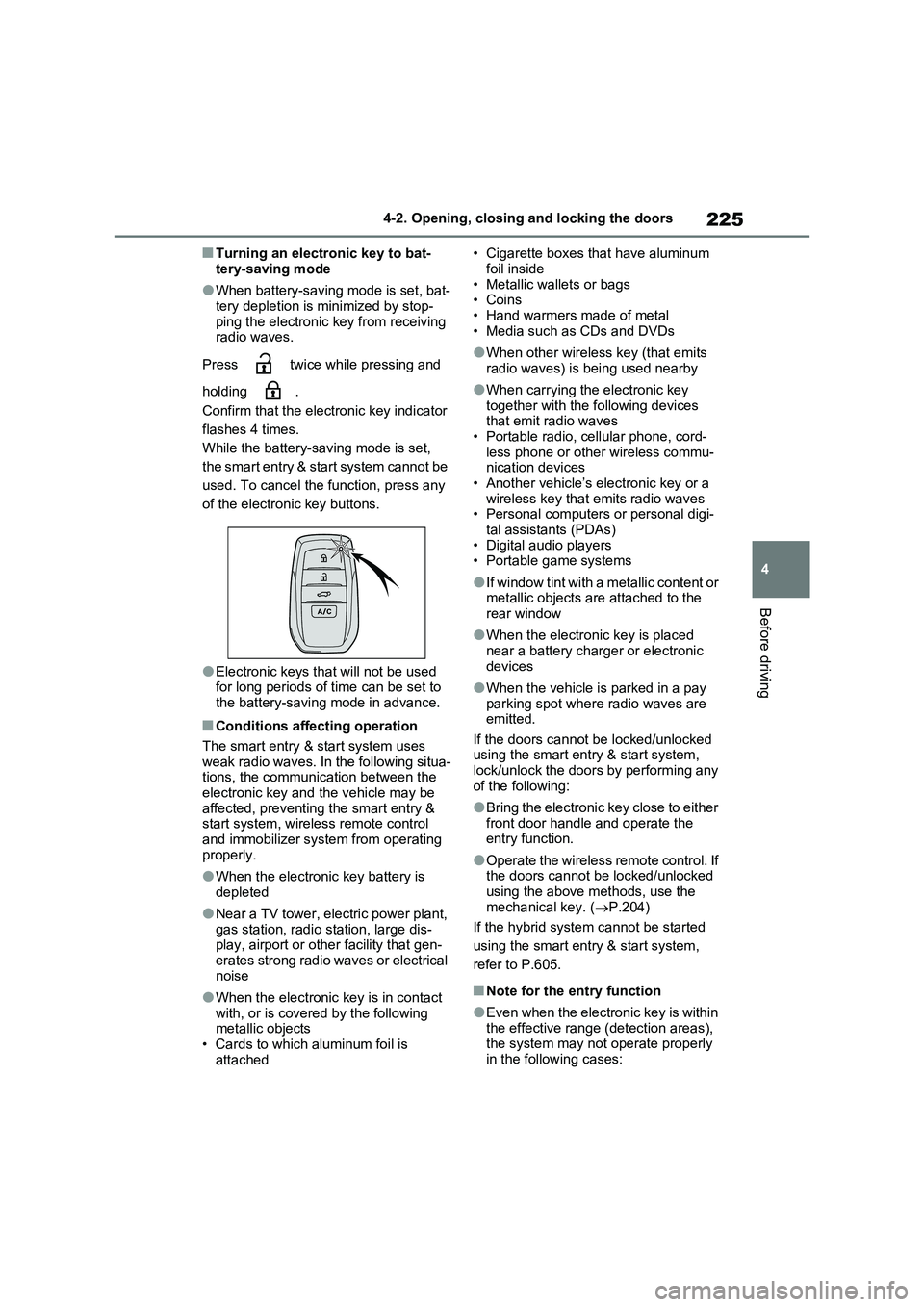
■Turning an electronic key to bat-
tery-saving mode
●When battery-saving mode is set, bat-
tery depletion is minimized by stop- ping the electronic key from receiving radio waves.
Press twice while pressing and
holding .
Confirm that the electronic key indicator
flashes 4 times.
While the battery-saving mode is set,
the smart entry & start system cannot be
used. To cancel the function, press any
of the electronic key buttons.
●Electronic keys that will not be used for long periods of time can be set to
the battery-saving mode in advance.
■Conditions affecting operation
The smart entry & start system uses
weak radio waves. In the following situa- tions, the communication between the electronic key and the vehicle may be
affected, preventing the smart entry & start system, wireless remote control and immobilizer system from operating
properly.
●When the electronic key battery is
depleted
●Near a TV tower, electric power plant,
gas station, radio station, large dis- play, airport or other facility that gen-erates strong radio waves or electrical
noise
●When the electronic key is in contact
with, or is covered by the following metallic objects• Cards to which aluminum foil is
attached
• Cigarette boxes that have aluminum
foil inside • Metallic wallets or bags•Coins
• Hand warmers made of metal • Media such as CDs and DVDs
●When other wireless key (that emits radio waves) is being used nearby
●When carrying the electronic key together with the following devices that emit radio waves
• Portable radio, cellular phone, cord- less phone or other wireless commu-nication devices
• Another vehicle’s electronic key or a wireless key that emits radio waves• Personal computers or personal digi-
tal assistants (PDAs) • Digital audio players• Portable game systems
●If window tint with a metallic content or metallic objects are attached to the
rear window
●When the electronic key is placed
near a battery charger or electronic devices
●When the vehicle is parked in a pay parking spot where radio waves are emitted.
If the doors cannot be locked/unlocked using the smart entry & start system, lock/unlock the doors by performing any
of the following:
●Bring the electronic key close to either
front door handle and operate the entry function.
●Operate the wireless remote control. If the doors cannot be locked/unlocked using the above methods, use the
mechanical key. ( P.204)
If the hybrid system cannot be started
using the smart entry & start system,
refer to P.605.
■Note for the entry function
●Even when the electronic key is within
the effective range (detection areas), the system may not operate properly in the following cases:
Page 227 of 664
227
4 4-2. Opening, closing and locking the doors
Before driving
■To operate the system properly
Make sure to carry the electronic key
when operating the system. For vehicles
with entry function, do not get the elec-
tronic key too close to the vehicle when
operating the system from the outside of
the vehicle.
Depending on the position and holding
condition of the electronic key, the key
may not be detected correctly and the
system may not operate properly. (The
alarm may go off accidentally, or the
door lock prevention may not operate.)
■If the smart entry & start system
does not operate properly
●Locking and unlocking the doors: Use
the mechanical key. (P.604)
●Starting the hybrid system: P.317
■Customization
Settings (e.g. smart entry & start sys-
tem) can be changed.
(Customizable features: P.633)
If the smart entry & start system has
been deactivated in a customized set-
ting, refer to the explanations for the fol-
lowing operations.
●Locking and unlocking the doors:
Use the wireless remote control or
mechanical key. (P.205, 604)
●Starting the hybrid system and chang-
ing power switch modes: P.605
●Stopping the hybrid system: P.319
Page 300 of 664
3005-1. Before driving
5- 1. B ef ore dr iv in g
■Before starting the hybrid sys-
tem
Check that the AC charging cable is
disconnected. (P.135)
■Starting the hybrid system
P.317
■Driving
1With the brake pedal depressed,
shift the shift lever to D.
(P.321)
2Release the parking brake.
(P.326)
If the parking brake is in automatic
mode, the parking brake is released
automatically when shifting the shift
lever to any position other than P.
(P.327)
3Gradually release the brake
pedal and gently depress the
accelerator pedal to accelerate
the vehicle.
■Stopping
1With the shift lever in D, depress
the brake pedal.
2If necessary, set the parking
brake. (P.326)
If the vehicle is to be stopped for an
extended period of time, shift the shift
lever to P. (P.321)
■Parking the vehicle
1With the shift lever in D, depress
the brake pedal.
2Set the parking brake (P.326),
and shift the shift lever to P.
(P.321)
3Turn the power switch to OFF to
stop the hybrid system.
4Lock the door, making sure that
you have the key on your per-
son.
If parking on a hill, block the wheels as
needed.
■Starting off on a steep uphill
1With the brake pedal depressed,
shift the shift lever to D.
(P.321)
2Pull the parking brake switch to
set the parking brake manually.
(P.326)
3Release the brake pedal and
gently depress the accelerator
pedal to accelerate the vehicle.
Parking brake automatic release func-
tion (P.327)
■When starting off on a uphill
The hill-start assist control will activate.
(P.438)
■For electricity-saving and fuel-effi-
cient driving
Understand the system characteristics
of the vehicle to use the functions of the
hybrid system. Also, keep in mind that
hybrid vehicles are similar to conven-
tional vehicles, and it is necessary to
refrain from activities such as sudden
acceleration. Refer to “Plug-in hybrid
vehicle driving tips” (P.99).
Driving the vehicle
The following procedures
should be observed to ensure
safe driving:
Driving procedure
Page 301 of 664
301
5 5-1. Before driving
Driving
■Driving in the rain
●Drive carefully when it is raining,
because visibility will be reduced, the
windows may become fogged-up, and
the road could be slippery.
●Drive carefully when it starts to rain,
as the road surface could be espe-
cially slippery.
●Refrain from high speeds when driv-
ing on an expressway in the rain,
because there may be a layer of water
between the tires and the road sur-
face, preventing the steering and
brakes from operating properly.
■ECO Accelerator Guidance
(P.182)
It is easier to drive in an Eco-friendly
manner by driving while referring to the
ECO Accelerator Guidance display.
Also, by using the ECO Accelerator
Guidance it is easier to increase the
“Eco Score” evaluation.
●When starting off: While staying within
the ECO Accelerator Guidance range,
gradually depress the accelerator
pedal and accelerate to the desired
speed. If excessive acceleration is
avoided, the “Start” score will
increase.
●When driving: After accelerating to the
desired speed, release the accelera-
tor pedal and drive at a stable speed
within the ECO Accelerator Guidance
range. By keeping the vehicle within
the ECO Accelerator Guidance range,
the “Cruise” score will increase.
●When stopping: When stopping the
vehicle, early releasing the accelera-
tor pedal will cause the “Stop” score to
increase.
■Restraining the hybrid system out-
put (Brake Override System)
●When the accelerator and brake ped-
als are depressed at the same time,
the hybrid system output may be
restrained.
●A warning message is displayed on
the multi-information display and head-up display (if equipped) while
the system is operating. (P.574)
■Restraining sudden start (Drive-
Start Control)
●When the following unusual operation
is performed, the hybrid system output
may be restrained.
• When the shift lever is shifted from R
to D, D to R, N to R, P to D
*, or P to R*
(D includes S) with the accelerator
pedal depressed, a warning message
appears on the multi-information dis-
play and head-up display (if
equipped). If a warning message is
shown on the multi-information dis-
play, read the message and follow the
instructions.
• When the accelerator pedal is
depressed too much while the vehicle
is in reverse.
*: Depending on the situation, the shift
lever may not be changed.
●While Drive-Start Control is being acti-
vated, your vehicle may have trouble
escaping from the mud or fresh snow.
In such case, deactivate TRC
(P.439) to cancel Drive-Start Con-
trol so that the vehicle may be able to
escape from the mud or fresh snow.
●Drive-Start Control does not work
when Trail Mode is turned on.
■Breaking in your new Toyota
To extend the life of the vehicle, observ-
ing the following precautions is recom-
mended:
●For the first 300 km (200 miles):
Avoid sudden stops.
●For the first 800 km (500 miles):
Do not tow a trailer.
●For the first 1000 km (600 miles):
• Do not drive at extremely high
speeds.
• Avoid sudden acceleration.
• Do not drive continuously in low
gears.
• Do not drive at a constant speed for
extended periods.
Page 302 of 664
3025-1. Before driving
■Operating your vehicle in a foreign
country
Comply with the relevant vehicle regis- tration laws and confirm the availability
of the correct fuel. ( P.620)
WARNING
Observe the following precautions. Failure to do so may result in death or
serious injury.
■When starting the vehicle
Always keep your foot on the brake pedal while stopped with the “READY” indicator is illuminated. This
prevents the vehicle from creeping.
■When driving the vehicle
●Do not drive if you are unfamiliar with the location of the brake and accelerator pedals to avoid
depressing the wrong pedal.
• Accidentally depressing the accel- erator pedal instead of the brake
pedal will result in sudden accelera- tion that may lead to an accident.
• When backing up, you may twist
your body around, leading to a diffi- culty in operating the pedals. Make sure to operate the pedals properly.
• Make sure to keep a correct driving posture even when moving the vehicle only slightly. This allows
you to depress the brake and accel- erator pedals properly.
• Depress the brake pedal using your
right foot. Depressing the brake pedal using your left foot may delay response in an emergency, result-
ing in an accident.
●The driver should pay extra atten- tion to pedestrians when the vehicle is powered only by the electric
motor (traction motor). As there is no engine noise, the pedestrians may misjudge the vehicle’s move-
ment. Even though the vehicle is equipped with the Acoustic Vehicle Alerting System, drive with care as
pedestrians in the vicinity may still not notice the vehicle if the sur-rounding area is noisy.
●Do not drive the vehicle over or stop the vehicle near flammable
materials such as leaves, paper or rags.The exhaust system and exhaust
gases can be extremely hot. These hot parts may cause a fire if there is any flammable material nearby.
●During normal driving, do not turn off the hybrid system. Turning the
hybrid system off while driving will not cause loss of steering or brak-ing control, however, power assist
to the steering will be lost. This will make it more difficult to steer smoothly, so you should pull over
and stop the vehicle as soon as it is safe to do so. In the event of an emergency, such
as if it becomes impossible to stop the vehicle in the normal way: P.560
●Use engine braking (downshift) to maintain a safe speed when driving
down a steep hill. Using the brakes continuously may cause the brakes to overheat and
lose effectiveness. ( P.321)
●Do not adjust the position of the
steering wheel, the seat, or the inside or outside rear view mirrors while driving.
Doing so may result in a loss of vehicle control.