stop start TOYOTA VERSO S 2011 Owner's Manual
[x] Cancel search | Manufacturer: TOYOTA, Model Year: 2011, Model line: VERSO S, Model: TOYOTA VERSO S 2011Pages: 664, PDF Size: 160.56 MB
Page 154 of 664
1542-2. Charging
■When a door is unlocked while
using “My Room Mode”
The charging connector unlocks,
charging stops and “My Room Mode”
stops. In order to use “My Room Mode”
again, reconnect the AC charging cable
and start “My Room Mode” (P.153).
When using “My Room Mode” with pub-
lic charging station, operation to start
charging using the charger may be
required again before starting “My Room
Mode”.
■Meter display during charging
If “My Room Mode” is not turned on for
approximately 100 seconds after the
power switch is turned on during
charging, the power switch will automat-
ically turn off.
■While using “My Room Mode”
Any of the following may occur.
●When the remaining charge of the
hybrid battery (traction battery)
reaches the lower limit, the air condi-
tioning system automatically turns off.
In this situation, the air conditioning
system cannot be used until the
remaining charge of the hybrid battery
(traction battery) increases. Turn the
power switch off and use “My Room
Mode” after the remaining charge of
the hybrid battery (traction battery) is
restored.
●When the outside temperature is low,
the heater output may be limited due
to the air conditioning system opera-
tion being restricted.
●Warning lights and indicators such as
electric power steering system warn-
ing light (yellow) and malfunction indi-
cator lamp may turn on, but this is not
a malfunction.
Also, when the surrounding area is
dark, the headlights are turned on.
(P.332)
■When a charging schedule is regis-
tered
When “My Room Mode” starts while the
charging schedule is on standby, charging schedules are ignored and
charging starts.
■When “My Room Mode” is used
while the hybrid battery (traction
battery) is fully charged
When the power switch is turned on
while the hybrid battery (traction battery)
is fully charged and the charging con-
nector that supplies power is connected,
“Charging Port Lid is Open” is displayed
on the multi-information display. In this
case, press of the meter control
switches to display the setting screen of
“My Room Mode”, and then select “My
Room Mode”.
When “My Room Mode” is used while
the hybrid battery (traction battery) is
fully charged, the electric power of the
hybrid battery (traction battery) may be
consumed. In this case, charging may
be performed again.
■When a message related to “My
Room Mode” is displayed
When a message is displayed on the
multi-information display while using or
attempting to start “My Room Mode”,
take the following correction proce-
dures.
●“Traction battery is too low for “My
Room Mode””
There is insufficient remaining charge in
the hybrid battery (traction battery) for
starting “My Room Mode”.
Wait until the charge of the hybrid bat-
tery (traction battery) increases, then
start “My Room Mode”.
●““My Room Mode” has stopped due to
low traction battery”
The remaining charge in the hybrid bat-
tery (traction battery) is insufficient.
Stop using “My Room Mode” and
charge the hybrid battery (traction bat-
tery).
●““My Room Mode” will stop when trac-
tion battery is too low Reduce power
usage to continue using “My Room
Page 156 of 664
1562-2. Charging
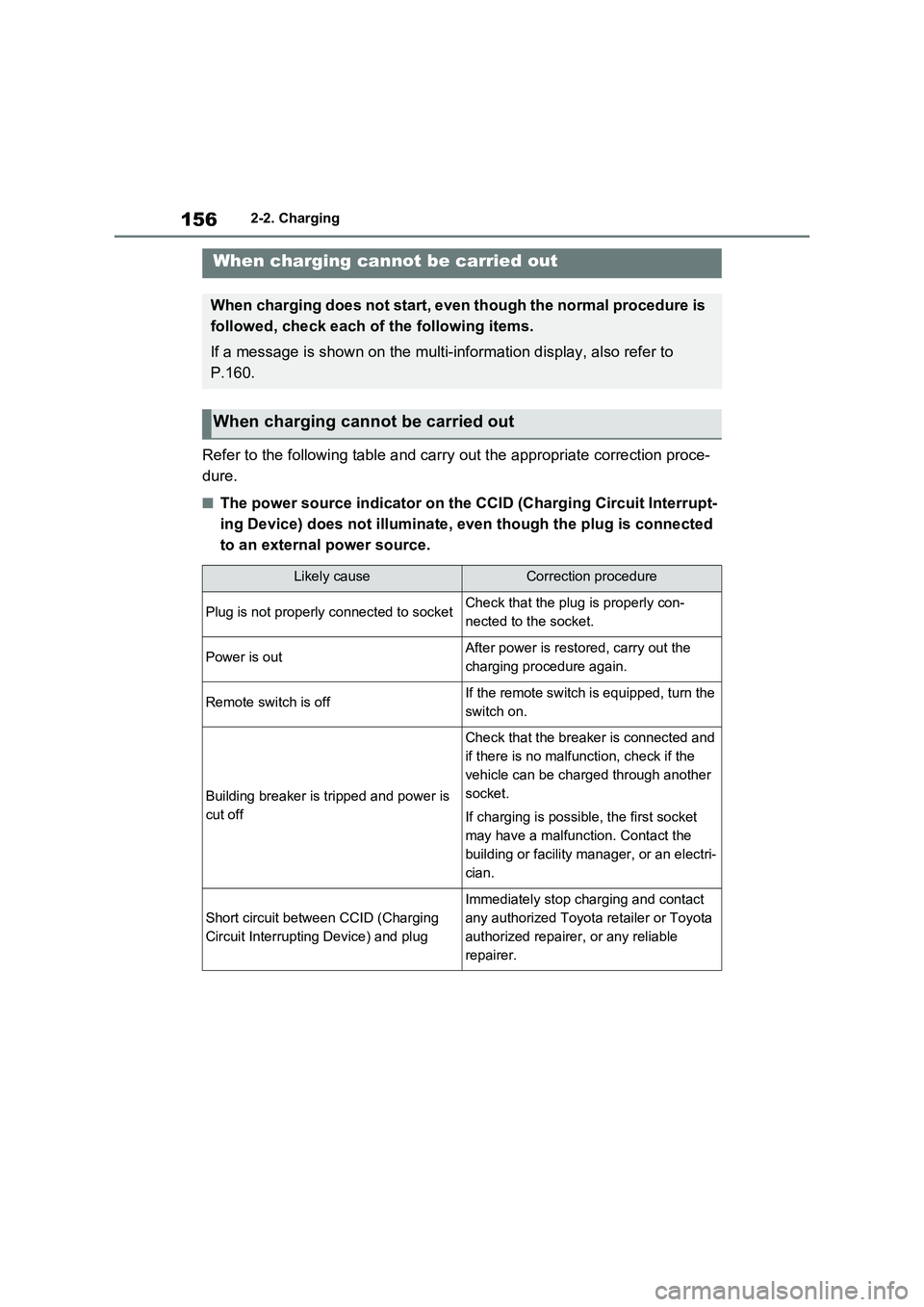
Refer to the following table and carry out the appropriate correction proce-
dure.
■The power source indicator on the CCID (Charging Circuit Interrupt-
ing Device) does not illuminate, even though the plug is connected
to an external power source.
When charging cannot be carried out
When charging does not start, even though the normal procedure is
followed, check each of the following items.
If a message is shown on the multi-information display, also refer to
P.160.
When charging cannot be carried out
Likely causeCorrection procedure
Plug is not properly connected to socketCheck that the plug is properly con-
nected to the socket.
Power is outAfter power is restored, carry out the
charging procedure again.
Remote switch is offIf the remote switch is equipped, turn the
switch on.
Building breaker is tripped and power is
cut off
Check that the breaker is connected and
if there is no malfunction, check if the
vehicle can be charged through another
socket.
If charging is possible, the first socket
may have a malfunction. Contact the
building or facility manager, or an electri-
cian.
Short circuit between CCID (Charging
Circuit Interrupting Device) and plug
Immediately stop charging and contact
any authorized Toyota retailer or Toyota
authorized repairer, or any reliable
repairer.
Page 157 of 664
157
2 2-2. Charging
Plug-in hybrid system
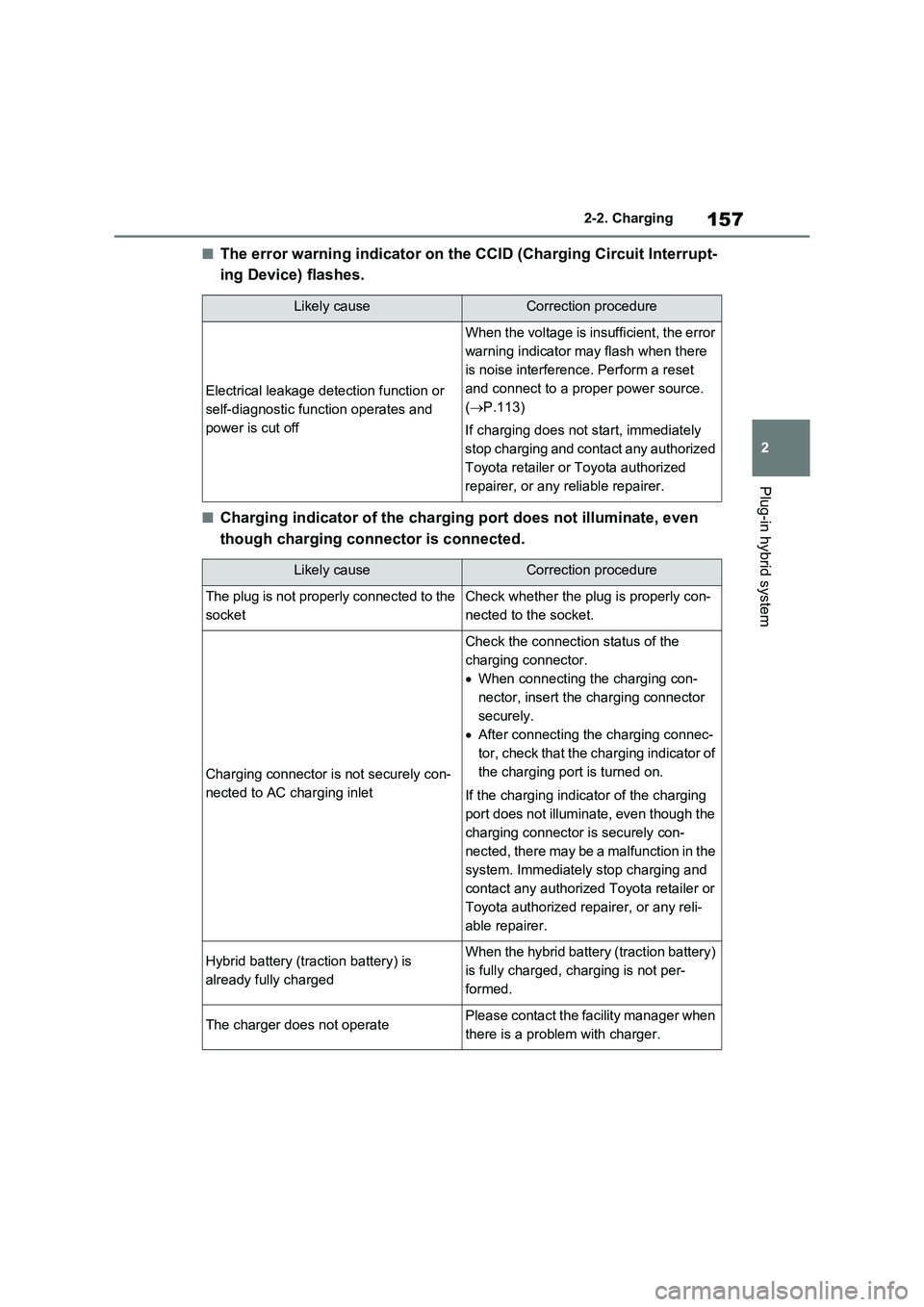
■The error warning indicator on the CCID (Charging Circuit Interrupt-
ing Device) flashes.
■Charging indicator of the charging port does not illuminate, even
though charging connector is connected.
Likely causeCorrection procedure
Electrical leakage detection function or
self-diagnostic function operates and
power is cut off
When the voltage is insufficient, the error
warning indicator may flash when there
is noise interference. Perform a reset
and connect to a proper power source.
(P.113)
If charging does not start, immediately
stop charging and contact any authorized
Toyota retailer or Toyota authorized
repairer, or any reliable repairer.
Likely causeCorrection procedure
The plug is not properly connected to the
socketCheck whether the plug is properly con-
nected to the socket.
Charging connector is not securely con-
nected to AC charging inlet
Check the connection status of the
charging connector.
When connecting the charging con-
nector, insert the charging connector
securely.
After connecting the charging connec-
tor, check that the charging indicator of
the charging port is turned on.
If the charging indicator of the charging
port does not illuminate, even though the
charging connector is securely con-
nected, there may be a malfunction in the
system. Immediately stop charging and
contact any authorized Toyota retailer or
Toyota authorized repairer, or any reli-
able repairer.
Hybrid battery (traction battery) is
already fully chargedWhen the hybrid battery (traction battery)
is fully charged, charging is not per-
formed.
The charger does not operatePlease contact the facility manager when
there is a problem with charger.
Page 159 of 664
159
2 2-2. Charging
Plug-in hybrid system
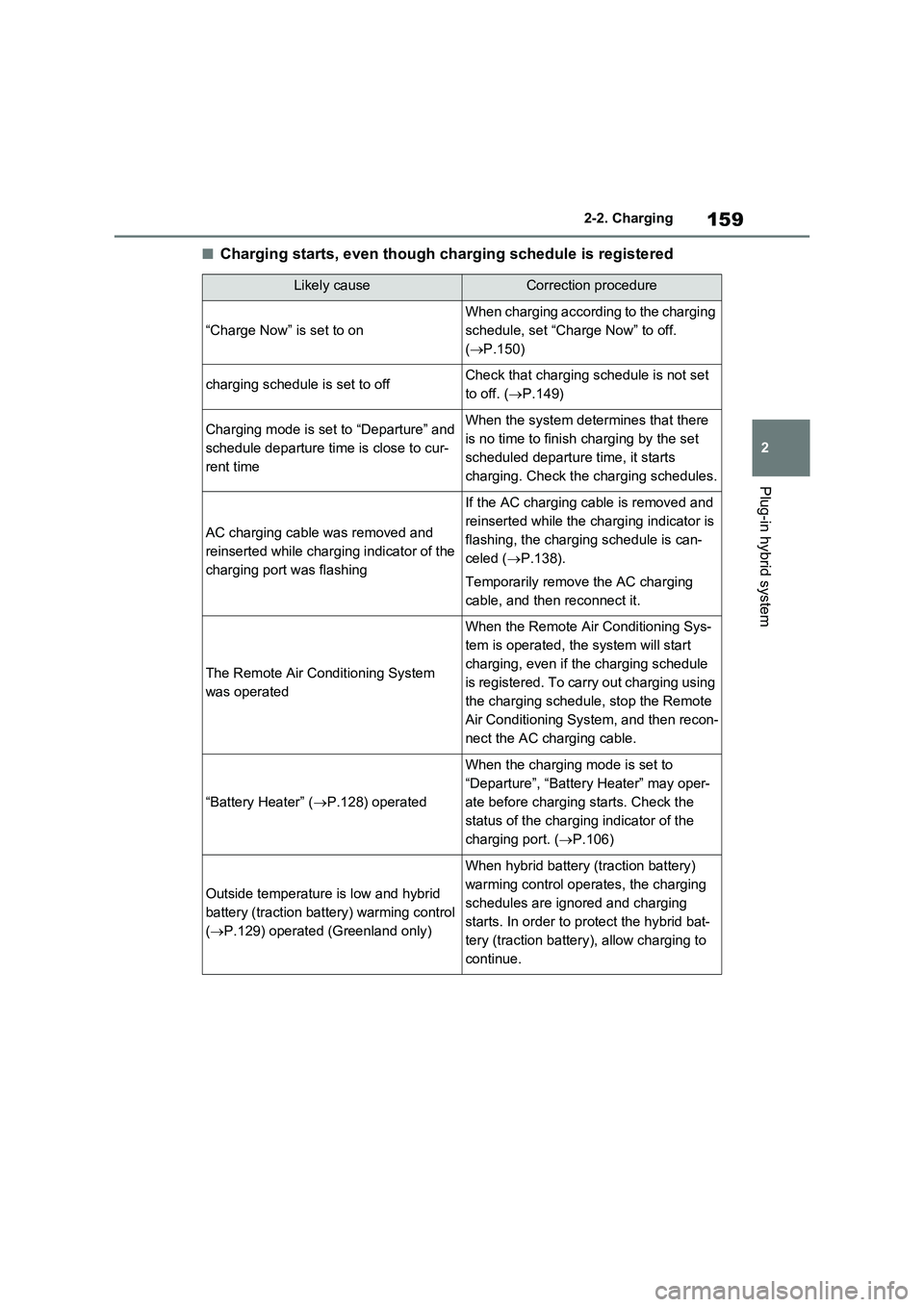
■Charging starts, even though charging schedule is registered
Likely causeCorrection procedure
“Charge Now” is set to on
When charging according to the charging
schedule, set “Charge Now” to off.
(P.150)
charging schedule is set to offCheck that charging schedule is not set
to off. (P.149)
Charging mode is set to “Departure” and
schedule departure time is close to cur-
rent timeWhen the system determines that there
is no time to finish charging by the set
scheduled departure time, it starts
charging. Check the charging schedules.
AC charging cable was removed and
reinserted while charging indicator of the
charging port was flashing
If the AC charging cable is removed and
reinserted while the charging indicator is
flashing, the charging schedule is can-
celed (P.138).
Temporarily remove the AC charging
cable, and then reconnect it.
The Remote Air Conditioning System
was operated
When the Remote Air Conditioning Sys-
tem is operated, the system will start
charging, even if the charging schedule
is registered. To carry out charging using
the charging schedule, stop the Remote
Air Conditioning System, and then recon-
nect the AC charging cable.
“Battery Heater” (P.128) operated
When the charging mode is set to
“Departure”, “Battery Heater” may oper-
ate before charging starts. Check the
status of the charging indicator of the
charging port. (P.106)
Outside temperature is low and hybrid
battery (traction battery) warming control
(P.129) operated (Greenland only)
When hybrid battery (traction battery)
warming control operates, the charging
schedules are ignored and charging
starts. In order to protect the hybrid bat-
tery (traction battery), allow charging to
continue.
Page 177 of 664
177
3 3-1. Instrument cluster
Vehicle status information and indicators
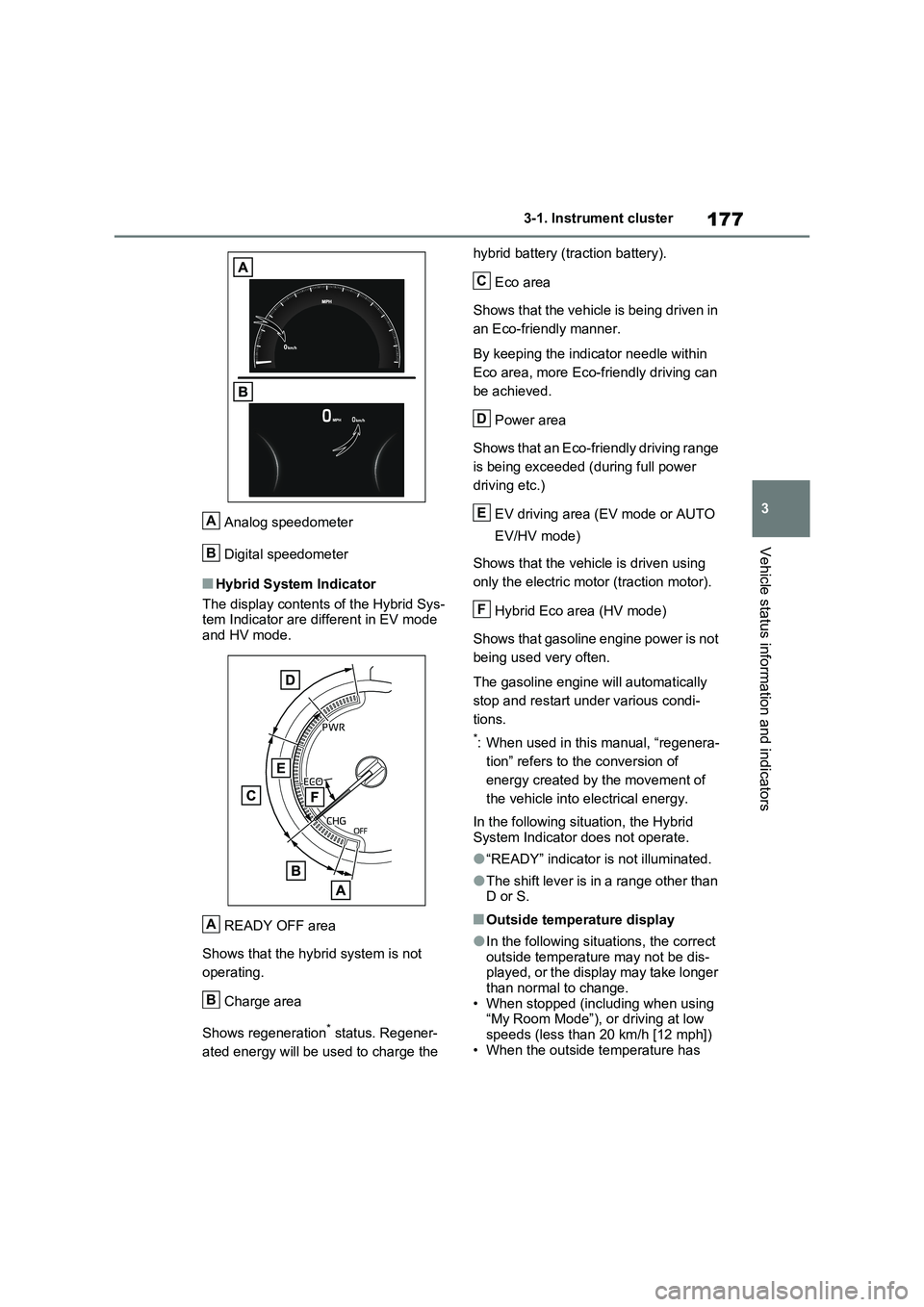
Analog speedometer
Digital speedometer
■Hybrid System Indicator
The display contents of the Hybrid Sys-
tem Indicator are different in EV mode
and HV mode.
READY OFF area
Shows that the hybrid system is not
operating.
Charge area
Shows regeneration
* status. Regener-
ated energy will be used to charge the hybrid battery (traction battery).
Eco area
Shows that the vehicle is being driven in
an Eco-friendly manner.
By keeping the indicator needle within
Eco area, more Eco-friendly driving can
be achieved.
Power area
Shows that an Eco-friendly driving range
is being exceeded (during full power
driving etc.)
EV driving area (EV mode or AUTO
EV/HV mode)
Shows that the vehicle is driven using
only the electric motor (traction motor).
Hybrid Eco area (HV mode)
Shows that gasoline engine power is not
being used very often.
The gasoline engine will automatically
stop and restart under various condi-
tions.
*: When used in this manual, “regenera-
tion” refers to the conversion of
energy created by the movement of
the vehicle into electrical energy.
In the following situation, the Hybrid
System Indicator does not operate.
●“READY” indicator is not illuminated.
●The shift lever is in a range other than
D or S.
■Outside temperature display
●In the following situations, the correct
outside temperature may not be dis-
played, or the display may take longer
than normal to change.
• When stopped (including when using
“My Room Mode”), or driving at low
speeds (less than 20 km/h [12 mph])
• When the outside temperature has
A
B
A
B
C
D
E
F
Page 181 of 664
181
3 3-1. Instrument cluster
Vehicle status information and indicators
Select to display fuel consumption
data in various forms.
■Power Consumption/Fuel
Economy
The display contents are different in
EV mode or AUTO EV/HV mode,
and HV mode.
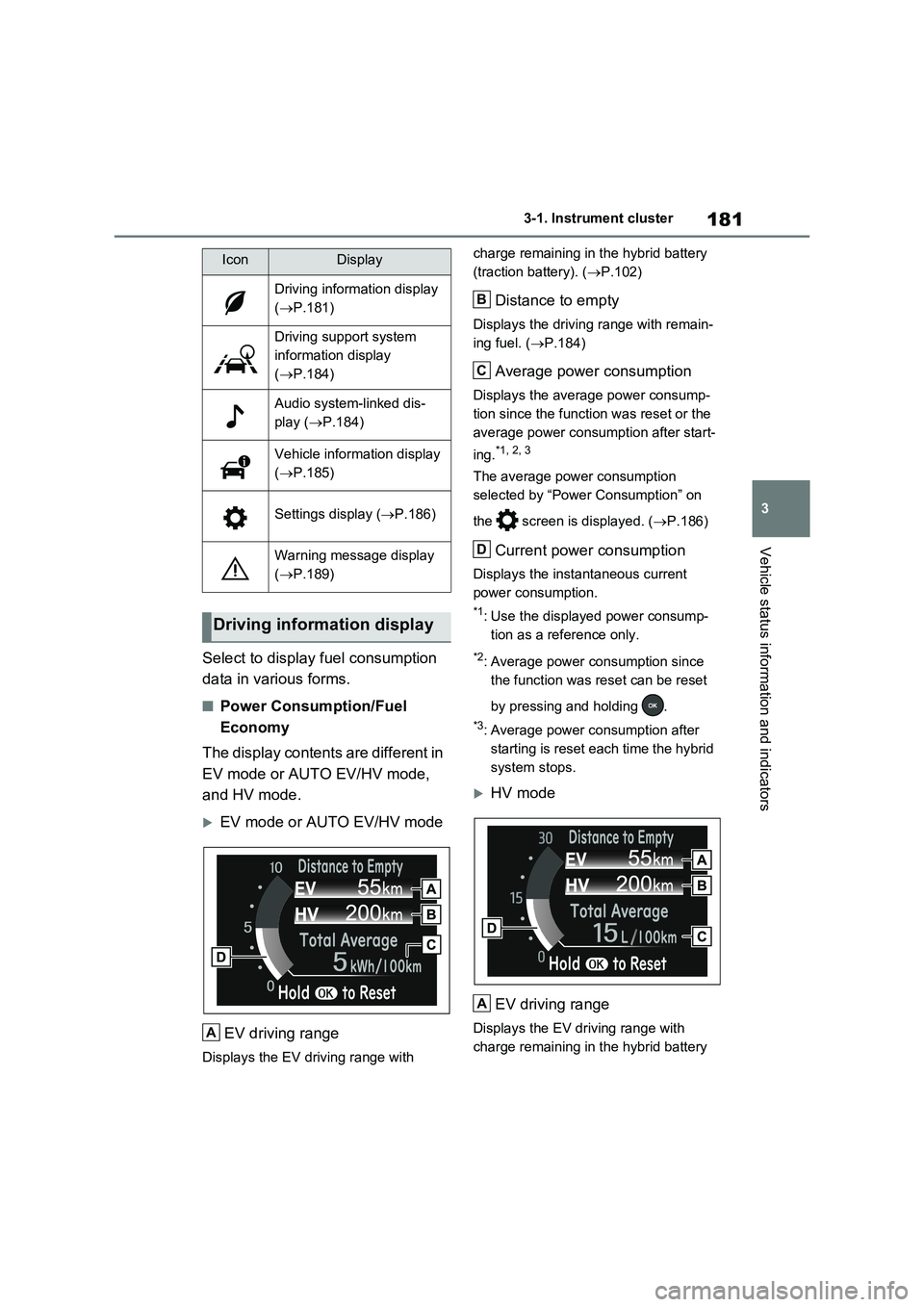
EV mode or AUTO EV/HV mode
EV driving range
Displays the EV driving range with charge remaining in the hybrid battery
(traction battery). (P.102)
Distance to empty
Displays the driving range with remain-
ing fuel. (P.184)
Average power consumption
Displays the average power consump-
tion since the function was reset or the
average power consumption after start-
ing.
*1, 2, 3
The average power consumption
selected by “Power Consumption” on
the screen is displayed. (P.186)
Current power consumption
Displays the instantaneous current
power consumption.
*1: Use the displayed power consump-
tion as a reference only.
*2: Average power consumption since
the function was reset can be reset
by pressing and holding .
*3: Average power consumption after
starting is reset each time the hybrid
system stops.
HV mode
EV driving range
Displays the EV driving range with
charge remaining in the hybrid battery
IconDisplay
Driving information display
(P.181)
Driving support system
information display
(P.184)
Audio system-linked dis-
play (P.184)
Vehicle information display
(P.185)
Settings display (P.186)
Warning message display
(P.189)
Driving information display
A
B
C
D
A
Page 182 of 664
1823-1. Instrument cluster
(traction battery). (P.90)
Distance to empty
Displays the driving range with remain-
ing fuel. (P.184)
Average fuel economy
Displays the average fuel economy
since the function was reset or the
average fuel economy after starting or
refueling.
*1, 2, 3
The average fuel economy selected by
“Fuel Economy” on the screen is
displayed. (P.186)
Current fuel economy
Displays the instantaneous current fuel
Economy.
*1: Use the displayed fuel consumption
as a reference only.
*2: Average fuel economy since the
function was reset can be reset by
pressing and holding .
*3: Average fuel economy after starting
is reset each time the hybrid system
stops.
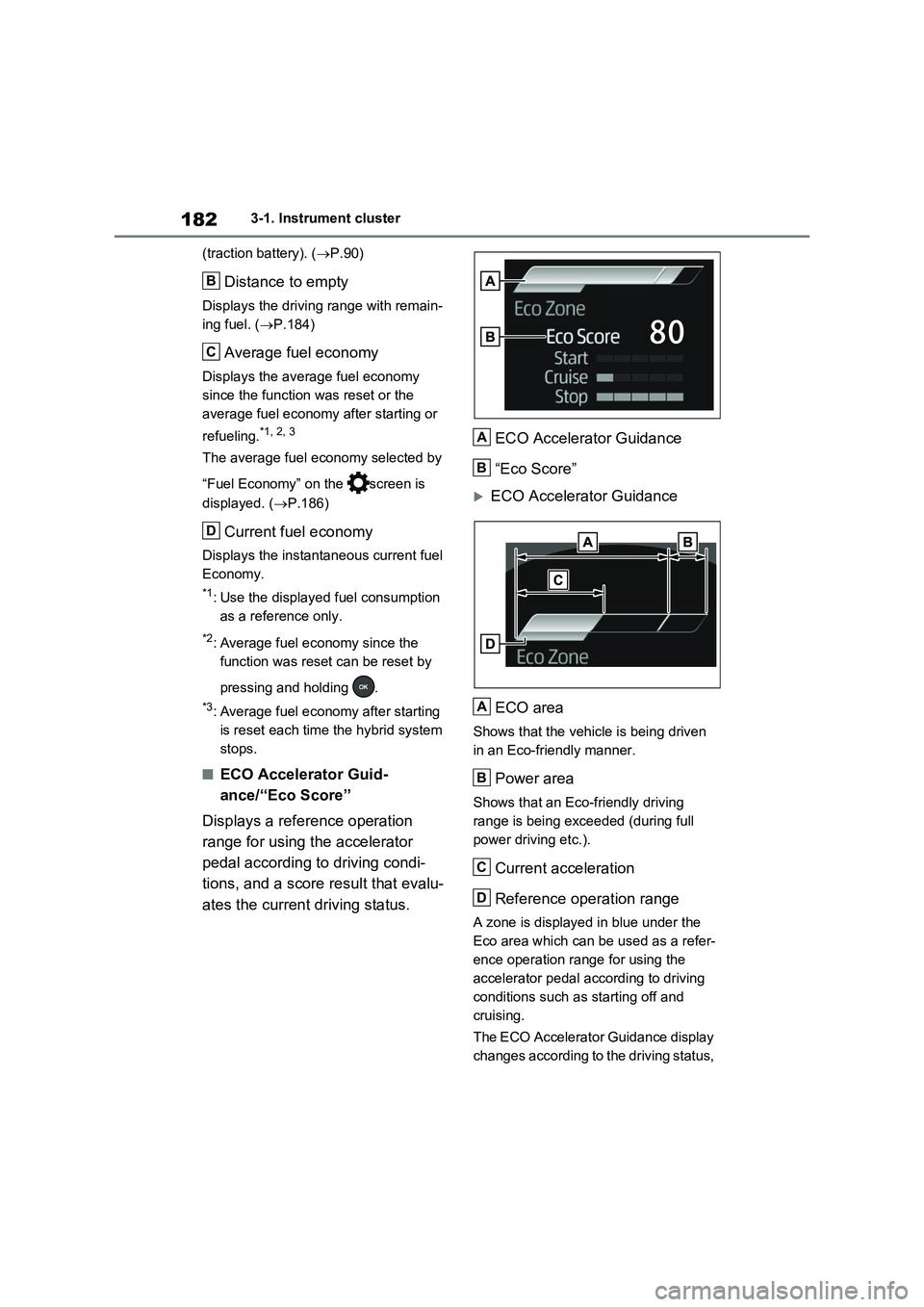
■ECO Accelerator Guid-
ance/“Eco Score”
Displays a reference operation
range for using the accelerator
pedal according to driving condi-
tions, and a score result that evalu-
ates the current driving status.ECO Accelerator Guidance
“Eco Score”
ECO Accelerator Guidance
ECO area
Shows that the vehicle is being driven
in an Eco-friendly manner.
Power area
Shows that an Eco-friendly driving
range is being exceeded (during full
power driving etc.).
Current acceleration
Reference operation range
A zone is displayed in blue under the
Eco area which can be used as a refer-
ence operation range for using the
accelerator pedal according to driving
conditions such as starting off and
cruising.
The ECO Accelerator Guidance display
changes according to the driving status,
B
C
D
A
B
A
B
C
D
Page 183 of 664
183
3 3-1. Instrument cluster
Vehicle status information and indicators
such as when starting off or cruising.
It is easier to drive in an Eco-friendly
manner by driving according to the dis-
play showing the accelerator pedal
operations and staying within the refer-
ence operation range.
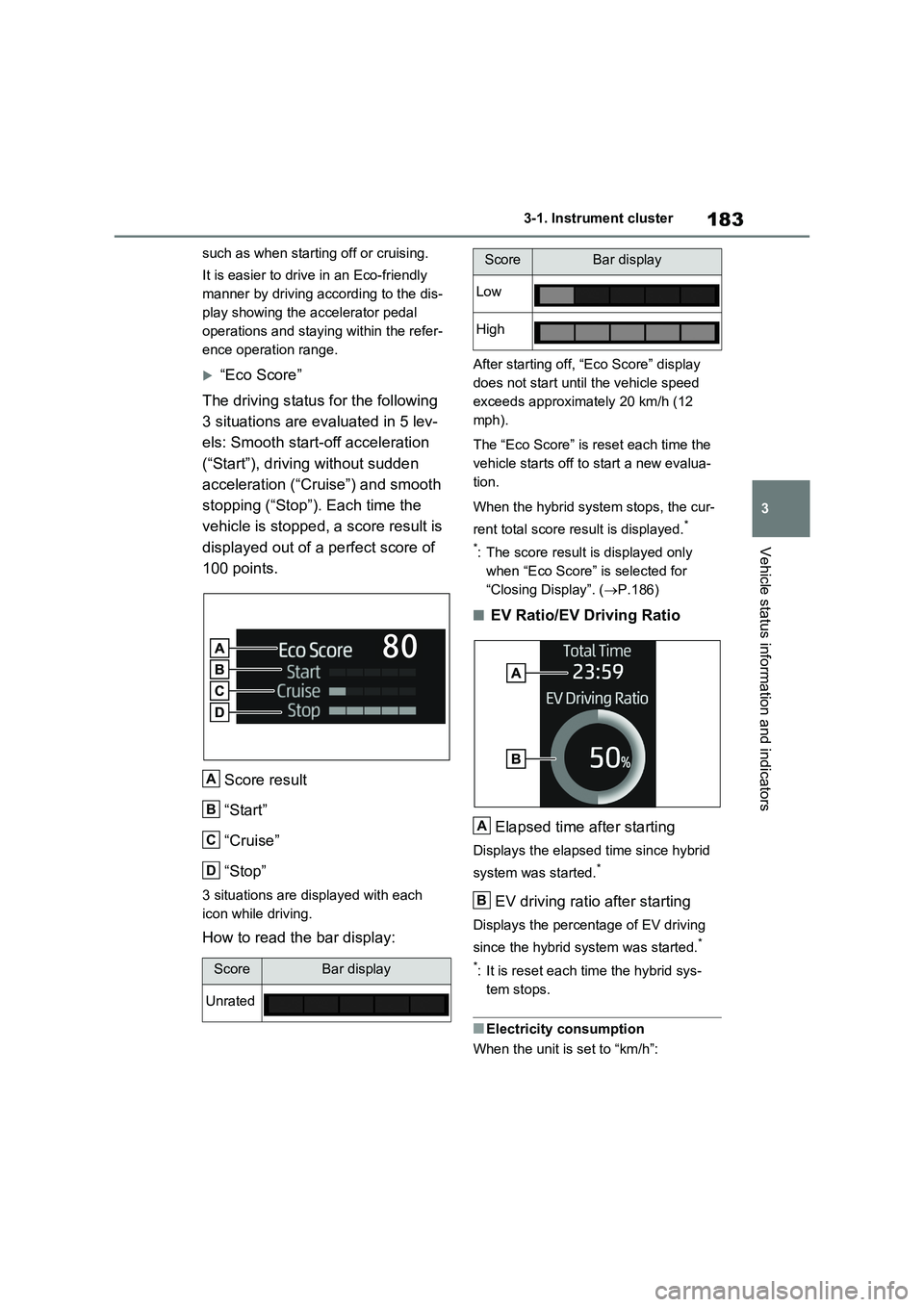
“Eco Score”
The driving status for the following
3 situations are evaluated in 5 lev-
els: Smooth start-off acceleration
(“Start”), driving without sudden
acceleration (“Cruise”) and smooth
stopping (“Stop”). Each time the
vehicle is stopped, a score result is
displayed out of a perfect score of
100 points.
Score result
“Start”
“Cruise”
“Stop”
3 situations are displayed with each
icon while driving.
How to read the bar display:
After starting off, “Eco Score” display
does not start until the vehicle speed
exceeds approximately 20 km/h (12
mph).
The “Eco Score” is reset each time the
vehicle starts off to start a new evalua-
tion.
When the hybrid system stops, the cur-
rent total score result is displayed.
*
*
: The score result is displayed only
when “Eco Score” is selected for
“Closing Display”. (P.186)
■EV Ratio/EV Driving Ratio
Elapsed time after starting
Displays the elapsed time since hybrid
system was started.
*
EV driving ratio after starting
Displays the percentage of EV driving
since the hybrid system was started.
*
*
: It is reset each time the hybrid sys-
tem stops.
■Electricity consumption
When the unit is set to “km/h”:
ScoreBar display
Unrated
A
B
C
D
Low
High
ScoreBar display
A
B
Page 185 of 664
185
3 3-1. Instrument cluster
Vehicle status information and indicators
■Drive information
2 items that are selected using the
“Drive Info Items” setting (average
speed, distance and total time) can
be displayed vertically.
The displayed information changes
according to the “Drive Info Type”
setting (since the system was
started or between resets).
(P.186)
Use the displayed information as a ref-
erence only.
Following items will be displayed.
“Trip”
• “Average Speed”: Displays the aver-
age vehicle speed since hybrid sys-
tem start
*
• “Distance”: Displays the distance
driven since hybrid system start*
• “Total Time”: Displays the elapsed
time since hybrid system start*
*
: These items are reset each time the
hybrid system stops.
“Total”
• “Average Speed”: Displays the aver-
age vehicle speed since the display
was reset
*
• “Distance”: Displays the distance
driven since the display was reset*
• “Total Time”: Displays the elapsed
time since the display was reset*
*
: To reset, display the desired item and
press and hold .
■Energy monitor
P.195
■Tire pressure
P.511
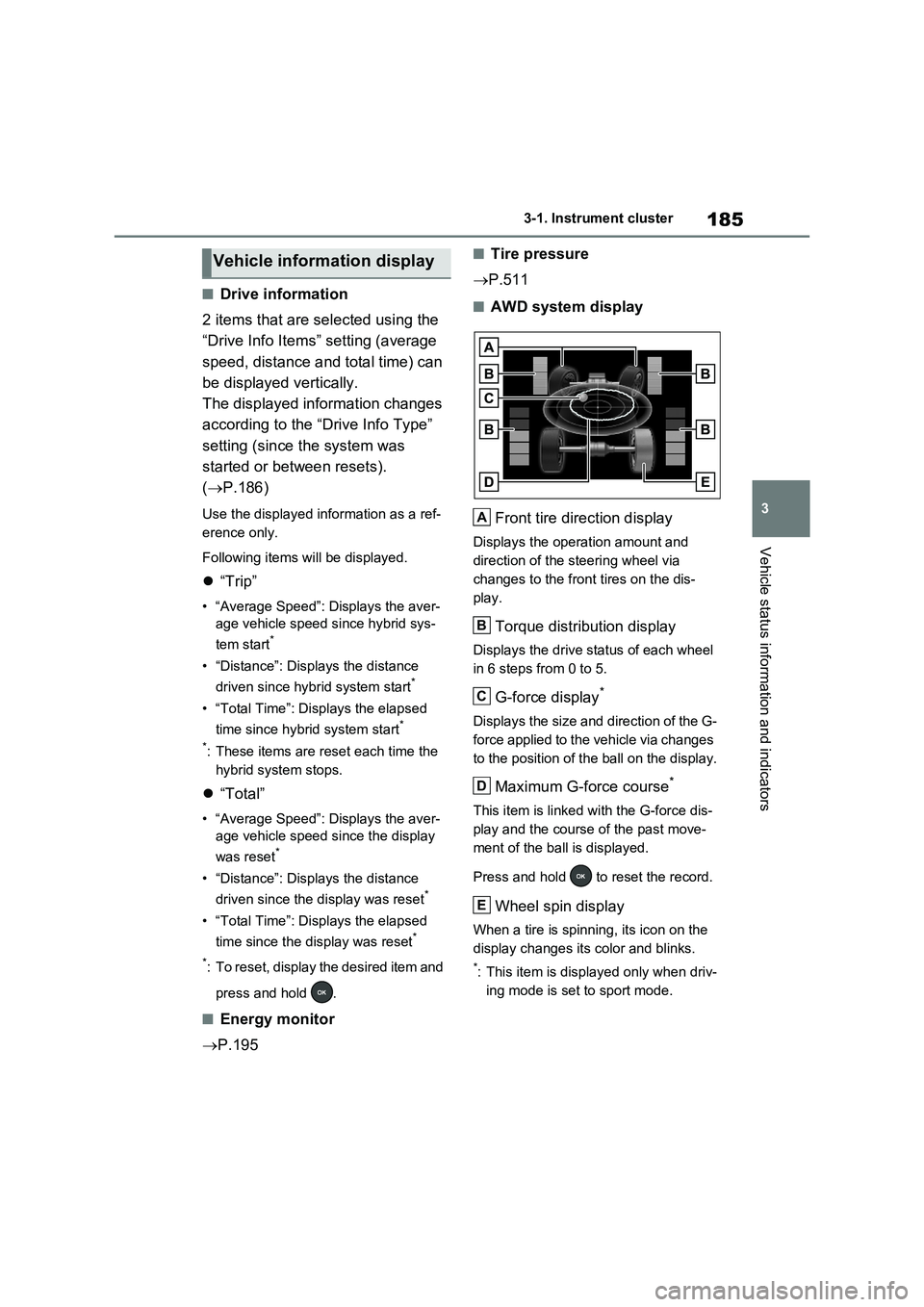
■AWD system display
Front tire direction display
Displays the operation amount and
direction of the steering wheel via
changes to the front tires on the dis-
play.
Torque distribution display
Displays the drive status of each wheel
in 6 steps from 0 to 5.
G-force display*
Displays the size and direction of the G-
force applied to the vehicle via changes
to the position of the ball on the display.
Maximum G-force course*
This item is linked with the G-force dis-
play and the course of the past move-
ment of the ball is displayed.
Press and hold to reset the record.
Wheel spin display
When a tire is spinning, its icon on the
display changes its color and blinks.
*: This item is displayed only when driv-
ing mode is set to sport mode.
Vehicle information display
A
B
C
D
E
Page 194 of 664
1943-1. Instrument cluster
Brake Override System
(P.301)
Drive-Start Control (P.301)
Parking Support Brake function
(static objects) (if equipped)
(P.424)
Displayed content is the same as that
displayed on the meter. For details,
refer to the explanations of each sys-
tem.
■ / icons
Displays the following multi-infor-
mation display linked icons:
: Master warning icon
Displayed when a warning message is
displayed on the multi-information dis-
play.
: Information icon
Displayed when a suggestion/advice
pop-up display is displayed on the
multi-information display.
■Warning message
Some warning messages are dis-
played when necessary, according
to certain conditions.
Displayed content is the same as that
displayed on the multi-information dis-
play. For details, refer to the explana-
tions of each system.
■Audio system operation status
Displayed when an audio remote
control switch on the steering wheel
is operated.
■Hands-free system status (if
equipped)
Displayed when the hands-free system is operated.
■Outside temperature display
Displayed when the power switch is
turned to ON or when the low out-
side temperature indicator is flash-
ing.
■When a pop-up display is displayed
When a pop-up display is displayed, a
current display may no longer be dis-
played. In this case, the display will
return after the pop-up display disap-
pears.
■Outside temperature display
●When the ambient temperature is
approximately 3°C (37°F) or lower,
will flash for approximately 10
seconds and the outside temperature
display will turn off.
●In the following situations, the correct
outside temperature may not be dis-
played, or the display may take longer
than normal to change:
• When stopped (including when using
“My Room Mode”), or driving at low
speeds (less than 20 km/h [12 mph])
• When the outside temperature has
changed suddenly (at the
entrance/exit of a garage, tunnel, etc.)
●When “--” or “E” is displayed, the sys-
tem may be malfunctioning.
Take your vehicle to any authorized
Toyota retailer or Toyota authorized
repairer, or any reliable repairer.
Display content selected by “HUD
Driving Support” on the screen
is displayed. (P.192)
Hybrid System Indica-
tor/Tachometer