charging TOYOTA VERSO S 2011 Owner's Manual
[x] Cancel search | Manufacturer: TOYOTA, Model Year: 2011, Model line: VERSO S, Model: TOYOTA VERSO S 2011Pages: 664, PDF Size: 160.56 MB
Page 107 of 664
107
2 2-2. Charging
Plug-in hybrid system
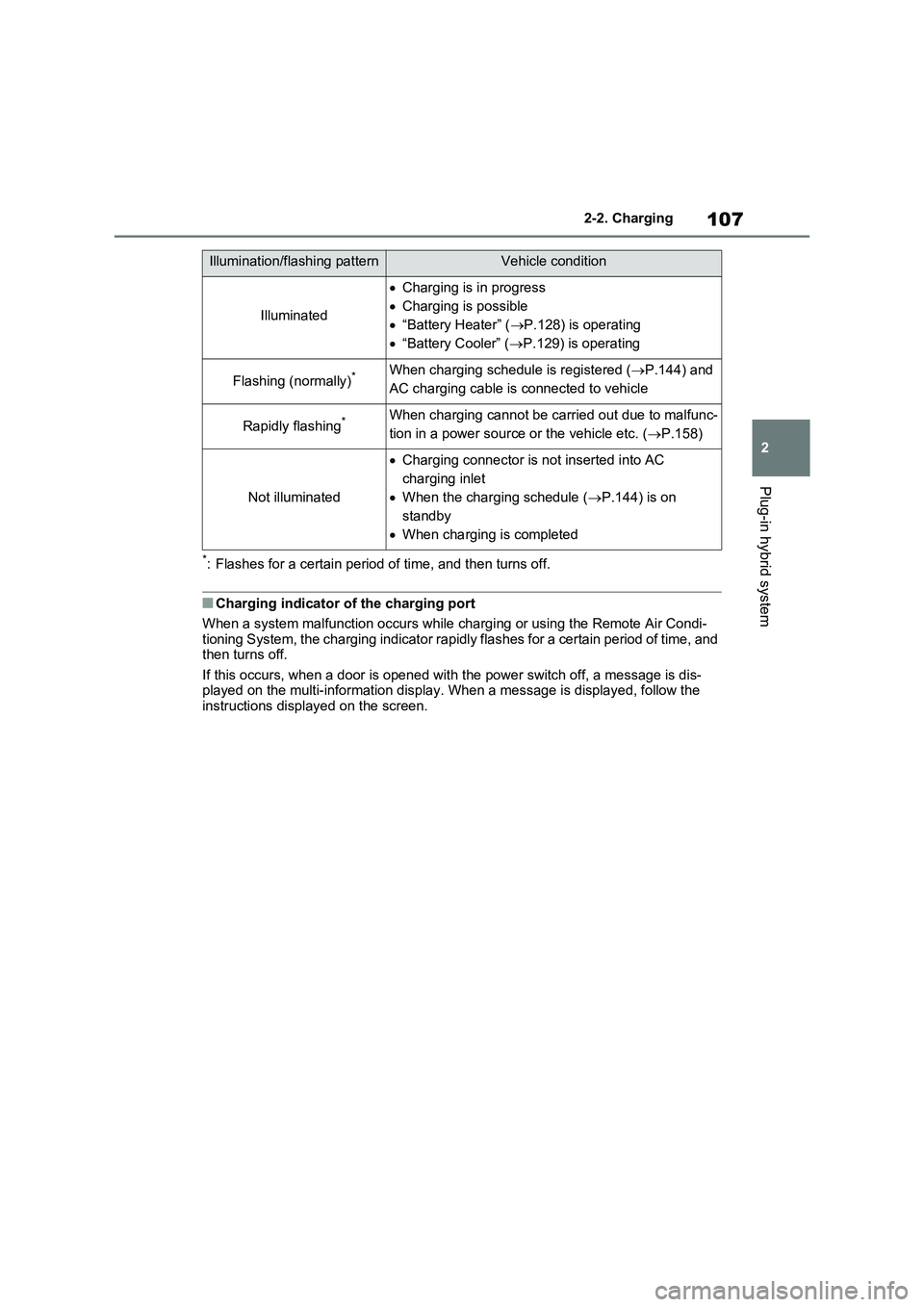
*: Flashes for a certain period of time, and then turns off.
■Charging indicator of the charging port
When a system malfunction occurs while charging or using the Remote Air Condi-
tioning System, the charging indicator rapidly flashes for a certain period of time, and
then turns off.
If this occurs, when a door is opened with the power switch off, a message is dis-
played on the multi-information display. When a message is displayed, follow the
instructions displayed on the screen.
Illumination/flashing patternVehicle condition
Illuminated
Charging is in progress
Charging is possible
“Battery Heater” (P.128) is operating
“Battery Cooler” (P.129) is operating
Flashing (normally)*When charging schedule is registered (P.144) and
AC charging cable is connected to vehicle
Rapidly flashing*When charging cannot be carried out due to malfunc-
tion in a power source or the vehicle etc. (P.158)
Not illuminated
Charging connector is not inserted into AC
charging inlet
When the charging schedule (P.144) is on
standby
When charging is completed
Page 108 of 664
1082-2. Charging
AC charging cable
The function, correct operating
procedure, etc. of the AC
charging cable are explained.
WARNING
■When using the AC charging
cable and CCID (Charging Circuit Interrupting Device)
Observe the following precautions.
Failure to do so may cause an unex- pected accident, resulting in death or serious injury.
●Do not attempt to disassemble or repair the AC charging cable, charging connector, plug or CCID
(Charging Circuit Interrupting Device).If a problem arises with the AC
charging cable or the CCID (Charging Circuit Interrupting Device), stop charging immediately
and contact any authorized Toyota retailer or Toyota authorized repairer, or any reliable repairer.
●Do not subject the AC charging cable, charging connector, plug or
CCID (Charging Circuit Interrupting Device) to strong force or impact.
●Do not apply excessive force to the AC charging cable by forcefully folding, twisting, pulling or dragging
the AC charging cable.
●Do not damage the AC charging
cable with sharp objects.
●Do not fold the charging connector
or plug or insert foreign objects into them.
●Do not put the charging connector and plug into water.
●Do not bring the AC charging cable to a high-temperature item such as a heating device.
●Do not apply a load to the AC charging cable and plug-cord (such as wrapping the AC charging cable
around the CCID (Charging Circuit Interrupting Device) and the charging connector).
●Do not use or leave the AC charging cable in situations where a
load is applied to the socket and the plug (such as when the CCID (Charging Circuit Interrupting
Device) is hanging in the air without contacting the ground).
●Mode 3 AC charging cable: Do not use outside the rated voltage (less than 277 V) or rated current (less
than 20 A).
NOTICE
■Precautions when handling AC charging cable
Make sure to observe the following precautions. Failure to observe these precautions may result in damage to
the AC charging cable and AC charging inlet.
●Insert the charging connector straight into the AC charging inlet.
●After inserting the charging connec-tor, do not apply excessive force to or twist the connector. Also, do not
lean on the connector or hang any objects from it.
●Do not step on or trip over the AC charging cable.
●Before removing the charging con-nector, make sure that it is unlocked. ( P.121)
●After removing the AC charging cable, promptly return it to its
proper location.
●After removing the charging con-
nector, securely install the AC charging inlet cap.
Page 109 of 664
109
2
2-2. Charging
Plug-in hybrid system
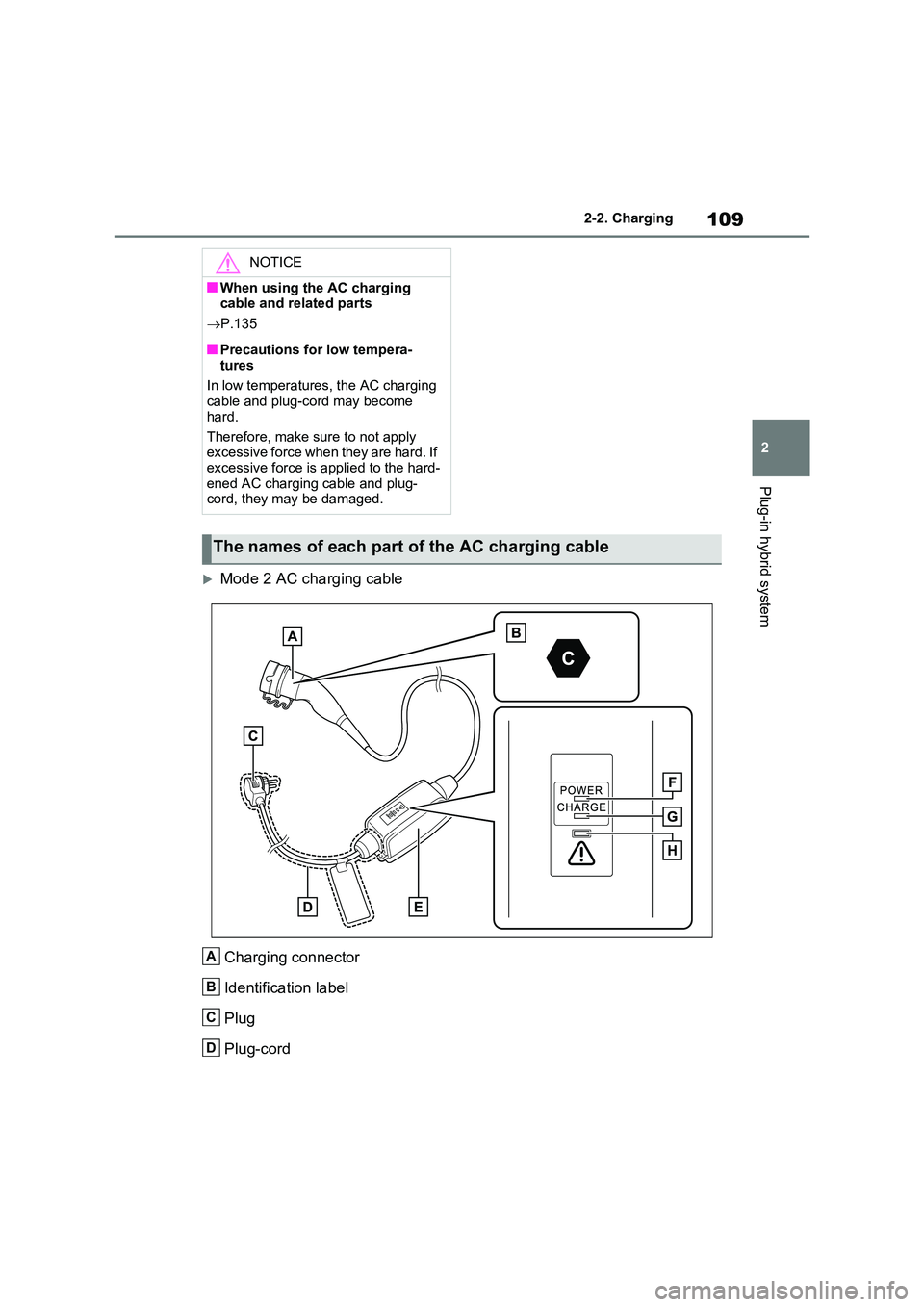
Mode 2 AC charging cable
Charging connector
Identification label
Plug
Plug-cord
NOTICE
■When using the AC charging cable and related parts
P.135
■Precautions for low tempera-
tures
In low temperatures, the AC charging cable and plug-cord may become
hard.
Therefore, make sure to not apply excessive force when they are hard. If
excessive force is applied to the hard- ened AC charging cable and plug-cord, they may be damaged.
The names of each part of the AC charging cable
A
B
C
D
Page 110 of 664
1102-2. Charging
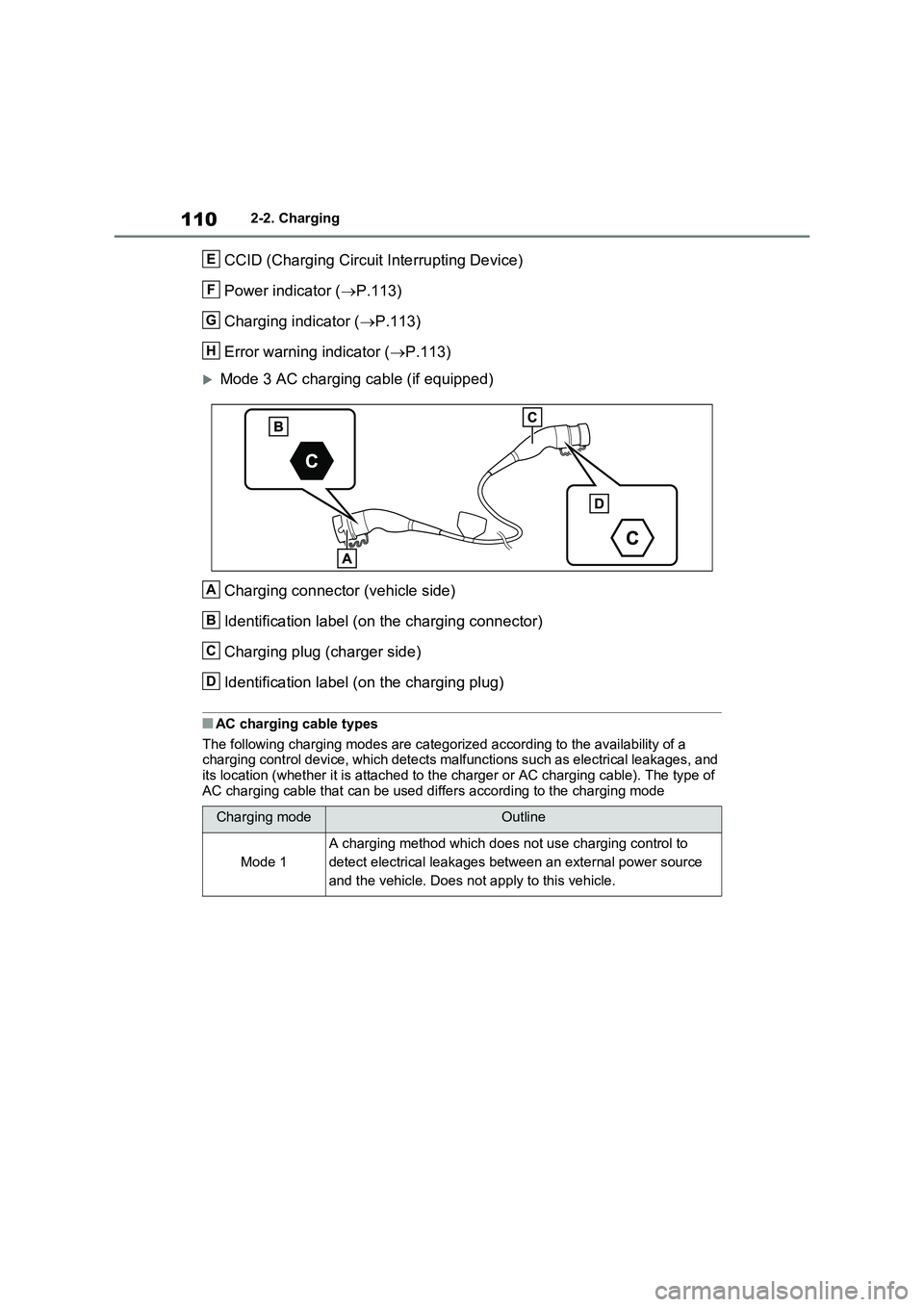
CCID (Charging Circuit Interrupting Device)
Power indicator ( P.113)
Charging indicator ( P.113)
Error warning indicator ( P.113)
Mode 3 AC charging cable (if equipped)
Charging connector (vehicle side)
Identification label (on the charging connector)
Charging plug (charger side)
Identification label (on the charging plug)
■AC charging cable types
The following charging modes are categorized according to the availability of a charging control device, which detects malfunctions such as electrical leakages, and its location (whether it is attached to the charger or AC charging cable). The type of
AC charging cable that can be used differs according to the charging mode
Charging modeOutline
Mode 1
A charging method which does not use charging control to
detect electrical leakages between an external power source
and the vehicle. Does not apply to this vehicle.
E
F
G
H
A
B
C
D
Page 111 of 664
111
2 2-2. Charging
Plug-in hybrid system
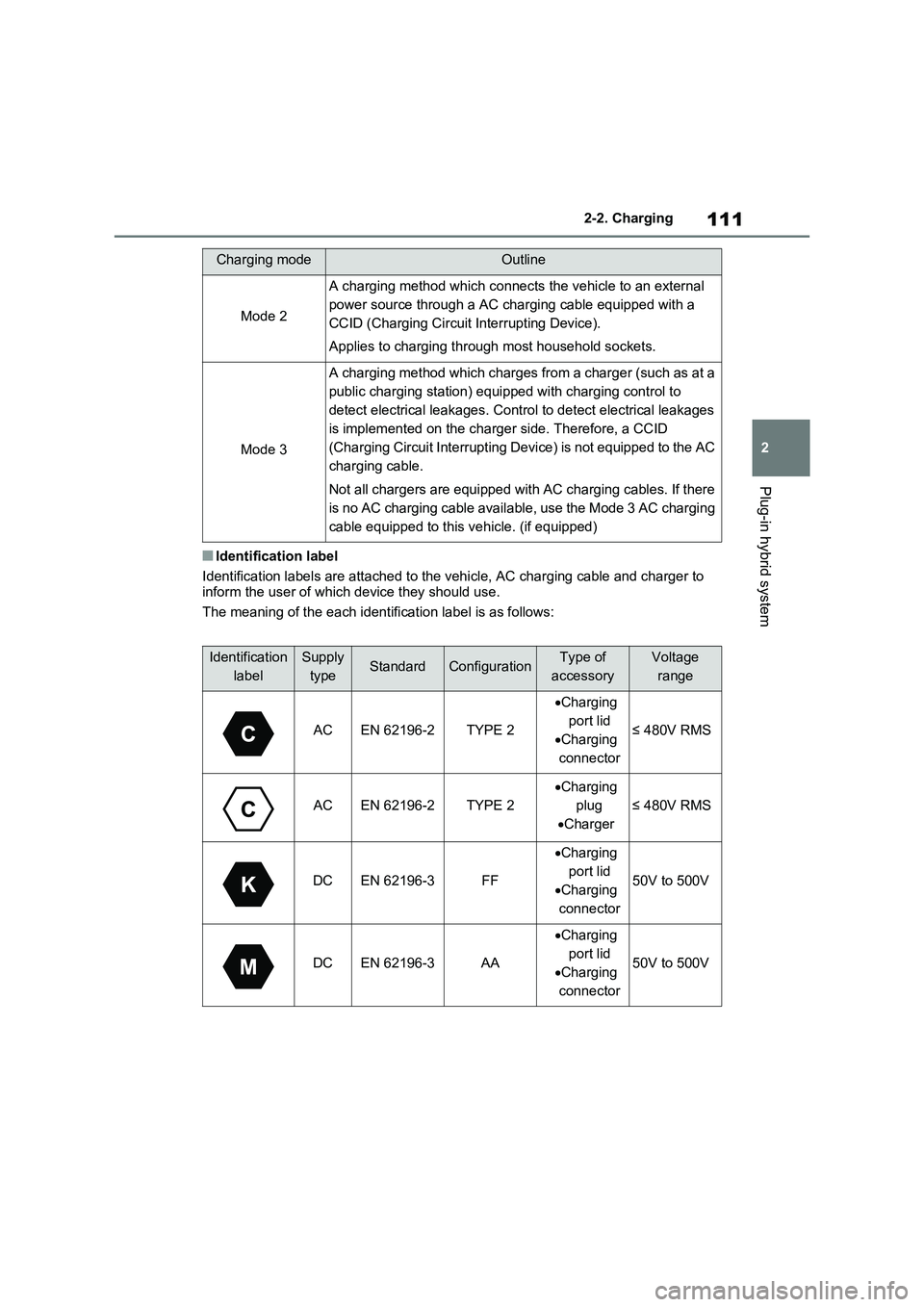
■Identification label
Identification labels are attached to the vehicle, AC charging cable and charger to
inform the user of which device they should use.
The meaning of the each identification label is as follows:
Mode 2
A charging method which connects the vehicle to an external
power source through a AC charging cable equipped with a
CCID (Charging Circuit Interrupting Device).
Applies to charging through most household sockets.
Mode 3
A charging method which charges from a charger (such as at a
public charging station) equipped with charging control to
detect electrical leakages. Control to detect electrical leakages
is implemented on the charger side. Therefore, a CCID
(Charging Circuit Interrupting Device) is not equipped to the AC
charging cable.
Not all chargers are equipped with AC charging cables. If there
is no AC charging cable available, use the Mode 3 AC charging
cable equipped to this vehicle. (if equipped)
Identification
labelSupply
typeStandardConfigurationType of
accessoryVoltage
range
ACEN 62196-2TYPE 2
Charging
port lid
Charging
connector
≤ 480V RMS
ACEN 62196-2TYPE 2
Charging
plug
Charger
≤ 480V RMS
DCEN 62196-3FF
Charging
port lid
Charging
connector
50V to 500V
DCEN 62196-3AA
Charging
port lid
Charging
connector
50V to 500V
Charging modeOutline
Page 112 of 664
1122-2. Charging
This product must be grounded. In
case of malfunction or break down,
grounding provides a path of least
resistance for electric current to
reduce the risk of electric shock.
This product is equipped with a
grounding conductor and a ground-
ing plug. The grounding plug must
be plugged into an appropriate
socket that is properly installed and
grounded in accordance with all
local codes and ordinances.
The CCID (Charging Circuit Inter-
rupting Device) has the following
safety features.
■Electrical leakage detection
function
If an electrical leakage is detected
during charging, the power source
will be automatically interrupted,
thus preventing fires or electrical
shocks caused by electrical leak-
age.
If the power source is interrupted, the
error warning indicator flashes.
If the power source is interrupted:
P.113
■Automatic check function
This is an automatic system check
that is run before charging begins
to check for problems in the opera-
tion of the electrical leakage detec-
tion function.
If a malfunction is found in the electrical
leakage detection function as a result of
the check, the error warning indicator
flashes to inform the user. ( P.113)
■Temperature detection func-
tion
A temperature detection function is
equipped to the plug. While
charging, if heat is generated due
to looseness on the socket side
etc., this function suppresses heat
by controlling the charging current.
■Conditions for supplying cur-
rent to the vehicle
The CCID (Charging Circuit Inter-
rupting Device) is designed to pre-
vent electrical current from being
supplied to the charging connector
when it is not connected to the
vehicle, even if the plug is inserted
into the socket.
Grounding (Mode 2 AC
charging cable)
WARNING
■Grounding precautions
●Improper connection of the ground-
ing conductor increases the risk of electric shock.Check with a qualified electrician or
serviceman if you are in doubt as to whether the product is properly grounded.
●Do not modify the grounding plug provided with the product. If it does
not fit the socket, have a proper socket installed by a qualified elec-trician.
Safety functions (Mode 2 AC
charging cable)
Page 113 of 664
113
2 2-2. Charging
Plug-in hybrid system
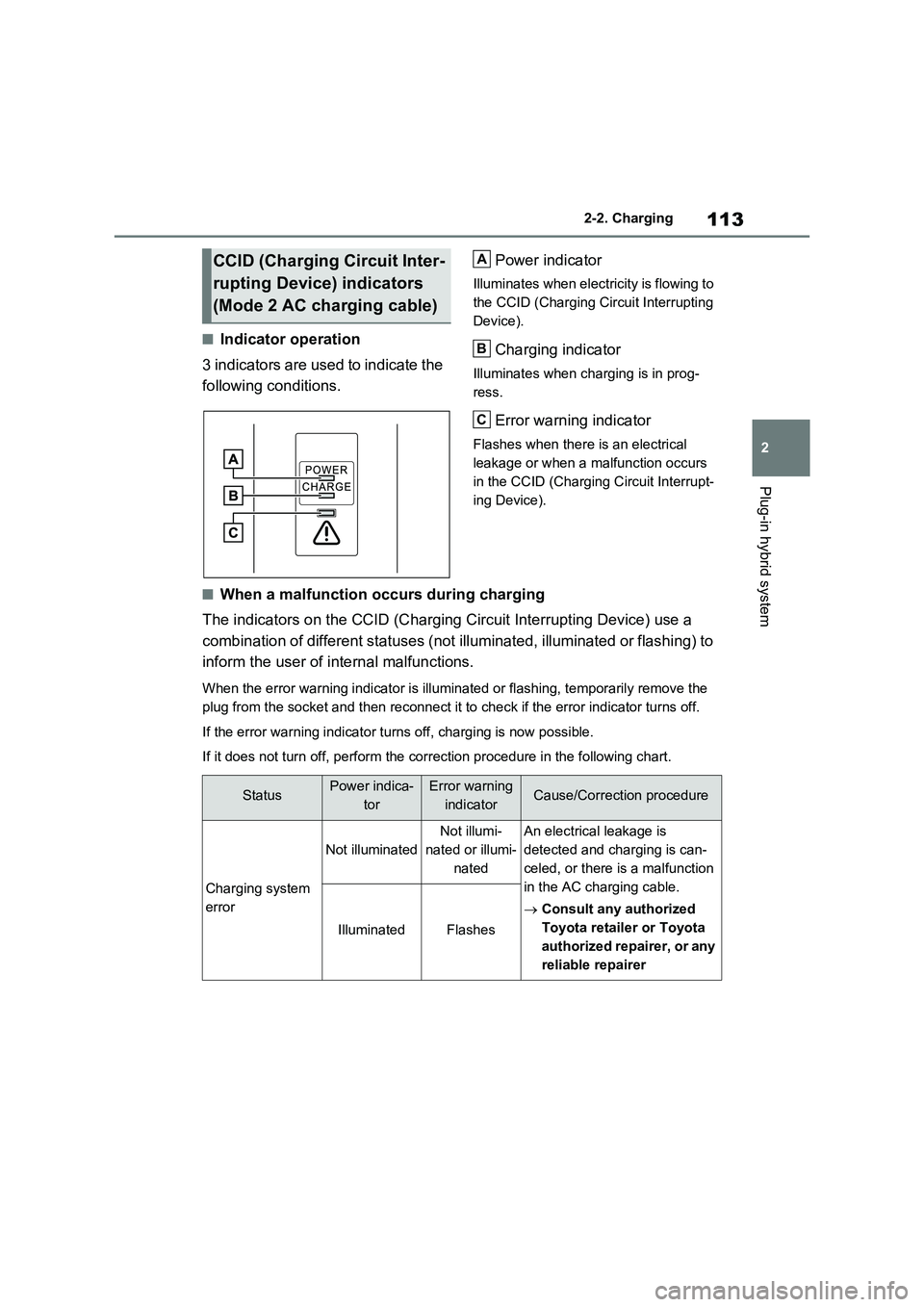
■Indicator operation
3 indicators are used to indicate the
following conditions.Power indicator
Illuminates when electricity is flowing to
the CCID (Charging Circuit Interrupting
Device).
Charging indicator
Illuminates when charging is in prog-
ress.
Error warning indicator
Flashes when there is an electrical
leakage or when a malfunction occurs
in the CCID (Charging Circuit Interrupt-
ing Device).
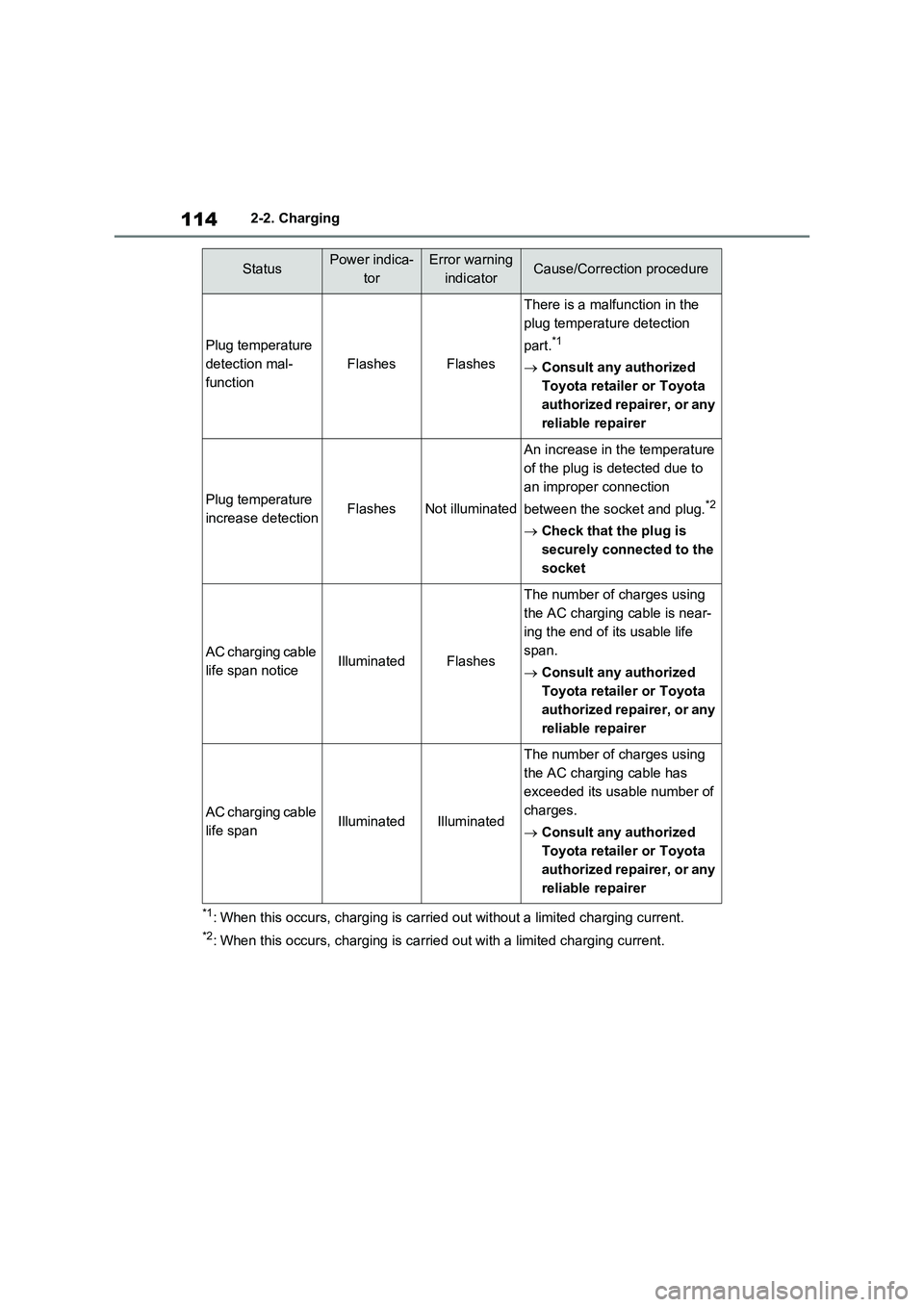
■When a malfunction occurs during charging
The indicators on the CCID (Charging Circuit Interrupting Device) use a
combination of different statuses (not illuminated, illuminated or flashing) to
inform the user of internal malfunctions.
When the error warning indicator is illuminated or flashing, temporarily remove the
plug from the socket and then reconnect it to check if the error indicator turns off.
If the error warning indicator turns off, charging is now possible.
If it does not turn off, perform the correction procedure in the following chart.
CCID (Charging Circuit Inter-
rupting Device) indicators
(Mode 2 AC charging cable)A
B
C
StatusPower indica-
torError warning
indicatorCause/Correction procedure
Charging system
error
Not illuminated
Not illumi-
nated or illumi-
natedAn electrical leakage is
detected and charging is can-
celed, or there is a malfunction
in the AC charging cable.
Consult any authorized
Toyota retailer or Toyota
authorized repairer, or any
reliable repairer
IlluminatedFlashes
Page 114 of 664
1142-2. Charging
*1: When this occurs, charging is carried out without a limited charging current.
*2: When this occurs, charging is carried out with a limited charging current.
Plug temperature
detection mal-
function
FlashesFlashes
There is a malfunction in the
plug temperature detection
part.
*1
Consult any authorized
Toyota retailer or Toyota
authorized repairer, or any
reliable repairer
Plug temperature
increase detectionFlashesNot illuminated
An increase in the temperature
of the plug is detected due to
an improper connection
between the socket and plug.
*2
Check that the plug is
securely connected to the
socket
AC charging cable
life span noticeIlluminatedFlashes
The number of charges using
the AC charging cable is near-
ing the end of its usable life
span.
Consult any authorized
Toyota retailer or Toyota
authorized repairer, or any
reliable repairer
AC charging cable
life spanIlluminatedIlluminated
The number of charges using
the AC charging cable has
exceeded its usable number of
charges.
Consult any authorized
Toyota retailer or Toyota
authorized repairer, or any
reliable repairer
StatusPower indica-
torError warning
indicatorCause/Correction procedure
Page 115 of 664
115
2
2-2. Charging
Plug-in hybrid system
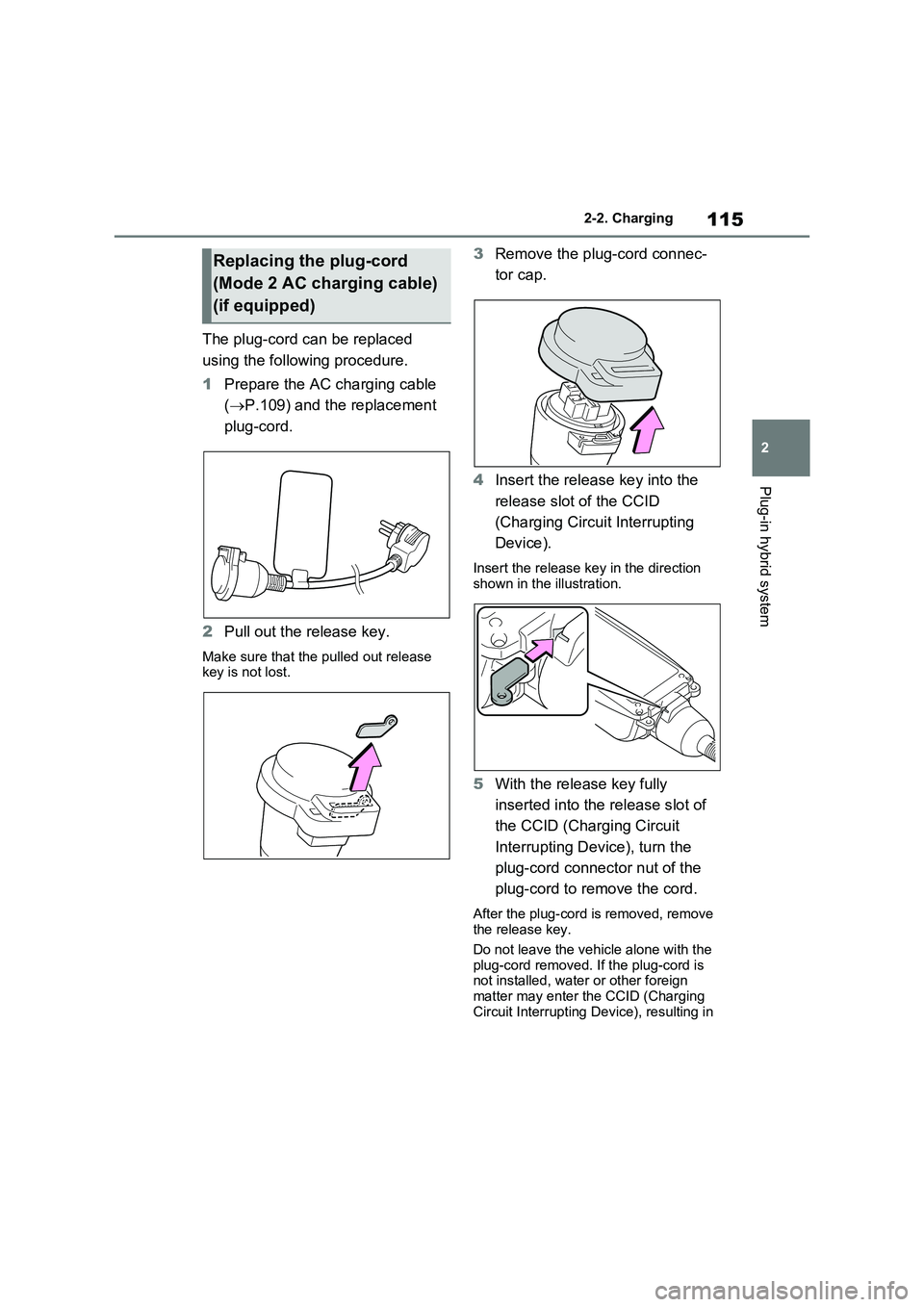
The plug-cord can be replaced
using the following procedure.
1 Prepare the AC charging cable
( P.109) and the replacement
plug-cord.
2 Pull out the release key.
Make sure that the pulled out release key is not lost.
3 Remove the plug-cord connec-
tor cap.
4 Insert the release key into the
release slot of the CCID
(Charging Circuit Interrupting
Device).
Insert the release key in the direction shown in the illustration.
5 With the release key fully
inserted into the release slot of
the CCID (Charging Circuit
Interrupting Device), turn the
plug-cord connector nut of the
plug-cord to remove the cord.
After the plug-cord is removed, remove the release key.
Do not leave the vehicle alone with the
plug-cord removed. If the plug-cord is not installed, water or other foreign matter may enter the CCID (Charging
Circuit Interrupting Device), resulting in
Replacing the plug-cord
(Mode 2 AC charging cable)
(if equipped)
Page 116 of 664
1162-2. Charging
a malfunction.
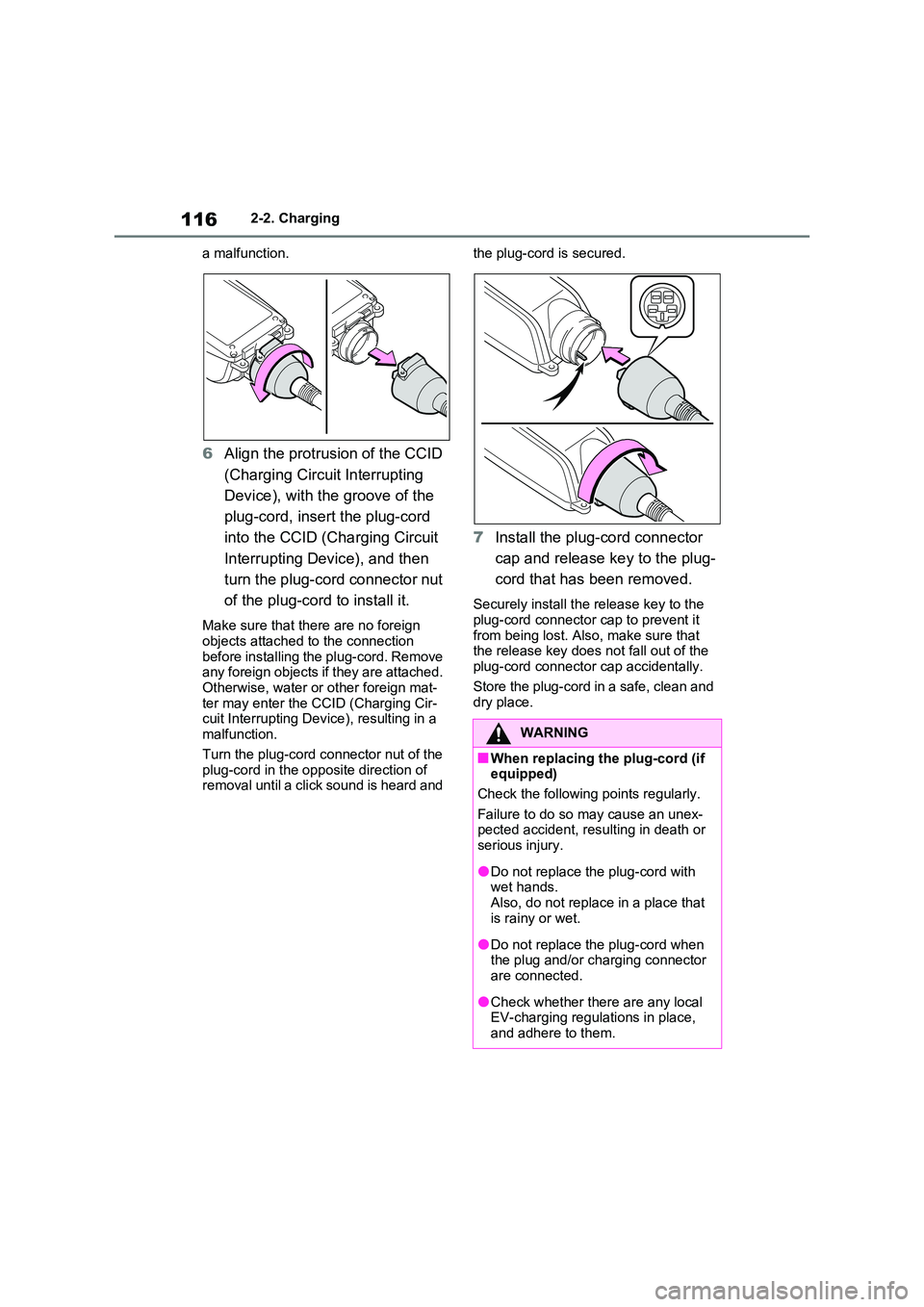
6 Align the protrusion of the CCID
(Charging Circuit Interrupting
Device), with the groove of the
plug-cord, insert the plug-cord
into the CCID (Charging Circuit
Interrupting Device), and then
turn the plug-cord connector nut
of the plug-cord to install it.
Make sure that there are no foreign objects attached to the connection
before installing the plug-cord. Remove any foreign objects if they are attached. Otherwise, water or other foreign mat-
ter may enter the CCID (Charging Cir- cuit Interrupting Device), resulting in a malfunction.
Turn the plug-cord connector nut of the plug-cord in the opposite direction of removal until a click sound is heard and
the plug-cord is secured.
7 Install the plug-cord connector
cap and release key to the plug-
cord that has been removed.
Securely install the release key to the
plug-cord connector cap to prevent it from being lost. Also, make sure that the release key does not fall out of the
plug-cord connector cap accidentally.
Store the plug-cord in a safe, clean and dry place.
WARNING
■When replacing the plug-cord (if equipped)
Check the following points regularly.
Failure to do so may cause an unex- pected accident, resulting in death or serious injury.
●Do not replace the plug-cord with wet hands.
Also, do not replace in a place that is rainy or wet.
●Do not replace the plug-cord when the plug and/or charging connector are connected.
●Check whether there are any local EV-charging regulations in place,
and adhere to them.