belt TOYOTA VERSO S 2011 Owner's Guide
[x] Cancel search | Manufacturer: TOYOTA, Model Year: 2011, Model line: VERSO S, Model: TOYOTA VERSO S 2011Pages: 664, PDF Size: 160.56 MB
Page 67 of 664
67
1
1-3. Emergency assistance
For safety and security
at the following URL.
http://www.opensourceautomotive.com/dcm/toyota/
WARNING
■When the Emergency Call may
not be made
●It may not be possible to make Emergency Calls in any of the fol-
lowing situations. In such cases, report to emergency services pro-vider (112 system etc.) by other
means such as nearby public phones.
• Even when the vehicle is in the cel-
lular phone service area, it may be difficult to connect to the eCall con-trol center if the reception is poor or
the line is busy. In such cases, even though the system attempts to connect to the eCall control center,
you may not be able to connect to the eCall control center to make Emergency Calls and contact emer-
gency services.
• When the vehicle is out of the cellu-
lar phone service area, the Emer- gency Calls cannot be made.
• When any related equipment (such as the “SOS” button panel, indicator lights, microphone, speaker, DCM,
antenna, or any wires connecting the equipment) is malfunctioning, damaged or broken, the Emer-
gency Call cannot be made.
• During an Emergency Call, the sys-
tem makes repeated attempts to connect to the eCall control center. However, if it cannot connect to the
eCall control center due to poor radio wave reception, the system may not be able to connect to the
cellular network and the call may finish without connecting. The red indicator light will blink for approxi-
mately 30 seconds to indicate this disconnection.
●If the 12-volt battery’s voltage decreases or there is a disconnec-tion, the system may not be able to
connect to the eCall control center.
■When the Emergency Call sys-
tem is replaced with a new one
The Emergency Call system should be registered. Contact any authorized
Toyota retailer or Toyota authorized repairer, or any reliable repairer.
■For your safety
●Please drive safely.The function of this system is to
assist you in making the Emer- gency Call in case of accidents such as traffic accidents or sudden
medical emergencies, and it does not protect the driver or passengers in any way. Please drive safely and
fasten your seatbelts at all times for your safety.
●In case of an emergency, make lives the top priority.
●If you smell anything burning or other unusual smells, leave the vehicle and evacuate to a safe area
immediately.
●If the airbags deploy when the sys-
tem is operating normally, the sys- tem makes emergency call. The system also makes emergency call
when the vehicle is struck from the rear or rolls over, even if the air-bags do not deploy.
●For safety, do not make the Emer-gency Call while driving.
Making calls during driving may cause mishandling of the steering wheel, which may lead to unex-
pected accidents. Stop the vehicle and confirm the safety of your surroundings before
making the Emergency Call.
Page 170 of 664
1703-1. Instrument cluster
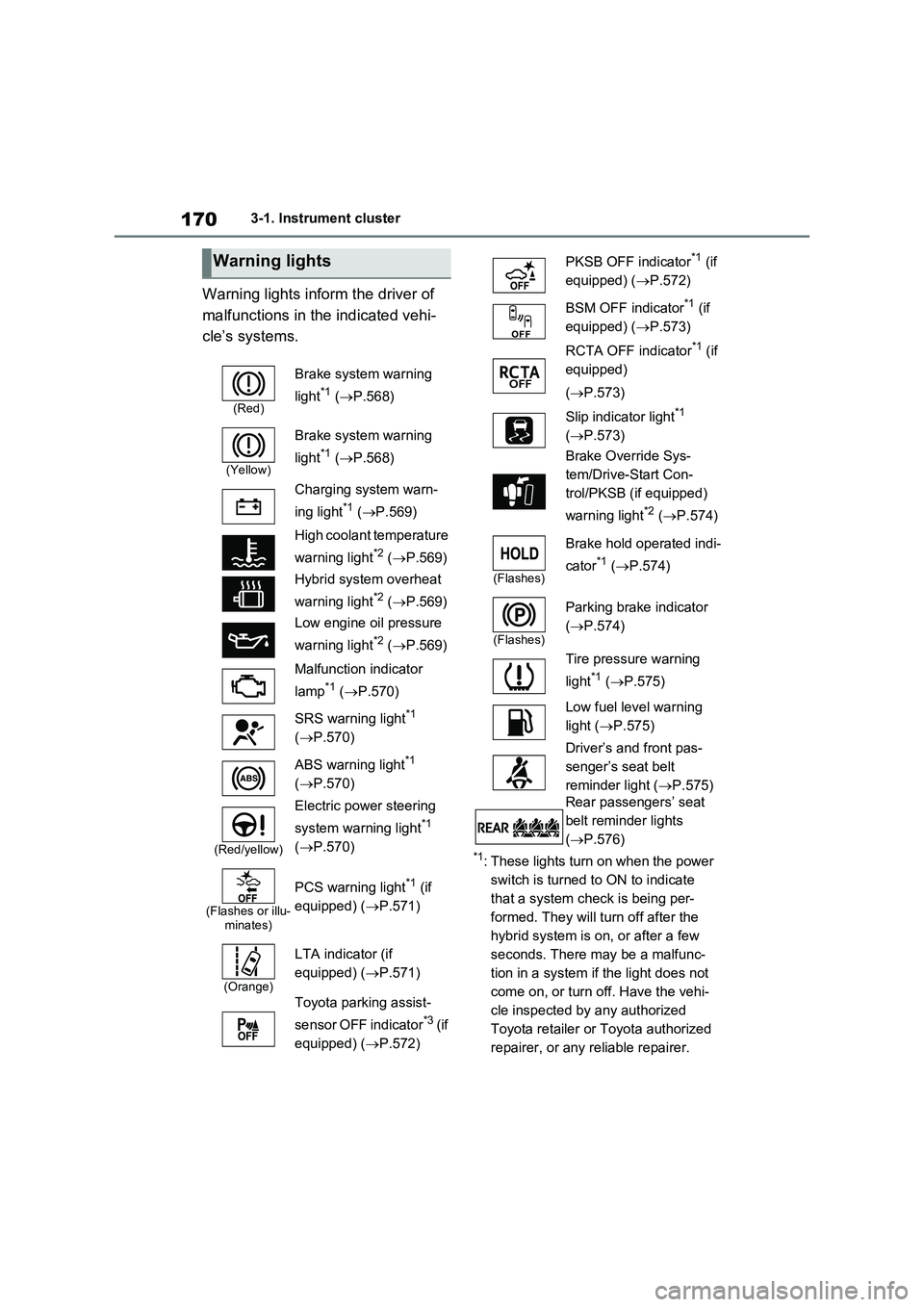
Warning lights inform the driver of
malfunctions in the indicated vehi-
cle’s systems.
*1: These lights turn on when the power
switch is turned to ON to indicate
that a system check is being per-
formed. They will turn off after the
hybrid system is on, or after a few
seconds. There may be a malfunc-
tion in a system if the light does not
come on, or turn off. Have the vehi-
cle inspected by any authorized
Toyota retailer or Toyota authorized
repairer, or any reliable repairer.
Warning lights
(Red)
Brake system warning
light
*1 (P.568)
(Yellow)
Brake system warning
light
*1 (P.568)
Charging system warn-
ing light
*1 (P.569)
High coolant temperature
warning light
*2 (P.569)
Hybrid system overheat
warning light
*2 (P.569)
Low engine oil pressure
warning light
*2 (P.569)
Malfunction indicator
lamp
*1 (P.570)
SRS warning light
*1
(P.570)
ABS warning light
*1
(P.570)
(Red/yellow)
Electric power steering
system warning light
*1
(P.570)
(Flashes or illu-
minates)
PCS warning light*1 (if
equipped) (P.571)
(Orange)
LTA indicator (if
equipped) (P.571)
Toyota parking assist-
sensor OFF indicator
*3 (if
equipped) (P.572)
PKSB OFF indicator*1 (if
equipped) (P.572)
BSM OFF indicator
*1 (if
equipped) (P.573)
RCTA OFF indicator
*1 (if
equipped)
(P.573)
Slip indicator light
*1
(P.573)
Brake Override Sys-
tem/Drive-Start Con-
trol/PKSB (if equipped)
warning light
*2 (P.574)
(Flashes)
Brake hold operated indi-
cator
*1 (P.574)
(Flashes)
Parking brake indicator
(P.574)
Tire pressure warning
light
*1 (P.575)
Low fuel level warning
light (P.575)
Driver’s and front pas-
senger’s seat belt
reminder light (P.575)
Rear passengers’ seat
belt reminder lights
(P.576)
Page 271 of 664
271
4
4-3. Adjusting the seats
Before driving
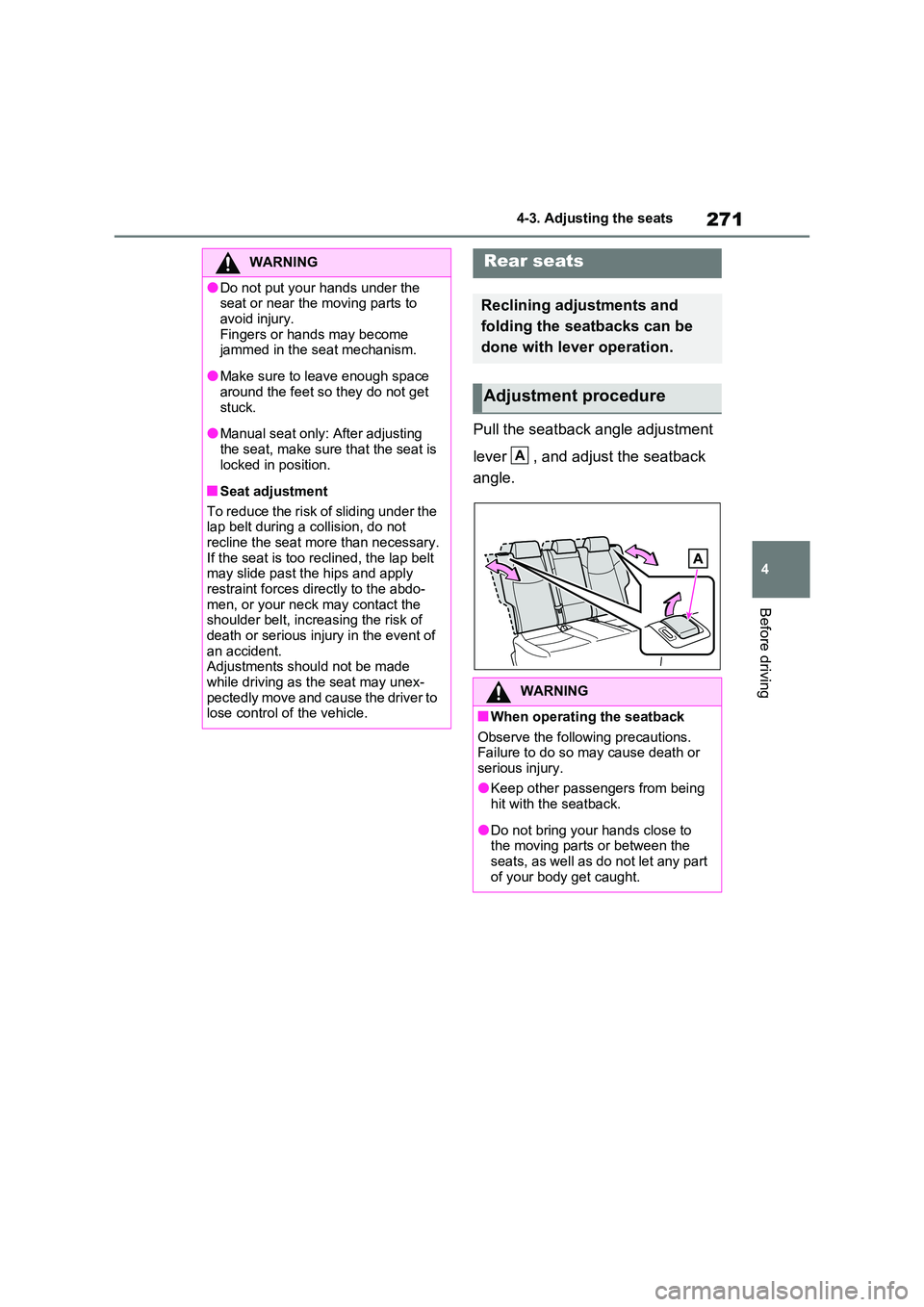
Pull the seatback angle adjustment
lever , and adjust the seatback
angle.
WARNING
●Do not put your hands under the seat or near the moving parts to
avoid injury. Fingers or hands may become jammed in the seat mechanism.
●Make sure to leave enough space around the feet so they do not get
stuck.
●Manual seat only: After adjusting
the seat, make sure that the seat is locked in position.
■Seat adjustment
To reduce the risk of sliding under the lap belt during a collision, do not
recline the seat more than necessary. If the seat is too reclined, the lap belt may slide past the hips and apply
restraint forces directly to the abdo- men, or your neck may contact the shoulder belt, increasing the risk of
death or serious injury in the event of an accident.Adjustments should not be made
while driving as the seat may unex- pectedly move and cause the driver to lose control of the vehicle.
Rear seats
Reclining adjustments and
folding the seatbacks can be
done with lever operation.
Adjustment procedure
WARNING
■When operating the seatback
Observe the following precautions. Failure to do so may cause death or serious injury.
●Keep other passengers from being hit with the seatback.
●Do not bring your hands close to the moving parts or between the seats, as well as do not let any part
of your body get caught.
A
Page 272 of 664
2724-3. Adjusting the seats
■Before folding down the seat-
backs
1 Park the vehicle in a safe place.
Apply the parking brake (P.326) and shift the shift lever to P. ( P.322)
2Adjust the position of the front
seat and the angle of the seat-
back. ( P.270)
Depending on the position of the front
seat, if the seatback is folded back- ward, it may interfere with the operation of the rear seat.
3 Lower the head restraint of the
rear seat. ( P.276)
4 Stow the armrest of the rear
seat if it is pulled out. ( P.484)
This step is not necessary when oper-
ating the left side seat only.
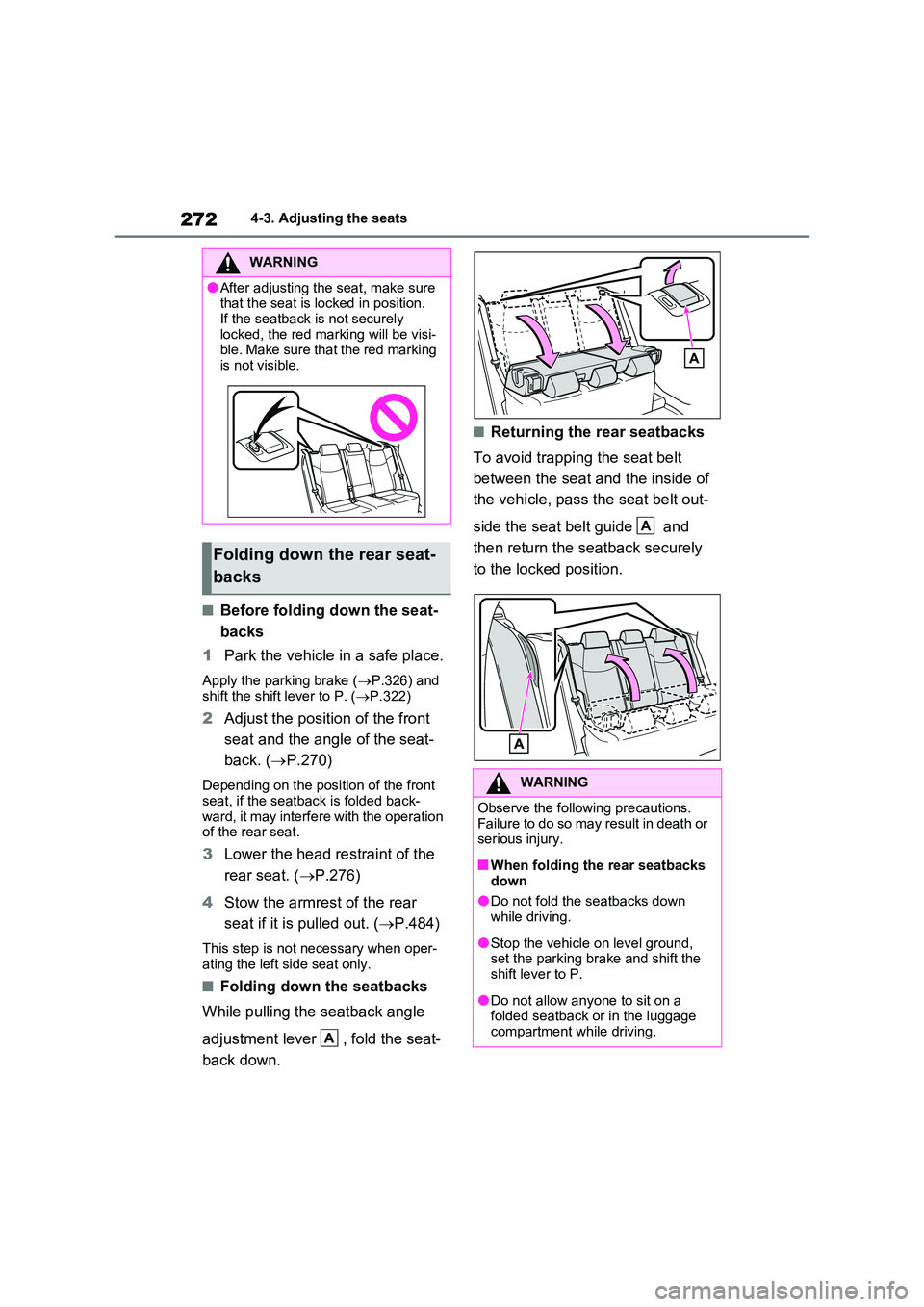
■Folding down the seatbacks
While pulling the seatback angle
adjustment lever , fold the seat-
back down.
■Returning the rear seatbacks
To avoid trapping the seat belt
between the seat and the inside of
the vehicle, pass the seat belt out-
side the seat belt guide and
then return the seatback securely
to the locked position.
WARNING
●After adjusting the seat, make sure that the seat is locked in position.
If the seatback is not securely locked, the red marking will be visi-ble. Make sure that the red marking
is not visible.
Folding down the rear seat-
backs
A
WARNING
Observe the following precautions. Failure to do so may result in death or serious injury.
■When folding the rear seatbacks down
●Do not fold the seatbacks down while driving.
●Stop the vehicle on level ground, set the parking brake and shift the shift lever to P.
●Do not allow anyone to sit on a folded seatback or in the luggage
compartment while driving.
A
Page 273 of 664
273
4
4-3. Adjusting the seats
Before driving
*: If equipped
■Recording procedure
1 Check that the shift lever is in P.
2 Turn the power switch to ON.
3 Adjust the driver’s seat to the
desired positions.
4 While pressing the “SET” but-
ton, or within 3 seconds after the
“SET” button is pressed, press
button “1” or “2” until the buzzer
sounds.
If the selected button has already been preset, the previously recorded position
WARNING
●Do not allow children to enter the luggage compartment.
●Do not operate the rear seat if it is occupied.
●Be careful not to get feet or hands caught in the moving parts or joints
of the seats during operation.
●Do not allow children to operate the
seat.
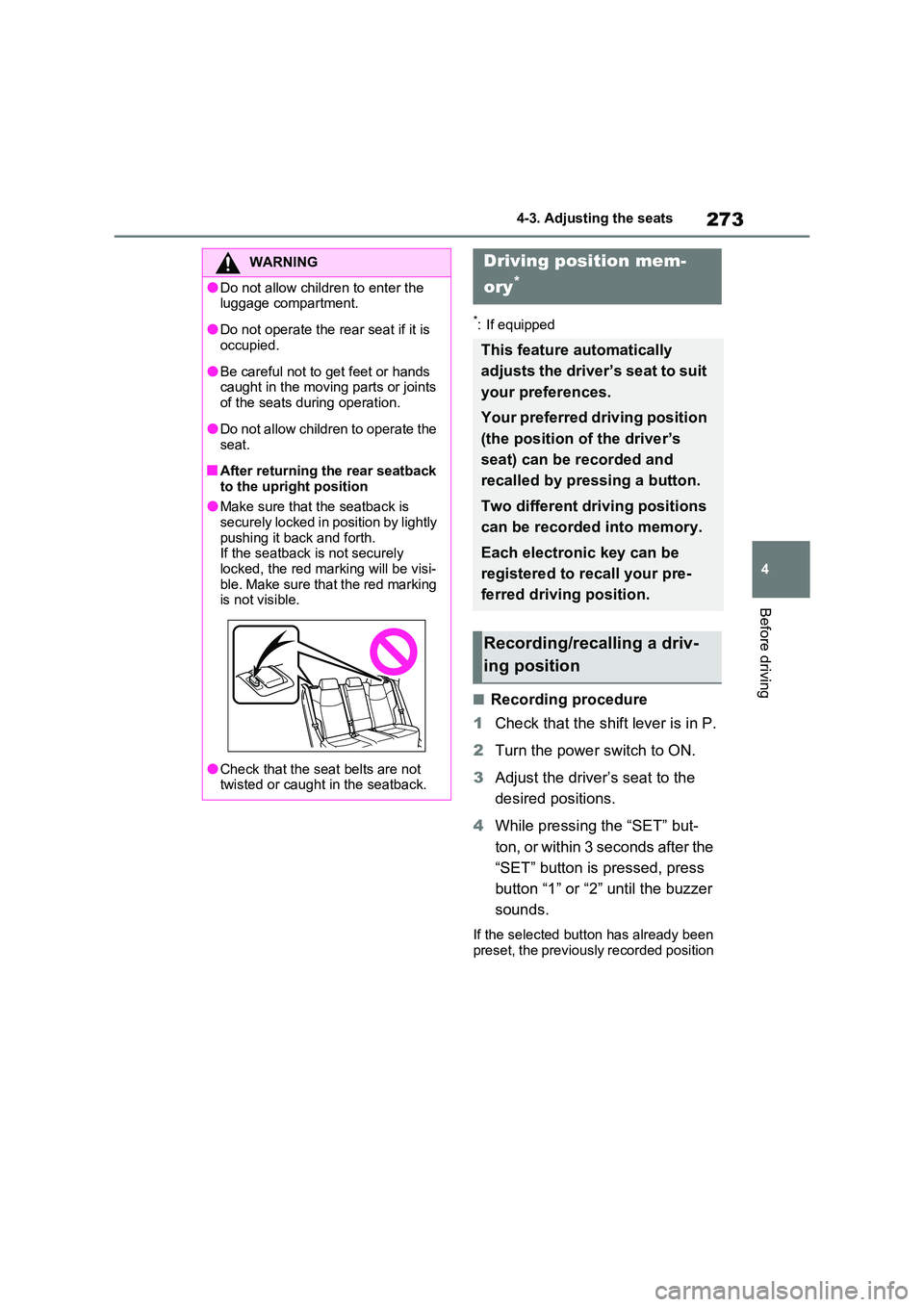
■After returning the rear seatback
to the upright position
●Make sure that the seatback is securely locked in position by lightly
pushing it back and forth. If the seatback is not securely locked, the red marking will be visi-
ble. Make sure that the red marking is not visible.
●Check that the seat belts are not twisted or caught in the seatback.
Driving position mem-
ory*
This feature automatically
adjusts the driver’s seat to suit
your preferences.
Your preferred driving position
(the position of the driver’s
seat) can be recorded and
recalled by pressing a button.
Two different driving positions
can be recorded into memory.
Each electronic key can be
registered to recall your pre-
ferred driving position.
Recording/recalling a driv-
ing position
Page 306 of 664
3065-1. Before driving
NOTICE
In the event that you drive on a flooded road and the vehicle is
flooded, be sure to have any autho- rized Toyota retailer or Toyota autho-rized repairer, or any reliable repairer
check the following:
●Brake function
●Changes in quantity and quality of oil and fluid used for the engine, hybrid transaxle (front and rear),
etc.
●Lubricant condition for the bearings
and suspension joints (where possi- ble), and the function of all joints, bearings, etc.
■When parking the vehicle
Always set the parking brake, and
shift the shift lever to P. Failure to do so may cause the vehicle to move or the vehicle may accelerate suddenly
if the accelerator pedal is accidentally depressed.
Cargo and luggage
Take notice of the following
information about storage pre-
cautions, cargo capacity and
load.
WARNING
■Things that must not be carried in the luggage compartment
The following things may cause a fire if loaded in the luggage compartment:
●Receptacles containing gasoline
●Aerosol cans
■Storage precautions
Observe the following precautions. Failure to do so may prevent the ped-
als from being depressed properly, may block the driver’s vision, or may result in items hitting the driver or
passengers, possibly causing an acci- dent.
●Stow cargo and luggage in the lug-
gage compartment whenever pos- sible.
●Do not stack anything in the lug-gage compartment higher than the seatbacks.
●When you fold down the rear seats, long items should not be placed
directly behind the front seats.
●Never allow anyone to ride in the
luggage compartment. It is not designed for passengers. They should ride in their seats with their
seat belts properly fastened. Other- wise, they are much more likely to suffer death or serious bodily injury,
in the event of sudden braking, sud- den swerving or an accident.
Page 328 of 664
3285-2. Driving procedures
●The driver is wearing the seat belt
●The shift lever is in a forward or reverse position.
●The malfunction indicator lamp or brake system warning light is not illu-
minated
If the automatic release function does
not operate, release the parking brake
manually.
■If “Parking Brake Temporarily Unavailable” is displayed on the multi-information display
If the parking brake is operated repeat- edly over a short period of time, the sys-tem may restrict operation to prevent
overheating. If this happens, refrain from operating the parking brake. Normal operation will return after about 1 min-
ute.
■If “Parking Brake Unavailable” is displayed on the multi-information display
Operate the parking brake switch. If the message does not disappear after oper-ating the switch several times, the sys-
tem may be malfunctioning. Have the vehicle inspected by any authorized Toyota retailer or Toyota authorized
repairer, or any reliable repairer.
■Parking brake operation sound
When the parking brake operates, a motor sound (whirring sound) may be
heard. This does not indicate a malfunc- tion.
■Parking brake indicator light
●Depending on the power switch mode, the parking brake indicator light will turn on and stay on as described
below: ON: Comes on until the parking brake is released.
Not in ON: Stays on for approximately 15 seconds.
●When the power switch is turned off with the parking brake set, the parking brake indicator light will stay on for
about 15 seconds. This does not indi-
cate a malfunction.
■When the parking brake switch
malfunctions
Automatic mode (automatic brake set- ting and releasing) will be turned on
automatically.
■Parking the vehicle
P.300
■Parking brake engaged warning buzzer
A buzzer will sound if the vehicle is driven with the parking brake engaged. “Parking Brake ON” is displayed on the
multi-information display (with the vehi- cle reaching a speed of 5 km/h [3 mph]).
■If the brake system warning light comes on
P.568
■Usage in winter time
P.446
WARNING
■When parking the vehicle
Do not leave a child in the vehicle alone. The parking brake may be released unintentionally by a child
and there is the danger of the vehicle moving that may lead to an accident resulting in death or serious injury.
■Parking brake switch
Do not set any objects near the park-
ing brake switch. Objects may inter- fere with the switch and may lead the parking brake to unexpectedly oper-
ate.
NOTICE
■When parking the vehicle
Before you leave the vehicle, shift the shift lever to P, set the parking brake
and make sure that the vehicle does not move.
Page 329 of 664
329
5
5-2. Driving procedures
Driving
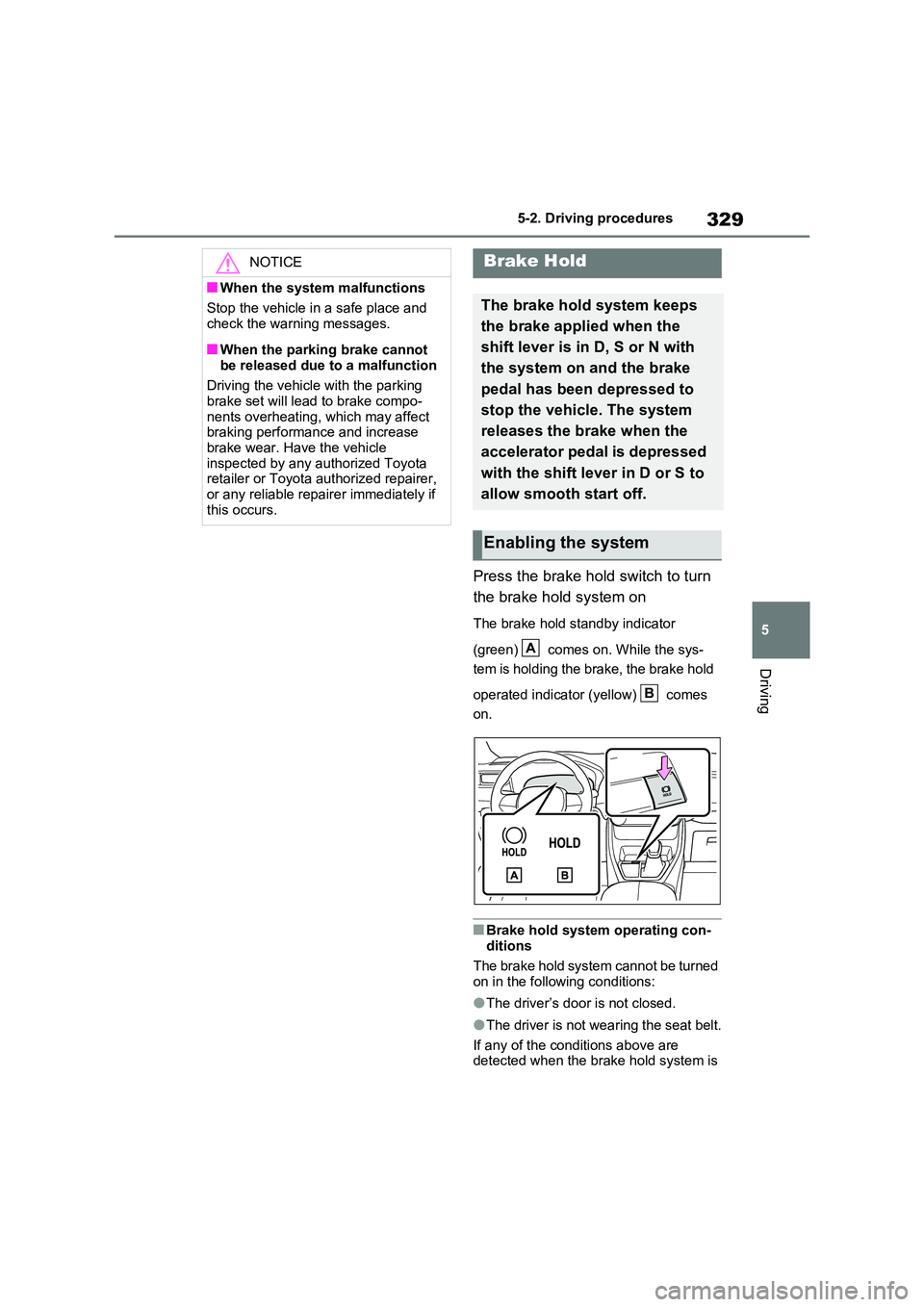
Press the brake hold switch to turn
the brake hold system on
The brake hold standby indicator
(green) comes on. While the sys-
tem is holding the brake, the brake hold
operated indicator (yellow) comes
on.
■Brake hold system operating con-
ditions
The brake hold system cannot be turned on in the following conditions:
●The driver’s door is not closed.
●The driver is not wearing the seat belt.
If any of the conditions above are detected when the brake hold system is
NOTICE
■When the system malfunctions
Stop the vehicle in a safe place and
check the warning messages.
■When the parking brake cannot
be released due to a malfunction
Driving the vehicle with the parking brake set will lead to brake compo-
nents overheating, which may affect braking performance and increase brake wear. Have the vehicle
inspected by any authorized Toyota retailer or Toyota authorized repairer, or any reliable repairer immediately if
this occurs.
Brake Hold
The brake hold system keeps
the brake applied when the
shift lever is in D, S or N with
the system on and the brake
pedal has been depressed to
stop the vehicle. The system
releases the brake when the
accelerator pedal is depressed
with the shift lever in D or S to
allow smooth start off.
Enabling the system
A
B
Page 330 of 664
3305-2. Driving procedures
enabled, the system will turn off and the
brake hold standby indicator light will go off. In addition, if any of the conditions are detected while the system is holding
the brake, a warning buzzer will sound and a message will be shown on the multi-information display. The parking
brake will then be set automatically.
■Brake hold function
●If the brake pedal is left released for a
period of about 3 minutes after the system has started holding the brake, the parking brake will be set automati-
cally. In this case, a warning buzzer sounds and a message is shown on the multi-information display.
●To turn the system off while the sys-tem is holding the brake, firmly
depress the brake pedal and press the button again.
●The brake hold function may not hold the vehicle when the vehicle is on a steep incline. In this situation, it may
be necessary for the driver to apply the brakes. A warning buzzer will sound and the multi-information dis-
play will inform the driver of this situa- tion. If a warning message is shown on the multi-information display, read
the message and follow the instruc- tions.
■When the parking brake is set auto-matically while the system is hold-
ing the brakes
Perform any of the following operations to release the parking brake:
●Depress the accelerator pedal. (The parking brake will not be released
automatically if the seat belt is not fas- tened.)
●Operate the parking brake switch with the brake pedal depressed.
Make sure that the parking brake indica-
tor light goes off. ( P.326)
■When an inspection at any autho-
rized Toyota retailer or Toyota authorized repairer, or any reliable repairer is necessary
When the brake hold standby indicator (green) does not illuminate even when the brake hold switch is pressed with the
brake hold system operating conditions met, the system may be malfunctioning. Have the vehicle inspected at any
authorized Toyota retailer or Toyota authorized repairer, or any reliable repairer.
■If “Brake Hold Malfunction Press
Brake to Deactivate Visit Your Dealer” or “Brake Hold Malfunction Visit Your Dealer” is displayed on
the multi-information display
The system may be malfunctioning. Have the vehicle inspected by any
authorized Toyota retailer or Toyota authorized repairer, or any reliable repairer.
■Warning messages and buzzers
Warning messages and buzzers are used to indicate a system malfunction or to inform the driver of the need for cau-
tion. If a warning message is shown on the multi-information display, read the message and follow the instructions.
■If the brake hold operated indicator
flashes
P.574
WARNING
■When the vehicle is on a steep
incline
When using the brake hold system on a steep incline, exercise caution. The
brake hold function may not hold the vehicle in such a situation.
■When stopped on a slippery road
The system cannot stop the vehicle when the gripping ability of the tires
has been exceeded. Do not use the system when stopped on a slippery road.
Page 385 of 664
385
5 5-5. Using the driving support systems
Driving
speed limit
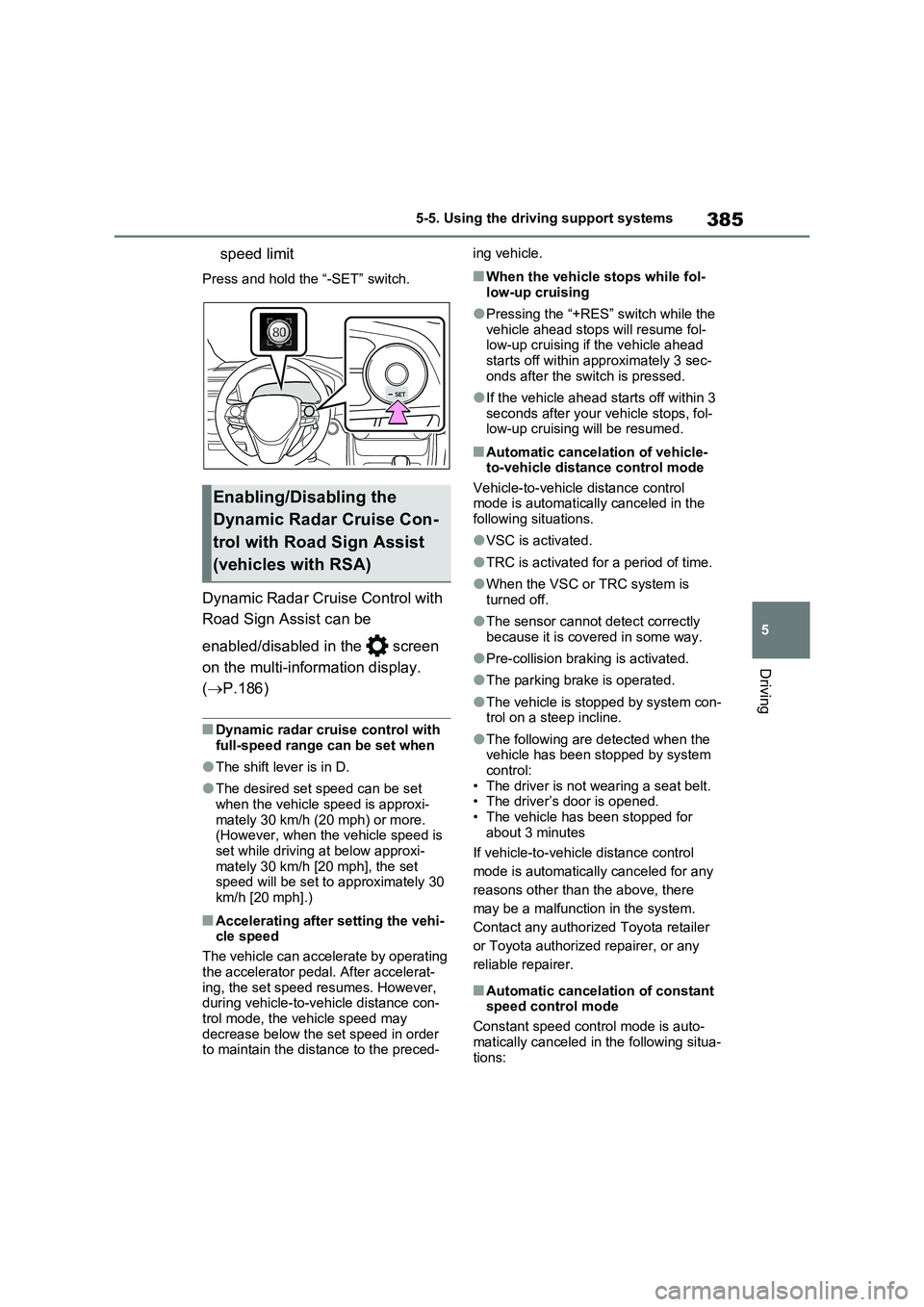
Press and hold the “-SET” switch.
Dynamic Radar Cruise Control with
Road Sign Assist can be
enabled/disabled in the screen
on the multi-information display.
(P.186)
■Dynamic radar cruise control with
full-speed range can be set when
●The shift lever is in D.
●The desired set speed can be set
when the vehicle speed is approxi-
mately 30 km/h (20 mph) or more.
(However, when the vehicle speed is
set while driving at below approxi-
mately 30 km/h [20 mph], the set
speed will be set to approximately 30
km/h [20 mph].)
■Accelerating after setting the vehi-
cle speed
The vehicle can accelerate by operating
the accelerator pedal. After accelerat-
ing, the set speed resumes. However,
during vehicle-to-vehicle distance con-
trol mode, the vehicle speed may
decrease below the set speed in order
to maintain the distance to the preced-ing vehicle.
■When the vehicle stops while fol-
low-up cruising
●Pressing the “+RES” switch while the
vehicle ahead stops will resume fol-
low-up cruising if the vehicle ahead
starts off within approximately 3 sec-
onds after the switch is pressed.
●If the vehicle ahead starts off within 3
seconds after your vehicle stops, fol-
low-up cruising will be resumed.
■Automatic cancelation of vehicle-
to-vehicle distance control mode
Vehicle-to-vehicle distance control
mode is automatically canceled in the
following situations.
●VSC is activated.
●TRC is activated for a period of time.
●When the VSC or TRC system is
turned off.
●The sensor cannot detect correctly
because it is covered in some way.
●Pre-collision braking is activated.
●The parking brake is operated.
●The vehicle is stopped by system con-
trol on a steep incline.
●The following are detected when the
vehicle has been stopped by system
control:
• The driver is not wearing a seat belt.
• The driver’s door is opened.
• The vehicle has been stopped for
about 3 minutes
If vehicle-to-vehicle distance control
mode is automatically canceled for any
reasons other than the above, there
may be a malfunction in the system.
Contact any authorized Toyota retailer
or Toyota authorized repairer, or any
reliable repairer.
■Automatic cancelation of constant
speed control mode
Constant speed control mode is auto-
matically canceled in the following situa-
tions:
Enabling/Disabling the
Dynamic Radar Cruise Con-
trol with Road Sign Assist
(vehicles with RSA)