light TOYOTA VERSO S 2011 Workshop Manual
[x] Cancel search | Manufacturer: TOYOTA, Model Year: 2011, Model line: VERSO S, Model: TOYOTA VERSO S 2011Pages: 664, PDF Size: 160.56 MB
Page 178 of 664
1783-1. Instrument cluster
changed suddenly (at the
entrance/exit of a garage, tunnel, etc.)
●When “--” or “E” is displayed, the sys-
tem may be malfunctioning. Take your vehicle to any authorized Toyota retailer or Toyota authorized
repairer, or any reliable repairer.
●Displays the outside temperature
within the range of -40°C (-40°F) to 50°C (122°F).
●When the outside temperature is
approximately 3°C (37°F) or lower,
the indicator will flash for approxi-
mately 10 seconds, then stay on.
■Liquid crystal display
P.180
■Customization
Settings (e. g. meter display) can be
changed on the screen of the multi-
information display. ( P.186)
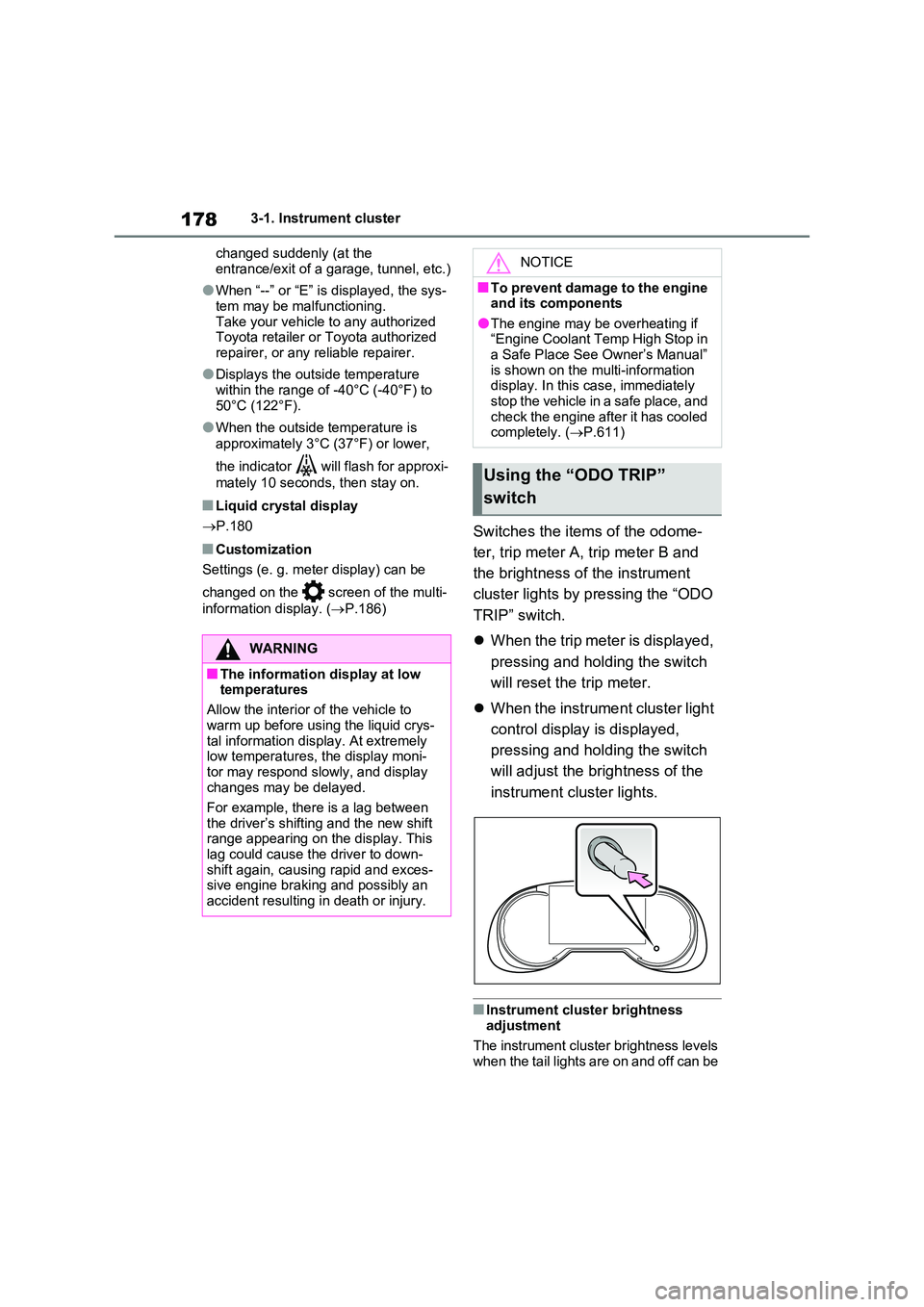
Switches the items of the odome-
ter, trip meter A, trip meter B and
the brightness of the instrument
cluster lights by pressing the “ODO
TRIP” switch.
When the trip meter is displayed,
pressing and holding the switch
will reset the trip meter.
When the instrument cluster light
control display is displayed,
pressing and holding the switch
will adjust the brightness of the
instrument cluster lights.
■Instrument cluster brightness adjustment
The instrument cluster brightness levels when the tail lights are on and off can be
WARNING
■The information display at low temperatures
Allow the interior of the vehicle to
warm up before using the liquid crys- tal information display. At extremely low temperatures, the display moni-
tor may respond slowly, and display changes may be delayed.
For example, there is a lag between
the driver’s shifting and the new shift range appearing on the display. This lag could cause the driver to down-
shift again, causing rapid and exces- sive engine braking and possibly an accident resulting in death or injury.
NOTICE
■To prevent damage to the engine and its components
●The engine may be overheating if “Engine Coolant Temp High Stop in a Safe Place See Owner’s Manual”
is shown on the multi-information display. In this case, immediately stop the vehicle in a safe place, and
check the engine after it has cooled completely. ( P.611)
Using the “ODO TRIP”
switch
Page 179 of 664
179
3
3-1. Instrument cluster
Vehicle status information and indicators
adjusted individually. However, when
the surroundings are bright (daytime, etc.), turning on the tail lights will not change the instrument cluster bright-
ness.
The clock can be adjusted on the
navigation/multimedia system.
Refer to “Navigation and multime-
dia system Owner’s manual” or
“Multimedia Owner’s Manual”.
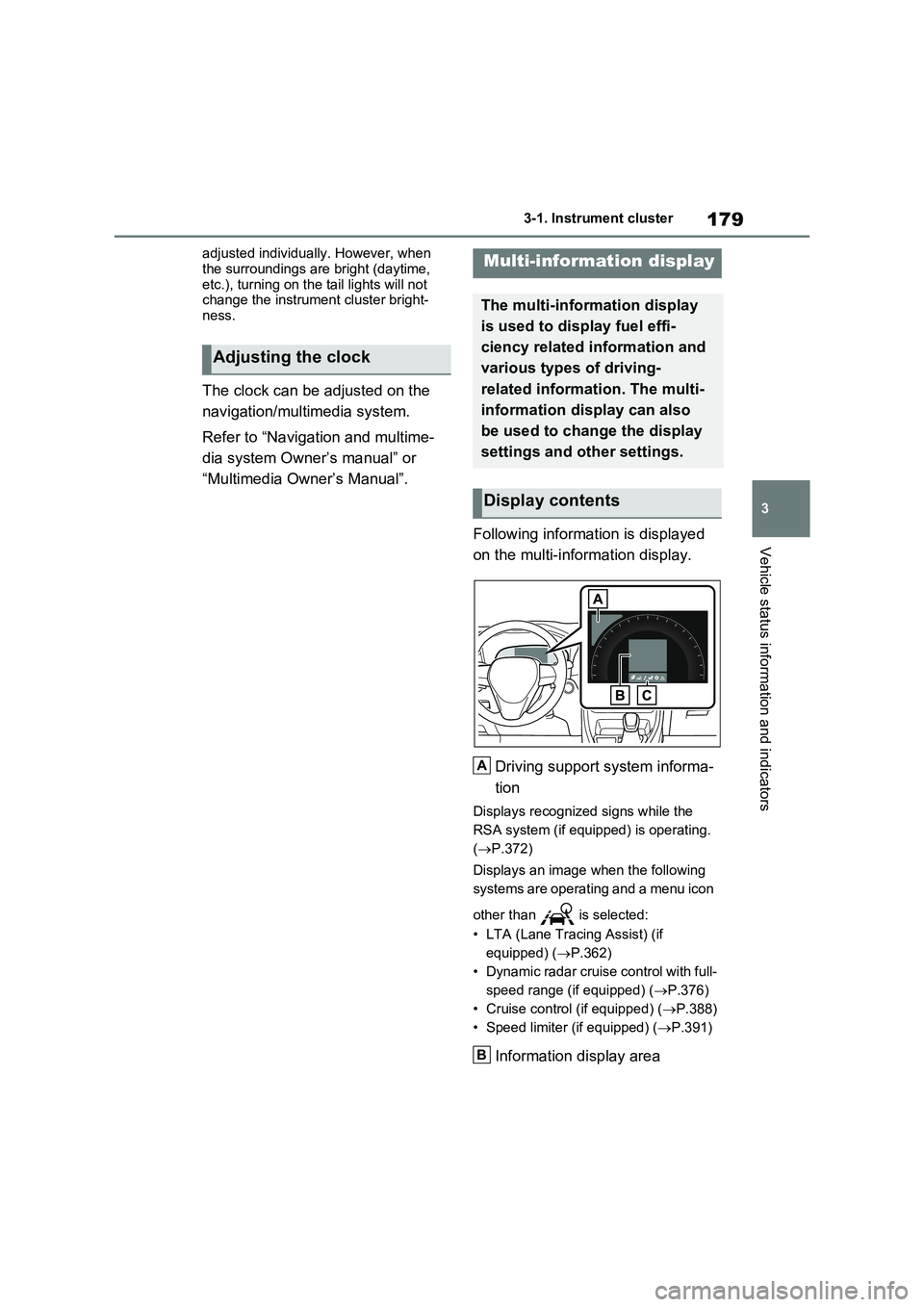
Following information is displayed
on the multi-information display.
Driving support system informa-
tion
Displays recognized signs while the
RSA system (if equipped) is operating.
( P.372)
Displays an image when the following
systems are operating and a menu icon
other than is selected:
• LTA (Lane Tracing Assist) (if
equipped) ( P.362)
• Dynamic radar cruise control with full-
speed range (if equipped) ( P.376)
• Cruise control (if equipped) ( P.388)
• Speed limiter (if equipped) ( P.391)
Information display area
Adjusting the clock
Multi-information display
The multi-information display
is used to display fuel effi-
ciency related information and
various types of driving-
related information. The multi-
information display can also
be used to change the display
settings and other settings.
Display contents
A
B
Page 180 of 664
1803-1. Instrument cluster
A variety of information can be dis-
played by selecting a menu icon.
Additionally, warning or sugges-
tion/advice pop-up displays will be dis-
played in some situations.
Menu icons ( P.180)
■The multi-information display is
displayed when
The power switch is in ON.
■When changing driving mode
●Background color of the multi-informa- tion display is changed following the selected driving mode. ( P.434)
●Background color of the multi-informa- tion display is changed following the
selected driving mode or when Trail Mode is turned on. ( P.434, 435)
■Liquid crystal display
Small spots or light spots may appear
on the display. This phenomenon is characteristic of liquid crystal displays, and there is no problem continuing to
use the display.
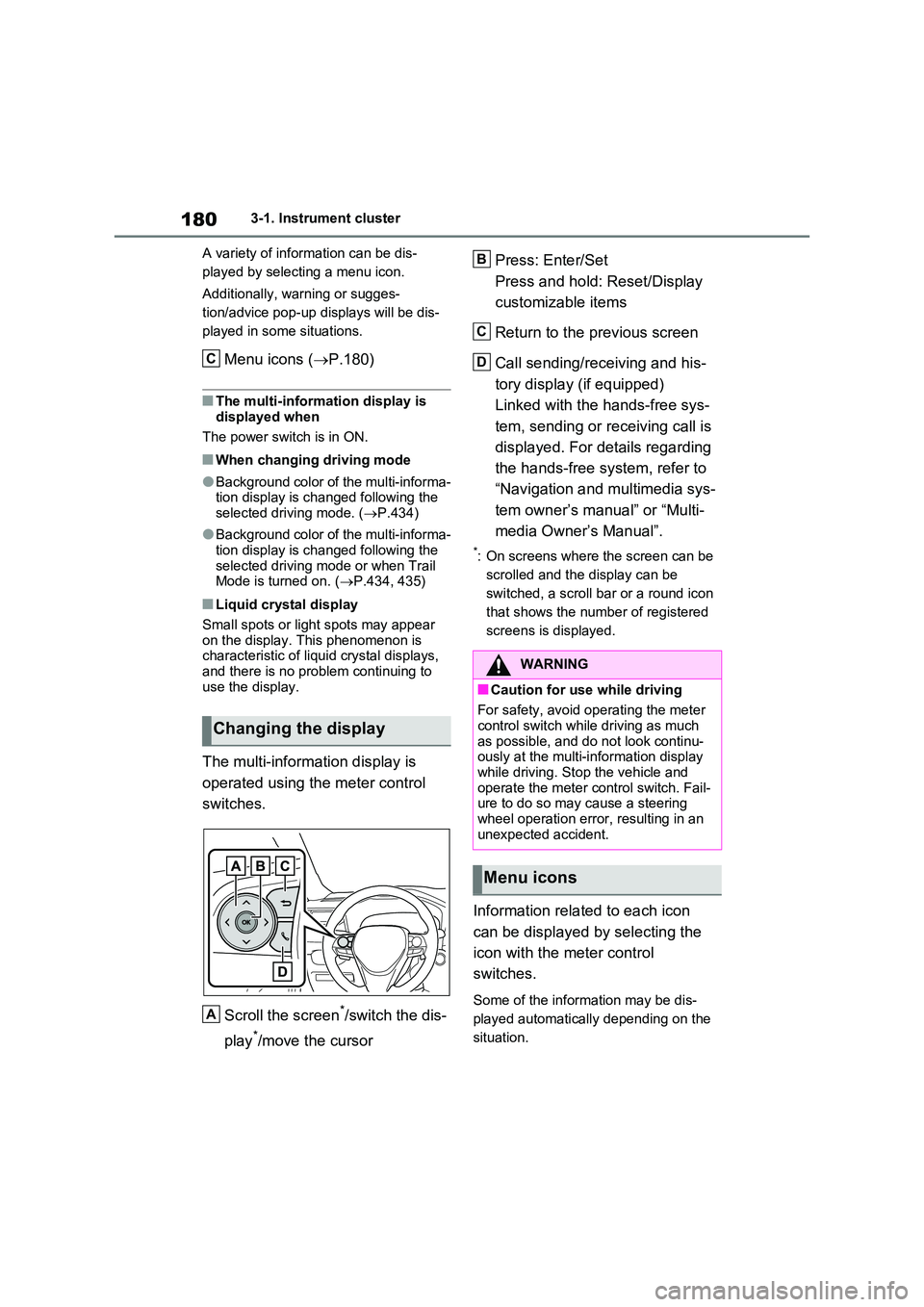
The multi-information display is
operated using the meter control
switches.
Scroll the screen*/switch the dis-
play*/move the cursor
Press: Enter/Set
Press and hold: Reset/Display
customizable items
Return to the previous screen
Call sending/receiving and his-
tory display (if equipped)
Linked with the hands-free sys-
tem, sending or receiving call is
displayed. For details regarding
the hands-free system, refer to
“Navigation and multimedia sys-
tem owner’s manual” or “Multi-
media Owner’s Manual”.
*: On screens where the screen can be
scrolled and the display can be
switched, a scroll bar or a round icon
that shows the number of registered
screens is displayed.
Information related to each icon
can be displayed by selecting the
icon with the meter control
switches.
Some of the information may be dis-
played automatically depending on the
situation.
Changing the display
C
A
WARNING
■Caution for use while driving
For safety, avoid operating the meter control switch while driving as much
as possible, and do not look continu- ously at the multi-information display while driving. Stop the vehicle and
operate the meter control switch. Fail- ure to do so may cause a steering wheel operation error, resulting in an
unexpected accident.
Menu icons
B
C
D
Page 190 of 664
1903-1. Instrument cluster
■Suggestion to enable the
power back door (if equipped)
If the power back door system is
disabled on the screen and the
power back door switch on the
instrument panel is operated, a
suggestion message will be dis-
played asking if you wish to enable
the power back door system. To
enable the power back door sys-
tem, select “Yes”.
After enabling the power back door sys-
tem, press the power back door switch
again to open or close the power back
door.
■Suggestion to turn on the
headlights
If the headlight switch is in other
than or , and the vehicle
speed is 5 km/h (3 mph) or higher
for a certain amount of time when
the surroundings are dark, a sug-
gestion message will be displayed.
■Suggestion to turn off the
headlights
If the headlights are left on for a
certain amount of time after the
power switch has been turned off, a
suggestion message will be dis-
played.
■Suggestion to close the power
windows (linked to windshield
wiper operation)
If the windshield wipers are oper-
ated with a power window open, a
suggestion message will be dis-
played asking if you wish to close the power windows. To close all of
the power windows, select “Yes”.
■Suggestion to close the power
windows (driving at high
speeds)
If the vehicle speed exceeds a cer-
tain speed with a power window
open, a suggestion message will be
displayed asking if you wish to
close the power windows. To close
all of the power windows, select
“Yes”.
■Customization
The suggestion function can be turned
on/off. (Customizable features: P.631)
Page 198 of 664
1983-1. Instrument cluster
warming up is finished.
Hybrid system output may be restricted
when the gasoline engine is displayed in
blue.
■Display
Audio system without navigation
function
1Press the “MENU” button.
2Select “Info” on the “Menu”
screen.
3Select “Trip information” or “His-
tory”.
Audio system with navigation
function
1Press the “MENU” button.
2Select “Info” on the “Menu”
screen.
3Select “ECO” on the “Informa-
tion” screen.
4Select “Trip information” or “His-
tory”.
■Trip information
If a screen other than “Trip informa-
tion” is displayed, select “Trip infor-
mation”.
The image is an example only, and may
vary slightly from actual conditions.
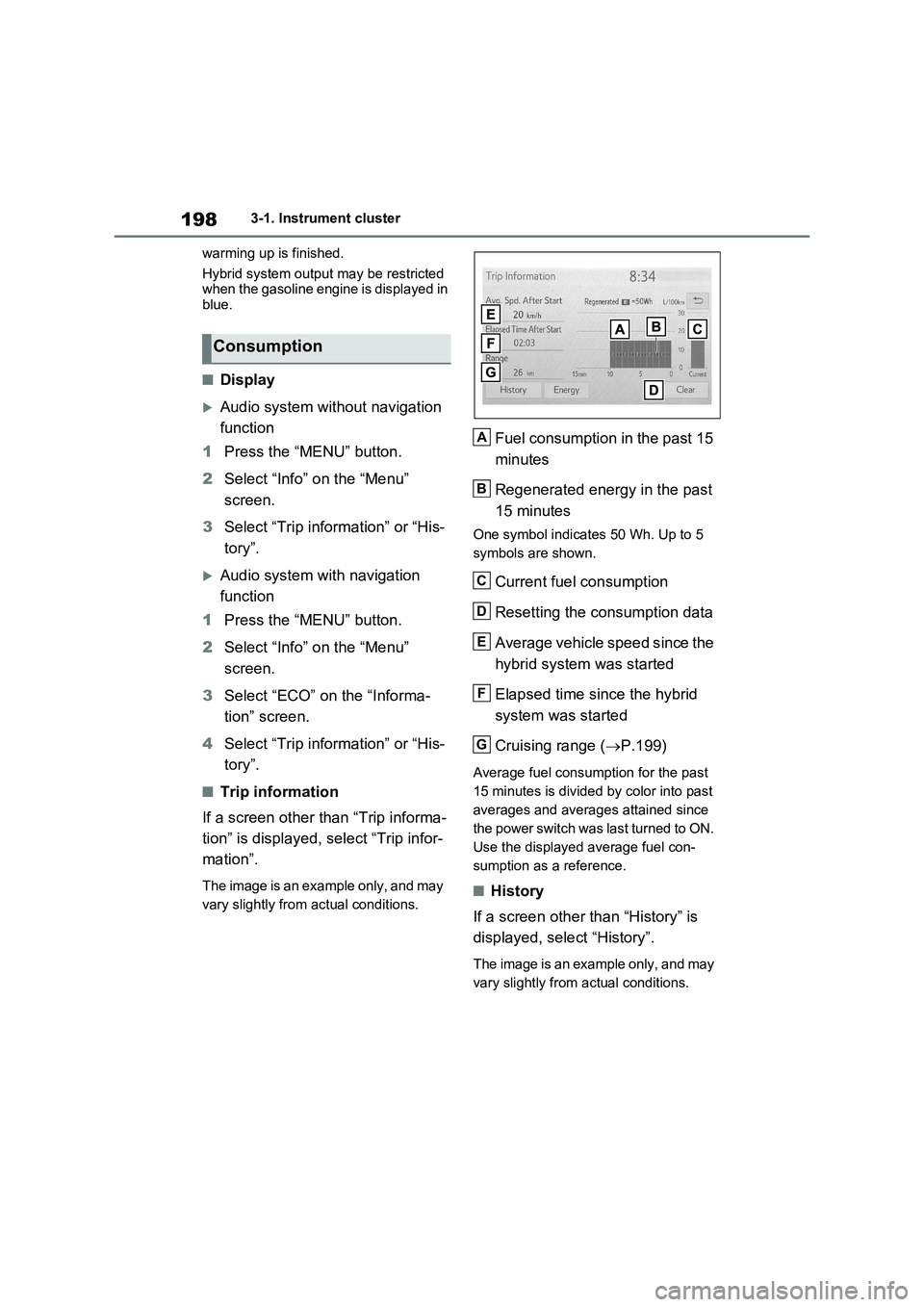
Fuel consumption in the past 15
minutes
Regenerated energy in the past
15 minutes
One symbol indicates 50 Wh. Up to 5
symbols are shown.
Current fuel consumption
Resetting the consumption data
Average vehicle speed since the
hybrid system was started
Elapsed time since the hybrid
system was started
Cruising range (P.199)
Average fuel consumption for the past
15 minutes is divided by color into past
averages and averages attained since
the power switch was last turned to ON.
Use the displayed average fuel con-
sumption as a reference.
■History
If a screen other than “History” is
displayed, select “History”.
The image is an example only, and may
vary slightly from actual conditions.
Consumption
A
B
C
D
E
F
G
Page 205 of 664
205
4
4-2. Opening, closing and locking the doors
Before driving
4-2.Opening, closing and lo cking th e d oors
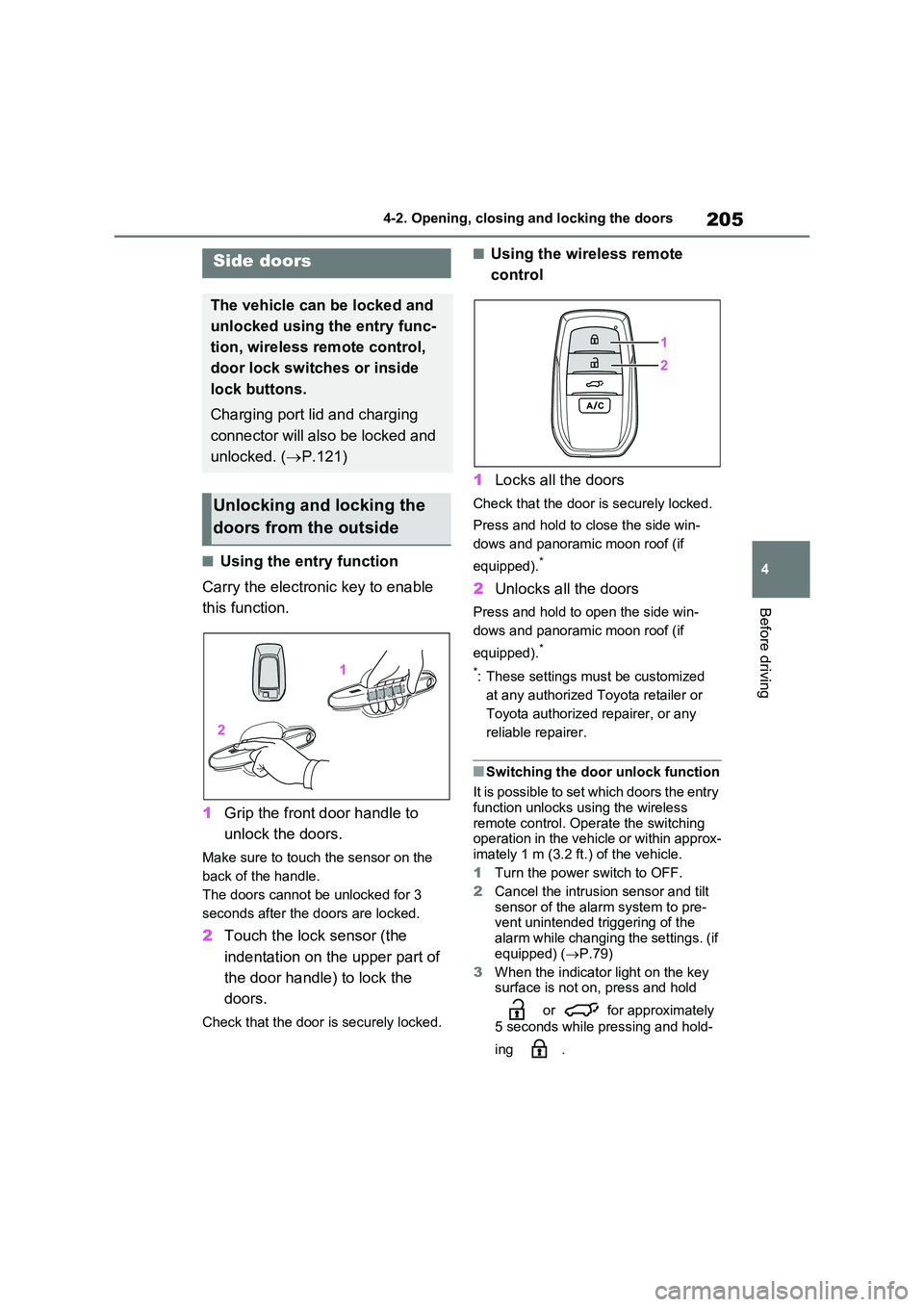
■Using the entry function
Carry the electronic key to enable
this function.
1 Grip the front door handle to
unlock the doors.
Make sure to touch the sensor on the
back of the handle.
The doors cannot be unlocked for 3
seconds after the doors are locked.
2 Touch the lock sensor (the
indentation on the upper part of
the door handle) to lock the
doors.
Check that the door is securely locked.
■Using the wireless remote
control
1 Locks all the doors
Check that the door is securely locked.
Press and hold to close the side win-
dows and panoramic moon roof (if
equipped).*
2 Unlocks all the doors
Press and hold to open the side win-
dows and panoramic moon roof (if
equipped).*
*: These settings must be customized
at any authorized Toyota retailer or
Toyota authorized repairer, or any
reliable repairer.
■Switching the door unlock function
It is possible to set which doors the entry function unlocks using the wireless
remote control. Operate the switching operation in the vehicle or within approx-imately 1 m (3.2 ft.) of the vehicle.
1 Turn the power switch to OFF.
2 Cancel the intrusion sensor and tilt
sensor of the alarm system to pre- vent unintended triggering of the
alarm while changing the settings. (if equipped) ( P.79)
3 When the indicator light on the key surface is not on, press and hold
or for approximately
5 seconds while pressing and hold-
ing .
Side doors
The vehicle can be locked and
unlocked using the entry func-
tion, wireless remote control,
door lock switches or inside
lock buttons.
Charging port lid and charging
connector will also be locked and
unlocked. ( P.121)
Unlocking and locking the
doors from the outside
Page 211 of 664
211
4
4-2. Opening, closing and locking the doors
Before driving
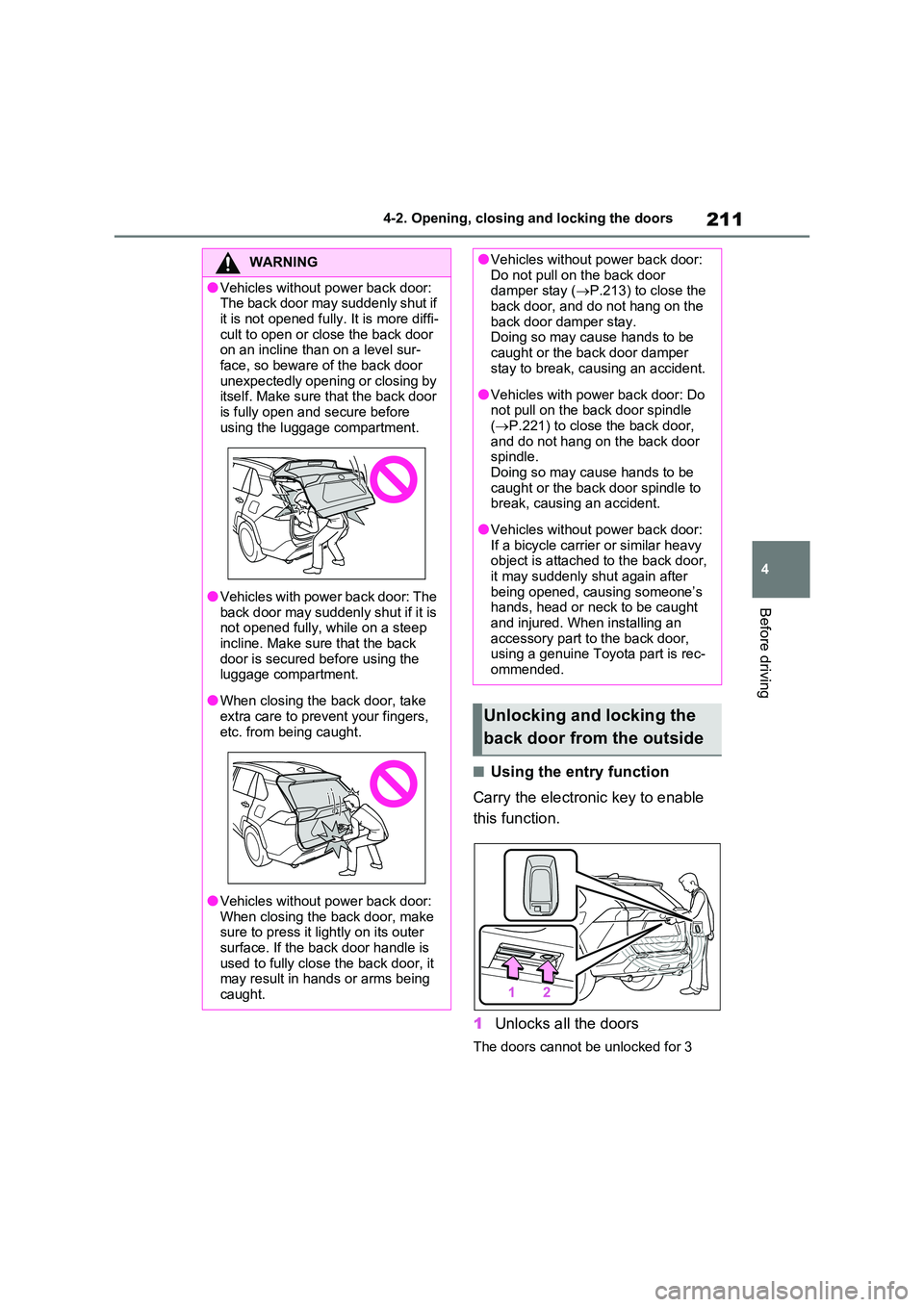
■Using the entry function
Carry the electronic key to enable
this function.
1 Unlocks all the doors
The doors cannot be unlocked for 3
WARNING
●Vehicles without power back door: The back door may suddenly shut if
it is not opened fully. It is more diffi- cult to open or close the back door on an incline than on a level sur-
face, so beware of the back door unexpectedly opening or closing by itself. Make sure that the back door
is fully open and secure before using the luggage compartment.
●Vehicles with power back door: The back door may suddenly shut if it is not opened fully, while on a steep
incline. Make sure that the back door is secured before using the luggage compartment.
●When closing the back door, take extra care to prevent your fingers,
etc. from being caught.
●Vehicles without power back door:
When closing the back door, make sure to press it lightly on its outer surface. If the back door handle is
used to fully close the back door, it may result in hands or arms being caught.
●Vehicles without power back door: Do not pull on the back door damper stay ( P.213) to close the
back door, and do not hang on the back door damper stay. Doing so may cause hands to be
caught or the back door damper stay to break, causing an accident.
●Vehicles with power back door: Do not pull on the back door spindle ( P.221) to close the back door,
and do not hang on the back door spindle. Doing so may cause hands to be
caught or the back door spindle to break, causing an accident.
●Vehicles without power back door: If a bicycle carrier or similar heavy object is attached to the back door,
it may suddenly shut again after being opened, causing someone’s hands, head or neck to be caught
and injured. When installing an accessory part to the back door, using a genuine Toyota part is rec-
ommended.
Unlocking and locking the
back door from the outside
Page 212 of 664
2124-2. Opening, closing and locking the doors
seconds after the doors are locked.
2 Locks all the doors
Check that the door is securely locked.
■Using the wireless remote
control
P.205
■Operation signals
P.206
■Security feature
P.206
■Using the door lock switches
P.208
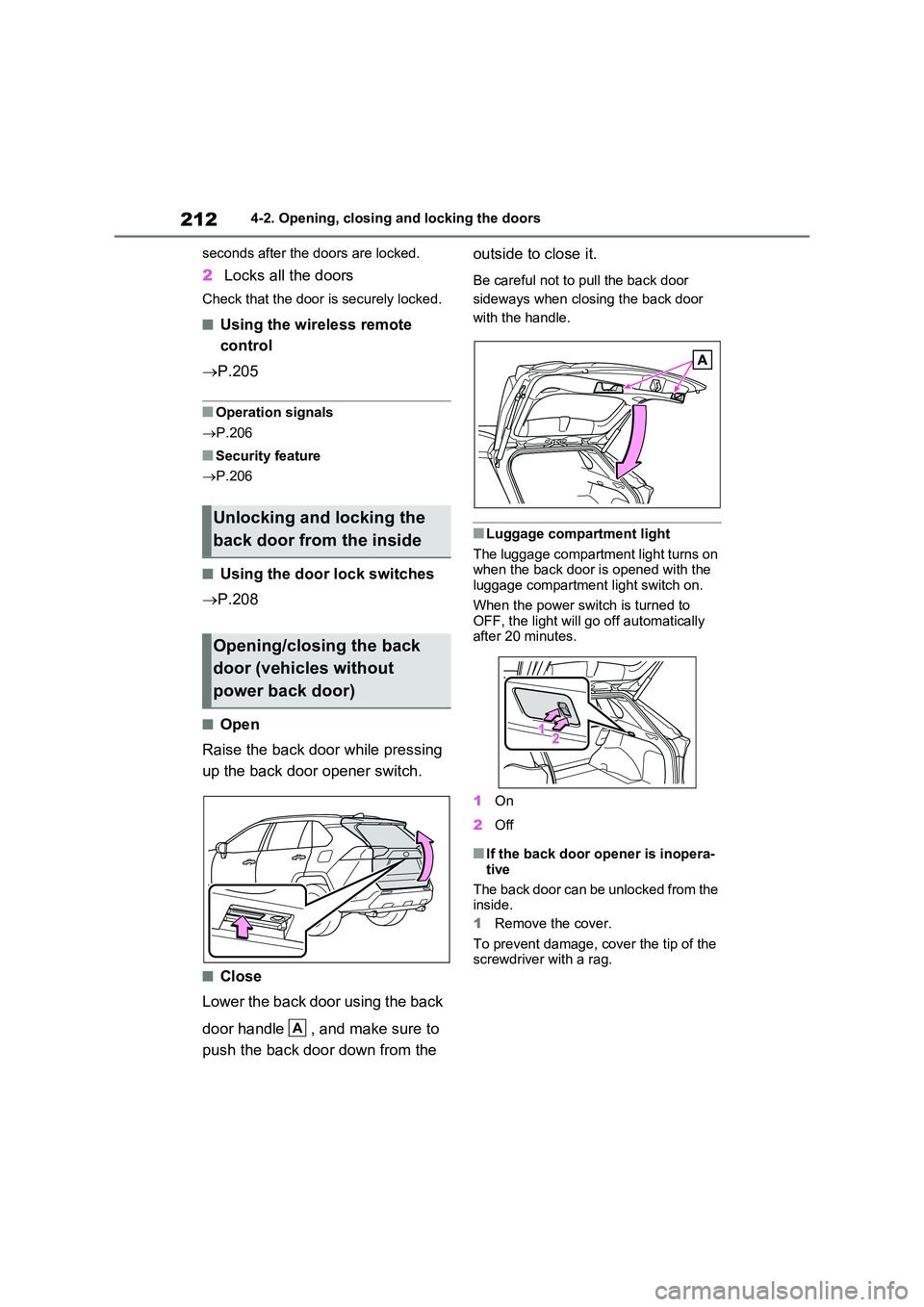
■Open
Raise the back door while pressing
up the back door opener switch.
■Close
Lower the back door using the back
door handle , and make sure to
push the back door down from the
outside to close it.
Be careful not to pull the back door
sideways when closing the back door
with the handle.
■Luggage compartment light
The luggage compartment light turns on when the back door is opened with the luggage compartment light switch on.
When the power switch is turned to OFF, the light will go off automatically after 20 minutes.
1 On
2 Off
■If the back door opener is inopera-
tive
The back door can be unlocked from the inside.
1 Remove the cover.
To prevent damage, cover the tip of the screwdriver with a rag.
Unlocking and locking the
back door from the inside
Opening/closing the back
door (vehicles without
power back door)
A
Page 215 of 664
215
4 4-2. Opening, closing and locking the doors
Before driving
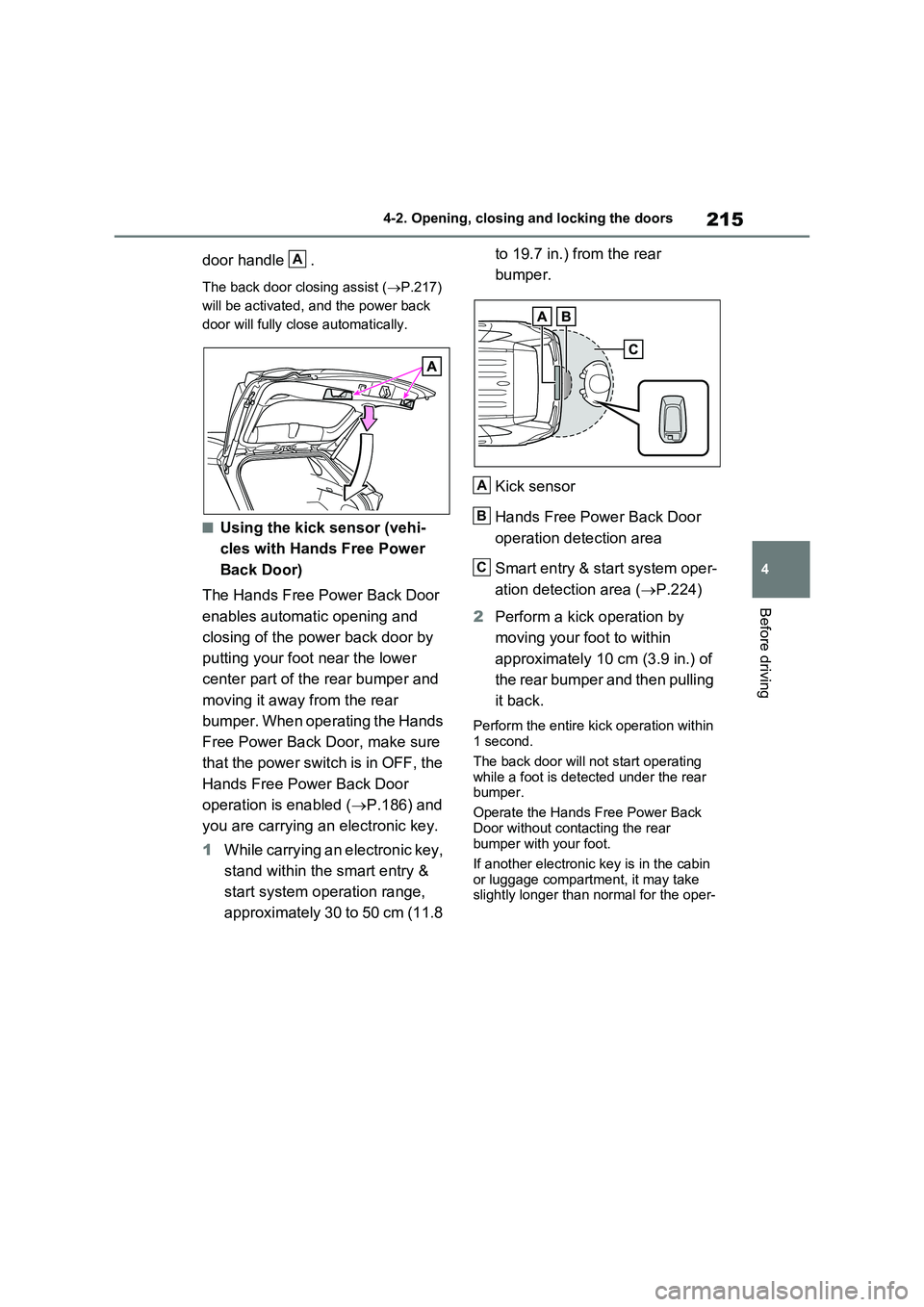
door handle .
The back door closing assist (P.217)
will be activated, and the power back
door will fully close automatically.
■Using the kick sensor (vehi-
cles with Hands Free Power
Back Door)
The Hands Free Power Back Door
enables automatic opening and
closing of the power back door by
putting your foot near the lower
center part of the rear bumper and
moving it away from the rear
bumper. When operating the Hands
Free Power Back Door, make sure
that the power switch is in OFF, the
Hands Free Power Back Door
operation is enabled (P.186) and
you are carrying an electronic key.
1While carrying an electronic key,
stand within the smart entry &
start system operation range,
approximately 30 to 50 cm (11.8 to 19.7 in.) from the rear
bumper.
Kick sensor
Hands Free Power Back Door
operation detection area
Smart entry & start system oper-
ation detection area (P.224)
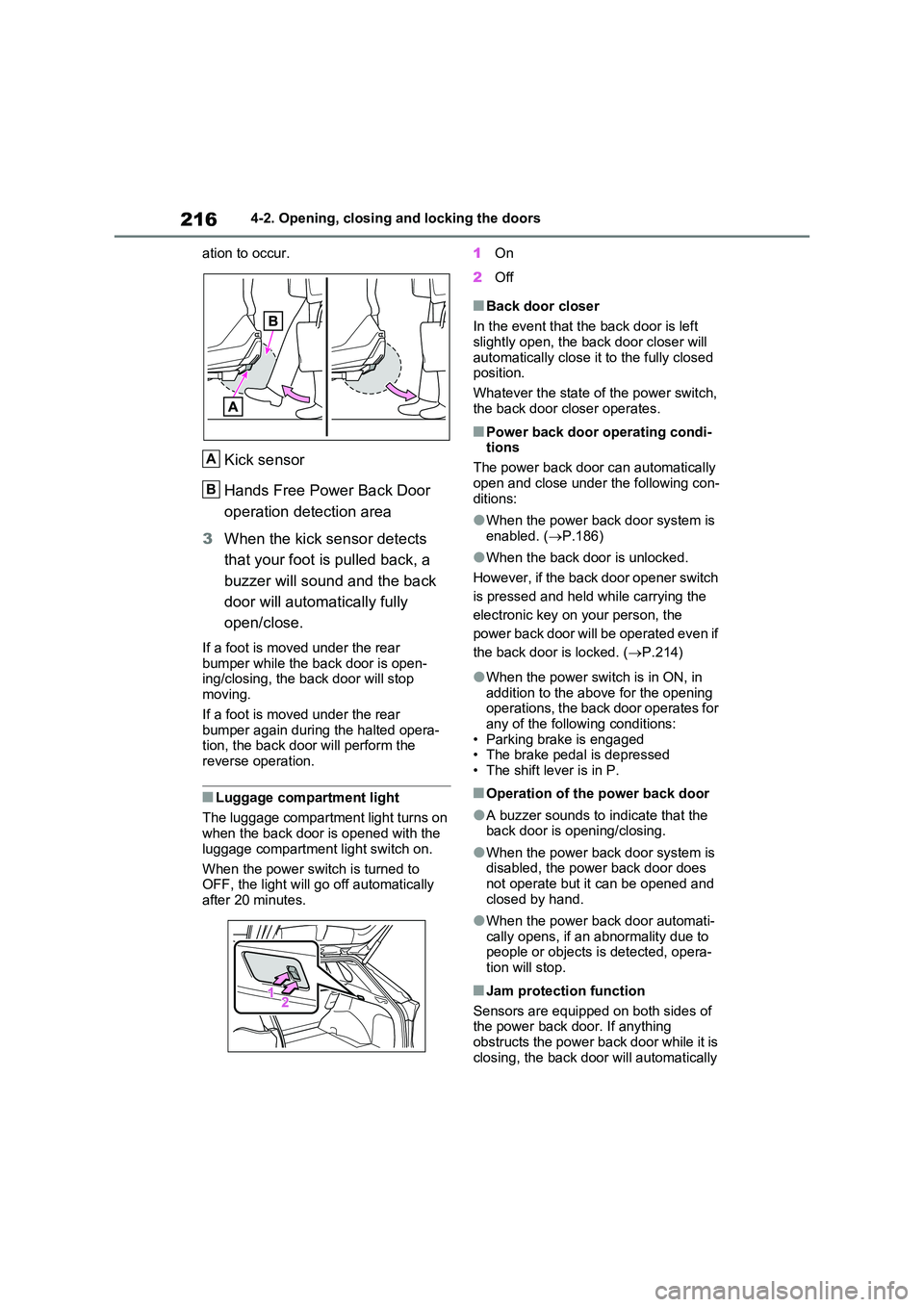
2Perform a kick operation by
moving your foot to within
approximately 10 cm (3.9 in.) of
the rear bumper and then pulling
it back.
Perform the entire kick operation within
1 second.
The back door will not start operating
while a foot is detected under the rear
bumper.
Operate the Hands Free Power Back
Door without contacting the rear
bumper with your foot.
If another electronic key is in the cabin
or luggage compartment, it may take
slightly longer than normal for the oper-
A
A
B
C
Page 216 of 664
2164-2. Opening, closing and locking the doors
ation to occur.
Kick sensor
Hands Free Power Back Door
operation detection area
3 When the kick sensor detects
that your foot is pulled back, a
buzzer will sound and the back
door will automatically fully
open/close.
If a foot is moved under the rear
bumper while the back door is open- ing/closing, the back door will stop moving.
If a foot is moved under the rear bumper again during the halted opera-tion, the back door will perform the
reverse operation.
■Luggage compartment light
The luggage compartment light turns on when the back door is opened with the
luggage compartment light switch on.
When the power switch is turned to OFF, the light will go off automatically
after 20 minutes.
1 On
2 Off
■Back door closer
In the event that the back door is left slightly open, the back door closer will
automatically close it to the fully closed position.
Whatever the state of the power switch,
the back door closer operates.
■Power back door operating condi- tions
The power back door can automatically
open and close under the following con- ditions:
●When the power back door system is enabled. ( P.186)
●When the back door is unlocked.
However, if the back door opener switch
is pressed and held while carrying the
electronic key on your person, the
power back door will be operated even if
the back door is locked. ( P.214)
●When the power switch is in ON, in
addition to the above for the opening operations, the back door operates for any of the following conditions:
• Parking brake is engaged • The brake pedal is depressed• The shift lever is in P.
■Operation of the power back door
●A buzzer sounds to indicate that the back door is opening/closing.
●When the power back door system is disabled, the power back door does
not operate but it can be opened and closed by hand.
●When the power back door automati-cally opens, if an abnormality due to people or objects is detected, opera-
tion will stop.
■Jam protection function
Sensors are equipped on both sides of the power back door. If anything
obstructs the power back door while it is closing, the back door will automatically
A
B