light TOYOTA VERSO S 2011 Owner's Guide
[x] Cancel search | Manufacturer: TOYOTA, Model Year: 2011, Model line: VERSO S, Model: TOYOTA VERSO S 2011Pages: 664, PDF Size: 160.56 MB
Page 105 of 664
105
2
2-2. Charging
Plug-in hybrid system
2-2.Charging
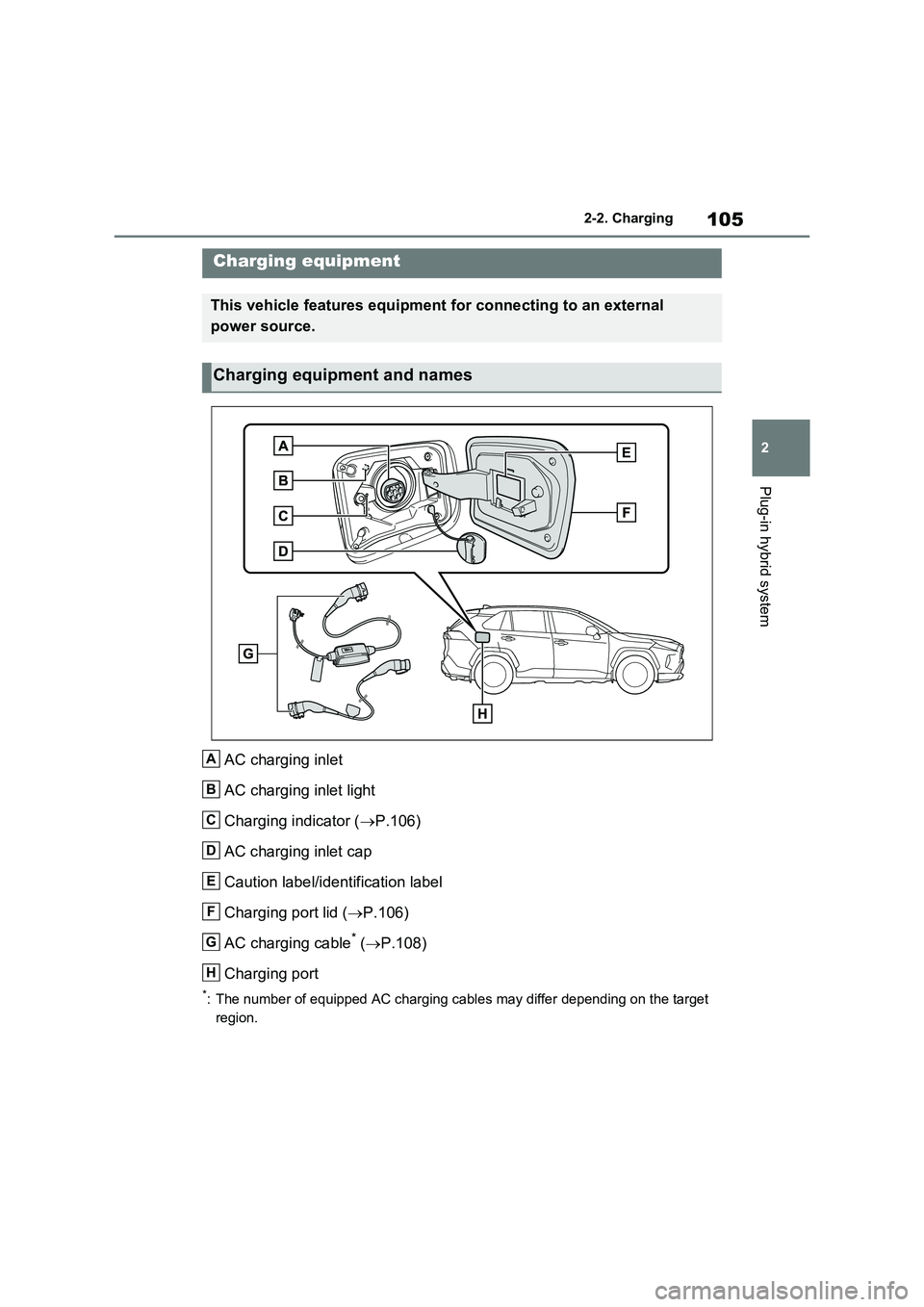
AC charging inlet
AC charging inlet light
Charging indicator ( P.106)
AC charging inlet cap
Caution label/identification label
Charging port lid ( P.106)
AC charging cable* ( P.108)
Charging port
*: The number of equipped AC charging cables may differ depending on the target
region.
Charging equipment
This vehicle features equipment for connecting to an external
power source.
Charging equipment and names
A
B
C
D
E
F
G
H
Page 106 of 664
1062-2. Charging
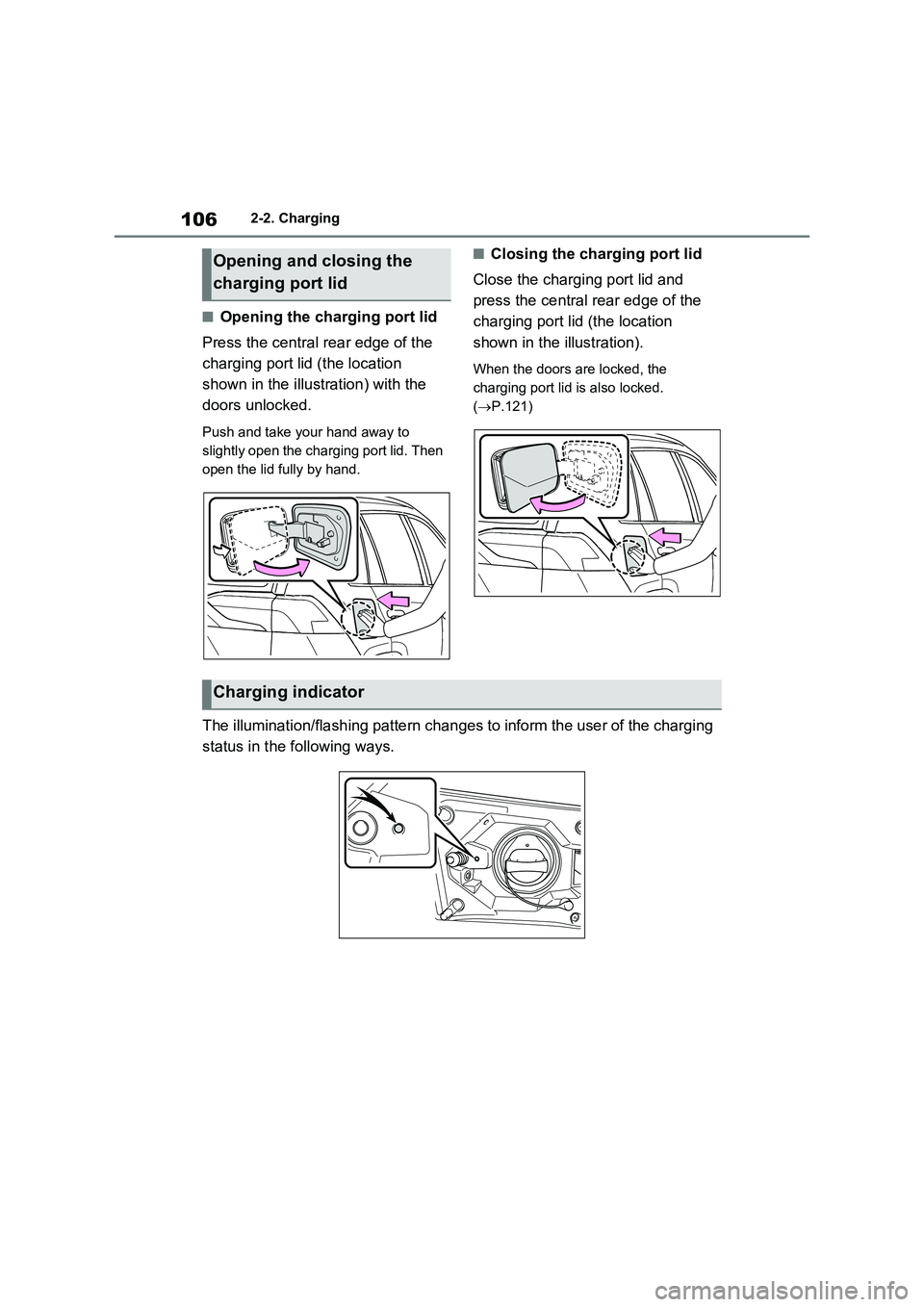
■Opening the charging port lid
Press the central rear edge of the
charging port lid (the location
shown in the illustration) with the
doors unlocked.
Push and take your hand away to
slightly open the charging port lid. Then
open the lid fully by hand.
■Closing the charging port lid
Close the charging port lid and
press the central rear edge of the
charging port lid (the location
shown in the illustration).
When the doors are locked, the
charging port lid is also locked.
(P.121)
The illumination/flashing pattern changes to inform the user of the charging
status in the following ways.
Opening and closing the
charging port lid
Charging indicator
Page 128 of 664
1282-2. Charging
such as the remaining charge of the
hybrid battery (traction battery), the
outside temperature and specifica-
tions of a charger (charging station).
*4: When using “My Room Mode”
(P.153), the time required for
charging to complete may be longer
or the charging may not be com-
pleted.
*5: If equipped
■Charging time may increase
In the following situations, charging time
may become longer than normal:
●In very hot or very cold temperatures.
●When the hybrid battery (traction bat-
tery) becomes hot, such as immedi-
ately after high-load driving.
●The vehicle is consuming a lot of elec-
tricity, for example, when the head-
lights are on etc.
●When using “My Room Mode”.
(P.153)
●There is a power outage during
charging.
●There is an interruption in the electri-
cal supply.
●There is a drop in the voltage of exter-
nal power source.
●The charge in the 12-volt battery is
low, for example due to the vehicle
being left unused for a long period of
time.
●The maximum charging current is set
to 8A or 16A* through “Vehicle Set-
tings”. (P.125)
●When the “Battery Heater” operates.
(P.128)
●When the “Battery Cooler” is operated
before charging. (P.129)
●When the plug generates heat due to
a loose socket connection etc.
*: Vehicles with 6.6 kW onboard traction
battery charger only
■Using a DC Charger
DC Chargers cannot be used with this
vehicle.
■Charging electricity
This vehicle can be charged up to
approximately 3.3 kW or 6.6 kW
*.
However, depending on the used char-
ger or AC charging cable, charging elec-
tricity may be limited.
*: Vehicles with 6.6 kW onboard traction
battery charger only
This vehicle is equipped with sev-
eral functions that are linked with
charging.
■“My Room Mode” (P.153)
When the AC charging cable is
connected to the vehicle, electrical
components such as the air condi-
tioning system or audio system can
be used using the external power
source
*.
*: The power of the hybrid battery (trac-
tion battery) may be used depending
on the situation.
■“Battery Heater”
When the outside temperature is
low and the AC charging cable is
connected to the vehicle, this func-
tion automatically warms the hybrid
battery (traction battery) until it
reaches or exceeds a certain tem-
perature.
“Battery Heater” will operate when
the “Battery Heater” of the
“Charging Settings” on the multi-
information display is on. (P.187)
Charging-linked functions
Page 133 of 664
133
2
2-2. Charging
Plug-in hybrid system
This vehicle has been designed to
allow charging from an external
power source using a AC charging
cable for exclusive use with stan-
dard household AC sockets.
However, the vehicle differs greatly
from standard household electrical
goods in the following ways, and
incorrect usage could cause fire or
electric shock, possibly leading to
death or serious injury.
The charging operation is
designed to operate at 8A-10A
continuously for the charge dura-
tion (approximately 9 hours).
( P.127)
Charging can be conducted out-
doors.
To charge properly, follow the pro-
cedure after reading the explana-
tion below. Charging is intended to
be carried out by licensed drivers
only who properly understand the
charging procedure.
Do not allow children to use the
AC charging cable without
supervision. Also, keep the AC
charging cable out of reach of
infants.
When charging with a charger,
follow the procedures for using
each charger.
When charging using a public
charging facility, check the set-
ting of the charging schedule
function.
• When the charging schedule is regis-
tered, temporarily turn off the function
or turn “Charge Now” on. ( P.145)
• When the charging schedule is set to
on, charging will not start even if the
AC charging cable is connected.
Also, charging fee may occur due to
connection of the AC charging cable.
Before charging, always check the
following items.
The parking brake is applied.
( P.326)
Lights such as the headlights,
emergency flashers and interior
lights etc. are turned off.
If these light switches are turned on,
then these features will consume elec-
tricity, and charging time will increase.
The power switch is turned to
OFF. ( P.320)
Before charging, make sure that
WARNING
■When the AC charging cable is connected to the vehicle
Do not operate the shift lever.
In the unlikely event that the AC charging cable has been damaged,
the shift position may change from P to another position and the vehicle could move, possibly leading to an
accident.
Charging precautions
Confirm the following before
charging
Inspecting the AC charging
cable
Page 134 of 664
1342-2. Charging
each part of the AC charging cable
is in good condition. (P.117)
■During charging
●The charging starting time may differ
depending on the state of the vehicle,
but this does not indicate a malfunc-
tion.
●Cooling fan sounds may be heard
from near the rear seat. (P.98)
●During charging, sounds may be
heard from near the hybrid battery
(traction battery) in accordance with
the operation of the air conditioning
system or “Battery Cooler” (P.129).
●During and after charging, the rear
seat and its surrounding area in which
the onboard traction battery charger is
installed may get warm.
●The surface of the CCID (Charging
Circuit Interrupting Device) may
become hot, but this does not indicate
a malfunction. (When using Mode 2
AC charging cable.)
●Depending on radio wave conditions,
interference may be heard on the
radio.
●The current charging condition and
the estimated time until charging will
complete can be checked on the
multi-information display.
■Capacity reduction of the hybrid
battery (traction battery)
The capacity of the hybrid battery (trac-
tion battery) will decline gradually when
the hybrid battery (traction battery) is in
use. The rate at which it declines will dif-
fer in accordance with environmental
conditions and the way in which the
vehicle is used. Observing the following
can help suppress battery capacity
decline.
●Avoid parking the vehicle in areas with
a high temperature under direct sun-
light when the hybrid battery (traction
battery) is fully charged.
●Avoid accelerating and decelerating frequently and suddenly when EV
driving.
●Avoid frequent driving near the top
speed for EV driving. (P.90)
●Leave a low level of charge in the
hybrid battery (traction battery) when
leaving the vehicle undriven for a long
period of time.
After confirming that EV mode or
AUTO EV/HV mode has switched to
HV mode, turn the power switch off.
●Use the charging schedule function as
much as possible in order to fully
charge the hybrid battery (traction bat-
tery) immediately before starting off.
(P.144)
Also, if the hybrid battery (traction bat-
tery) capacity reduces, the distance that
can be driven in EV mode or AUTO
EV/HV mode decreases. However, vehi-
cle performance does not significantly
become worse.
■When the remaining charge of the
hybrid battery (traction battery) is
low after charging
In the following situations, the remaining
charge of the hybrid battery (traction
battery) after charging completes may
be less than normal in order to protect
the system (the EV driving range after
the battery is fully charged may be
shorter).
*
●Charging is carried out when the out-
side temperature is low or high.
●Charging is carried out immediately
after high-load driving or in extreme
heat.
When none of the above situations
apply and there is a drastic drop in the
remaining charge of the hybrid battery
(traction battery) after charging com-
pletes, have the vehicle inspected by
any authorized Toyota retailer or Toyota
authorized repairer, or any reliable
repairer.
*: When this occurs, even if the remain-
ing charge display of the hybrid bat-
tery (traction battery) shows that it is
Page 137 of 664
137
2 2-2. Charging
Plug-in hybrid system
information of the charger.
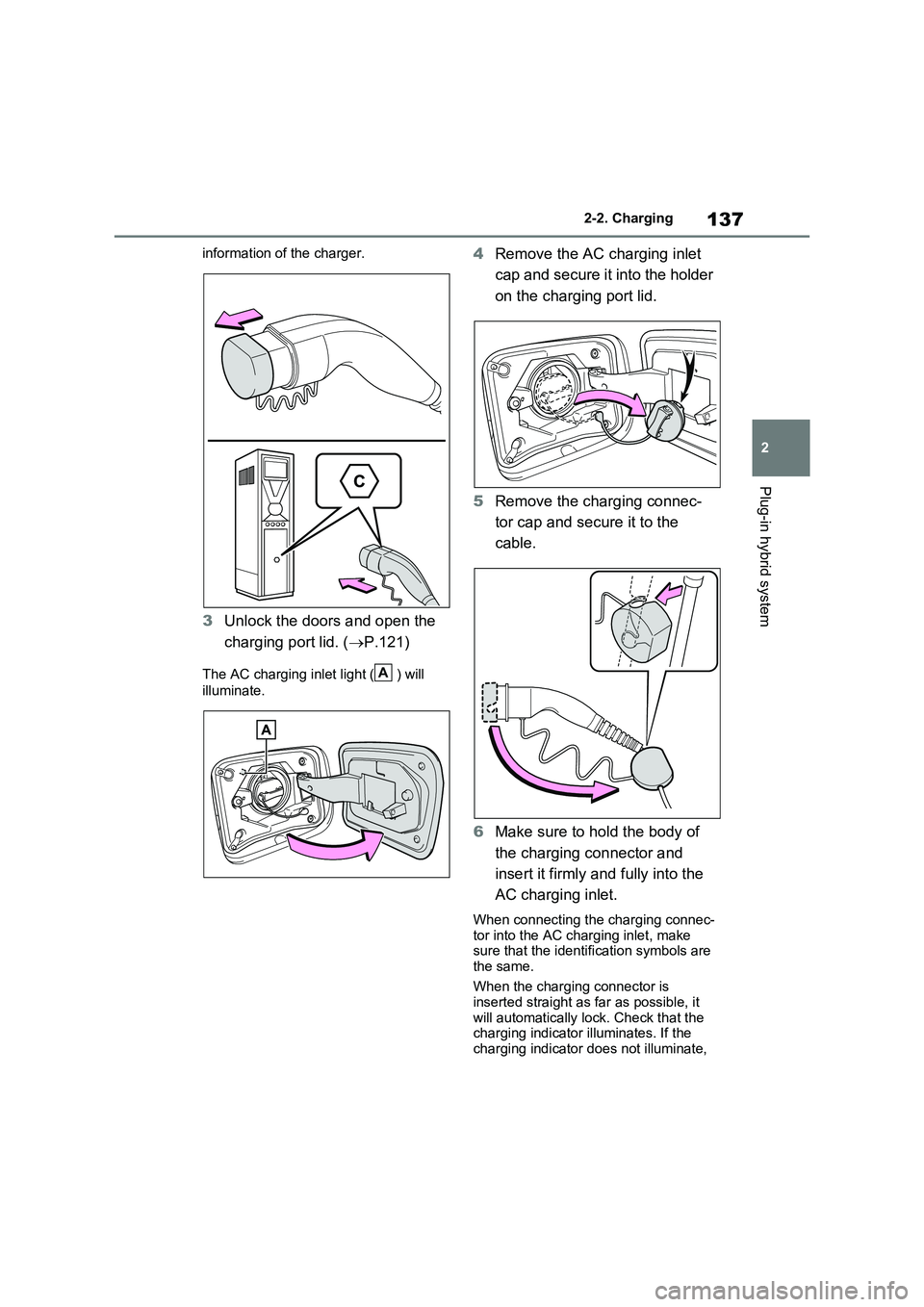
3Unlock the doors and open the
charging port lid. (P.121)
The AC charging inlet light ( ) will
illuminate.
4Remove the AC charging inlet
cap and secure it into the holder
on the charging port lid.
5Remove the charging connec-
tor cap and secure it to the
cable.
6Make sure to hold the body of
the charging connector and
insert it firmly and fully into the
AC charging inlet.
When connecting the charging connec-
tor into the AC charging inlet, make
sure that the identification symbols are
the same.
When the charging connector is
inserted straight as far as possible, it
will automatically lock. Check that the
charging indicator illuminates. If the
charging indicator does not illuminate,
A
Page 139 of 664
139
2
2-2. Charging
Plug-in hybrid system
charging is displayed ( P.195).
■Charging at a public charging sta-
tion with authentication function
When a door is unlocked during charging, the charging connector is
unlocked and charging will be stopped. In this case, the charging station authentication is canceled and charging
may not be able to restart. Reconnect the charging connector and perform authentication for the charging station.
■Protection function of AC charging
inlet overheating (vehicles with 6.6 kW onboard traction battery char-ger)
By installing a temperature sensor to the AC charging inlet, prevents parts from melting when the temperature rises due
to foreign matter entering the charging connector. When a certain temperature increase is detected, charging is
stopped immediately and a message is displayed on the multi-information dis-play. After the temperature has
decreased, charging resumes by per- forming the operation to start charging again.
WARNING
■When charging
Observe the following precautions.
Failure to do so may cause an unex-
pected accident, resulting in death or serious injury.
●Connect to a power source suitable
for charging. ( P.124)
●Check that the AC charging cable,
plug and socket are free of foreign matter.
●Before charging, check that the AC charging inlet is not deformed, damaged or corroded, and check
that the inlet is free of foreign mat- ter such as dirt, snow and ice. If there is dirt or dust in these areas,
remove completely before inserting the charging connector.
●Before inserting the charging plug into the charger, make sure there is no dirt or dust on the terminal
areas. If there is dirt or dust in these areas, remove completely before inserting the charging plug.
●Do not get the terminals of the AC charging inlet wet.
●Only use sockets where the plug can be securely inserted.
●Do not bundle or wind the AC charging cable while charging, as
doing so may result in overheating.
●Do not touch the terminals of the
charging connector and AC charging inlet with a sharp metal objects (needles etc.) or hands, or
short them with foreign objects.
●When charging outdoors, make
sure to connect to a rain-tight socket for outdoor use. Ensure the rain-tight cover closes completely. If
the rain-tight cover cannot be closed, install a rain-tight cover that will close.
●In order to stop charging at the charging station, follow the instruc-
tions of the charger.
●If any heat, smoke, odors, noise or
other abnormalities are noticed during charging, stop charging immediately.
●Do not insert the plug if the socket is submerged in water or snow.
●When charging while it is raining or snowing, do not connect or discon-
nect the plug if your hands are wet. Also, do not get the plug or outlet wet.
●Do not charge the vehicle during a lightning storm.
●Prevent the AC charging cable from being caught in the door or back
door.
Page 141 of 664
141
2
2-2. Charging
Plug-in hybrid system
To prevent electrical shock, be sure
to remove by following the proce-
dures below.
1 Unlock the doors to unlock the
charging connector. ( P.122)
The charging connector will be
unlocked and the AC charging inlet light will illuminate when the doors are unlocked.
NOTICE
■When charging
Do not insert the plug into the AC
charging inlet.
The AC charging inlet may be dam- aged.
■Using private power generator
Do not use private power generators
as a power source for charging.
Doing so may make charging unsta- ble, the voltage may be insufficient,
and the error warning indicator on the CCID (Charging Circuit Interrupting Device) of the AC charging cable may
flash.
■Charging station
Due to the environment in which the power equipment is located, charging may be unstable due to noise, the
voltage may be insufficient, and the error warning indicator on the CCID (Charging Circuit Interrupting Device)
of the AC charging cable may flash.
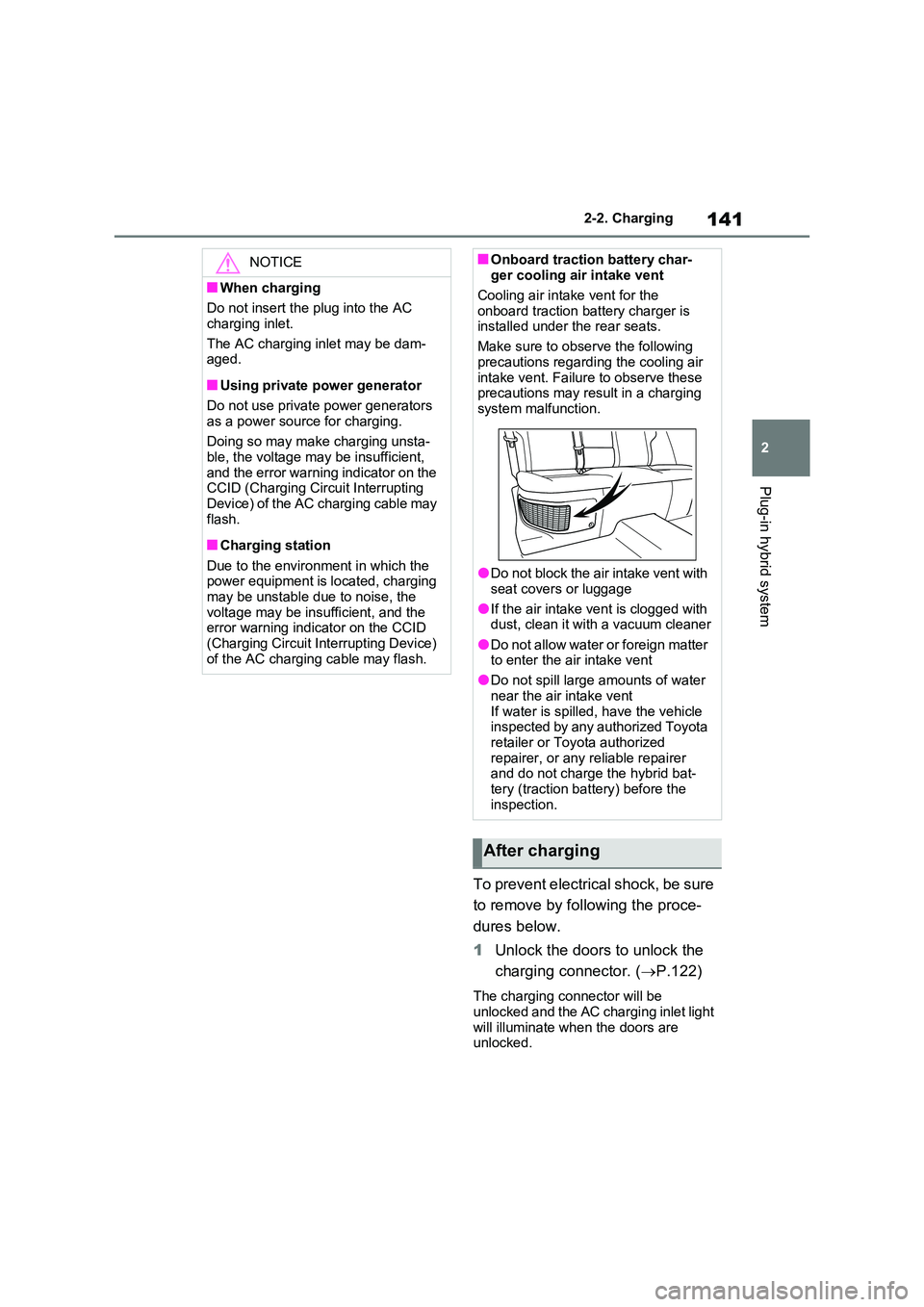
■Onboard traction battery char- ger cooling air intake vent
Cooling air intake vent for the
onboard traction battery charger is installed under the rear seats.
Make sure to observe the following
precautions regarding the cooling air intake vent. Failure to observe these precautions may result in a charging
system malfunction.
●Do not block the air intake vent with
seat covers or luggage
●If the air intake vent is clogged with dust, clean it with a vacuum cleaner
●Do not allow water or foreign matter to enter the air intake vent
●Do not spill large amounts of water
near the air intake vent If water is spilled, have the vehicle inspected by any authorized Toyota
retailer or Toyota authorized repairer, or any reliable repairer and do not charge the hybrid bat-
tery (traction battery) before the inspection.
After charging
Page 143 of 664
143
2
2-2. Charging
Plug-in hybrid system
■When the outside temperature is low or high
The level shown on the SOC (State of Charge) gauge ( P.174) may drop slightly when the power switch is turned
to ON, even if charging has been com- pleted and the hybrid battery (traction battery) is fully charged. However, this
does not indicate a malfunction.
■When removing the charging con- nector
Unlock the doors using the smart entry
& start system or wireless remote con- trol to unlock the charging connector, check that the lock is released, and then
pull the charging connector towards you. ( P.121)
■If the charging connector cannot be unlocked
P.123
WARNING
■After charging
Remove the plug if it will not be used for a long time.
Dirt and dust may accumulate plug or
socket, which could cause a malfunc- tion or fire, possibly leading to death or serious injury.
NOTICE
■After charging
●Store the AC charging cable out of
reach from infants and children.
●After disconnecting the charging
connector from the AC charging inlet, make sure to put on the AC charging inlet cap and close the
charging port lid. If the AC charging inlet cap is not put on, water or for-eign objects may enter the AC
charging inlet, which could lead to vehicle damage.
●After removing the plug from the socket, keep it in a safe place free from moisture and dust. The AC
charging cable or plug may be dam- aged if the cable is stepped on or ridden over by the vehicle.
Page 144 of 664
1442-2. Charging
■Calendar settings
Current date and time information is
automatically set using GPS. However,
if GPS calibration of clock is turned off in
the multimedia system settings, the date
needs to be set on the multi-information
display.
If the calendar settings check screen is
displayed when an attempt was made to
register a charge schedule, check that
the correct date is set. If it is incorrect,
be sure to correct it.
If the calendar information is wrong, the
charging schedule function will not oper-
ate normally.
When registering the charging
schedule, the following settings can
be changed.
■Select the charging mode
One of the two following charging
modes can be selected.
“Start”
Starts charging at the set time*1 and fin-ishes charging when fully charged.
*2
“Departure”
Starts charging to finish at the set
time.
*3, 4
When this setting is selected, the air
conditioning-linked function can be
used.
*1: Charging schedule function is per-
formed in accordance with the clock
in the multi-information display.
Before registering the charging
schedule, check the clock settings to
the proper time.
*2: There might be a slight error in the
timing when charging starts due to
the state of the hybrid battery (trac-
tion battery).
*3: When the system determines that
there is no time to finish charging by
the set scheduled departure time, it
starts charging. Check the charging
schedules.
*4: If sudden changes in temperature or
changes in the condition of the
power source occur while charging,
charging may not end exactly at the
time estimated by the system.
■Repeated setting
The periodic charging schedule can
be set by selecting your desired
day of the week. (If no days are
selected, charging is only carried
out once.)
■Air conditioning-linked set-
ting (“Climate Prep”)
When the charging mode is set to
“Departure”, the vehicle air condi-
tioning system (P.452) can be set
to automatically operate
* according
Using the charging
schedule function
Charging can be carried out at
the desired time by registering
the charging schedule. Also, it
is possible to set the charging
schedule to one’s prefer-
ences, such as having
charging complete by a certain
departure time or be carried
out at the same time on certain
days.
Settings of the charging
schedule function