change time TOYOTA VERSO S 2011 Repair Manual
[x] Cancel search | Manufacturer: TOYOTA, Model Year: 2011, Model line: VERSO S, Model: TOYOTA VERSO S 2011Pages: 664, PDF Size: 160.56 MB
Page 606 of 664
6068-2. Steps to take in an emergency
played on the multi-information
display.
4 Press the power switch shortly
and firmly.
In the event that the hybrid system
still cannot be started, contact any
authorized Toyota retailer or Toyota
authorized repairer, or any reliable
repairer.
■Stopping the hybrid system
Shift the shift lever to P, set the parking
brake and press the power switch as you normally do when stopping the hybrid system.
■Replacing the key battery
As the above procedure is a temporary measure, it is recommended that the electronic key battery be replaced
immediately when the battery is depleted. ( P.543)
■Alarm (if equipped)
Using the mechanical key to lock the
doors will not set the alarm system.
If a door is unlocked using the mechani- cal key when the alarm system is set,
the alarm may be triggered. ( P.78)
■Changing power switch modes
Release the brake pedal and press the power switch in step 3 above.
The hybrid system does not start and modes will be changed each time the switch is pressed. ( P.320)
If you have a set of jumper (or
booster) cables and a second vehi-
cle with a 12-volt battery, you can
jump start your vehicle by following
the steps below.
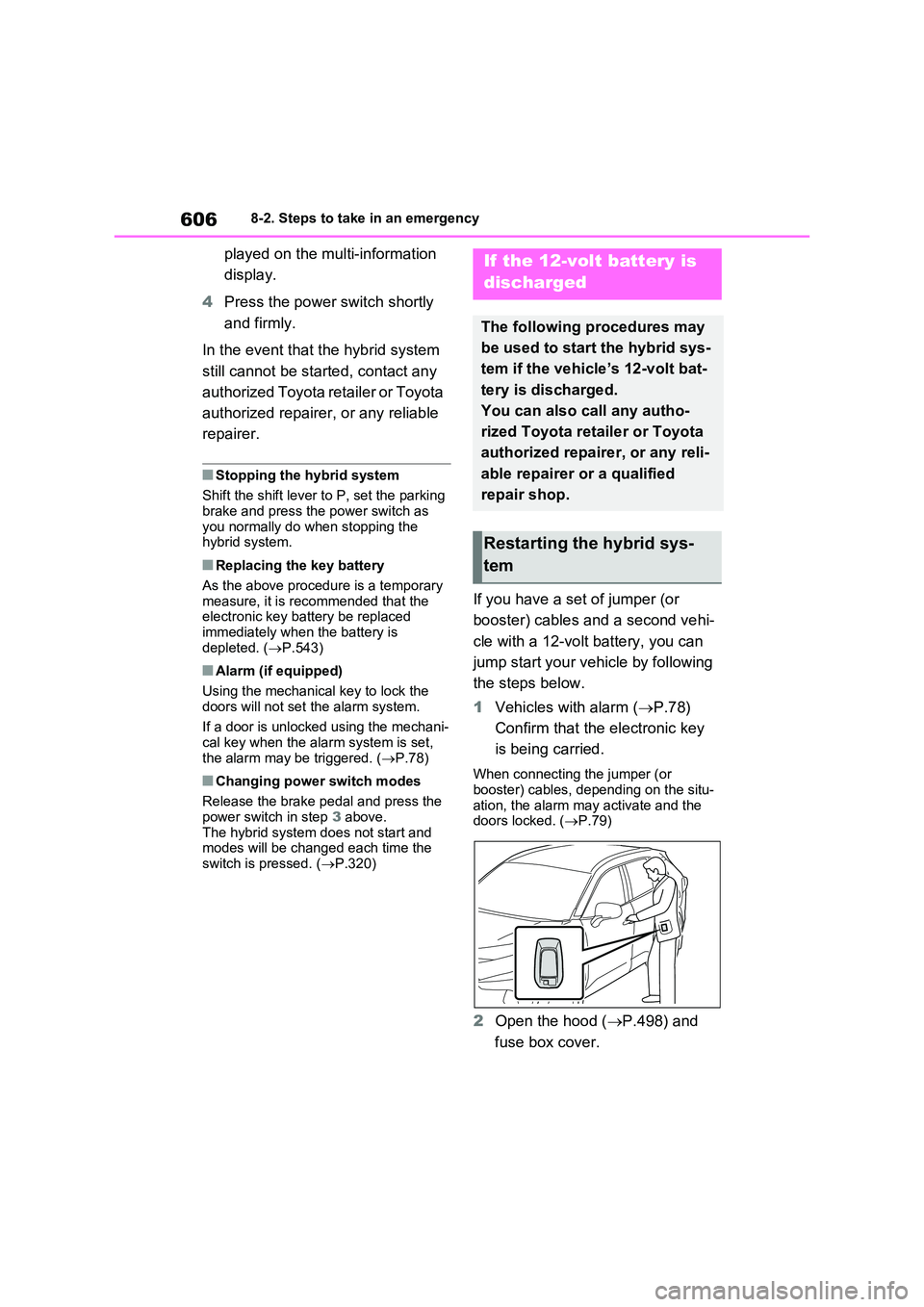
1 Vehicles with alarm (P.78)
Confirm that the electronic key
is being carried.
When connecting the jumper (or booster) cables, depending on the situ-
ation, the alarm may activate and the doors locked. ( P.79)
2Open the hood (P.498) and
fuse box cover.
If the 12-volt battery is
discharged
The following procedures may
be used to start the hybrid sys-
tem if the vehicle’s 12-volt bat-
tery is discharged.
You can also call any autho-
rized Toyota retailer or Toyota
authorized repairer, or any reli-
able repairer or a qualified
repair shop.
Restarting the hybrid sys-
tem
Page 629 of 664
629
9
9-2. Customization
Vehicle specifications
9-2.Customiz ation
■Changing using the naviga-
tion/multimedia system
1 Press the “MENU” button.
2 Select “Setup” on the menu
screen and select “Vehicle”.
3 Select “Vehicle Customization”.
Various setting can be changed.
Refer to the list of settings that can
be changed for details.
■Changing using the multi-
information display
1 Press or of the meter
control switches and select .
2 Press or of the meter
control switches, select the item.
3 To switch the function on and
off, press to switch to the
desired setting.
4 To perform detailed setting of
functions that support detailed
settings, press and hold and
display the setting screen.
The method of performing detailed set- ting differs for each screen. Please
refer to the advice sentence displayed on the screen.
To go back to the previous screen or
exit the customize mode, press .
■When customizing using the navi- gation/multimedia system or multi-information display
Stop the vehicle in a safe place, apply the parking brake, and shift the shift lever to P. Also, to prevent 12-volt bat-
tery discharge, leave the hybrid system operating while customizing the fea-tures.
Customizable features
Your vehicle includes a variety
of electronic features that can
be personalized to suit your
preferences. The settings of
these features can be changed
using the multi-information
display, navigation/multimedia
system, or at any authorized
Toyota retailer or Toyota
authorized repairer, or any reli-
able repairer.
Customizing vehicle fea-
tures
WARNING
■During customization
As the hybrid system needs to be operating during customization,
ensure that the vehicle is parked in a place with adequate ventilation. In a closed area such as a garage,
exhaust gases including harmful car- bon monoxide (CO) may collect and
enter the vehicle. This may lead to death or a serious health hazard.
NOTICE
■During customization
To prevent 12-volt battery discharge, ensure that the hybrid system is oper-
ating while customizing features.
Page 630 of 664
6309-2. Customization
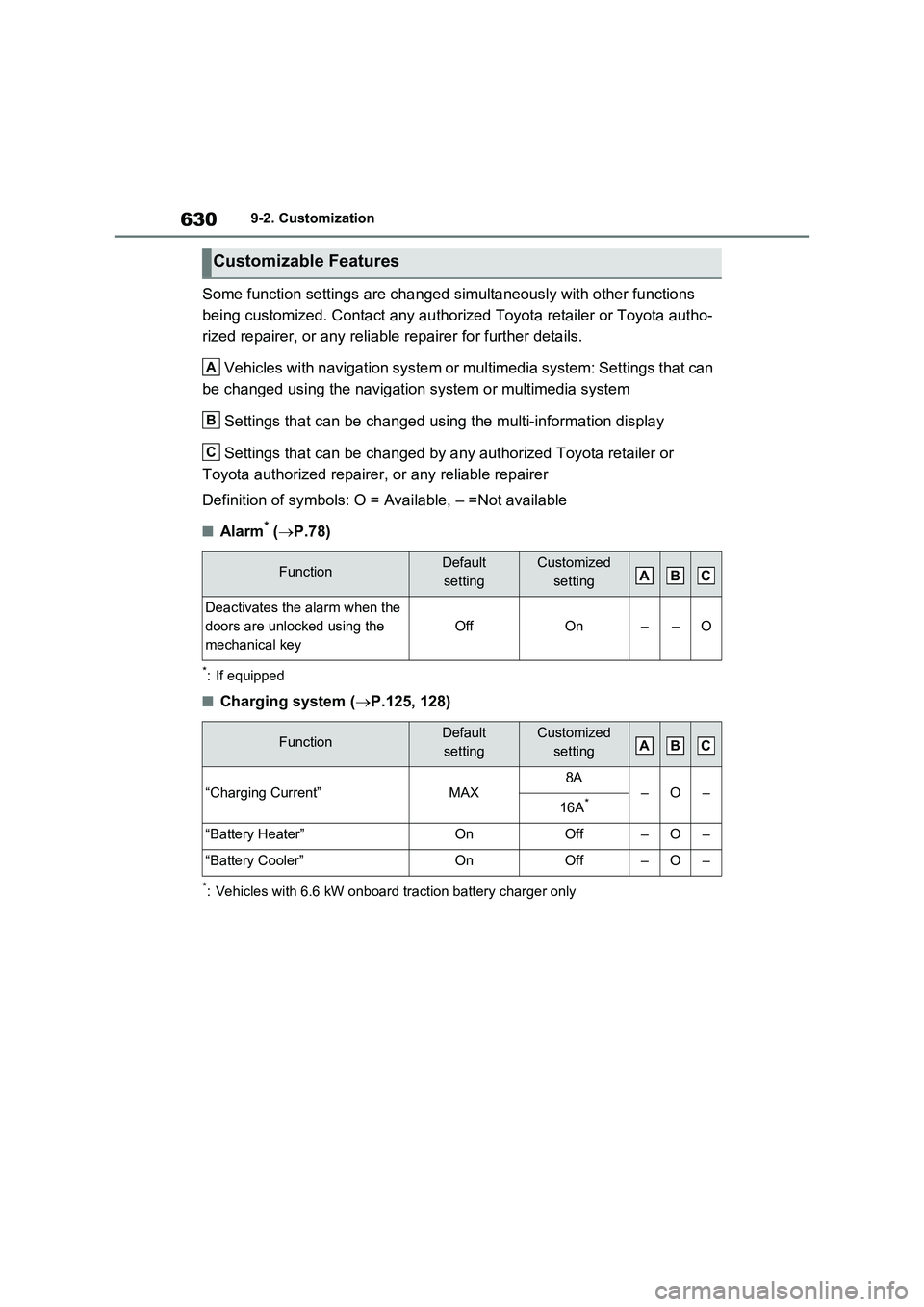
Some function settings are changed simultaneously with other functions
being customized. Contact any authorized Toyota retailer or Toyota autho-
rized repairer, or any reliable repairer for further details.
Vehicles with navigation system or multimedia system: Settings that can
be changed using the navigation system or multimedia system
Settings that can be changed using the multi-information display
Settings that can be changed by any authorized Toyota retailer or
Toyota authorized repairer, or any reliable repairer
Definition of symbols: O = Available, – =Not available
■Alarm* (P.78)
*: If equipped
■Charging system (P.125, 128)
*: Vehicles with 6.6 kW onboard traction battery charger only
Customizable Features
FunctionDefault
settingCustomized
setting
Deactivates the alarm when the
doors are unlocked using the
mechanical key
OffOn––O
FunctionDefault
settingCustomized
setting
“Charging Current”MAX8A–O–16A*
“Battery Heater”OnOff–O–
“Battery Cooler”OnOff–O–
A
B
C
ABC
ABC
Page 634 of 664
6349-2. Customization
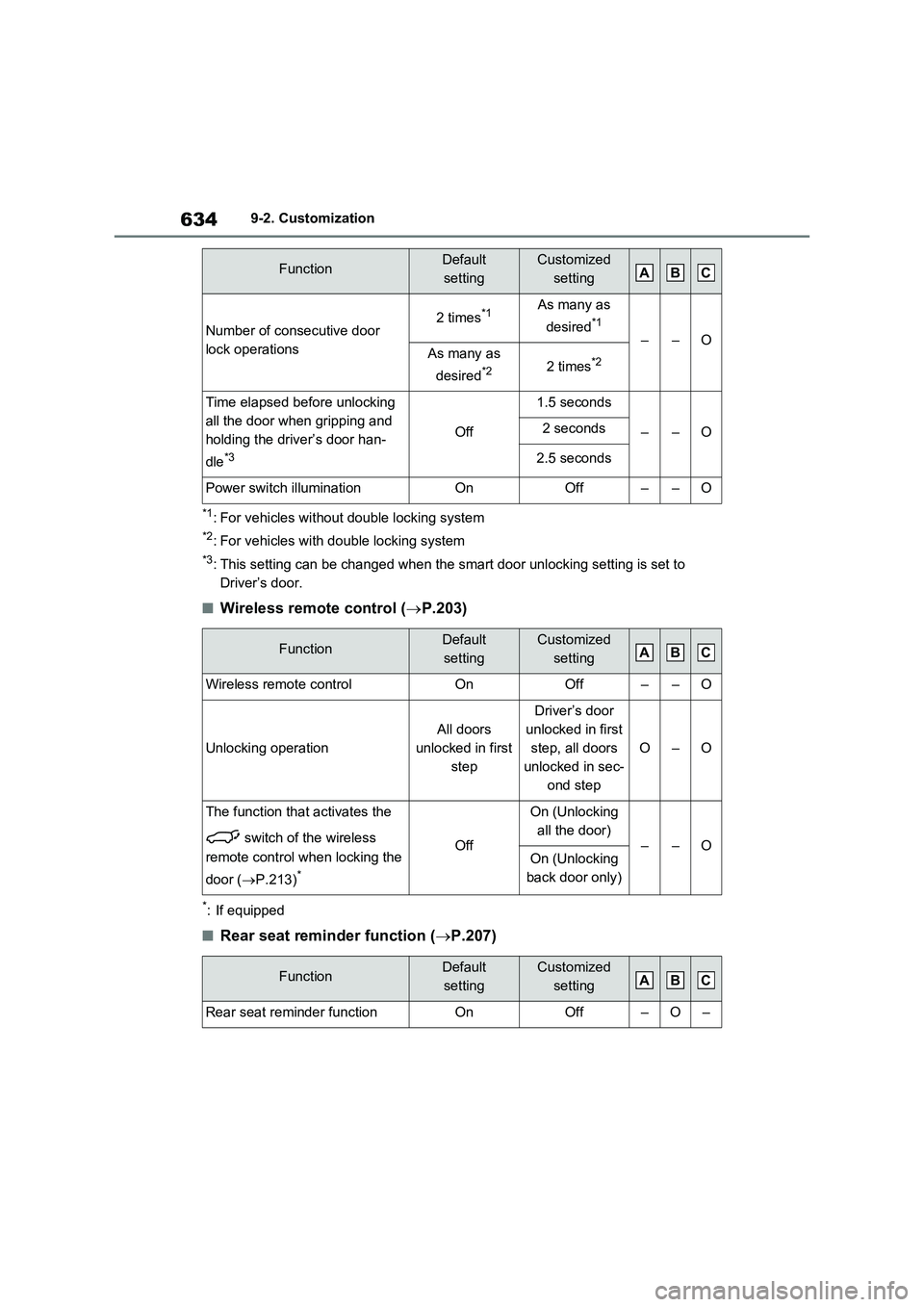
*1: For vehicles without double locking system
*2: For vehicles with double locking system
*3: This setting can be changed when the smart door unlocking setting is set to
Driver’s door.
■Wireless remote control (P.203)
*: If equipped
■Rear seat reminder function (P.207)
Number of consecutive door
lock operations2 times*1As many as
desired
*1
––OAs many as
desired
*22 times*2
Time elapsed before unlocking
all the door when gripping and
holding the driver’s door han-
dle
*3
Off
1.5 seconds
––O2 seconds
2.5 seconds
Power switch illuminationOnOff––O
FunctionDefault
settingCustomized
setting
Wireless remote controlOnOff––O
Unlocking operation
All doors
unlocked in first
step
Driver’s door
unlocked in first
step, all doors
unlocked in sec-
ond step
O–O
The function that activates the
switch of the wireless
remote control when locking the
door (P.213)
*
Off
On (Unlocking
all the door)
––OOn (Unlocking
back door only)
FunctionDefault
settingCustomized
setting
Rear seat reminder functionOnOff–O–
FunctionDefault
settingCustomized
settingABC
ABC
ABC