change time TOYOTA VERSO S 2011 Service Manual
[x] Cancel search | Manufacturer: TOYOTA, Model Year: 2011, Model line: VERSO S, Model: TOYOTA VERSO S 2011Pages: 664, PDF Size: 160.56 MB
Page 361 of 664
361
5 5-5. Using the driving support systems
Driving
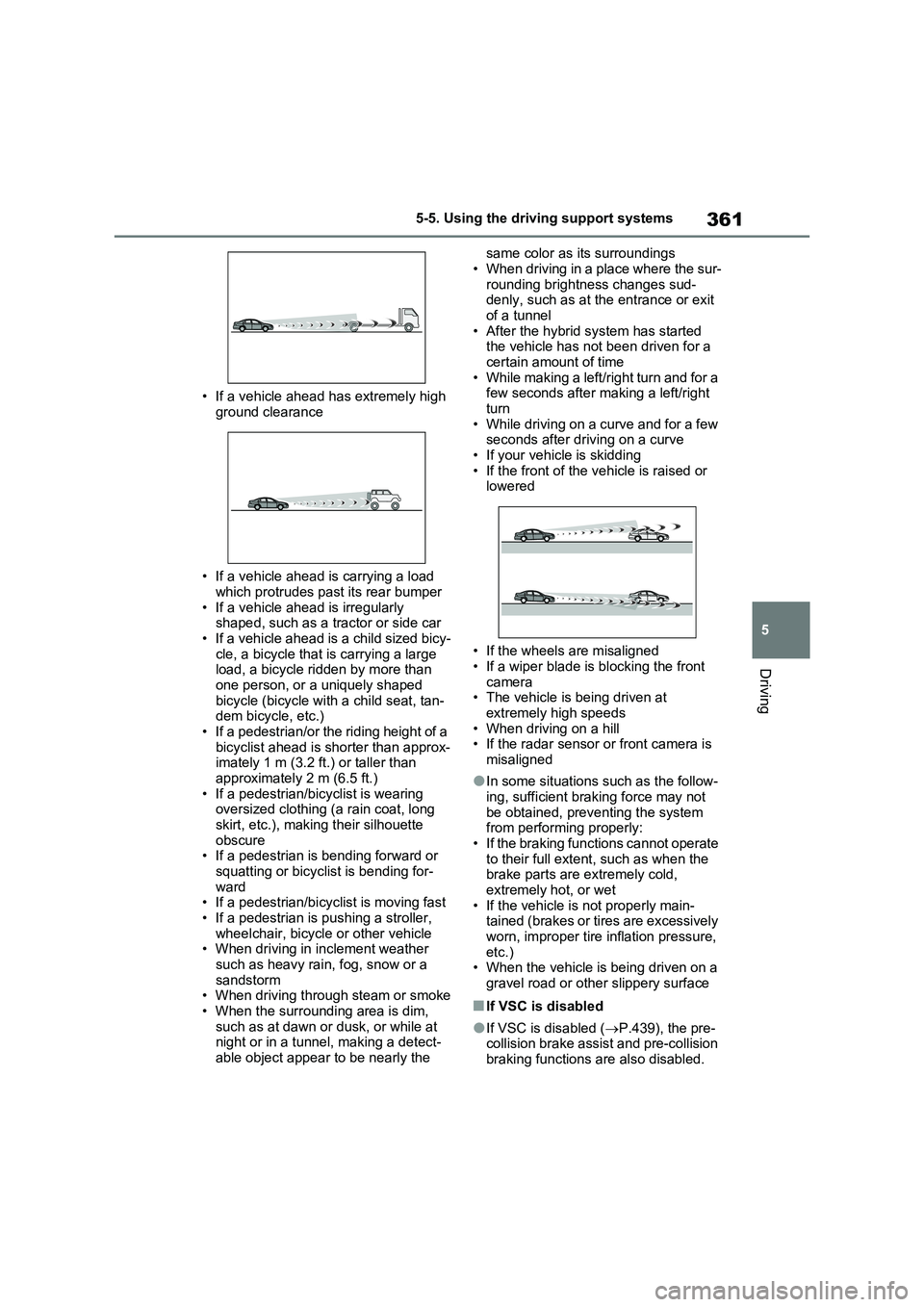
• If a vehicle ahead has extremely high
ground clearance
• If a vehicle ahead is carrying a load
which protrudes past its rear bumper
• If a vehicle ahead is irregularly
shaped, such as a tractor or side car
• If a vehicle ahead is a child sized bicy-
cle, a bicycle that is carrying a large
load, a bicycle ridden by more than
one person, or a uniquely shaped
bicycle (bicycle with a child seat, tan-
dem bicycle, etc.)
• If a pedestrian/or the riding height of a
bicyclist ahead is shorter than approx-
imately 1 m (3.2 ft.) or taller than
approximately 2 m (6.5 ft.)
• If a pedestrian/bicyclist is wearing
oversized clothing (a rain coat, long
skirt, etc.), making their silhouette
obscure
• If a pedestrian is bending forward or
squatting or bicyclist is bending for-
ward
• If a pedestrian/bicyclist is moving fast
• If a pedestrian is pushing a stroller,
wheelchair, bicycle or other vehicle
• When driving in inclement weather
such as heavy rain, fog, snow or a
sandstorm
• When driving through steam or smoke
• When the surrounding area is dim,
such as at dawn or dusk, or while at
night or in a tunnel, making a detect-
able object appear to be nearly the same color as its surroundings
• When driving in a place where the sur-
rounding brightness changes sud-
denly, such as at the entrance or exit
of a tunnel
• After the hybrid system has started
the vehicle has not been driven for a
certain amount of time
• While making a left/right turn and for a
few seconds after making a left/right
turn
• While driving on a curve and for a few
seconds after driving on a curve
• If your vehicle is skidding
• If the front of the vehicle is raised or
lowered
• If the wheels are misaligned
• If a wiper blade is blocking the front
camera
• The vehicle is being driven at
extremely high speeds
• When driving on a hill
• If the radar sensor or front camera is
misaligned
●In some situations such as the follow-
ing, sufficient braking force may not
be obtained, preventing the system
from performing properly:
• If the braking functions cannot operate
to their full extent, such as when the
brake parts are extremely cold,
extremely hot, or wet
• If the vehicle is not properly main-
tained (brakes or tires are excessively
worn, improper tire inflation pressure,
etc.)
• When the vehicle is being driven on a
gravel road or other slippery surface
■If VSC is disabled
●If VSC is disabled (P.439), the pre-
collision brake assist and pre-collision
braking functions are also disabled.
Page 375 of 664
375
5 5-5. Using the driving support systems
Driving
system will notify the driver.
When the vehicle speed exceeds
the speed notification threshold
of the speed limit sign displayed,
the sign display will be empha-
sized and a buzzer will sound.
When the RSA system recog-
nizes a no-entry sign and detects
that the vehicle has entered a
no-entry area based on the map
information of the navigation sys-
tem, the no-entry sign flashes
and a buzzer will sound. (For
vehicles with navigation system)
If it is detected that your vehicle
is overtaking when a no overtak-
ing sign is displayed on the multi-
information display, the dis-
played sign will flash and a steer-
ing wheel will vibrate.
Depending on the situation, traffic
environment (traffic direction,
speed unit) may be detected incor-
rectly and a notification function
may not operate properly.
■Setting procedure
P.186
■Automatic turn-off of RSA sign dis-
play
One or more signs automatically turn off
in the following situations.
●No sign has been recognized for a
certain distance.
●The road changes due to a left or right
turn, etc.
■Conditions in which the function
may not operate or detect correctly
In the following situations, RSA does not
operate normally and may not recognize signs, display the incorrect sign, etc.
However, this does not indicate a mal-
function.
●The front camera is misaligned due to
a strong impact being applied to the
sensor, etc.
●Dirt, snow, stickers, etc. are on the
windshield near the front camera.
●In inclement weather such as heavy
rain, fog, snow or sand storms.
●Light from an oncoming vehicle, the
sun, etc. enters the front camera.
●The sign is dirty, faded, tilted or bent.
●The contrast of electronic sign is low.
●All or part of the sign is hidden by the
leaves of a tree, a pole, etc.
●The sign is only visible to the front
camera for a short amount of time.
●The driving scene (turning, lane
change, etc.) is judged incorrectly.
●If a sign not appropriate for the cur-
rently traveled lane, but the sign exists
directly after a freeway branches, or in
an adjacent lane just before merging.
●Stickers are attached to the rear of the
preceding vehicle.
●A sign resembling a system compati-
ble sign is recognized.
●Side road speed signs may be
detected and displayed (if positioned
in sight of the front camera) while the
vehicle is traveling on the main road.
●Roundabout exit road speed signs
may be detected and displayed (if
positioned in sight of the front camera)
while traveling on a roundabout.
●The front of the vehicle is raised or
lowered due to the carried load.
●The surrounding brightness is not suf-
ficient or changes suddenly.
●When a sign intended for trucks, etc.
is recognized.
●The vehicle is driven in a country with
a different direction of traffic.
●The navigation system map data is
Page 380 of 664
3805-5. Using the driving support systems
When a vehicle is detected running ahead of you, the system automatically deceler-
ates your vehicle. When a greater reduction in vehicle speed is necessary, the sys-
tem applies the brakes (the stop lights will come on at this time). The system will
respond to changes in the speed of the vehicle ahead in order to maintain the vehi-
cle-to-vehicle distance set by the driver. Approach warning warns you when the sys-
tem cannot decelerate sufficiently to prevent your vehicle from closing in on the
vehicle ahead.
When the vehicle ahead of you stops, your vehicle will also stop (vehicle is stopped
by system control). After the vehicle ahead starts off, pressing the “+RES” switch or
depressing the accelerator pedal (start-off operation) will resume follow-up cruising.
If the start-off operation is not performed, system control continues to keep your
vehicle stopped.
When the turn signal lever is operated and your vehicle moves to an overtaking lane
while driving at 50 mph (80 km/h) or more, the vehicle will accelerate to help to over-
take a passing vehicle.
The system’s identification of what is an overtaking lane may be determined solely
based on the location of the steering wheel in the vehicle (left side driver position
versus right side driver position.) If the vehicle is driven to a region where the over-
taking lane is on a different side from where the vehicle is normally driven, the vehi-
cle may accelerate when the turn signal lever is operated in the opposite direction to
the overtaking lane (e.g., if the driver normally operates the vehicle in a region
where the overtaking lane is to the right but then drives to a region where the over-
taking lane is to the left, the vehicle may accelerate when the right turn signal is acti-
vated).
Example of acceleration
When there are no longer any preceding vehicles driving slower than the
set speed
The system accelerates until the set speed is reached. The system then returns to
constant speed cruising.
1Press the cruise control main
switch to activate the cruise con-
trol.
Dynamic radar cruise control indicator
will come on and a message will be dis-
played on the multi-information display.
Press the switch again to deactivate the
cruise control.If the cruise control main switch is
pressed and held for 1.5 seconds or
more, the system turns on in constant
C
Setting the vehicle speed
(vehicle-to-vehicle distance
control mode)
Page 381 of 664
381
5
5-5. Using the driving support systems
Driving
speed control mode. ( P.383)
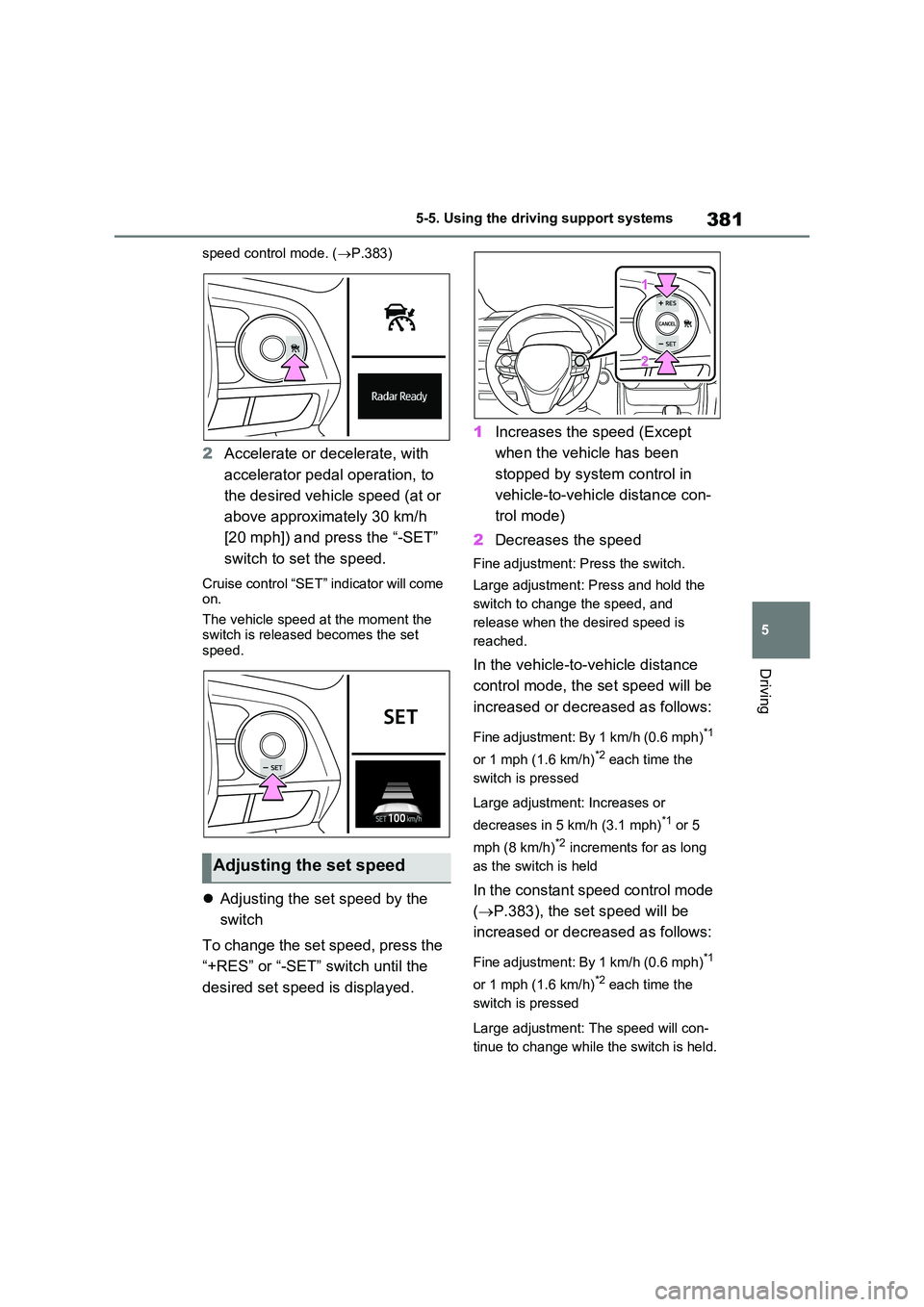
2Accelerate or decelerate, with
accelerator pedal operation, to
the desired vehicle speed (at or
above approximately 30 km/h
[20 mph]) and press the “-SET”
switch to set the speed.
Cruise control “SET” indicator will come on.
The vehicle speed at the moment the switch is released becomes the set speed.
Adjusting the set speed by the
switch
To change the set speed, press the
“+RES” or “-SET” switch until the
desired set speed is displayed.
1 Increases the speed (Except
when the vehicle has been
stopped by system control in
vehicle-to-vehicle distance con-
trol mode)
2 Decreases the speed
Fine adjustment: Press the switch.
Large adjustment: Press and hold the
switch to change the speed, and
release when the desired speed is
reached.
In the vehicle-to-vehicle distance
control mode, the set speed will be
increased or decreased as follows:
Fine adjustment: By 1 km/h (0.6 mph)*1
or 1 mph (1.6 km/h)*2 each time the
switch is pressed
Large adjustment: Increases or
decreases in 5 km/h (3.1 mph)*1 or 5
mph (8 km/h)*2 increments for as long
as the switch is held
In the constant speed control mode
( P.383), the set speed will be
increased or decreased as follows:
Fine adjustment: By 1 km/h (0.6 mph)*1
or 1 mph (1.6 km/h)*2 each time the
switch is pressed
Large adjustment: The speed will con-
tinue to change while the switch is held.
Adjusting the set speed
Page 386 of 664
3865-5. Using the driving support systems
●Actual vehicle speed is more than
approximately 16 km/h (10 mph) below the set vehicle speed.
●Actual vehicle speed falls below approximately 30 km/h (20 mph).
●VSC is activated.
●TRC is activated for a period of time.
●When the VSC or TRC system is turned off.
●Pre-collision braking is activated.
●The parking brake is operated.
If constant speed control mode is auto-
matically canceled for any reasons other
than the above, there may be a malfunc-
tion in the system. Contact any autho-
rized Toyota retailer or Toyota
authorized repairer, or any reliable
repairer.
■The Dynamic Radar Cruise Control with Road Sign Assist may not
operate properly when (vehicles with RSA)
As the Dynamic Radar Cruise Control
with Road Sign Assist may not operate properly in conditions in which RSA may not operate or detect correctly
( P.375), when using this function, make sure to check the speed limit sign displayed.
In the following situations, the set speed may not be changed to the recognized speed limit by pressing and holding the
“+RES”/“-SET” switch.
●If speed limit information is not avail-
able
●When the recognized speed limit is
the same as the set speed
●When the recognized speed limit is
outside of the speed range that the dynamic radar cruise control system can operate
■Brake operation
A brake operation sound may be heard and the brake pedal response may change, but these are not malfunctions.
■Warning messages and buzzers for
dynamic radar cruise control with full-speed range
Warning messages and buzzers are
used to indicate a system malfunction or to inform the driver of the need for cau-tion while driving. If a warning message
is shown on the multi-information dis- play, read the message and follow the instructions. ( P.353, 578)
■When the sensor may not be cor-
rectly detecting the vehicle ahead
In the case of the following and depend- ing on the conditions, operate the brake
pedal when deceleration of the system is insufficient or operate the accelerator pedal when acceleration is required.
As the sensor may not be able to cor- rectly detect these types of vehicles, the approach warning ( P.383) may not be
activated.
●Vehicles that cut in suddenly
●Vehicles traveling at low speeds
●Vehicles that are not moving in the same lane
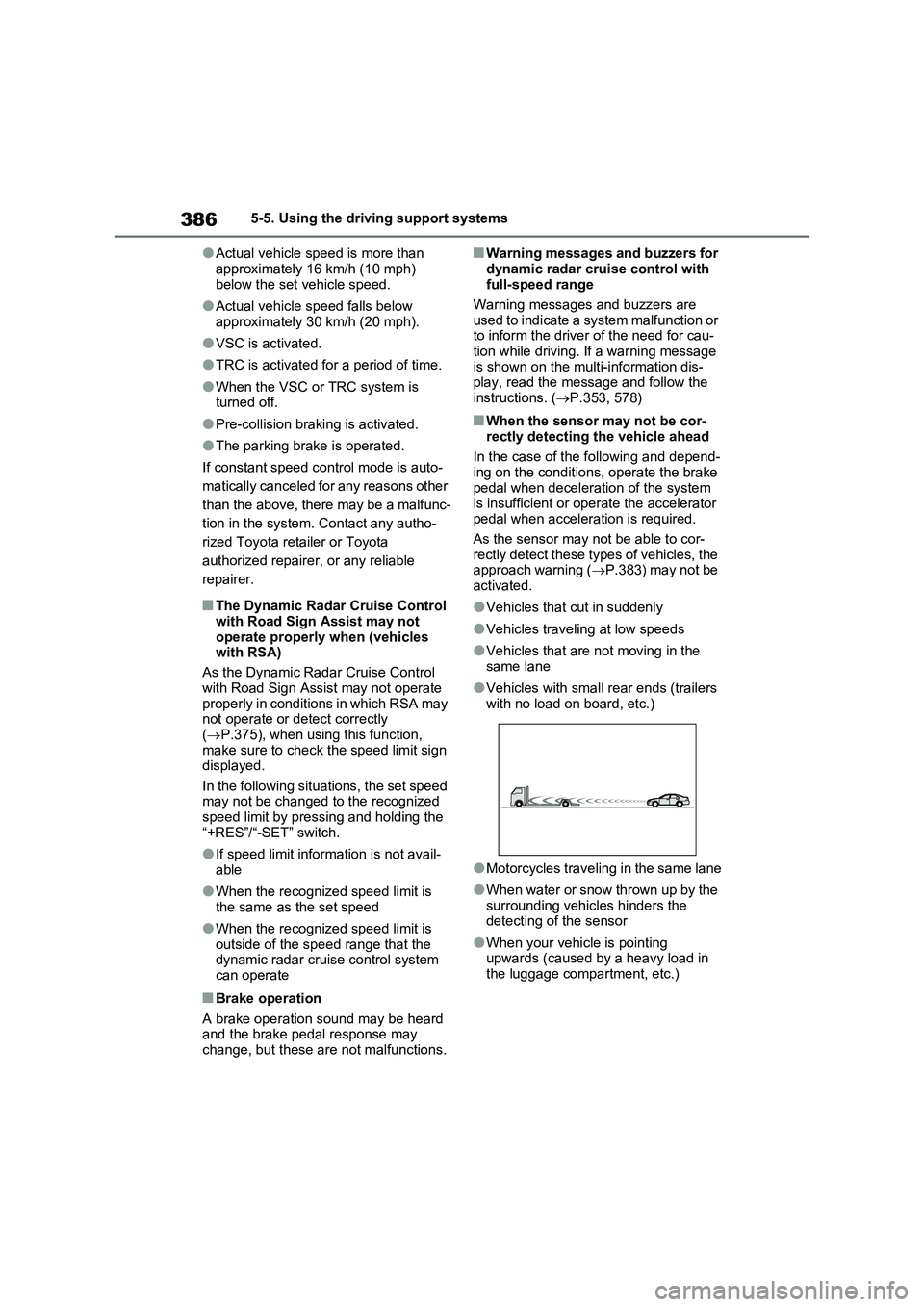
●Vehicles with small rear ends (trailers with no load on board, etc.)
●Motorcycles traveling in the same lane
●When water or snow thrown up by the
surrounding vehicles hinders the detecting of the sensor
●When your vehicle is pointing upwards (caused by a heavy load in the luggage compartment, etc.)
Page 389 of 664
389
5
5-5. Using the driving support systems
Driving
cruise control.
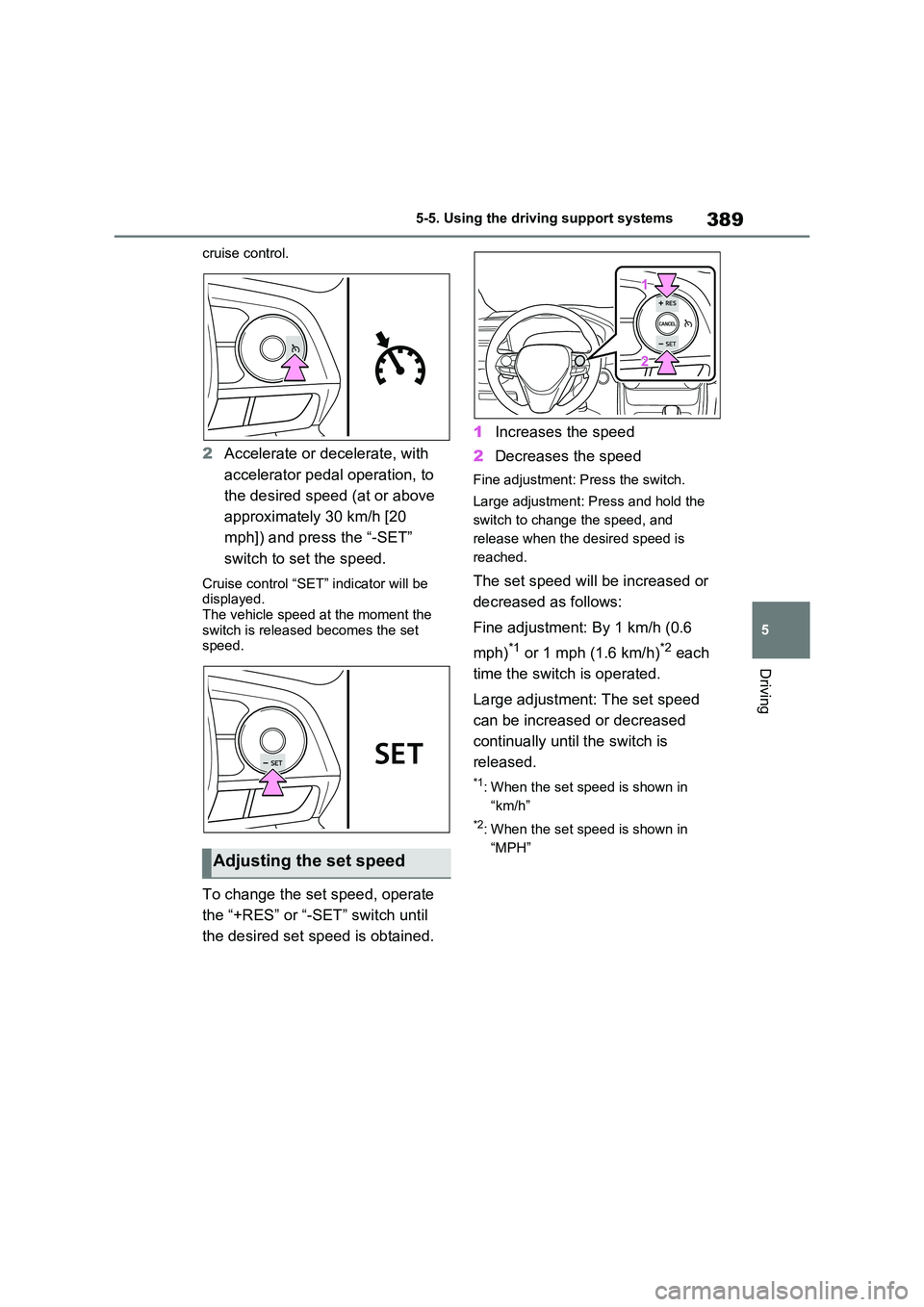
2 Accelerate or decelerate, with
accelerator pedal operation, to
the desired speed (at or above
approximately 30 km/h [20
mph]) and press the “-SET”
switch to set the speed.
Cruise control “SET” indicator will be displayed.
The vehicle speed at the moment the switch is released becomes the set speed.
To change the set speed, operate
the “+RES” or “-SET” switch until
the desired set speed is obtained.
1 Increases the speed
2 Decreases the speed
Fine adjustment: Press the switch.
Large adjustment: Press and hold the
switch to change the speed, and
release when the desired speed is
reached.
The set speed will be increased or
decreased as follows:
Fine adjustment: By 1 km/h (0.6
mph)*1 or 1 mph (1.6 km/h)*2 each
time the switch is operated.
Large adjustment: The set speed
can be increased or decreased
continually until the switch is
released.
*1: When the set speed is shown in
“km/h”
*2: When the set speed is shown in
“MPH”Adjusting the set speed
Page 418 of 664
4185-5. Using the driving support systems
People may not be detected if they are
wearing certain types of clothing.
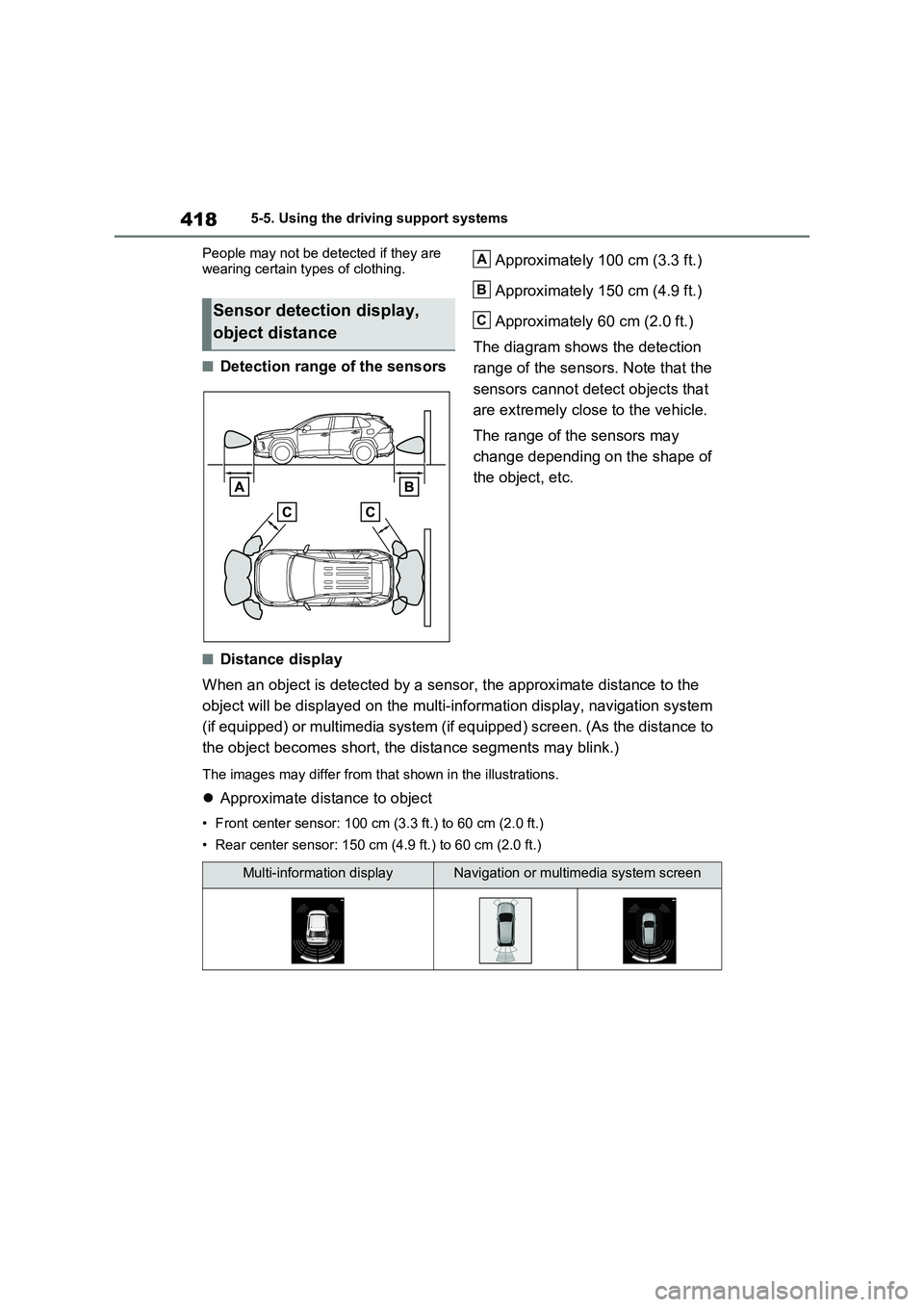
■Detection range of the sensorsApproximately 100 cm (3.3 ft.)
Approximately 150 cm (4.9 ft.)
Approximately 60 cm (2.0 ft.)
The diagram shows the detection
range of the sensors. Note that the
sensors cannot detect objects that
are extremely close to the vehicle.
The range of the sensors may
change depending on the shape of
the object, etc.
■Distance display
When an object is detected by a sensor, the approximate distance to the
object will be displayed on the multi-information display, navigation system
(if equipped) or multimedia system (if equipped) screen. (As the distance to
the object becomes short, the distance segments may blink.)
The images may differ from that shown in the illustrations.
Approximate distance to object
• Front center sensor: 100 cm (3.3 ft.) to 60 cm (2.0 ft.)
• Rear center sensor: 150 cm (4.9 ft.) to 60 cm (2.0 ft.)
Sensor detection display,
object distance
A
B
C
Multi-information displayNavigation or multimedia system screen
Page 421 of 664
421
5
5-5. Using the driving support systems
Driving
The Parking Support Brake can be
enabled/disabled on the screen
of the multi-information display. All
of the Parking Support Brake func-
tions (static objects and rear-cross-
ing vehicles) are enabled/disabled
simultaneously. ( P.186)
When the Parking Support Brake is dis-
abled, the PKSB OFF indicator
( P.171) illuminates on the multi-infor-
mation display.
To re-enable the system, select on
the multi-information display, select
and turn it on.
If the system is disabled, it will remain
off even if the power switch is turned to
ON after the power switch has been
turned off.
WARNING
■Limitations of the Parking Sup- port Brake system
Do not overly rely on the system, as doing so may lead to an accident.
Always drive while checking the
safety of the surroundings of the vehi- cle.
Depending on the vehicle and road
conditions, weather, etc., the system may not operate.
The detection capabilities of sensors
and radars are limited. Always drive while checking the safety of the sur-roundings of the vehicle.
●The driver is solely responsible for safe driving. Always drive carefully,
taking care to observe your sur- roundings. The Parking Support Brake system is designed to pro-
vide support to lessen the severity of collisions. However, it may not operate in some situations.
●The Parking Support Brake system is not designed to stop the vehicle
completely. Additionally, even if the system has stopped the vehicle, it is necessary to depress the brake
pedal immediately as brake control will be canceled after approximately 2 seconds.
●Do not attempt to test the operation of the Parking Support Brake sys-
tem yourself such as intentionally driving to a vehicle or wall.Depending on the situations, the
system may not operate properly, possibly leading to an accident.
NOTICE
■If “PKSB Unavailable” is dis-played on the multi-information
display and the PKSB OFF indi- cator illuminates
If this message is displayed immedi-
ately after the power switch is changed to ON, operate the vehicle carefully, paying attention to your sur-
roundings. It may be necessary to drive the vehicle for a certain amount of time before the system returns to
normal. (If the system does not return to normal after driving for a while, clean the sensors and their surround-
ing area on the bumpers.)
Enabling/Disabling the Park-
ing Support Brake
Page 436 of 664
4365-5. Using the driving support systems
■Trail Mode
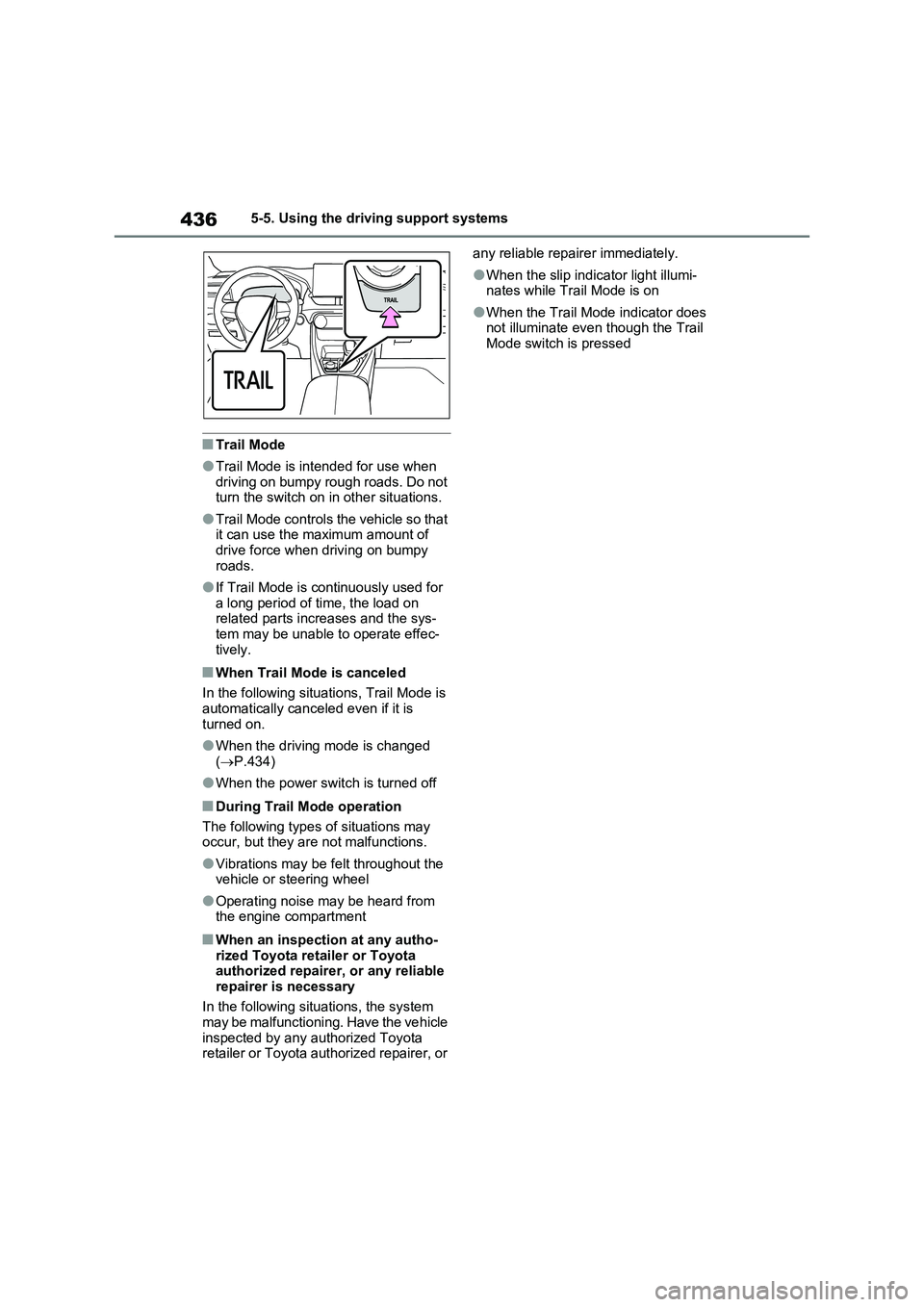
●Trail Mode is intended for use when
driving on bumpy rough roads. Do not
turn the switch on in other situations.
●Trail Mode controls the vehicle so that
it can use the maximum amount of
drive force when driving on bumpy
roads.
●If Trail Mode is continuously used for
a long period of time, the load on
related parts increases and the sys-
tem may be unable to operate effec-
tively.
■When Trail Mode is canceled
In the following situations, Trail Mode is
automatically canceled even if it is
turned on.
●When the driving mode is changed
(P.434)
●When the power switch is turned off
■During Trail Mode operation
The following types of situations may
occur, but they are not malfunctions.
●Vibrations may be felt throughout the
vehicle or steering wheel
●Operating noise may be heard from
the engine compartment
■When an inspection at any autho-
rized Toyota retailer or Toyota
authorized repairer, or any reliable
repairer is necessary
In the following situations, the system
may be malfunctioning. Have the vehicle
inspected by any authorized Toyota
retailer or Toyota authorized repairer, or any reliable repairer immediately.
●When the slip indicator light illumi-
nates while Trail Mode is on
●When the Trail Mode indicator does
not illuminate even though the Trail
Mode switch is pressed
Page 453 of 664
453
6
6-1. Using the air conditioning system and defogger
Interior features
■Adjusting the temperature set-
ting
Turn driver’s side temperature con-
trol dial clockwise to increases the
temperature and turn the dial coun-
terclockwise to decreases the tem-
perature.
The air conditioning system switches
between individual and simultaneous
modes each time the “DUAL” switch is
pressed.
Simultaneous mode (the indicator on
the “DUAL” switch is off):
The driver’s side temperature control
dial can be used to adjust the tempera-
ture for the driver’s and passenger’s
side. At this time, operate the passen-
ger’s side temperature control dial to
enter individual mode.
Individual mode (the indicator on the
“DUAL” switch is on):
The temperature for the driver’s and
passenger’s side can be adjusted sepa-
rately.
■Setting the fan speed
Press the fan speed increase
switch to increase the fan speed
and the fan speed decrease switch
to decrease the fan speed.
Pressing the “OFF” switch to turns off
the fan.
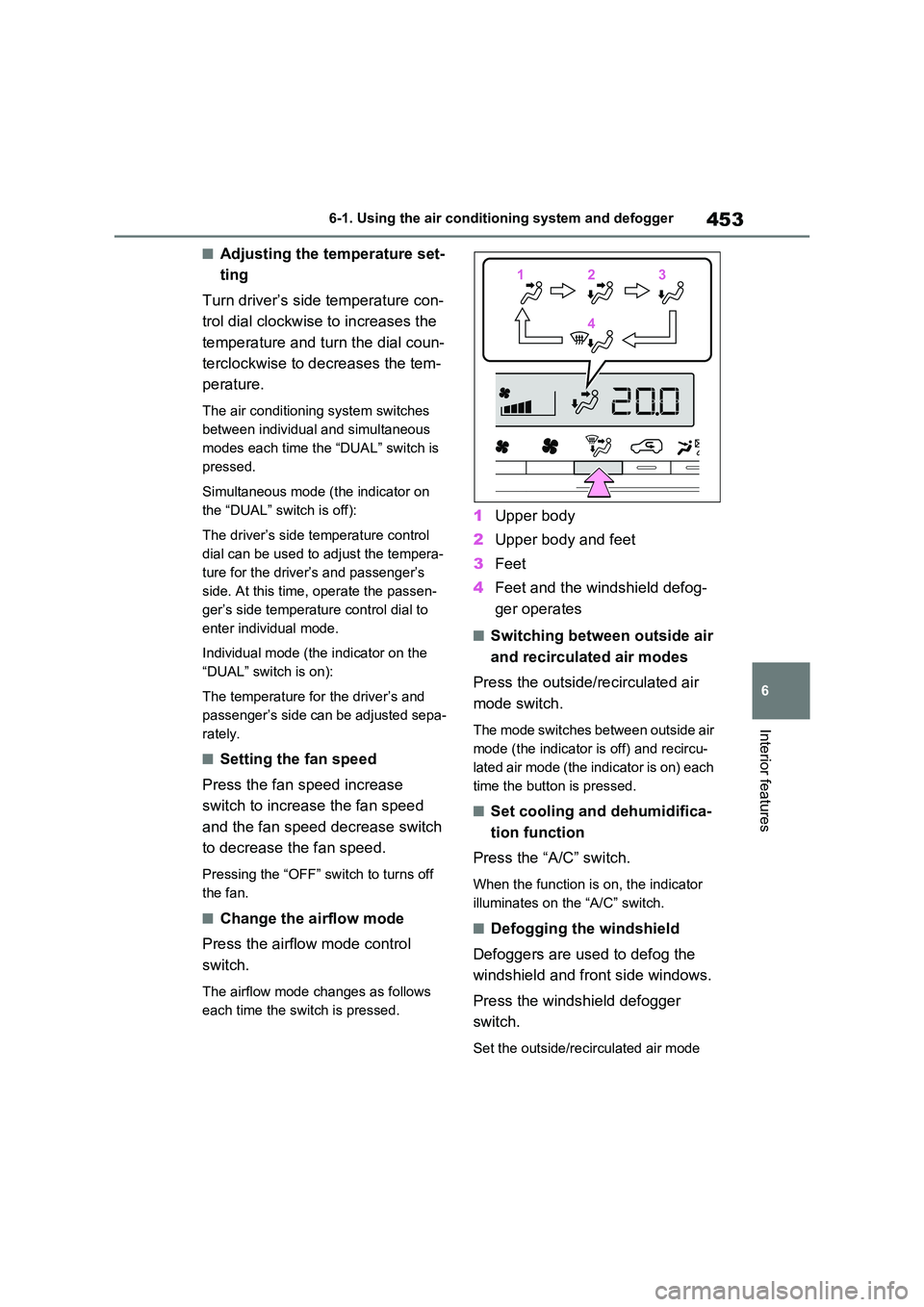
■Change the airflow mode
Press the airflow mode control
switch.
The airflow mode changes as follows
each time the switch is pressed.
1 Upper body
2 Upper body and feet
3 Feet
4 Feet and the windshield defog-
ger operates
■Switching between outside air
and recirculated air modes
Press the outside/recirculated air
mode switch.
The mode switches between outside air
mode (the indicator is off) and recircu-
lated air mode (the indicator is on) each
time the button is pressed.
■Set cooling and dehumidifica-
tion function
Press the “A/C” switch.
When the function is on, the indicator
illuminates on the “A/C” switch.
■Defogging the windshield
Defoggers are used to defog the
windshield and front side windows.
Press the windshield defogger
switch.
Set the outside/recirculated air mode
112233
44