change time TOYOTA VERSO S 2011 Workshop Manual
[x] Cancel search | Manufacturer: TOYOTA, Model Year: 2011, Model line: VERSO S, Model: TOYOTA VERSO S 2011Pages: 664, PDF Size: 160.56 MB
Page 454 of 664
4546-1. Using the air conditioning system and defogger
switch to outside air mode if the recircu-
lated air mode is used. (It may switch
automatically.)
To defog the windshield and the side
windows quickly, turn the air flow and
temperature up.
To return to the previous mode, press
the windshield defogger switch again
when the windshield is defogged.
When the windshield defogger switch is
on, the indicator illuminates on the
windshield defogger switch.
■Defogging the rear window
and outside rear view mirrors
Defoggers are used to defog the
rear window, and to remove rain-
drops, dew and frost from the out-
side rear view mirrors.
Press the rear window defogger
and outside rear view mirror defog-
gers switch.
The defoggers will automatically turn off
after 15 minutes.
When the rear window defogger and
outside rear view mirror defoggers
switch is on, the indicator illuminates on
the rear window defogger and outside
rear view mirror defoggers switch.
■Blower customization
The fan speed can be adjusted
according to your preference.
1Press the automatic mode or
airflow mode control switch.
2Press the blower customization
switch.
3Each time the blower customi-
zation switch is pressed, the fan
speed changes as follows.
Normal “ECO” “FAST”
■Heating
●In HV mode, the gasoline engine may
operate in order to extract heat from
the engine coolant via the heater.
●In EV mode, heating is done by a heat
pump system.
• When the outside temperature is low
or it is snowing, compared to conven-
tional vehicles, heating may be less
effective and warm air may not come
out.
• When the outside heat exchanger is
frosted over, fan speed declines and it
may become harder to heat the inte-
rior. However, it is not a malfunction.
In this situation, the air temperature
from the outlets may not change even
though the set temperature is raised.
• If frost has formed of the outside heat
exchanger, the heating performance
will decline. The frost can be removed
from the outside heat exchanger by
operating the Remote Air Conditioning
System before driving (P.460).
When frosted over, the heating opera-
tion of the Remote Air Conditioning
System starts after defrosting.
• When “AUTO” switch is turned on, the
heating is controlled optimally. There-
fore, the set heating performance may
not be achieved even if the fan speed
setting is increased.
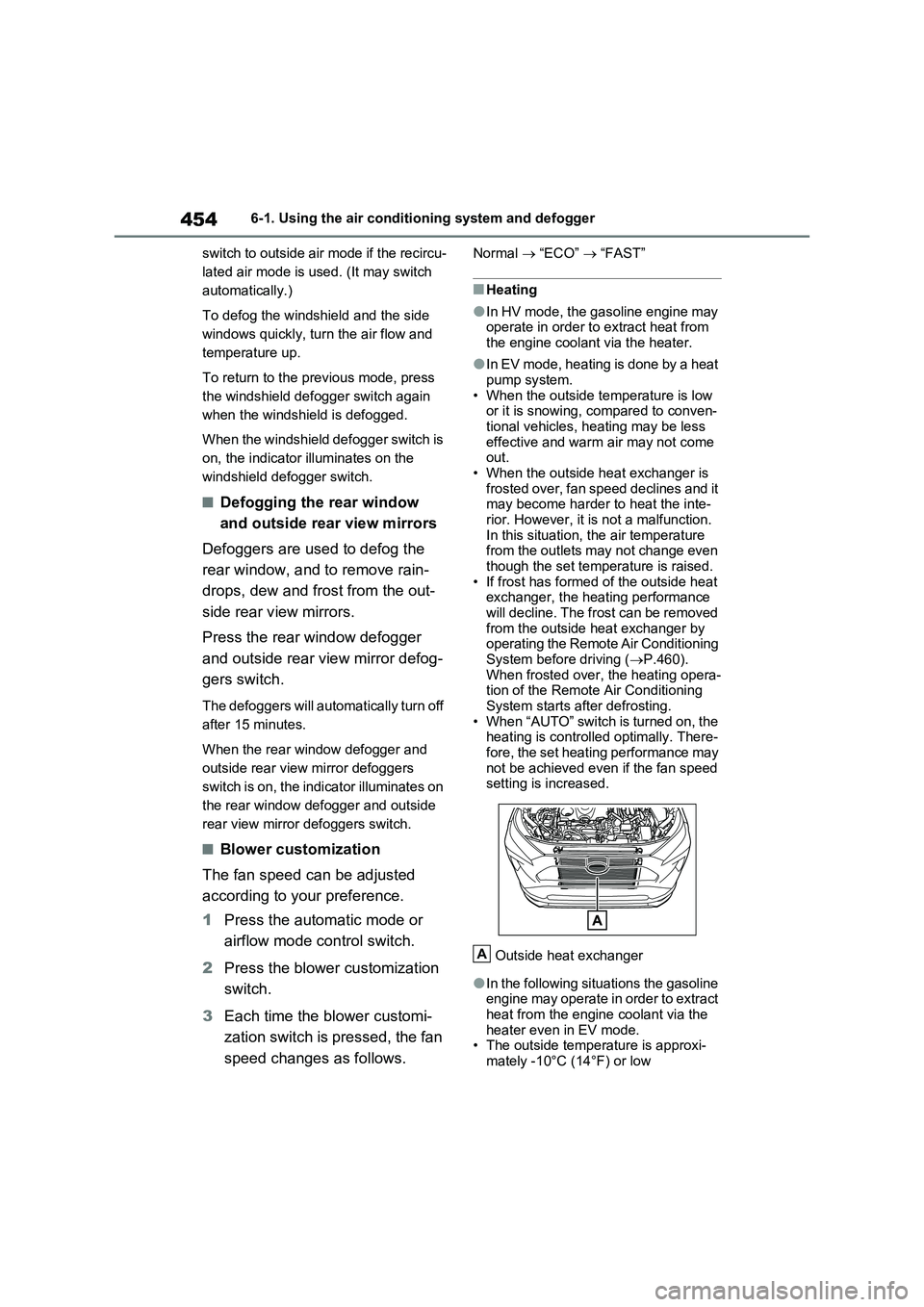
Outside heat exchanger
●In the following situations the gasoline
engine may operate in order to extract
heat from the engine coolant via the
heater even in EV mode.
• The outside temperature is approxi-
mately -10°C (14°F) or low
A
Page 456 of 664
4566-1. Using the air conditioning system and defogger
●During use, various odors from inside
and outside the vehicle may enter into and accumulate in the air conditioning system. This may then cause odor to
be emitted from the vents.
●To reduce potential odors from occur-
ring: • It is recommended that the air condi-tioning system be set to outside air
mode prior to turning the vehicle off. • The start timing of the blower may be delayed for a short period of time
immediately after the air conditioning system is started in automatic mode.
●When parking, the system automati-cally switches to outside air mode to encourage better air circulation
throughout the vehicle, helping to reduce odors that occur when starting the vehicle.
■Air conditioning filter
P.532
■Noise from air conditioning system
Approximately 90 seconds after the power switch turned to OFF, you may
hear sound coming from air conditioning system. This is the sound of a air condi-tioning system initialize and, it does not
indicate a malfunction.
■Customization
Settings (e.g. A/C Auto switch opera- tion) can be changed.
(Customizable features: P.640)
1Press the “AUTO” switch.
The dehumidification function begins to
operate. Air outlets and fan speed are automatically adjusted according to the temperature setting and humidity.
2 Adjust the temperature setting.
3 To stop the operation, press the
“OFF” switch.
If the fan speed setting or air flow
modes are operated, the automatic
mode indicator goes off. However,
automatic mode for functions other
than that operated is maintained.
■Using automatic mode
Fan speed is adjusted automatically
according to the temperature setting and the ambient conditions.
WARNING
■Cautions for using “My Room Mode”
Do not leave children, people who need assistance, or pets inside the vehicle. The system may turn off
automatically and the interior tem- perature may become high or low, resulting in heat stroke, dehydration
or hypothermia. Failure to do so may result in death or serious injury.
■To prevent the windshield from fogging up
Do not use the windshield defogger
switch during cool air operation in extremely humid weather.The difference between the tempera-
ture of the outside air and that of the windshield can cause the outer sur-face of the windshield to fog up,
blocking your vision.
■When the outside rear view mir-
ror defoggers are operating
Do not touch the rear view mirror sur- faces when the outside rear view mir-
ror defoggers are on.
NOTICE
■To prevent 12-volt battery dis- charge
Do not leave the air conditioning sys- tem on longer than necessary when the hybrid system is off.
Using automatic mode
Page 458 of 664
4586-1. Using the air conditioning system and defogger
tributing to increased fuel effi-
ciency.
Front seat concentrated airflow
mode operates in the following situ-
ations.
No passengers are detected in
the rear seats
The windshield defogger is not
operating
While operating, illuminates.
■Manually turning front seat
concentrated airflow mode
on/off
In front seat concentrated airflow
mode, directing airflow to the front
seats only and to all seats can be
switched via switch operation.
When the mode has been switched
manually, automatic airflow control
stops operating.
Press the on the air condition-
ing operation panel and switch the
airflow.
Indicator illuminated: Airflow to
the front seats only
Indicator off: Airflow to all the
seats
■Operation of automatic airflow con-
trol
●In order to maintain a comfortable
interior, airflow may be directed to
seats without passengers immediately
after the hybrid system is started and
at other times depending on the out-
side temperature.
●After the hybrid system is started, if passengers move around inside or
enter/exit the vehicle, the system can-
not accurately detect the presence of
passengers and automatic airflow
control will not operate.
■Operation of manual airflow control
Even if the function is manually switched
to directing airflow to only the front
seats, when a rear seat is occupied, it
may automatically direct airflow to all
seats.
■To return to automatic airflow con-
trol
1With the indicator off, turn the power
switch off.
2After 60 minutes or more elapse,
turn the power switch to ON.
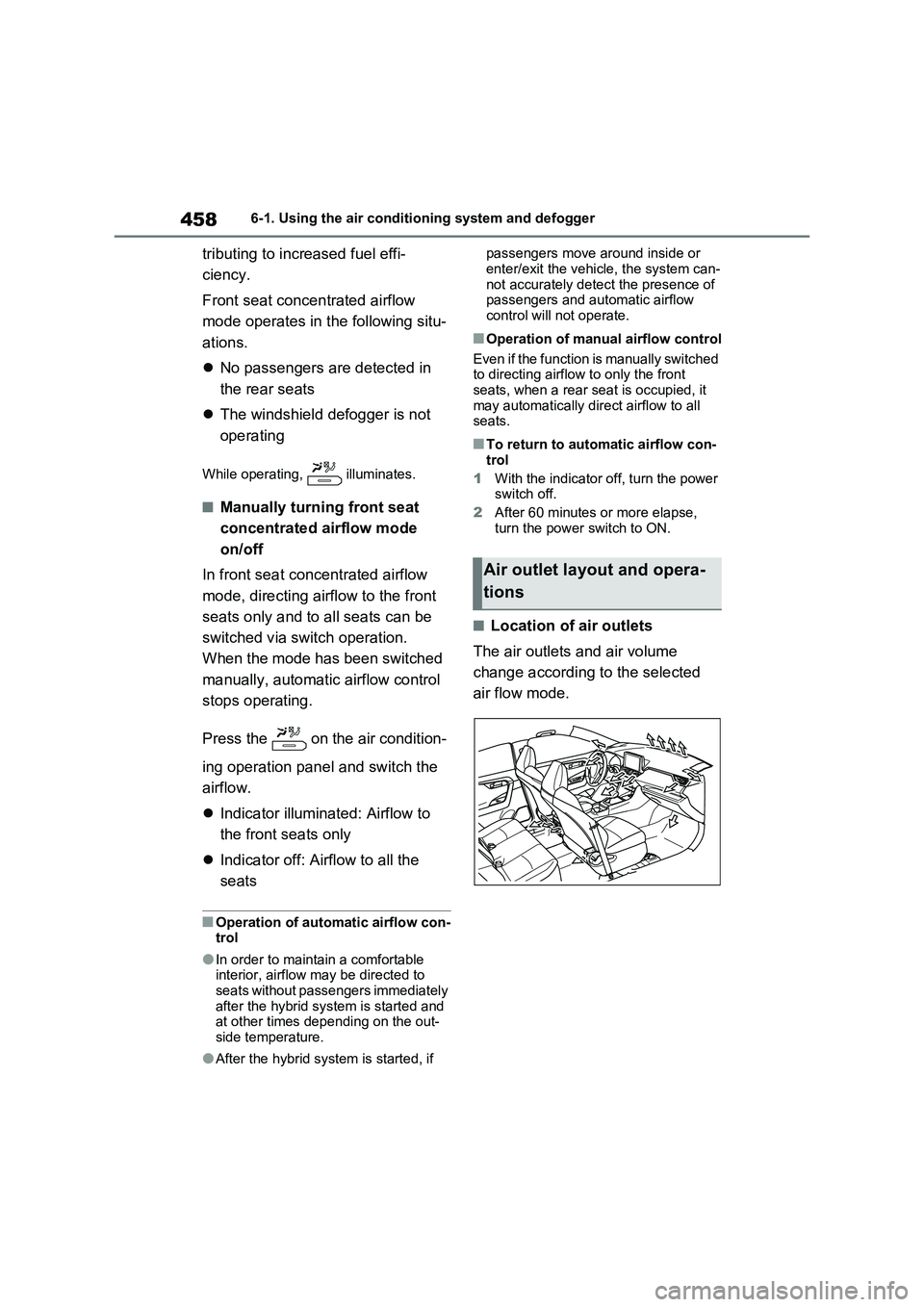
■Location of air outlets
The air outlets and air volume
change according to the selected
air flow mode.
Air outlet layout and opera-
tions
Page 461 of 664
461
6
6-1. Using the air conditioning system and defogger
Interior features
●The outside temperature is extremely
low
●When the hybrid system is cool (for
example, after being left for a long time in low temperatures)
■Windshield defogger
When defogging the windshield using
the Remote Air Conditioning System, defogging may be insufficient due to the power being restricted more than during
normal air conditioning operation. Also, the outside of the windshield may fog up due to the outside temperature, humidity
or air conditioning set temperature.
■Using the heater via the Remote Air Conditioning System
●When the outside temperature is low, heating may feel insufficient due to restricted operation of the air condi-
tioning.
●When the outside heat exchanger
becomes frosted over, heating perfor- mance may decline due to automati-cally switching to the frost removal
operation. ( P.452)
■Security feature
Any unlocked doors will be automatically locked when the system is operating.
The emergency flashers flash to indicate that the doors have been locked or the system has been turned off.
■Conditions affecting operation
P.225
■While the Remote Air Conditioning System is operating
●Depending on the operating condition of the Remote Air Conditioning Sys-tem, the air conditioning compressor
or cooling fan may spin and an operat- ing noise may be heard.However, this does not indicate a mal-
function.
●The air conditioning operation
switches, etc. will not operate while the Remote Air Conditioning System is operating.
■Electronic key battery depletion
P.202
■When the electronic key battery is fully depleted
P.543
■Customization
Setting (e.g. Operation using “A/C” on the wireless remote control) can be changed. (Customizable features:
P.629)
WARNING
■Precautions for the Remote Air Conditioning System
●Do not use the system if people are in the vehicle. Even when the system is in use, the
internal temperature may still reach a high or low level due to features such as the automatic shut-off.
Children and pets left inside the vehicle may suffer heatstroke dehy-dration or hypothermia, or could
result in death or serious injury.
●Depending on the surrounding envi-
ronment, signals from the wireless switch may transmit further than expected. Pay appropriate attention
to the vehicle’s surroundings and use the switch only when neces-sary.
●Do not operate “A/C” on the wire-less remote control if the hood is
open. The air conditioning may operate unintentionally and objects may be drawn into the electrical
cooling fan.
NOTICE
■To prevent the hybrid battery (traction battery) from being dis-charged
Use “A/C” on the wireless remote control only when necessary.
Page 463 of 664
463
6
6-1. Using the air conditioning system and defogger
Interior features
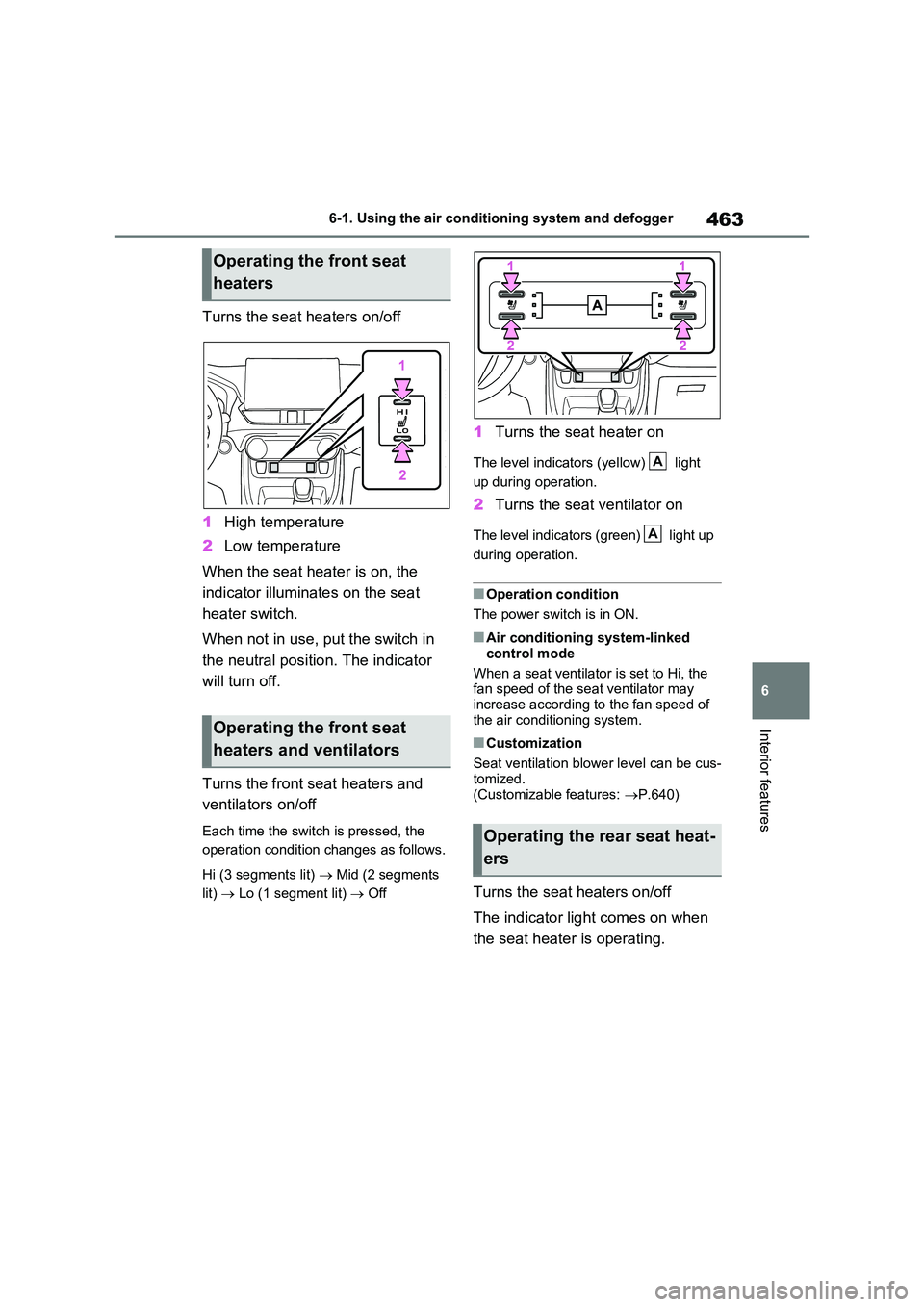
Turns the seat heaters on/off
1 High temperature
2 Low temperature
When the seat heater is on, the
indicator illuminates on the seat
heater switch.
When not in use, put the switch in
the neutral position. The indicator
will turn off.
Turns the front seat heaters and
ventilators on/off
Each time the switch is pressed, the
operation condition changes as follows.
Hi (3 segments lit) Mid (2 segments
lit) Lo (1 segment lit) Off
1Turns the seat heater on
The level indicators (yellow) light
up during operation.
2 Turns the seat ventilator on
The level indicators (green) light up
during operation.
■Operation condition
The power switch is in ON.
■Air conditioning system-linked
control mode
When a seat ventilator is set to Hi, the fan speed of the seat ventilator may
increase according to the fan speed of the air conditioning system.
■Customization
Seat ventilation blower level can be cus-
tomized. (Customizable features: P.640)
Turns the seat heaters on/off
The indicator light comes on when
the seat heater is operating.
Operating the front seat
heaters
Operating the front seat
heaters and ventilators
Operating the rear seat heat-
ers
A
A
Page 466 of 664
4666-2. Using the interior lights
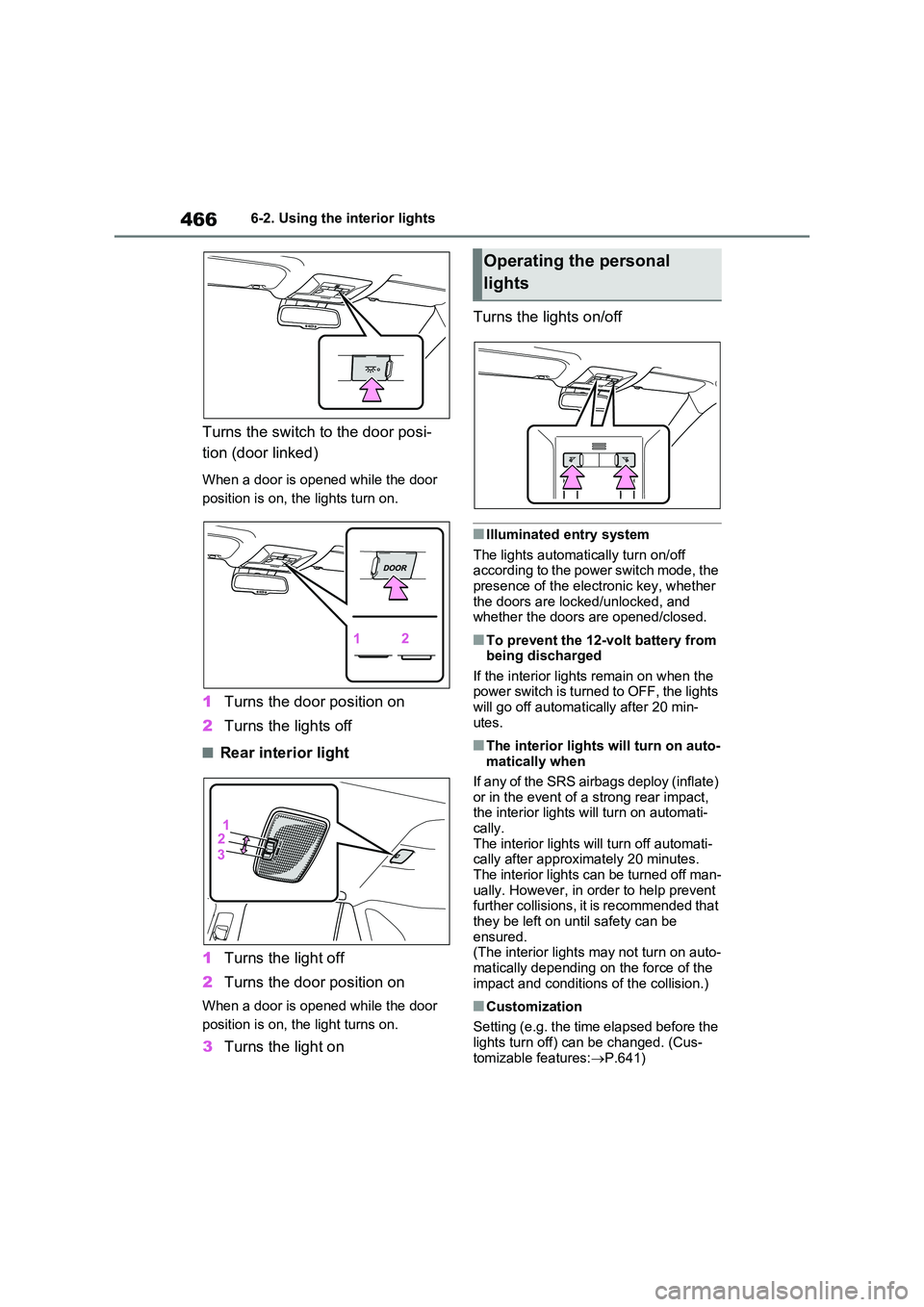
Turns the switch to the door posi-
tion (door linked)
When a door is opened while the door
position is on, the lights turn on.
1 Turns the door position on
2 Turns the lights off
■Rear interior light
1 Turns the light off
2 Turns the door position on
When a door is opened while the door
position is on, the light turns on.
3 Turns the light on
Turns the lights on/off
■Illuminated entry system
The lights automatically turn on/off according to the power switch mode, the presence of the electronic key, whether
the doors are locked/unlocked, and whether the doors are opened/closed.
■To prevent the 12-volt battery from being discharged
If the interior lights remain on when the power switch is turned to OFF, the lights will go off automatically after 20 min-
utes.
■The interior lights will turn on auto- matically when
If any of the SRS airbags deploy (inflate)
or in the event of a strong rear impact, the interior lights will turn on automati-cally.
The interior lights will turn off automati- cally after approximately 20 minutes. The interior lights can be turned off man-
ually. However, in order to help prevent further collisions, it is recommended that they be left on until safety can be
ensured. (The interior lights may not turn on auto-
matically depending on the force of the impact and conditions of the collision.)
■Customization
Setting (e.g. the time elapsed before the
lights turn off) can be changed. (Cus- tomizable features: P.641)
Operating the personal
lights
Page 482 of 664
4826-4. Using the other interior features
• Repeatedly flashes 4 times con-
tinuously (Orange)
■The wireless charger can be oper-
ated when
The power switch is in ACC or ON.
■Usable portable devices
Qi standard wireless charge standard
can be used on compatible devices.
However, not all Qi standard devices
and compatibility are guaranteed.
Starting with mobile phones and
smartphones, it is aimed for low power
electrically supplied portable devices of
no more than 5W.
■When covers and accessories are
attached to portable devices
Do not charge in situations where cover
and accessories not able to handle Qi
are attached to the portable device.
Depending on the type of cover and
accessory, it may not be possible to
charge. When charging is not performed
even with the portable device placed on
the charge area, remove the cover and
accessories.
■While charging, noise enters the
AM radio
Turn off the wireless charger and con-
firm that the noise has decreased. If the
noise decreases, continuously pushing
the power supply switch of the wireless
charger for 2 seconds, the frequency of
the charger can be changed and the
noise can be reduced.Also, on that
occasion, the operation indicator light
will flash orange 2 times.
■Important points of the wireless
charger
●If the electronic key cannot be detected within the vehicle interior,
charging cannot be done. When the
door is opened and closed, charging
may be temporarily suspended.
●When charging, the wireless charging
device and portable device will get
warmer, however this is not a mal-
function.
When a portable device gets warm
while charging, charging may stop
due to the protection function on the
portable device side. In this case,
when the temperature of the portable
device drops significantly, charge
again.
●Depending on usage of the portable
device, it may not be fully charged.
This is not a malfunction.
●When using a mobile phone near a
wireless charger, the call sensitivity
and communication speed may be
reduced.
■Operation sounds
When the power supply is turned on,
while searching for the portable device a
sound will be produced, however this is
not a malfunction.
■Cleaning the wireless charger
P.492
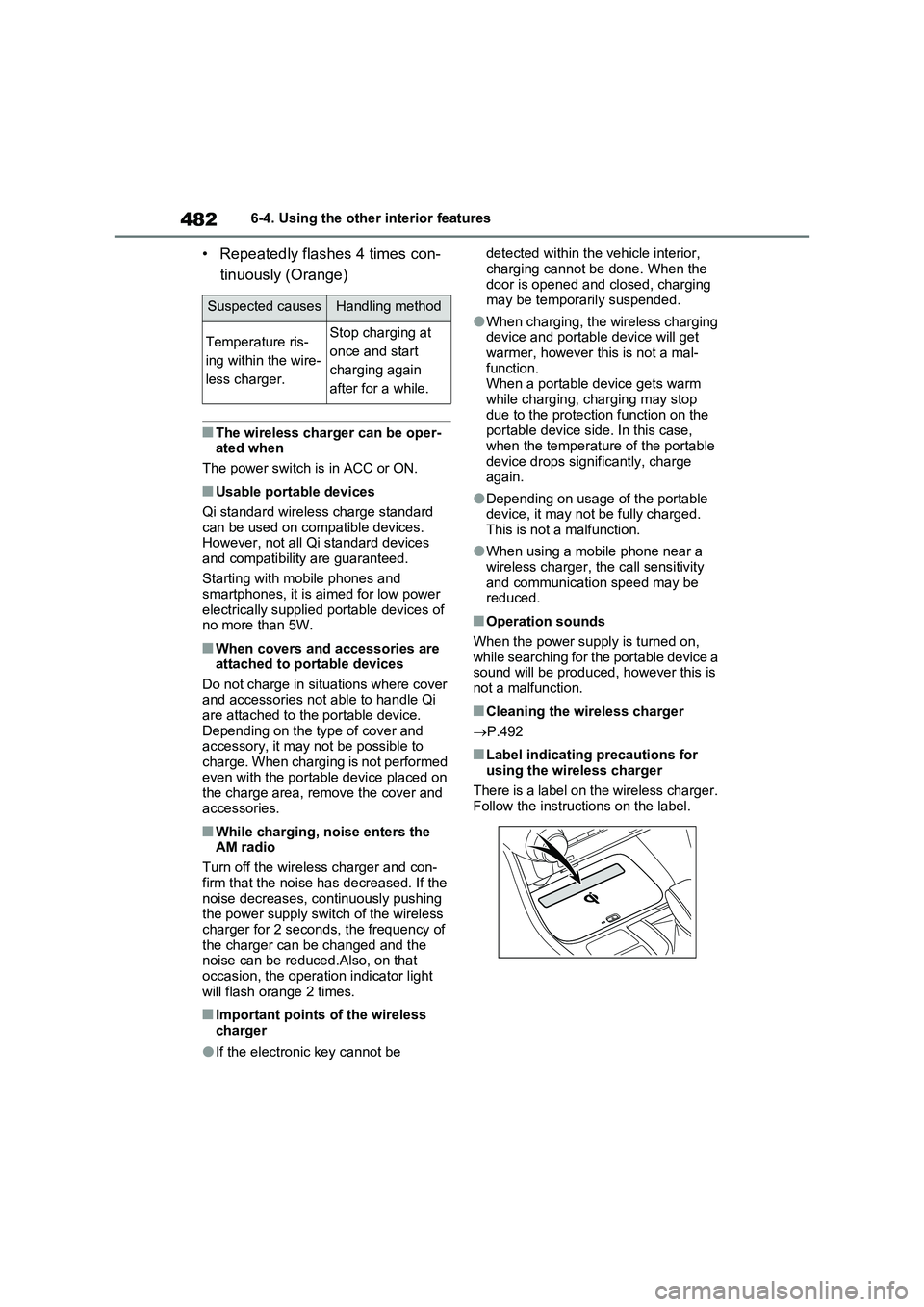
■Label indicating precautions for
using the wireless charger
There is a label on the wireless charger.
Follow the instructions on the label.
Suspected causesHandling method
Temperature ris-
ing within the wire-
less charger.Stop charging at
once and start
charging again
after for a while.
Page 512 of 664
5127-3. Do-it-yourself maintenance
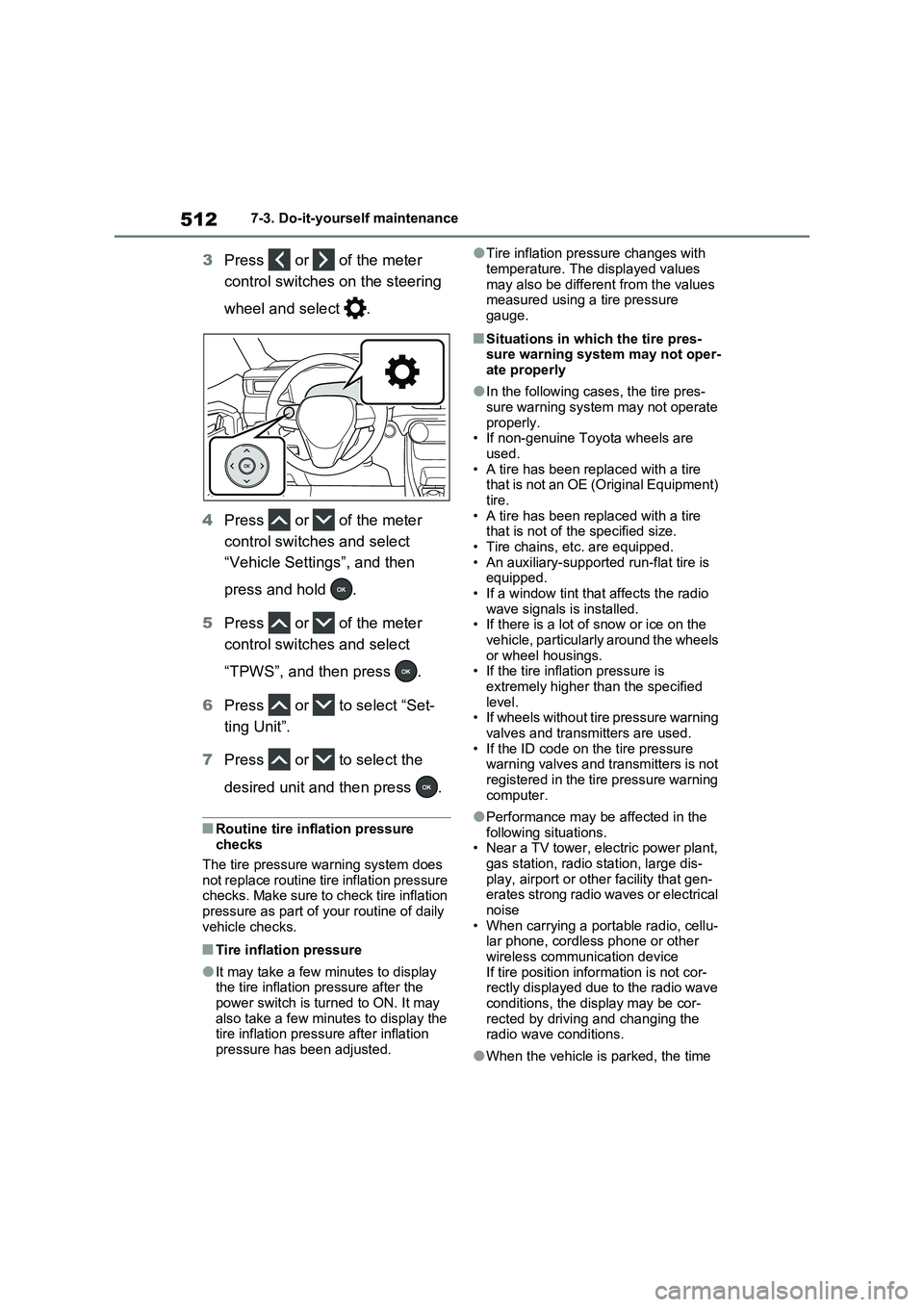
3Press or of the meter
control switches on the steering
wheel and select .
4Press or of the meter
control switches and select
“Vehicle Settings”, and then
press and hold .
5Press or of the meter
control switches and select
“TPWS”, and then press .
6Press or to select “Set-
ting Unit”.
7Press or to select the
desired unit and then press .
■Routine tire inflation pressure
checks
The tire pressure warning system does
not replace routine tire inflation pressure
checks. Make sure to check tire inflation
pressure as part of your routine of daily
vehicle checks.
■Tire inflation pressure
●It may take a few minutes to display
the tire inflation pressure after the
power switch is turned to ON. It may
also take a few minutes to display the
tire inflation pressure after inflation
pressure has been adjusted.
●Tire inflation pressure changes with
temperature. The displayed values
may also be different from the values
measured using a tire pressure
gauge.
■Situations in which the tire pres-
sure warning system may not oper-
ate properly
●In the following cases, the tire pres-
sure warning system may not operate
properly.
• If non-genuine Toyota wheels are
used.
• A tire has been replaced with a tire
that is not an OE (Original Equipment)
tire.
• A tire has been replaced with a tire
that is not of the specified size.
• Tire chains, etc. are equipped.
• An auxiliary-supported run-flat tire is
equipped.
• If a window tint that affects the radio
wave signals is installed.
• If there is a lot of snow or ice on the
vehicle, particularly around the wheels
or wheel housings.
• If the tire inflation pressure is
extremely higher than the specified
level.
• If wheels without tire pressure warning
valves and transmitters are used.
• If the ID code on the tire pressure
warning valves and transmitters is not
registered in the tire pressure warning
computer.
●Performance may be affected in the
following situations.
• Near a TV tower, electric power plant,
gas station, radio station, large dis-
play, airport or other facility that gen-
erates strong radio waves or electrical
noise
• When carrying a portable radio, cellu-
lar phone, cordless phone or other
wireless communication device
If tire position information is not cor-
rectly displayed due to the radio wave
conditions, the display may be cor-
rected by driving and changing the
radio wave conditions.
●When the vehicle is parked, the time
Page 526 of 664
5267-3. Do-it-yourself maintenance
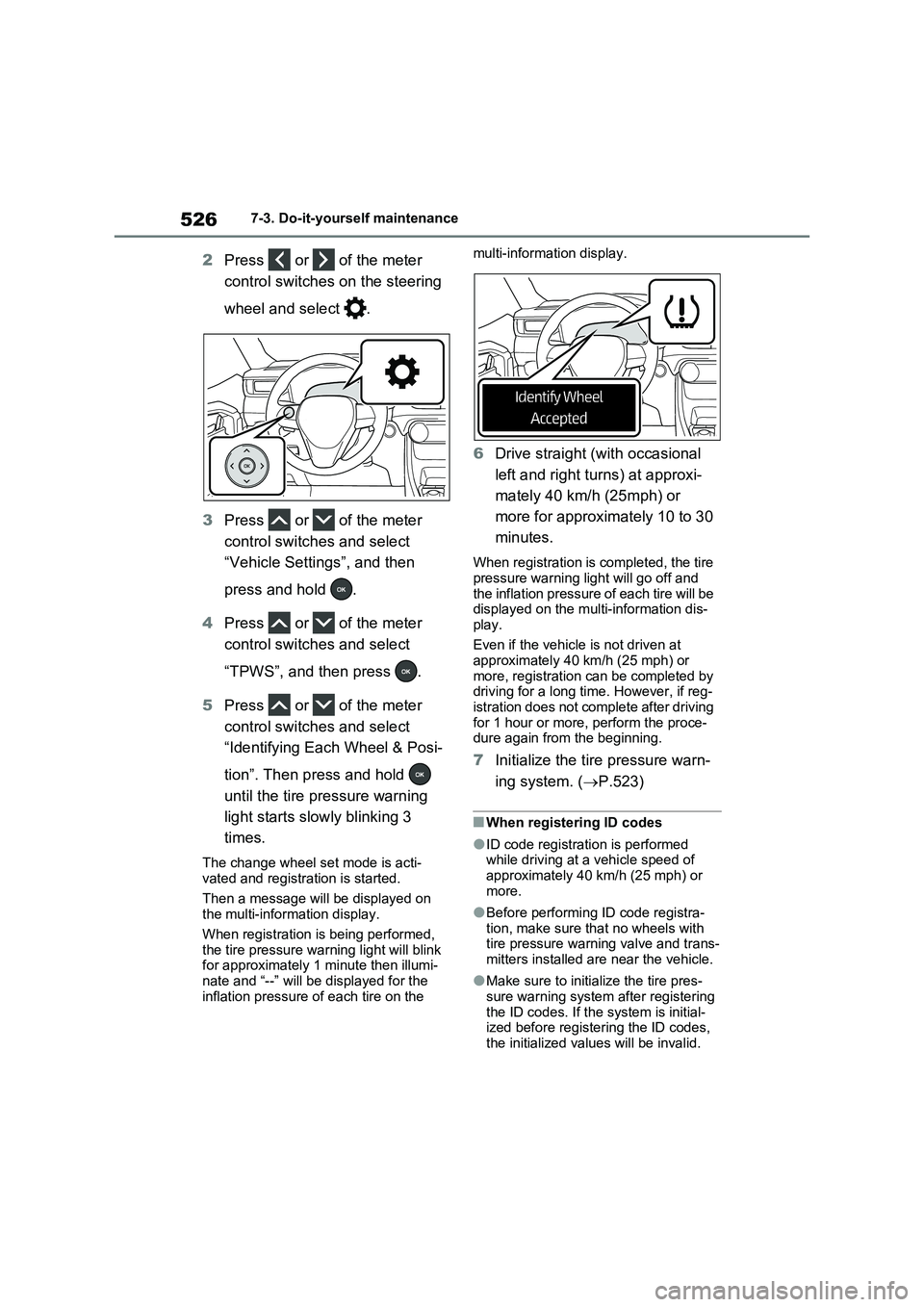
2Press or of the meter
control switches on the steering
wheel and select .
3Press or of the meter
control switches and select
“Vehicle Settings”, and then
press and hold .
4Press or of the meter
control switches and select
“TPWS”, and then press .
5Press or of the meter
control switches and select
“Identifying Each Wheel & Posi-
tion”. Then press and hold
until the tire pressure warning
light starts slowly blinking 3
times.
The change wheel set mode is acti-
vated and registration is started.
Then a message will be displayed on
the multi-information display.
When registration is being performed,
the tire pressure warning light will blink
for approximately 1 minute then illumi-
nate and “--” will be displayed for the
inflation pressure of each tire on the multi-information display.
6Drive straight (with occasional
left and right turns) at approxi-
mately 40 km/h (25mph) or
more for approximately 10 to 30
minutes.
When registration is completed, the tire
pressure warning light will go off and
the inflation pressure of each tire will be
displayed on the multi-information dis-
play.
Even if the vehicle is not driven at
approximately 40 km/h (25 mph) or
more, registration can be completed by
driving for a long time. However, if reg-
istration does not complete after driving
for 1 hour or more, perform the proce-
dure again from the beginning.
7Initialize the tire pressure warn-
ing system. (P.523)
■When registering ID codes
●ID code registration is performed
while driving at a vehicle speed of
approximately 40 km/h (25 mph) or
more.
●Before performing ID code registra-
tion, make sure that no wheels with
tire pressure warning valve and trans-
mitters installed are near the vehicle.
●Make sure to initialize the tire pres-
sure warning system after registering
the ID codes. If the system is initial-
ized before registering the ID codes,
the initialized values will be invalid.
Page 528 of 664
5287-3. Do-it-yourself maintenance
After registration of a second wheel
set, either of these two wheel sets
can be selected for usage with the
tire pressure warning system.
■Operating conditions for the
function
This function will perform the
change of wheel set only if a sec-
ond wheel set has been regis-
tered. If no second wheel set has
been registered, no change will
be made when selecting this
function in the menu.
Only a change between both
registered wheel set is possible,
mixing between these wheel sets
is not supported.
■How to change between wheel
sets
1Have the vehicle fitted with the
preferred wheel set.
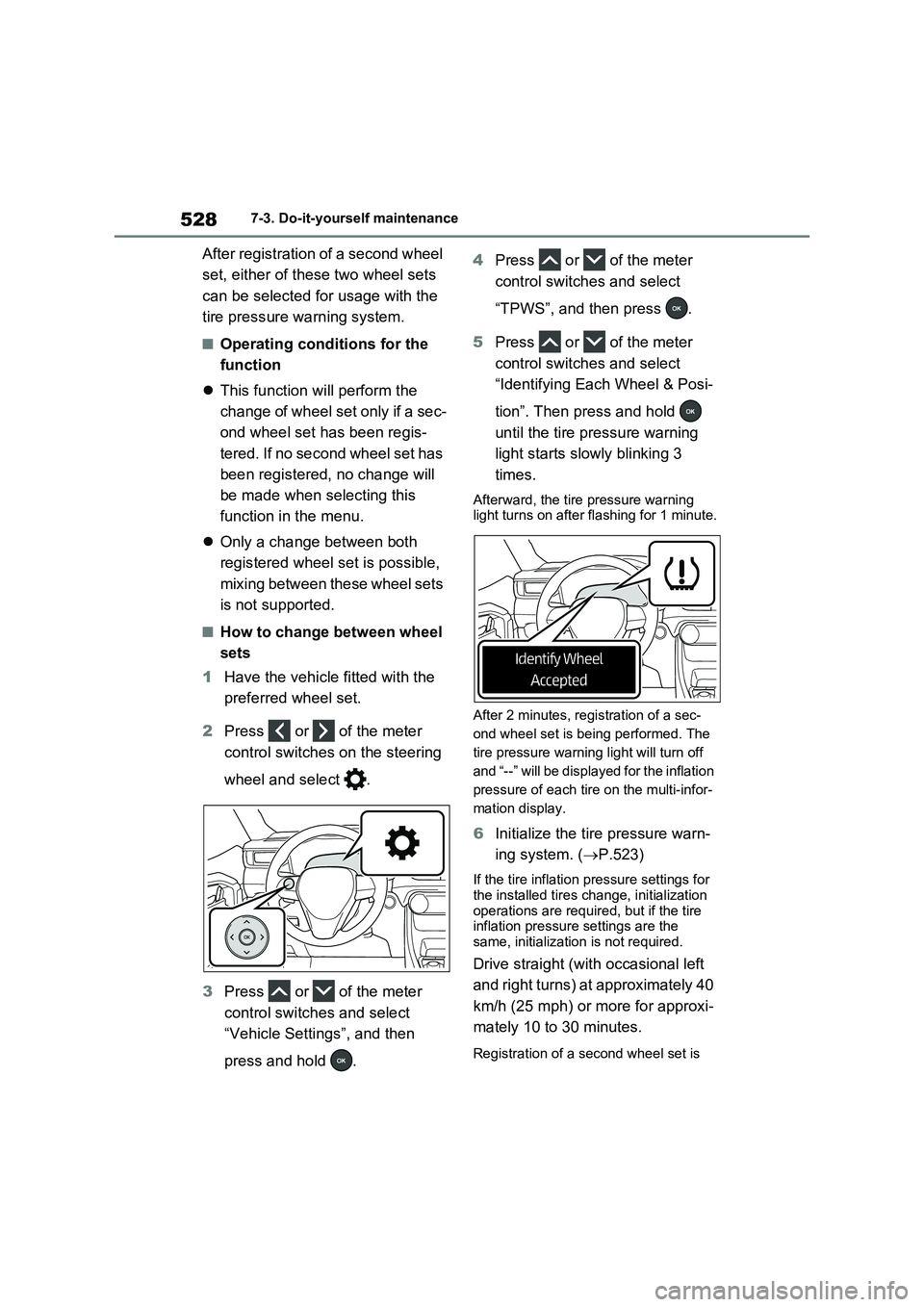
2Press or of the meter
control switches on the steering
wheel and select .
3Press or of the meter
control switches and select
“Vehicle Settings”, and then
press and hold .4Press or of the meter
control switches and select
“TPWS”, and then press .
5Press or of the meter
control switches and select
“Identifying Each Wheel & Posi-
tion”. Then press and hold
until the tire pressure warning
light starts slowly blinking 3
times.
Afterward, the tire pressure warning
light turns on after flashing for 1 minute.
After 2 minutes, registration of a sec-
ond wheel set is being performed. The
tire pressure warning light will turn off
and “--” will be displayed for the inflation
pressure of each tire on the multi-infor-
mation display.
6Initialize the tire pressure warn-
ing system. (P.523)
If the tire inflation pressure settings for
the installed tires change, initialization
operations are required, but if the tire
inflation pressure settings are the
same, initialization is not required.
Drive straight (with occasional left
and right turns) at approximately 40
km/h (25 mph) or more for approxi-
mately 10 to 30 minutes.
Registration of a second wheel set is