battery TOYOTA VERSO S 2011 Manual Online
[x] Cancel search | Manufacturer: TOYOTA, Model Year: 2011, Model line: VERSO S, Model: TOYOTA VERSO S 2011Pages: 664, PDF Size: 160.56 MB
Page 358 of 664
3585-5. Using the driving support systems
1Early
2 Middle
This is the default setting.
3Late
■Operational conditions
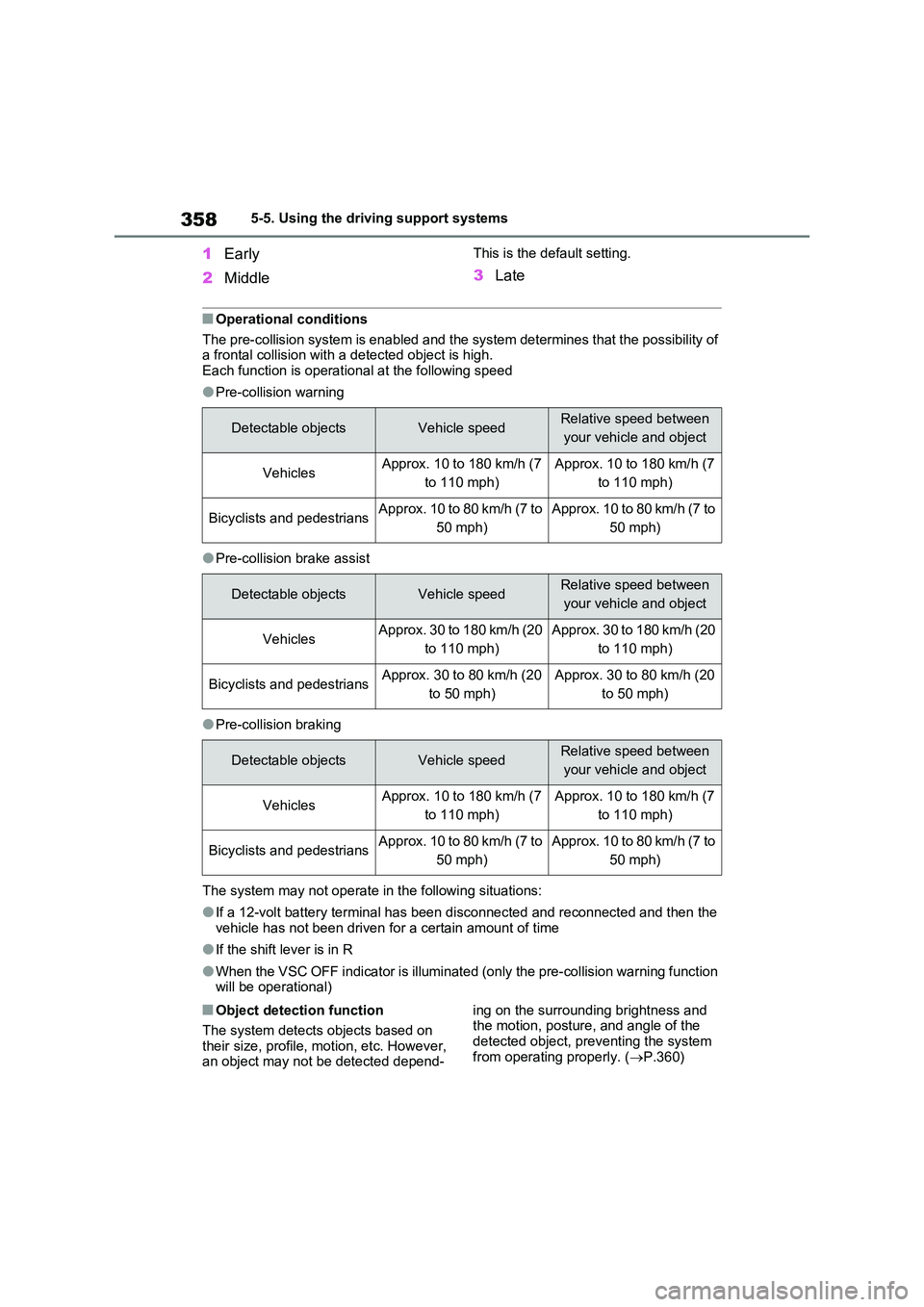
The pre-collision system is enabled and the system determines that the possibility of a frontal collision with a detected object is high.Each function is operational at the following speed
●Pre-collision warning
●Pre-collision brake assist
●Pre-collision braking
The system may not operate in the following situations:
●If a 12-volt battery terminal has been disconnected and reconnected and then the vehicle has not been driven for a certain amount of time
●If the shift lever is in R
●When the VSC OFF indicator is illuminated (only the pre-collision warning function will be operational)
■Object detection function
The system detects objects based on
their size, profile, motion, etc. However, an object may not be detected depend-
ing on the surrounding brightness and the motion, posture, and angle of the
detected object, preventing the system from operating properly. ( P.360)
Detectable objectsVehicle speedRelative speed between
your vehicle and object
VehiclesApprox. 10 to 180 km/h (7
to 110 mph)
Approx. 10 to 180 km/h (7
to 110 mph)
Bicyclists and pedestriansApprox. 10 to 80 km/h (7 to
50 mph)
Approx. 10 to 80 km/h (7 to
50 mph)
Detectable objectsVehicle speedRelative speed between
your vehicle and object
VehiclesApprox. 30 to 180 km/h (20
to 110 mph)
Approx. 30 to 180 km/h (20
to 110 mph)
Bicyclists and pedestriansApprox. 30 to 80 km/h (20
to 50 mph)
Approx. 30 to 80 km/h (20
to 50 mph)
Detectable objectsVehicle speedRelative speed between
your vehicle and object
VehiclesApprox. 10 to 180 km/h (7
to 110 mph)
Approx. 10 to 180 km/h (7
to 110 mph)
Bicyclists and pedestriansApprox. 10 to 80 km/h (7 to
50 mph)
Approx. 10 to 80 km/h (7 to
50 mph)
Page 445 of 664
445
5
5-6. Driving tips
Driving
5-6.Driving tips
Use fluids that are appropriate to
the prevailing outside tempera-
tures.
• Engine oil
• Engine coolant
• Power control unit coolant
• Washer fluid
Have a service technician
inspect the condition of the 12-
volt battery.
Have the vehicle fitted with four
snow tires or purchase a set of
tire chains for the front tires.
Ensure that all tires are the same size
and brand, and that chains match the
size of the tires.*
*: Tire chains cannot be mounted on
vehicles with 235/55R19 tires.
Winter driving tips
Carry out the necessary prepa-
rations and inspections before
driving the vehicle in winter.
Always drive the vehicle in a
manner appropriate to the pre-
vailing weather conditions.
Pre-winter preparations
WARNING
■Driving with snow tires
Observe the following precautions to reduce the risk of accidents.
Failure to do so may result in a loss of vehicle control and cause death or serious injury.
●Use tires of the specified size.
●Maintain the recommended level of air pressure.
●Do not drive at speeds in excess of the speed limit or the speed limit specified for the snow tires being
used.
●Use snow tires on all, not just some
wheels.
■Driving with tire chains (except
235/55R19 tires)
Observe the following precautions to reduce the risk of accidents.
Failure to do so may result in the vehi- cle being unable to be driven safely, and may cause death or serious
injury.
●Do not drive in excess of the speed
limit specified for the tire chains being used, or 50 km/h (30 mph), whichever is lower.
●Avoid driving on bumpy road sur-faces or over potholes.
●Avoid sudden acceleration, abrupt steering, sudden braking and shift-
ing operations that cause sudden engine braking.
●Slow down sufficiently before enter-ing a curve to ensure that vehicle control is maintained.
●Do not use LTA (Lane Tracing Assist) system (if equipped).
NOTICE
■Repairing or replacing snow tires
Request repairs or replacement of snow tires from any authorized
Toyota retailer or Toyota authorized repairer, or any reliable repairer or legitimate tire retailers.
This is because the removal and attachment of snow tires affects the operation of the tire pressure warning
valves and transmitters.
Page 449 of 664
449
5
5-6. Driving tips
Driving
cautions to ensure your driving
enjoyment and to help prevent the
closure of areas to off-road vehi-
cles:
Drive your vehicle only in areas
where off-road vehicles are per-
mitted to travel.
Respect private property. Get
owner’s permission before enter-
ing private property.
Do not enter areas that are
closed. Honor gates, barriers
and signs that restrict travel.
Stay on established roads. When
conditions are wet, driving tech-
niques should be changed or
travel delayed to prevent dam-
age to roads.
WARNING
■Off-road driving precautions
Always observe the following precau- tions to minimize the risk of death, serious injury or damage to your vehi-
cle:
●Drive carefully when off the road. Do not take unnecessary risks by
driving in dangerous places.
●Do not grip the steering wheel
spokes when driving off-road. A bad bump could jerk the wheel and injure your hands. Keep both hands
and especially your thumbs on the outside of the rim.
●Always check your brakes for effec-tiveness immediately after driving in sand, mud, water or snow.
●After driving through tall grass, mud, rock, sand, rivers, etc., check that there is no grass, bush, paper,
rags, stone, sand, etc. adhering or trapped on the underbody. Clear off any such matter from the
underbody. If the vehicle is used with these materials trapped or adhering to the underbody, a break-
down or fire could occur.
●When driving off-road or in rugged
terrain, do not drive at excessive speeds, jump, make sharp turns, strike objects, etc. This may cause
loss of control or vehicle rollover causing death or serious injury. You are also risking expensive damage
to your vehicle’s suspension and chassis.
NOTICE
■To prevent the water damage
Take all necessary safety measures to ensure that water damage to the hybrid battery (traction battery),
hybrid system or other components does not occur.
●Water entering the engine compart-
ment may cause severe damage to the hybrid system.
●Water entering the hybrid transmis-sion will cause deterioration in transmission quality. The malfunc-
tion indicator may come on, and the vehicle may not be drivable.
●Water can wash the grease from wheel bearings, causing rusting and premature failure, and may
also enter the hybrid transaxle case, reducing the gear oil’s lubri-cating qualities.
Page 456 of 664
4566-1. Using the air conditioning system and defogger
●During use, various odors from inside
and outside the vehicle may enter into and accumulate in the air conditioning system. This may then cause odor to
be emitted from the vents.
●To reduce potential odors from occur-
ring: • It is recommended that the air condi-tioning system be set to outside air
mode prior to turning the vehicle off. • The start timing of the blower may be delayed for a short period of time
immediately after the air conditioning system is started in automatic mode.
●When parking, the system automati-cally switches to outside air mode to encourage better air circulation
throughout the vehicle, helping to reduce odors that occur when starting the vehicle.
■Air conditioning filter
P.532
■Noise from air conditioning system
Approximately 90 seconds after the power switch turned to OFF, you may
hear sound coming from air conditioning system. This is the sound of a air condi-tioning system initialize and, it does not
indicate a malfunction.
■Customization
Settings (e.g. A/C Auto switch opera- tion) can be changed.
(Customizable features: P.640)
1Press the “AUTO” switch.
The dehumidification function begins to
operate. Air outlets and fan speed are automatically adjusted according to the temperature setting and humidity.
2 Adjust the temperature setting.
3 To stop the operation, press the
“OFF” switch.
If the fan speed setting or air flow
modes are operated, the automatic
mode indicator goes off. However,
automatic mode for functions other
than that operated is maintained.
■Using automatic mode
Fan speed is adjusted automatically
according to the temperature setting and the ambient conditions.
WARNING
■Cautions for using “My Room Mode”
Do not leave children, people who need assistance, or pets inside the vehicle. The system may turn off
automatically and the interior tem- perature may become high or low, resulting in heat stroke, dehydration
or hypothermia. Failure to do so may result in death or serious injury.
■To prevent the windshield from fogging up
Do not use the windshield defogger
switch during cool air operation in extremely humid weather.The difference between the tempera-
ture of the outside air and that of the windshield can cause the outer sur-face of the windshield to fog up,
blocking your vision.
■When the outside rear view mir-
ror defoggers are operating
Do not touch the rear view mirror sur- faces when the outside rear view mir-
ror defoggers are on.
NOTICE
■To prevent 12-volt battery dis- charge
Do not leave the air conditioning sys- tem on longer than necessary when the hybrid system is off.
Using automatic mode
Page 460 of 664
4606-1. Using the air conditioning system and defogger
If the Remote Air Conditioning Sys-
tem is used while the AC charging
cable is connected to the vehicle,
electricity from an external power
source can be used minimizing the
drop in charge of the hybrid battery
(traction battery).
Charging will be conducted automati-
cally after the Remote Air Conditioning
System is stopped.
Check the temperature setting of
the air conditioning system.
(P.452)
The Remote Air Conditioning System
will operate in accordance with the tem-
perature settings of the air conditioning
system.
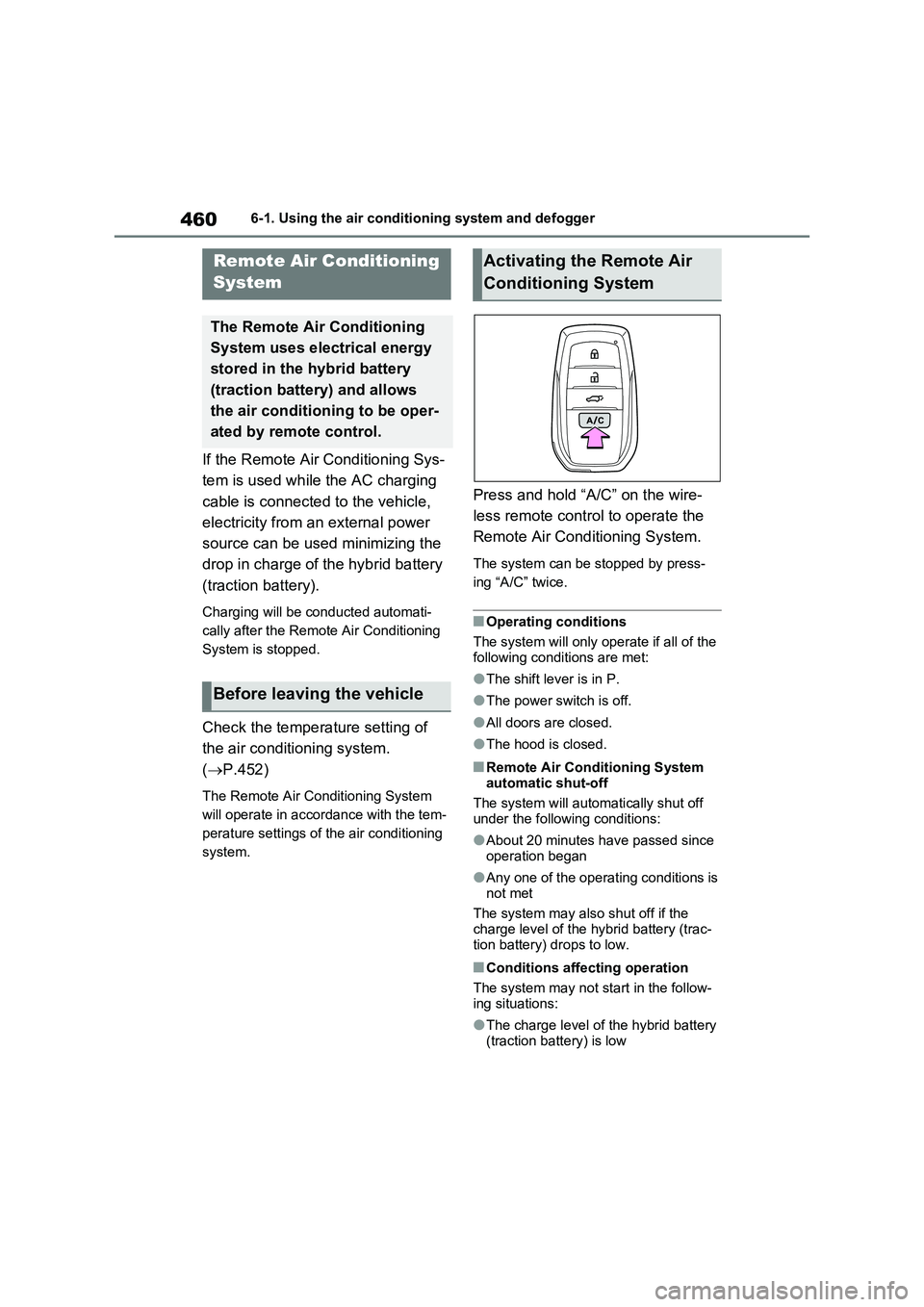
Press and hold “A/C” on the wire-
less remote control to operate the
Remote Air Conditioning System.
The system can be stopped by press-
ing “A/C” twice.
■Operating conditions
The system will only operate if all of the
following conditions are met:
●The shift lever is in P.
●The power switch is off.
●All doors are closed.
●The hood is closed.
■Remote Air Conditioning System
automatic shut-off
The system will automatically shut off
under the following conditions:
●About 20 minutes have passed since
operation began
●Any one of the operating conditions is
not met
The system may also shut off if the
charge level of the hybrid battery (trac-
tion battery) drops to low.
■Conditions affecting operation
The system may not start in the follow-
ing situations:
●The charge level of the hybrid battery
(traction battery) is low
Remote Air Conditioning
System
The Remote Air Conditioning
System uses electrical energy
stored in the hybrid battery
(traction battery) and allows
the air conditioning to be oper-
ated by remote control.
Before leaving the vehicle
Activating the Remote Air
Conditioning System
Page 461 of 664
461
6
6-1. Using the air conditioning system and defogger
Interior features
●The outside temperature is extremely
low
●When the hybrid system is cool (for
example, after being left for a long time in low temperatures)
■Windshield defogger
When defogging the windshield using
the Remote Air Conditioning System, defogging may be insufficient due to the power being restricted more than during
normal air conditioning operation. Also, the outside of the windshield may fog up due to the outside temperature, humidity
or air conditioning set temperature.
■Using the heater via the Remote Air Conditioning System
●When the outside temperature is low, heating may feel insufficient due to restricted operation of the air condi-
tioning.
●When the outside heat exchanger
becomes frosted over, heating perfor- mance may decline due to automati-cally switching to the frost removal
operation. ( P.452)
■Security feature
Any unlocked doors will be automatically locked when the system is operating.
The emergency flashers flash to indicate that the doors have been locked or the system has been turned off.
■Conditions affecting operation
P.225
■While the Remote Air Conditioning System is operating
●Depending on the operating condition of the Remote Air Conditioning Sys-tem, the air conditioning compressor
or cooling fan may spin and an operat- ing noise may be heard.However, this does not indicate a mal-
function.
●The air conditioning operation
switches, etc. will not operate while the Remote Air Conditioning System is operating.
■Electronic key battery depletion
P.202
■When the electronic key battery is fully depleted
P.543
■Customization
Setting (e.g. Operation using “A/C” on the wireless remote control) can be changed. (Customizable features:
P.629)
WARNING
■Precautions for the Remote Air Conditioning System
●Do not use the system if people are in the vehicle. Even when the system is in use, the
internal temperature may still reach a high or low level due to features such as the automatic shut-off.
Children and pets left inside the vehicle may suffer heatstroke dehy-dration or hypothermia, or could
result in death or serious injury.
●Depending on the surrounding envi-
ronment, signals from the wireless switch may transmit further than expected. Pay appropriate attention
to the vehicle’s surroundings and use the switch only when neces-sary.
●Do not operate “A/C” on the wire-less remote control if the hood is
open. The air conditioning may operate unintentionally and objects may be drawn into the electrical
cooling fan.
NOTICE
■To prevent the hybrid battery (traction battery) from being dis-charged
Use “A/C” on the wireless remote control only when necessary.
Page 462 of 664
4626-1. Using the air conditioning system and defogger
*: If equipped
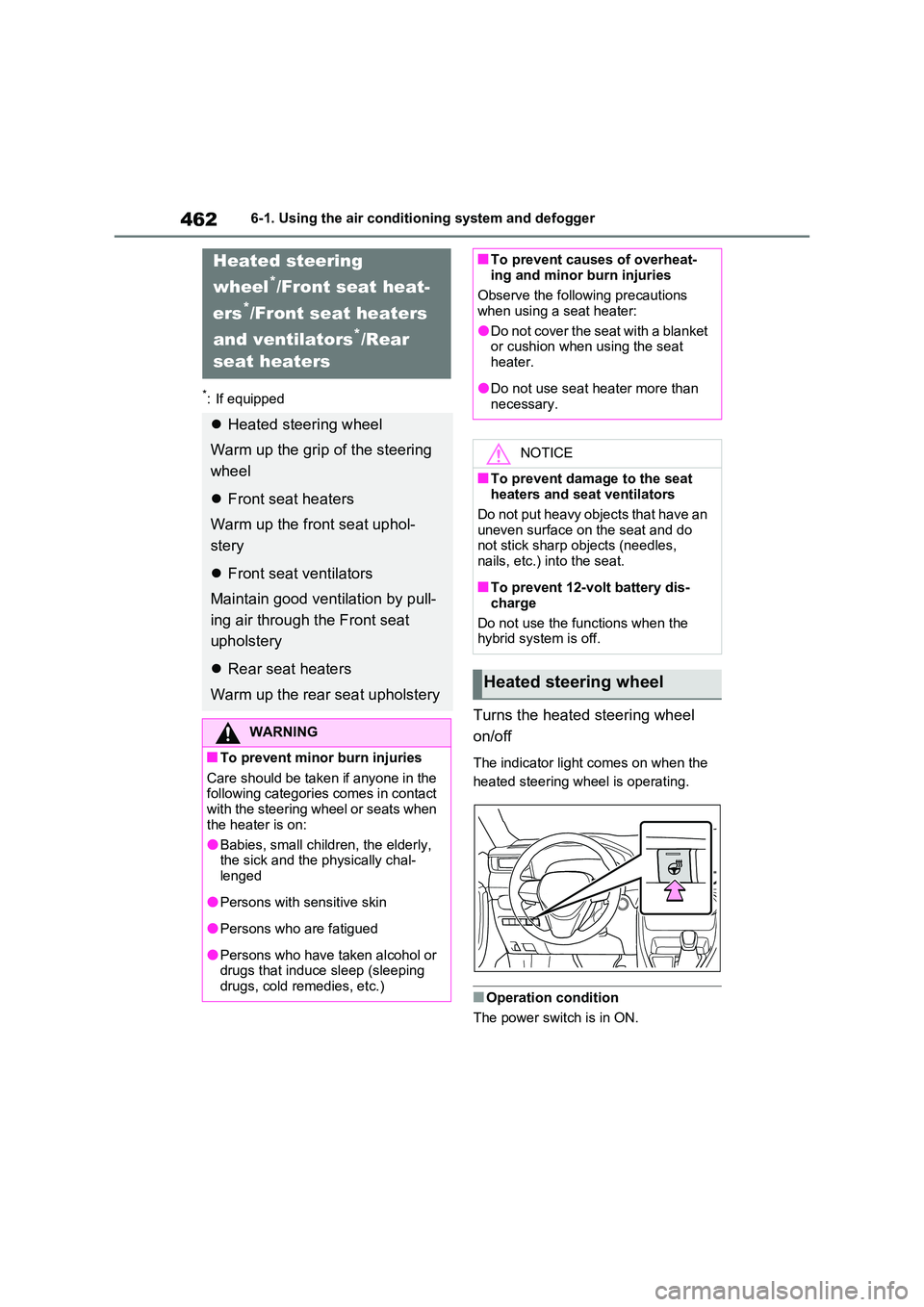
Turns the heated steering wheel
on/off
The indicator light comes on when the
heated steering wheel is operating.
■Operation condition
The power switch is in ON.
Heated steering
wheel*/Front seat heat-
ers*/Front seat heaters
and ventilators*/Rear
seat heaters
Heated steering wheel
Warm up the grip of the steering
wheel
Front seat heaters
Warm up the front seat uphol-
stery
Front seat ventilators
Maintain good ventilation by pull-
ing air through the Front seat
upholstery
Rear seat heaters
Warm up the rear seat upholstery
WARNING
■To prevent minor burn injuries
Care should be taken if anyone in the following categories comes in contact with the steering wheel or seats when
the heater is on:
●Babies, small children, the elderly, the sick and the physically chal-
lenged
●Persons with sensitive skin
●Persons who are fatigued
●Persons who have taken alcohol or drugs that induce sleep (sleeping drugs, cold remedies, etc.)
■To prevent causes of overheat-ing and minor burn injuries
Observe the following precautions
when using a seat heater:
●Do not cover the seat with a blanket or cushion when using the seat
heater.
●Do not use seat heater more than
necessary.
NOTICE
■To prevent damage to the seat heaters and seat ventilators
Do not put heavy objects that have an uneven surface on the seat and do not stick sharp objects (needles,
nails, etc.) into the seat.
■To prevent 12-volt battery dis-
charge
Do not use the functions when the hybrid system is off.
Heated steering wheel
Page 466 of 664
4666-2. Using the interior lights
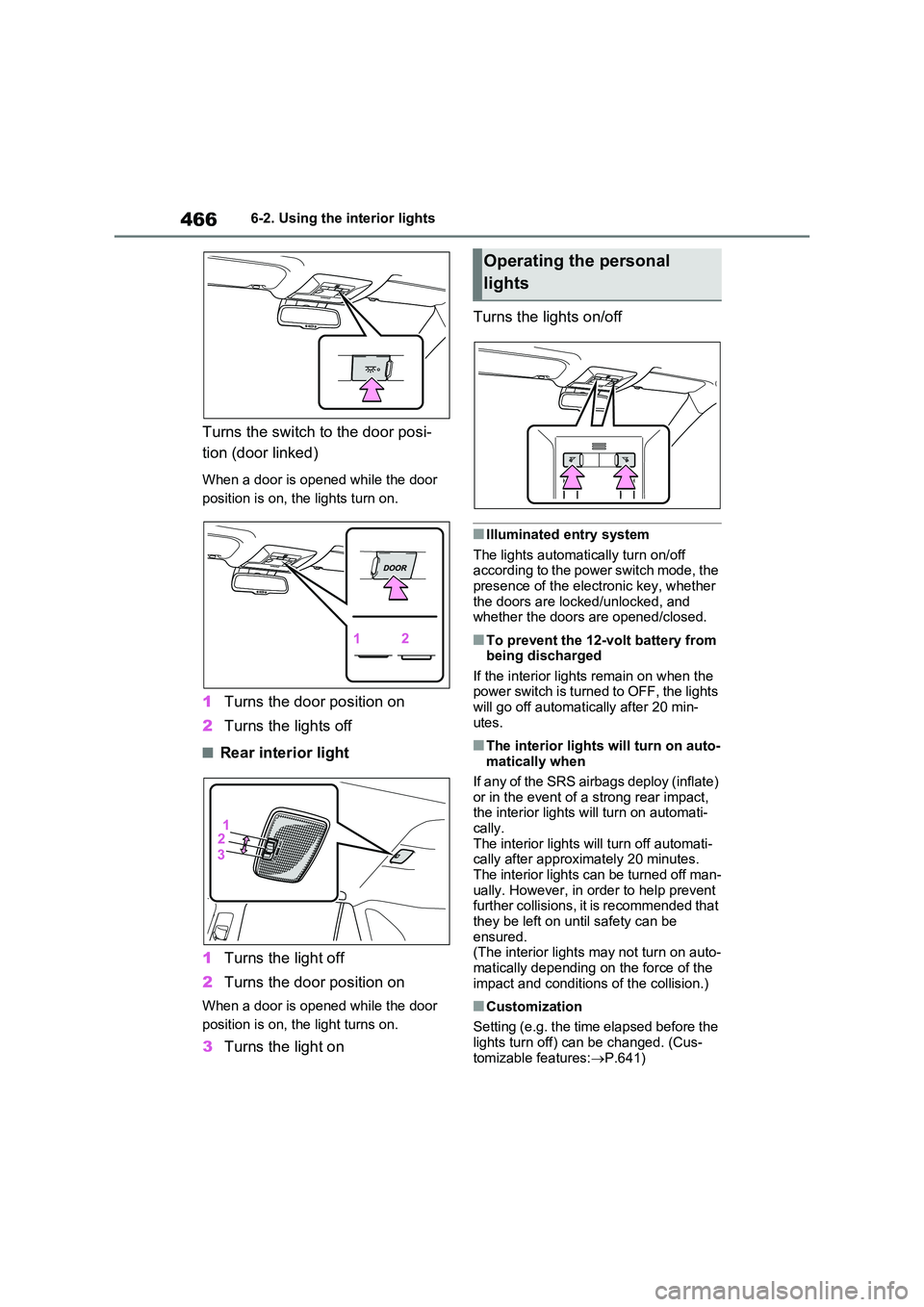
Turns the switch to the door posi-
tion (door linked)
When a door is opened while the door
position is on, the lights turn on.
1 Turns the door position on
2 Turns the lights off
■Rear interior light
1 Turns the light off
2 Turns the door position on
When a door is opened while the door
position is on, the light turns on.
3 Turns the light on
Turns the lights on/off
■Illuminated entry system
The lights automatically turn on/off according to the power switch mode, the presence of the electronic key, whether
the doors are locked/unlocked, and whether the doors are opened/closed.
■To prevent the 12-volt battery from being discharged
If the interior lights remain on when the power switch is turned to OFF, the lights will go off automatically after 20 min-
utes.
■The interior lights will turn on auto- matically when
If any of the SRS airbags deploy (inflate)
or in the event of a strong rear impact, the interior lights will turn on automati-cally.
The interior lights will turn off automati- cally after approximately 20 minutes. The interior lights can be turned off man-
ually. However, in order to help prevent further collisions, it is recommended that they be left on until safety can be
ensured. (The interior lights may not turn on auto-
matically depending on the force of the impact and conditions of the collision.)
■Customization
Setting (e.g. the time elapsed before the
lights turn off) can be changed. (Cus- tomizable features: P.641)
Operating the personal
lights
Page 467 of 664
467
6
6-2. Using the interior lights
Interior features
NOTICE
■To prevent 12-volt battery dis- charge
Do not leave the lights on longer than necessary when the hybrid system is off.
Page 476 of 664
4766-4. Using the other interior features
6-4.Using the o ther interio r fea tures
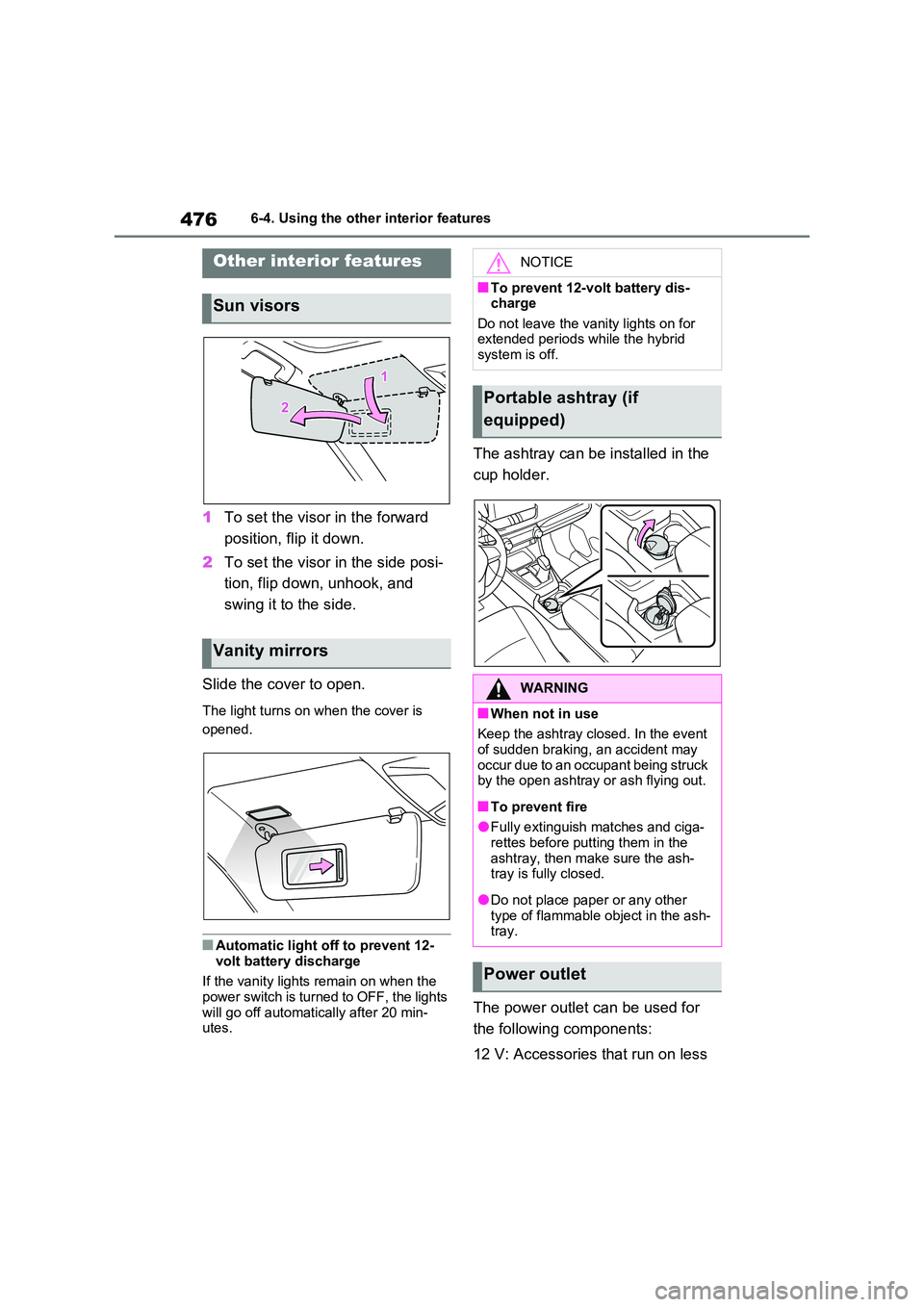
1To set the visor in the forward
position, flip it down.
2 To set the visor in the side posi-
tion, flip down, unhook, and
swing it to the side.
Slide the cover to open.
The light turns on when the cover is
opened.
■Automatic light off to prevent 12-
volt battery discharge
If the vanity lights remain on when the power switch is turned to OFF, the lights
will go off automatically after 20 min- utes.
The ashtray can be installed in the
cup holder.
The power outlet can be used for
the following components:
12 V: Accessories that run on less
Other interior features
Sun visors
Vanity mirrors
NOTICE
■To prevent 12-volt battery dis- charge
Do not leave the vanity lights on for extended periods while the hybrid system is off.
Portable ashtray (if
equipped)
WARNING
■When not in use
Keep the ashtray closed. In the event of sudden braking, an accident may
occur due to an occupant being struck by the open ashtray or ash flying out.
■To prevent fire
●Fully extinguish matches and ciga-rettes before putting them in the
ashtray, then make sure the ash- tray is fully closed.
●Do not place paper or any other type of flammable object in the ash-tray.
Power outlet