battery TOYOTA VERSO S 2011 Workshop Manual
[x] Cancel search | Manufacturer: TOYOTA, Model Year: 2011, Model line: VERSO S, Model: TOYOTA VERSO S 2011Pages: 664, PDF Size: 160.56 MB
Page 174 of 664
1743-1. Instrument cluster
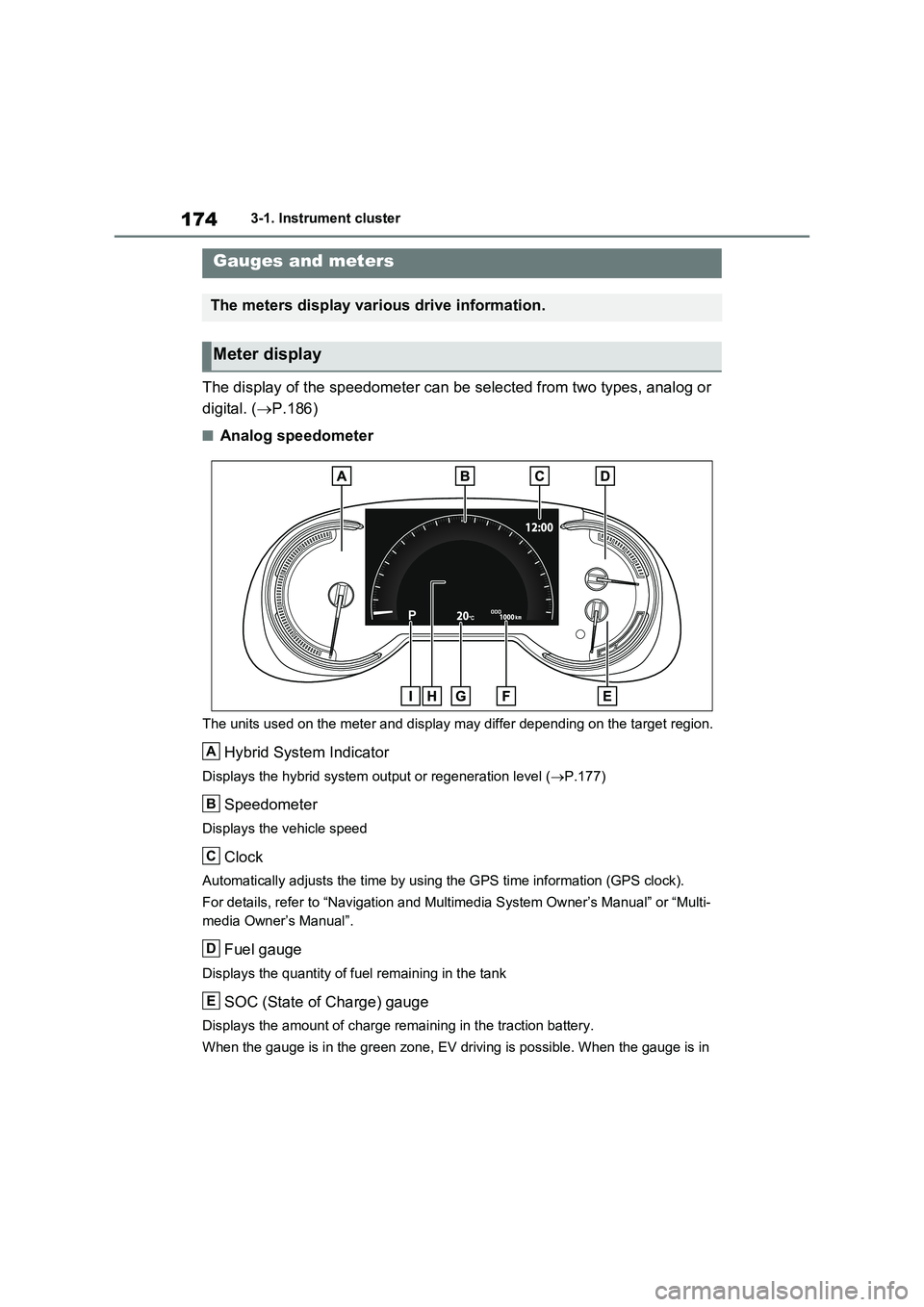
The display of the speedometer can be selected from two types, analog or
digital. ( P.186)
■Analog speedometer
The units used on the meter and display may differ depending on the target region.
Hybrid System Indicator
Displays the hybrid system output or regeneration level (P.177)
Speedometer
Displays the vehicle speed
Clock
Automatically adjusts the time by using the GPS time information (GPS clock).
For details, refer to “Navigation and Multimedia System Owner’s Manual” or “Multi-
media Owner’s Manual”.
Fuel gauge
Displays the quantity of fuel remaining in the tank
SOC (State of Charge) gauge
Displays the amount of charge remaining in the traction battery.
When the gauge is in the green zone, EV driving is possible. When the gauge is in
Gauges and meters
The meters display various drive information.
Meter display
A
B
C
D
E
Page 175 of 664
175
3 3-1. Instrument cluster
Vehicle status information and indicators
the blue zone, EV driving is no longer possible (in this situation, the vehicle switches
to HV mode). Charge the hybrid battery (traction battery) to allow EV driving.
Odometer, trip meter and instrument cluster light control display
Odometer:
Displays the total distance that the vehicle has been driven
Trip meter:
Displays the distance the vehicle has been driven since the meter was last reset.
Trip meters “A” and “B” can be used to record and display different distances inde-
pendently.
Instrument cluster light control:
Displays the brightness of the instrument cluster lights that can be adjusted.
Outside temperature (P.177)
Multi-information display
Presents the driver with a variety of driving-related data (P.179)
Displays warning messages if a malfunction occurs (P.578)
Shift position and shift range indicator
Displays the selected shift position or selected shift range (P.321)
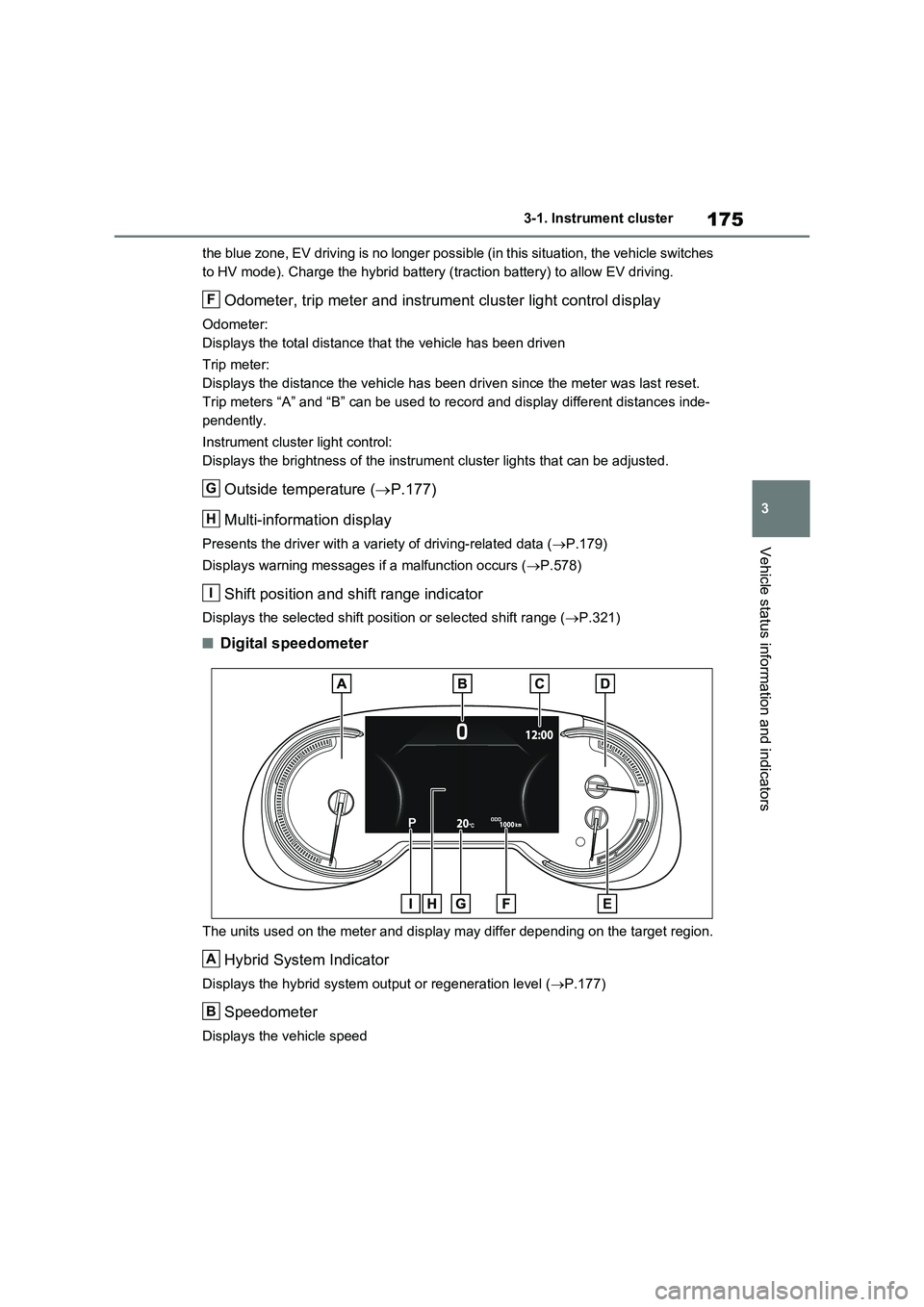
■Digital speedometer
The units used on the meter and display may differ depending on the target region.
Hybrid System Indicator
Displays the hybrid system output or regeneration level (P.177)
Speedometer
Displays the vehicle speed
F
G
H
I
A
B
Page 176 of 664
1763-1. Instrument cluster
Clock
Automatically adjusts the time by using the GPS time information (GPS clock).
For details, refer to “Navigation and Multimedia System Owner’s Manual” or “Multi-
media Owner’s Manual”.
Fuel gauge
Displays the quantity of fuel remaining in the tank
SOC (State of Charge) gauge
Displays the amount of charge remaining in the traction battery.
When the gauge is in the green zone, EV driving is possible. When the gauge is in
the blue zone, EV driving is no longer possible (in this situation, the vehicle switches
to HV mode). Charge the hybrid battery (traction battery) to allow EV driving.
Odometer, trip meter and instrument cluster light control display
Odometer:
Displays the total distance that the vehicle has been driven
Trip meter:
Displays the distance the vehicle has been driven since the meter was last reset.
Trip meters A and B can be used to record and display different distances inde-
pendently.
Instrument cluster light control:
Displays the brightness of the instrument cluster lights that can be adjusted.
Outside temperature (P.177)
Multi-information display
Presents the driver with a variety of driving-related data (P.179)
Displays warning messages if a malfunction occurs (P.578)
Shift position and shift range indicator
Displays the selected shift position or selected shift range (P.321)
■The meters and display illuminate
when
The power switch is in ON.
■When changing driving mode
●Speedometer color is changed follow-
ing the selected driving mode.
(P.434)
●Speedometer color is changed follow-
ing the selected driving mode or when
Trail Mode is turned on. (P.434,
435)
■If the units of measure for speed-
ometer can be changed (if
equipped)
The other units of measure is also dis-
played as shown in the illustrations.
C
D
E
F
G
H
I
Page 177 of 664
177
3 3-1. Instrument cluster
Vehicle status information and indicators
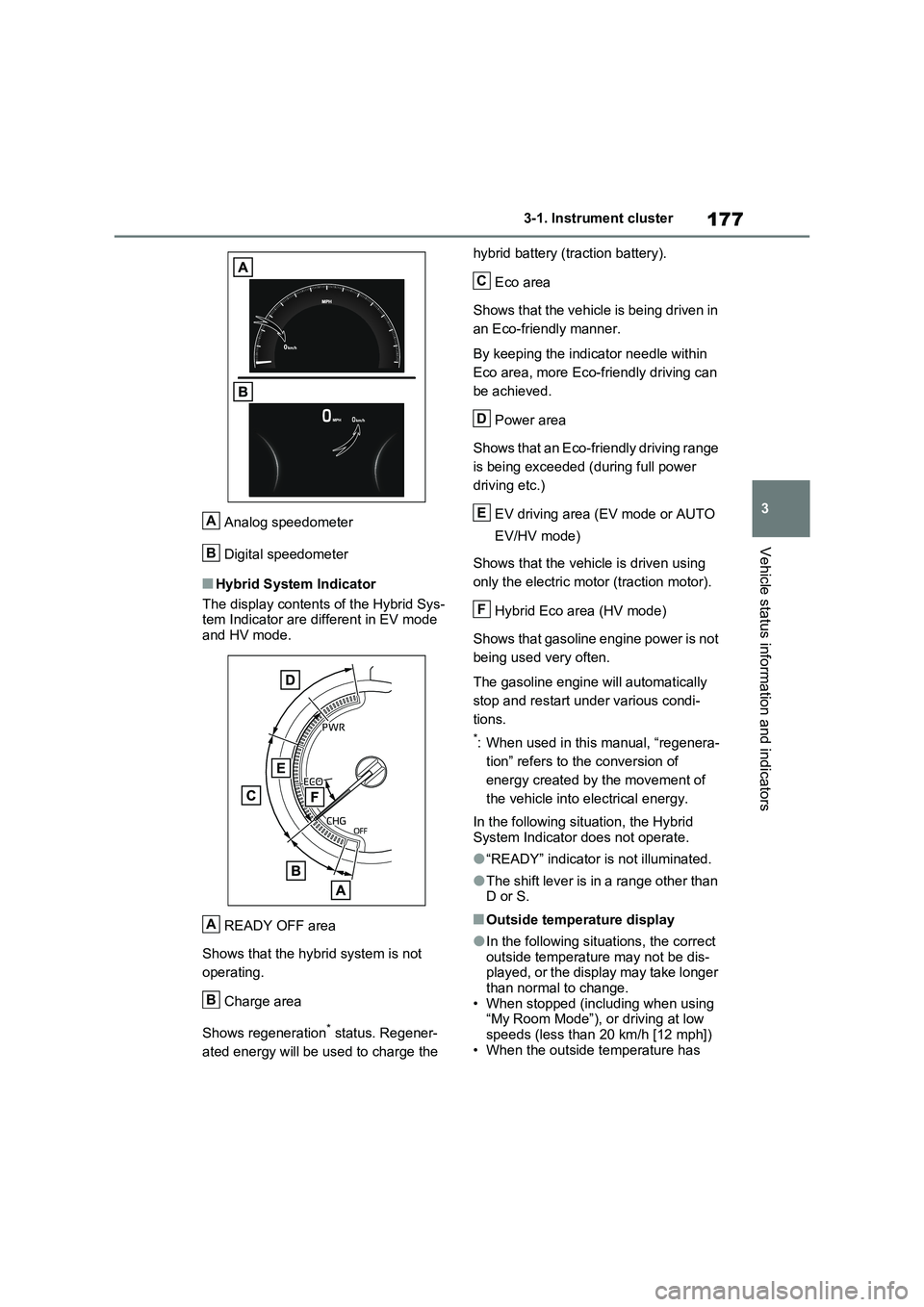
Analog speedometer
Digital speedometer
■Hybrid System Indicator
The display contents of the Hybrid Sys-
tem Indicator are different in EV mode
and HV mode.
READY OFF area
Shows that the hybrid system is not
operating.
Charge area
Shows regeneration
* status. Regener-
ated energy will be used to charge the hybrid battery (traction battery).
Eco area
Shows that the vehicle is being driven in
an Eco-friendly manner.
By keeping the indicator needle within
Eco area, more Eco-friendly driving can
be achieved.
Power area
Shows that an Eco-friendly driving range
is being exceeded (during full power
driving etc.)
EV driving area (EV mode or AUTO
EV/HV mode)
Shows that the vehicle is driven using
only the electric motor (traction motor).
Hybrid Eco area (HV mode)
Shows that gasoline engine power is not
being used very often.
The gasoline engine will automatically
stop and restart under various condi-
tions.
*: When used in this manual, “regenera-
tion” refers to the conversion of
energy created by the movement of
the vehicle into electrical energy.
In the following situation, the Hybrid
System Indicator does not operate.
●“READY” indicator is not illuminated.
●The shift lever is in a range other than
D or S.
■Outside temperature display
●In the following situations, the correct
outside temperature may not be dis-
played, or the display may take longer
than normal to change.
• When stopped (including when using
“My Room Mode”), or driving at low
speeds (less than 20 km/h [12 mph])
• When the outside temperature has
A
B
A
B
C
D
E
F
Page 181 of 664
181
3 3-1. Instrument cluster
Vehicle status information and indicators
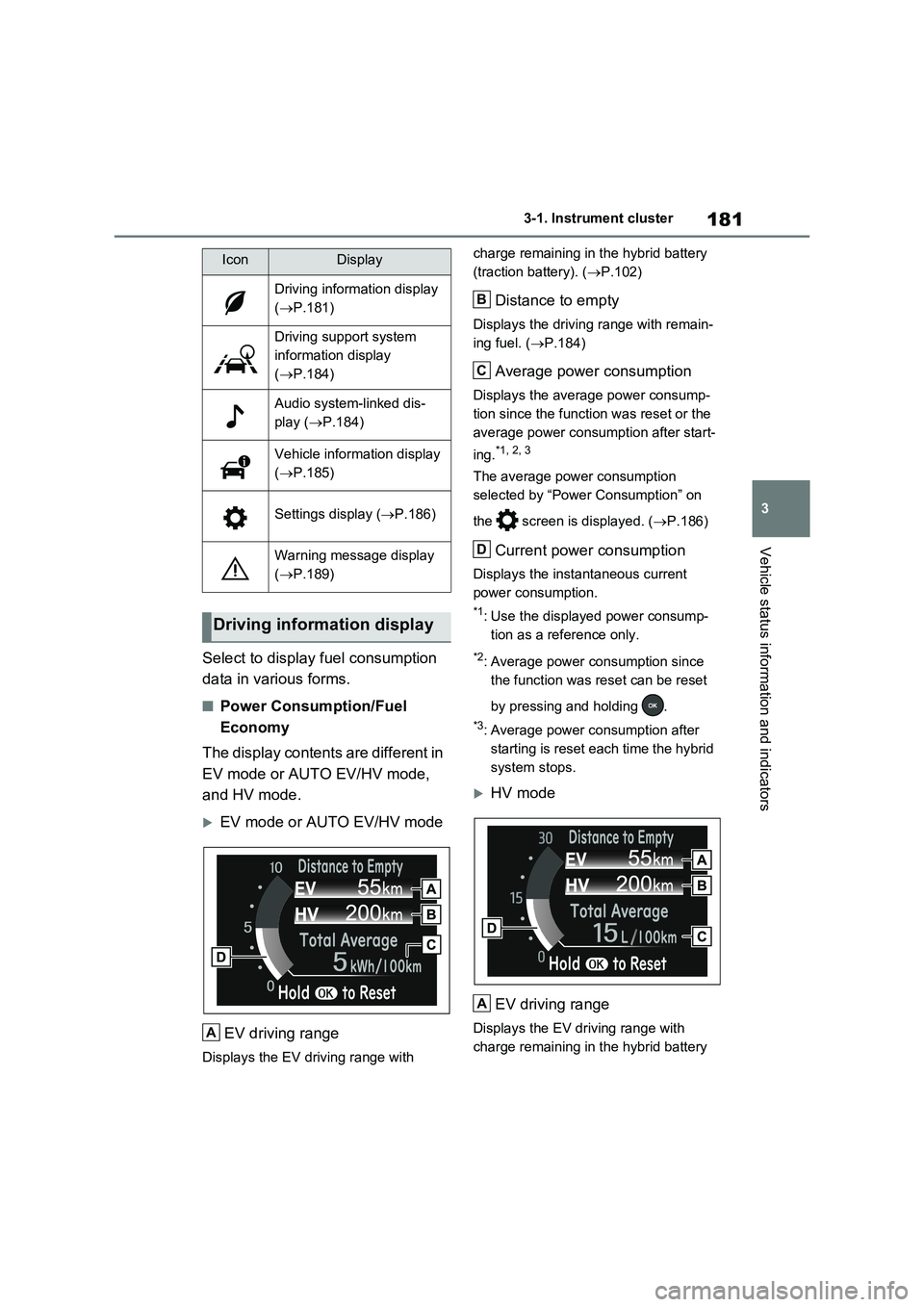
Select to display fuel consumption
data in various forms.
■Power Consumption/Fuel
Economy
The display contents are different in
EV mode or AUTO EV/HV mode,
and HV mode.
EV mode or AUTO EV/HV mode
EV driving range
Displays the EV driving range with charge remaining in the hybrid battery
(traction battery). (P.102)
Distance to empty
Displays the driving range with remain-
ing fuel. (P.184)
Average power consumption
Displays the average power consump-
tion since the function was reset or the
average power consumption after start-
ing.
*1, 2, 3
The average power consumption
selected by “Power Consumption” on
the screen is displayed. (P.186)
Current power consumption
Displays the instantaneous current
power consumption.
*1: Use the displayed power consump-
tion as a reference only.
*2: Average power consumption since
the function was reset can be reset
by pressing and holding .
*3: Average power consumption after
starting is reset each time the hybrid
system stops.
HV mode
EV driving range
Displays the EV driving range with
charge remaining in the hybrid battery
IconDisplay
Driving information display
(P.181)
Driving support system
information display
(P.184)
Audio system-linked dis-
play (P.184)
Vehicle information display
(P.185)
Settings display (P.186)
Warning message display
(P.189)
Driving information display
A
B
C
D
A
Page 182 of 664
1823-1. Instrument cluster
(traction battery). (P.90)
Distance to empty
Displays the driving range with remain-
ing fuel. (P.184)
Average fuel economy
Displays the average fuel economy
since the function was reset or the
average fuel economy after starting or
refueling.
*1, 2, 3
The average fuel economy selected by
“Fuel Economy” on the screen is
displayed. (P.186)
Current fuel economy
Displays the instantaneous current fuel
Economy.
*1: Use the displayed fuel consumption
as a reference only.
*2: Average fuel economy since the
function was reset can be reset by
pressing and holding .
*3: Average fuel economy after starting
is reset each time the hybrid system
stops.
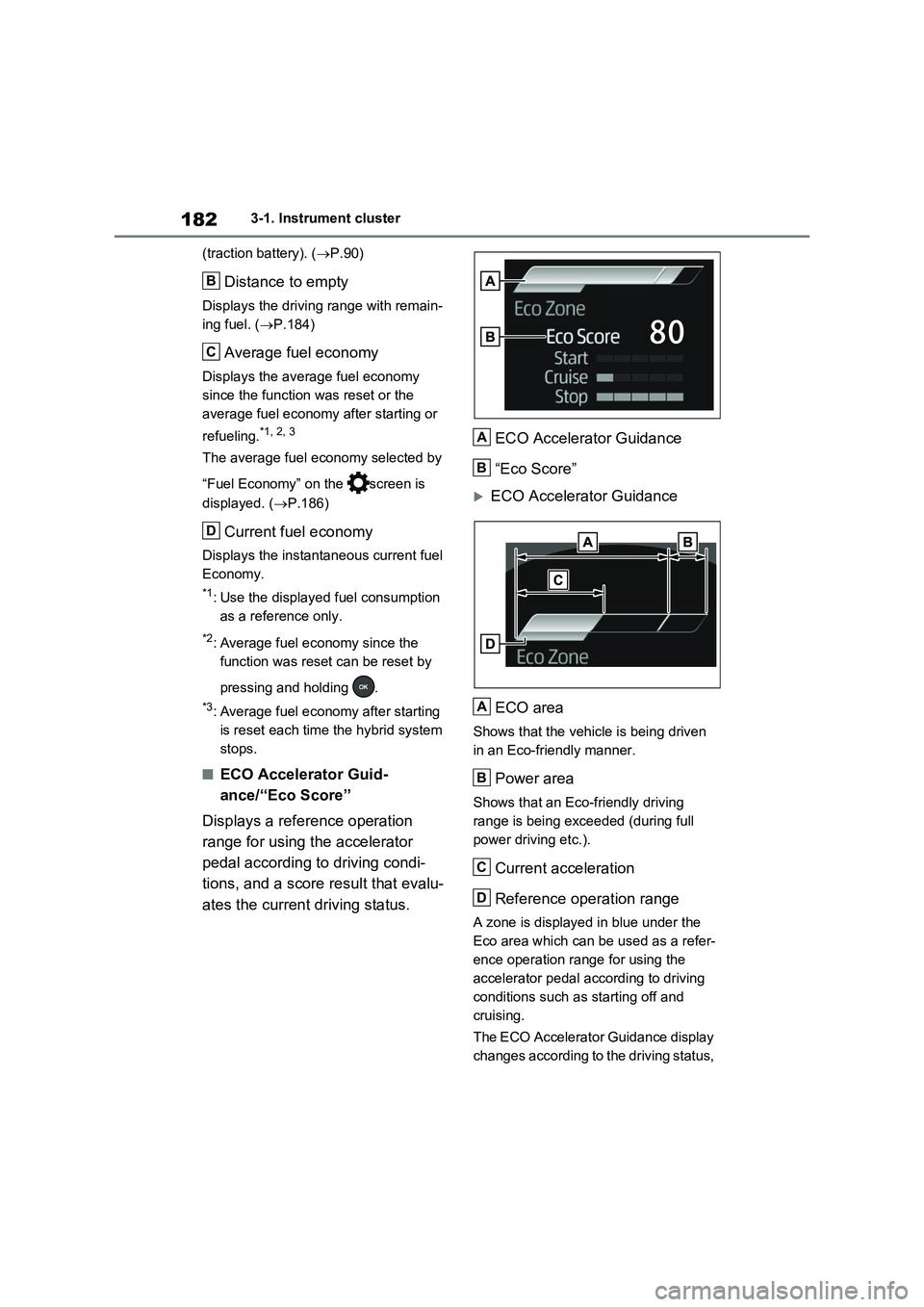
■ECO Accelerator Guid-
ance/“Eco Score”
Displays a reference operation
range for using the accelerator
pedal according to driving condi-
tions, and a score result that evalu-
ates the current driving status.ECO Accelerator Guidance
“Eco Score”
ECO Accelerator Guidance
ECO area
Shows that the vehicle is being driven
in an Eco-friendly manner.
Power area
Shows that an Eco-friendly driving
range is being exceeded (during full
power driving etc.).
Current acceleration
Reference operation range
A zone is displayed in blue under the
Eco area which can be used as a refer-
ence operation range for using the
accelerator pedal according to driving
conditions such as starting off and
cruising.
The ECO Accelerator Guidance display
changes according to the driving status,
B
C
D
A
B
A
B
C
D
Page 187 of 664
187
3 3-1. Instrument cluster
Vehicle status information and indicators
■ (Toyota parking assist-
sensor) (if equipped) (P.414)
Select to set up the following items.
Toyota parking assist-sensor
on/off
Select to enable/disable the Toyota
parking assist-sensor.
“Volume”
Select to set the volume of the buzzer
which sounds when the Toyota parking
assist-sensor is operated.
■RCTA (Rear Crossing Traffic
Alert) (if equipped) (P.393)
RCTA (Rear Crossing Traffic
Alert) on/off
Select to enable/disable the RCTA sys-
tem.
“Volume”
Select to change the RCTA buzzer vol-
ume.
■ PKSB (Parking Support
Brake System) (if equipped)
(P.420)
Select to enable/disable the Park-
ing Support Brake function.
■“HUD Main” (if equipped)
(P.191)
HUD on/off
Select to enable/disable the head-up
display.
“HUD Brightness/Position”
Select to adjust the brightness or verti-
cal position of the head-up display.
“HUD Driving Support”
Select to change the items displayed
on the head-up display.
“HUD Rotation”
Select to adjust the angle of the head-
up display.
■ RSA (Road Sign Assist)
(if equipped) (P.372)
Select to set up the following items.
Road Sign Assist on/off
Select to enable/disable the RSA sys-
tem.
“Notification Method”
Select to change each notification
method used to notify the driver when
the system recognizes excess speed,
no overtaking and no-entry sign.
“Notification Level”
Select to change each notification level
used to notify the driver when the sys-
tem recognizes a speed limit sign.
■DRCC (RSA) (if equipped)
(P.384)
Select to enable/disable the
Dynamic Radar Cruise Control with
Road Sign Assist.
■Vehicle Settings
“Charging Settings”
Select to set up the following items.
• “Charging Schedule”
Select to register or change the
charging schedule. (P.144)
• “Charging Current”
Select to change the charging current.
(P.125)
• “Battery Heater”
Select to enable/disable the battery
heater. (P.128)
• “Battery Cooler”
Page 188 of 664
1883-1. Instrument cluster
Select to enable/disable the battery
cooler. (P.129)
PBD (Power Back Door) (if
equipped) (P.213)
Select to set up the following items.
•System settings
Select to enable/disable the power
back door system.
•“Hands Free”
*
Select to enable/disable the Hands
Free Power Back Door.
• “Opening Adjustment”
Select the open position when power
back door is fully open.
•“Volume”
Select to set the volume of the buzzer
which sounds when the power back
door system operates.
*: Vehicles with Hands Free Power
Back Door
“TPWS” (Tire Pressure Warning
System) (P.511)
• “Setting Pressure”
Select to initialize the tire pressure
warning system.
• “Identifying Each Wheel & Position”
Select to register the ID codes of the
tire pressure sensors to the tire pres-
sure warning system.
•“Setting Unit”
Select to change the units of measure
displayed.
“Rear Seat Reminder” (P.207)
Select to enable/disable the rear seat
reminder.
■ Settings
“Language”
Select to change the language on the
multi-information display.
“Units”
Select to change the units of measure
displayed.
“Meter Type”
Select to change the speedometer dis-
play.
(EV indicator) (P.90)
Select to enable/disable the EV indica-
tor.
(Driving information display
settings)
Select to set up the following items.
•“Hybrid System”
Select to enable/disable the ECO
Accelerator Guidance (P.182).
• “Fuel Economy”
Select to change the display on Fuel
Economy (P.181).
• “Power Consumption”
Select to change the display on Power
Consumption (P.181).
(Audio settings)
Select to enable/disable screen.
(Vehicle information dis-
play settings)
• “Display Contents”
Select to set up the following items.
“Energy monitor”:
Select to enable/disable the Energy
monitor (P.195)
AWD:
Select to enable/disable the AWD sys-
tem display (P.185).
Page 189 of 664
189
3
3-1. Instrument cluster
Vehicle status information and indicators
• “Drive Info Type”
Select to change the drive information
type display between trip and total.
( P.185).
• “Drive Info Items”
Select to set the items on the upper and
lower side of the drive information
screen from three items, average
speed, distance and total time.
“Closing Display”
Select to set the items displayed when
the power switch is turned off.
“Pop-Up Display” (if equipped)
Select to enable/disable the following
pop-up displays, which may appear in
some situations.
• Intersection guidance display of the
navigation system-linked system (if
equipped)
• Incoming call display of the hands-
free phone system (if equipped)
• Audio operation
• Volume operation
• Voice control (if equipped)
“Calender”
Select to set up the calender.
This can only be set if GPS calibration
of clock is turned off in the multimedia
system settings.
“MID OFF”
A blank screen is displayed
“Default Settings”
Select to reset the meter display set-
tings.
■Suspension of the settings display
●In the following situations, operation of the settings display will be temporarily suspended.
• When a warning message appears on
the multi-information display
• When the vehicle begins to move
●Settings for functions not equipped to
the vehicle are not displayed.
●When a function is turned off, the
related settings for that function are not selectable.
Select to display warning mes-
sages and measures to be taken if
a malfunction is detected.
( P.578)
Displays suggestions to the driver
in the following situations. To select
a response to a displayed sugges-
tion, use the meter control
switches.
WARNING
■Cautions during setting up the
display
As the hybrid system needs to be operating during setting up the dis-
play, ensure that the vehicle is parked in a place with adequate ventilation. In a closed area such as a garage,
exhaust gases including harmful car- bon monoxide (CO) may collect and enter the vehicle. This may lead to
death or a serious health hazard.
NOTICE
■During setting up the display
To prevent 12-volt battery discharge, ensure that the hybrid system is oper-
ating while setting up the display fea- tures.
Warning message display
Suggestion function
Page 193 of 664
193
3
3-1. Instrument cluster
Vehicle status information and indicators
• Driving support system information
display
• Compass (if equipped)
• Audio system operation status
Display angle
Select to adjust the angle of the head-
up display.
■Enabling/disabling of the head-up display
If the head-up display is disabled, it will remain disabled when the power switch is turned off then back to ON.
■Display brightness
The brightness of the head-up display
can be adjusted on screen of the
multi-information display. Also, it is auto-
matically adjusted according to the ambient brightness.
■Driving support system infor-
mation display
Displays the operational status of
the following systems:
LTA (Lane Tracing Assist) (if
equipped) ( P.362)
Dynamic radar cruise control
with full-speed range (if
equipped) ( P.376)
Displayed content is the same as that
displayed on the multi-information dis-
play. For details, refer to the explana-
tions of each system.
■Navigation system-linked dis-
play area (if equipped)
Displays the following items which
are linked to the navigation system:
Street name
Route guidance to destination
Compass
Pop-up displays for the following
systems will be displayed when
necessary:
■Driving support systems
Displays a warning/sugges-
tion/advice message or the operat-
ing state of a relevant system.
PCS (Pre-Collision System) (if
equipped) ( P.355)
WARNING
■Caution for changing settings of the head-up display
If the hybrid system is operating when
changing the display settings, ensure that the vehicle is parked in a place with adequate ventilation. In a closed
area such as a garage, exhaust gases including harmful carbon mon-oxide (CO) may collect and enter the
vehicle. This may lead to death or a serious health hazard.
NOTICE
■When changing the settings of the head-up display
To prevent 12-volt battery discharge,
ensure that the hybrid system is oper- ating while changing the settings of the head-up display.
Driving support system
information/navigation sys-
tem-linked display area (if
equipped)
Pop-up display