VSC TOYOTA VERSO S 2011 Owners Manual
[x] Cancel search | Manufacturer: TOYOTA, Model Year: 2011, Model line: VERSO S, Model: TOYOTA VERSO S 2011Pages: 664, PDF Size: 160.56 MB
Page 19 of 664
19Pictorial index
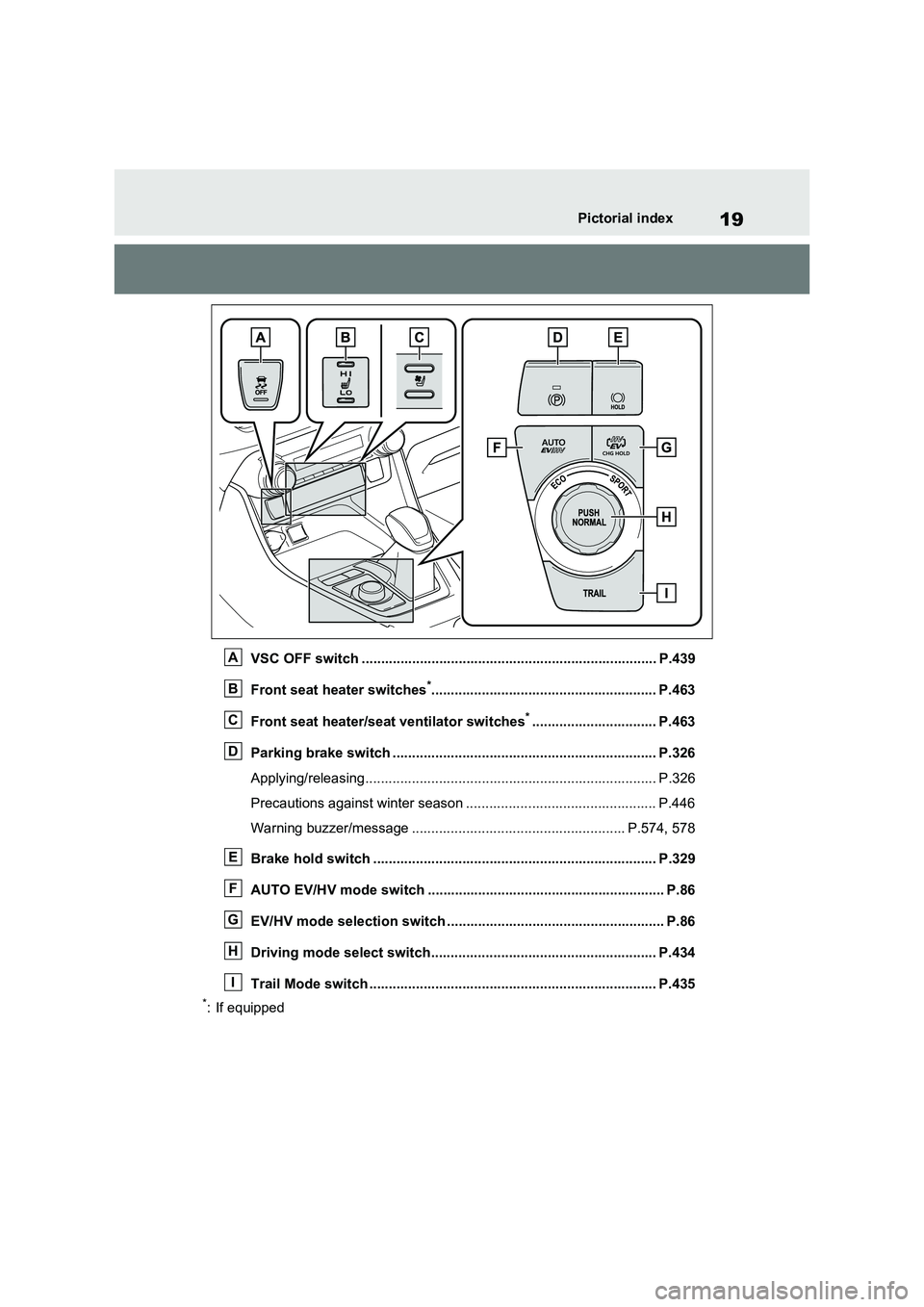
VSC OFF switch ............................................................................ P.439
Front seat heater switches
*.......................................................... P.463
Front seat heater/seat ventilator switches
*................................ P.463
Parking brake switch .................................................................... P.326
Applying/releasing........................................................................... P.326
Precautions against winter season ................................................. P.446
Warning buzzer/message ....................................................... P.574, 578
Brake hold switch ......................................................................... P.329
AUTO EV/HV mode switch ............................................................. P.86
EV/HV mode selection switch ........................................................ P.86
Driving mode select switch.......................................................... P.434
Trail Mode switch .......................................................................... P.435
*: If equipped
A
B
C
D
E
F
G
H
I
Page 27 of 664
27Pictorial index
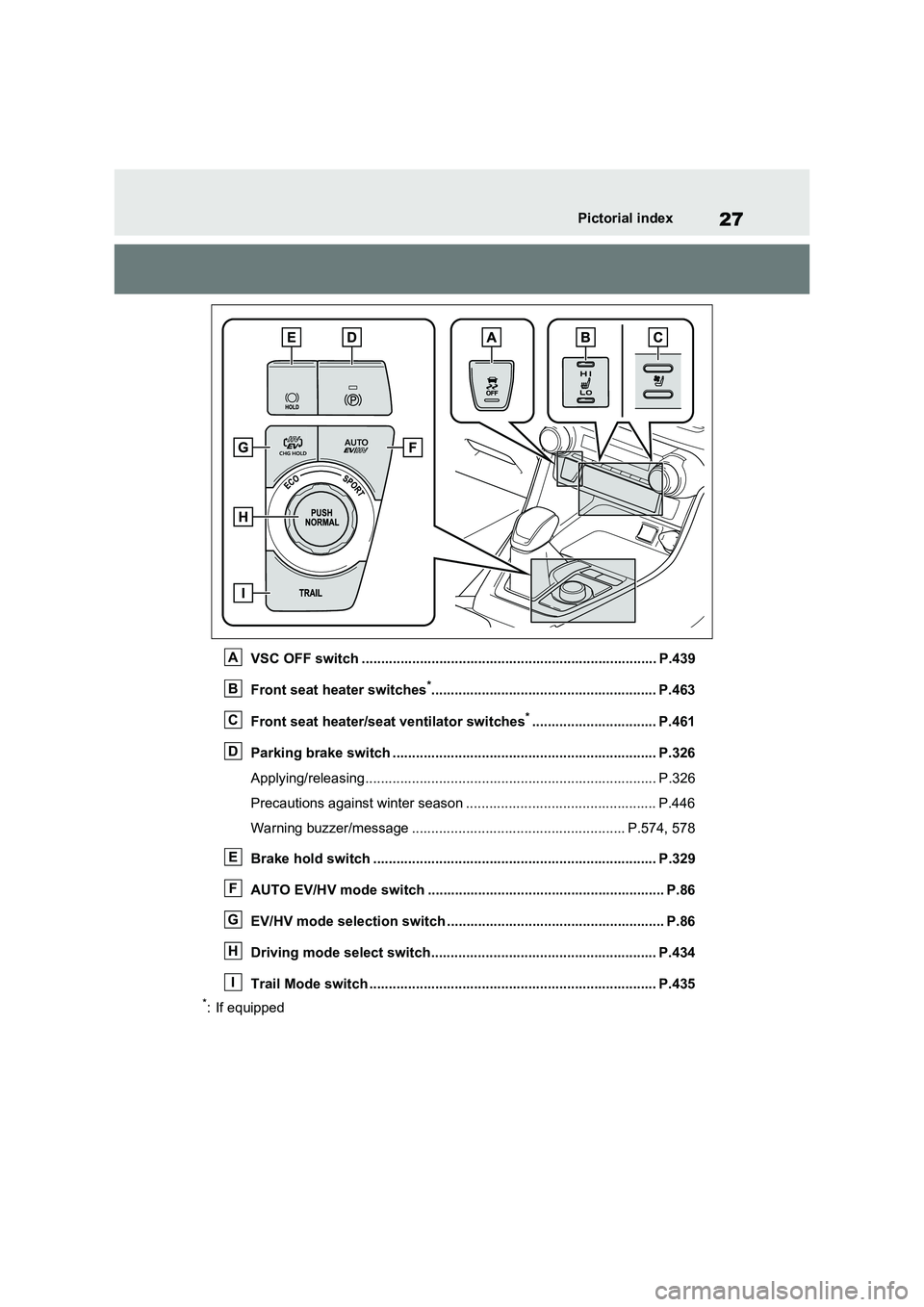
VSC OFF switch ............................................................................ P.439
Front seat heater switches
*.......................................................... P.463
Front seat heater/seat ventilator switches
*................................ P.461
Parking brake switch .................................................................... P.326
Applying/releasing........................................................................... P.326
Precautions against winter season ................................................. P.446
Warning buzzer/message ....................................................... P.574, 578
Brake hold switch ......................................................................... P.329
AUTO EV/HV mode switch ............................................................. P.86
EV/HV mode selection switch ........................................................ P.86
Driving mode select switch.......................................................... P.434
Trail Mode switch .......................................................................... P.435
*: If equipped
A
B
C
D
E
F
G
H
I
Page 172 of 664
1723-1. Instrument cluster
*1: This light illuminates on the multi-
information display with a message.
*2: Depending on the operating condi-
tion, the color and illuminating/flash-
ing state of the light change.
*3: The light comes on when the system
is turned off.
*4: Toyota parking assist-sensor OFF
indicator turns on when the power
switch is turned to ON while the
Toyota parking assist-sensor func-
tion is on. It will turn off after a few
seconds.
*5: These lights turn on when the power
switch is turned to ON to indicate
that a system check is being per-
formed. They will turn off after the
hybrid system is on, or after a few
seconds. There may be a malfunc-
tion in a system if the lights do not
turn on, or turn off. Have the vehicle
inspected by any authorized Toyota
retailer or Toyota authorized
repairer, or any reliable repairer.
*6: This light illuminates on the outside
rear view mirrors.
*7: When the outside temperature is
approximately 3°C (37°F) or lower,
(Flashes)
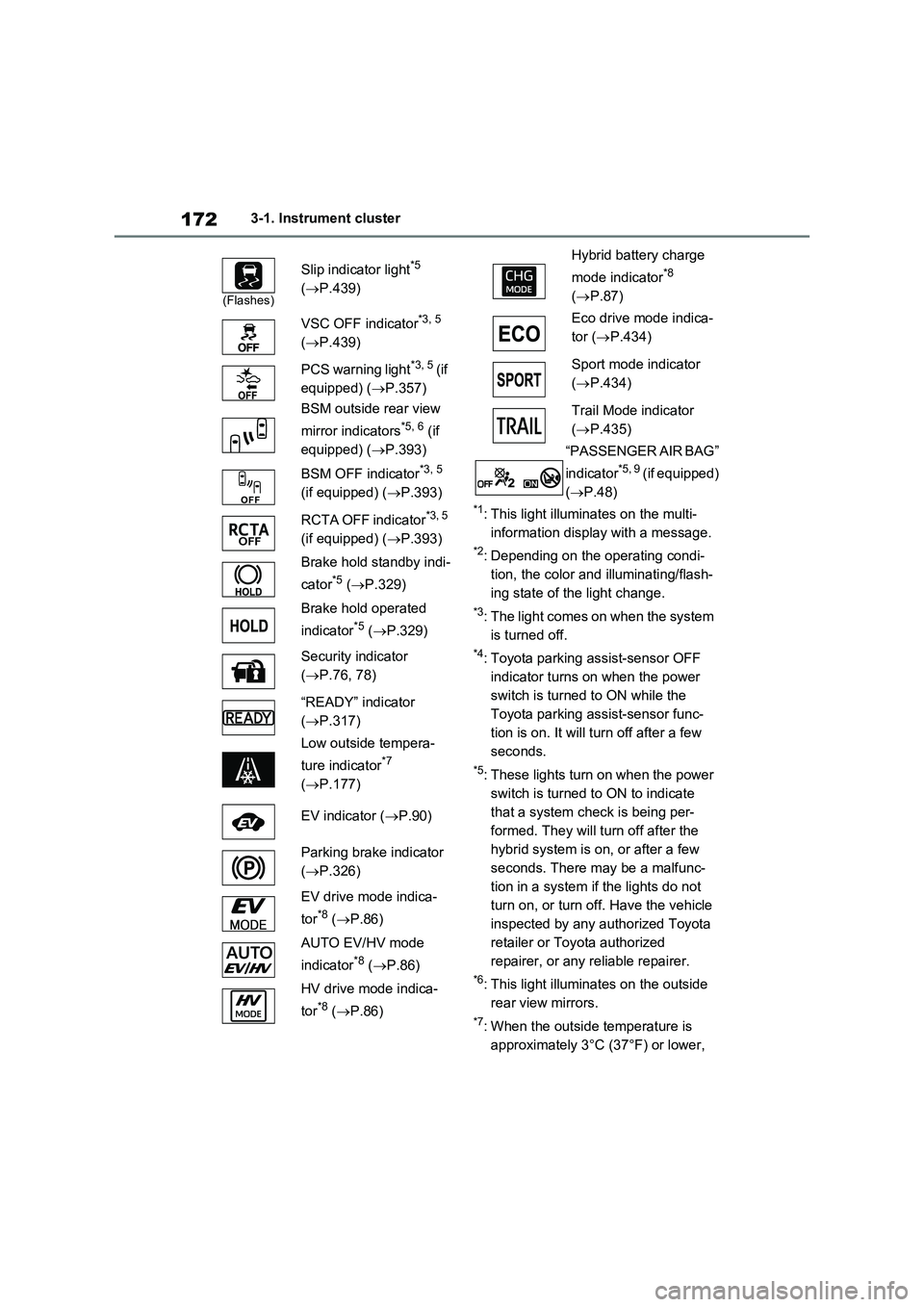
Slip indicator light*5
(P.439)
VSC OFF indicator
*3, 5
(P.439)
PCS warning light
*3, 5 (if
equipped) (P.357)
BSM outside rear view
mirror indicators
*5, 6 (if
equipped) (P.393)
BSM OFF indicator
*3, 5
(if equipped) (P.393)
RCTA OFF indicator
*3, 5
(if equipped) (P.393)
Brake hold standby indi-
cator
*5 (P.329)
Brake hold operated
indicator
*5 (P.329)
Security indicator
(P.76, 78)
“READY” indicator
(P.317)
Low outside tempera-
ture indicator
*7
(P.177)
EV indicator (P.90)
Parking brake indicator
(P.326)
EV drive mode indica-
tor
*8 (P.86)
AUTO EV/HV mode
indicator
*8 (P.86)
HV drive mode indica-
tor
*8 (P.86)
Hybrid battery charge
mode indicator
*8
(P.87)
Eco drive mode indica-
tor (P.434)
Sport mode indicator
(P.434)
Trail Mode indicator
(P.435)
“PASSENGER AIR BAG”
indicator
*5, 9 (if equipped)
(P.48)
Page 358 of 664
3585-5. Using the driving support systems
1Early
2 Middle
This is the default setting.
3Late
■Operational conditions
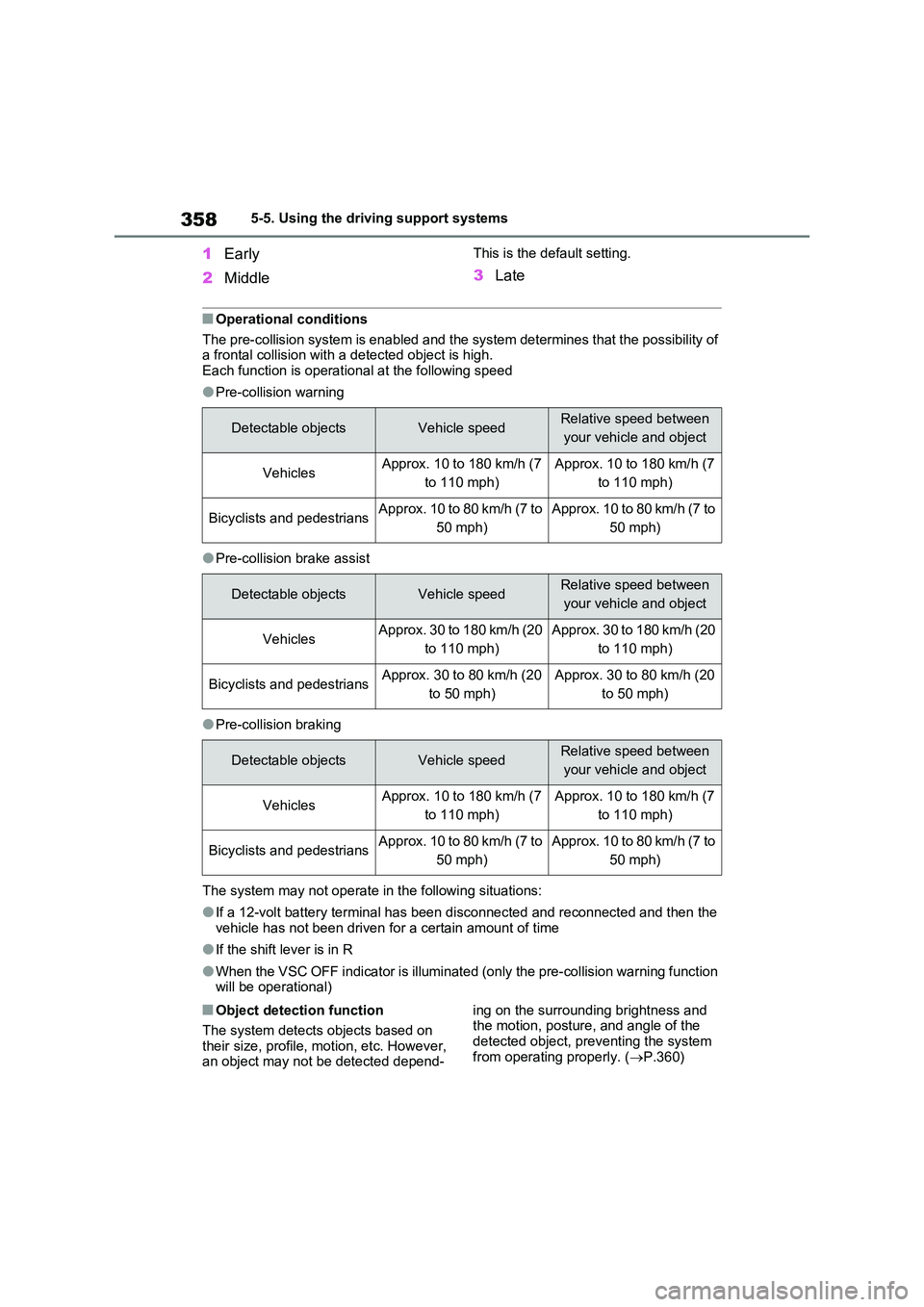
The pre-collision system is enabled and the system determines that the possibility of a frontal collision with a detected object is high.Each function is operational at the following speed
●Pre-collision warning
●Pre-collision brake assist
●Pre-collision braking
The system may not operate in the following situations:
●If a 12-volt battery terminal has been disconnected and reconnected and then the vehicle has not been driven for a certain amount of time
●If the shift lever is in R
●When the VSC OFF indicator is illuminated (only the pre-collision warning function will be operational)
■Object detection function
The system detects objects based on
their size, profile, motion, etc. However, an object may not be detected depend-
ing on the surrounding brightness and the motion, posture, and angle of the
detected object, preventing the system from operating properly. ( P.360)
Detectable objectsVehicle speedRelative speed between
your vehicle and object
VehiclesApprox. 10 to 180 km/h (7
to 110 mph)
Approx. 10 to 180 km/h (7
to 110 mph)
Bicyclists and pedestriansApprox. 10 to 80 km/h (7 to
50 mph)
Approx. 10 to 80 km/h (7 to
50 mph)
Detectable objectsVehicle speedRelative speed between
your vehicle and object
VehiclesApprox. 30 to 180 km/h (20
to 110 mph)
Approx. 30 to 180 km/h (20
to 110 mph)
Bicyclists and pedestriansApprox. 30 to 80 km/h (20
to 50 mph)
Approx. 30 to 80 km/h (20
to 50 mph)
Detectable objectsVehicle speedRelative speed between
your vehicle and object
VehiclesApprox. 10 to 180 km/h (7
to 110 mph)
Approx. 10 to 180 km/h (7
to 110 mph)
Bicyclists and pedestriansApprox. 10 to 80 km/h (7 to
50 mph)
Approx. 10 to 80 km/h (7 to
50 mph)
Page 361 of 664
361
5 5-5. Using the driving support systems
Driving
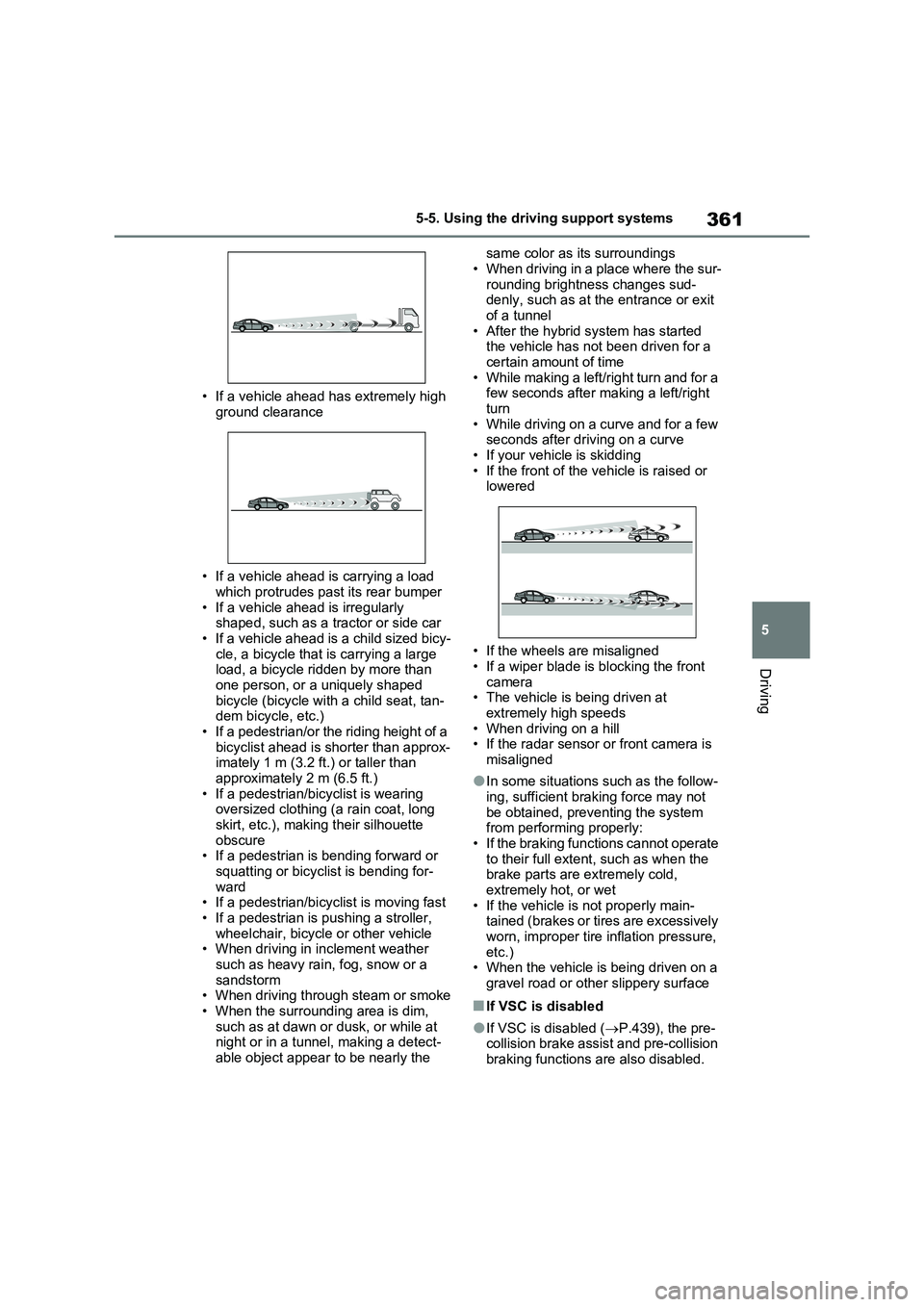
• If a vehicle ahead has extremely high
ground clearance
• If a vehicle ahead is carrying a load
which protrudes past its rear bumper
• If a vehicle ahead is irregularly
shaped, such as a tractor or side car
• If a vehicle ahead is a child sized bicy-
cle, a bicycle that is carrying a large
load, a bicycle ridden by more than
one person, or a uniquely shaped
bicycle (bicycle with a child seat, tan-
dem bicycle, etc.)
• If a pedestrian/or the riding height of a
bicyclist ahead is shorter than approx-
imately 1 m (3.2 ft.) or taller than
approximately 2 m (6.5 ft.)
• If a pedestrian/bicyclist is wearing
oversized clothing (a rain coat, long
skirt, etc.), making their silhouette
obscure
• If a pedestrian is bending forward or
squatting or bicyclist is bending for-
ward
• If a pedestrian/bicyclist is moving fast
• If a pedestrian is pushing a stroller,
wheelchair, bicycle or other vehicle
• When driving in inclement weather
such as heavy rain, fog, snow or a
sandstorm
• When driving through steam or smoke
• When the surrounding area is dim,
such as at dawn or dusk, or while at
night or in a tunnel, making a detect-
able object appear to be nearly the same color as its surroundings
• When driving in a place where the sur-
rounding brightness changes sud-
denly, such as at the entrance or exit
of a tunnel
• After the hybrid system has started
the vehicle has not been driven for a
certain amount of time
• While making a left/right turn and for a
few seconds after making a left/right
turn
• While driving on a curve and for a few
seconds after driving on a curve
• If your vehicle is skidding
• If the front of the vehicle is raised or
lowered
• If the wheels are misaligned
• If a wiper blade is blocking the front
camera
• The vehicle is being driven at
extremely high speeds
• When driving on a hill
• If the radar sensor or front camera is
misaligned
●In some situations such as the follow-
ing, sufficient braking force may not
be obtained, preventing the system
from performing properly:
• If the braking functions cannot operate
to their full extent, such as when the
brake parts are extremely cold,
extremely hot, or wet
• If the vehicle is not properly main-
tained (brakes or tires are excessively
worn, improper tire inflation pressure,
etc.)
• When the vehicle is being driven on a
gravel road or other slippery surface
■If VSC is disabled
●If VSC is disabled (P.439), the pre-
collision brake assist and pre-collision
braking functions are also disabled.
Page 362 of 664
3625-5. Using the driving support systems
●The PCS warning light will turn on and
“VSC Turned OFF Pre-Collision Brake
System Unavailable” will be displayed
on the multi-information display.
*: If equipped
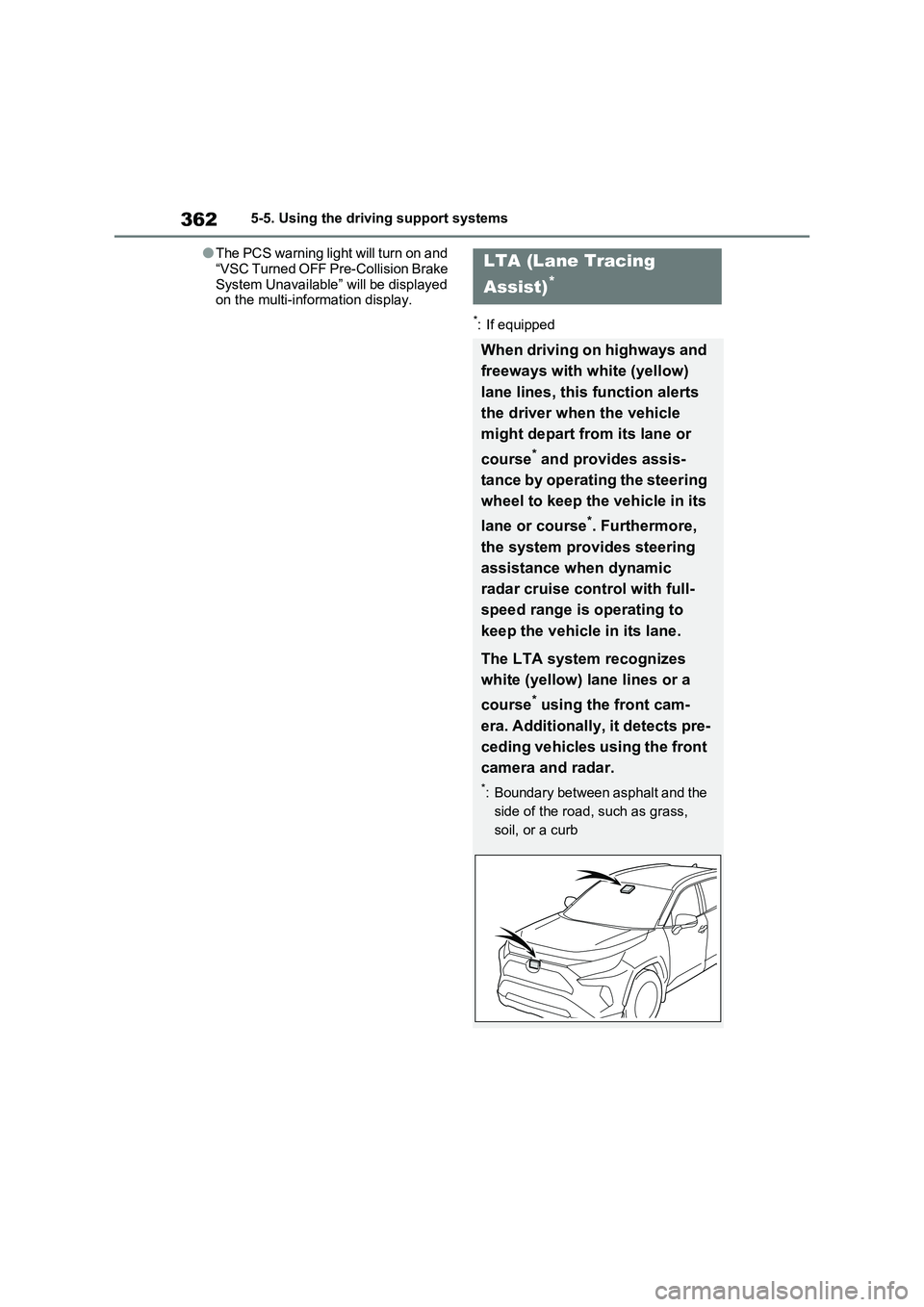
LTA (Lane Tracing
Assist)
*
When driving on highways and
freeways with white (yellow)
lane lines, this function alerts
the driver when the vehicle
might depart from its lane or
course
* and provides assis-
tance by operating the steering
wheel to keep the vehicle in its
lane or course
*. Furthermore,
the system provides steering
assistance when dynamic
radar cruise control with full-
speed range is operating to
keep the vehicle in its lane.
The LTA system recognizes
white (yellow) lane lines or a
course
* using the front cam-
era. Additionally, it detects pre-
ceding vehicles using the front
camera and radar.
*: Boundary between asphalt and the
side of the road, such as grass,
soil, or a curb
Page 369 of 664
369
5 5-5. Using the driving support systems
Driving
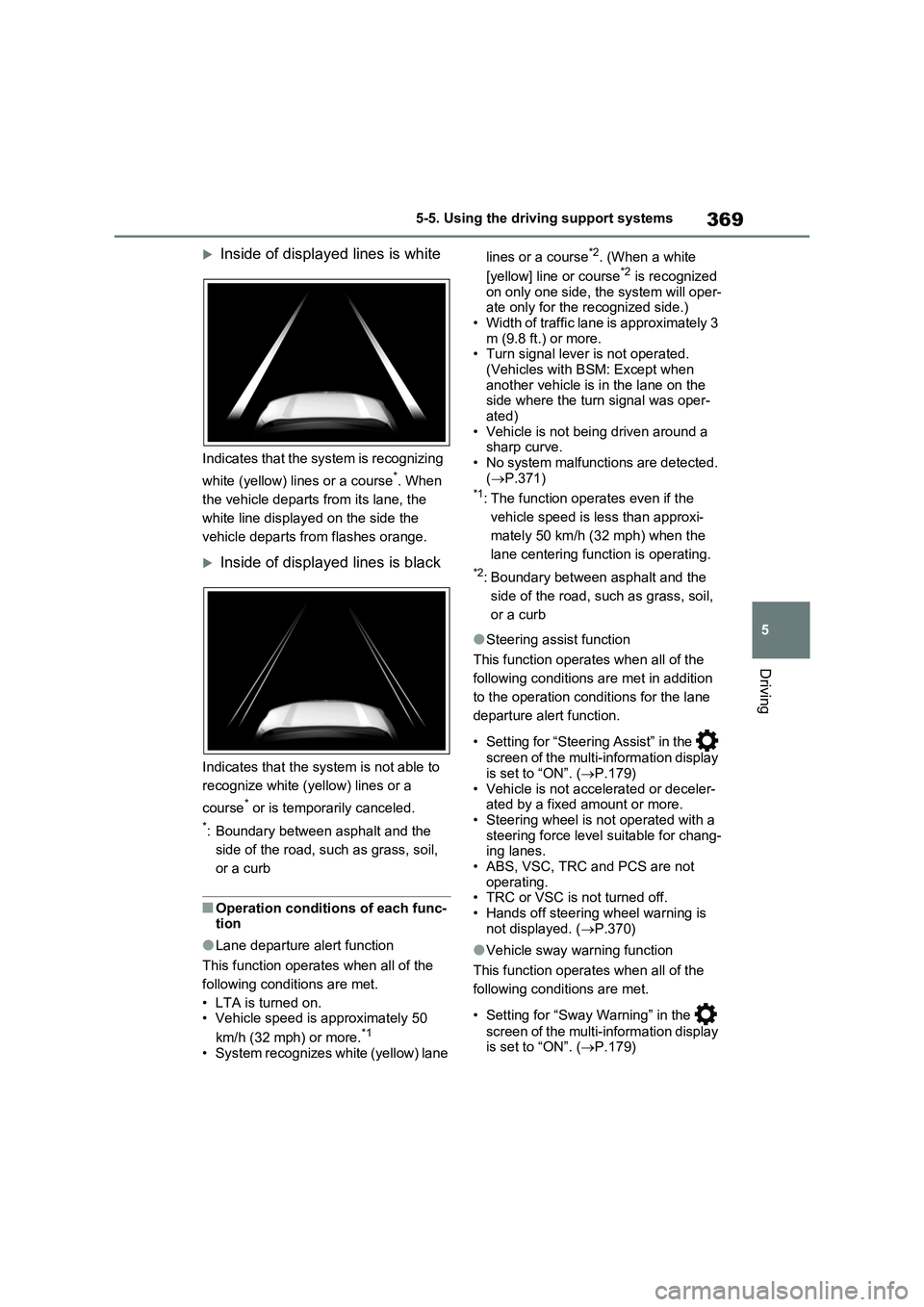
Inside of displayed lines is white
Indicates that the system is recognizing
white (yellow) lines or a course
*. When
the vehicle departs from its lane, the
white line displayed on the side the
vehicle departs from flashes orange.
Inside of displayed lines is black
Indicates that the system is not able to
recognize white (yellow) lines or a
course
* or is temporarily canceled.
*: Boundary between asphalt and the
side of the road, such as grass, soil,
or a curb
■Operation conditions of each func-
tion
●Lane departure alert function
This function operates when all of the
following conditions are met.
• LTA is turned on.
• Vehicle speed is approximately 50
km/h (32 mph) or more.
*1
• System recognizes white (yellow) lane lines or a course
*2. (When a white
[yellow] line or course*2 is recognized
on only one side, the system will oper-
ate only for the recognized side.)
• Width of traffic lane is approximately 3
m (9.8 ft.) or more.
• Turn signal lever is not operated.
(Vehicles with BSM: Except when
another vehicle is in the lane on the
side where the turn signal was oper-
ated)
• Vehicle is not being driven around a
sharp curve.
• No system malfunctions are detected.
(P.371)
*1: The function operates even if the
vehicle speed is less than approxi-
mately 50 km/h (32 mph) when the
lane centering function is operating.
*2: Boundary between asphalt and the
side of the road, such as grass, soil,
or a curb
●Steering assist function
This function operates when all of the
following conditions are met in addition
to the operation conditions for the lane
departure alert function.
• Setting for “Steering Assist” in the
screen of the multi-information display
is set to “ON”. (P.179)
• Vehicle is not accelerated or deceler-
ated by a fixed amount or more.
• Steering wheel is not operated with a
steering force level suitable for chang-
ing lanes.
• ABS, VSC, TRC and PCS are not
operating.
• TRC or VSC is not turned off.
• Hands off steering wheel warning is
not displayed. (P.370)
●Vehicle sway warning function
This function operates when all of the
following conditions are met.
• Setting for “Sway Warning” in the
screen of the multi-information display
is set to “ON”. (P.179)
Page 370 of 664
3705-5. Using the driving support systems
• Vehicle speed is approximately 50
km/h (32 mph) or more.
• Width of traffic lane is approximately 3
m (9.8 ft.) or more.
• No system malfunctions are detected.
(P.371)
●Lane centering function
This function operates when all of the
following conditions are met.
• LTA is turned on.
• Setting for “Steering Assist” and “Lane
Center” in the screen of the multi-
information display are set to “ON”.
(P.179)
• This function recognizes white (yel-
low) lane lines or the position of a pre-
ceding vehicle (except when the
preceding vehicle is small, such as a
motorcycle).
• The dynamic radar cruise control with
full-speed range is operating in vehi-
cle-to-vehicle distance control mode.
• Width of traffic lane is approximately 3
to 4 m (10 to 13 ft.).
• Turn signal lever is not operated.
• Vehicle is not being driven around a
sharp curve.
• No system malfunctions are detected.
(P.371)
• Vehicle does not accelerate or decel-
erate by a fixed amount or more.
• Steering wheel is not operated with a
steering force level suitable for chang-
ing lanes.
• ABS, VSC, TRC and PCS are not
operating.
• TRC or VSC is not turned off.
• Hands off steering wheel warning is
not displayed. (P.370)
• The vehicle is being driven in the cen-
ter of a lane.
• Steering assist function is not operat-
ing.
■Temporary cancelation of functions
●When operation conditions are no lon-
ger met, a function may be temporar-
ily canceled. However, when the
operation conditions are met again,
operation of the function is automati-
cally restored. (P.369)
●If the operation conditions (P.369)
are no longer met while the lane cen-
tering function is operating, the steer-
ing wheel may vibrate and the buzzer
may sound to indicate that the func-
tion has been temporarily canceled.
However, if the “Alert” customization
setting is set to “Steering wheel vibra-
tion”, the system will notify the driver
by vibrating the steering wheel instead
of sounding the buzzer.
■Steering assist function/lane cen-
tering function
●Depending on the vehicle speed, lane
departure situation, road conditions,
etc., the driver may not feel the func-
tion is operating or the function may
not operate at all.
●The steering control of the function is
overridden by the driver’s steering
wheel operation.
●Do not attempt to test the operation of
the steering assist function.
■Lane departure alert function
●The warning buzzer may be difficult to
hear due to external noise, audio play-
back, etc. Also, it may be difficult to
feel steering wheel vibrations due to
the road conditions, etc.
●If the edge of the course* is not clear
or straight, the lane departure alert
function may not operate.
●Vehicles with BSM: It may not be pos-
sible for the system to determine if
there is a danger of a collision with a
vehicle in an adjacent lane.
●Do not attempt to test the operation of
the lane departure alert function.
*: Boundary between asphalt and the
side of the road, such as grass, soil,
or a curb
■Hands off steering wheel warning
In the following situations, a warning
message urging the driver to hold the
steering wheel and the symbol shown in
the illustration are displayed on the
multi-information display to warn the
Page 385 of 664
385
5 5-5. Using the driving support systems
Driving
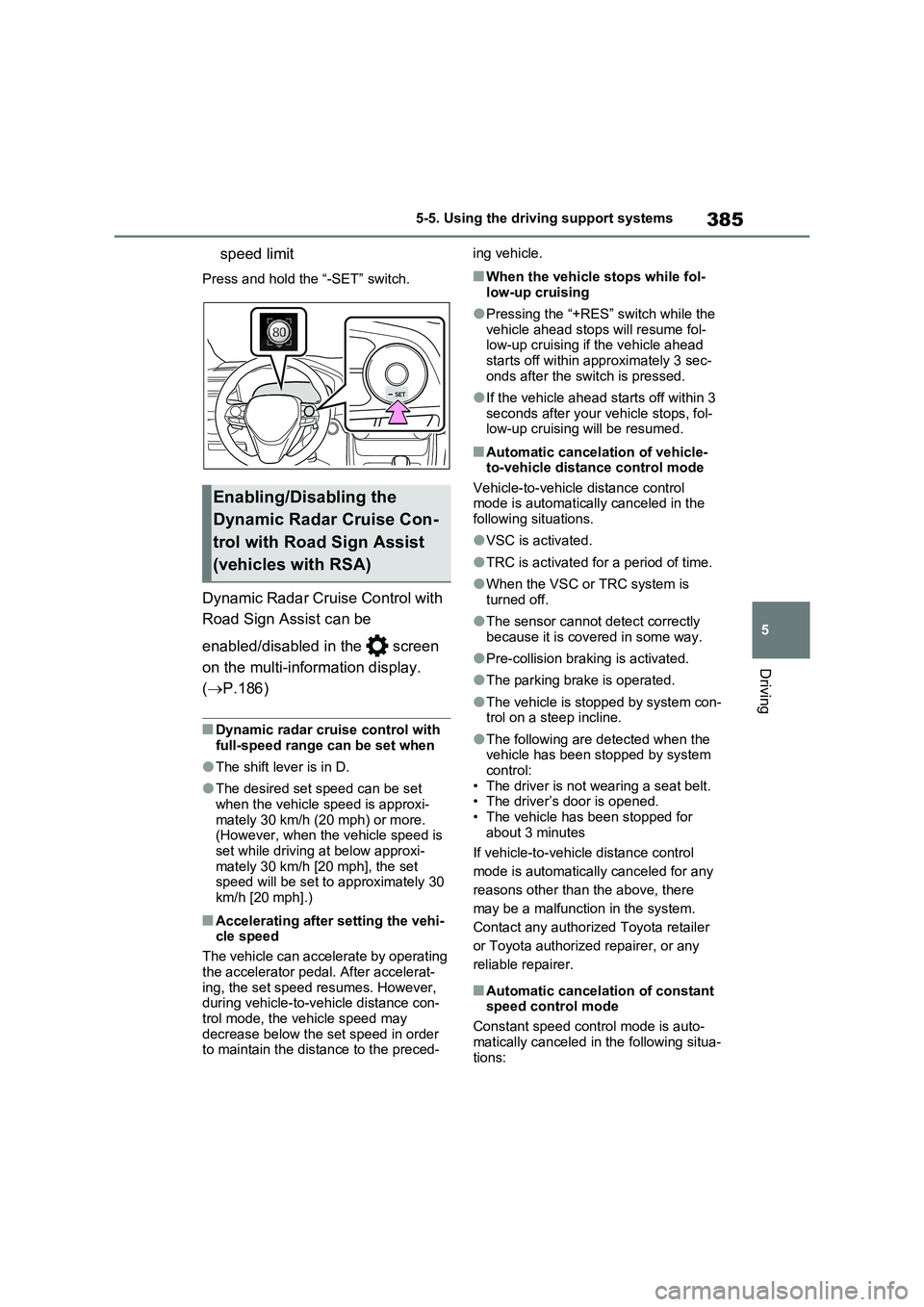
speed limit
Press and hold the “-SET” switch.
Dynamic Radar Cruise Control with
Road Sign Assist can be
enabled/disabled in the screen
on the multi-information display.
(P.186)
■Dynamic radar cruise control with
full-speed range can be set when
●The shift lever is in D.
●The desired set speed can be set
when the vehicle speed is approxi-
mately 30 km/h (20 mph) or more.
(However, when the vehicle speed is
set while driving at below approxi-
mately 30 km/h [20 mph], the set
speed will be set to approximately 30
km/h [20 mph].)
■Accelerating after setting the vehi-
cle speed
The vehicle can accelerate by operating
the accelerator pedal. After accelerat-
ing, the set speed resumes. However,
during vehicle-to-vehicle distance con-
trol mode, the vehicle speed may
decrease below the set speed in order
to maintain the distance to the preced-ing vehicle.
■When the vehicle stops while fol-
low-up cruising
●Pressing the “+RES” switch while the
vehicle ahead stops will resume fol-
low-up cruising if the vehicle ahead
starts off within approximately 3 sec-
onds after the switch is pressed.
●If the vehicle ahead starts off within 3
seconds after your vehicle stops, fol-
low-up cruising will be resumed.
■Automatic cancelation of vehicle-
to-vehicle distance control mode
Vehicle-to-vehicle distance control
mode is automatically canceled in the
following situations.
●VSC is activated.
●TRC is activated for a period of time.
●When the VSC or TRC system is
turned off.
●The sensor cannot detect correctly
because it is covered in some way.
●Pre-collision braking is activated.
●The parking brake is operated.
●The vehicle is stopped by system con-
trol on a steep incline.
●The following are detected when the
vehicle has been stopped by system
control:
• The driver is not wearing a seat belt.
• The driver’s door is opened.
• The vehicle has been stopped for
about 3 minutes
If vehicle-to-vehicle distance control
mode is automatically canceled for any
reasons other than the above, there
may be a malfunction in the system.
Contact any authorized Toyota retailer
or Toyota authorized repairer, or any
reliable repairer.
■Automatic cancelation of constant
speed control mode
Constant speed control mode is auto-
matically canceled in the following situa-
tions:
Enabling/Disabling the
Dynamic Radar Cruise Con-
trol with Road Sign Assist
(vehicles with RSA)
Page 386 of 664
3865-5. Using the driving support systems
●Actual vehicle speed is more than
approximately 16 km/h (10 mph) below the set vehicle speed.
●Actual vehicle speed falls below approximately 30 km/h (20 mph).
●VSC is activated.
●TRC is activated for a period of time.
●When the VSC or TRC system is turned off.
●Pre-collision braking is activated.
●The parking brake is operated.
If constant speed control mode is auto-
matically canceled for any reasons other
than the above, there may be a malfunc-
tion in the system. Contact any autho-
rized Toyota retailer or Toyota
authorized repairer, or any reliable
repairer.
■The Dynamic Radar Cruise Control with Road Sign Assist may not
operate properly when (vehicles with RSA)
As the Dynamic Radar Cruise Control
with Road Sign Assist may not operate properly in conditions in which RSA may not operate or detect correctly
( P.375), when using this function, make sure to check the speed limit sign displayed.
In the following situations, the set speed may not be changed to the recognized speed limit by pressing and holding the
“+RES”/“-SET” switch.
●If speed limit information is not avail-
able
●When the recognized speed limit is
the same as the set speed
●When the recognized speed limit is
outside of the speed range that the dynamic radar cruise control system can operate
■Brake operation
A brake operation sound may be heard and the brake pedal response may change, but these are not malfunctions.
■Warning messages and buzzers for
dynamic radar cruise control with full-speed range
Warning messages and buzzers are
used to indicate a system malfunction or to inform the driver of the need for cau-tion while driving. If a warning message
is shown on the multi-information dis- play, read the message and follow the instructions. ( P.353, 578)
■When the sensor may not be cor-
rectly detecting the vehicle ahead
In the case of the following and depend- ing on the conditions, operate the brake
pedal when deceleration of the system is insufficient or operate the accelerator pedal when acceleration is required.
As the sensor may not be able to cor- rectly detect these types of vehicles, the approach warning ( P.383) may not be
activated.
●Vehicles that cut in suddenly
●Vehicles traveling at low speeds
●Vehicles that are not moving in the same lane
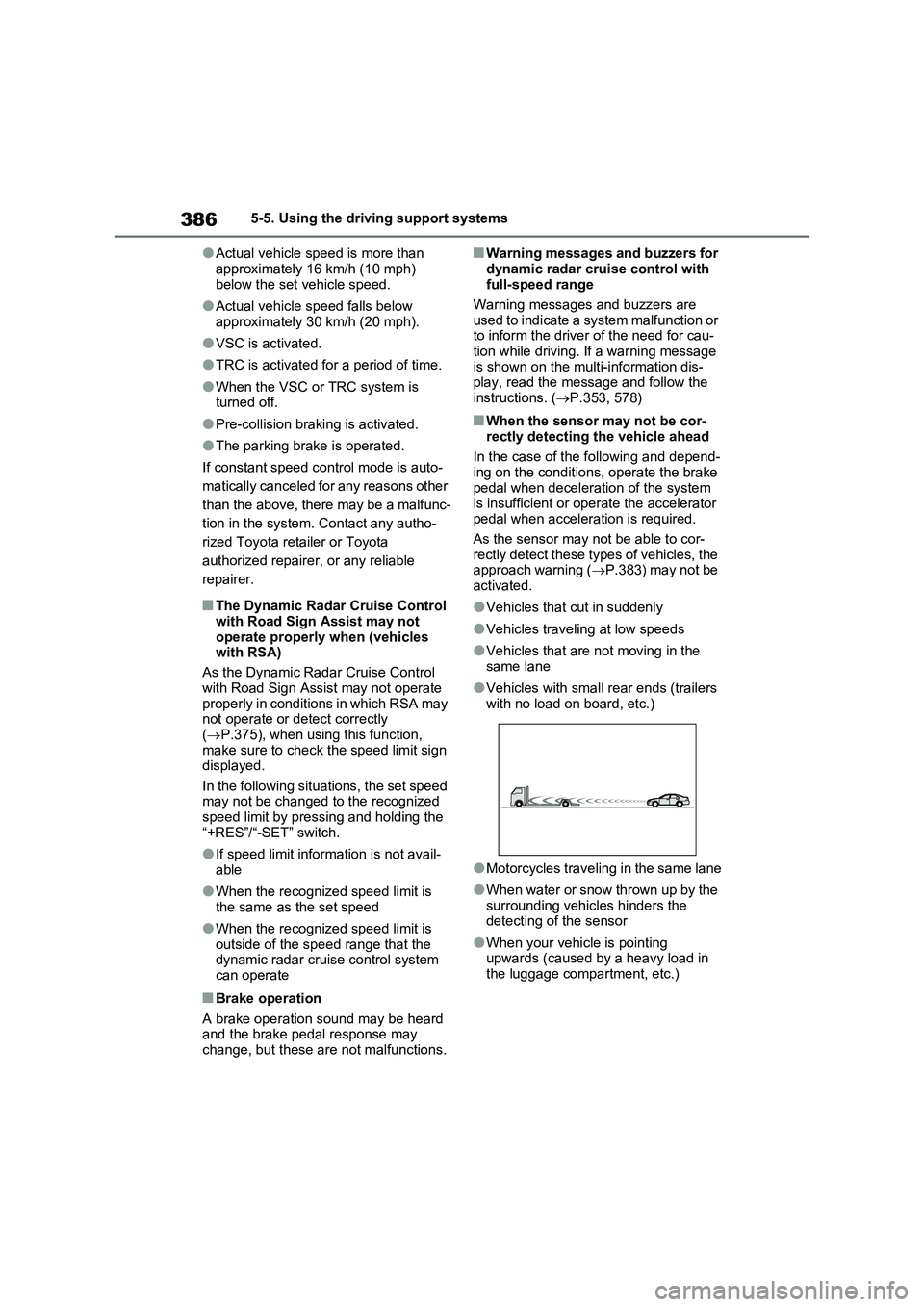
●Vehicles with small rear ends (trailers with no load on board, etc.)
●Motorcycles traveling in the same lane
●When water or snow thrown up by the
surrounding vehicles hinders the detecting of the sensor
●When your vehicle is pointing upwards (caused by a heavy load in the luggage compartment, etc.)