stop start TOYOTA VERSO S 2014 Service Manual
[x] Cancel search | Manufacturer: TOYOTA, Model Year: 2014, Model line: VERSO S, Model: TOYOTA VERSO S 2014Pages: 560, PDF Size: 16.94 MB
Page 190 of 560
190
2-1. Driving procedures
VERSO-S_EE
Multidrive
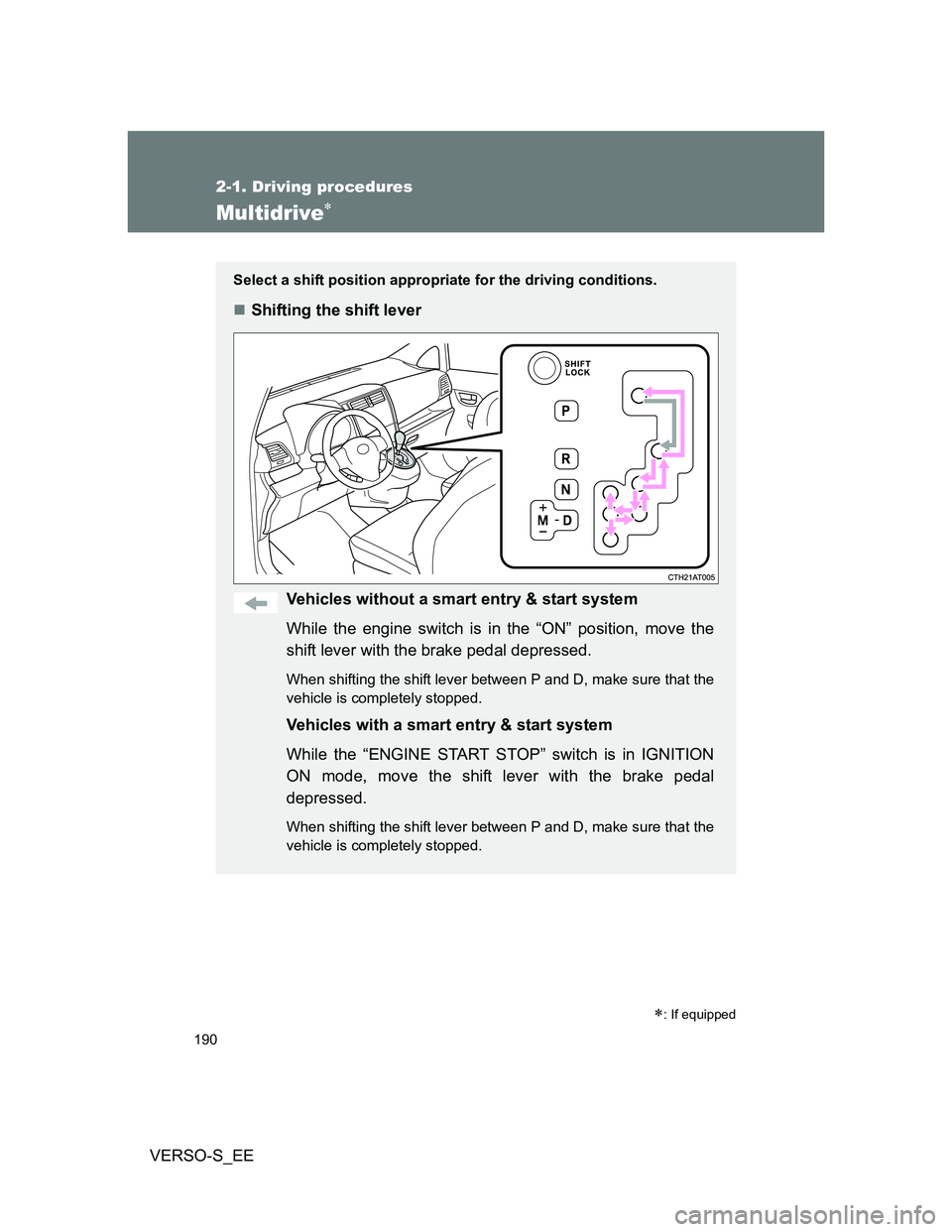
Select a shift position appropriate for the driving conditions.
Shifting the shift lever
Vehicles without a smart entry & start system
While the engine switch is in the “ON” position, move the
shift lever with the brake pedal depressed.
When shifting the shift lever between P and D, make sure that the
vehicle is completely stopped.
Vehicles with a smart entry & start system
While the “ENGINE START STOP” switch is in IGNITION
ON mode, move the shift lever with the brake pedal
depressed.
When shifting the shift lever between P and D, make sure that the
vehicle is completely stopped.
: If equipped
Page 194 of 560
194 2-1. Driving procedures
VERSO-S_EE
If the shift lever cannot be shifted from P
P. 489, 490
When driving with the cruise control system (if equipped)
Engine braking will not occur in M position even when downshifting to
M6, 5 or 4.
Engine braking will not occur in D position even when the paddle shift
switch is used for downshifting to D6, 5 or 4.
If the “M” indicator flashes or a buzzer beeps after shifting the shift
lever to M
This may indicate a malfunction in the Multidrive system. Have the vehicle
inspected by any authorized Toyota dealer or repairer, or another duly quali-
fied and equipped professional immediately.
(In this situation, the transmission will operate in the same manner as when
the shift lever is in D.)
When the vehicle comes to a stop with the shift lever in the M position
The transmission will automatically downshift to M1 once the vehicle is
stopped.
After a stop, the vehicle will start off in M1.
When the vehicle is stopped, the transmission is set at M1.
Deactivation of the temporary gear steps selection mode in the D posi-
tion
In the following situations, temporary gear steps selection mode in the D
position will be deactivated:
When the vehicle comes to a stop
If the accelerator pedal is depressed for more than a certain period of
time in one gear step
When the “+” paddle shift switch is held down for a period of time
Downshift restriction warning buzzer (7-speed sport sequential shift-
matic mode)
To help ensure safety and driving performance, downshifting operation may
sometimes be restricted. In some circumstances, downshifting may not be
possible even when the shift lever or paddle shift switches are operated. (A
buzzer will sound twice.)
Page 199 of 560
199 2-1. Driving procedures
2
When driving
VERSO-S_EE
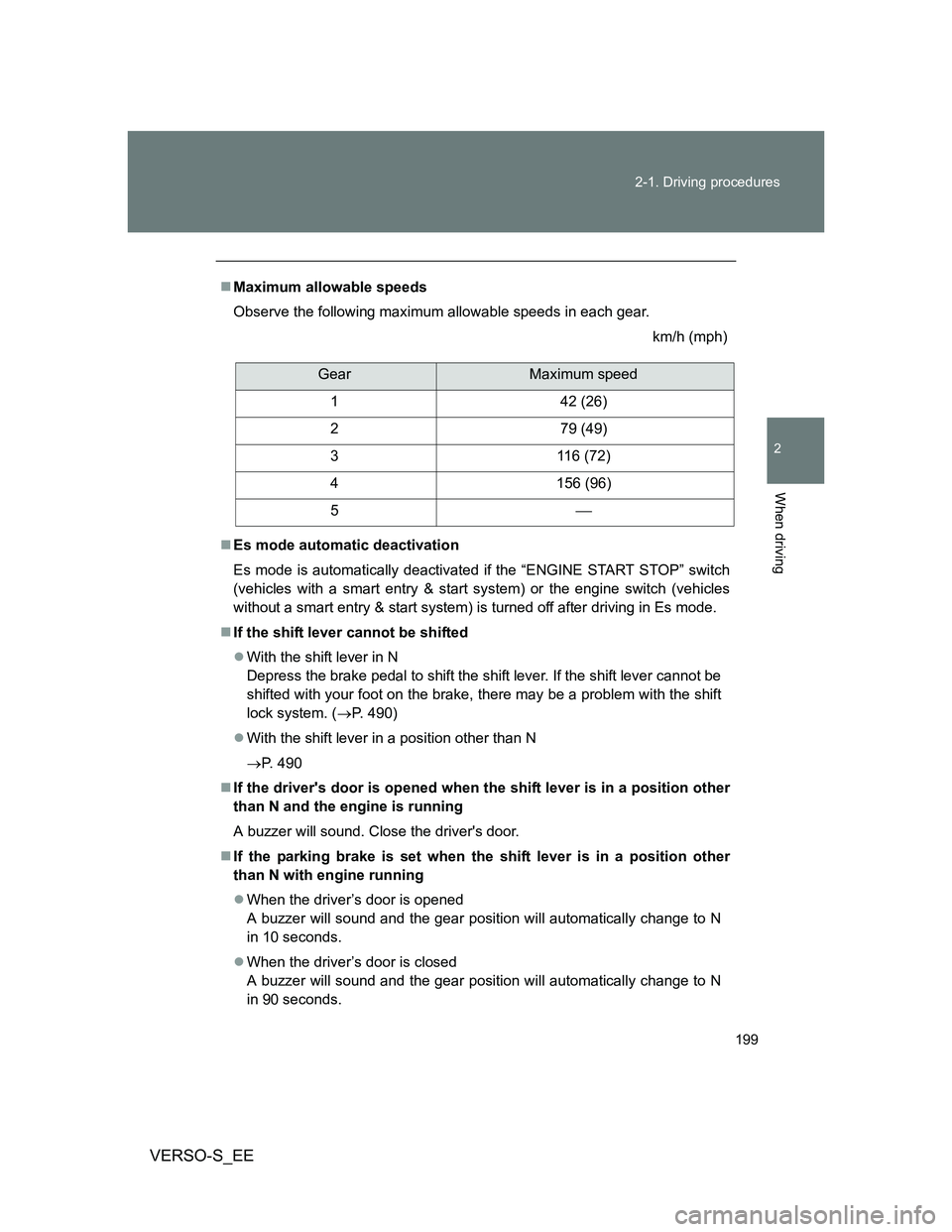
Maximum allowable speeds
Observe the following maximum allowable speeds in each gear.
km/h (mph)
Es mode automatic deactivation
Es mode is automatically deactivated if the “ENGINE START STOP” switch
(vehicles with a smart entry & start system) or the engine switch (vehicles
without a smart entry & start system) is turned off after driving in Es mode.
If the shift lever cannot be shifted
With the shift lever in N
Depress the brake pedal to shift the shift lever. If the shift lever cannot be
shifted with your foot on the brake, there may be a problem with the shift
lock system. (P. 490)
With the shift lever in a position other than N
P. 490
If the driver's door is opened when the shift lever is in a position other
than N and the engine is running
A buzzer will sound. Close the driver's door.
If the parking brake is set when the shift lever is in a position other
than N with engine running
When the driver’s door is opened
A buzzer will sound and the gear position will automatically change to N
in 10 seconds.
When the driver’s door is closed
A buzzer will sound and the gear position will automatically change to N
in 90 seconds.
GearMaximum speed
1 42 (26)
2 79 (49)
3 116 (72)
4 156 (96)
5
Page 200 of 560
200 2-1. Driving procedures
VERSO-S_EE
If the “M” indicator does not come on even after shifting the shift lever
to M
This may indicate a malfunction in the multi-mode manual transmission sys-
tem. Have the vehicle inspected by any authorized Toyota dealer or repairer,
or another duly qualified and equipped professional immediately.
(In this situation, the transmission will operate in the same manner as when
the shift lever is in E.)
If the “N” indicator is flashing
When shifting the shift lever
Shift the shift lever to N. Wait a few seconds and shift the shift lever to the
desired position.
When the engine is turned off
Vehicles without smart entry & start system: Turn the engine switch to the
“ON” position. Depress the brake pedal and shift the shift lever to N, and
then to the desired position.
Vehicles with smart entry & start system: Turn the “ENGINE START
STOP” switch to IGNITION ON mode. Depress the brake pedal and shift
the shift lever to N, and then to the desired position.
If the indicator still flashes after the above operations, shift the shift lever to
N and start the engine. Then, shift the shift lever to the desired position.
If the “N” indicator is flashing and warning buzzer is beeping
Shift the shift lever to N, and then to E, M or R.
Reverse warning buzzer
When shifting into R, a buzzer will sound to inform the driver that the shift
lever is in R.
Downshift restriction warning buzzer (in E mode [when the paddle shift
switches are operated] or M mode)
To help ensure safety and driving performance, downshifting operation may
sometimes be restricted. In some circumstances, downshifting may not be
possible even when the shift lever or paddle shift switches are operated. (A
buzzer will sound twice.)
Page 204 of 560
204
2-1. Driving procedures
VERSO-S_EE
Turn signal lever
Turn signals can be operated when
Vehicles without a smart entry & start system: The engine switch is in the
“ON” position.
Vehicles with a smart entry & start system: The “ENGINE START STOP”
switch is in IGNITION ON mode.
If the indicator flashes faster than usual
Check that a light bulb in the front or rear turn signal lights has not burned
out.
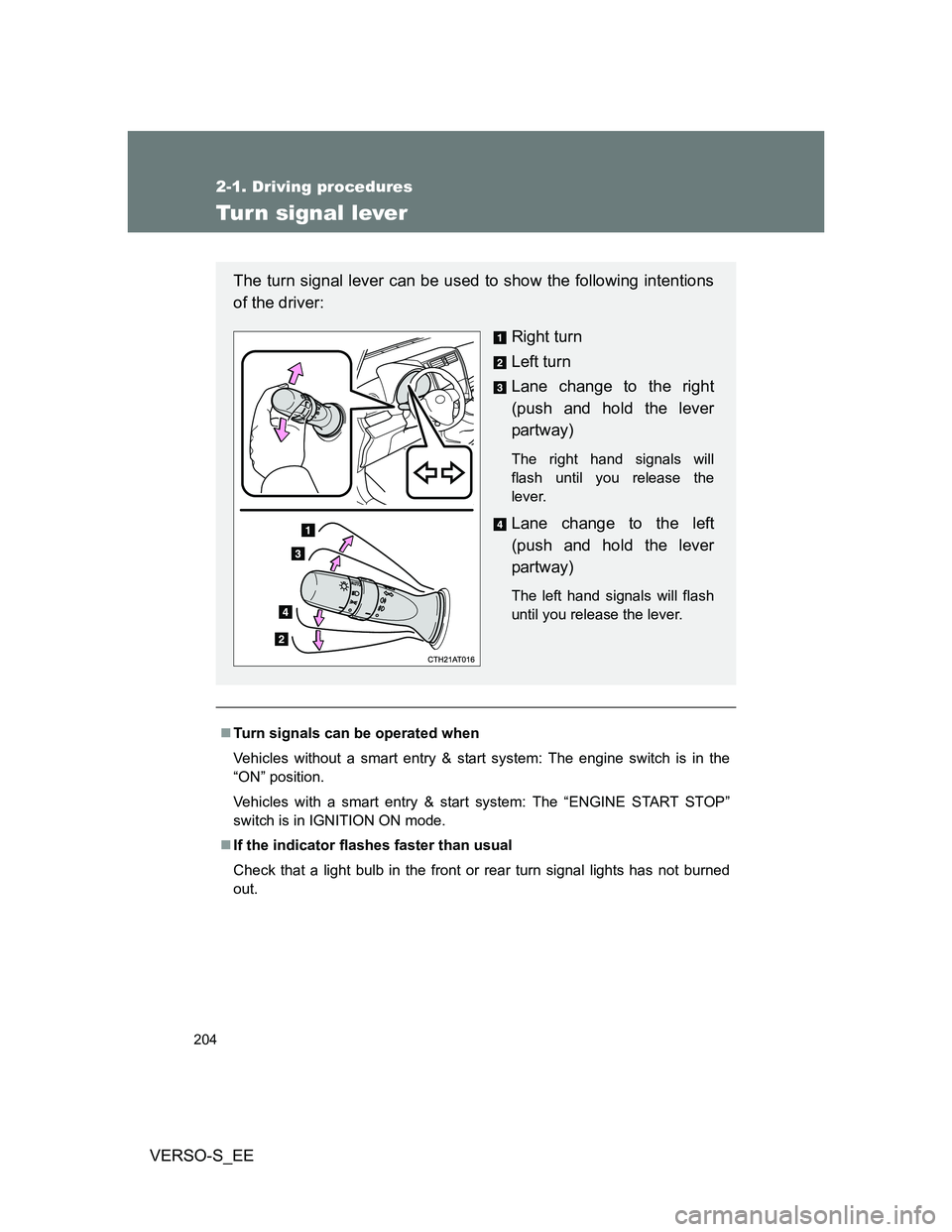
The turn signal lever can be used to show the following intentions
of the driver:
Right turn
Left turn
Lane change to the right
(push and hold the lever
partway)
The right hand signals will
flash until you release the
lever.
Lane change to the left
(push and hold the lever
partway)
The left hand signals will flash
until you release the lever.
Page 207 of 560
207
2
When driving
VERSO-S_EE
2-2. Instrument cluster
Gauges and meters
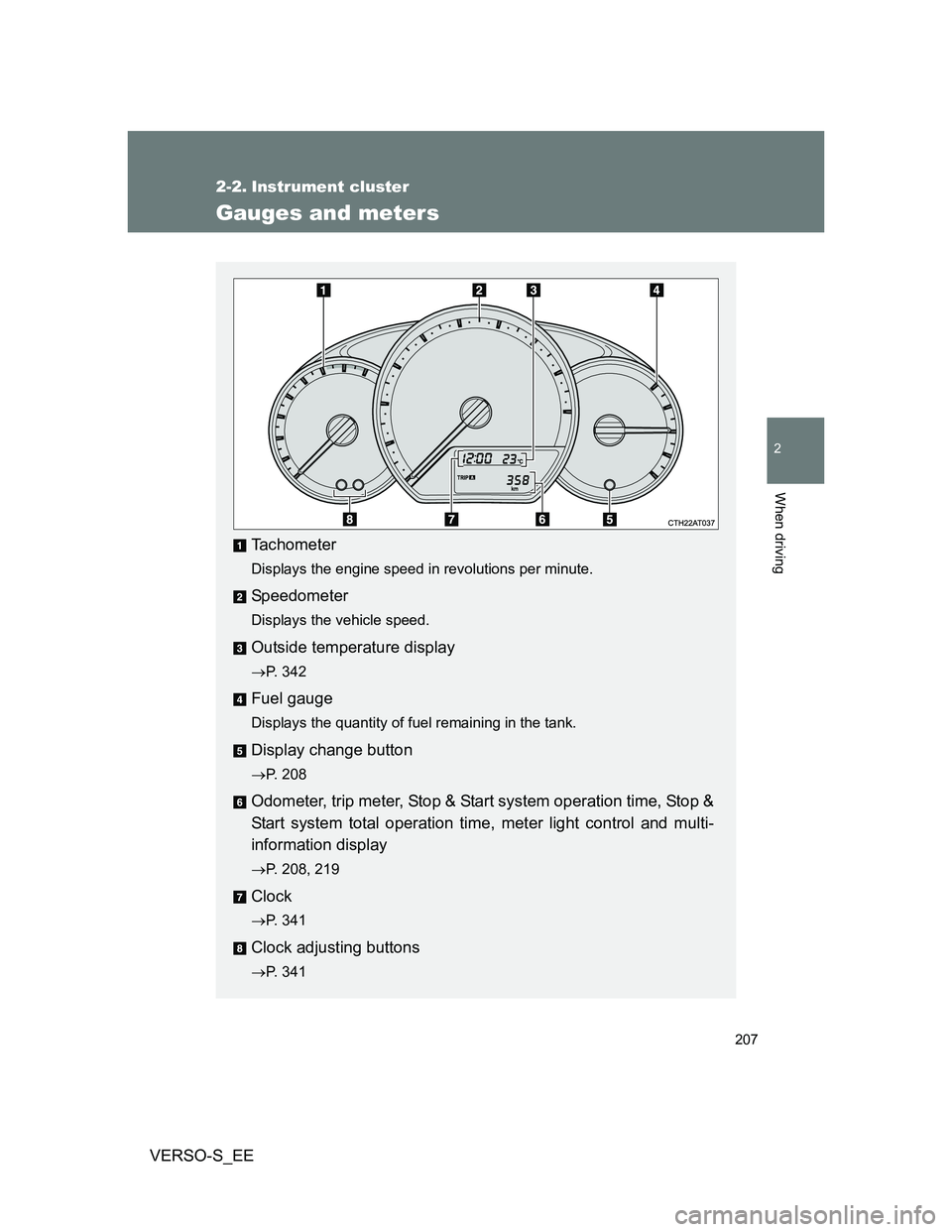
Tachometer
Displays the engine speed in revolutions per minute.
Speedometer
Displays the vehicle speed.
Outside temperature display
P. 342
Fuel gauge
Displays the quantity of fuel remaining in the tank.
Display change button
P. 208
Odometer, trip meter, Stop & Start system operation time, Stop &
Start system total operation time, meter light control and multi-
information display
P. 208, 219
Clock
P. 341
Clock adjusting buttons
P. 341
Page 208 of 560
208 2-2. Instrument cluster
VERSO-S_EE
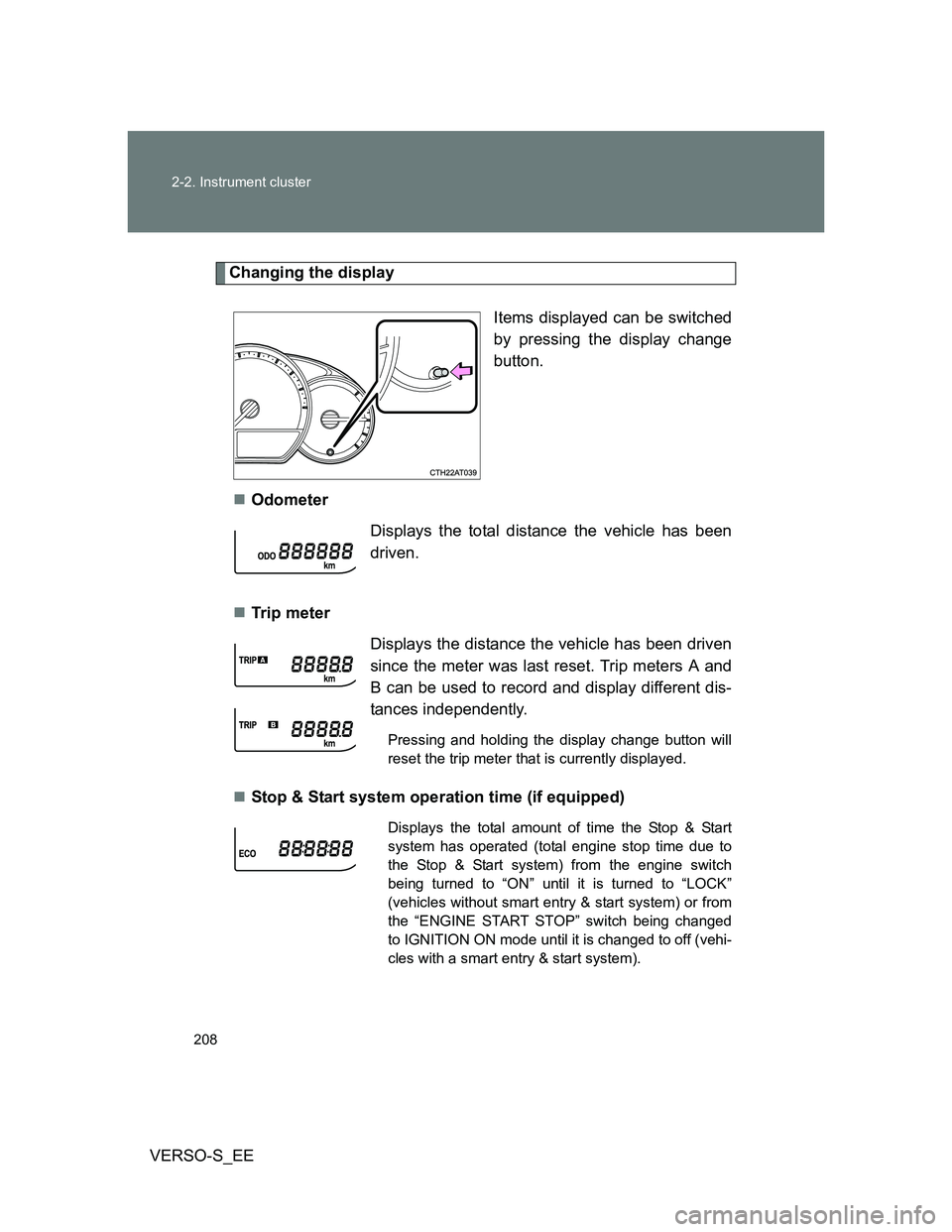
Changing the display
Items displayed can be switched
by pressing the display change
button.
Odometer
Tr ip m eter
Stop & Start system operation time (if equipped)
Displays the total distance the vehicle has been
driven.
Displays the distance the vehicle has been driven
since the meter was last reset. Trip meters A and
B can be used to record and display different dis-
tances independently.
Pressing and holding the display change button will
reset the trip meter that is currently displayed.
Displays the total amount of time the Stop & Start
system has operated (total engine stop time due to
the Stop & Start system) from the engine switch
being turned to “ON” until it is turned to “LOCK”
(vehicles without smart entry & start system) or from
the “ENGINE START STOP” switch being changed
to IGNITION ON mode until it is changed to off (vehi-
cles with a smart entry & start system).
Page 209 of 560
209 2-2. Instrument cluster
2
When driving
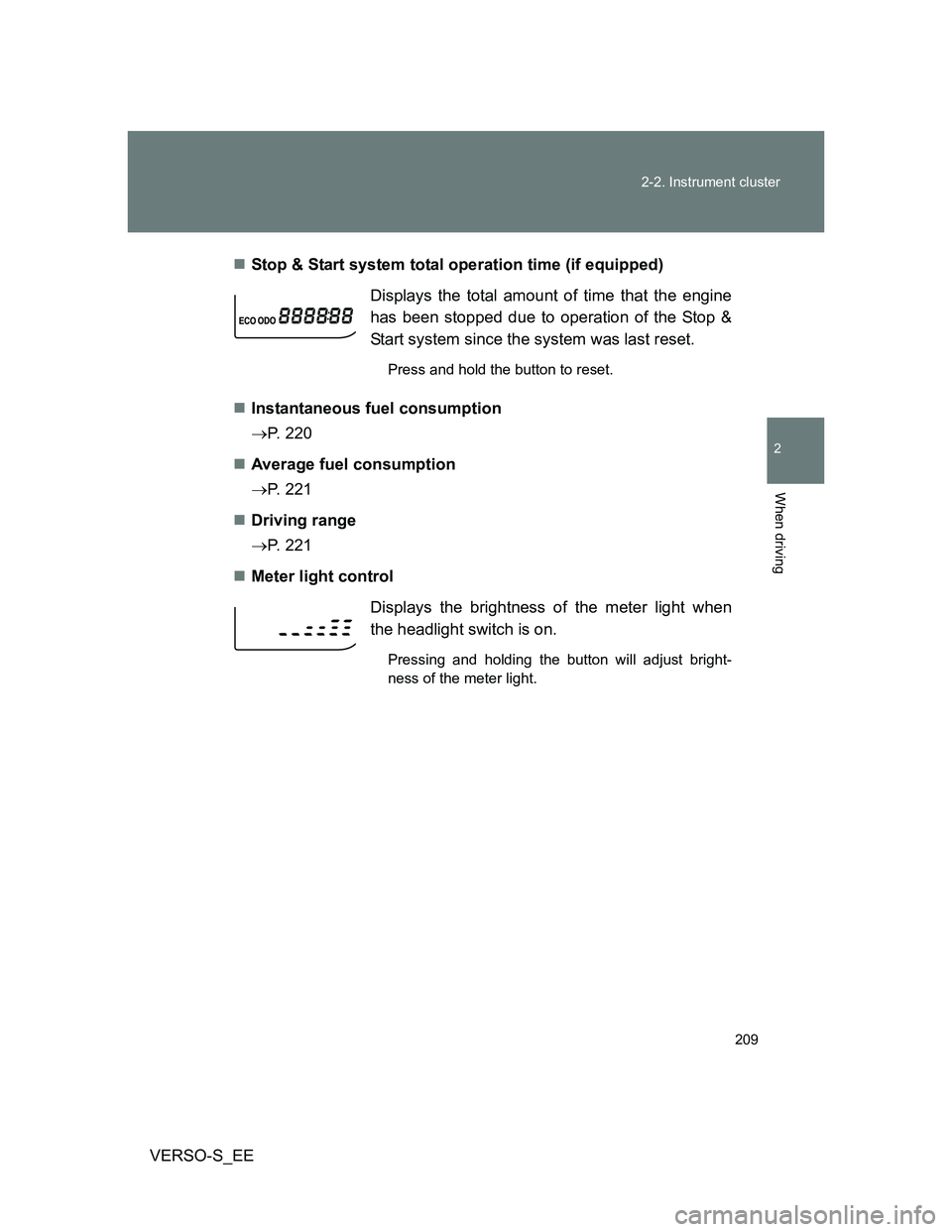
VERSO-S_EEStop & Start system total operation time (if equipped)
Instantaneous fuel consumption
P. 220
Average fuel consumption
P. 221
Driving range
P. 221
Meter light controlDisplays the total amount of time that the engine
has been stopped due to operation of the Stop &
Start system since the system was last reset.
Press and hold the button to reset.
Displays the brightness of the meter light when
the headlight switch is on.
Pressing and holding the button will adjust bright-
ness of the meter light.
Page 211 of 560
211 2-2. Instrument cluster
2
When driving
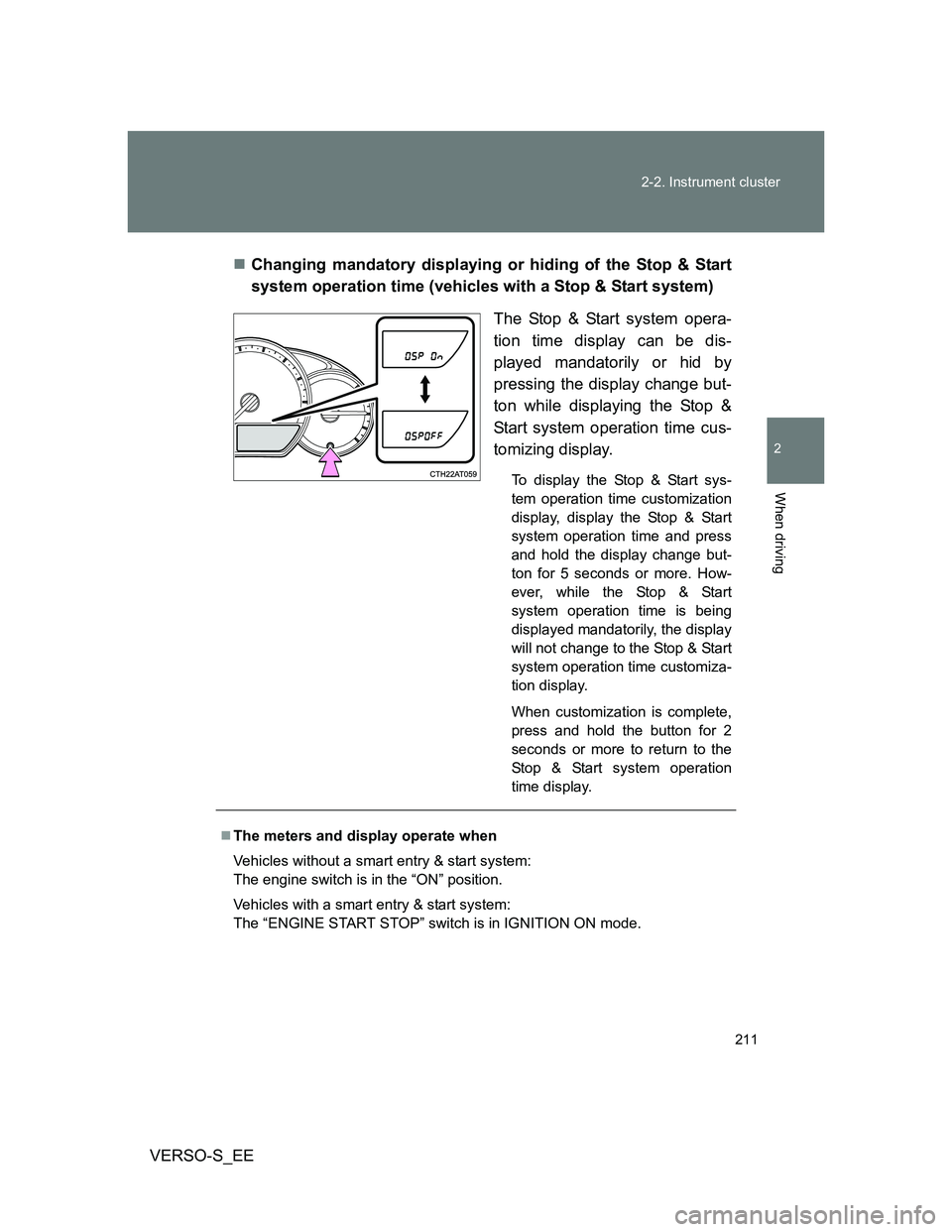
VERSO-S_EEChanging mandatory displaying or hiding of the Stop & Start
system operation time (vehicles with a Stop & Start system)
The Stop & Start system opera-
tion time display can be dis-
played mandatorily or hid by
pressing the display change but-
ton while displaying the Stop &
Start system operation time cus-
tomizing display.
To display the Stop & Start sys-
tem operation time customization
display, display the Stop & Start
system operation time and press
and hold the display change but-
ton for 5 seconds or more. How-
ever, while the Stop & Start
system operation time is being
displayed mandatorily, the display
will not change to the Stop & Start
system operation time customiza-
tion display.
When customization is complete,
press and hold the button for 2
seconds or more to return to the
Stop & Start system operation
time display.
The meters and display operate when
Vehicles without a smart entry & start system:
The engine switch is in the “ON” position.
Vehicles with a smart entry & start system:
The “ENGINE START STOP” switch is in IGNITION ON mode.
Page 215 of 560
215 2-2. Instrument cluster
2
When driving
VERSO-S_EE
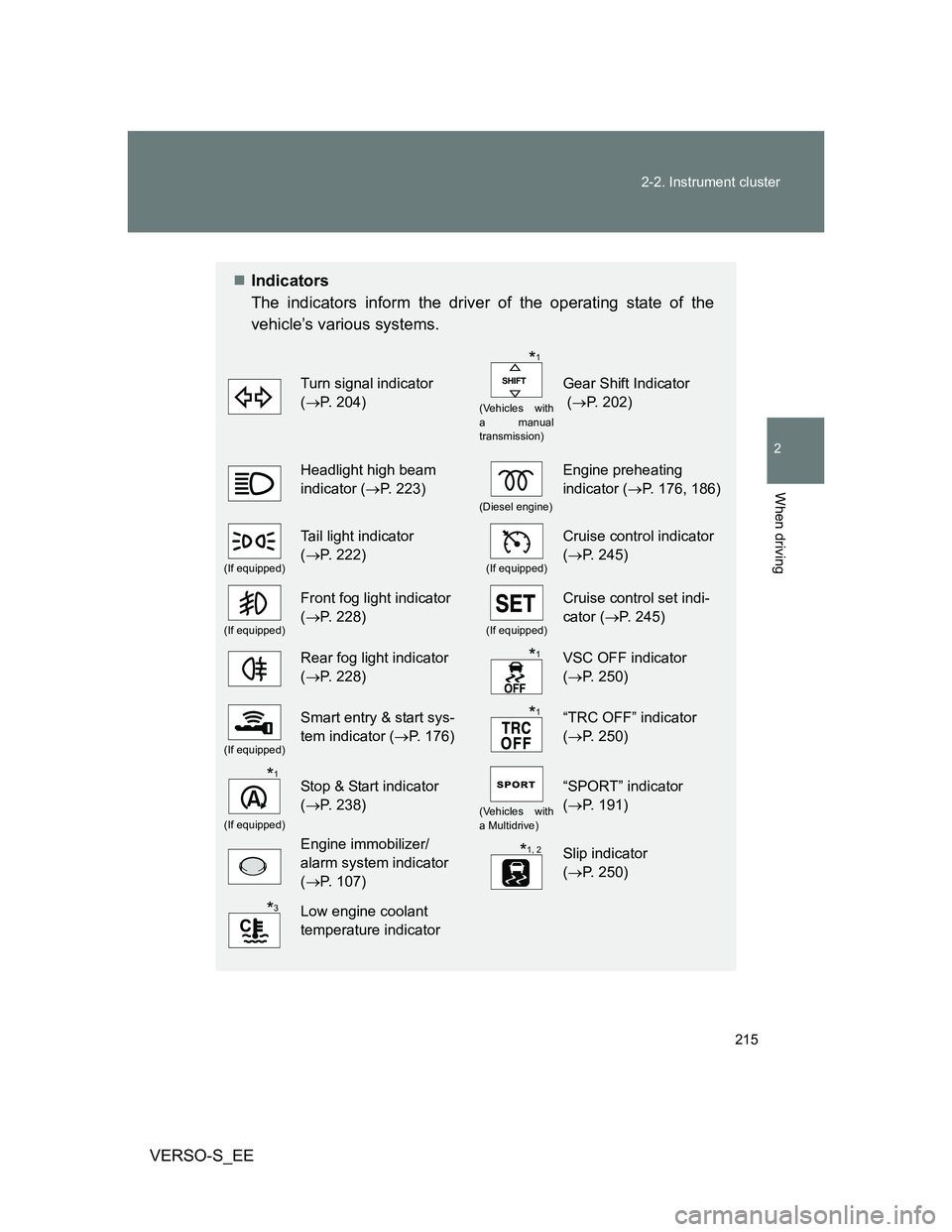
Indicators
The indicators inform the driver of the operating state of the
vehicle’s various systems.
Turn signal indicator
(P. 204)
(Vehicles with
a manual
transmission)
Gear Shift Indicator
(P. 202)
Headlight high beam
indicator (P. 223)
(Diesel engine)
Engine preheating
indicator (P. 176, 186)
(If equipped)
Tail light indicator
(P. 222)
(If equipped)
Cruise control indicator
(P. 245)
(If equipped)
Front fog light indicator
(P. 228)
(If equipped)
Cruise control set indi-
cator (P. 245)
Rear fog light indicator
(P. 228)VSC OFF indicator
(P. 250)
(If equipped)
Smart entry & start sys-
tem indicator (P. 176)“TRC OFF” indicator
(P. 250)
(If equipped)
Stop & Start indicator
(P. 238)
(Vehicles with
a Multidrive)
“SPORT” indicator
(P. 191)
Engine immobilizer/
alarm system indicator
(P. 107)Slip indicator
(P. 250)
Low engine coolant
temperature indicator
*1
*1
*1
*1
*1, 2
*3