battery TOYOTA xB 2013 Owners Manual (in English)
[x] Cancel search | Manufacturer: TOYOTA, Model Year: 2013, Model line: xB, Model: TOYOTA xB 2013Pages: 396, PDF Size: 10.16 MB
Page 4 of 396

TABLE OF CONTENTSIndex
4
Scion_xB_OM_OM12G46U_(U)
4-1. Maintenance and careCleaning and protecting the vehicle exterior ........... 206
Cleaning and protecting the vehicle interior ............ 209
4-2. Maintenance Maintenance requirements .................... 212
General maintenance ......... 214
Emission inspection and maintenance (I/M)
programs .......................... 218
4-3. Do-it-yourself maintenance Do-it-yourself service precautions ...................... 219
Hood................................... 222
Positioning a floor jack ....... 224
Engine compartment .......... 226
Tires ................................... 240
Tire inflation pressure......... 248
Wheels ............................... 252
Air conditioning filter ........... 255
Wireless remote control battery .............................. 258
Checking and replacing fuses ................................ 262
Light bulbs .......................... 272 5-1. Essential information
Emergency flashers ............ 284
If your vehicle needs to be towed ........................... 285
If you think something is wrong ............................ 292
Fuel pump shut off system .............................. 293
5-2. Steps to take in an emergency If a warning light turns on or a warning buzzer
sounds... .......................... 294
If you have a flat tire ........... 307
If the engine will not start .................................. 321
If the shift lever cannot be shifted from P (automatic
transmission) .................... 322
If you lose your keys ........... 323
If the vehicle battery is discharged ........................ 324
If your vehicle overheats..... 328
If the vehicle becomes stuck ................................. 331
If your vehicle has to be stopped in an
emergency ........................ 333
4Maintenance and care5When trouble arises
Page 29 of 396
29
1-2. Opening, closing and locking the doors
1
Before driving
Scion_xB_OM_OM12G46U_(U)
■
Security feature
If a door is not opened within approximately 60 seconds after the vehicle is
unlocked, the security feature automatically locks the vehicle again.
■ Conditions aff ecting operation
The wireless remote control function may not operate normally in the follow-
ing situations:
● When the wireless remote control battery is depleted
● Near a TV tower, radio station, electr ic power plant, airport or other facil-
ity that generates strong radio waves
● When carrying a portable radio, cell ular phone or other wireless commu-
nication devices
● When multiple wireless keys are in the vicinity
● When the wireless key is in contact with, or is covered by, a metallic
object
● When a wireless key (that emits radio waves) is being used nearby
● When the wireless key has been left near an electrical appliance such as
a personal computer
● If window tint with a metallic content or metallic objects are attached to
the rear window
■ Key battery depletion
If the wireless remote control function does not operate, the battery may be
depleted. Replace the battery when necessary. ( P. 258)
■ Customization that can be configured at Scion dealer
Settings (e.g. door unlocking function) can be changed.
(Customizable features: P. 362)
Page 30 of 396

30 1-2. Opening, closing and locking the doors
Scion_xB_OM_OM12G46U_(U)
■Certification for wir eless remote control
U.S.A.
FCC ID: HYQ13BDP
FCC ID: HYQ12BDP
FCC ID: HYQ12BEA
NOTE:
This device complies with part 15 of the FCC Rules. Operation is subject to
the following two conditions: (1) This device may not cause harmful interfer-
ence, and (2) this device must accept any interference received, including
interference that may cause undesired operation.
FCC WARNING:
Changes or modifications not expressly approved by the party responsible
for compliance could void the user’s authority to operate the equipment.
The FCC ID/IC Certification number is affixed inside the equipment. You can
find the ID/number when replacing the battery.
Canada
NOTE:
This device complies with Industry Canada licence-exempt RSS stan-
dard(s). Operation is subject to the following two conditions: (1) this device
may not cause interference, and (2) this device must accept any interfer-
ence, including interference that may cause undesired operation of the
device.
Page 122 of 396
122 2-1. Driving procedures
Scion_xB_OM_OM12G46U_(U)
NOTICE
■To prevent battery discharge
Do not leave the engine switch in the “ACC” or “ON” position for long periods
of time without the engine running.
■ When starting the engine
● Do not crank the engine for more than 30 seconds at a time. This may
overheat the starter and wiring system.
● Do not race a cold engine.
● If the engine becomes difficult to start or stalls frequently, have the engine
checked immediately.
Page 139 of 396
139
2-2. Instrument cluster
2
When driving
Scion_xB_OM_OM12G46U_(U)
■
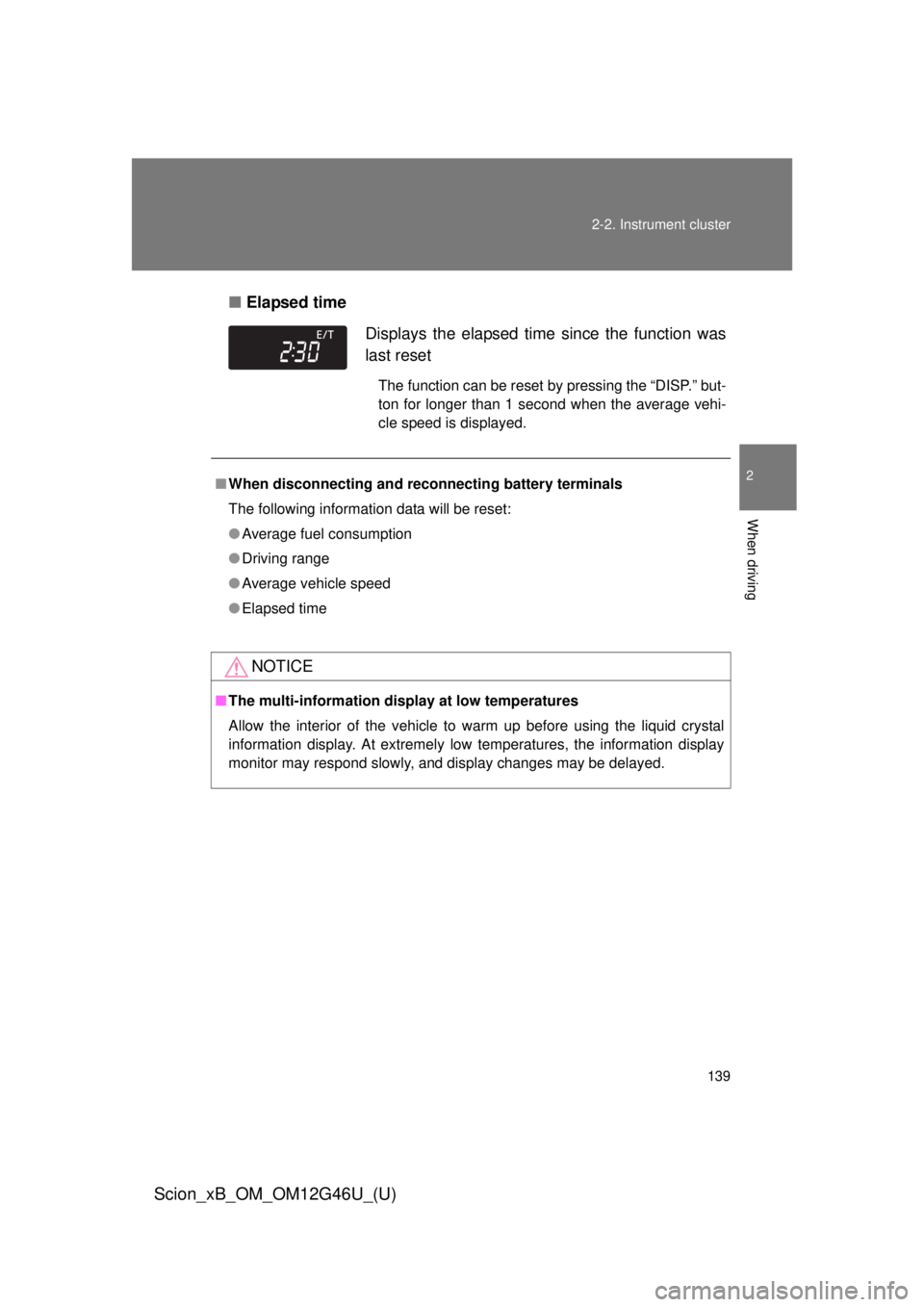
Elapsed time
Displays the elapsed time since the function was
last reset
The function can be reset by pressing the “DISP.” but-
ton for longer than 1 second when the average vehi-
cle speed is displayed.
■ When disconnecting and reco nnecting battery terminals
The following information data will be reset:
● Average fuel consumption
● Driving range
● Average vehicle speed
● Elapsed time
NOTICE
■The multi-information disp lay at low temperatures
Allow the interior of the vehicle to warm up before using the liquid crystal
information display. At extremely low temperatures, the information display
monitor may respond slowly, and display changes may be delayed.
Page 142 of 396
142 2-3. Operating the lights and Windshield wipers
Scion_xB_OM_OM12G46U_(U)
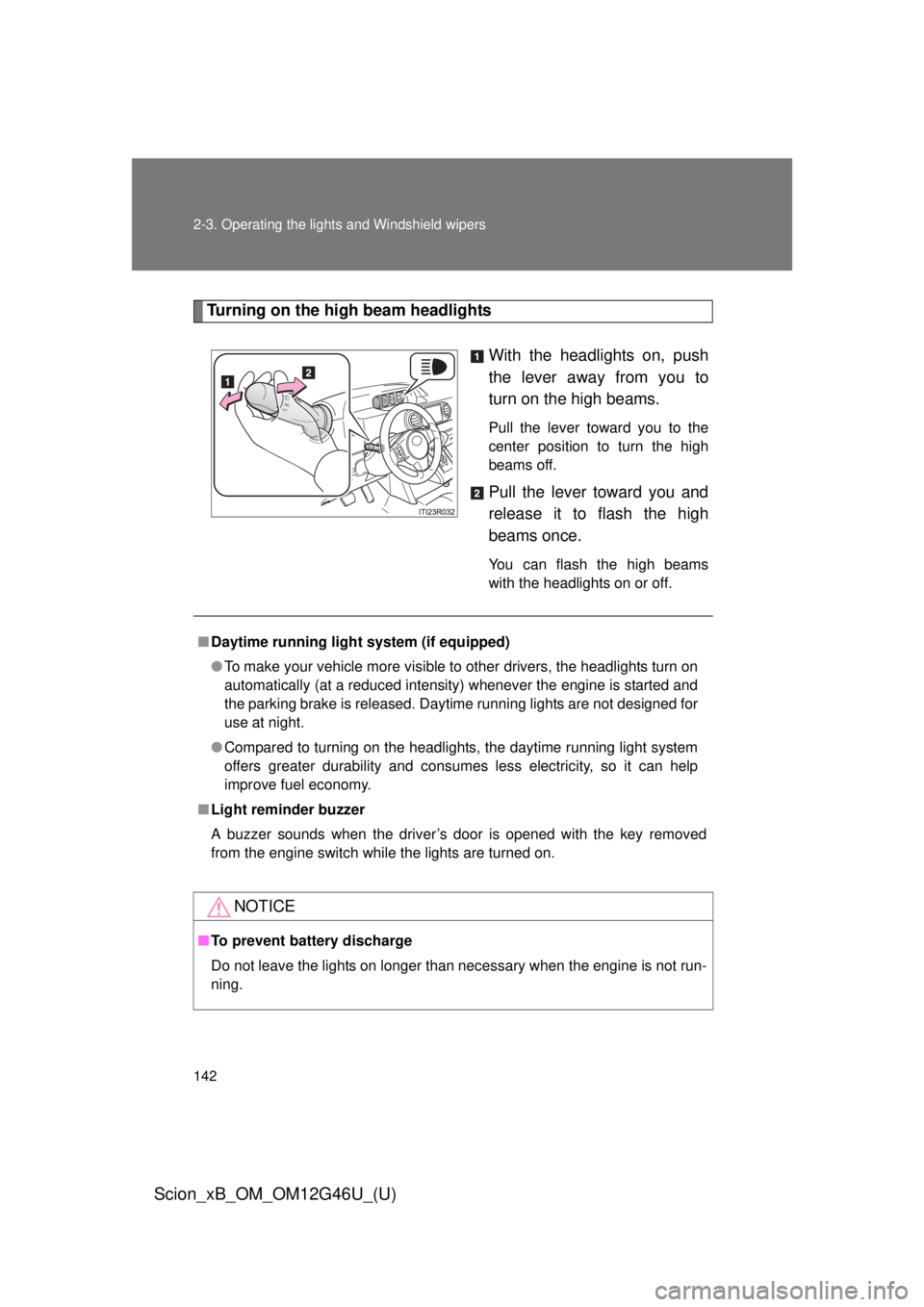
Turning on the high beam headlightsWith the headlights on, push
the lever away from you to
turn on the high beams.
Pull the lever toward you to the
center position to turn the high
beams off.
Pull the lever toward you and
release it to flash the high
beams once.
You can flash the high beams
with the headlights on or off.
■Daytime running light system (if equipped)
● To make your vehicle more visible to other drivers, the headlights turn on
automatically (at a reduced intensity) whenever the engine is started and
the parking brake is released. Daytime running lights are not designed for
use at night.
● Compared to turning on the headlights, the daytime running light system
offers greater durability and consumes less electricity, so it can help
improve fuel economy.
■ Light reminder buzzer
A buzzer sounds when the driver’s door is opened with the key removed
from the engine switch while the lights are turned on.
NOTICE
■To prevent battery discharge
Do not leave the lights on longer than necessary when the engine is not run-
ning.
Page 163 of 396
163
2-5. Driving information
2
When driving
Scion_xB_OM_OM12G46U_(U)
Winter driving tips
Carry out the necessary preparations and inspections before driving
the vehicle in winter. Always drive the vehicle in a manner appropri-
ate to the prevailing weather conditions.
■ Pre-winter preparations
●Use fluids that are appropriate to the prevailing outside tem-
peratures.
• Engine oil
• Engine coolant
• Washer fluid
● Have a service technician inspect the level and specific grav-
ity of battery electrolyte.
● Have the vehicle fitted with four snow tires or purchase a set
of tire chains for the front tires.
Ensure that all tires are the same size and brand, and that chains
match the size of the tires.
■Before driving the vehicle
Perform the following according to the driving conditions:
●Do not try to forcibly open a window or move a wiper that is
frozen. Pour warm water over the frozen area to melt the ice.
Wipe away the water immediately to prevent it from freezing.
● To ensure proper operation of th e climate control system fan,
remove any snow that has accumulated on the air inlet vents
in front of the windshield.
● Remove any ice that has accumu lated on the vehicle chassis.
● Periodically check for and remove any excess ice or snow
that may have accumulated in the wheel well or on the
brakes.
Page 179 of 396
179
3-1. Using the air conditioning system
and defogger
3
Interior features
Scion_xB_OM_OM12G46U_(U)
■Using the system in recirculated air mode
The windows will fog up more easily if recirculated air mode is used for an
extended period of time.
■ When
is selected for the air outlets used
For your driving comfort, air flowing to the feet may be warmer than air flow-
ing to the upper body depending on the temperature setting.
■ When outside air temperature is below 32°F (0°C)
The cooling and dehumidification function may not operate even when
is pressed.
■ Air conditioning odors
● During use, various odors from inside and outside the vehicle may enter
into and accumulate in the air conditioning system. This may then cause
odor to be emitted from the vents.
● To reduce potential odors from occurring:
It is recommended that the air conditioning system be set to outside air
mode prior to turning the vehicle off.
CAUTION
■To prevent the windshield from fogging up
Do not use during cool air operation in extremely humid weather. The
difference between the temperature of the outside air and that of the wind-
shield can cause the outer surface of the windshield to fog up, blocking your
vision.
NOTICE
■To prevent battery discharge
Do not leave the air conditioning system on longer than necessary when the
engine is stopped.
Page 186 of 396

186 3-3. Using the interior lights
Scion_xB_OM_OM12G46U_(U)
■Illuminated entry system
The lights automatically turn on/off according to the engine switch position,
whether the doors are locked/unlocked, and whether the doors are open/
closed.
■ To prevent the battery discharged
The following lights will go off automatically after 20 minutes:
● Interior light
● Personal light
● Luggage compartment light ( P. 38)
■ Customization that can be configured at Scion dealer
Settings (e.g. The time elapsed before lights turn off) can be changed.
(Customizable features: P. 362)
Personal lights
Page 196 of 396
196
3-5. Other interior features
Scion_xB_OM_OM12G46U_(U)
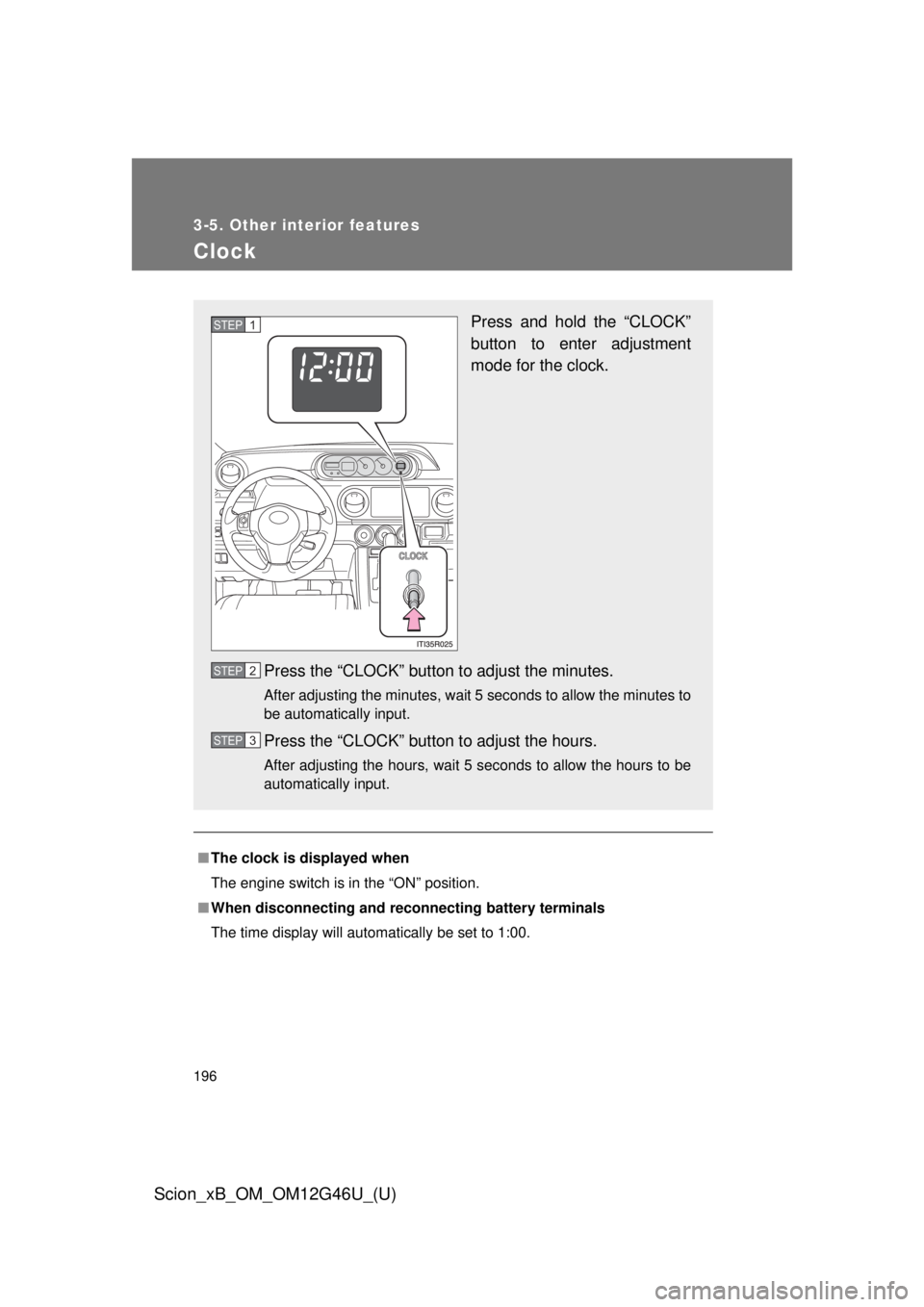
Clock
■The clock is displayed when
The engine switch is in the “ON” position.
■ When disconnecting and reco nnecting battery terminals
The time display will automatically be set to 1:00.
Press and hold the “CLOCK”
button to enter adjustment
mode for the clock.
Press the “CLOCK” button to adjust the minutes.
After adjusting the minutes, wait 5 seconds to allow the minutes to
be automatically input.
Press the “CLOCK” button to adjust the hours.
After adjusting the hours, wait 5 seconds to allow the hours to be
automatically input.
STEP 1
STEP 2
STEP 3