change time TOYOTA xB 2013 Owners Manual (in English)
[x] Cancel search | Manufacturer: TOYOTA, Model Year: 2013, Model line: xB, Model: TOYOTA xB 2013Pages: 24, PDF Size: 4.01 MB
Page 2 of 24
This Quick Reference Guide is a summary of basic vehicle
operations. It contains brief descriptions of fundamental operations
so you can locate and use the vehicle’s main equipment quickly
and easily.
The Quick Reference Guide is not intended as a substitute for the
Owner’s Manual located in the vehicle’s glove box. We strongly
encourage you to review the Owner’s Manual and supplementary
manuals so you will have a better understanding of the vehicle’s
capabilities and limitations.
Your dealership and the entire staff of Toyota Motor Sales, U.S.A.,
Inc. wish you many years of satisfied driving in your new Scion xD.
A word about safe vehicle operations
This Quick Reference Guide is not a full description of Scion xD
operations. Every Scion xD owner should review the Owner’s
Manual that accompanies this vehicle.
Pay special attention to the boxed information highlighted in
color throughout the Owner’s Manual. Each box contains safe
operating instructions to help you avoid injury or equipment
malfunction.
All information in this Quick Reference Guide is current at the
time of printing. Toyota reserves the right to make changes at
any time without notice.
2013
Scion xD
OVERVIEW
FEATURES/OPERATIONS
SAFETY AND
EMERGENCY
FEATURES
INDEX
1 Visit your Toyota dealer for information on customizing this feature.
2013Scion-xD.indd 28/6/12 8:47 PM
Page 18 of 24
16
SAFETY AND EMERGENCY FEATURES
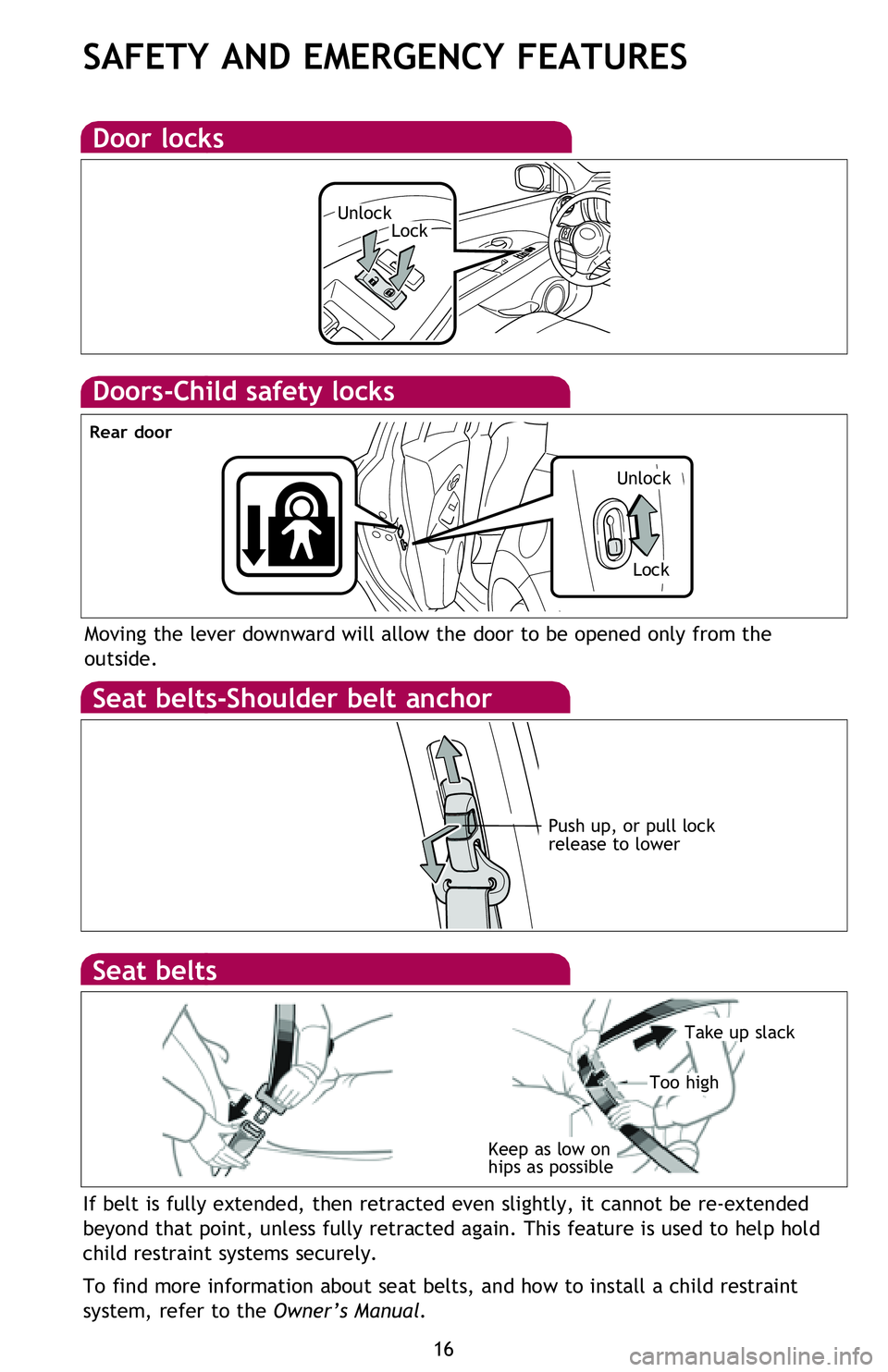
Doors-Child safety locks
Moving the lever downward will allow the door to be opened only from the
outside.
Seat belts-Shoulder belt anchor
Push up, or pull lock
release to lower
Rear door
Door locks
If belt is fully extended, then retracted even slightly, it cannot be re-extended
beyond that point, unless fully retracted again. This feature is used to help hold
child restraint systems securely.
To find more information about seat belts, and how to install a child restraint
system, refer to the Owner’s Manual.
Keep as low on
hips as possible
Take up slack
Too high
Seat belts
Spare tire & tools
Tool and spare tire location
Removing the spare tire
Refer to the Owner’s Manual for jack positioning and tire changing procedures.
Tire Pressure Monitoring (warning)
System
After adjusting tire pressures, or after tires have been rotated or replaced, turn
the ignition switch to “ON” and press and hold the “
SET” button until indicator
blinks three times. Let the vehicle sit for a few minutes to allow initialization to
complete.
Refer to the load label on the door jamb or the Owner’s Manual for tire inflation
specifications.
If the tire pressure indicator flashes for more than 60 seconds and then remains on,
take the vehicle to your local Scion dealer.
NOTE: The warning light may come on due to temperature changes or changes
in tire pressure from natural air leakage. If the system has not been initialized
recently, setting the tire pressures to factory specifications should tu\
rn off the light.
UnlockLock
Spare tire
Jack handle
Unlock
Lock
2013Scion-xD.indd 168/6/12 8:48 PM
Page 19 of 24
OVERVIEW
FEATURES/OPERATIONS
SAFETY AND EMERGENCY FEATURES
17
Moving the lever downward will allow the door to be opened only from the
outside.
If belt is fully extended, then retracted even slightly, it cannot be re-extended
beyond that point, unless fully retracted again. This feature is used to help hold
child restraint systems securely.
To find more information about seat belts, and how to install a child restraint
system, refer to the Owner’s Manual.
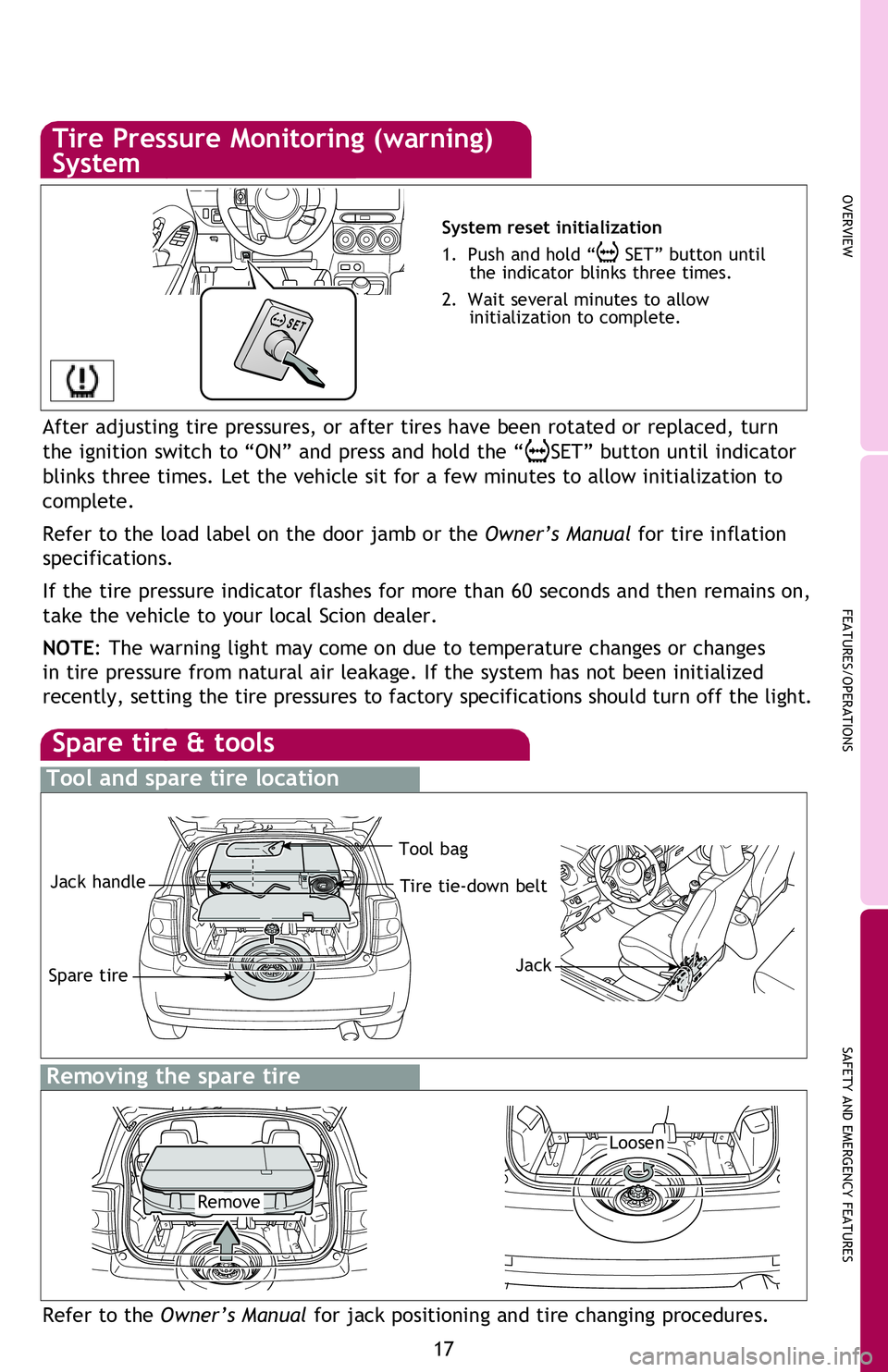
Spare tire & tools
Tool and spare tire location
Removing the spare tire
Refer to the Owner’s Manual for jack positioning and tire changing procedures.
Tire Pressure Monitoring (warning)
System
System reset initialization
1. Push and hold “
SET” button until
the indicator blinks three times.
2. Wait several minutes to allow
initialization to complete.
After adjusting tire pressures, or after tires have been rotated or replaced, turn
the ignition switch to “ON” and press and hold the “
SET” button until indicator
blinks three times. Let the vehicle sit for a few minutes to allow initialization to
complete.
Refer to the load label on the door jamb or the Owner’s Manual for tire inflation
specifications.
If the tire pressure indicator flashes for more than 60 seconds and then remains on,
take the vehicle to your local Scion dealer.
NOTE: The warning light may come on due to temperature changes or changes
in tire pressure from natural air leakage. If the system has not been initialized
recently, setting the tire pressures to factory specifications should tu\
rn off the light.
Loosen
Remove Tool bag
Tire tie-down belt
Spare tire
Jack handle
Jack
2013Scion-xD.indd 178/6/12 8:48 PM