reset TOYOTA YARIS 2016 Owner's Manual
[x] Cancel search | Manufacturer: TOYOTA, Model Year: 2016, Model line: YARIS, Model: TOYOTA YARIS 2016Pages: 592, PDF Size: 10.44 MB
Page 381 of 592
YARIS_SEDAN_OM_OM99M18z_(U)
3794-3. Bluetooth®
4
Interior Features
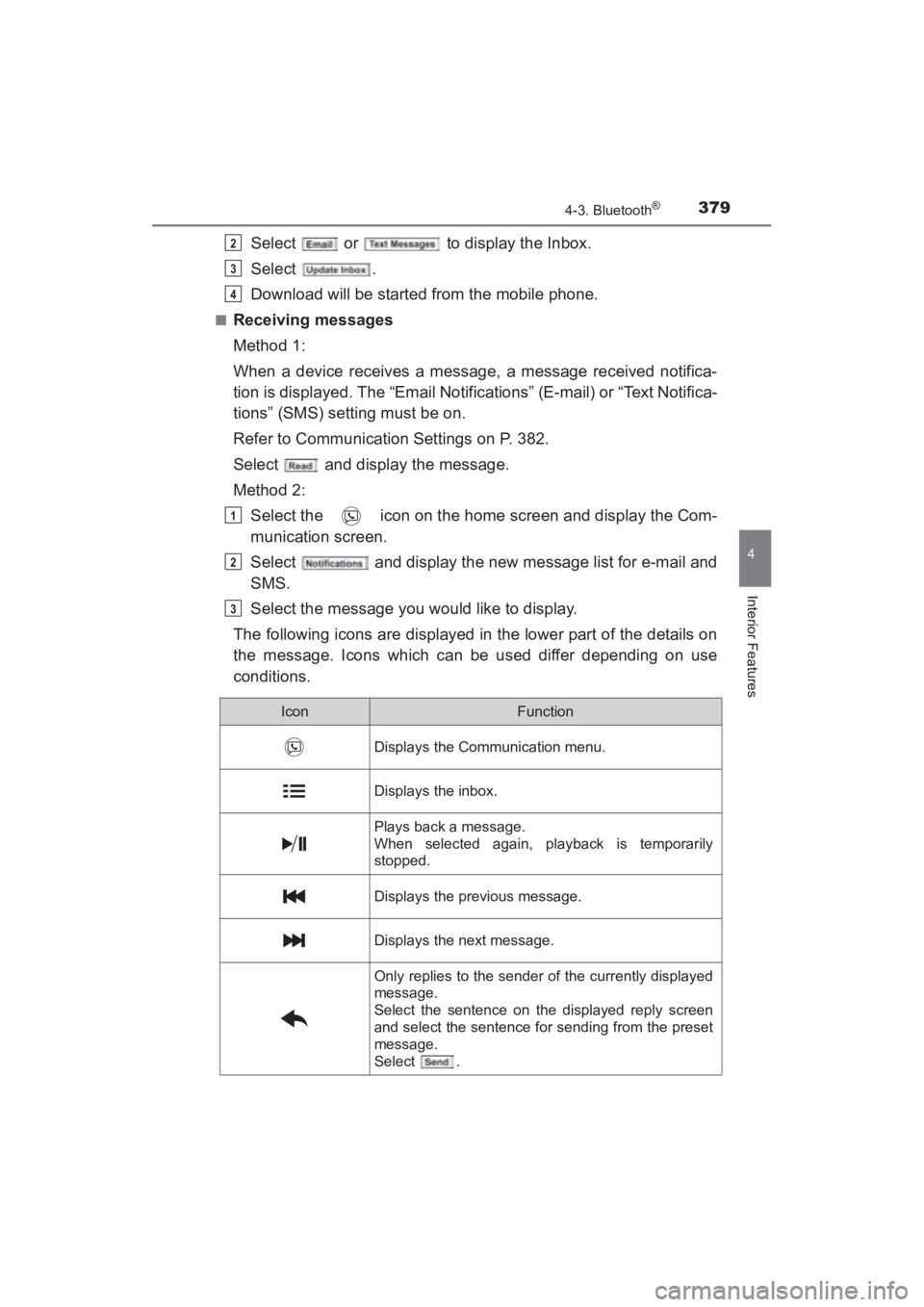
Select or to display the Inbox.
Select .
Download will be started from the mobile phone.
■Receiving messages
Method 1:
When a device receives a message, a message received notifica-
tion is displayed. The “Email Notifications” (E-mail) or “Text Notifica-
tions” (SMS) setting must be on.
Refer to Communication Settings on P. 382.
Select and display the message.
Method 2:Select the icon on the home screen and display the Com-
munication screen.
Select and display the new message list for e-mail and
SMS.
Select the message you would like to display.
The following icons are displayed in the lower part of the details on
the message. Icons which can be used differ depending on use
conditions.
2
3
4
1
2
3
IconFunction
Displays the Communication menu.
Displays the inbox.
Plays back a message.
When selected again, playback is temporarily
stopped.
Displays the previous message.
Displays the next message.
Only replies to the sender of the currently displayed
message.
Select the sentence on the displayed reply screen
and select the sentence for sending from the preset
message.
Select .
YARIS_SEDAN_OM_OM99M18z_(U).book Page 379 Monday, June 1, 2015 9:22 PM
Page 382 of 592
380
YARIS_SEDAN_OM_OM99M18z_(U)
4-3. Bluetooth®
Up to three preset messages can be selected.
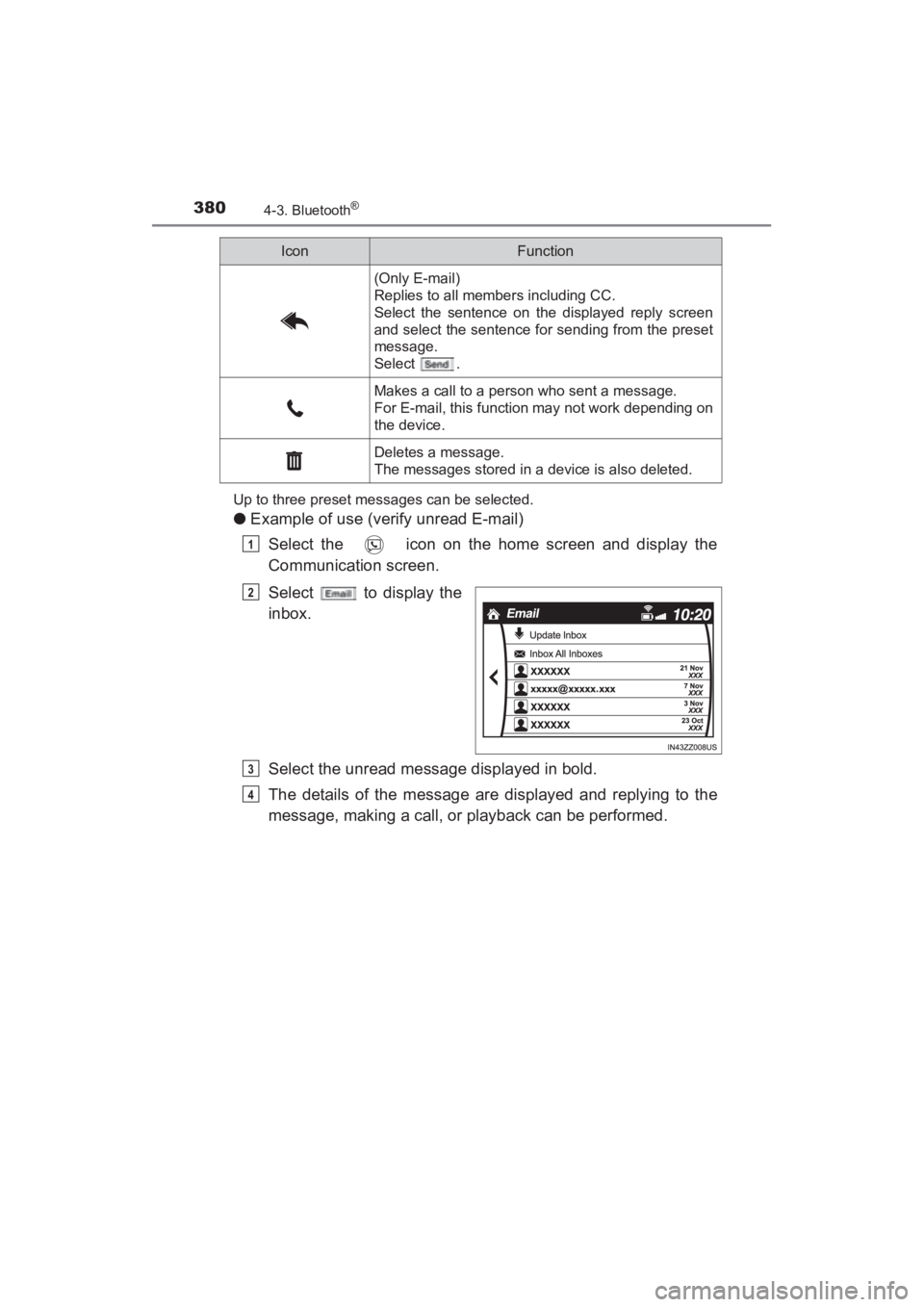
●Example of use (verify unread E-mail)
Select the icon on the home screen and display the
Communication screen.
Select to display the
inbox.
Select the unread message displayed in bold.
The details of the message are displayed and replying to the
message, making a call, or playback can be performed.
(Only E-mail)
Replies to all members including CC.
Select the sentence on the displayed reply screen
and select the sentence for sending from the preset
message.
Select .
Makes a call to a person who sent a message.
For E-mail, this function may not work depending on
the device.
Deletes a message.
The messages stored in a device is also deleted.
IconFunction
1
2
3
4
YARIS_SEDAN_OM_OM99M18z_(U).book Page 380 Monday, June 1, 2015 9:22 PM
Page 383 of 592
YARIS_SEDAN_OM_OM99M18z_(U)
3814-3. Bluetooth®
4
Interior Features
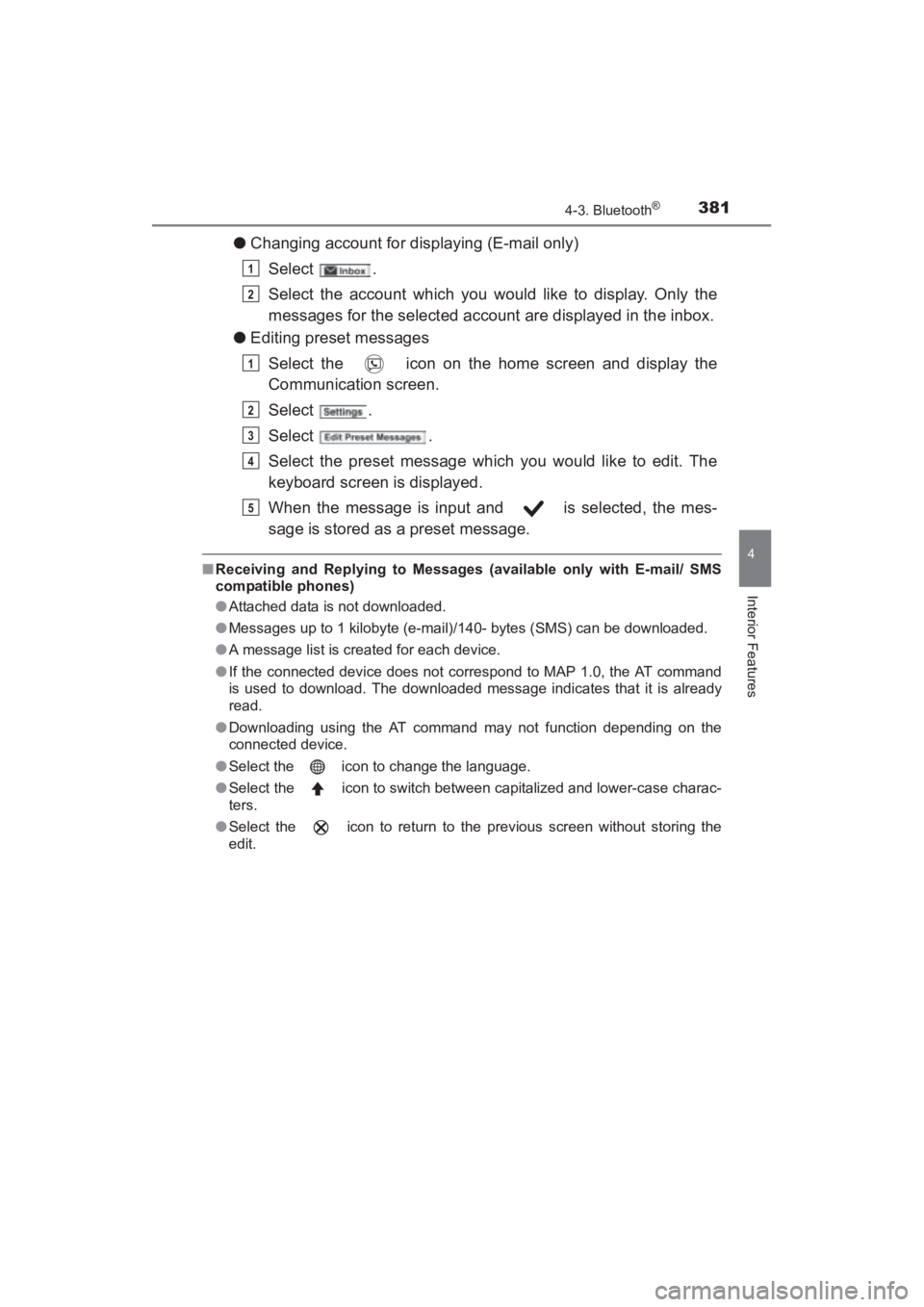
●Changing account for displaying (E-mail only)
Select .
Select the account which you would like to display. Only the
messages for the selected account are displayed in the inbox.
● Editing preset messages
Select the icon on the home screen and display the
Communication screen.
Select .
Select .
Select the preset message which you would like to edit. The
keyboard screen is displayed.
When the message is input and is selected, the mes-
sage is stored as a preset message.
■Receiving and Replying to Messages (available only with E-mail/ SMS
compatible phones)
●Attached data is not downloaded.
● Messages up to 1 kilobyte (e-mail)/140- bytes (SMS) can be downloaded.
● A message list is created for each device.
● If the connected device does not correspond to MAP 1.0, the AT command
is used to download. The downloaded message indicates that it is already
read.
● Downloading using the AT command may not function depending on the
connected device.
● Select the icon to change the language.
● Select the icon to switch between capitalized and lower-case charac-
ters.
● Select the icon to return to the previous screen without storing the
edit.
1
2
1
2
3
4
5
YARIS_SEDAN_OM_OM99M18z_(U).book Page 381 Monday, June 1, 2015 9:22 PM
Page 385 of 592
YARIS_SEDAN_OM_OM99M18z_(U)
3834-3. Bluetooth®
4
Interior Features
*1Depending on the device, it may be necessary to acquire download per-
mission on the device side.
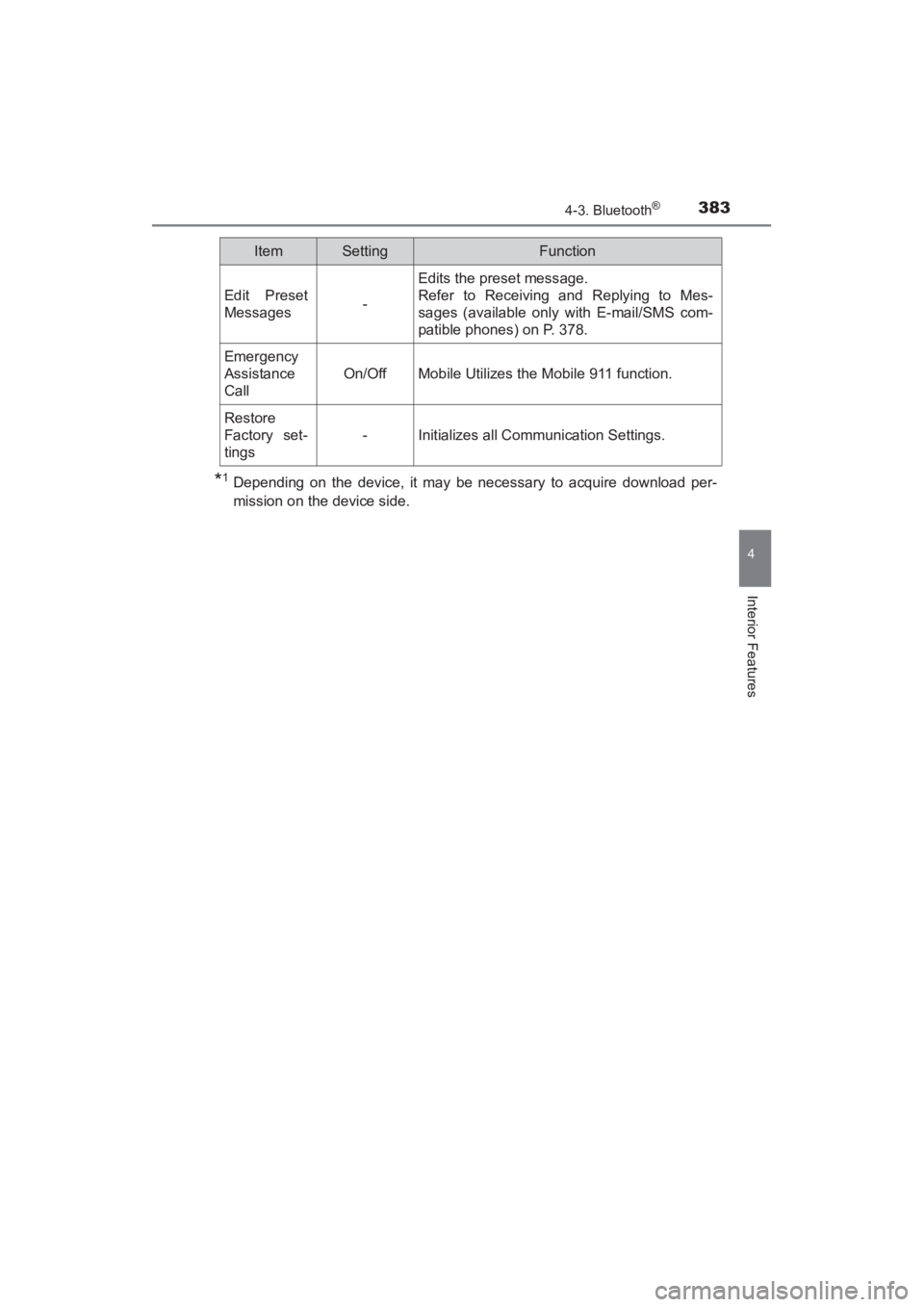
Edit Preset
Messages-
Edits the preset message.
Refer to Receiving and Replying to Mes-
sages (available only with E-mail/SMS com-
patible phones) on P. 378.
Emergency
Assistance
Call
On/OffMobile Utilizes the Mobile 911 function.
Restore
Factory set-
tings
-Initializes all Communication Settings.
ItemSettingFunction
YARIS_SEDAN_OM_OM99M18z_(U).book Page 383 Monday, June 1, 2015 9:22 PM
Page 397 of 592
YARIS_SEDAN_OM_OM99M18z_(U)
3954-3. Bluetooth®
4
Interior Features
Aha is an application which can be used to enjoy various Internet con-
tent such as Internet radio and podcasts.
Stay connected to your friends activities by getting updates from
Facebook and Twitter. Using the location-based service, nearby ser-
vices and destinations can be searched or real- time local information
can be obtained.
For details on Aha, refer to “http://www.aharadio.com/”.
*Aha, the Aha logo, and the Aha trade dress are trademarks or registered
trademarks of Harman International Industries, Inc., used with permission.To operate Aha from your Bluetooth
® device, perform the following in
advance:
• Install the Aha application to your device.
• Create an Aha account for your device.
• Log onto Aha using your device.
• Select the preset station on your device.
■
Playback
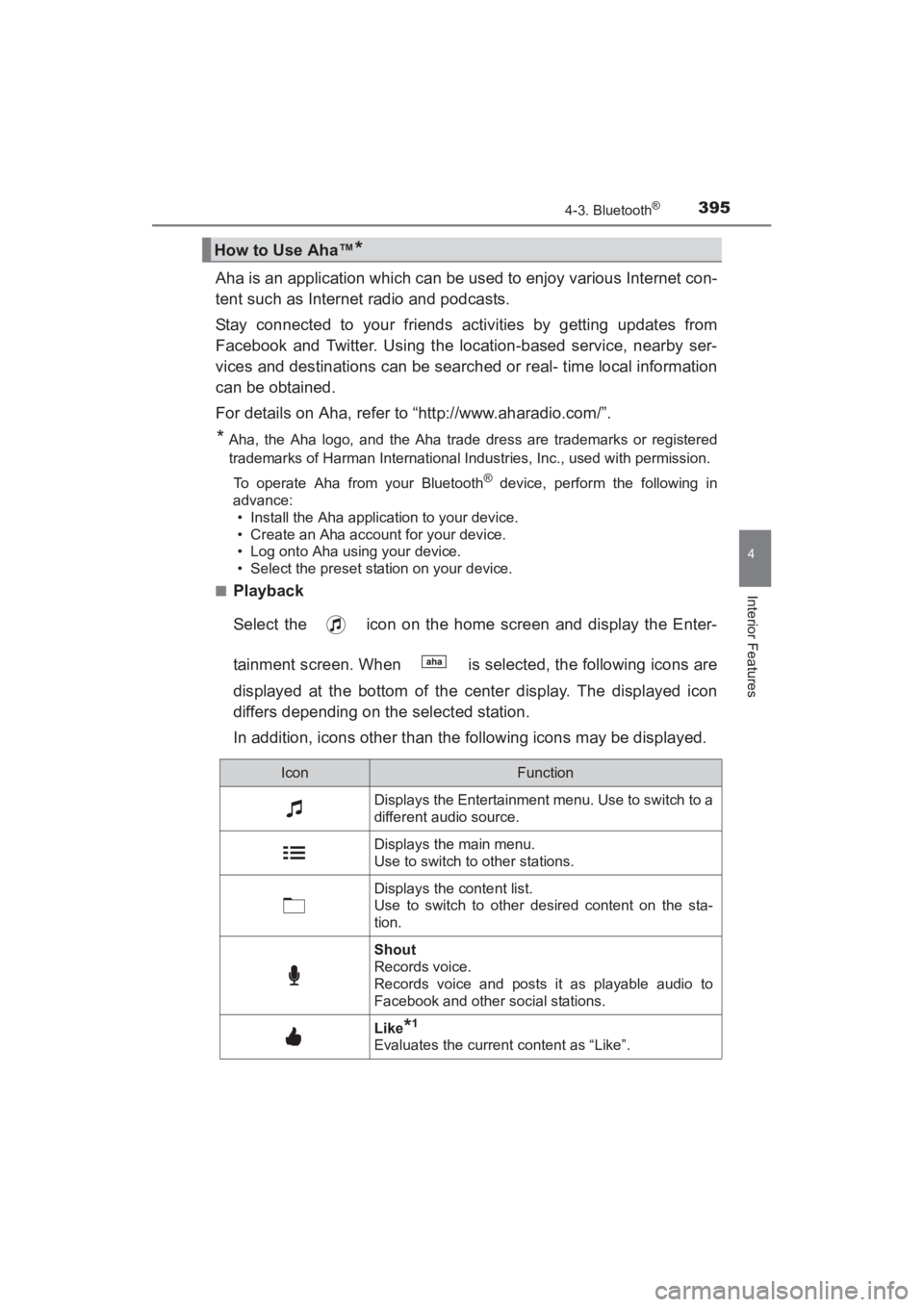
Select the icon on the home screen and display the Enter-
tainment screen. When is selected, the following icons are
displayed at the bottom of the center display. The displayed icon
differs depending on the selected station.
In addition, icons other than the following icons may be displayed.
How to Use Aha™*
IconFunction
Displays the Entertainment menu. Use to switch to a
different audio source.
Displays the main menu.
Use to switch to other stations.
Displays the content list.
Use to switch to other desired content on the sta-
tion.
Shout
Records voice.
Records voice and posts it as playable audio to
Facebook and other social stations.
Like*1
Evaluates the current content as “Like”.
YARIS_SEDAN_OM_OM99M18z_(U).book Page 395 Monday, June 1, 2015 9:22 PM
Page 399 of 592
YARIS_SEDAN_OM_OM99M18z_(U)
3974-3. Bluetooth®
4
Interior Features
Switch the tab and select the station category.
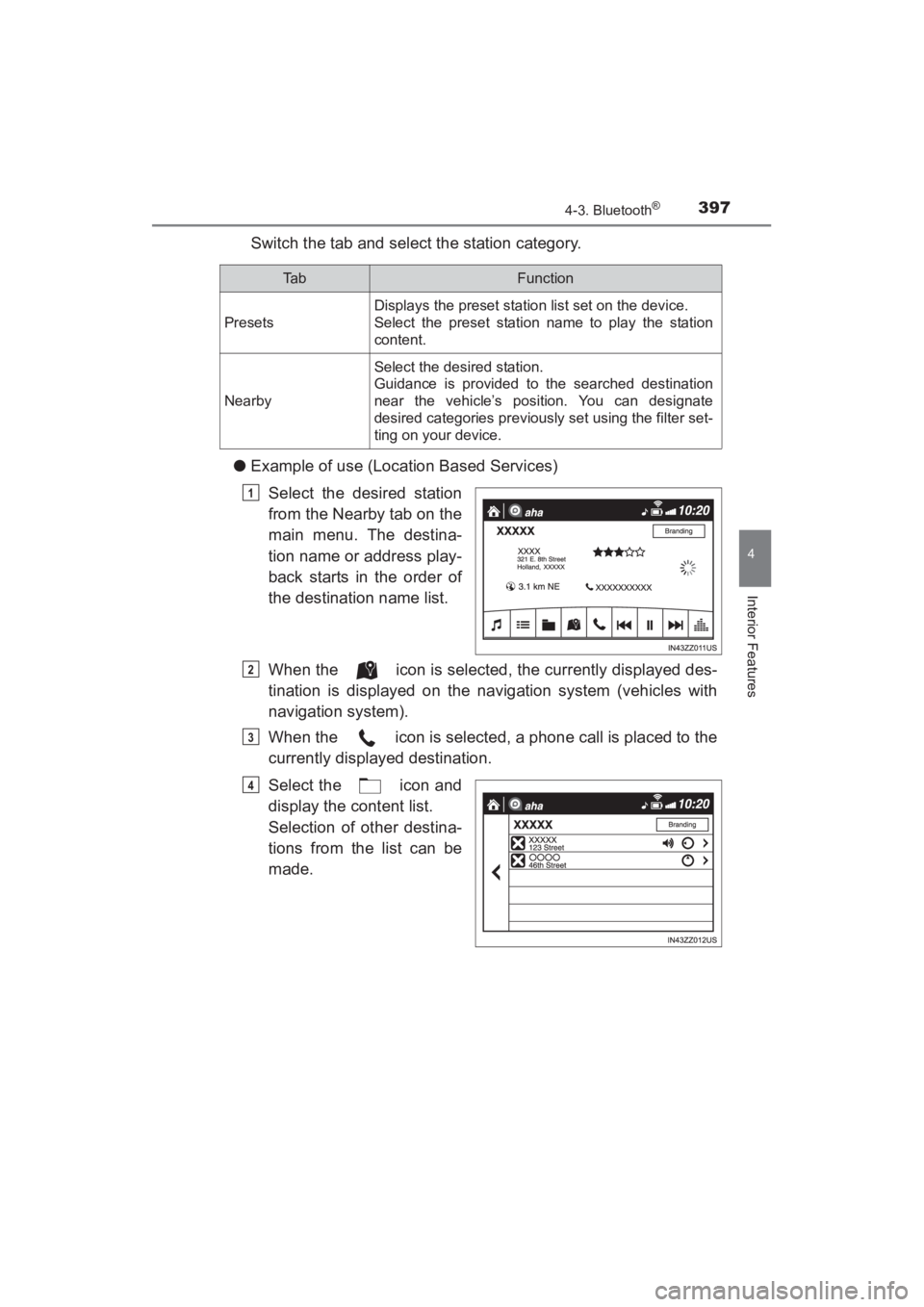
● Example of use (Location Based Services)
Select the desired station
from the Nearby tab on the
main menu. The destina-
tion name or address play-
back starts in the order of
the destination name list.
When the icon is selected, the currently displayed des-
tination is displayed on the navigation system (vehicles with
navigation system).
When the icon is selected, a phone call is placed to the
currently displayed destination.
Select the icon and
display the content list.
Selection of other destina-
tions from the list can be
made.
Ta bFunction
Presets
Displays the preset station list set on the device.
Select the preset station name to play the station
content.
Nearby
Select the desired station.
Guidance is provided to the searched destination
near the vehicle’s position. You can designate
desired categories previously set using the filter set-
ting on your device.
1
2
3
4
YARIS_SEDAN_OM_OM99M18z_(U).book Page 397 Monday, June 1, 2015 9:22 PM
Page 422 of 592
420
YARIS_SEDAN_OM_OM99M18z_(U)
5-2. Scheduled Maintenance
Maintenance Monitor
“Oil Change” with a flexible setting*1 is available. Consult your Autho-
rized Toyota Dealer when you want to change the setting
*2. Once the
system turns on, the wrench indicator light in the instrument cluster
will be illuminated when remaining oil life becomes less than
300 miles (500 km), or remaining days are less than 15 (whichever
comes first).
■Reset method
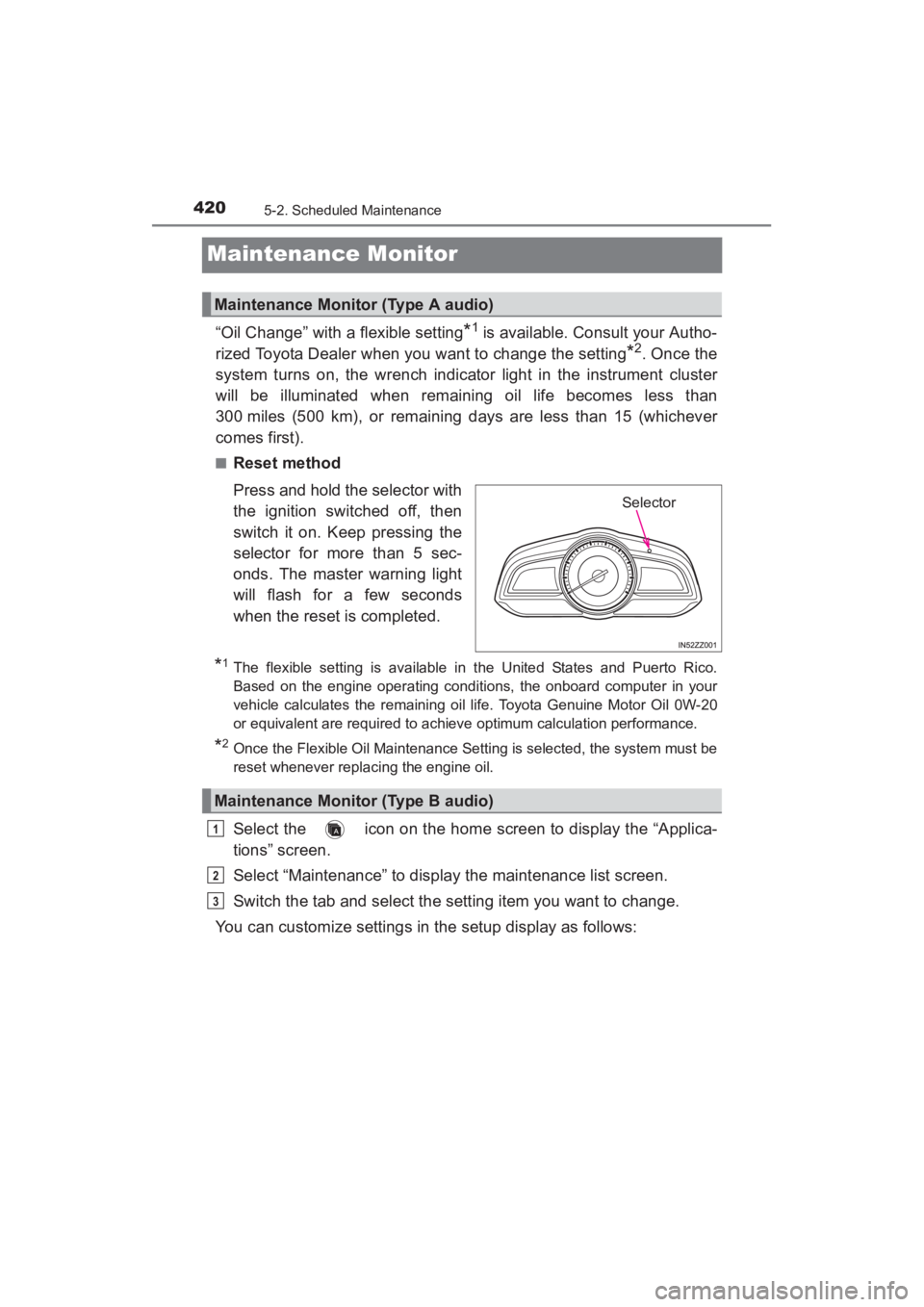
Press and hold the selector with
the ignition switched off, then
switch it on. Keep pressing the
selector for more than 5 sec-
onds. The master warning light
will flash for a few seconds
when the reset is completed.
*1The flexible setting is available in the United States and Puerto Rico.
Based on the engine operating conditions, the onboard computer in your
vehicle calculates the remaining oil life. Toyota Genuine Motor Oil 0W-20
or equivalent are required to achiev e optimum calculation performance.
*2Once the Flexible Oil Maintenance Setting is selected, the system must be
reset whenever replacing the engine oil.
Select the icon on the home screen to display the “Applica-
tions” screen.
Select “Maintenance” to display the maintenance list screen.
Switch the tab and select the setting item you want to change.
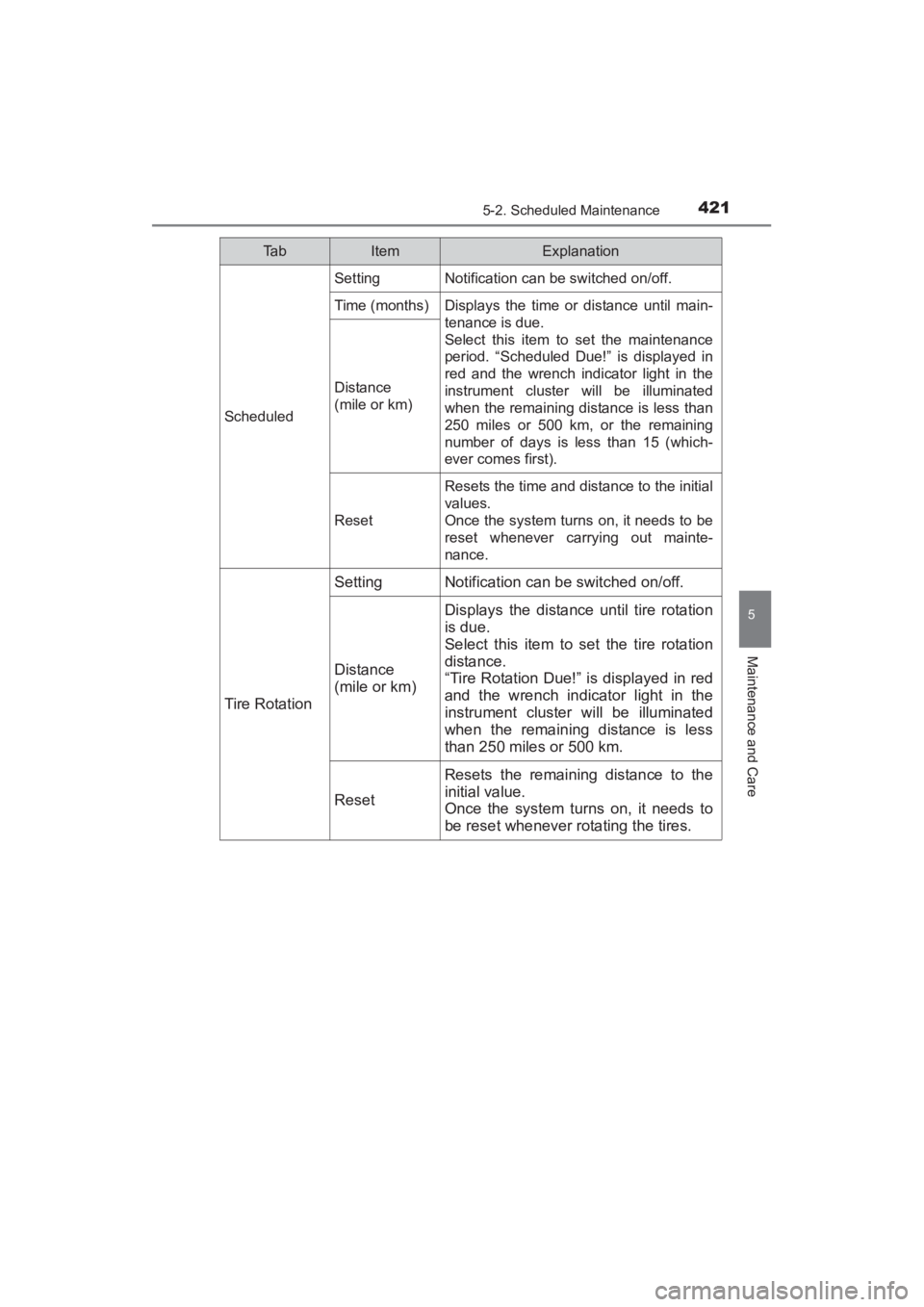
You can customize settings in the setup display as follows:
Maintenance Monitor (Type A audio)
Selector
Maintenance Monitor (Type B audio)
1
2
3
YARIS_SEDAN_OM_OM99M18z_(U).book Page 420 Monday, June 1, 2015 9:22 PM
Page 423 of 592
YARIS_SEDAN_OM_OM99M18z_(U)
4215-2. Scheduled Maintenance
5
Maintenance and Care
Ta bItemExplanation
Scheduled
SettingNotification can be switched on/off.
Time (months)Displays the time or distance until main-
tenance is due.
Select this item to set the maintenance
period. “Scheduled Due!” is displayed in
red and the wrench indicator light in the
instrument cluster will be illuminated
when the remaining distance is less than
250 miles or 500 km, or the remaining
number of days is less than 15 (which-
ever comes first).
Distance
(mile or km)
Reset
Resets the time and distance to the initial
values.
Once the system turns on, it needs to be
reset whenever carrying out mainte-
nance.
Tire Rotation
SettingNotification can be switched on/off.
Distance
(mile or km)
Displays the distance until tire rotation
is due.
Select this item to set the tire rotation
distance.
“Tire Rotation Due!” is displayed in red
and the wrench indicator light in the
instrument cluster will be illuminated
when the remaining distance is less
than 250 miles or 500 km.
Reset
Resets the remaining distance to the
initial value.
Once the system turns on, it needs to
be reset whenever rotating the tires.
YARIS_SEDAN_OM_OM99M18z_(U).book Page 421 Monday, June 1, 2015 9:22 PM
Page 424 of 592
4225-2. Scheduled Maintenance
YARIS_SEDAN_OM_OM99M18z_(U)
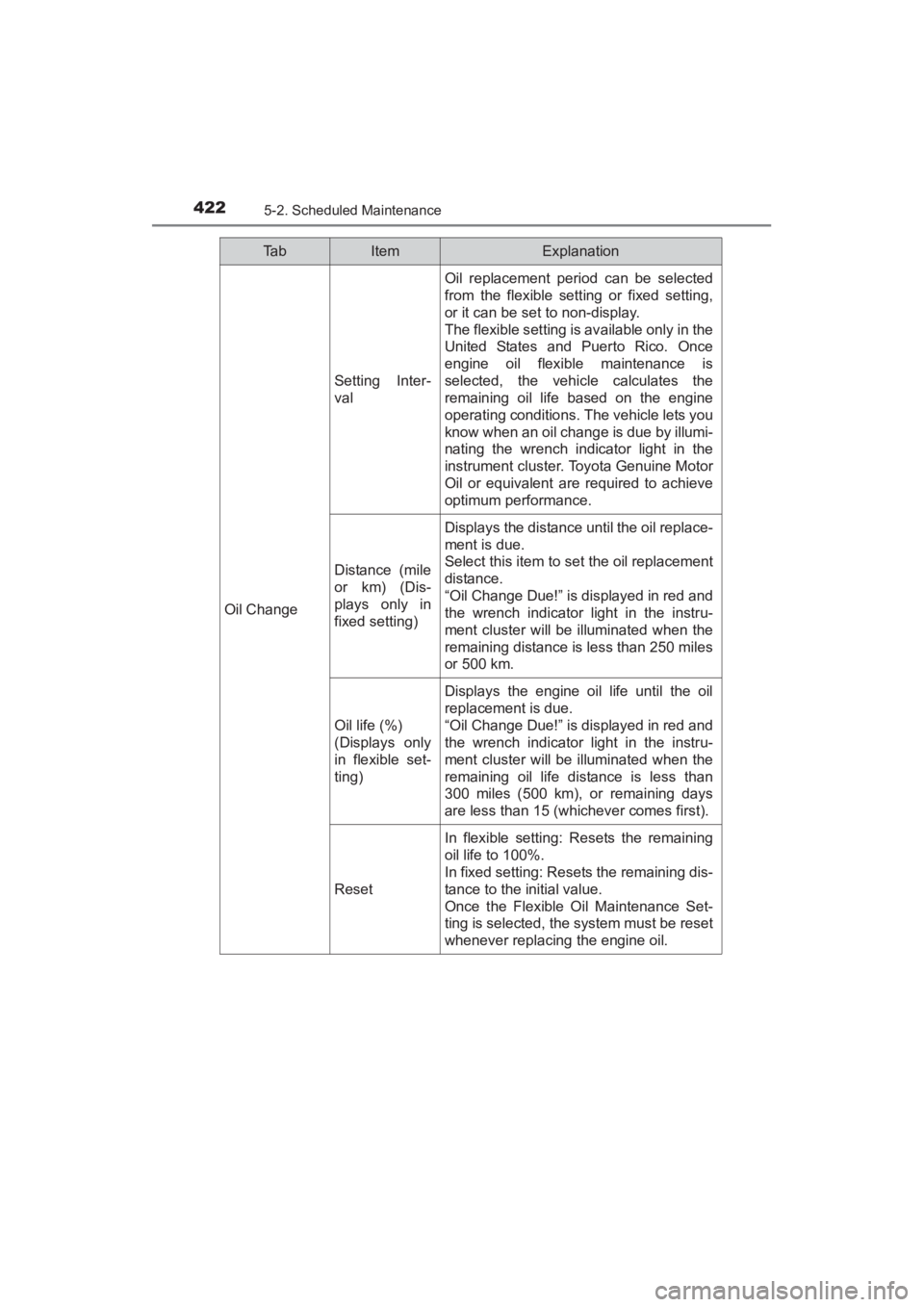
Oil Change
Setting Inter-
val
Oil replacement period can be selected
from the flexible setting or fixed setting,
or it can be set to non-display.
The flexible setting is available only in the
United States and Puerto Rico. Once
engine oil flexible maintenance is
selected, the vehicle calculates the
remaining oil life based on the engine
operating conditions. The vehicle lets you
know when an oil change is due by illumi-
nating the wrench indicator light in the
instrument cluster. Toyota Genuine Motor
Oil or equivalent are required to achieve
optimum performance.
Distance (mile
or km) (Dis-
plays only in
fixed setting)
Displays the distance until the oil replace-
ment is due.
Select this item to set the oil replacement
distance.
“Oil Change Due!” is displayed in red and
the wrench indicator light in the instru-
ment cluster will be illuminated when the
remaining distance is less than 250 miles
or 500 km.
Oil life (%)
(Displays only
in flexible set-
ting)
Displays the engine oil life until the oil
replacement is due.
“Oil Change Due!” is displayed in red and
the wrench indicator light in the instru-
ment cluster will be illuminated when the
remaining oil life distance is less than
300 miles (500 km), or remaining days
are less than 15 (whichever comes first).
Reset
In flexible setting: Resets the remaining
oil life to 100%.
In fixed setting: Resets the remaining dis-
tance to the initial value.
Once the Flexible Oil Maintenance Set-
ting is selected, the system must be reset
whenever replacing the engine oil.
Ta bItemExplanation
YARIS_SEDAN_OM_OM99M18z_(U).book Page 422 Monday, June 1, 2015 9:22 PM
Page 425 of 592
YARIS_SEDAN_OM_OM99M18z_(U)
4235-2. Scheduled Maintenance
5
Maintenance and Care
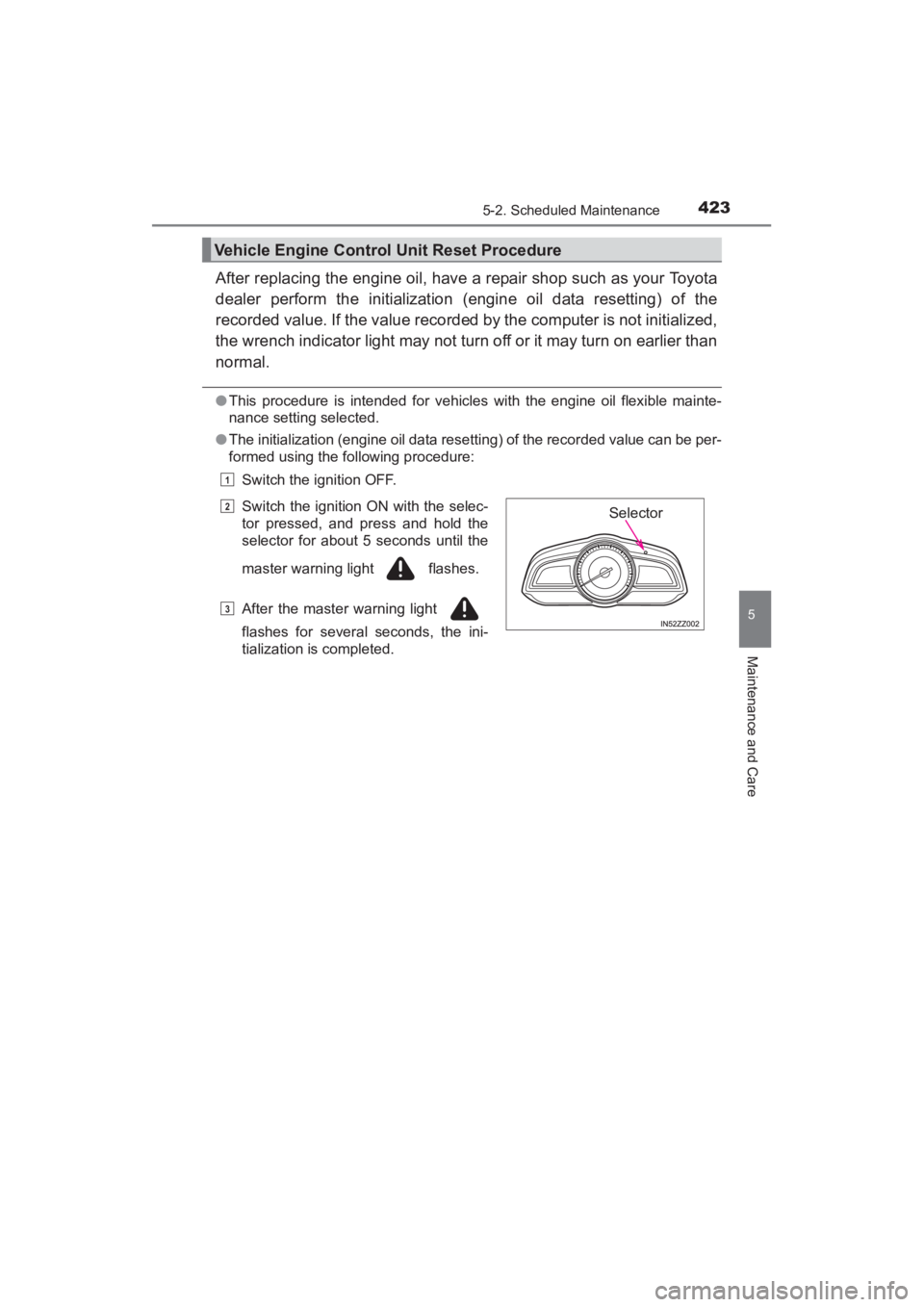
After replacing the engine oil, have a repair shop such as your Toyota
dealer perform the initialization (engine oil data resetting) of the
recorded value. If the value recorded by the computer is not initialized,
the wrench indicator light may not turn off or it may turn on earlier than
normal.
●This procedure is intended for vehicles with the engine oil flexible mainte-
nance setting selected.
● The initialization (engine oil data resetting) of the recorded value can be per-
formed using the following procedure:
Switch the ignition OFF.
Vehicle Engine Control Unit Reset Procedure
Switch the ignition ON with the selec-
tor pressed, and press and hold the
selector for about 5 seconds until the
master warning light flashes.
After the master warning light
flashes for several seconds, the ini-
tialization is completed.
1
2
3
Selector
YARIS_SEDAN_OM_OM99M18z_(U).book Page 423 Monday, June 1, 2015 9:22 PM