lock TOYOTA YARIS 2017 Owners Manual
[x] Cancel search | Manufacturer: TOYOTA, Model Year: 2017, Model line: YARIS, Model: TOYOTA YARIS 2017Pages: 549, PDF Size: 33.09 MB
Page 273 of 549
2734-7. Driving tips
4
Driving
YARIS_F_OM_Europe_OM52J20E
Accelerate the vehicle slowly, keep a safe distance between you and
the vehicle ahead, and drive at a reduced speed suitable to road con-
ditions.
● Park the vehicle and move the shift lever to P (Multidrive) 1 or R
(manual transmission) without setting the parking brake. The park-
ing brake may freeze up, preventing it from being released. If the
vehicle is parked without setting the parking brake, make sure to
block the wheels.
Failure to do so may be dangerous because it may cause the vehi-
cle to move unexpectedly, leading to an accident.
● On vehicles with a Multidrive, if the vehicle is parked without setting
the parking brake, confirm that the shift lever cannot be moved out
of P.
The shift lever will be locked if it is attempted to be shifted from P to
any other position without depressing the brake pedal. If the shift
lever can be shifted from P, there may be a problem with the shift
lock system. Have the vehicle inspected by any authorized Toyota
dealer or repairer, or another duly qualified and equipped profes-
sional.
When driving the vehicle
When parking the vehicle
Page 298 of 549
2985-5. Using an external device
YARIS_F_OM_Europe_OM52J20E
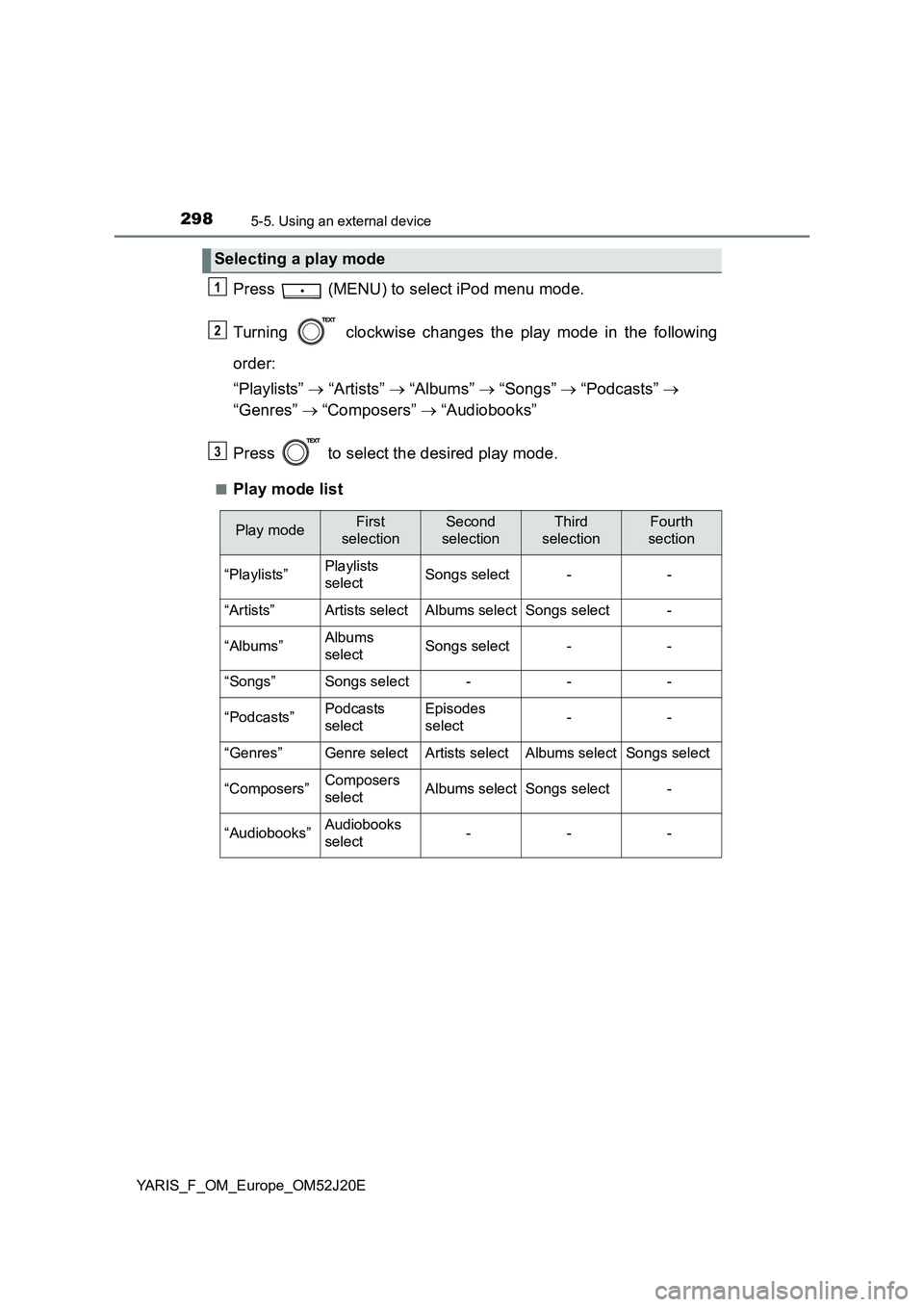
Press (MENU) to select iPod menu mode.
Turning clockwise changes the play mode in the following
order:
“Playlists” “Artists” “Albums” “Songs” “Podcasts”
“Genres” “Composers” “Audiobooks”
Press to select the desired play mode.
■Play mode list
Selecting a play mode
1
2
3
Play modeFirst
selection
Second
selection
Third
selection
Fourth
section
“Playlists”Playlists
selectSongs select--
“Artists”Artists selectAlbums selectSongs select-
“Albums”Albums
selectSongs select--
“Songs”Songs select---
“Podcasts”Podcasts
select
Episodes
select--
“Genres”Genre selectArtists selectAlbums selectSongs select
“Composers”Composers
selectAlbums selectSongs select-
“Audiobooks”Audiobooks
select---
Page 313 of 549
3136-1. Using the air conditioning system and defogger
6
Interior features
YARIS_F_OM_Europe_OM52J20E
■Adjusting the temperature setting
Vehicles without the button
Turn the temperature control dial clockwise to increase the temper-
ature.
Vehicles with the button
To adjust the temperature setting, turn the temperature control dial
clockwise (warm) or counterclockwise (cool).
If is not pressed, the system will blow ambient temperature air or
heated air.
■Fan speed setting
To adjust the fan speed, turn the fan speed control dial clockwise
(increase) or counterclockwise (decrease).
Turning the dial to “0” turns off the fan.
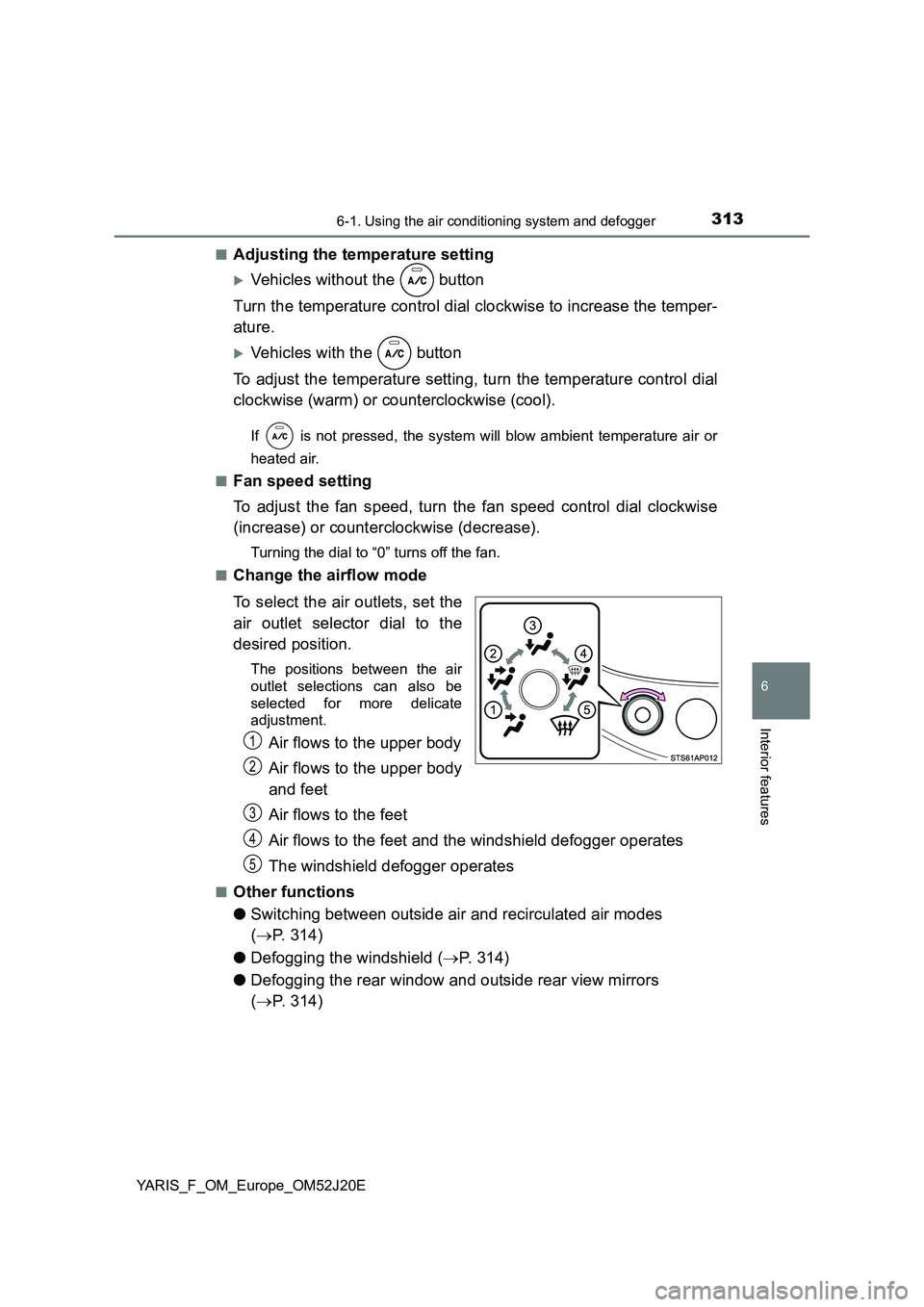
■Change the airflow mode
To select the air outlets, set the
air outlet selector dial to the
desired position.
The positions between the air
outlet selections can also be
selected for more delicate
adjustment.
Air flows to the upper body
Air flows to the upper body
and feet
Air flows to the feet
Air flows to the feet and the windshield defogger operates
The windshield defogger operates
■Other functions
● Switching between outside air and recirculated air modes
( P. 314)
● Defogging the windshield (P. 314)
● Defogging the rear window and outside rear view mirrors
( P. 314)
1
2
3
4
5
Page 319 of 549
3196-1. Using the air conditioning system and defogger
6
Interior features
YARIS_F_OM_Europe_OM52J20E
WARNING
■To prevent the windshield from fogging up
Do not set the air outlet selector dial to during cool air operation in
extremely humid weather. The differenc e between the temperature of the
outside air and that of the windshield can cause the outer surface of the
windshield to fog up, blocking your vision.
■ When the outside rear view mirror defoggers (if equipped) are on
Do not touch the outside surface of the rear view mirrors, as they can
become very hot and burn you.
NOTICE
■ To prevent battery discharge
Do not leave the air conditioning syst em on longer than necessary when the
engine is stopped.
Page 321 of 549
3216-1. Using the air conditioning system and defogger
6
Interior features
YARIS_F_OM_Europe_OM52J20E
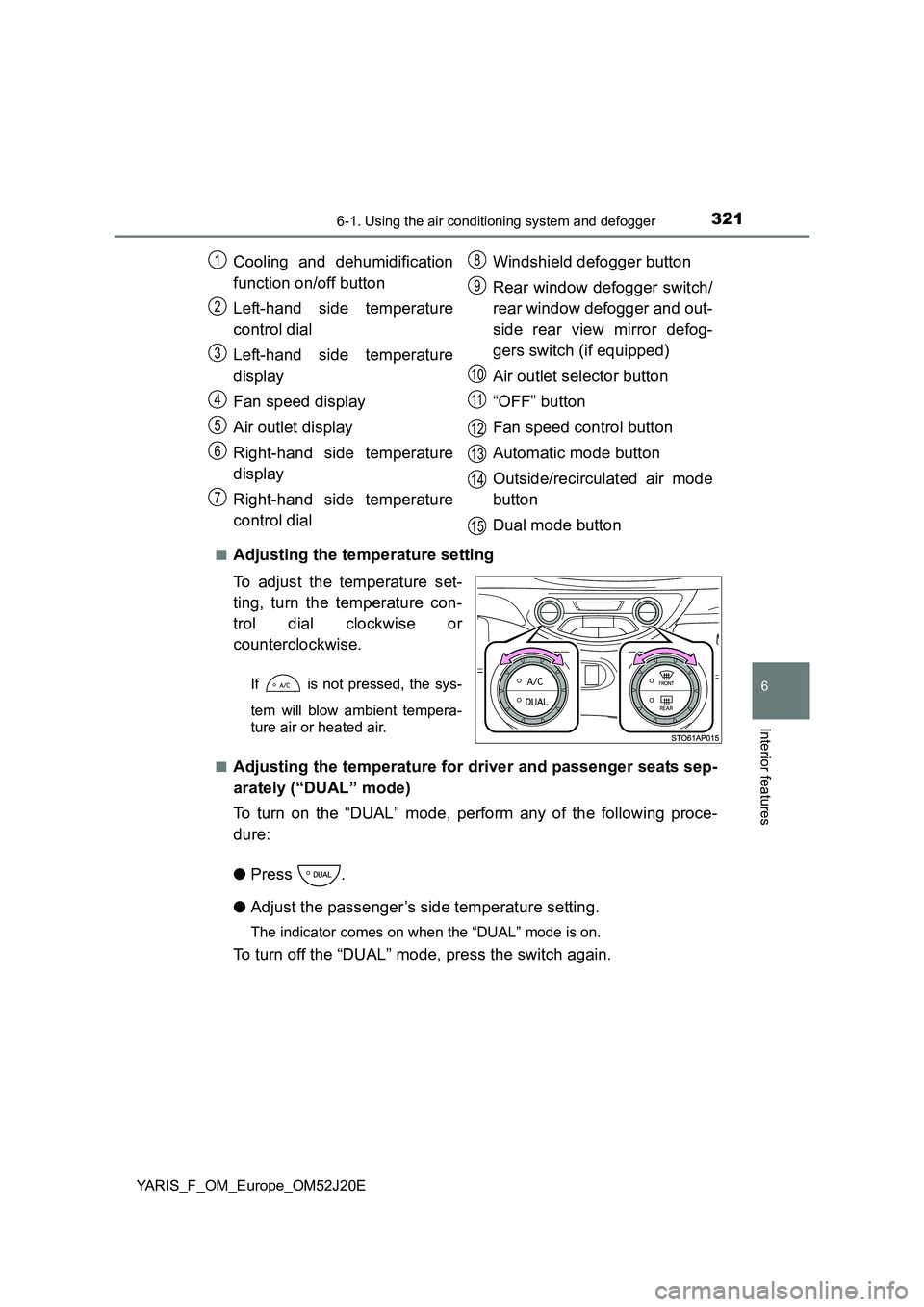
■Adjusting the temperature setting
To adjust the temperature set-
ting, turn the temperature con-
trol dial clockwise or
counterclockwise.
If is not pressed, the sys-
tem will blow ambient tempera-
ture air or heated air.
■Adjusting the temperature for driver and passenger seats sep-
arately (“DUAL” mode)
To turn on the “DUAL” mode, perform any of the following proce-
dure:
● Press .
● Adjust the passenger’s side temperature setting.
The indicator comes on when the “DUAL” mode is on.
To turn off the “DUAL” mode, press the switch again.
Cooling and dehumidification
function on/off button
Left-hand side temperature
control dial
Left-hand side temperature
display
Fan speed display
Air outlet display
Right-hand side temperature
display
Right-hand side temperature
control dial
Windshield defogger button
Rear window defogger switch/
rear window defogger and out-
side rear view mirror defog-
gers switch (if equipped)
Air outlet selector button
“OFF” button
Fan speed control button
Automatic mode button
Outside/recirculated air mode
button
Dual mode button
1
2
3
4
5
6
7
8
9
10
11
12
13
14
15
Page 327 of 549
3276-1. Using the air conditioning system and defogger
6
Interior features
YARIS_F_OM_Europe_OM52J20E
■ Ventilation and air conditioning odors
● To let fresh air in, set the air conditioning system to the outside air mode.
● During use, various odors from inside and outside the vehicle may enter into
and accumulate in the air conditioning system. This may then cause odor to
be emitted from the vents.
● To reduce potential odors from occurring:
• It is recommended that the air condi tioning system be set to outside air
mode prior to turning the vehicle off.
• The start timing of the blower may be delayed for a short period of time
immediately after the air conditioning system is started in AUTO mode.
■ Air conditioning system operations when the engine is stopped due to
the Stop & Start system (vehicles with a Stop & Start system)
When the engine is stopped due to Stop & Start system operations, the auto-
matic air conditioning cooling, heating and dehumidification functions turn off
and the fan speed is decreased according to the outside temperature etc. or
air blowing stops. To stop the air conditioning system from turning off, press
the Stop & Start cancel switch and refrain from using the Stop & Start system.
■ An odor comes from the air conditioning system due to the Stop & Start
system operation (vehicles with a Stop & Start system)
When the engine is stopped due to the Stop & Start system, an odor caused
by moisture may be detected. This does not indicate a malfunction.
■ Air conditioning filter
P. 400
WARNING
■To prevent the windshield from fogging up
Do not use during cool air operation in extremely humid weather. The
difference between the temperature of the outside air and that of the wind-
shield can cause the outer surface of the windshield to fog up, blocking your
vision.
■ When the outside rear view mirror defoggers (if equipped) are on
Do not touch the outside surface of the rear view mirrors, as they can
become very hot and burn you.
NOTICE
■ To prevent battery discharge
Do not leave the air conditioning syst em on longer than necessary when the
engine is stopped.
Page 333 of 549
3336-2. Using the interior lights
6
Interior features
YARIS_F_OM_Europe_OM52J20E
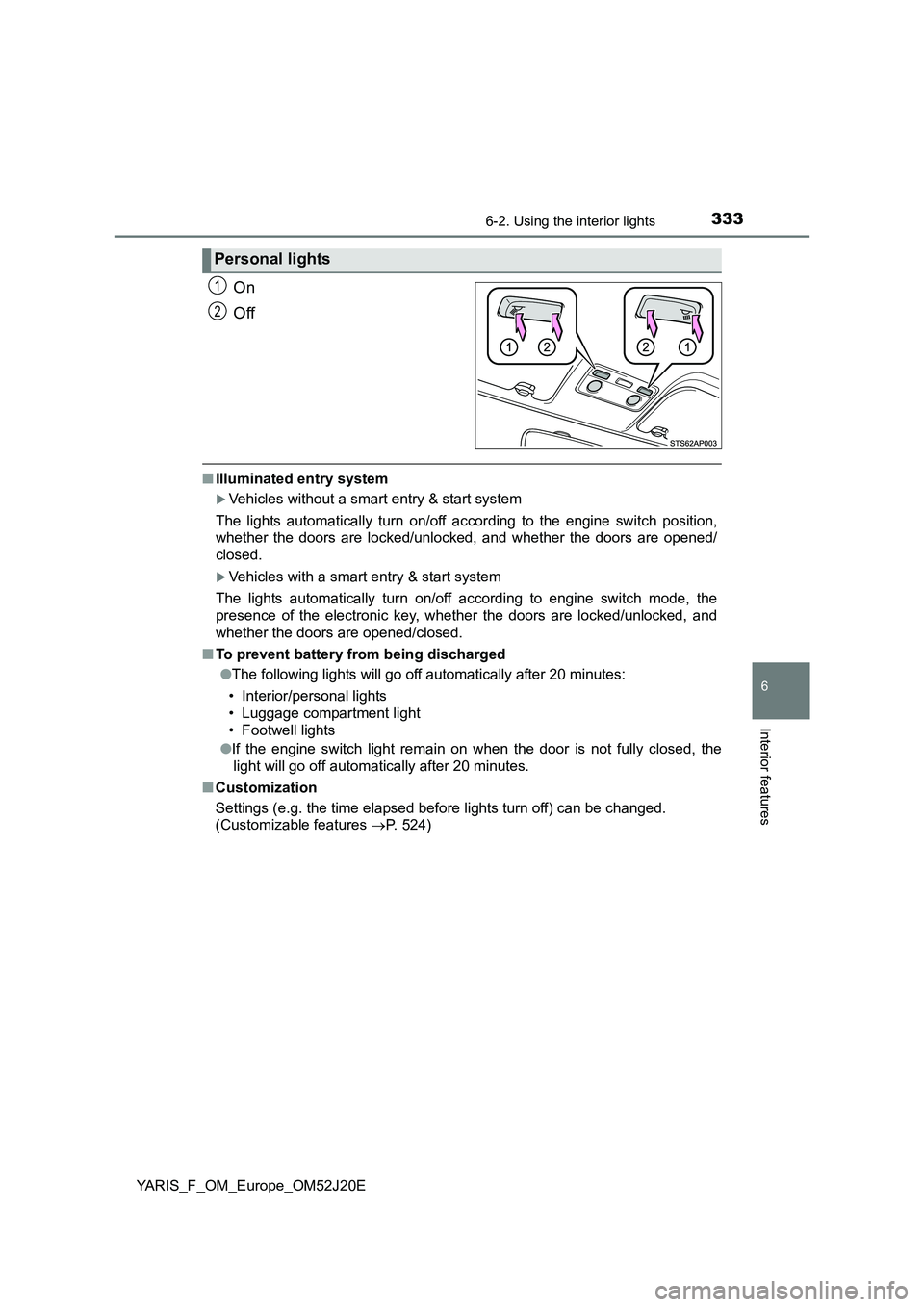
On
Off
■ Illuminated entry system
Vehicles without a smart entry & start system
The lights automatically turn on/off according to the engine switch position,
whether the doors are locked/unloc ked, and whether the doors are opened/
closed.
Vehicles with a smart entry & start system
The lights automatically turn on/off according to engine switch mode, the
presence of the electronic key, whet her the doors are locked/unlocked, and
whether the doors are opened/closed.
■ To prevent battery from being discharged
● The following lights will go off automatically after 20 minutes:
• Interior/personal lights
• Luggage compartment light
• Footwell lights
● If the engine switch light remain on when the door is not fully closed, the
light will go off automatically after 20 minutes.
■ Customization
Settings (e.g. the time elapsed before lights turn off) can be changed.
(Customizable features P. 524)
Personal lights
1
2
Page 347 of 549
3476-4. Using the other interior features
6
Interior features
YARIS_F_OM_Europe_OM52J20E
Fold down the armrest for use.
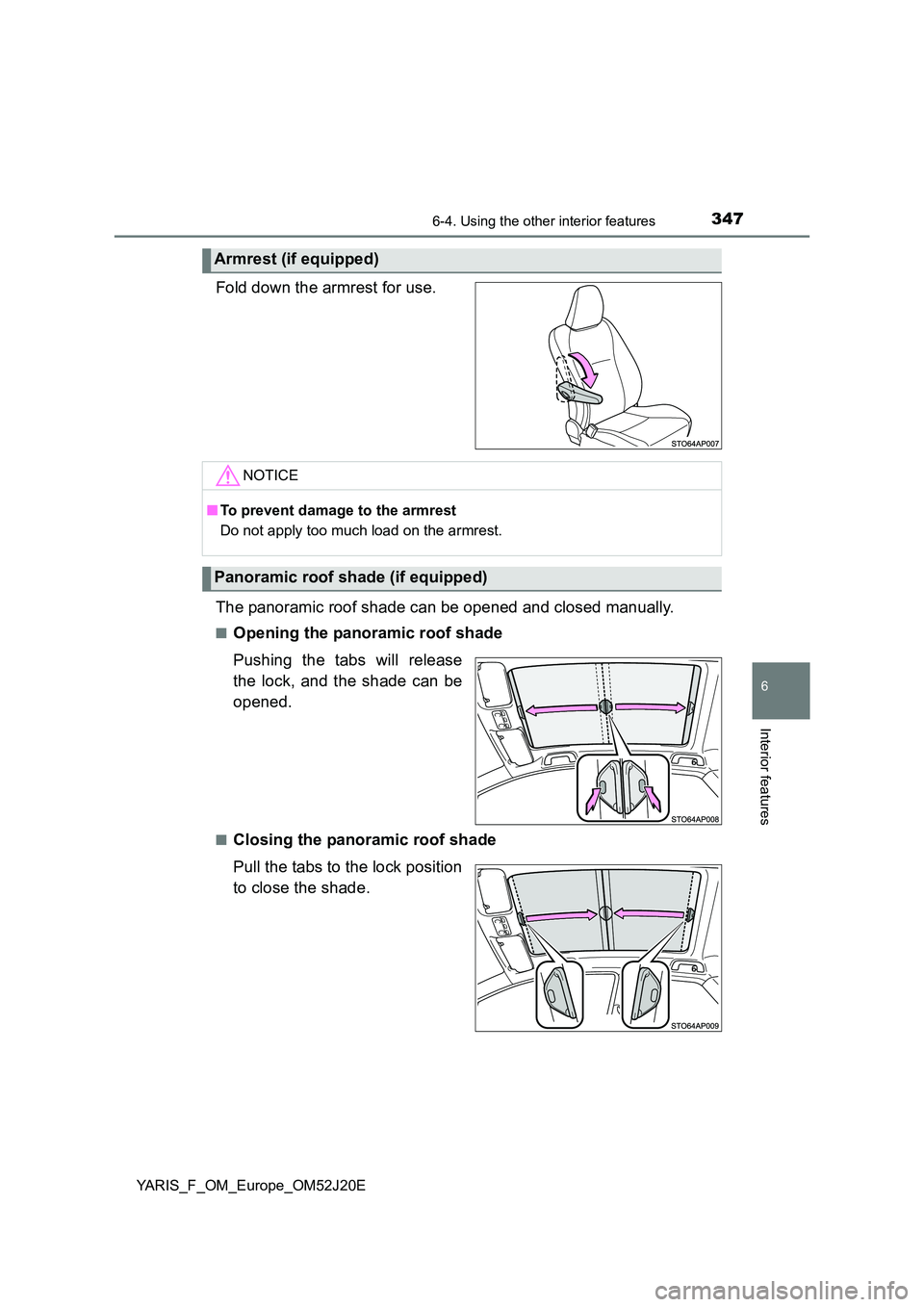
The panoramic roof shade can be opened and closed manually.
■Opening the panoramic roof shade
Pushing the tabs will release
the lock, and the shade can be
opened.
■Closing the panoramic roof shade
Pull the tabs to the lock position
to close the shade.
Armrest (if equipped)
NOTICE
■ To prevent damage to the armrest
Do not apply too much load on the armrest.
Panoramic roof shade (if equipped)
Page 350 of 549
3507-1. Maintenance and care
YARIS_F_OM_Europe_OM52J20E
Cleaning and protecting the vehicle exterior
●Working from top to bottom, liberally apply water to the vehicle
body, wheel wells and underside of the vehicle to remove any dirt
and dust.
● Wash the vehicle body using a sponge or soft cloth, such as a
chamois.
● For hard-to-remove marks, use car wash soap and rinse thoroughly
with water.
● Wipe away any water.
● Wax the vehicle when the waterproof coating deteriorates.
If water does not bead on a clean surface, apply wax when the vehicle
body is cool.
■ Automatic car washes
● Fold the mirrors and remove the antenna before washing the vehicle. Start
washing from the front of the vehicle. Make sure to re-install the antenna
and extend the mirrors before driving.
● Brushes used in automatic car washes may scratch the vehicle surface and
harm your vehicle’s paint.
● Rear spoiler (if equipped) may not be washable in some automatic car
washes. There may also be an increased risk of damage to vehicle.
■ High pressure car washes
● Do not allow the nozzles of the car wash to come within close proximity of
the windows and door borders, and high mounted stoplight.
● Before using the car wash, check that the fuel filler door on your vehicle is
closed properly.
■ When using a car wash (vehicles with a smart entry & start system)
If the door handle becomes wet while the electronic key is within the effective
range, the door may lock and unlock repeatedly. Place the key in a position
2 m (6 ft.) or more separate from the vehicle while the vehicle is being
washed. (Take care to ensure that the key is not stolen.)
Perform the following to protect the vehicle and maintain it in
prime condition:
Page 360 of 549
3607-3. Do-it-yourself maintenance
YARIS_F_OM_Europe_OM52J20E
WARNING
The engine compartment contains many mechanisms and fluids that may
move suddenly, become hot, or become electrically energized. To avoid
death or serious injury, observe the following precautions.
■ When working on the engine compartment
● Keep hands, clothing and tools away from the moving fan and engine
drive belt.
● Be careful not to touch the engine, radiator, exhaust manifold, etc. right
after driving as they may be hot. Oil and other fluids may also be hot.
● Do not leave anything that may burn easily, such as paper and rags, in the
engine compartment.
● Do not smoke, cause sparks or expose an open flame to fuel on the bat-
tery. Fuel and battery fumes are flammable.
● Be extremely cautious when working on the battery. It contains poisonous
and corrosive sulfuric acid.
● Take care because brake fluid can harm your hands or eyes and damage
painted surfaces. If fluid gets on your hands or in your eyes, flush the
affected area with clean water immediately.
If you still experience discomfort, consult a doctor.
■ When working near the electric cooling fan or radiator grille
Vehicles without a smart entry & start system
Be sure the engine switch is in the “LOCK” position.
With the engine switch in the “ON” position, the electric cooling fan may
automatically start to run if the air conditioning is on and/or the coolant tem-
perature is high. ( P. 375)
Vehicles with a smart entry & start system
Be sure the engine switch is off.
With the engine switch in IGNITION ON mode, the electric cooling fan may
automatically start to run if the air conditioning is on and/or the coolant tem-
perature is high. ( P. 375)
■ Safety glasses
Wear safety glasses to prevent flying or falling material, fluid spray, etc.
from getting in your eyes.