audio TOYOTA YARIS 2017 User Guide
[x] Cancel search | Manufacturer: TOYOTA, Model Year: 2017, Model line: YARIS, Model: TOYOTA YARIS 2017Pages: 549, PDF Size: 33.09 MB
Page 242 of 549
2424-5. Toyota Safety Sense
YARIS_F_OM_Europe_OM52J20E
■Temporary cancelation of the LDA system functions
If any of the following occurs, the LDA system functions will be temporarily
canceled. The functions will resume after the necessary operating conditions
have returned.
● The turn signal lever is operated.
● The vehicle speed deviates from the operating range of the LDA system
functions.
● When the lane lines cannot be recognized while driving.
● When the lane departure warning sounds.
The lane departure warning function will not operate again for a several sec-
onds after it has been activated, even if the vehicle leaves the lane again.
■ The lane departure warning
Depending on the audio system sound level or air conditioning fan noise
while the audio system or air conditioning sy stem is in use, it may be difficult
to hear the warning sound.
■ After the vehicle has been parked in the sun
The LDA system may not be immediatel y available. When the temperature in
the cabin decreases and the temperature around the front sensor ( P. 240)
becomes suitable for its operation, the functions will begin to operate.
■ If there are lane markers on only one side of the vehicle
The lane departure warning will not operate for the side on which lane mark-
ers could not be recognized.
■ Conditions in which the function may not operate correctly
In the following situations, the front sensor may be unable to recognize lane
markers causing the lane departure warning function to operate incorrectly.
However, this does not indicate a malfunction.
● When driving through an area, such as a tollbooth, a crossing or before a
ticket checkpoint
● When driving on a sharp curve
● When lane markers are extremely narrow or extremely wide
● When the vehicle leans to one side an unusual amount due to a heavy load
or improper tire inflation pressure
● When the following distance between your vehicle and the vehicle ahead is
extremely short
● When the lane markers are yellow (These may be more difficult for the sys-
tem to recognize compared to white markers.)
● When the lane markers are broken, Botts’ dots (raised pavement markers)
or stones
Page 262 of 549
2624-6. Using the driving support systems
YARIS_F_OM_Europe_OM52J20E
■ The Stop & Start system protection feature
Vehicles without a smart entry & start system
When an excessively loud sound is being projected by the audio system, the
audio system may be automatically cut off in order to maintain power for the
Stop & Start system function.
If this occurs, turning the engine switch to the “LOCK” position then to the
“ACC” or “ON” position re -enables the audio system.
Vehicles with a smart entry & start system
When an excessively loud sound is being projected by the audio system, the
audio system may be automatically cut off in order to maintain power for the
Stop & Start system function.
If this occurs, turning the engine switch off then to ACCESSORY mode or
IGNITION ON mode re-enables the audio system.
■ Hood
If the hood is opened while the engine is stopped by the Stop & Start system,
the engine cannot be restarted by the Stop & Start system or by the automatic
engine start function. Restart the engi ne with the engine switch operation.
( P. 182, 185)
Vehicles with a Multidrive: If the hood is opened while the engine is stopped
by the Stop & Start system and the shift lever is in N or P, the engine will
restart.
■ When to use the Stop & Start system
Use the Stop & Start system when stopping the vehicle temporarily at red
lights, intersections, etc. When stoppi ng the vehicle for a longer period of
time, turn off the engine completely.
■ Stop & Start system warning buzzer
If the engine is stopped by the Stop & Start system and either of the following
actions is performed, a buzzer will sound and the Stop & Start indicator will
flash (Multidrive), or a buzzer will sound (manual transmission). This indi-
cates that the engine is only stopped by the Stop & Start system, not that the
engine has been turned off completely.
Vehicles with a Multidrive
The driver’s door is opened when the shift lever is in D or M.
Vehicles with a manual transmission
The shift lever is shifted into a position other than N with the clutch pedal
released.
Page 277 of 549
277
5Audio system
YARIS_F_OM_Europe_OM52J20E
5-1. Basic Operations
Audio system types............ 278
Steering wheel audio
switches ........................... 280
USB port ............................ 281
5-2. Using the audio system
Optimal use of the audio
system ............................. 282
5-3. Using the radio
Radio operation ................. 284
5-4. Playing audio CDs and
MP3/WMA discs
CD player operation ........... 289
5-5. Using an external device
Listening to an iPod ........... 297
Listening to a USB
memory device ................ 304
Page 278 of 549
2785-1. Basic Operations
YARIS_F_OM_Europe_OM52J20E
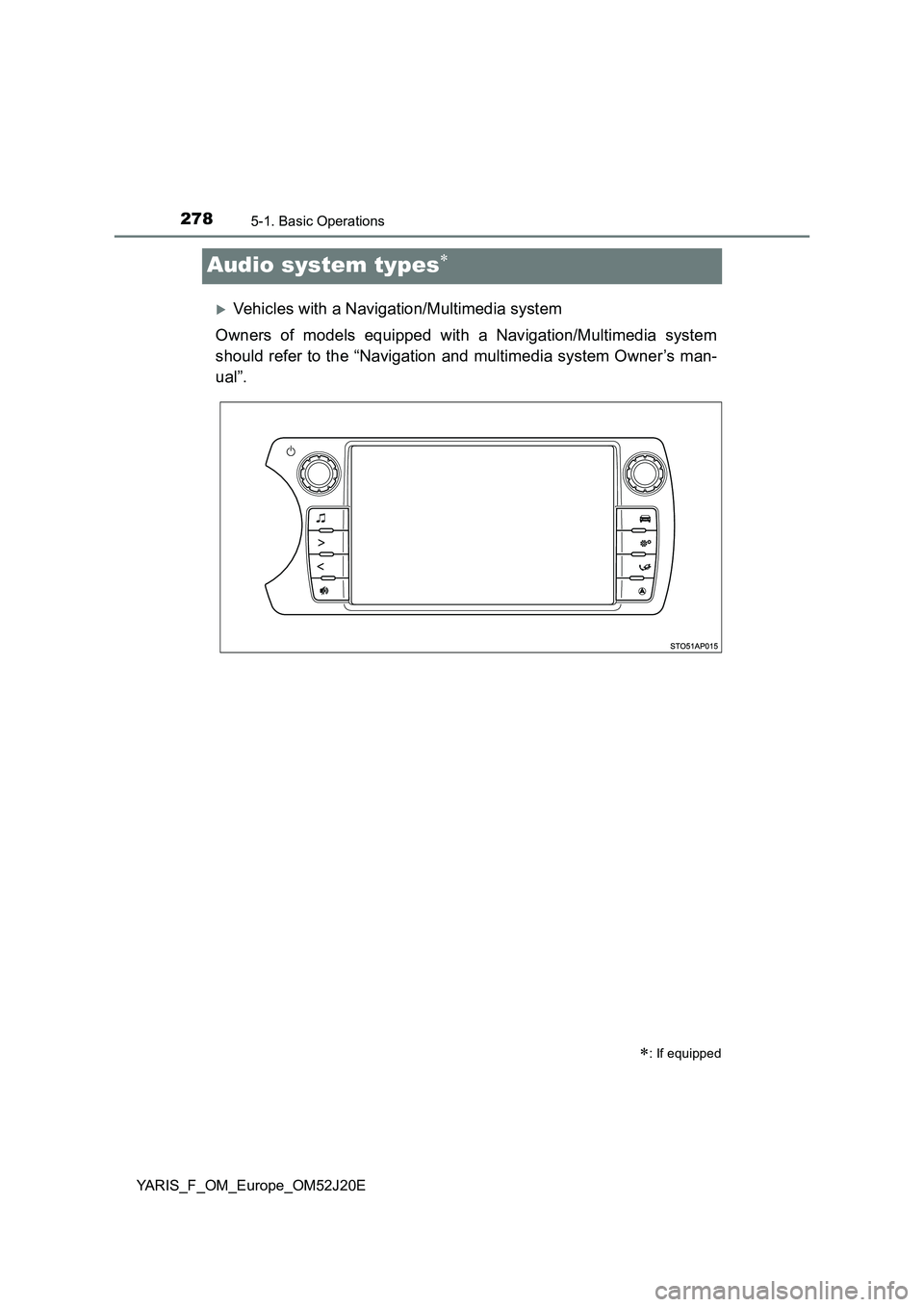
Audio system types
Vehicles with a Navigation/Multimedia system
Owners of models equipped with a Navigation/Multimedia system
should refer to the “Navigation and multimedia system Owner’s man-
ual”.
: If equipped
Page 279 of 549
2795-1. Basic Operations
5
Audio system
YARIS_F_OM_Europe_OM52J20E
Vehicles without a Navigation/Multimedia system
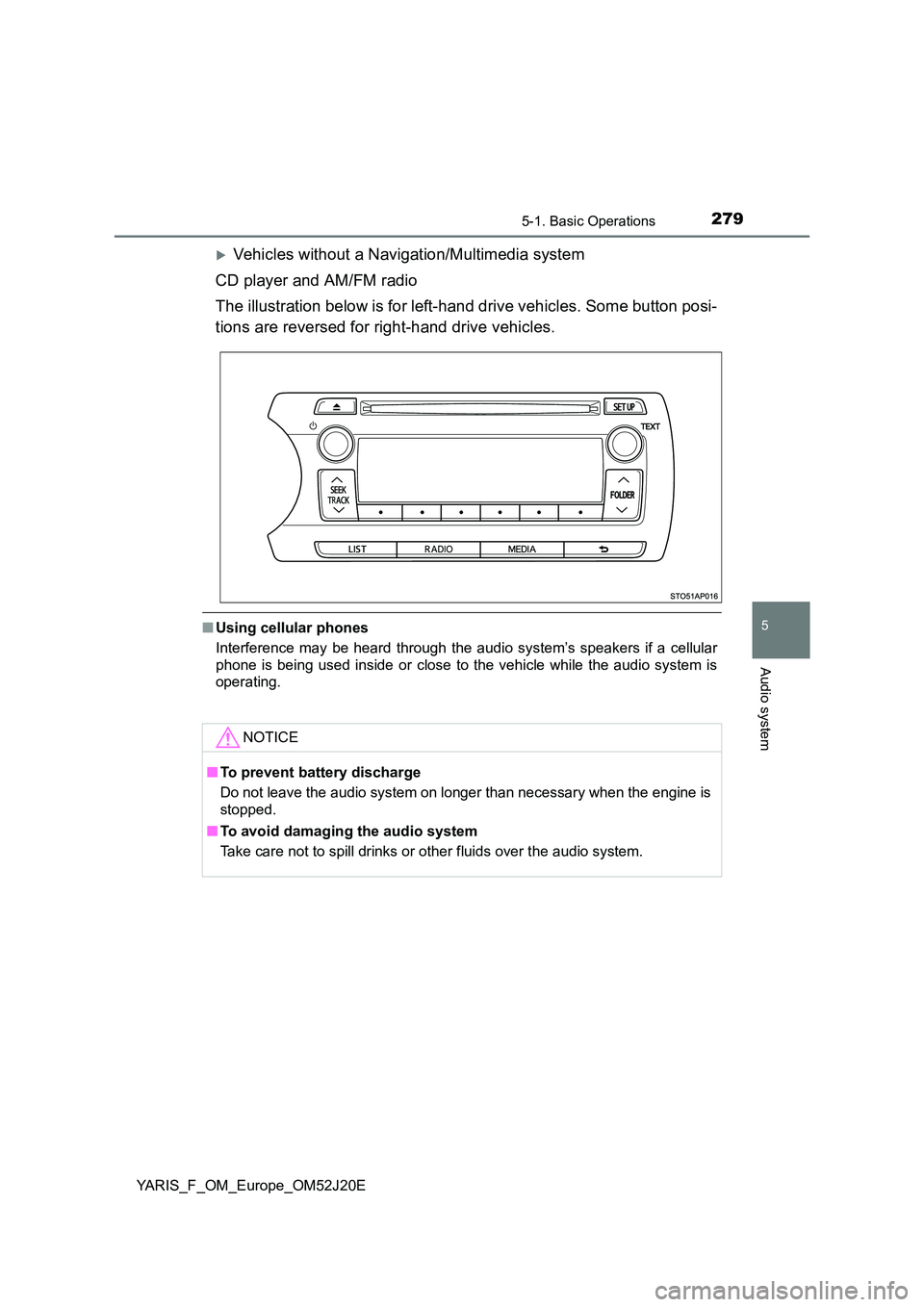
CD player and AM/FM radio
The illustration below is for left-hand drive vehicles. Some button posi-
tions are reversed for right-hand drive vehicles.
■ Using cellular phones
Interference may be heard through the audio system’s speakers if a cellular
phone is being used inside or close to the vehicle while the audio system is
operating.
NOTICE
■ To prevent battery discharge
Do not leave the audio system on longer than necessary when the engine is
stopped.
■ To avoid damaging the audio system
Take care not to spill drinks or other fluids over the audio system.
Page 280 of 549
2805-1. Basic Operations
YARIS_F_OM_Europe_OM52J20E
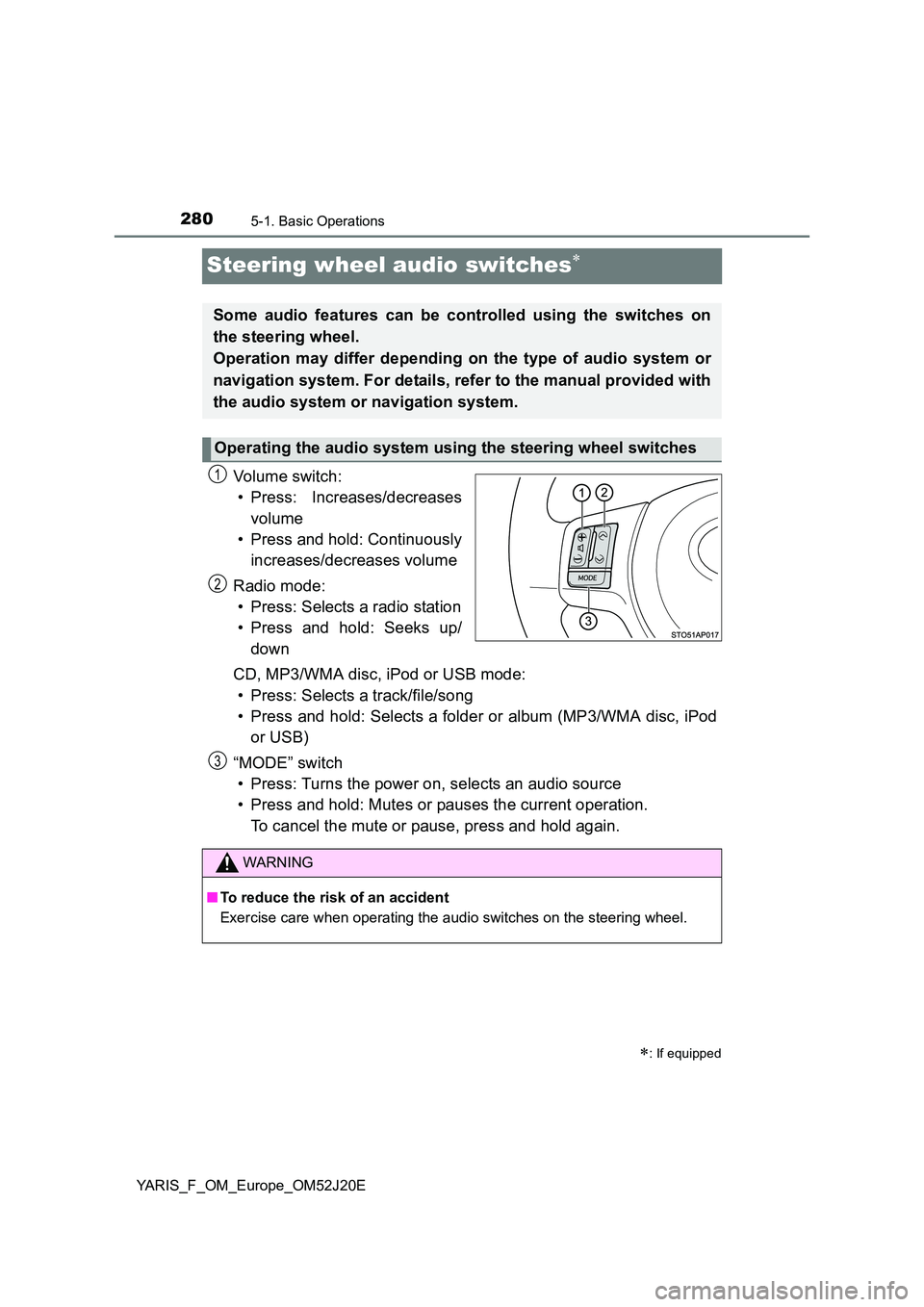
Steering wheel audio switches
Vo lu m e swi tc h :
• Press: Increases/decreases
volume
• Press and hold: Continuously
increases/decreases volume
Radio mode:
• Press: Selects a radio station
• Press and hold: Seeks up/
down
CD, MP3/WMA disc, iPod or USB mode:
• Press: Selects a track/file/song
• Press and hold: Selects a folder or album (MP3/WMA disc, iPod
or USB)
“MODE” switch
• Press: Turns the power on, selects an audio source
• Press and hold: Mutes or pauses the current operation.
To cancel the mute or pause, press and hold again.
: If equipped
Some audio features can be controlled using the switches on
the steering wheel.
Operation may differ depending on the type of audio system or
navigation system. For details, refer to the manual provided with
the audio system or navigation system.
Operating the audio system using the steering wheel switches
1
2
WARNING
■ To reduce the risk of an accident
Exercise care when operating the audio switches on the steering wheel.
3
Page 281 of 549
281
5
5-1. Basic Operations
Audio system
YARIS_F_OM_Europe_OM52J20E
USB por t
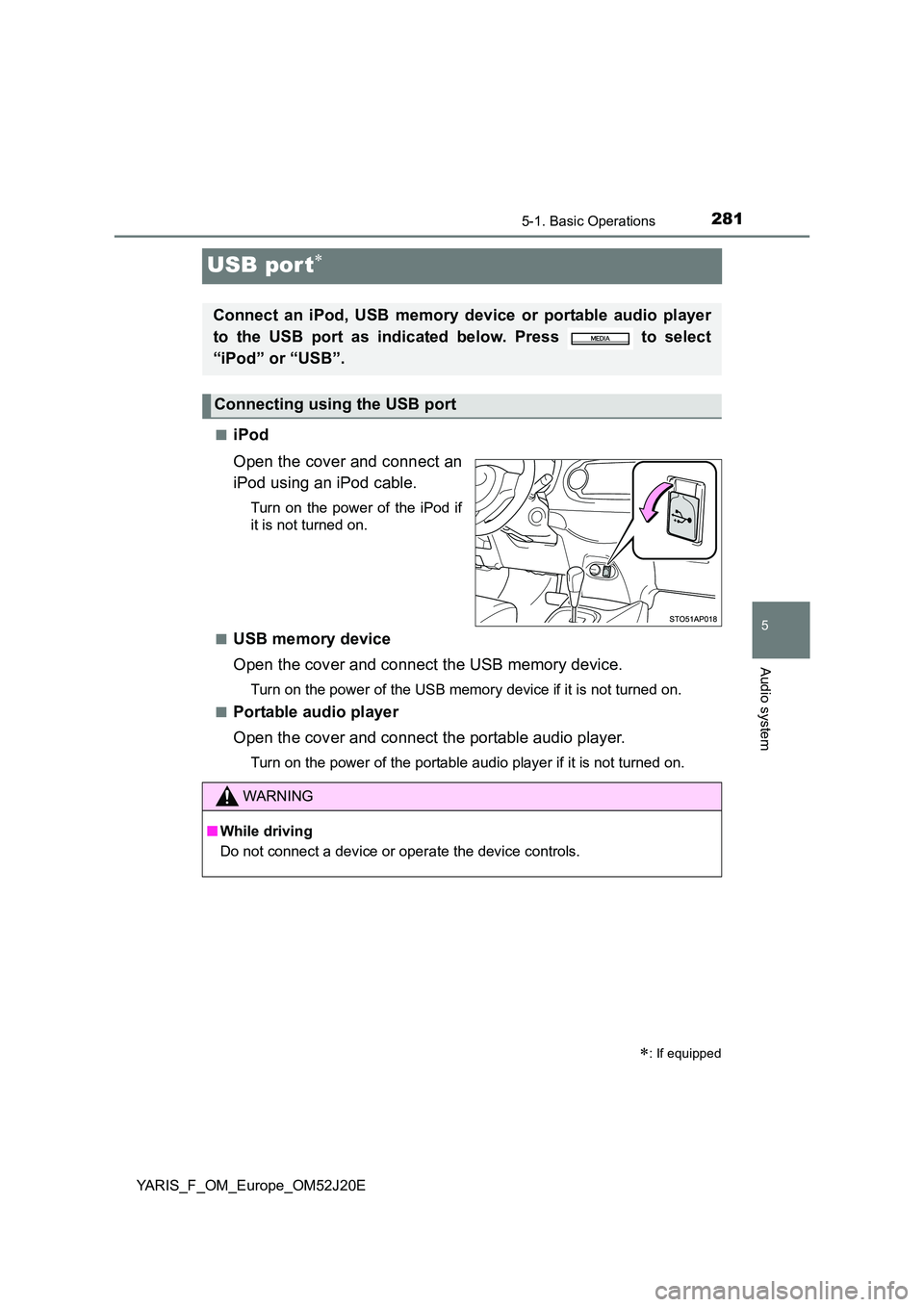
■iPod
Open the cover and connect an
iPod using an iPod cable.
Turn on the power of the iPod if
it is not turned on.
■USB memory device
Open the cover and connect the USB memory device.
Turn on the power of the USB memory device if it is not turned on.
■Portable audio player
Open the cover and connect the portable audio player.
Turn on the power of the portable audio player if it is not turned on.
: If equipped
Connect an iPod, USB memory device or portable audio player
to the USB port as indicated below. Press to select
“iPod” or “USB”.
Connecting using the USB port
WARNING
■ While driving
Do not connect a device or operate the device controls.
Page 282 of 549
2825-2. Using the audio system
YARIS_F_OM_Europe_OM52J20E
Optimal use of the audio system
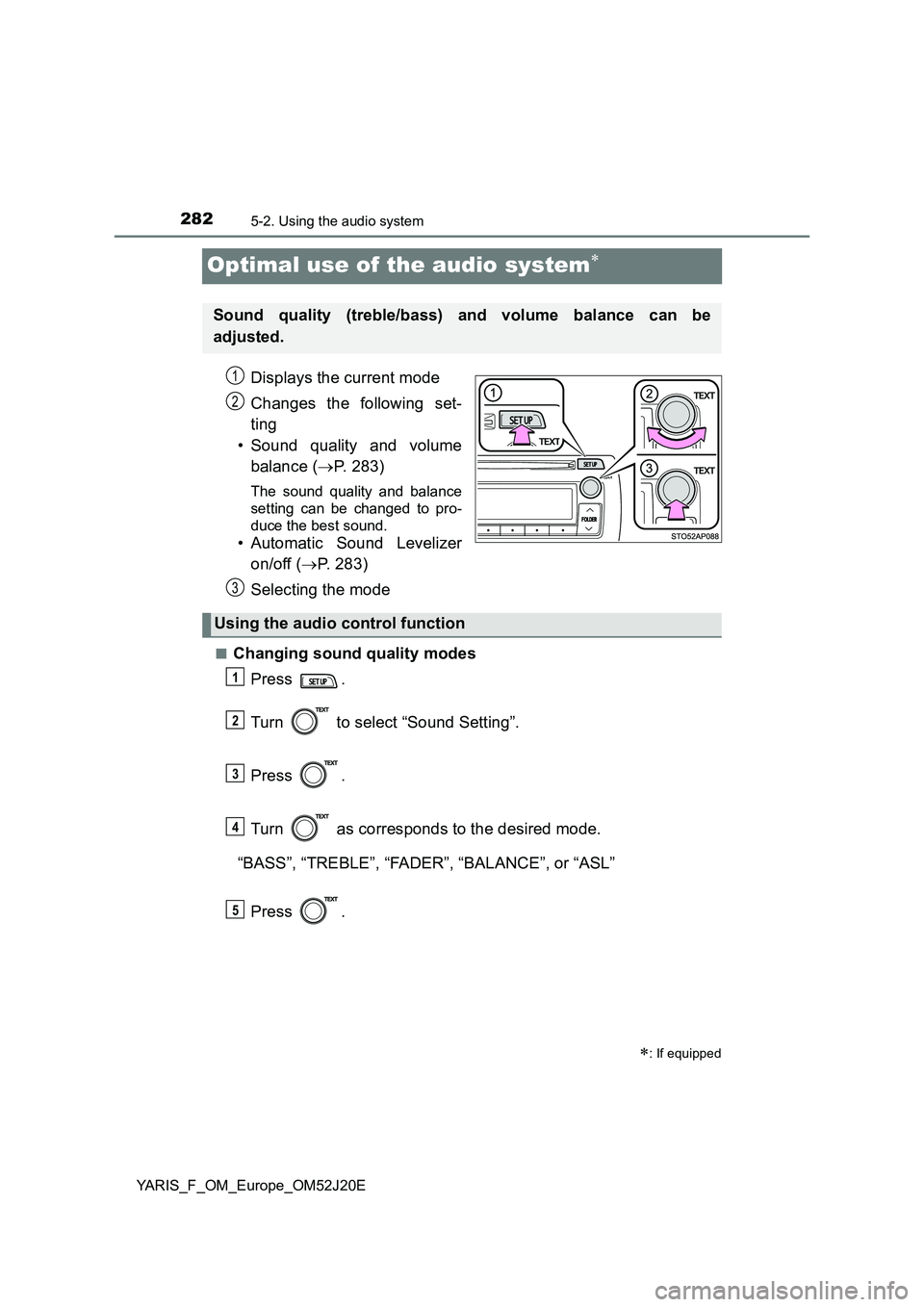
Displays the current mode
Changes the following set-
ting
• Sound quality and volume
balance ( P. 283)
The sound quality and balance
setting can be changed to pro-
duce the best sound.
• Automatic Sound Levelizer
on/off ( P. 283)
Selecting the mode
■Changing sound quality modes
Press .
Turn to select “Sound Setting”.
Press .
Turn as corresponds to the desired mode.
“BASS”, “TREBLE”, “FADER”, “BALANCE”, or “ASL”
Press .
: If equipped
Sound quality (treble/bass) and volume balance can be
adjusted.
STO51AP005
1
2
3
Using the audio control function
1
2
3
4
5
Page 283 of 549
2835-2. Using the audio system
5
Audio system
YARIS_F_OM_Europe_OM52J20E
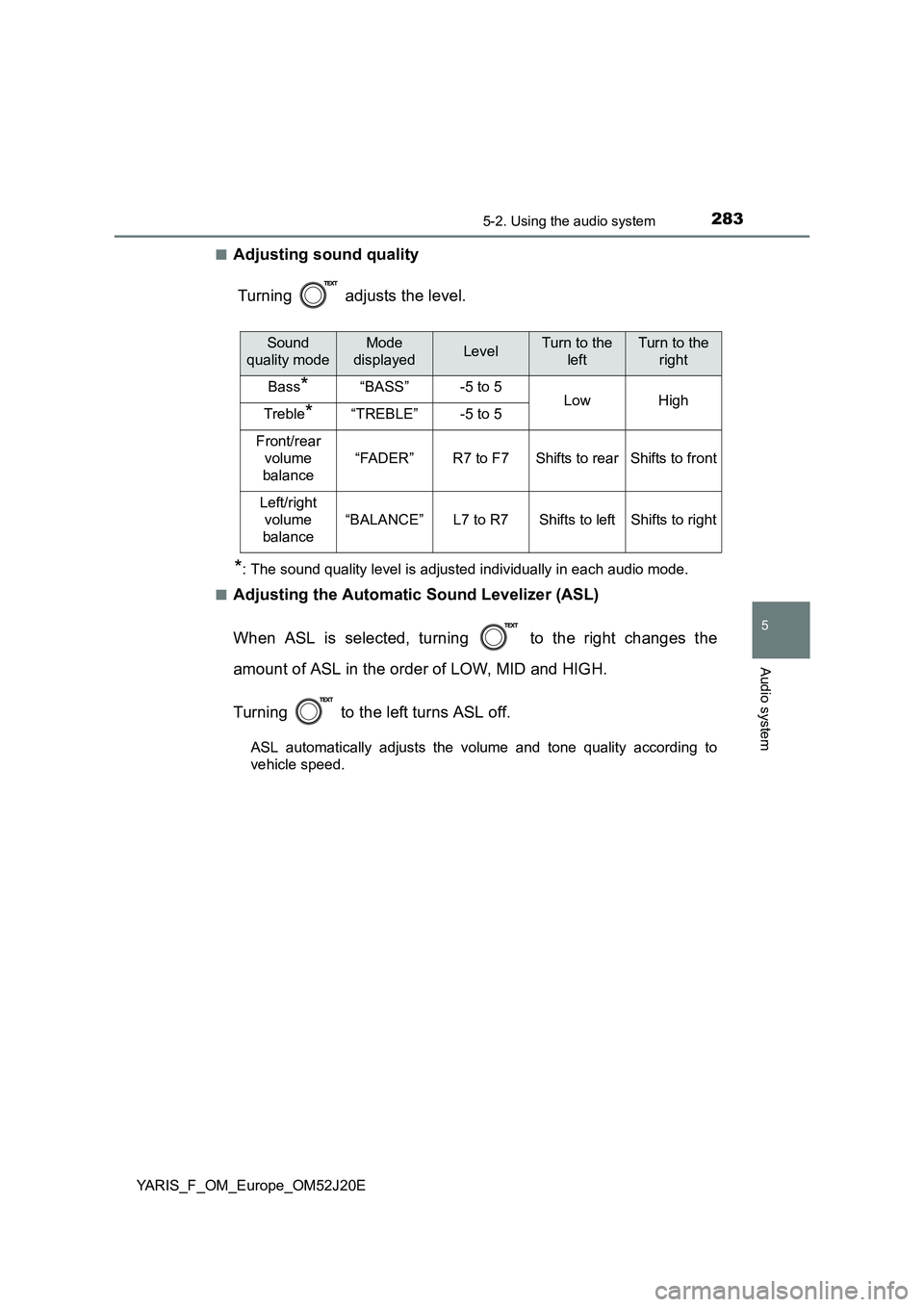
■Adjusting sound quality
Turning adjusts the level.
*: The sound quality level is adjusted individually in each audio mode.
■Adjusting the Automatic Sound Levelizer (ASL)
When ASL is selected, turning to the right changes the
amount of ASL in the order of LOW, MID and HIGH.
Turning to the left turns ASL off.
ASL automatically adjusts the volume and tone quality according to
vehicle speed.
Sound
quality mode
Mode
displayedLevelTurn to the
left
Turn to the
right
Bass*“BASS”-5 to 5LowHighTreble*“TREBLE”-5 to 5
Front/rear
volume
balance
“FADER”R7 to F7Shifts to rearShifts to front
Left/right
volume
balance
“BALANCE”L7 to R7Shifts to leftShifts to right
Page 285 of 549
![TOYOTA YARIS 2017 User Guide 2855-3. Using the radio
5
Audio system
YARIS_F_OM_Europe_OM52J20E
Search for a desired station by turning or pressing “” or “”
on .
Press and hold the button (from [1] to [6]) th](/img/14/49190/w960_49190-284.png "TOYOTA YARIS 2017 User Guide 2855-3. Using the radio
5
Audio system
YARIS_F_OM_Europe_OM52J20E
Search for a desired station by turning or pressing “” or “”
on .
Press and hold the button (from [1] to [6]) th")
2855-3. Using the radio
5
Audio system
YARIS_F_OM_Europe_OM52J20E
Search for a desired station by turning or pressing “” or “”
on .
Press and hold the button (from [1] to [6]) the station
is to be set to until you hear a beep.
■Updating the station list
Press .
The station list will be displayed.
Press (UPDATE) to update the list.
“Updating” is displayed while the searching is in process, and then avail-
able stations will be listed on the display.
To cancel the updating process, press .
■Selecting a station from the station list
Press .
The station list will be displayed.
Turn to select a station.
Press to tune in the station.
To return to the previous display, press .
Setting station presets
Using the station list
1
2
1
2
1
2
3