rear fog TOYOTA YARIS 2017 User Guide
[x] Cancel search | Manufacturer: TOYOTA, Model Year: 2017, Model line: YARIS, Model: TOYOTA YARIS 2017Pages: 549, PDF Size: 33.09 MB
Page 210 of 549
2104-3. Operating the lights and wipers
YARIS_F_OM_Europe_OM52J20E
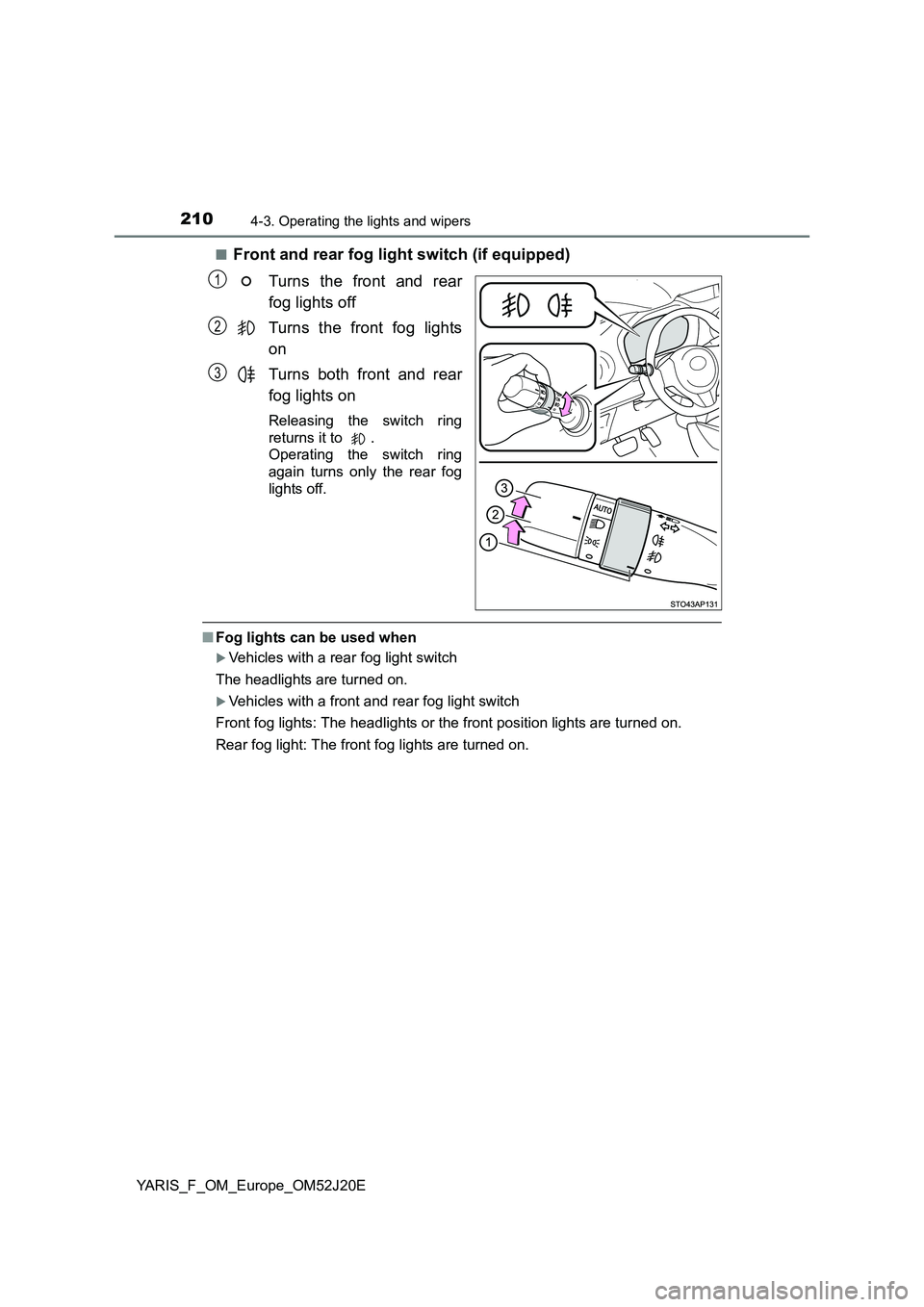
■Front and rear fog light switch (if equipped)
Turns the front and rear
fog lights off
Turns the front fog lights
on
Turns both front and rear
fog lights on
Releasing the switch ring
returns it to .
Operating the switch ring
again turns only the rear fog
lights off.
■ Fog lights can be used when
Vehicles with a rear fog light switch
The headlights are turned on.
Vehicles with a front and rear fog light switch
Front fog lights: The headlights or the front position lights are turned on.
Rear fog light: The front fog lights are turned on.
1
2
3
Page 225 of 549
2254-5. Toyota Safety Sense
4
Driving
YARIS_F_OM_Europe_OM52J20E
WARNING
●If water droplets cannot be properly removed from the area of the wind-
shield in front of the front sensor by the windshield wipers, replace the
wiper insert or wiper blade.
If the wiper inserts or wiper blades need to be replaced, contact any autho-
rized Toyota dealer or repairer, or another duly qualified and equipped
professional.
● Do not attach window tinting to the windshield.
● Replace the windshield if it is damaged or cracked.
If the windshield needs to be replaced, contact any authorized Toyota
dealer or repairer, or another dul y qualified and equipped professional.
● Do not install an antenna in front of the sensor.
● Do not get the front sensor wet.
● Do not allow bright lights to shine into the front sensor.
● Do not dirty or damage the front sensor.
When cleaning the inside of the windshi eld, do not allow glass cleaner to
contact the lens. Also, do not touch the lens.
If the lens is dirty or damaged, contact any authorized Toyota dealer or
repairer, or another duly qualified and equipped professional.
● Do not subject the front sensor to a strong impact.
● Do not change the installation position or direction of the front sensor or
remove it.
● Do not disassemble the front sensor.
● Do not install an electronic device or device that emits strong electric
waves near the front sensor.
● Do not modify any components of the vehicle around the front sensor
(inside rear view mirror, sun visors, etc.) or ceiling.
● Do not attach any accessories that may obstruct the front sensor to the
hood, front grille or front bumper. C ontact any authorized Toyota dealer or
repairer, or another duly qualified and equipped professional for details.
● If a surfboard or other long object is to be mounted on the roof, make sure
that it will not obstruct the front sensor.
● Do not modify the headlights or other lights.
● Do not attach anything to or place anything on the dashboard.
■ Installation area of front sensor on windshield When the windshield is fogging up easily, the glass around the front sensor
may be hot due to the heater running. If the glass is touched, it may result in
burns.
Page 312 of 549
3126-1. Using the air conditioning system and defogger
YARIS_F_OM_Europe_OM52J20E
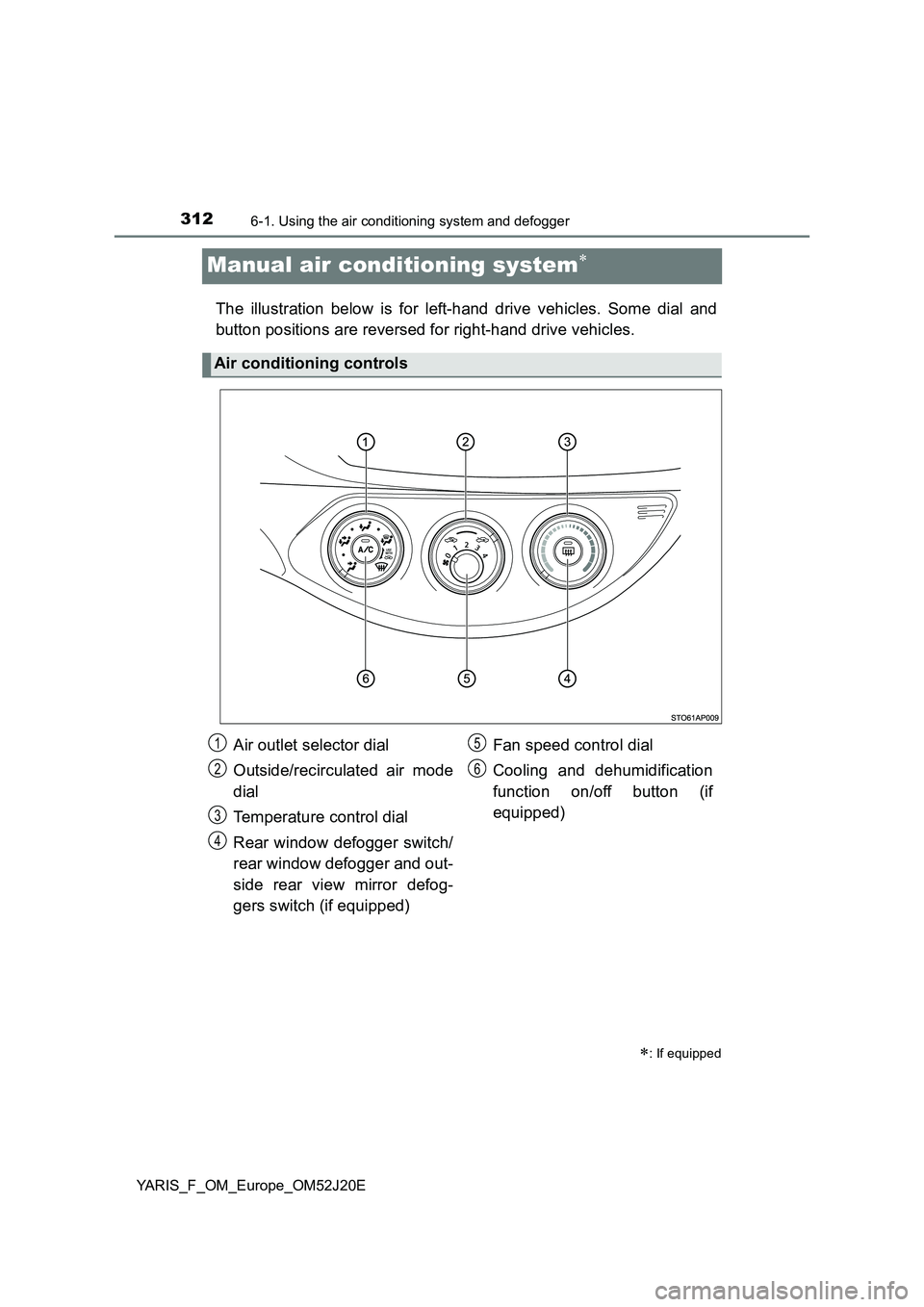
Manual air conditioning system
The illustration below is for left-hand drive vehicles. Some dial and
button positions are reversed for right-hand drive vehicles.
: If equipped
Air conditioning controls
Air outlet selector dial
Outside/recirculated air mode
dial
Temperature control dial
Rear window defogger switch/
rear window defogger and out-
side rear view mirror defog-
gers switch (if equipped)
Fan speed control dial
Cooling and dehumidification
function on/off button (if
equipped)
1
2
3
4
5
6
Page 313 of 549
3136-1. Using the air conditioning system and defogger
6
Interior features
YARIS_F_OM_Europe_OM52J20E
■Adjusting the temperature setting
Vehicles without the button
Turn the temperature control dial clockwise to increase the temper-
ature.
Vehicles with the button
To adjust the temperature setting, turn the temperature control dial
clockwise (warm) or counterclockwise (cool).
If is not pressed, the system will blow ambient temperature air or
heated air.
■Fan speed setting
To adjust the fan speed, turn the fan speed control dial clockwise
(increase) or counterclockwise (decrease).
Turning the dial to “0” turns off the fan.
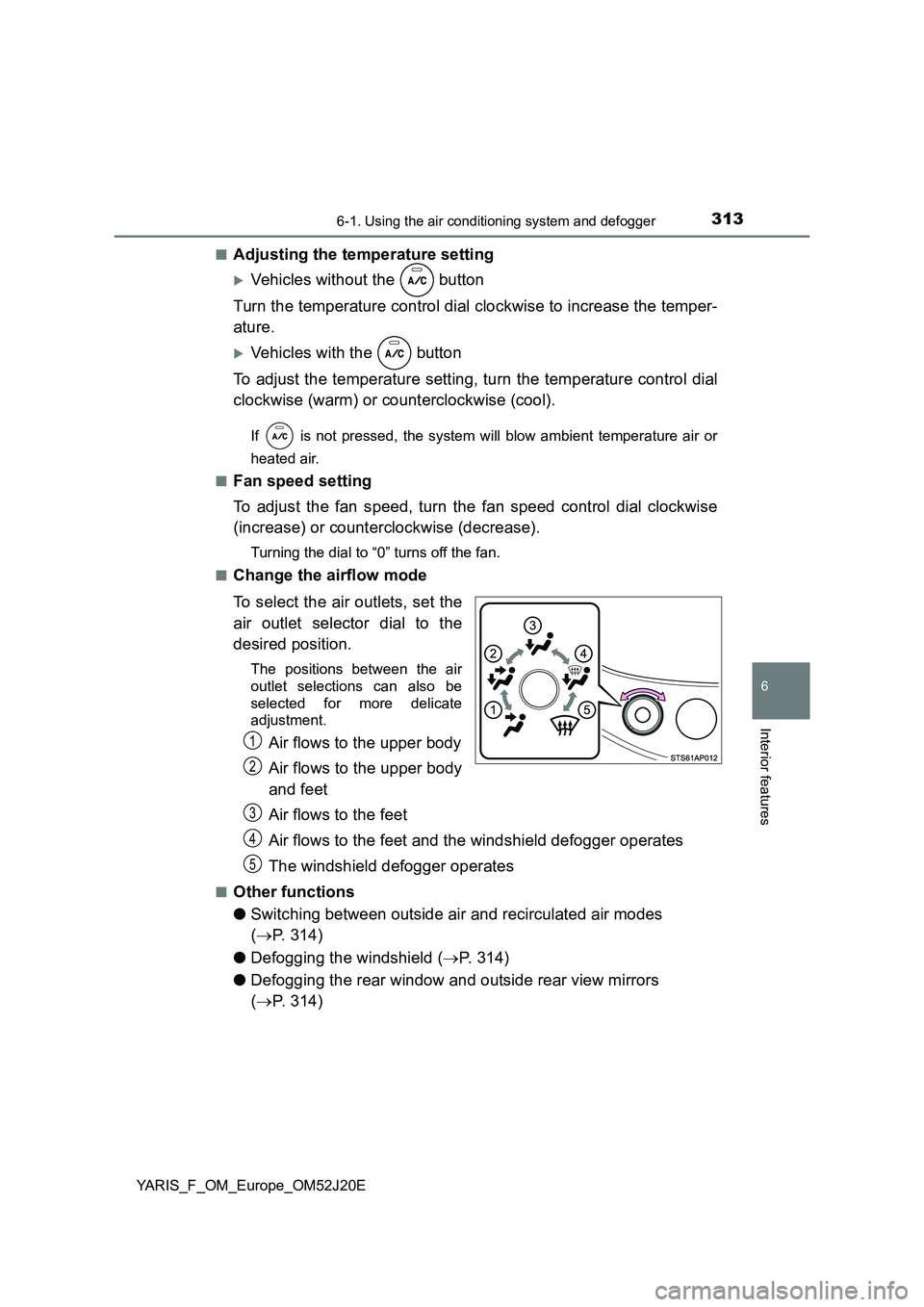
■Change the airflow mode
To select the air outlets, set the
air outlet selector dial to the
desired position.
The positions between the air
outlet selections can also be
selected for more delicate
adjustment.
Air flows to the upper body
Air flows to the upper body
and feet
Air flows to the feet
Air flows to the feet and the windshield defogger operates
The windshield defogger operates
■Other functions
● Switching between outside air and recirculated air modes
( P. 314)
● Defogging the windshield (P. 314)
● Defogging the rear window and outside rear view mirrors
( P. 314)
1
2
3
4
5
Page 314 of 549
3146-1. Using the air conditioning system and defogger
YARIS_F_OM_Europe_OM52J20E
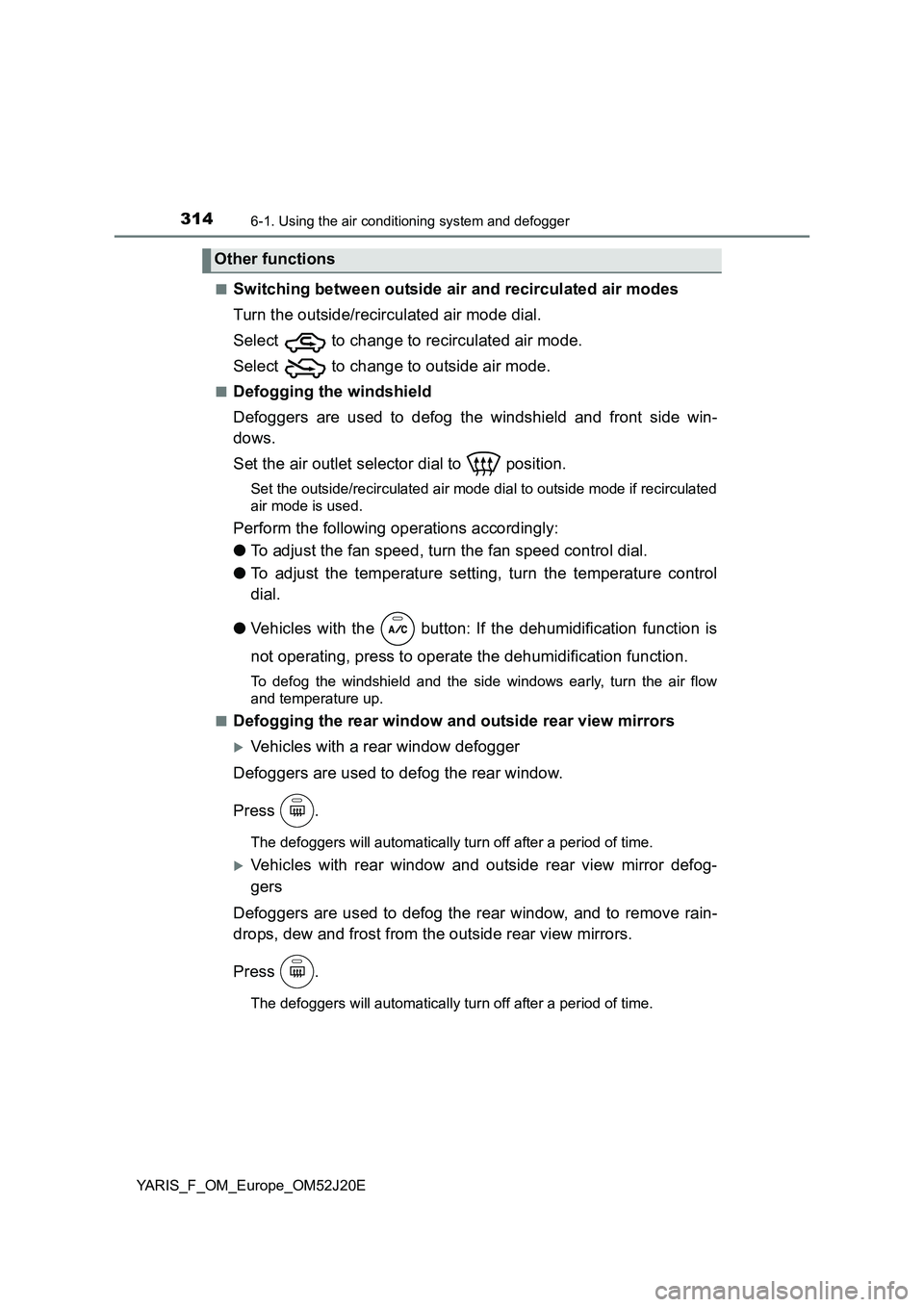
■Switching between outside air and recirculated air modes
Turn the outside/recirculated air mode dial.
Select to change to recirculated air mode.
Select to change to outside air mode.
■Defogging the windshield
Defoggers are used to defog the windshield and front side win-
dows.
Set the air outlet selector dial to position.
Set the outside/recirculated air mode dial to outside mode if recirculated
air mode is used.
Perform the following operations accordingly:
● To adjust the fan speed, turn the fan speed control dial.
● To adjust the temperature setting, turn the temperature control
dial.
● Vehicles with the button: If the dehumidification function is
not operating, press to operate the dehumidification function.
To defog the windshield and the side windows early, turn the air flow
and temperature up.
■Defogging the rear window and outside rear view mirrors
Vehicles with a rear window defogger
Defoggers are used to defog the rear window.
Press .
The defoggers will automatically turn off after a period of time.
Vehicles with rear window and outside rear view mirror defog-
gers
Defoggers are used to defog the rear window, and to remove rain-
drops, dew and frost from the outside rear view mirrors.
Press .
The defoggers will automatically turn off after a period of time.
Other functions
Page 319 of 549
3196-1. Using the air conditioning system and defogger
6
Interior features
YARIS_F_OM_Europe_OM52J20E
WARNING
■To prevent the windshield from fogging up
Do not set the air outlet selector dial to during cool air operation in
extremely humid weather. The differenc e between the temperature of the
outside air and that of the windshield can cause the outer surface of the
windshield to fog up, blocking your vision.
■ When the outside rear view mirror defoggers (if equipped) are on
Do not touch the outside surface of the rear view mirrors, as they can
become very hot and burn you.
NOTICE
■ To prevent battery discharge
Do not leave the air conditioning syst em on longer than necessary when the
engine is stopped.
Page 321 of 549
3216-1. Using the air conditioning system and defogger
6
Interior features
YARIS_F_OM_Europe_OM52J20E
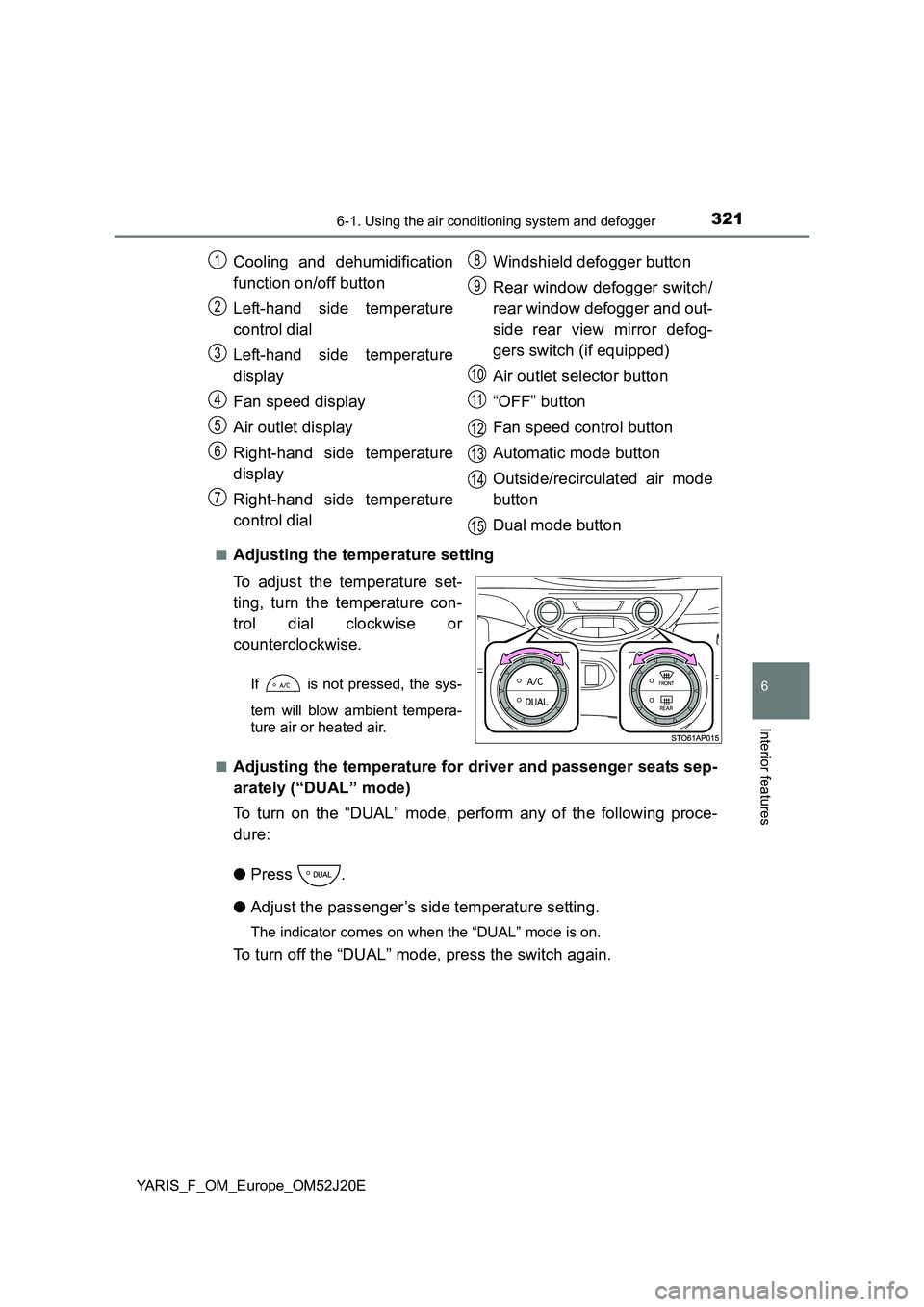
■Adjusting the temperature setting
To adjust the temperature set-
ting, turn the temperature con-
trol dial clockwise or
counterclockwise.
If is not pressed, the sys-
tem will blow ambient tempera-
ture air or heated air.
■Adjusting the temperature for driver and passenger seats sep-
arately (“DUAL” mode)
To turn on the “DUAL” mode, perform any of the following proce-
dure:
● Press .
● Adjust the passenger’s side temperature setting.
The indicator comes on when the “DUAL” mode is on.
To turn off the “DUAL” mode, press the switch again.
Cooling and dehumidification
function on/off button
Left-hand side temperature
control dial
Left-hand side temperature
display
Fan speed display
Air outlet display
Right-hand side temperature
display
Right-hand side temperature
control dial
Windshield defogger button
Rear window defogger switch/
rear window defogger and out-
side rear view mirror defog-
gers switch (if equipped)
Air outlet selector button
“OFF” button
Fan speed control button
Automatic mode button
Outside/recirculated air mode
button
Dual mode button
1
2
3
4
5
6
7
8
9
10
11
12
13
14
15
Page 322 of 549
3226-1. Using the air conditioning system and defogger
YARIS_F_OM_Europe_OM52J20E
■Fan speed setting
Press “ ” on to increase the fan speed.
Press “ ” on to decrease the fan speed.
Press to turn the fan off.
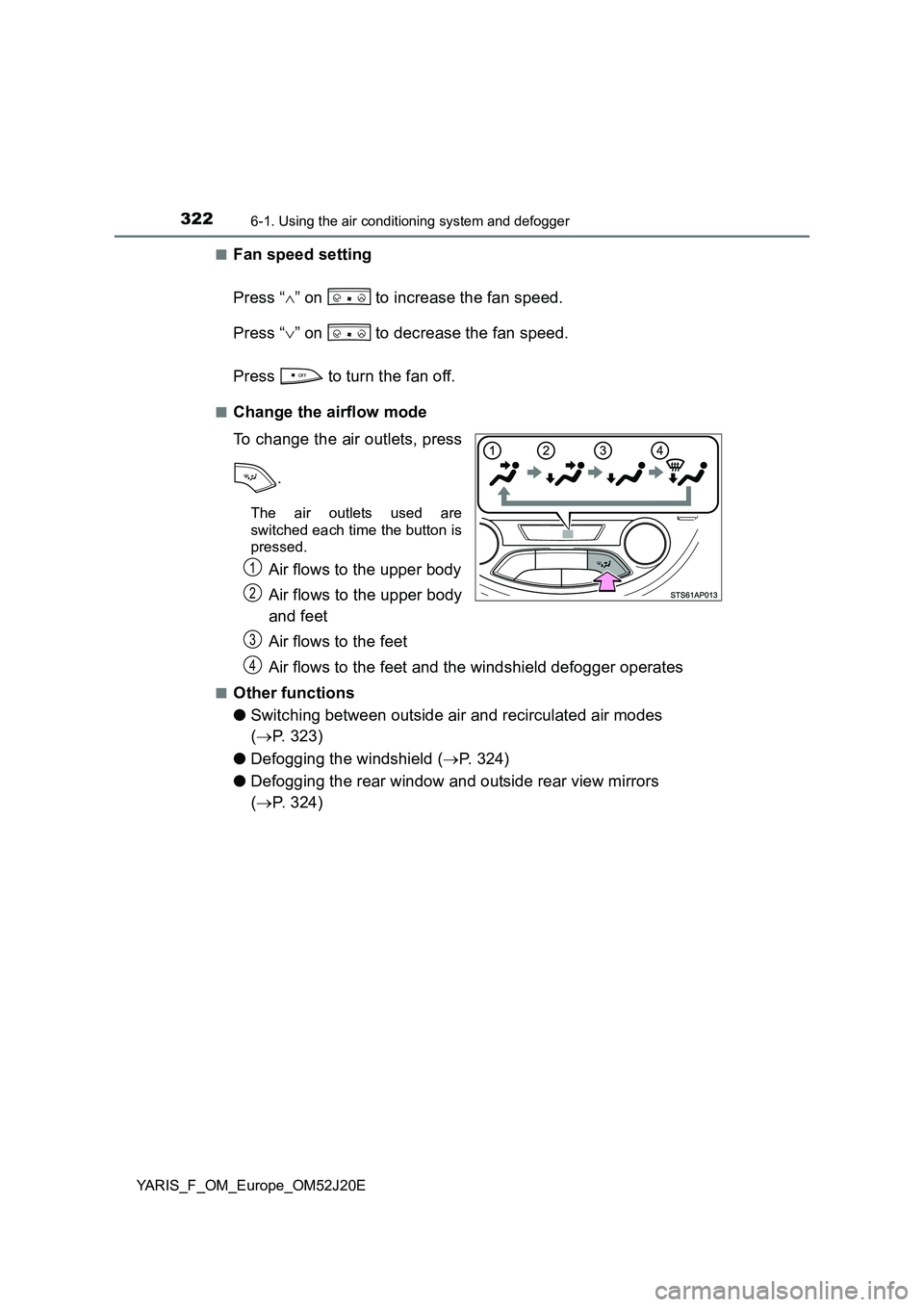
■Change the airflow mode
To change the air outlets, press
.
The air outlets used are
switched each time the button is
pressed.
Air flows to the upper body
Air flows to the upper body
and feet
Air flows to the feet
Air flows to the feet and the windshield defogger operates
■Other functions
● Switching between outside air and recirculated air modes
( P. 323)
● Defogging the windshield (P. 324)
● Defogging the rear window and outside rear view mirrors
( P. 324)
1
2
3
4
Page 324 of 549
3246-1. Using the air conditioning system and defogger
YARIS_F_OM_Europe_OM52J20E
■Defogging the windshield
Defoggers are used to defog the windshield and front side win-
dows.
Press .
The dehumidification function operates and fan speed increases.
Set the outside/recirculated air mode button to outside mode if recircu-
lated air mode is used. (It may switch automatically.)
To defog the windshield and the side windows early, turn the air flow and
temperature up.
To return to the previous mode, press again when the windshield
is defogged.
■Defogging the rear window and outside rear view mirrors
Vehicles with a rear window defogger
Defogger is used to defog the rear window.
Press .
The defogger will automatically turn off after a period of time.
Vehicles with rear window and outside rear view mirror defoggers
Defoggers are used to defog the rear window, and to remove rain-
drops, dew and frost from the outside rear view mirrors.
Press .
The defoggers will automatically turn off after a period of time.
Page 327 of 549
3276-1. Using the air conditioning system and defogger
6
Interior features
YARIS_F_OM_Europe_OM52J20E
■ Ventilation and air conditioning odors
● To let fresh air in, set the air conditioning system to the outside air mode.
● During use, various odors from inside and outside the vehicle may enter into
and accumulate in the air conditioning system. This may then cause odor to
be emitted from the vents.
● To reduce potential odors from occurring:
• It is recommended that the air condi tioning system be set to outside air
mode prior to turning the vehicle off.
• The start timing of the blower may be delayed for a short period of time
immediately after the air conditioning system is started in AUTO mode.
■ Air conditioning system operations when the engine is stopped due to
the Stop & Start system (vehicles with a Stop & Start system)
When the engine is stopped due to Stop & Start system operations, the auto-
matic air conditioning cooling, heating and dehumidification functions turn off
and the fan speed is decreased according to the outside temperature etc. or
air blowing stops. To stop the air conditioning system from turning off, press
the Stop & Start cancel switch and refrain from using the Stop & Start system.
■ An odor comes from the air conditioning system due to the Stop & Start
system operation (vehicles with a Stop & Start system)
When the engine is stopped due to the Stop & Start system, an odor caused
by moisture may be detected. This does not indicate a malfunction.
■ Air conditioning filter
P. 400
WARNING
■To prevent the windshield from fogging up
Do not use during cool air operation in extremely humid weather. The
difference between the temperature of the outside air and that of the wind-
shield can cause the outer surface of the windshield to fog up, blocking your
vision.
■ When the outside rear view mirror defoggers (if equipped) are on
Do not touch the outside surface of the rear view mirrors, as they can
become very hot and burn you.
NOTICE
■ To prevent battery discharge
Do not leave the air conditioning syst em on longer than necessary when the
engine is stopped.