steering TOYOTA YARIS 2017 Owner's Guide
[x] Cancel search | Manufacturer: TOYOTA, Model Year: 2017, Model line: YARIS, Model: TOYOTA YARIS 2017Pages: 549, PDF Size: 33.09 MB
Page 189 of 549
1894-2. Driving procedures
4
Driving
YARIS_F_OM_Europe_OM52J20E
WARNING
■When starting the engine
Always start the engine while sitting in the driver’s seat. Do not depress the
accelerator pedal while starting the engine under any circumstances.
Doing so may cause an accident resulting in death or serious injury.
■ Caution while driving
If engine failure occurs while the vehicle is moving, do not lock or open the
doors until the vehicle reaches a safe and complete stop. Activation of the
steering lock in this circumstance may lead to an accident, resulting in
death or serious injury.
■ Stopping the engine in an emergency
If you want to stop the engine in an emergency while driving the vehicle,
press and hold the engine switch for more than 3 seconds, or press it briefly
3 times or more in succession. ( P. 429)
However, do not touch the engine switch while driving except in an emer-
gency. Turning the engine switch off while driving will not cause loss of
steering or braking control, but the power assist to these systems will be
lost. This will make it more difficult to steer and brake, so you should pull
over and stop the vehicle as soon as it is safe to do so.
Page 227 of 549
2274-5. Toyota Safety Sense
4
Driving
YARIS_F_OM_Europe_OM52J20E
WARNING
■Limitations of the pre-crash safety system
● The driver is solely responsible for safe driving. Always drive safely, taking
care to observe your surroundings.
Do not use the pre-crash safety system instead of normal braking opera-
tions under any circumstances. This system will not prevent collisions or
lessen collision damage or injury in every situation. Do not overly rely on
this system. Failure to do so may lead to an accident, resulting in death or
serious injury.
● Although this system is designed to help avoid and reduce the impact of a
collision, its effectiveness may change according to various conditions,
therefore the system may not always be able to achieve the same level of
performance.
Read the following conditions carefully. Do not overly rely on this system
and always drive carefully.
• Conditions under which the system may operate even if there is no pos-
sibility of a collision: P. 232
• Conditions under which the system may not operate properly: P. 2 3 6
● Do not attempt to test the operation of the pre-crash safety system your-
self, as the system may not operate properly, possibly leading to an acci-
dent.
■ Pre-crash braking
● The pre-crash braking function may not operate if certain operations are
performed by the driver. If the accelerator pedal is being depressed
strongly or the steering wheel is bei ng turned, the system may determine
that the driver is taking evasive action and possibly prevent the pre-crash
braking function from operating.
● In some situations, while the pre-crash braking function is operating, oper-
ation of the function may be canceled if the accelerator pedal is depressed
strongly or the steering wheel is turned and the system determines that
the driver is taking evasive action.
● A large amount of braking force is applied while the pre-crash braking
function is operating. Additionally, as the operation of the pre-crash brak-
ing function will be canceled af ter the vehicle has been stopped for
approximately 2 seconds if it is stopped by the operation of the pre-crash
braking function, the driver should depress the brake pedal as necessary.
● If the brake pedal is being depressed, the system may determine that the
driver is taking evasive action and possibly delay the operation timing of
the pre-crash braking function.
Page 231 of 549
2314-5. Toyota Safety Sense
4
Driving
YARIS_F_OM_Europe_OM52J20E
■Operational conditions
The pre-crash safety system is enabled and determines that the possibility of
a frontal collision with a vehicle is high.
Each function is operational at the following speeds:
● Pre-crash warning:
• Vehicle speed is approximately 15 to 140 km/h (10 to 86 mph).
• The relative speed between your vehicle and a preceding vehicle is
approximately 15 km/h (10 mph) or more.
● Pre-crash brake assist:
• Vehicle speed is approximately 30 to 80 km/h (19 to 49 mph).
• The relative speed between your vehicle and a preceding vehicle is
approximately 30 km/h (19 mph) or more.
● Pre-crash braking:
• Vehicle speed is approximately 10 to 80 km/h (7 to 49 mph).
• The relative speed between your vehicle and a preceding vehicle is
approximately 10 km/h (7 mph) or more.
The system may not operate in the following situations:
● If a battery terminal has been disconnected and reconnected and then the
vehicle has not been driven for a certain amount of time
● If the shift lever is in R
● If VSC is disabled (only the pre-crash warning function will be operational)
■ Cancelation of the pre-crash braking
● If either of the following occur while the pre-crash braking function is operat-
ing, it will be canceled:
• The accelerator pedal is depressed strongly.
• The steering wheel is turned sharply or abruptly.
● If the vehicle is stopped by the operation of the pre-crash braking function,
the operation of the pre-crash braking function will be canceled after the
vehicle has been stopped for approximately 2 seconds.
Page 244 of 549
2444-5. Toyota Safety Sense
YARIS_F_OM_Europe_OM52J20E
WARNING
■Before using the LDA system
Do not rely solely on the LDA system. The LDA system does not drive the
vehicle automatically, nor does it reduce the amount of care you need to
take. As such, the driver must always assume full responsibility for under-
standing his/her surroundings, for operat ing the steering wheel to correct
the driving line, and for driving safely.
Inappropriate or negligent driving could lead to an accident.
■ To avoid operating the LDA by mistake
Switch the LDA system off using the LDA switch when not in use.
NOTICE
■ To prevent damage to or incorrect operation of the LDA system
● Do not modify the headlights or attach stickers to the surface of the lights.
● Do not modify the suspension. If your suspension needs repairs, contact
any authorized Toyota dealer or repairer, or another duly qualified and
equipped professional.
● Do not install or place anything on the hood or the grille. Also, do not install
a grille guard (bull bars, kangaroo bar etc.).
Page 265 of 549
265
4
4-6. Using the driving support systems
Driving
YARIS_F_OM_Europe_OM52J20E
Driving assist systems
◆ABS (Anti-lock Brake System)
Helps to prevent wheel lock when the brakes are applied suddenly,
or if the brakes are applied while driving on a slippery road surface
◆Brake assist
Generates an increased level of braking force after the brake pedal
is depressed when the system detects a panic stop situation
◆VSC (Vehicle Stability Control) (if equipped)
Helps the driver to control skidding when swerving suddenly or
turning on slippery road surfaces
◆TRC (Traction Control) (if equipped)
Helps to maintain drive power and prevent the drive wheels from
spinning when starting the vehicle or accelerating on slippery roads
◆EPS (Electric Power Steering)
Employs an electric motor to reduce the amount of effort needed to
turn the steering wheel
◆PCS (Pre-Crash Safety system) (if equipped)
P. 2 2 6
◆Emergency brake signal
When the brakes are applied suddenly, the emergency flashers
automatically flash to alert the vehicle behind.
To help enhance driving safety and performance, the following
systems operate automatically in response to various driving
situations. Be aware, however, that these systems are supple-
mentary and should not be relied upon too heavily when operat-
ing the vehicle.
Page 267 of 549
2674-6. Using the driving support systems
4
Driving
YARIS_F_OM_Europe_OM52J20E
■Turning off both TRC and VSC systems
To turn TRC and VSC systems off, press and hold the VSC OFF switch for
more than 3 seconds while the vehicle is stopped.
The “TRC OFF” indicator and the VSC OFF indicator will come on.
Press the switch again to turn the systems back on.
On vehicles with pre-crash safety system, pre-crash brake assist and pre-
crash braking will also be disabled. The PCS warning light will come on.
( P. 239)
■ When the “TRC OFF” indicator comes on even if the VSC OFF switch
has not been pressed
TRC cannot be operated. Contact any authorized Toyota dealer or repairer, or
another duly qualified and equipped professional.
■ Sounds and vibrations caused by the ABS, brake assist, TRC and VSC
systems
● A sound may be heard from the engine compartment when the brake pedal
is depressed repeatedly, when the engine is started or just after the vehicle
begins to move. This sound does not indicate that a malfunction has
occurred in any of these systems.
● Any of the following conditions may occur when the above systems are
operating. None of these indicates that a malfunction has occurred.
• Vibrations may be felt through the vehicle body and steering.
• A motor sound may be heard after the vehicle comes to a stop.
• The brake pedal may pulsate slightly after the ABS is activated.
• The brake pedal may move down slightly after the ABS is activated.
■ EPS operation sound
When the steering wheel is operated, a motor sound (whirring sound) may be
heard. This does not indicate a malfunction.
■ Automatic reactivation of TRC and VSC systems
After turning the TRC and VSC systems off, the systems will be automatically
re-enabled in the following situations:
● When the engine switch is turned to the “LOCK” position
● If only the TRC system is turned off, the TRC will turn on when vehicle
speed increases
If both the TRC and VSC systems are turned off, automatic re-enabling will
not occur when vehicle speed increases.
■ Reduced effectiveness of the EPS system
The effectiveness of the EPS system is reduced to prevent the system from
overheating when there is frequent steering input over an extended period of
time. The steering wheel may feel heavy as a result.
Should this occur, refrain from excessive steering input or stop the vehicle
and turn the engine off. The EPS system should return to normal within 10
minutes.
Page 275 of 549
2754-7. Driving tips
4
Driving
YARIS_F_OM_Europe_OM52J20E
WARNING
■Driving with snow tires
Observe the following precautions to reduce the risk of accidents.
Failure to do so may result in a loss of vehicle control and cause death or
serious injury.
● Use tires of the specified size.
● Maintain the recommended level of air pressure.
● Do not drive at speeds in excess of the speed limit or the speed limit spec-
ified for the snow tires being used.
● Use snow tires on all, not just some wheels.
● Do not use tires of noticeably different wear level.
■ Driving with tire chains
Observe the following precautions to reduce the risk of accidents.
Failure to do so may result in the vehicle being unable to be driven safely,
and may cause death or serious injury.
● Do not drive in excess of the speed limit specified for the tire chains being
used, or 50 km/h (30 mph), whichever is lower.
● Avoid driving on bumpy road surfaces or over potholes.
● Avoid sudden acceleration, abrupt steering, sudden braking and shifting
operations that cause sudden engine braking.
● Slow down sufficiently before entering a curve to ensure that vehicle con-
trol is maintained.
● Do not use LDA (Lane Departure Alert) (if equipped).
Page 277 of 549
277
5Audio system
YARIS_F_OM_Europe_OM52J20E
5-1. Basic Operations
Audio system types............ 278
Steering wheel audio
switches ........................... 280
USB port ............................ 281
5-2. Using the audio system
Optimal use of the audio
system ............................. 282
5-3. Using the radio
Radio operation ................. 284
5-4. Playing audio CDs and
MP3/WMA discs
CD player operation ........... 289
5-5. Using an external device
Listening to an iPod ........... 297
Listening to a USB
memory device ................ 304
Page 280 of 549
2805-1. Basic Operations
YARIS_F_OM_Europe_OM52J20E
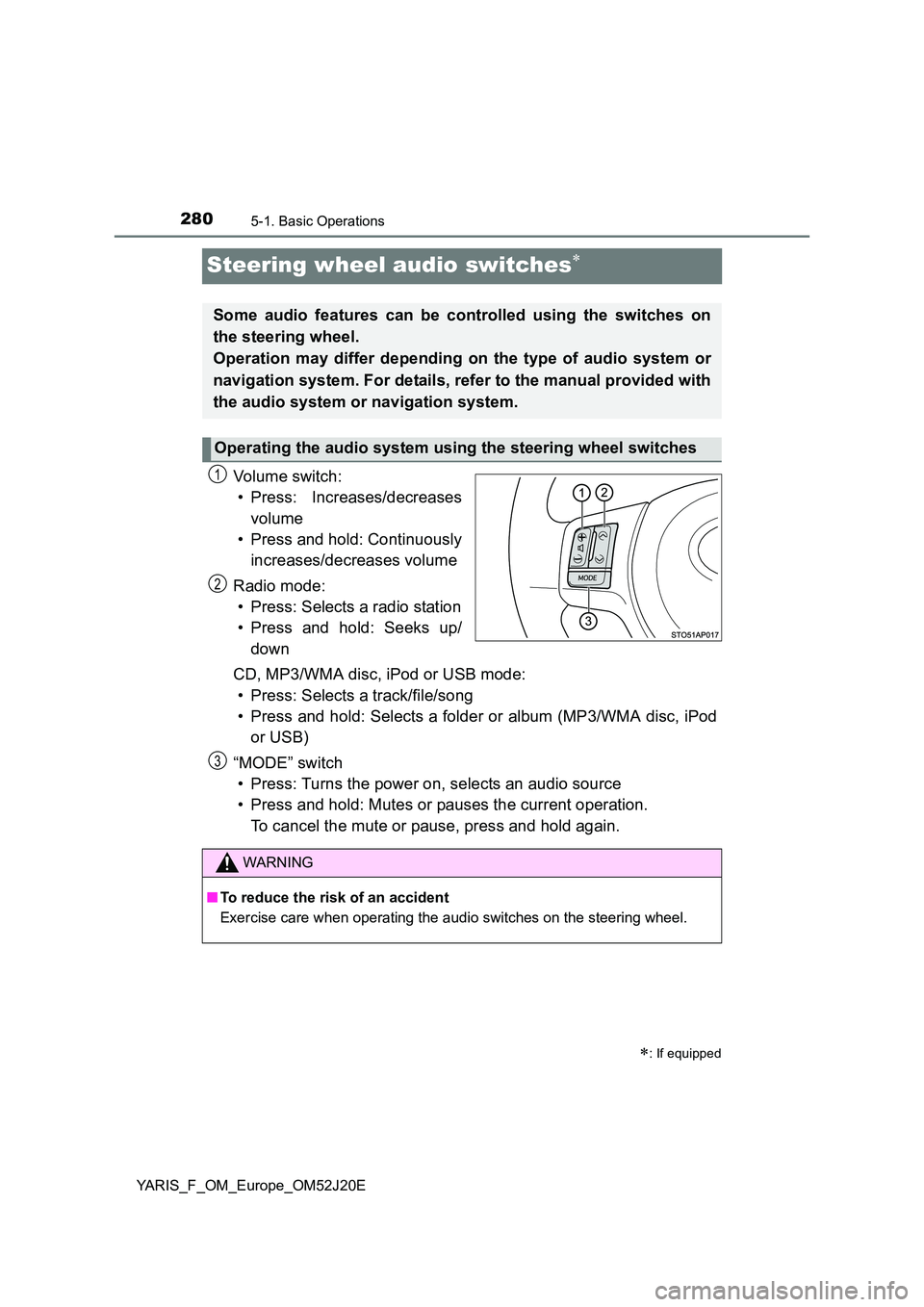
Steering wheel audio switches
Vo lu m e swi tc h :
• Press: Increases/decreases
volume
• Press and hold: Continuously
increases/decreases volume
Radio mode:
• Press: Selects a radio station
• Press and hold: Seeks up/
down
CD, MP3/WMA disc, iPod or USB mode:
• Press: Selects a track/file/song
• Press and hold: Selects a folder or album (MP3/WMA disc, iPod
or USB)
“MODE” switch
• Press: Turns the power on, selects an audio source
• Press and hold: Mutes or pauses the current operation.
To cancel the mute or pause, press and hold again.
: If equipped
Some audio features can be controlled using the switches on
the steering wheel.
Operation may differ depending on the type of audio system or
navigation system. For details, refer to the manual provided with
the audio system or navigation system.
Operating the audio system using the steering wheel switches
1
2
WARNING
■ To reduce the risk of an accident
Exercise care when operating the audio switches on the steering wheel.
3
Page 352 of 549
3527-1. Maintenance and care
YARIS_F_OM_Europe_OM52J20E
NOTICE
■To prevent paint deterioration and corrosion on the body and compo-
nents (aluminum wheels etc.)
● Wash the vehicle immediately in the following cases:
• After driving near the sea coast
• After driving on salted roads
• If coal tar or tree sap is present on the paint surface
• If dead insects, insect droppings or bird droppings are present on the
paint surface
• After driving in an area contaminated with soot, oily smoke, mine dust,
iron powder or chemical substances
• If the vehicle becomes heavily soiled with dust or mud
• If liquids such as benzene and gasoline are spilled on the paint surface
● If the paint is chipped or scratched, have it repaired immediately.
● To prevent the wheels from corroding, remove any dirt and store in a place
with low humidity when storing the wheels.
■ Cleaning the exterior lights
● Wash carefully. Do not use organic substances or scrub with a hard brush.
This may damage the surfaces of the lights.
● Do not apply wax to the surfaces of the lights.
Wax may cause damage to the lenses.
■ Antenna installation and removal precautions
● Before driving, ensure that the antenna is installed.
● When the antenna is removed, such as before entering an automatic car
wash, make sure to store it in a suitable place so as not to lose it. Also,
before driving, make sure to reinstall the antenna in its original position.
■ When using an automatic car wash (vehicles with a rain-sensing wind-
shield wiper)
Set the wiper switch to the off position.
If the wiper switch is in “AUTO”, the wiper may operate and the wiper blade
may be damaged.
■ To prevent damage to the antenna
Remove the antenna in the following situations:
● When the antenna will touch the ceiling of a garage or other such places
● When a car cover is to be used to cover the vehicle
■ When using a high pressure car wash
Do not bring the nozzle tip close to boots (rubber or resin manufactured
cover), connectors or the following parts. The parts may be damaged if they
come into contact with high-pressure water.
• Traction related parts
• Steering parts
• Suspension parts
• Brake parts