tow TOYOTA YARIS 2017 Owners Manual
[x] Cancel search | Manufacturer: TOYOTA, Model Year: 2017, Model line: YARIS, Model: TOYOTA YARIS 2017Pages: 549, PDF Size: 33.09 MB
Page 3 of 549
3
1
7
8
6
5
4
3
2
9
YARIS_F_OM_Europe_OM52J20E
4-1. Before driving
Driving the vehicle .............160
Cargo and luggage ............171
Trailer towing .....................173
4-2. Driving procedures
Engine (ignition) switch
(vehicles without
a smart entry &
start system) ....................182
Engine (ignition) switch
(vehicles with
a smart entry &
start system) ....................185
Multidrive ...........................191
Manual transmission ..........197
Turn signal lever ................201
Parking brake.....................202
4-3. Operating the lights
and wipers
Headlight switch.................203
Fog light switch ..................209
Windshield wiper and
washer .............................211
Rear window wiper and
washer .............................215
4-4. Refueling
Opening the fuel tank
cap ...................................217
4-5. Toyota Safety Sense
Toyota Safety Sense .........220
PCS
(Pre-Crash Safety
system) ............................226
LDA
(Lane Departure Alert) .... 240
Automatic High Beam ....... 245
4-6. Using the driving support
systems
Cruise control .................... 249
Speed limiter ..................... 253
Stop & start system ........... 257
Driving assist systems....... 265
Diesel particulate filter
system............................. 270
4-7. Driving tips
Winter driving tips.............. 272
5-1. Basic Operations
Audio system types ........... 278
Steering wheel audio
switches .......................... 280
USB port............................ 281
5-2. Using the audio system
Optimal use of the audio
system............................. 282
5-3. Using the radio
Radio operation ................. 284
5-4. Playing audio CDs and
MP3/WMA discs
CD player operation .......... 289
5-5. Using an external device
Listening to an iPod........... 297
Listening to a USB
memory device ................ 304
4Driving
5Audio system
Page 5 of 549
5
1
7
8
6
5
4
3
2
9
YARIS_F_OM_Europe_OM52J20E
8-1. Essential information
Emergency flashers ...........428
If your vehicle has to
be stopped in
an emergency ..................429
8-2. Steps to take in
an emergency
If your vehicle needs to
be towed ..........................431
If you think something is
wrong ...............................437
Fuel pump shut off system
(gasoline engine only) .....438
If a warning light turns on
or a warning buzzer
sounds .............................439
If you have a flat tire
(vehicles with
a spare tire) .....................453
If you have a flat tire
(vehicles with
an emergency tire
puncture repair kit)...........468
If the engine will not start ...484
If the electronic key does
not operate properly
(vehicles with a smart
entry & start system)........486
If the vehicle battery is
discharged .......................488
If your vehicle overheats ....493
If you run out of fuel and
the engine stalls
(diesel engine only) ......... 497
If the vehicle becomes
stuck................................ 499
9-1. Specifications
Maintenance data
(fuel, oil level, etc.) .......... 502
Fuel information ................ 522
9-2. Customization
Customizable features ...... 524
9-3. Items to initialize
Items to initialize................ 528
What to do if...
(Troubleshooting) .................... 530
Alphabetical index...................... 534
8When trouble arises
9Vehicle specifications
Index
Toyota Motor Europe NV/SA, Avenue du Bourget 60 - 1140 Brussels, Belgium
www.toyota-europe.com
Page 12 of 549
12Pictorial index
YARIS_F_OM_Europe_OM52J20E
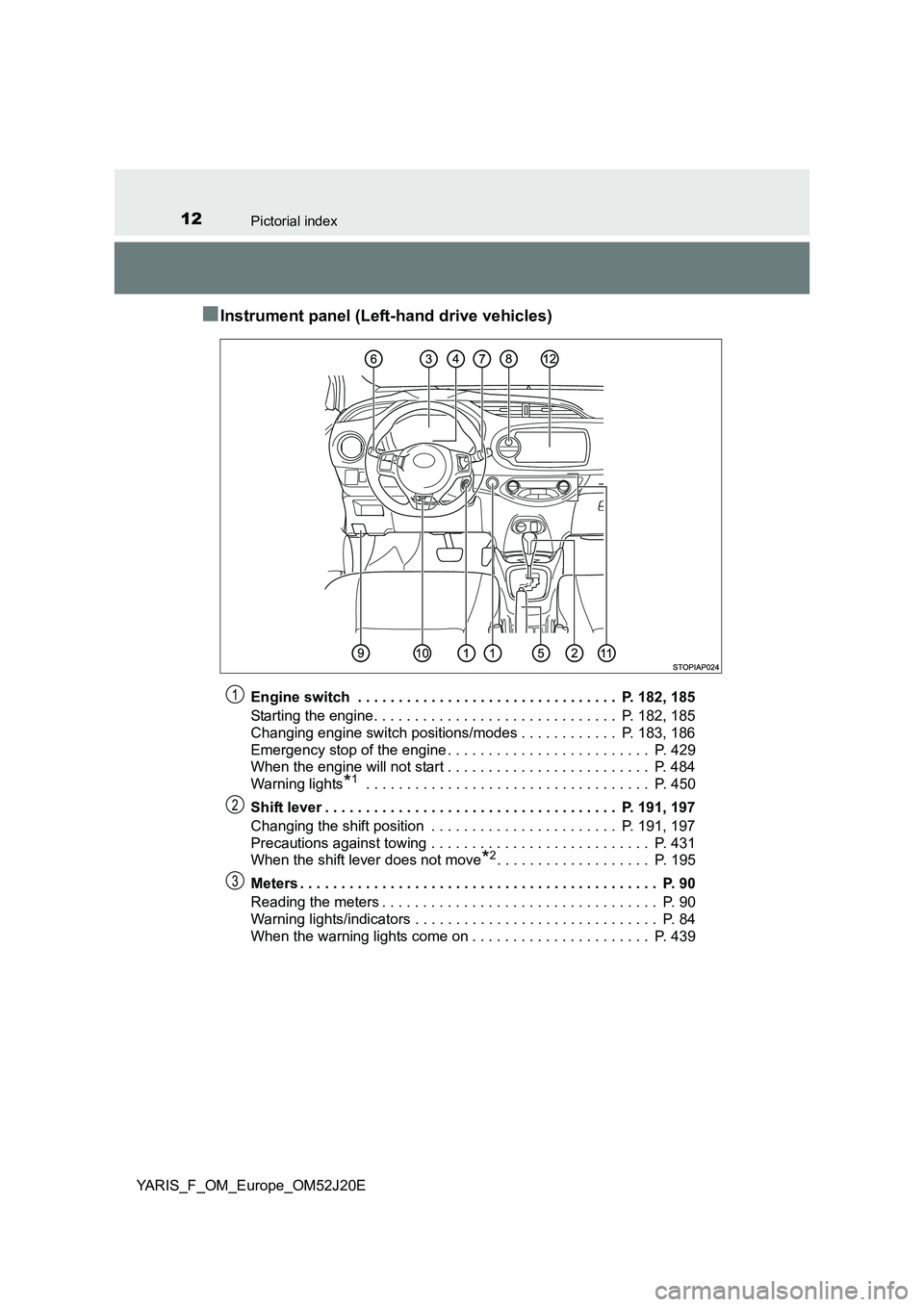
■Instrument panel (Left-hand drive vehicles)
Engine switch . . . . . . . . . . . . . . . . . . . . . . . . . . . . . . . . P. 182, 185
Starting the engine. . . . . . . . . . . . . . . . . . . . . . . . . . . . . . P. 182, 185
Changing engine switch positions/modes . . . . . . . . . . . . P. 183, 186
Emergency stop of the engine . . . . . . . . . . . . . . . . . . . . . . . . . P. 429
When the engine will not start . . . . . . . . . . . . . . . . . . . . . . . . . P. 484
Warning lights*1 . . . . . . . . . . . . . . . . . . . . . . . . . . . . . . . . . . . P. 450
Shift lever . . . . . . . . . . . . . . . . . . . . . . . . . . . . . . . . . . . . P. 191, 197
Changing the shift position . . . . . . . . . . . . . . . . . . . . . . . P. 191, 197
Precautions against towing . . . . . . . . . . . . . . . . . . . . . . . . . . . P. 431
When the shift lever does not move*2. . . . . . . . . . . . . . . . . . . P. 195
Meters . . . . . . . . . . . . . . . . . . . . . . . . . . . . . . . . . . . . . . . . . . . . P. 90
Reading the meters . . . . . . . . . . . . . . . . . . . . . . . . . . . . . . . . . . P. 90
Warning lights/indicators . . . . . . . . . . . . . . . . . . . . . . . . . . . . . . P. 84
When the warning lights come on . . . . . . . . . . . . . . . . . . . . . . P. 439
1
2
3
Page 19 of 549
19Pictorial index
YARIS_F_OM_Europe_OM52J20E
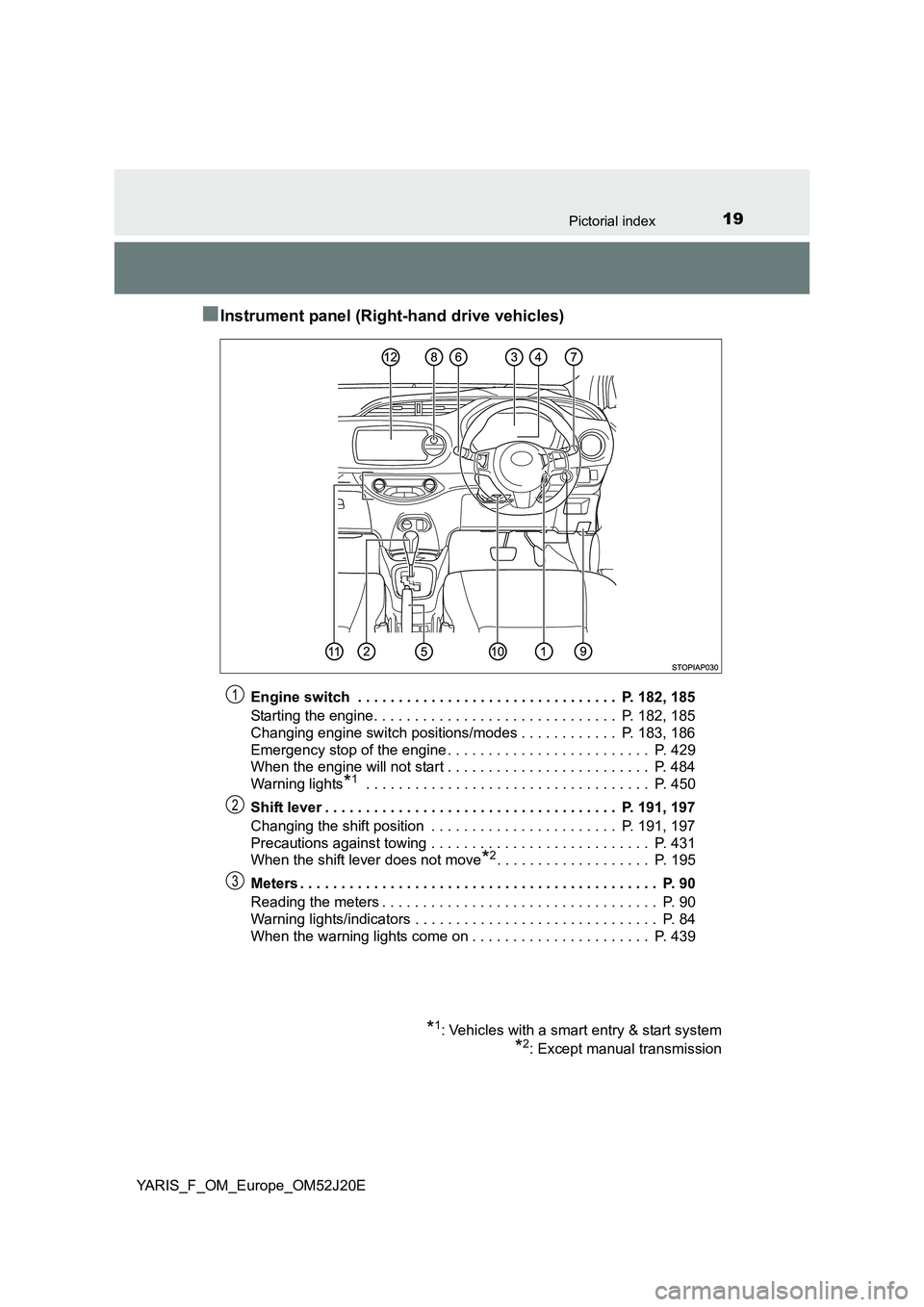
■Instrument panel (Right-hand drive vehicles)
Engine switch . . . . . . . . . . . . . . . . . . . . . . . . . . . . . . . . P. 182, 185
Starting the engine. . . . . . . . . . . . . . . . . . . . . . . . . . . . . . P. 182, 185
Changing engine switch positions/modes . . . . . . . . . . . . P. 183, 186
Emergency stop of the engine . . . . . . . . . . . . . . . . . . . . . . . . . P. 429
When the engine will not start . . . . . . . . . . . . . . . . . . . . . . . . . P. 484
Warning lights*1 . . . . . . . . . . . . . . . . . . . . . . . . . . . . . . . . . . . P. 450
Shift lever . . . . . . . . . . . . . . . . . . . . . . . . . . . . . . . . . . . . P. 191, 197
Changing the shift position . . . . . . . . . . . . . . . . . . . . . . . P. 191, 197
Precautions against towing . . . . . . . . . . . . . . . . . . . . . . . . . . . P. 431
When the shift lever does not move*2. . . . . . . . . . . . . . . . . . . P. 195
Meters . . . . . . . . . . . . . . . . . . . . . . . . . . . . . . . . . . . . . . . . . . . . P. 90
Reading the meters . . . . . . . . . . . . . . . . . . . . . . . . . . . . . . . . . . P. 90
Warning lights/indicators . . . . . . . . . . . . . . . . . . . . . . . . . . . . . . P. 84
When the warning lights come on . . . . . . . . . . . . . . . . . . . . . . P. 439
*1: Vehicles with a smart entry & start system
*2: Except manual transmission
1
2
3
Page 34 of 549
341-1. For safe use
YARIS_F_OM_Europe_OM52J20E
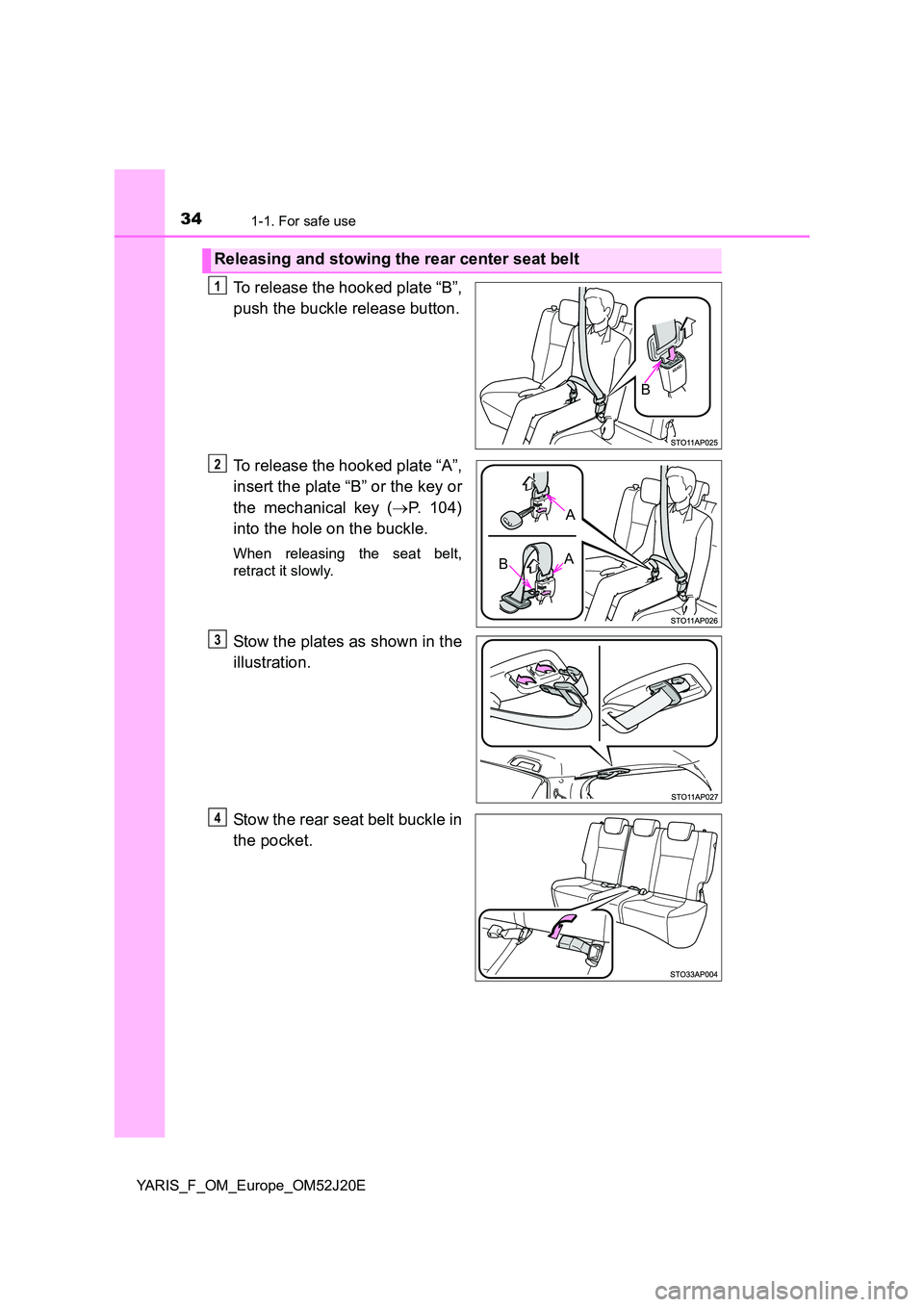
To release the hooked plate “B”,
push the buckle release button.
To release the hooked plate “A”,
insert the plate “B” or the key or
the mechanical key ( P. 104)
into the hole on the buckle.
When releasing the seat belt,
retract it slowly.
Stow the plates as shown in the
illustration.
Stow the rear seat belt buckle in
the pocket.
Releasing and stowing the rear center seat belt
B
1
A
BA
2
3
4
Page 41 of 549
411-1. For safe use
1
For safety and security
YARIS_F_OM_Europe_OM52J20E
WARNING
■SRS airbag precautions
Observe the following precautions regarding the SRS airbags.
Failure to do so may cause death or serious injury.
● The driver and all passengers in the vehicle must wear their seat belts
properly.
The SRS airbags are supplemental devices to be used with the seat belts.
● The SRS driver airbag deploys with considerable force, and can cause
death or serious injury especially if the driver is very close to the airbag.
Since the risk zone for the driver’s airbag is the first 50 - 75 mm (2 - 3 in.)
of inflation, placing yourself 250 mm ( 10 in.) from your driver airbag pro-
vides you with a clear margin of safety. This distance is measured from
the center of the steering wheel to your breastbone. If you sit less than
250 mm (10 in.) away now, you can change your driving position in sev-
eral ways:
• Move your seat to the rear as far as you can while still reaching the ped-
als comfortably.
• Slightly recline the back of the seat. Although vehicle designs vary,
many drivers can achieve the 250 mm (10 in.) distance, even with the
driver seat all the way forward, simply by reclining the back of the seat
somewhat. If reclining the back of your seat makes it hard to see the
road, raise yourself by using a firm, non-slippery cushion, or raise the
seat if your vehicle has that feature.
• If your steering wheel is adjustable, tilt it downward. This points the air-
bag toward your chest instead of your head and neck.
The seat should be adjusted as recommended above, while still maintain-
ing control of the foot pedals, steering wheel, and your view of the instru-
ment panel controls.
Page 43 of 549
431-1. For safe use
1
For safety and security
YARIS_F_OM_Europe_OM52J20E
WARNING
■SRS airbag precautions
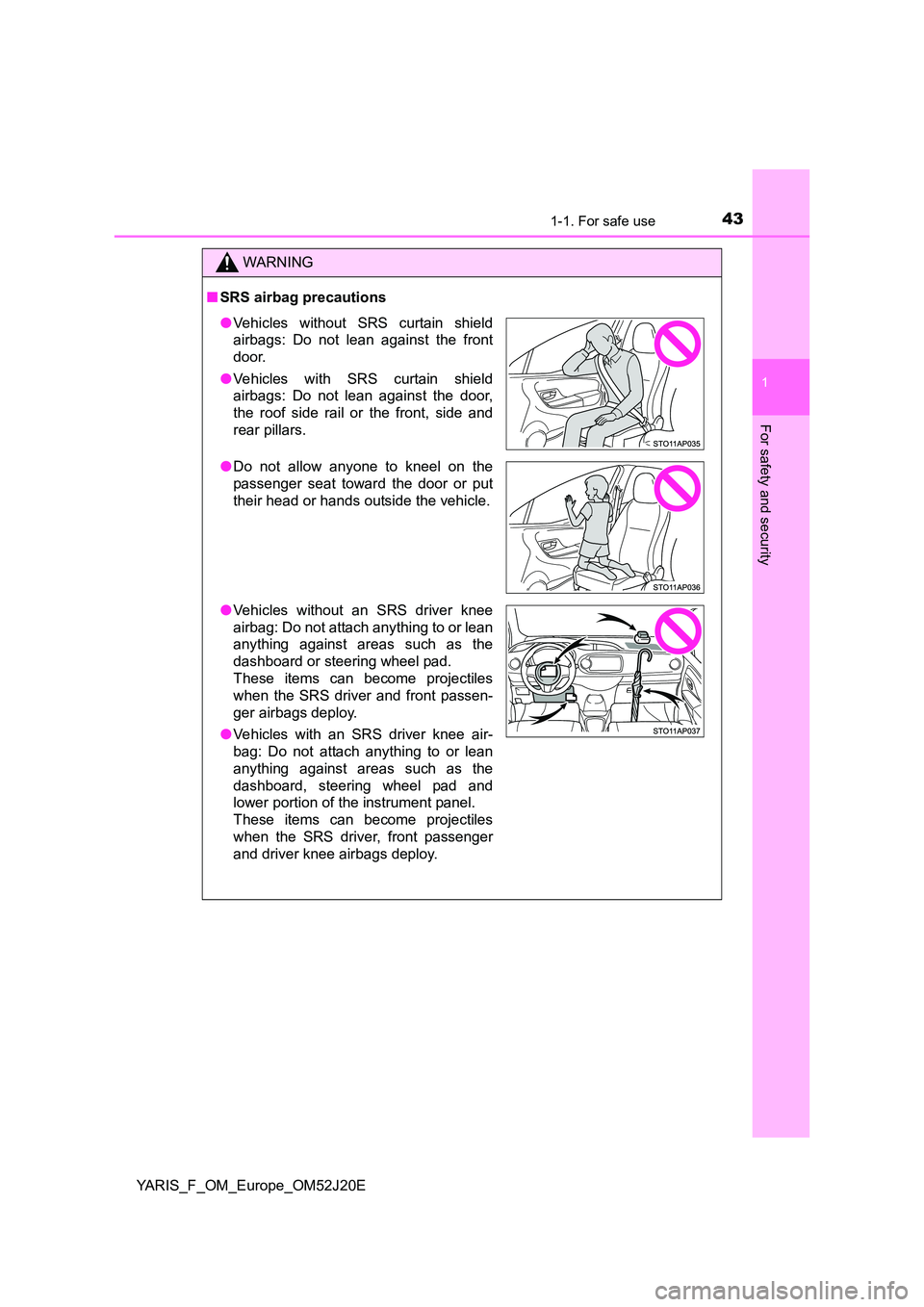
●Vehicles without SRS curtain shield
airbags: Do not lean against the front
door.
● Vehicles with SRS curtain shield
airbags: Do not lean against the door,
the roof side rail or the front, side and
rear pillars.
● Do not allow anyone to kneel on the
passenger seat toward the door or put
their head or hands outside the vehicle.
● Vehicles without an SRS driver knee
airbag: Do not attach anything to or lean
anything against areas such as the
dashboard or steering wheel pad.
These items can become projectiles
when the SRS driver and front passen-
ger airbags deploy.
● Vehicles with an SRS driver knee air-
bag: Do not attach anything to or lean
anything against areas such as the
dashboard, steering wheel pad and
lower portion of the instrument panel.
These items can become projectiles
when the SRS driver, front passenger
and driver knee airbags deploy.
Page 104 of 549
1043-1. Key information
YARIS_F_OM_Europe_OM52J20E
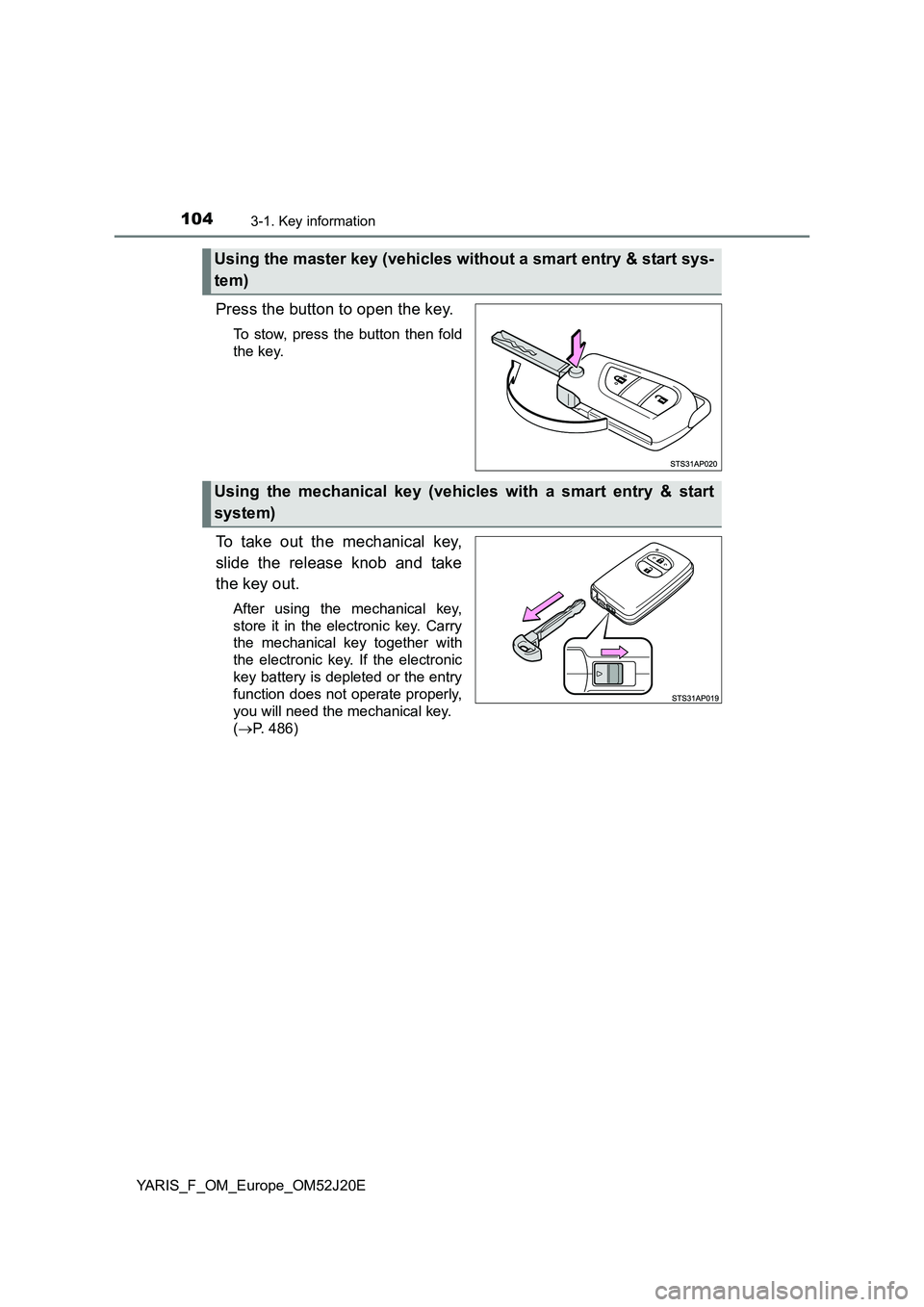
Press the button to open the key.
To stow, press the button then fold
the key.
To take out the mechanical key,
slide the release knob and take
the key out.
After using the mechanical key,
store it in the electronic key. Carry
the mechanical key together with
the electronic key. If the electronic
key battery is depleted or the entry
function does not operate properly,
you will need the mechanical key.
( P. 486)
Using the master key (vehicles without a smart entry & start sys-
tem)
Using the mechanical key (vehicles with a smart entry & start
system)
Page 105 of 549
1053-1. Key information
3
Operation of each component
YARIS_F_OM_Europe_OM52J20E
■If you lose your keys
New genuine keys can be made by any authorized Toyota dealer or repairer,
or another duly qualified and equipped professional using the other key and
the key number stamped on your key number plate. Keep the plate in a safe
place such as your wallet, not in the vehicle.
■ When riding in an aircraft
When bringing a key with wireless remo te control function onto an aircraft,
make sure you do not press any buttons on the key while inside the aircraft
cabin. If you are carrying a key in your bag etc., ensure that the buttons are
not likely to be pressed accidentally. Pressing a button may cause the key to
emit radio waves that could interfere with the operation of the aircraft.
■ Conditions affecting operation (wireless remote control)
The wireless remote control function may not operate normally in the follow-
ing situations:
● When the wireless key battery is depleted
● Near a TV tower, electric power plant, gas station, radio station, large dis-
play, airport or other facility that generates strong radio waves or electrical
noise
● When carrying a portable radio, cellular phone or other wireless communi-
cation devices
● When the wireless key is in contact with, or is covered by a metallic object
● When other wireless keys (that emit radio waves) are being used nearby
● If window tint with a metallic content or metallic objects are attached to the
rear window
■ Key battery depletion
If the wireless remote control function does not operate, the battery may be
depleted. Replace the battery when necessary.
Page 130 of 549
1303-2. Opening, closing and locking the doors
YARIS_F_OM_Europe_OM52J20E
■ Conditions affecting operation
The smart entry & start system uses weak radio waves. In the following situa-
tions, the communication between the electronic key and the vehicle may be
affected, preventing the smart entry & start system, wireless remote control
and engine immobilizer system from operating properly.
(Ways of coping: P. 486)
● When the electronic key battery is depleted
● Near a TV tower, electric power plant, gas station, radio station, large dis-
play, airport or other facility that generates strong radio waves or electrical
noise
● When the electronic key is in contact with, or is covered by the following
metallic objects
• Cards to which aluminum foil is attached
• Cigarette boxes that have aluminum foil inside
• Metallic wallets or bags
• Coins
• Hand warmers made of metal
• Media such as CDs and DVDs
● When other wireless keys (that emit radio waves) are being used nearby
● When carrying the electronic key together with the following devices that
emit radio waves
• Portable radio, cellular phone, cordless phone or other wireless commu-
nication device
• Another vehicle’s electronic key or a wireless key that emits radio waves
• Personal computers or personal digital assistants (PDAs)
• Digital audio players
• Portable game systems
● If window tint with a metallic content or metallic objects are attached to the
rear window
● When the electronic key is placed near a battery charger or electronic
devices