display TOYOTA YARIS 2018 Owners Manual
[x] Cancel search | Manufacturer: TOYOTA, Model Year: 2018, Model line: YARIS, Model: TOYOTA YARIS 2018Pages: 632, PDF Size: 44.1 MB
Page 369 of 632
3695-7. “SETUP” menu
5
Audio system
YARIS_HV_OM_Europe_OM52J66E
Select “Delete contacts” using the tune/scroll knob. (P. 358)
Select the desired phone number using the knob and press
(“Yes”).
To delete all the registered phone numbers, select “All delete” using
the knob and press (“Yes”).
Press (“A-Z”) to display the registered names in alphabetical
order of the initial.
Select “Delete other PB” using the tune/scroll knob. ( P. 358)
Select the desired phonebook using the knob and press
(“Yes”).
Select “Call volume” using the tune/scroll knob. ( P. 358)
Change the call volume.
To decrease the volume: Turn the knob counterclockwise.
To increase the volume: Turn the knob clockwise.
To set the volume, press (“Back”).
Deleting a registered phone number
Deleting another cellular phone’s phonebook
Setting call volume
1
2
1
2
1
2
Page 371 of 632
3715-8. Bluetooth® Audio
5
Audio system
YARIS_HV_OM_Europe_OM52J66E
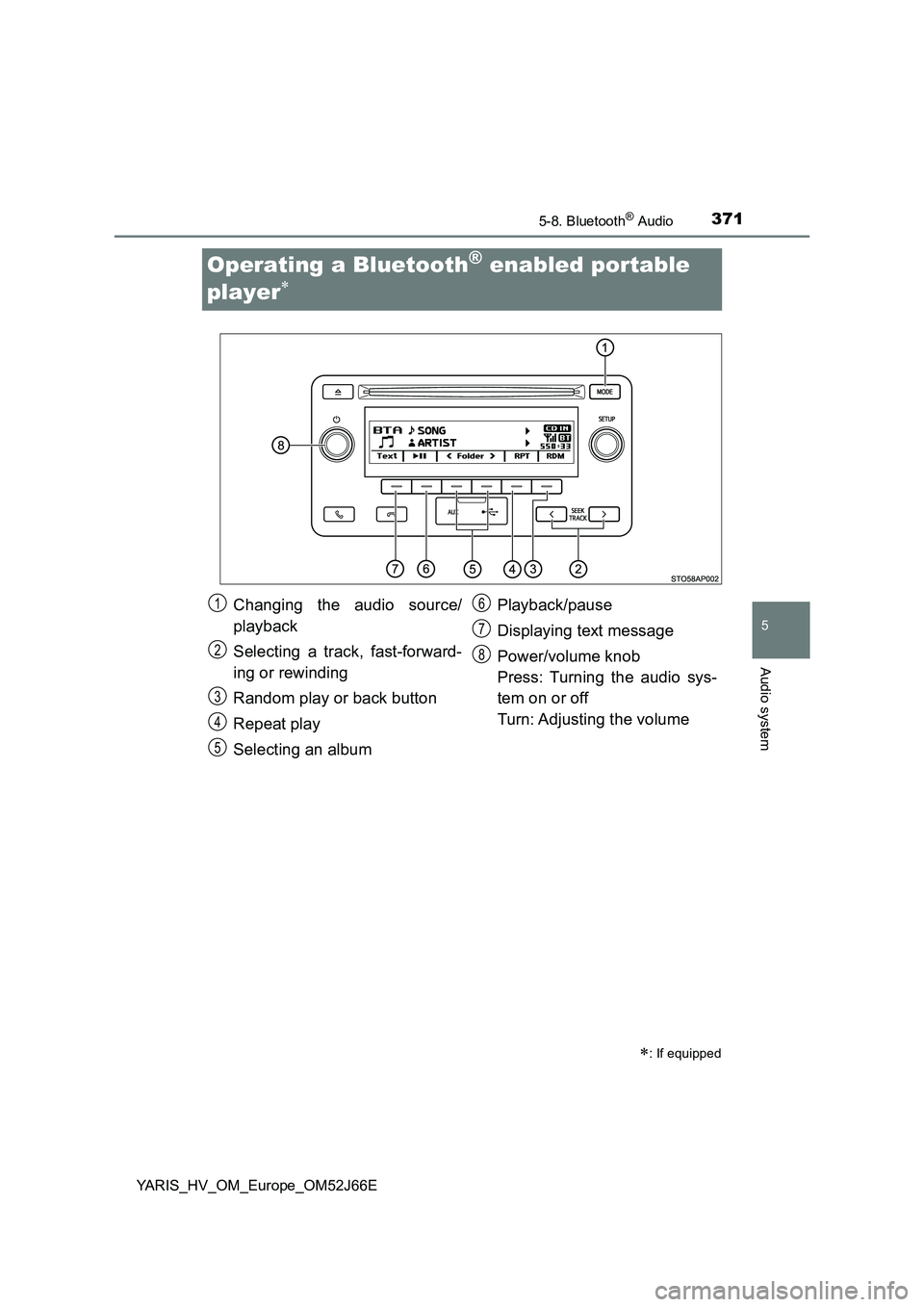
Operating a Bluetooth® enabled portable
player
: If equipped
Changing the audio source/
playback
Selecting a track, fast-forward-
ing or rewinding
Random play or back button
Repeat play
Selecting an album
Playback/pause
Displaying text message
Power/volume knob
Press: Turning the audio sys-
tem on or off
Turn: Adjusting the volume
1
2
3
4
5
6
7
8
Page 373 of 632
3735-8. Bluetooth® Audio
5
Audio system
YARIS_HV_OM_Europe_OM52J66E
Press ( ).
Press (“Text”) to display or hide the album title.
If there are continuing texts, is displayed.
Press and hold the button to display the remaining texts.
■ Bluetooth® audio system functions
Depending on the portable player that is connected to the system, certain
functions may not be available.
■ Display
P. 333
Playing and pausing tracks
Switching the display
Page 374 of 632
3745-9. Bluetooth® Phone
YARIS_HV_OM_Europe_OM52J66E
Making a phone call
Select “Phonebook” using the tune/scroll knob.
Select the desired name using the knob and press the off-hook
switch.
By pressing (“Add S. Dial”) and one of the speed dial buttons
(from [1] to [5]) while the desired name is selected, it
can be registered as a speed dial.
Press (“A-Z”) to display the registered names in alphabetical
order of the initial.
Select “Speed Dials” using the tune/scroll knob.
Press the desired preset button (from [1] to [5]) and
press the off-hook switch.
To delete a registered speed dial, after selecting the desired preset
button (from [1] to [5]) press (“Delete”) and then
press (“Yes”).
Select “Speed Dials” or “Dial by number” using the tune/scroll knob.
Enter the phone number and press the off-hook switch.
: If equipped
To enter the “Phone” or “TEL” mode, press the off-hook switch.
Dialing by selecting a name
Speed dialing
Dialing by entering the number
1
2
1
2
1
2
Page 387 of 632
3876-1. Using the air conditioning system and defogger
6
Interior features
YARIS_HV_OM_Europe_OM52J66E
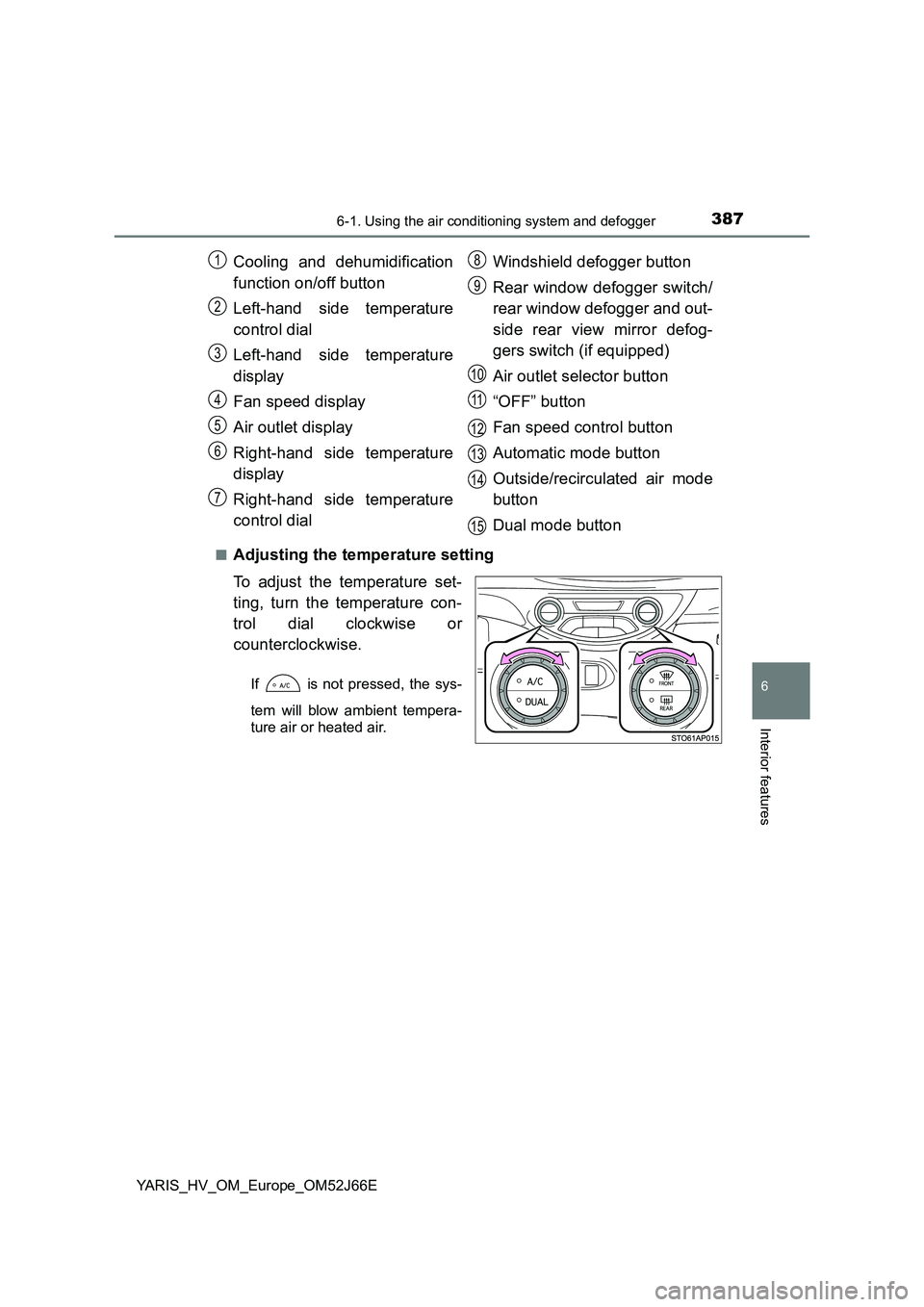
■Adjusting the temperature setting
To adjust the temperature set-
ting, turn the temperature con-
trol dial clockwise or
counterclockwise.
If is not pressed, the sys-
tem will blow ambient tempera-
ture air or heated air.
Cooling and dehumidification
function on/off button
Left-hand side temperature
control dial
Left-hand side temperature
display
Fan speed display
Air outlet display
Right-hand side temperature
display
Right-hand side temperature
control dial
Windshield defogger button
Rear window defogger switch/
rear window defogger and out-
side rear view mirror defog-
gers switch (if equipped)
Air outlet selector button
“OFF” button
Fan speed control button
Automatic mode button
Outside/recirculated air mode
button
Dual mode button
1
2
3
4
5
6
7
8
9
10
11
12
13
14
15
Page 420 of 632
4207-1. Maintenance and care
YARIS_HV_OM_Europe_OM52J66E
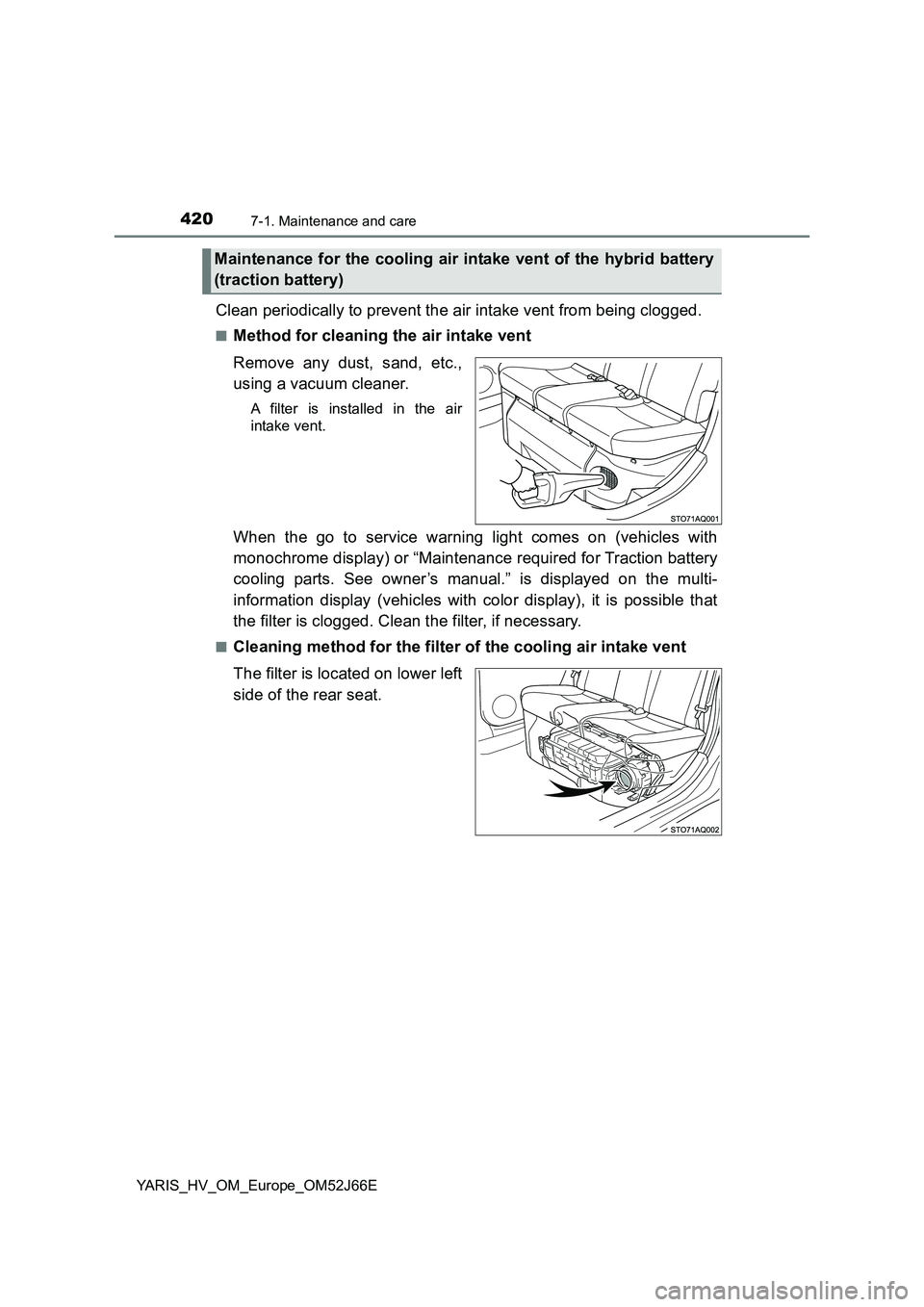
Clean periodically to prevent the air intake vent from being clogged.
■Method for cleaning the air intake vent
Remove any dust, sand, etc.,
using a vacuum cleaner.
A filter is installed in the air
intake vent.
When the go to service warning light comes on (vehicles with
monochrome display) or “Maintenance required for Traction battery
cooling parts. See owner’s manual.” is displayed on the multi-
information display (vehicles with color display), it is possible that
the filter is clogged. Clean the filter, if necessary.
■Cleaning method for the filter of the cooling air intake vent
The filter is located on lower left
side of the rear seat.
Maintenance for the cooling air intake vent of the hybrid battery
(traction battery)
Page 423 of 632
4237-1. Maintenance and care
7
Maintenance and care
YARIS_HV_OM_Europe_OM52J66E
Start the hybrid system and make sure that the go to service warn-
ing light (vehicles with monochrome display) or “Maintenance
required for Traction battery cooling parts. See owner’s manual.” on
the multi-information display (vehicles with color display) turns off.
Vehicles with monochrome display
It may take up to 20 minutes for the light to turns off, after the hybrid
system is started. If the light does not turns off, even though the fil-
ter is clean, consult any authorized Toyota retailer or Toyota autho-
rized repairer, or any reliable repairer.
Vehicles with color display
It may take up to 20 minutes for the message to turns off, after the
hybrid system is started. If the message does not turns off, even
though the filter is clean, consult any authorized Toyota retailer or
Toyota authorized repairer, or any reliable repairer.
■ Caring for leather areas
Toyota recommends cleaning the interior of the vehicle at least twice a year to
maintain the quality of the vehicle’s interior.
■ Shampooing the carpets
There are several commercial foaming-type cleaners available. Use a sponge
or brush to apply the foam. Rub in overlapping circles. Do not use water.
Wipe dirty surfaces and let them dry. Excellent results are obtained by keep-
ing the carpet as dry as possible.
■ Seat belts
Clean with mild soap and lukewarm water using a cloth or sponge. Also
check the belts periodically for excessive wear, fraying or cuts.
6
Page 424 of 632
4247-1. Maintenance and care
YARIS_HV_OM_Europe_OM52J66E
■ Maintenance for air intake vent for cooling the hybrid battery (traction
battery)
● When the vehicle is continuously driven with the air intake vent blocked, the
traction battery may overheat and cause a decline in fuel consumption.
● The cleaning time for air intake vent differs depending on the driving envi-
ronment, etc.
■ Cleaning the cooling air intake vent
● If there are any uncertainties with cleaning the filter, consult any authorized
Toyota retailer or Toyota authorized repairer, or any reliable repairer. Han-
dling mistakes may lead to the cover or filter becoming damaged.
● When the vehicle is continuously driven with the filter clogged, the traction
battery may overheat which could lead to a decline in fuel consumption and
a breakdown.
● The cleaning time for filter differs depending on the driving environment, etc.
■ When the go to service warning light turns on (vehicles with mono-
chrome display) or “Maintenance re quired for Traction battery cooling
parts. See owner’s manual.” is displayed on the multi-information dis-
play (vehicles with color display)
● It is possible the air intake vent or filter is clogged due to accumulated dust.
Clean the air intake vent and filter, referring to the cleaning method.
● When continuously driven in this state, the hybrid battery (traction battery)
may overheat, which may lead to the driving distance by the electric motor
getting shorter, the fuel consumption worsening, and causing damage.
Clean the air intake vent periodically to prevent dust, etc., from collecting in
the air intake vent or filter.
● If the go to service warning light (vehicles with monochrome display) or the
display message in the Multi-Informat ion display (vehicles with color dis-
play) does not turn off, even if the air intake vent is cleaned, have the vehi-
cle inspected at any authorized Toyota retailer or Toyota authorized repairer,
or any reliable repairer.
Page 431 of 632
4317-3. Do-it-yourself maintenance
7
Maintenance and care
YARIS_HV_OM_Europe_OM52J66E
WARNING
The engine compartment contains many mechanisms and fluids that may
move suddenly, become hot, or become el ectrically energized. To avoid death
or serious injury, observe the following precautions.
■ When working on the engine compartment
● Vehicles without a smart entry & start system: Make sure that the power
switch is in the “LOCK” position and the “READY” indicator are off.
● Vehicles with a smart entry & start system: Make sure that the “Power on”
on the multi-information display and the “READY” indicator are both off.
● Keep hands, clothing and tools away from the moving fan.
● Be careful not to touch the engine, power control unit, radiator, exhaust
manifold, etc., right after driving as they may be hot. Oil and other fluids
may also be hot.
● Do not leave anything that may burn easily, such as paper and rags, in the
engine compartment.
● Do not smoke, cause sparks or expose an open flame to fuel. Fuel fumes
are flammable.
● Take care because brake fluid can harm your hands or eyes and damage
painted surfaces. If fluid gets on your hands or in your eyes, flush the
affected area with clean water immediately.
If you still experience discomfort, consult a doctor.
■ When working near the electric cooling fan or radiator grille
Vehicles without a smart entry & start system
Be sure the power switch is in the “LOCK” position.
With the power switch in the “ON” position, the electric cooling fan may
automatically start to run if the air conditioning is on and/or the coolant tem-
perature is high. ( P. 443)
Vehicles with a smart entry & start system
Be sure the power switch is off.
With the power switch in ON mode, the electric cooling fan may automati-
cally start to run if the air conditioning is on and/or the coolant temperature
is high. ( P. 443)
■ Safety glasses
Wear safety glasses to prevent flying or falling material, fluid spray, etc.,
from getting in your eyes.
Page 505 of 632
505
8When trouble arises
YARIS_HV_OM_Europe_OM52J66E
8-1. Essential information
Emergency flashers ........... 506
If your vehicle has to
be stopped in
an emergency .................. 507
8-2. Steps to take in
an emergency
If your vehicle needs to
be towed .......................... 509
If you think something is
wrong ............................... 516
If a warning light turns on
or a warning buzzer
sounds ............................. 517
If a warning message is
displayed (vehicles with
color display) ................... 531
If you have a flat tire
(vehicles with
an emergency tire
puncture repair kit)........... 537
If you have a flat tire
(vehicles with
a spare tire) ..................... 556
If the hybrid system will
not start............................ 571
If the electronic key does
not operate properly
(vehicles with a smart
entry & start system)........ 573
If the vehicle 12-volt
battery is discharged ....... 576
If your vehicle overheats .... 581
If the vehicle becomes
stuck ................................ 587