display TOYOTA YARIS 2018 Manual PDF
[x] Cancel search | Manufacturer: TOYOTA, Model Year: 2018, Model line: YARIS, Model: TOYOTA YARIS 2018Pages: 632, PDF Size: 44.1 MB
Page 297 of 632
2974-5. Toyota Safety Sense
4
Driving
YARIS_HV_OM_Europe_OM52J66E
■ Conditions in which the function may not operate or detect correctly
In the following situations, RSA does not operate normally and may not rec-
ognize signs, display the incorrect sign, etc. However, this does not indicate a
malfunction.
● The front sensor is misaligned due to a strong impact being applied to the
sensor, etc.
● Dirt, snow, stickers, etc., are on the windshield near the front sensor.
● In inclement weather such as heavy rain, fog, snow or sand storms
● Light from an oncoming vehicle, the sun, etc., enters the front sensor.
● The sign is small, dirty, faded, tilted or bent, and if an electronic sign, the
contrast is poor.
● All or part of the sign is hidden by the leaves of a tree, a pole, etc.
● The sign is only visible to the front sensor for a short amount of time.
● The driving scene (turning, lane change, etc.) is judged incorrectly.
● Even if it is a sign not appropriate for the currently traveled lane, such a sign
exists directly after a freeway branches, or in an adjacent lane just before
merging.
● Stickers are attached to the rear of the preceding vehicle.
● A sign resembling a system compatible sign is recognized.
● The vehicle is driven in a country with a different direction of traffic.
● Side road speed signs may be detected and displayed (if positioned in sight
of the front sensor) while the vehicle is traveling on the main road.
● Roundabout exit road speed signs may be detected and displayed (if posi-
tioned in sight of the front sensor) while traveling on a roundabout.
● The speed information displayed on the meter and that displayed on the
Navigation system (if equipped) may be different due to the Navigation sys-
tem using map data.
Page 298 of 632
2984-5. Toyota Safety Sense
YARIS_HV_OM_Europe_OM52J66E
■ When driving vehicle in country with different speed unit
Since RSA recognizes signs based on the set unit of the meter, it is neces-
sary to change the set unit of the meter. Adjust the set unit of the meter to the
speed unit of signs in the current location. ( P. 608)
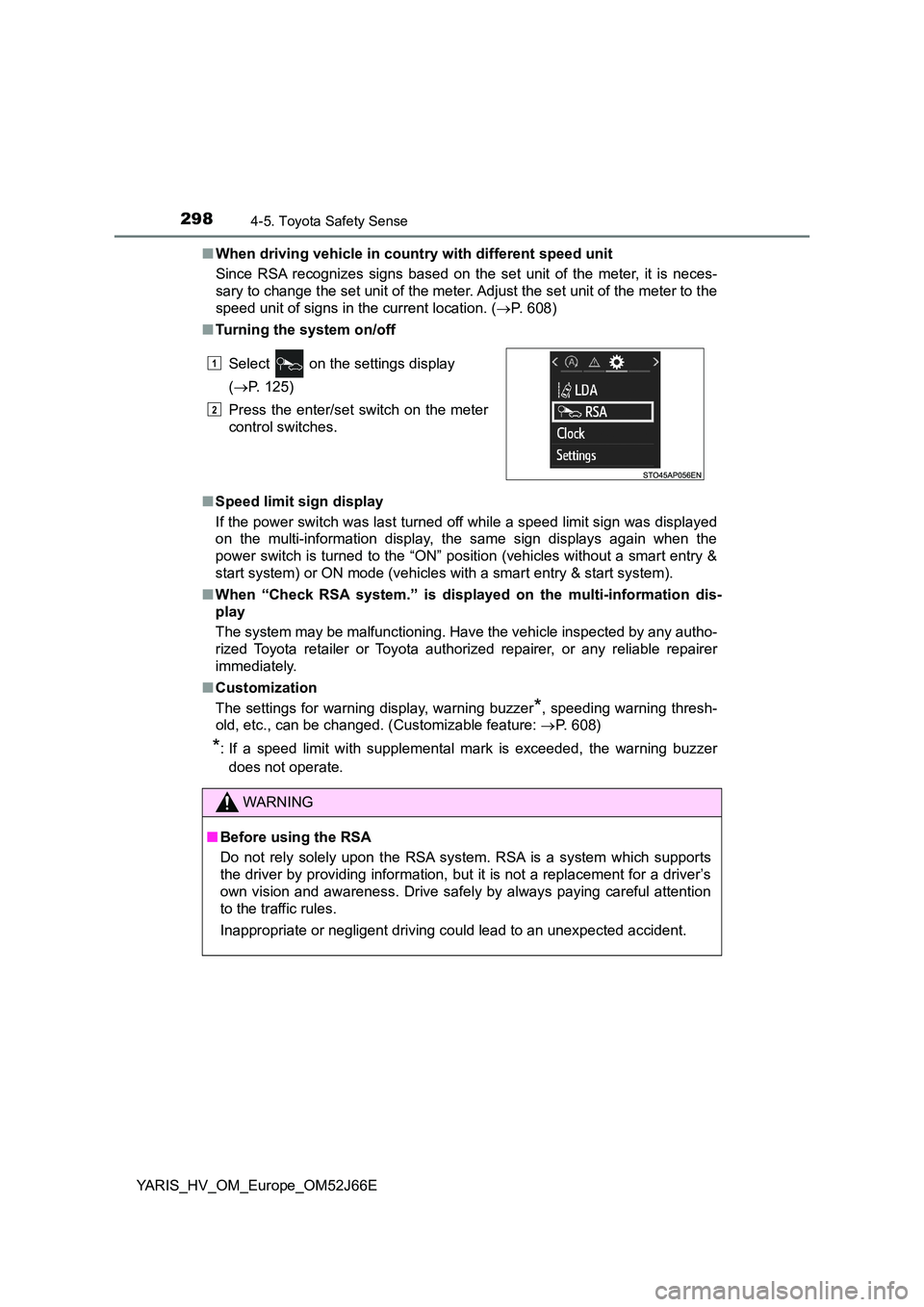
■ Turning the system on/off
■ Speed limit sign display
If the power switch was last turned off while a speed limit sign was displayed
on the multi-information display, the same sign displays again when the
power switch is turned to the “ON” position (vehicles without a smart entry &
start system) or ON mode (vehicles with a smart entry & start system).
■ When “Check RSA system.” is displayed on the multi-information dis-
play
The system may be malfunctioning. Have the vehicle inspected by any autho-
rized Toyota retailer or Toyota authorized repairer, or any reliable repairer
immediately.
■ Customization
The settings for warning display, warning buzzer*, speeding warning thresh-
old, etc., can be changed. (Customizable feature: P. 608)
*: If a speed limit with supplemental mark is exceeded, the warning buzzer
does not operate.
Select on the settings display
( P. 125)
Press the enter/set switch on the meter
control switches.
WARNING
■ Before using the RSA
Do not rely solely upon the RSA system. RSA is a system which supports
the driver by providing information, but it is not a replacement for a driver’s
own vision and awareness. Drive safely by always paying careful attention
to the traffic rules.
Inappropriate or negligent driving could lead to an unexpected accident.
1
2
Page 301 of 632
3014-6. Using the driving support systems
4
Driving
YARIS_HV_OM_Europe_OM52J66E
■Cruise control can be set when
● The shift lever is in D.
● Vehicle speed is above approximately 40 km/h (25 mph).
■ Accelerating after setting the vehicle speed
● The vehicle can be accelerated normally. After acceleration, the set speed
resumes.
● Even without canceling the cruise control, the set speed can be increased
by first accelerating the vehicle to the desired speed and then pushing the
lever down to set the new speed.
■ Automatic cruise control cancelation
Cruise control will stop maintaining the vehicle speed in any of the following
situations.
● Actual vehicle speed falls more than approximately 16 km/h (10 mph) below
the preset vehicle speed.
At this time, the memorized set speed is not retained.
● Actual vehicle speed is below approximately 40 km/h (25 mph).
● VSC is activated.
■ If the cruise control indicator comes in yellow (vehicles with mono-
chrome display) or “Check cruise control system.” is displayed on the
multi-information display ( vehicles with color display)
Press the “ON-OFF” button once to deactivate the system, and then press
the button again to reactivate the system.
If the cruise control speed cannot be set or if the cruise control cancels imme-
diately after being activated, there may be a malfunction in the cruise control
system. Have the vehicle inspected by any authorized Toyota retailer or Toy-
ota authorized repairer, or any reliable repairer.
Page 304 of 632
3044-6. Using the driving support systems
YARIS_HV_OM_Europe_OM52J66E
◆Emergency brake signal
When the brakes are applied suddenly, the emergency flashers
automatically flash to alert the vehicle behind.
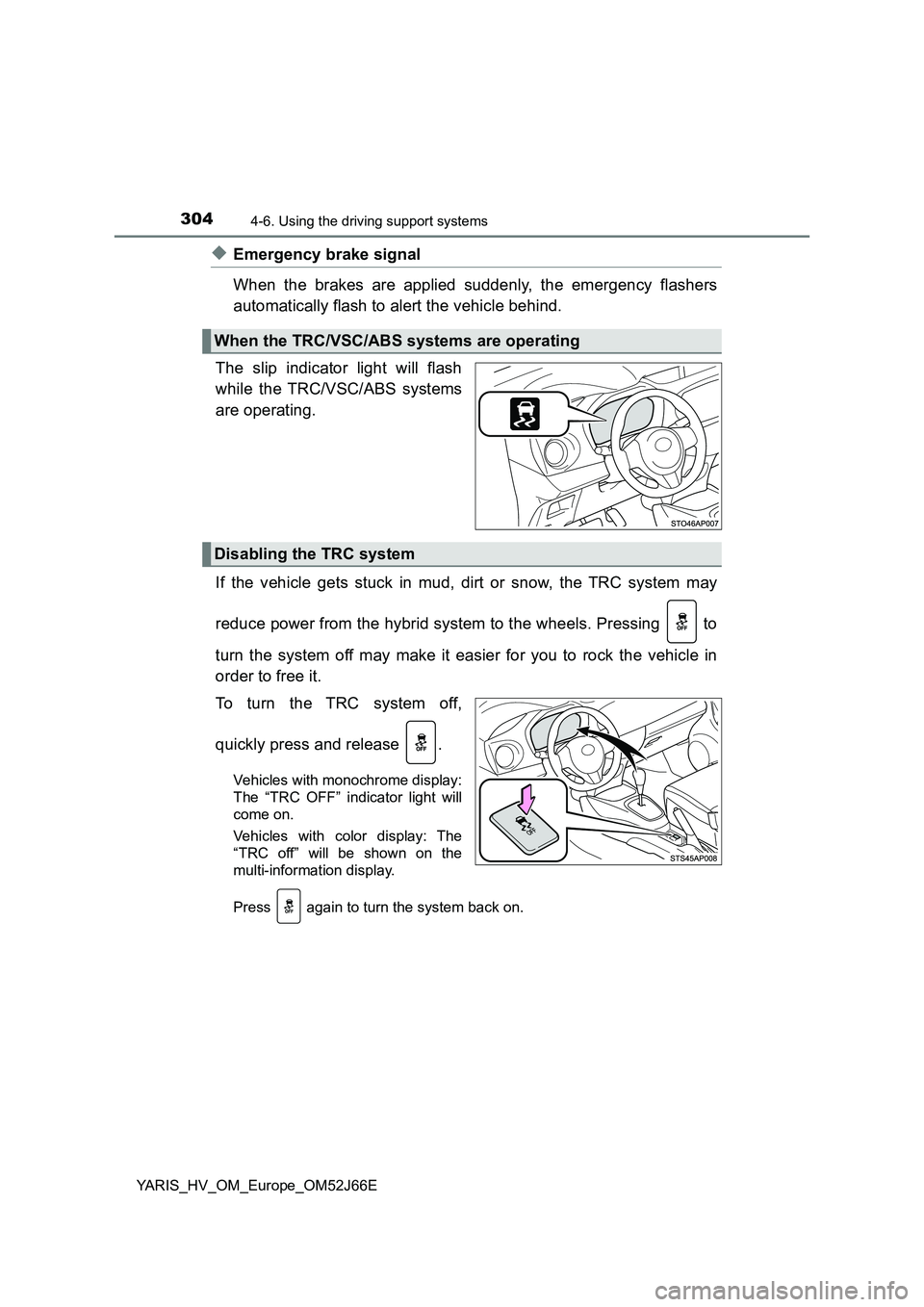
The slip indicator light will flash
while the TRC/VSC/ABS systems
are operating.
If the vehicle gets stuck in mud, dirt or snow, the TRC system may
reduce power from the hybrid system to the wheels. Pressing to
turn the system off may make it easier for you to rock the vehicle in
order to free it.
To turn the TRC system off,
quickly press and release .
Vehicles with monochrome display:
The “TRC OFF” indicator light will
come on.
Vehicles with color display: The
“TRC off” will be shown on the
multi-information display.
Press again to turn the system back on.
When the TRC/VSC/ABS systems are operating
Disabling the TRC system
Page 305 of 632
3054-6. Using the driving support systems
4
Driving
YARIS_HV_OM_Europe_OM52J66E
■Turning off both TRC and VSC systems
Vehicles with monochrome display
To turn the TRC and VSC systems off, press and hold for more than 3
seconds while the vehicle is stopped.
The “TRC OFF” indicator light and the VSC OFF indicator light will come on.
Press again to turn the systems back on.
Vehicles with color display
To turn TRC and VSC systems off, press and hold for more than 3 sec-
onds while the vehicle is stopped.
The VSC OFF indicator light will come on and the “TRC off” will be shown on
the multi-information display.*
Press again to turn the systems back on.
*: On vehicles with pre-crash safety system, pre-crash brake assist and pre-
crash braking will also be disabled. The PCS warning light will come on.
( P. 278)
■ When the “TRC OFF” indicator light comes on even if has not been
pressed (vehicles with monochrome display)
TRC is temporary deactivated. If the indicator light continues to remain on,
contact any authorized Toyota retailer or Toyota authorized repairer, or any
reliable repairer.
■ When the message is displayed on the multi-information display show-
ing that TRC has been disabled even if has not been pressed (vehi-
cles with color display)
TRC is temporary deactivated. If the information continues to show, contact
any authorized Toyota retailer or Toyota authorized repairer, or any reliable
repairer.
Page 324 of 632
3245-2. Using the audio system
YARIS_HV_OM_Europe_OM52J66E
Optimal use of the audio system
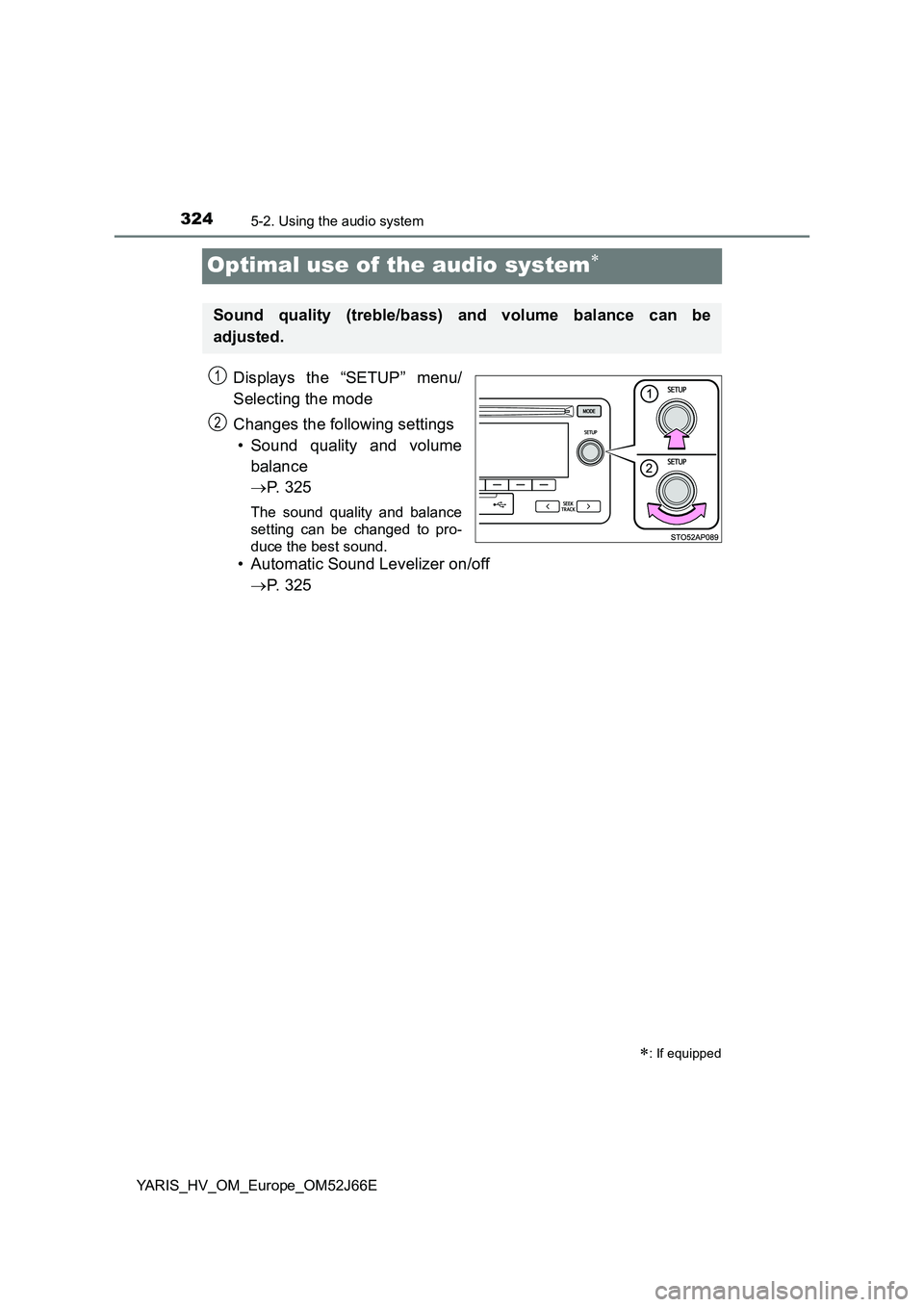
Displays the “SETUP” menu/
Selecting the mode
Changes the following settings
• Sound quality and volume
balance
P. 3 2 5
The sound quality and balance
setting can be changed to pro-
duce the best sound.
• Automatic Sound Levelizer on/off
P. 3 2 5
: If equipped
Sound quality (treble/bass) and volume balance can be
adjusted.
STO51AP005
1
2
Page 325 of 632
3255-2. Using the audio system
5
Audio system
YARIS_HV_OM_Europe_OM52J66E
■Changing sound quality modes
Press the tune/scroll knob.
Turn the knob to select “Sound settings”.
Press the knob.
Turn the knob as corresponds to the desired mode.
“Bass”, “Treble”, “Fader”, “Balance”, or “ASL” can be selected.
Press the knob.
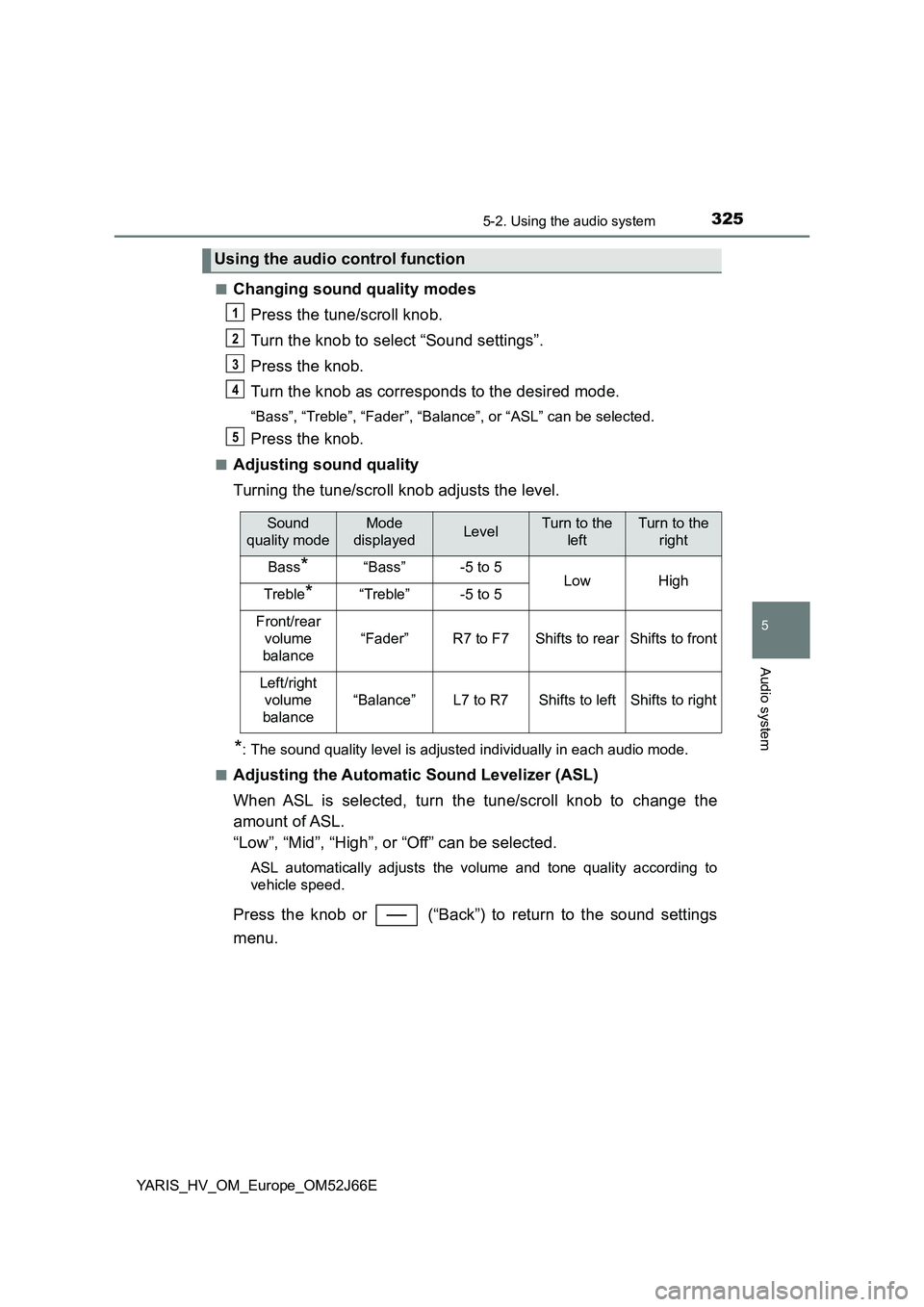
■Adjusting sound quality
Turning the tune/scroll knob adjusts the level.
*: The sound quality level is adjusted individually in each audio mode.
■Adjusting the Automatic Sound Levelizer (ASL)
When ASL is selected, turn the tune/scroll knob to change the
amount of ASL.
“Low”, “Mid”, “High”, or “Off” can be selected.
ASL automatically adjusts the volume and tone quality according to
vehicle speed.
Press the knob or (“Back”) to return to the sound settings
menu.
Using the audio control function
1
2
3
4
5
Sound
quality mode
Mode
displayedLevelTurn to the
left
Turn to the
right
Bass*“Bass”-5 to 5LowHighTreble*“Treble”-5 to 5
Front/rear
volume
balance
“Fader”R7 to F7Shifts to rearShifts to front
Left/right
volume
balance
“Balance”L7 to R7Shifts to leftShifts to right
Page 326 of 632
3265-3. Using the radio
YARIS_HV_OM_Europe_OM52J66E
Radio operation
Search for desired stations by turning the tune/scroll knob or press-
ing the “ ” or “” button of “SEEK TRACK”.
Press and hold a desired station selector button until you hear a
beep.
: If equipped
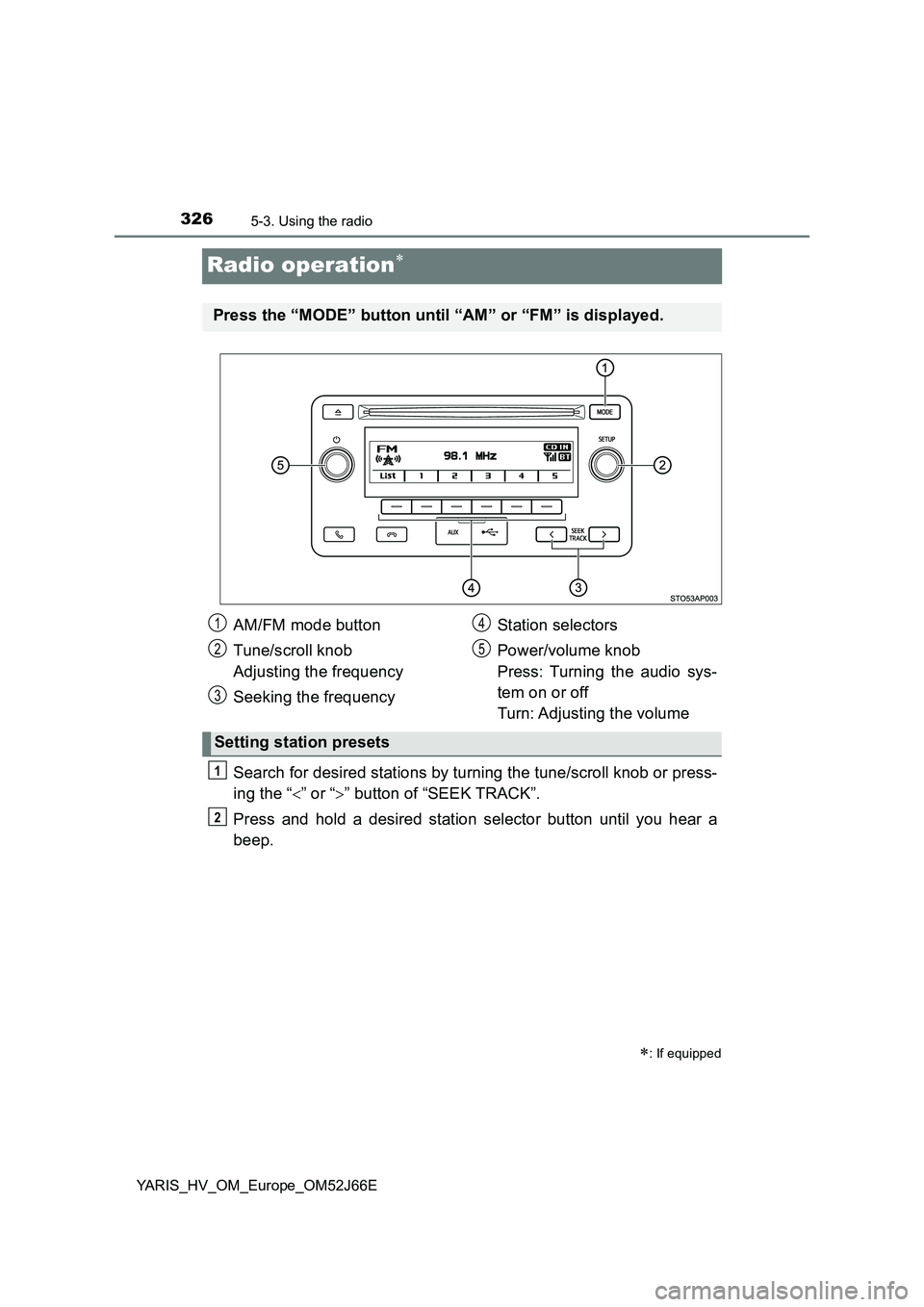
Press the “MODE” button until “AM” or “FM” is displayed.
AM/FM mode button
Tune/scroll knob
Adjusting the frequency
Seeking the frequency
Station selectors
Power/volume knob
Press: Turning the audio sys-
tem on or off
Turn: Adjusting the volume
Setting station presets
1
2
3
4
5
1
2
Page 327 of 632
3275-3. Using the radio
5
Audio system
YARIS_HV_OM_Europe_OM52J66E
■Updating the station list
Press (“List”).
The station list will be displayed.
Press (“Update”) to update the list.
“Updating” is displayed while the searching is in process, and then avail-
able stations will be listed on the display.
To cancel the updating process, press (“Back”).
■Selecting a station from the station list
Press (“List”).
The station list will be displayed.
Turn the tune/scroll knob to select a station.
Press the knob to tune in the station.
To return to the previous display, press (“Back”).
Using the station list
1
2
1
2
3
Page 330 of 632
3305-4. Playing audio CDs and MP3/WMA discs
YARIS_HV_OM_Europe_OM52J66E
CD player operation
: If equipped
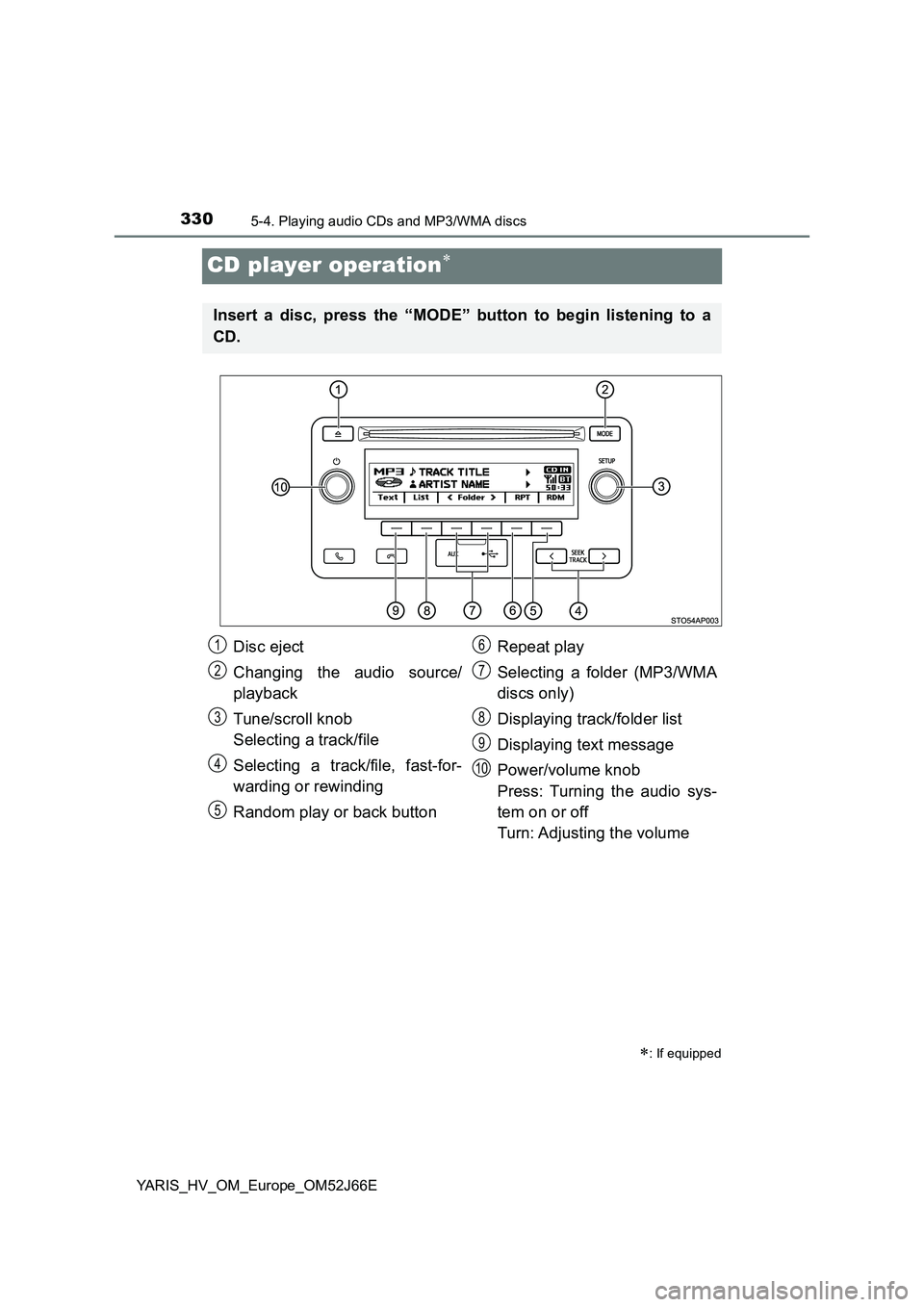
Insert a disc, press the “MODE” button to begin listening to a
CD.
Disc eject
Changing the audio source/
playback
Tune/scroll knob
Selecting a track/file
Selecting a track/file, fast-for-
warding or rewinding
Random play or back button
Repeat play
Selecting a folder (MP3/WMA
discs only)
Displaying track/folder list
Displaying text message
Power/volume knob
Press: Turning the audio sys-
tem on or off
Turn: Adjusting the volume
1
2
3
4
5
6
7
8
9
10