battery TOYOTA YARIS 2018 User Guide
[x] Cancel search | Manufacturer: TOYOTA, Model Year: 2018, Model line: YARIS, Model: TOYOTA YARIS 2018Pages: 632, PDF Size: 44.1 MB
Page 95 of 632
951-3. Hybrid system
1
For safety and security
YARIS_HV_OM_Europe_OM52J66E
NOTICE
■Hybrid battery (traction battery) air intake vent
● Do not get water or foreign materials in the air intake vent as this may
cause a short circuit and damage the hybrid battery (traction battery).
● Do not carry large amounts of water such as water cooler bottles in the
vehicle. If water spills onto the hybrid battery (traction battery), the battery
may be damaged. Have the vehicle inspected by any authorized Toyota
retailer or Toyota authorized repairer, or any reliable repairer.
● There is a filter installed to the air intake vent. When the filter remains
noticeably dirty even after cleaning the air intake vent, filter cleaning or
replacement is recommended. For information regarding filter cleaning or
replacement, contact any authorized Toyota retailer or Toyota authorized
repairer, or any reliable repairer.
● Vehicles with color display: If “Maintenance required for Traction battery
cooling parts. See owner’s manual.” is shown on the multi-information dis-
play, the air intake vent and filter may be clogged. Refer to P. 420 for infor-
mation on how to clean the air intake vent.
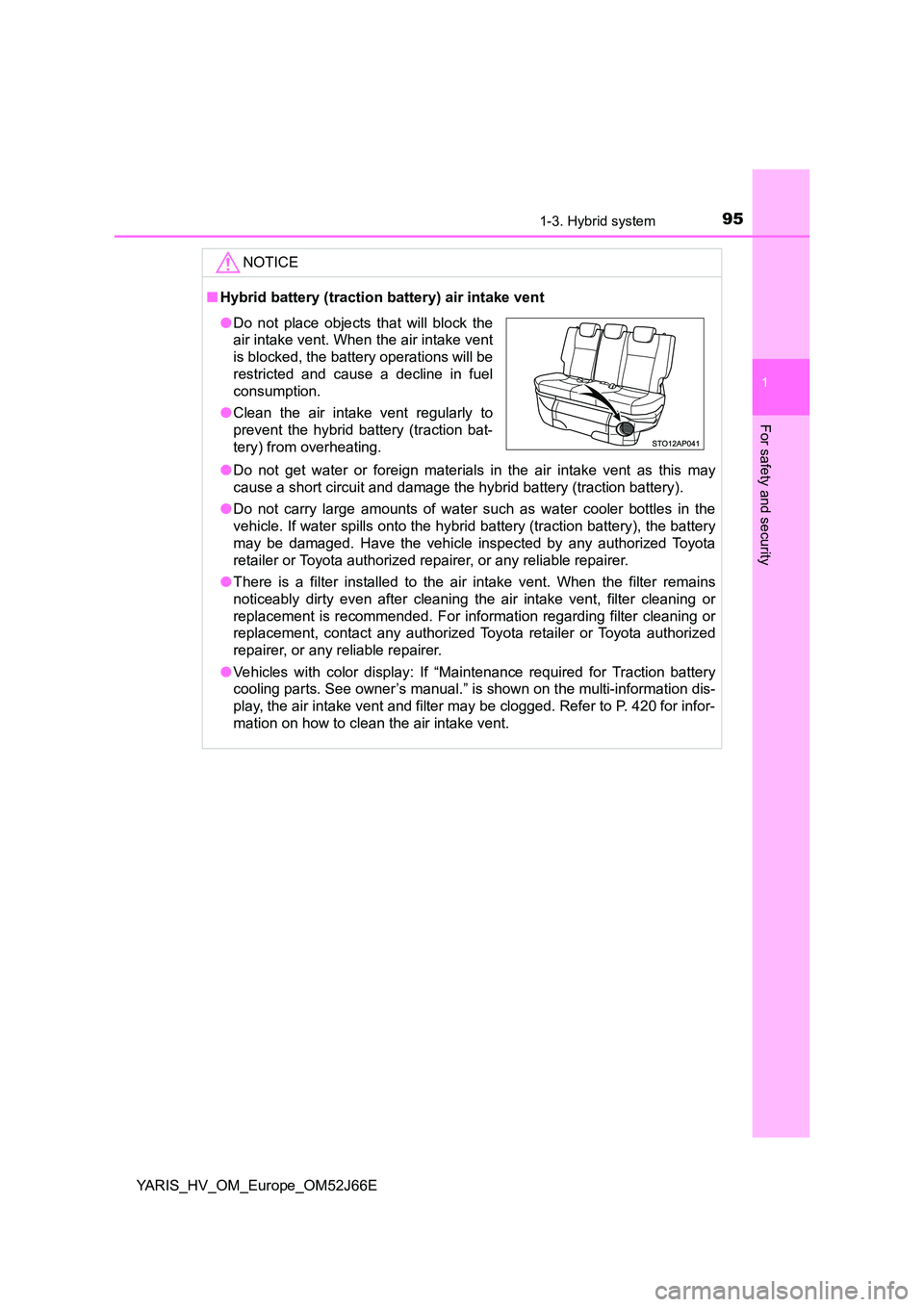
● Do not place objects that will block the
air intake vent. When the air intake vent
is blocked, the battery operations will be
restricted and cause a decline in fuel
consumption.
● Clean the air intake vent regularly to
prevent the hybrid battery (traction bat-
tery) from overheating.
Page 110 of 632
1102. Instrument cluster
YARIS_HV_OM_Europe_OM52J66E
*1: These lights turn on when the power switch is turned to the “ON” position
(vehicles without a smart entry & start system) or ON mode (vehicles with
a smart entry & start system) to indicate that a system check is being per-
formed. They will turn off after the hybrid system on, or after a few sec-
onds. There may be a malfunction in a system if a light does not come on,
or if the lights do not turn off. Have the vehicle inspected by any authorized
Toyota retailer or Toyota authorized repairer, or any reliable repairer.
*2: If equipped
*3: The light turns on to indicate a malfunction.
*4: The light flashes in yellow to indicate a malfunction. The light flashes
quickly in green to indicate that the steering lock has not been released.
*5: The light illuminate on the center panel.
*6: The light flashes to indicate a malfunction.
*7: The lights turn on with LDA indicator to indicate a malfunction.
*8: Vehicles with monochrome display
*9: Vehicles with color display
*10: The light illuminates on the multi-information display.
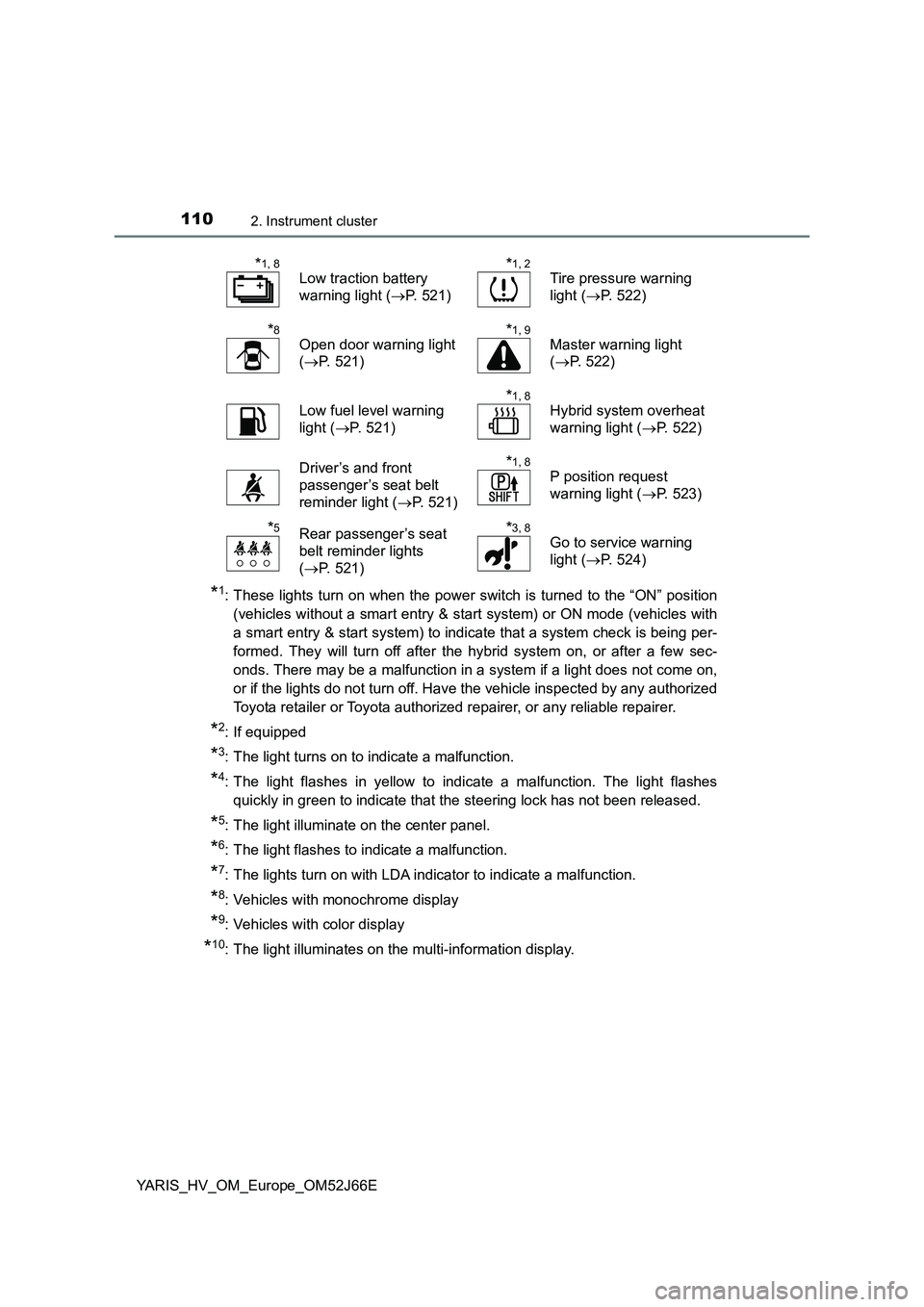
*1, 8
Low traction battery
warning light ( P. 521)
*1, 2
Tire pressure warning
light ( P. 522)
*8
Open door warning light
( P. 521)
*1, 9
Master warning light
( P. 522)
Low fuel level warning
light ( P. 521)
*1, 8
Hybrid system overheat
warning light ( P. 522)
Driver’s and front
passenger’s seat belt
reminder light ( P. 521)
*1, 8
P position request
warning light ( P. 523)
*5Rear passenger’s seat
belt reminder lights
( P. 521)
*3, 8
Go to service warning
light ( P. 524)
Page 116 of 632
1162. Instrument cluster
YARIS_HV_OM_Europe_OM52J66E
● By keeping the indicator needle within Eco area, more Eco-friendly driving
can be achieved.
● Charge area indicates regeneration* status. Regenerated energy will be
used to charge the hybrid battery (traction battery).
*: When used in this manual, “regeneration” refers to the conversion of
energy created by the movement of the vehicle into electrical energy.
■ Engine speed
On hybrid vehicles, engine speed is precisely controlled in order to help
improve fuel efficiency and reduce exhaust emissions, etc.
There are times when the engine speed that is displayed may differ even
when vehicle operation and driving conditions are the same.
■ Outside temperature display
● In the following situations, the correct outside temperature may not be dis-
played, or the display may take longer than normal to change.
• When stopped, or driving at low speeds (less than 25 km/h [16 mph])
• When the outside temperature has changed suddenly (at the entrance/
exit of a garage, tunnel, etc.)
● When “- -” or “E” is displayed, the system may be malfunctioning.
Take your vehicle to any authorized Toyota retailer or Toyota authorized
repairer, or any reliable repairer.
● The temperature range that can be displayed is from -40°C (-40°F) to 50°C
(122°F).
NOTICE
■ To prevent damage to the engine and its components
The engine may be overheating if the high engine coolant temperature
warning light flashes or comes on. In this case, immediately stop the vehicle
in a safe place, and check the engine after it has cooled completely.
( P. 5 8 1 )
Page 119 of 632
1192. Instrument cluster
2
Instrument cluster
YARIS_HV_OM_Europe_OM52J66E
■The meters and display illuminate when
Vehicles without a smart entry & start system
The power switch is in the “ON” position.
Vehicles with a smart entry & start system
The power switch is in ON mode.
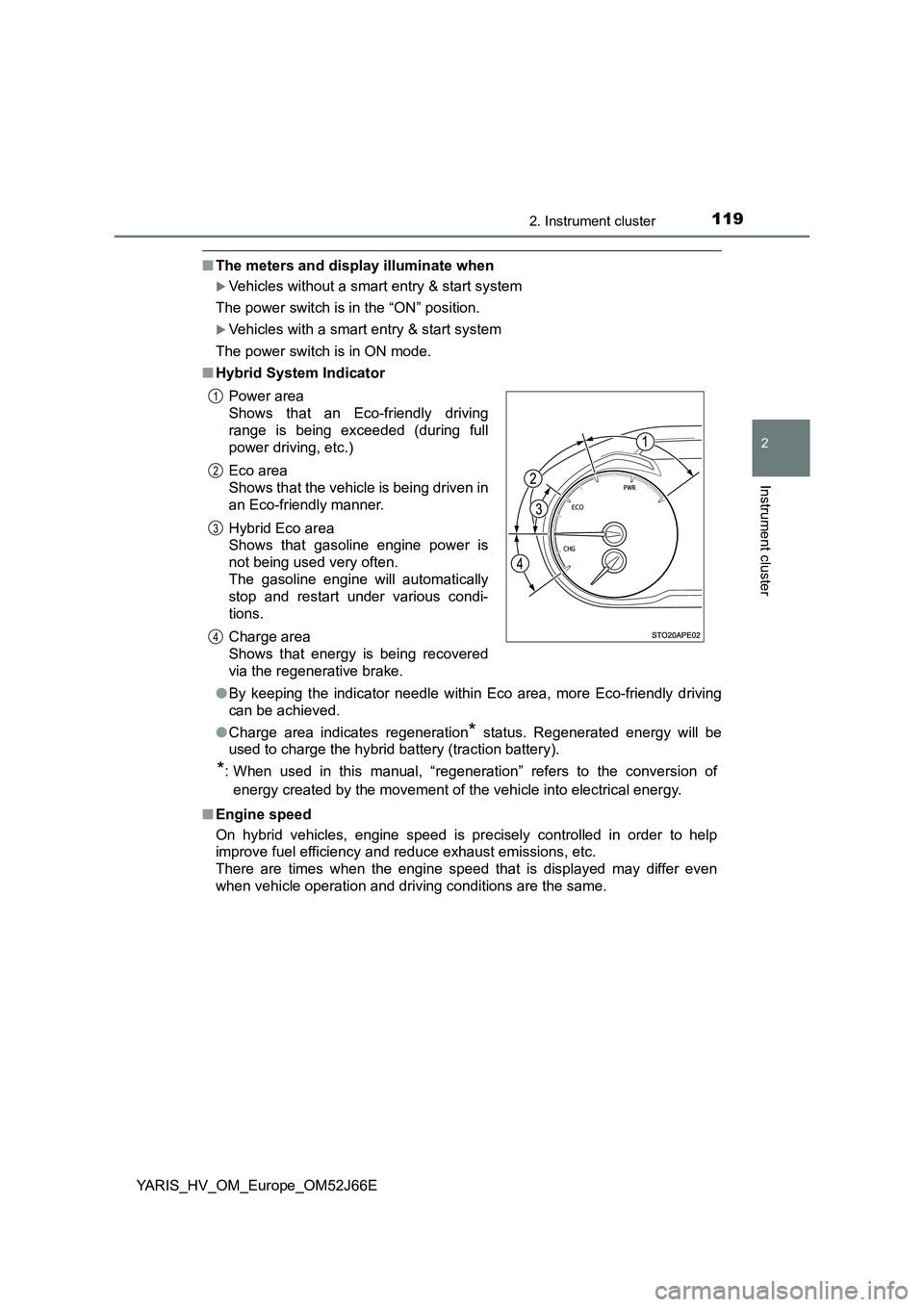
■ Hybrid System Indicator
● By keeping the indicator needle within Eco area, more Eco-friendly driving
can be achieved.
● Charge area indicates regeneration* status. Regenerated energy will be
used to charge the hybrid battery (traction battery).
*: When used in this manual, “regeneration” refers to the conversion of
energy created by the movement of the vehicle into electrical energy.
■ Engine speed
On hybrid vehicles, engine speed is precisely controlled in order to help
improve fuel efficiency and reduce exhaust emissions, etc.
There are times when the engine speed that is displayed may differ even
when vehicle operation and driving conditions are the same.
Power area
Shows that an Eco-friendly driving
range is being exceeded (during full
power driving, etc.)
Eco area
Shows that the vehicle is being driven in
an Eco-friendly manner.
Hybrid Eco area
Shows that gasoline engine power is
not being used very often.
The gasoline engine will automatically
stop and restart under various condi-
tions.
Charge area
Shows that energy is being recovered
via the regenerative brake.
1
2
3
4
Page 123 of 632
1232. Instrument cluster
2
Instrument cluster
YARIS_HV_OM_Europe_OM52J66E
EV indicator can be activated or deactivated by pressing the display
change button when the EV indicator customization display is dis-
played.
To change the EV indicator customization display, display the odometer
and press and hold the display change button until the display changes.
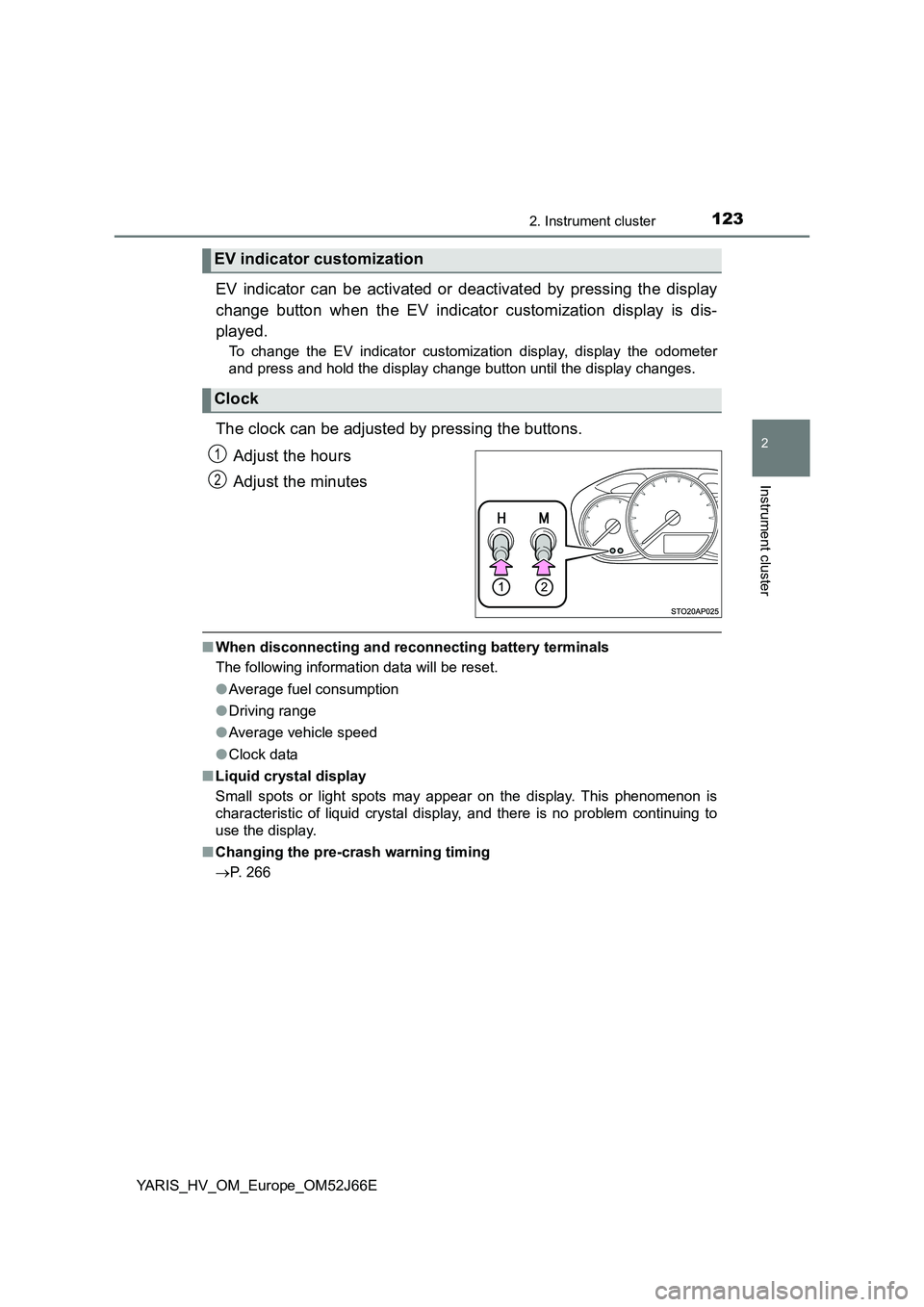
The clock can be adjusted by pressing the buttons.
Adjust the hours
Adjust the minutes
■ When disconnecting and reconnecting battery terminals
The following information data will be reset.
● Average fuel consumption
● Driving range
● Average vehicle speed
● Clock data
■ Liquid crystal display
Small spots or light spots may appear on the display. This phenomenon is
characteristic of liquid crystal display, and there is no problem continuing to
use the display.
■ Changing the pre-crash warning timing
P. 266
EV indicator customization
Clock
1
2
Page 131 of 632
1312. Instrument cluster
2
Instrument cluster
YARIS_HV_OM_Europe_OM52J66E
■Pop-up display
In some situations, such as when a switch operation is performed, a pop-up
display will be temporarily display ed on the multi-information display.
The pop-up display function can be set on/off.
■ Setting display automatic cancelation
“Settings” item in settings display is not selectable during driving and cannot
be operated.
Also, the settings screen is temporarily canceled in the following situations.
● A warning message is displayed.
● The vehicle starts off.
■ Liquid crystal display
Small spots or light spots may appear on the display. This phenomenon is
characteristic of liquid crystal displays, and there is no problem continuing to
use the display.
■ When disconnecting and reconnecting 12-volt battery terminals
The drive information and clock data will be reset.
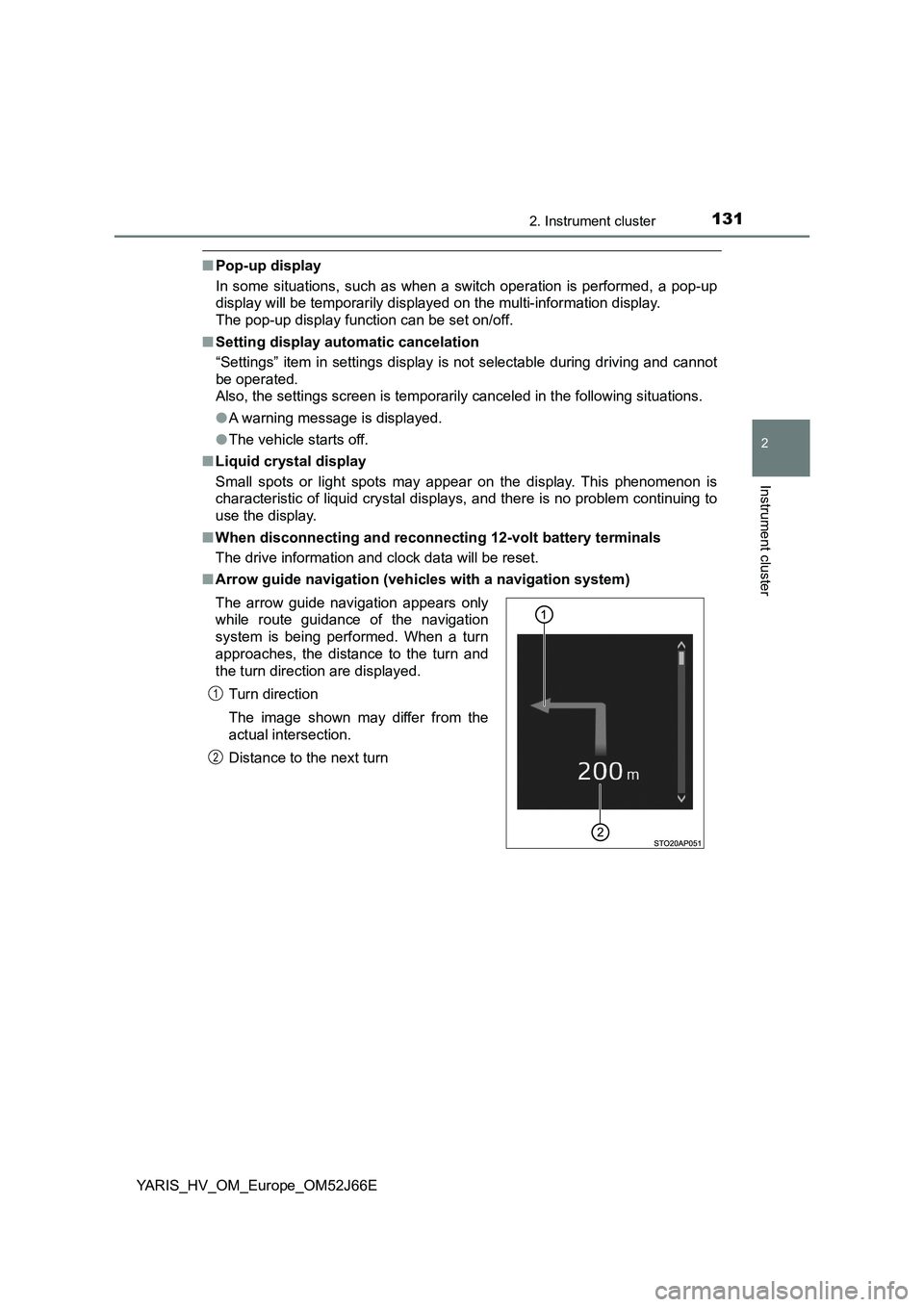
■ Arrow guide navigation (vehicles with a navigation system)
The arrow guide navigation appears only
while route guidance of the navigation
system is being performed. When a turn
approaches, the distance to the turn and
the turn direction are displayed.
Turn direction
The image shown may differ from the
actual intersection.
Distance to the next turn
1
2
Page 132 of 632
1322. Instrument cluster
YARIS_HV_OM_Europe_OM52J66E
WARNING
■Caution for use while driving
● When operating the multi-information display while driving, pay extra
attention to the safety of the area around the vehicle.
● Do not look continuously at the multi-information display while driving as
you may fail to see pedestrians, objects on the road, etc., ahead of the
vehicle.
■ Cautions during setting up the display
As the engine needs to be running during setting up the display, ensure that
the vehicle is parked in a place with adequate ventilation. In a closed area
such as a garage, exhaust gases including harmful carbon monoxide (CO)
may collect and enter the vehicle. This may lead to death or a serious
health hazard.
NOTICE
■ While setting up the display
To prevent 12-volt battery discharge, ens ure that the hybrid system is run-
ning while setting up the display features.
■ The multi-information display at low temperatures
Allow the interior of the vehicle to warm up before using the liquid crystal
information display. At extremely low temperatures, the information display
monitor may respond slowly, and display changes may be delayed.
Page 135 of 632
1352. Instrument cluster
2
Instrument cluster
YARIS_HV_OM_Europe_OM52J66E
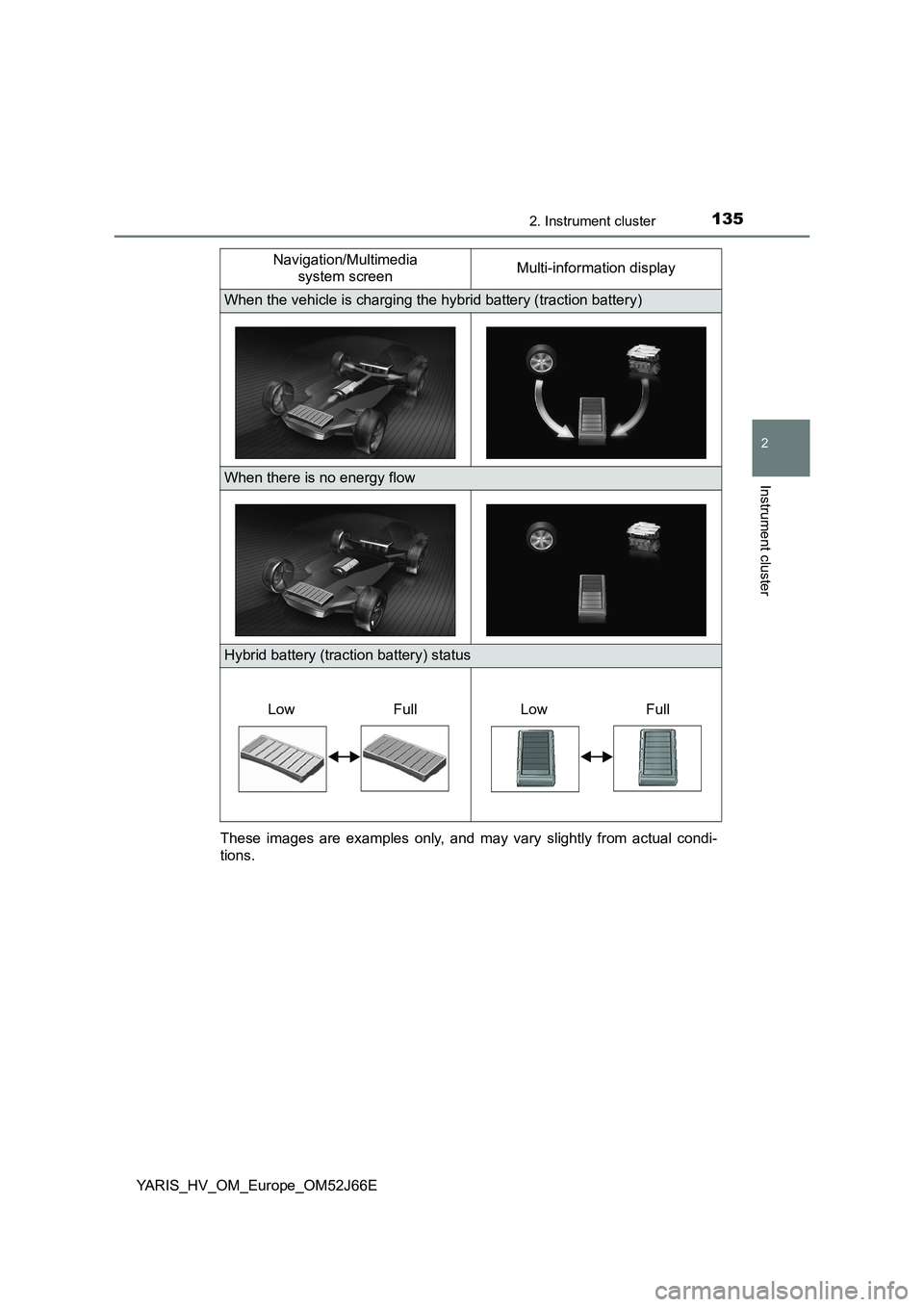
These images are examples only, and may vary slightly from actual condi-
tions.
When the vehicle is charging the hybrid battery (traction battery)
When there is no energy flow
Hybrid battery (traction battery) status
Navigation/Multimedia
system screen Multi-information display
Low FullLow Full
Page 143 of 632
1433-1. Key information
3
Operation of each component
YARIS_HV_OM_Europe_OM52J66E
■If you lose your keys
New genuine keys can be made by any authorized Toyota retailer or Toyota
authorized repairer, or any reliable repairer using the other key and the key
number stamped on your key number plate. Keep the plate in a safe place
such as your wallet, not in the vehicle.
■ When riding in an aircraft
When bringing a key with wireless remote control function onto an aircraft,
make sure you do not press any buttons on the key while inside the aircraft
cabin. If you are carrying a key in your bag etc., ensure that the buttons are
not likely to be pressed accidentally. Pressing a button may cause the key to
emit radio waves that could interfere with the operation of the aircraft.
■ Conditions affecting operation of the smart entry & start system or wire-
less remote control
Vehicles without a smart entry & start system
The wireless remote control function may not operate normally in the follow-
ing situations:
● When the wireless key battery is depleted
● Near a TV tower, electric power plant, gas station, radio station, large dis-
play, airport or other facility that generates strong radio waves or electrical
noise
● When carrying a portable radio, cellular phone or other wireless communi-
cation devices
● When the wireless key is in contact with, or is covered by a metallic object
● When other wireless keys (that emit radio waves) are being used nearby
● If window tint with a metallic content or metallic objects are attached to the
rear window
Vehicles with a smart entry & start system
P. 168
Page 144 of 632
1443-1. Key information
YARIS_HV_OM_Europe_OM52J66E
■ Key battery depletion
Vehicles without a smart entry & start system
If the wireless remote control function does not operate, the battery may be
depleted. Replace the battery when necessary. ( P. 477)
Vehicles with a smart entry & start system
● The standard battery life is 1 to 2 years.
● If the battery becomes low, an alarm will sound in the cabin when the hybrid
system stops. ( P. 477)
● As the electronic key always receives radio waves, the battery will become
depleted even if the electronic key is not used. The following symptoms indi-
cate that the electronic key battery may be depleted. Replace the battery
when necessary. ( P. 477)
• The smart entry & start system or the wireless remote control does not
operate.
• The detection area becomes smaller.
• The LED indicator on the key surface does not turn on.
● To avoid serious deterioration, do not leave the electronic key within 1 m
(3 ft.) of the following electrical appliances that produce a magnetic field:
•TVs
• Personal computers
• Cellular phones, cordless phones and battery chargers
• Recharging cellular phones or cordless phones
• Induction cookers
• Table lamps
■ Replacing the battery
P. 477
■ Confirmation of the registered key number (vehicles with a smart entry &
start system)
The number of keys already registered to the vehicle can be confirmed. Ask
any authorized Toyota retailer or Toyota authorized repairer, or any reliable
repairer for details.
■ If a wrong key is used
On some models, the key cylinder rotates freely to isolate inside mechanism.
■ Customization
Settings (e.g. wireless remote control system) can be changed.
(Customizable features: P. 603)