lock TOYOTA YARIS 2018 Owner's Manual
[x] Cancel search | Manufacturer: TOYOTA, Model Year: 2018, Model line: YARIS, Model: TOYOTA YARIS 2018Pages: 632, PDF Size: 44.1 MB
Page 104 of 632
1041-4. Theft deterrent system
YARIS_HV_OM_Europe_OM52J66E
Double locking system
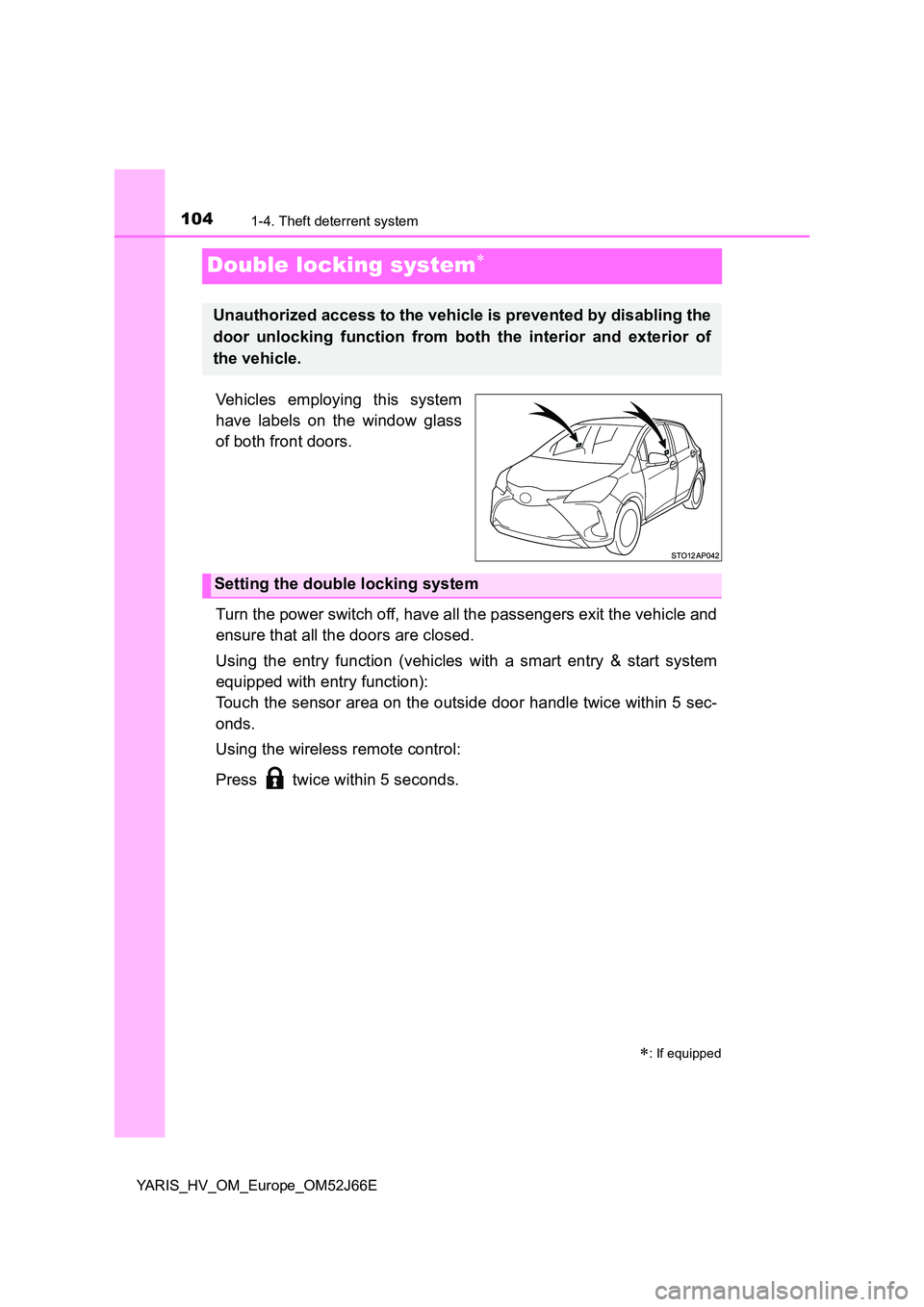
Vehicles employing this system
have labels on the window glass
of both front doors.
Turn the power switch off, have all the passengers exit the vehicle and
ensure that all the doors are closed.
Using the entry function (vehicles with a smart entry & start system
equipped with entry function):
Touch the sensor area on the outside door handle twice within 5 sec-
onds.
Using the wireless remote control:
Press twice within 5 seconds.
: If equipped
Unauthorized access to the vehicle is prevented by disabling the
door unlocking function from both the interior and exterior of
the vehicle.
Setting the double locking system
Page 105 of 632
1051-4. Theft deterrent system
1
For safety and security
YARIS_HV_OM_Europe_OM52J66E
Using the entry function (vehicles with a smart entry & start system
equipped with entry function):
Hold either front outside door handle or push up the back door opener
switch.
Using the wireless remote control:
Press .
Canceling the double locking system
WARNING
■ Double locking system precaution
Never activate the double locking system when there are people in the vehi-
cle because all the doors cannot be opened from inside the vehicle.
Page 110 of 632
1102. Instrument cluster
YARIS_HV_OM_Europe_OM52J66E
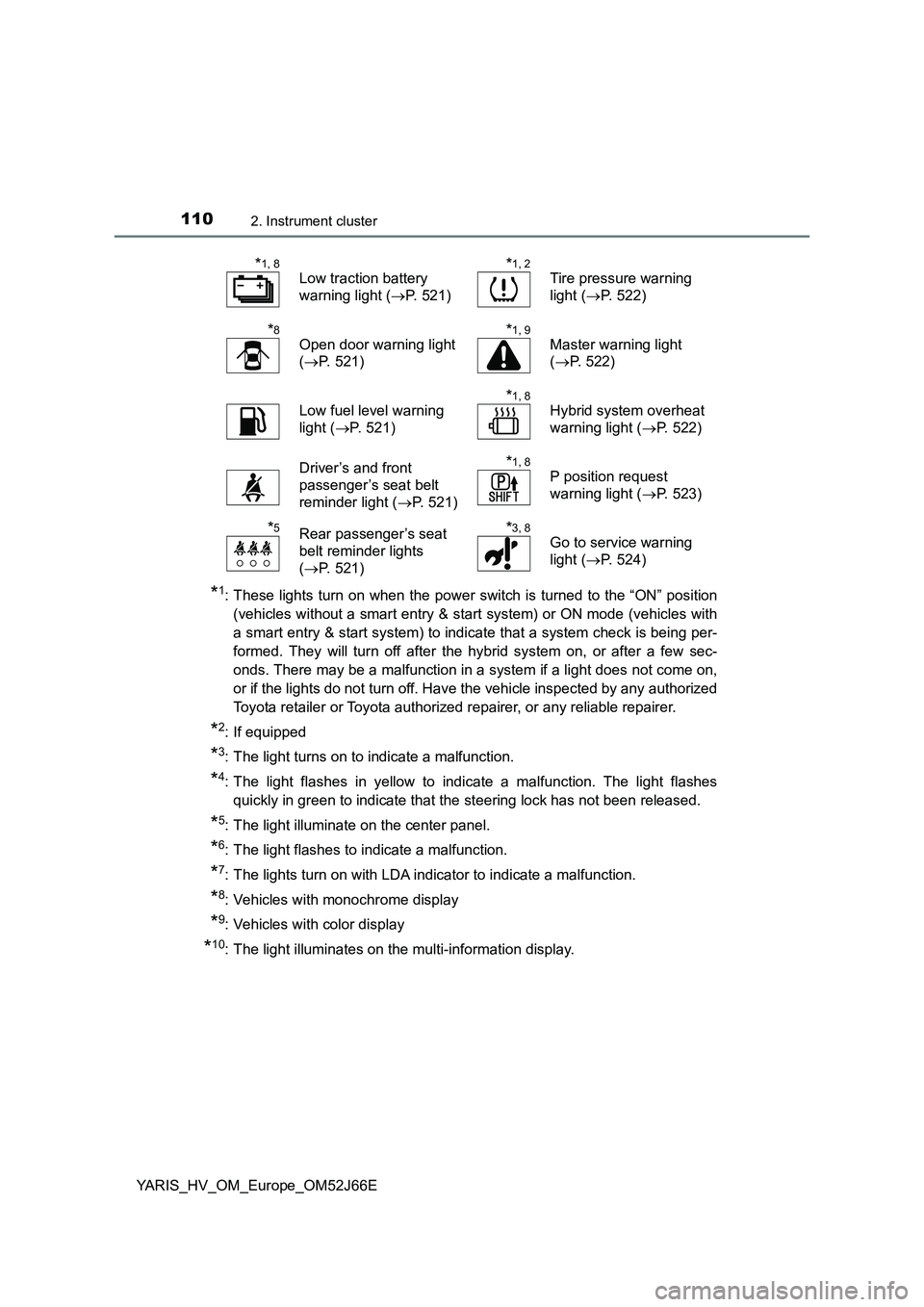
*1: These lights turn on when the power switch is turned to the “ON” position
(vehicles without a smart entry & start system) or ON mode (vehicles with
a smart entry & start system) to indicate that a system check is being per-
formed. They will turn off after the hybrid system on, or after a few sec-
onds. There may be a malfunction in a system if a light does not come on,
or if the lights do not turn off. Have the vehicle inspected by any authorized
Toyota retailer or Toyota authorized repairer, or any reliable repairer.
*2: If equipped
*3: The light turns on to indicate a malfunction.
*4: The light flashes in yellow to indicate a malfunction. The light flashes
quickly in green to indicate that the steering lock has not been released.
*5: The light illuminate on the center panel.
*6: The light flashes to indicate a malfunction.
*7: The lights turn on with LDA indicator to indicate a malfunction.
*8: Vehicles with monochrome display
*9: Vehicles with color display
*10: The light illuminates on the multi-information display.
*1, 8
Low traction battery
warning light ( P. 521)
*1, 2
Tire pressure warning
light ( P. 522)
*8
Open door warning light
( P. 521)
*1, 9
Master warning light
( P. 522)
Low fuel level warning
light ( P. 521)
*1, 8
Hybrid system overheat
warning light ( P. 522)
Driver’s and front
passenger’s seat belt
reminder light ( P. 521)
*1, 8
P position request
warning light ( P. 523)
*5Rear passenger’s seat
belt reminder lights
( P. 521)
*3, 8
Go to service warning
light ( P. 524)
Page 114 of 632
1142. Instrument cluster
YARIS_HV_OM_Europe_OM52J66E
Gauges and meters (vehicles with mono-
chrome display)
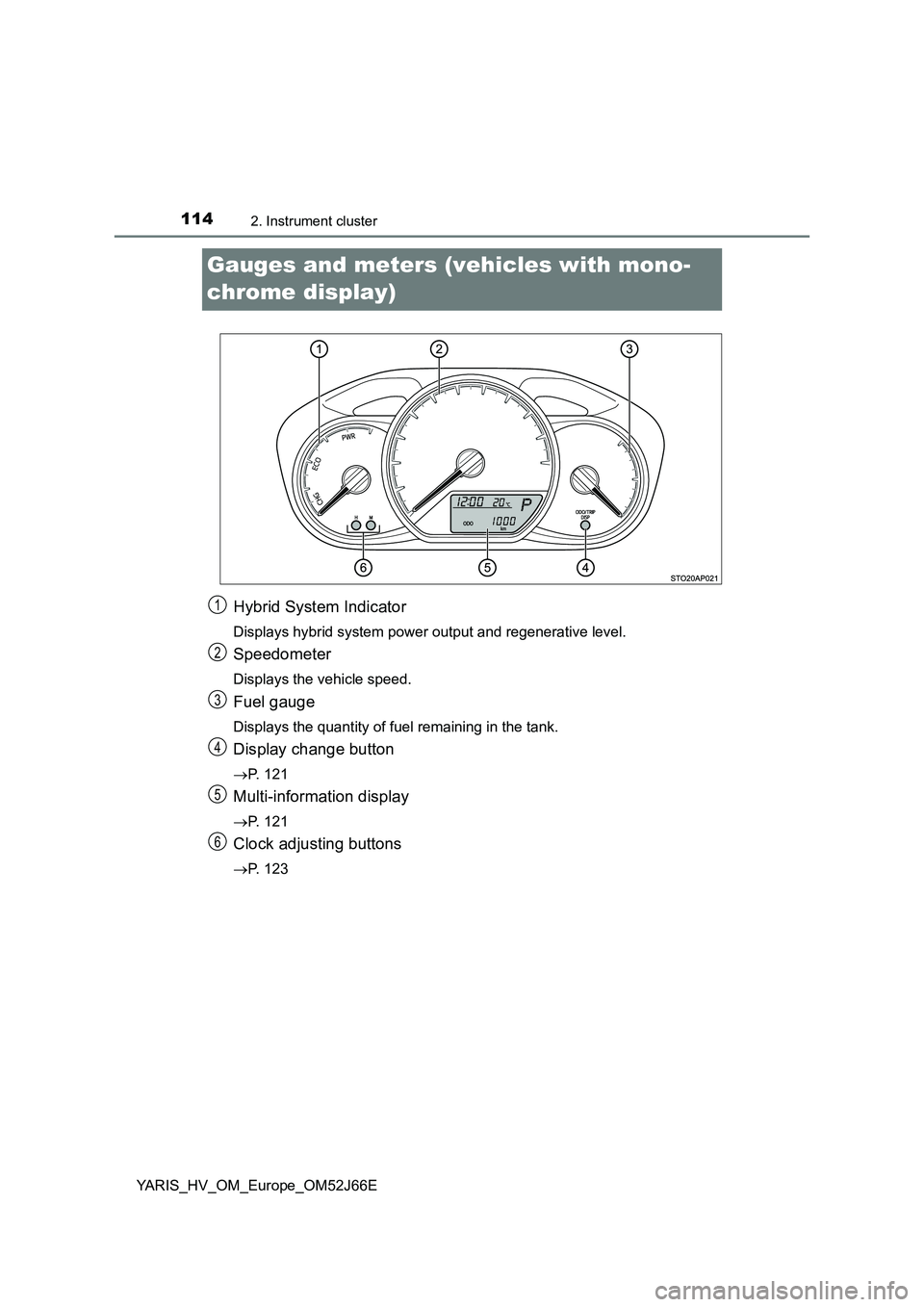
Hybrid System Indicator
Displays hybrid system power output and regenerative level.
Speedometer
Displays the vehicle speed.
Fuel gauge
Displays the quantity of fuel remaining in the tank.
Display change button
P. 121
Multi-information display
P. 121
Clock adjusting buttons
P. 123
1
2
3
4
5
6
Page 117 of 632
117
2
2. Instrument cluster
Instrument cluster
YARIS_HV_OM_Europe_OM52J66E
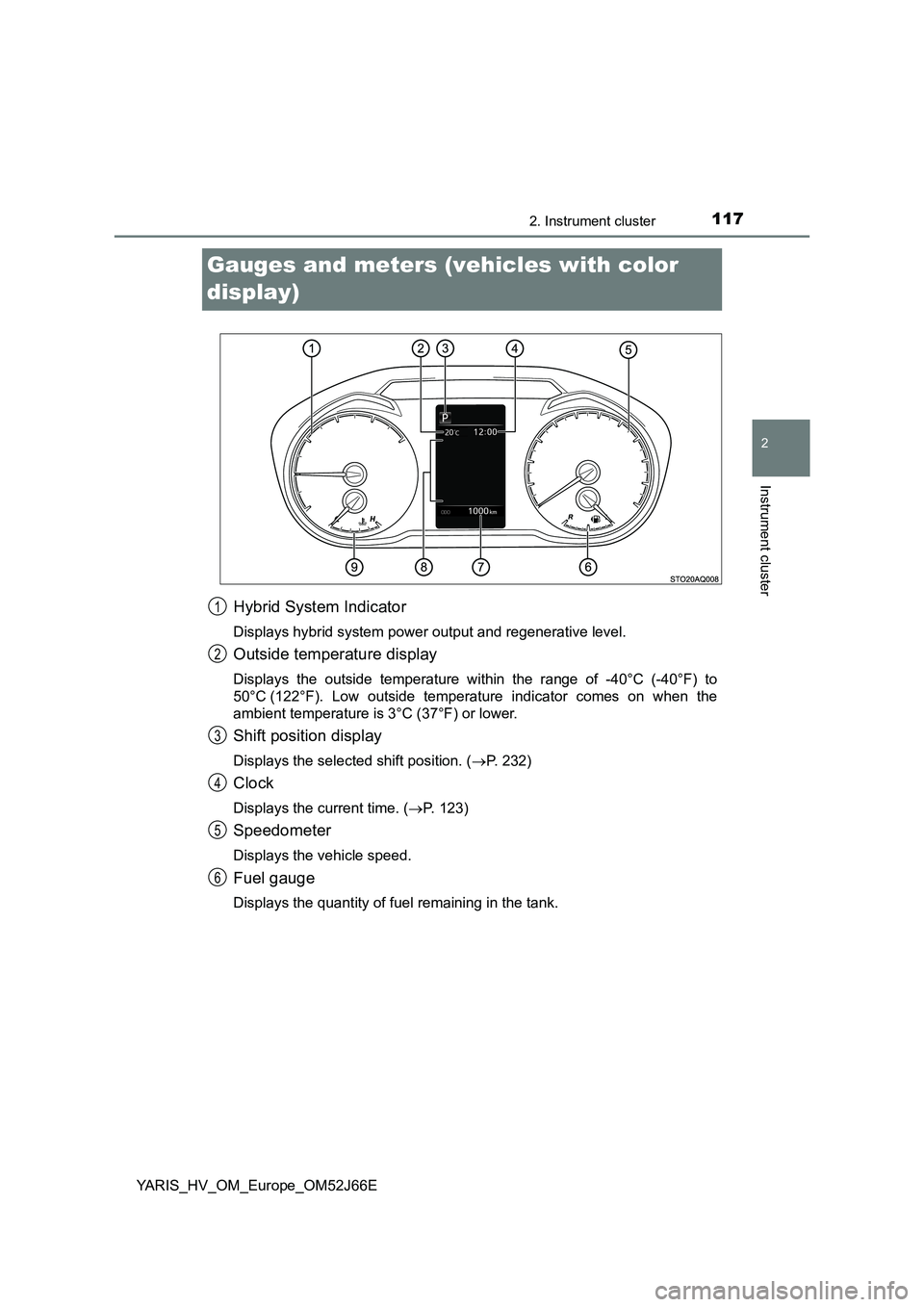
Gauges and meters (vehicles with color
display)
Hybrid System Indicator
Displays hybrid system power output and regenerative level.
Outside temperature display
Displays the outside temperature within the range of -40°C (-40°F) to
50°C (122°F). Low outside temperature indicator comes on when the
ambient temperature is 3°C (37°F) or lower.
Shift position display
Displays the selected shift position. ( P. 232)
Clock
Displays the current time. (P. 123)
Speedometer
Displays the vehicle speed.
Fuel gauge
Displays the quantity of fuel remaining in the tank.
1
2
3
4
5
6
Page 121 of 632
121
2
2. Instrument cluster
Instrument cluster
YARIS_HV_OM_Europe_OM52J66E
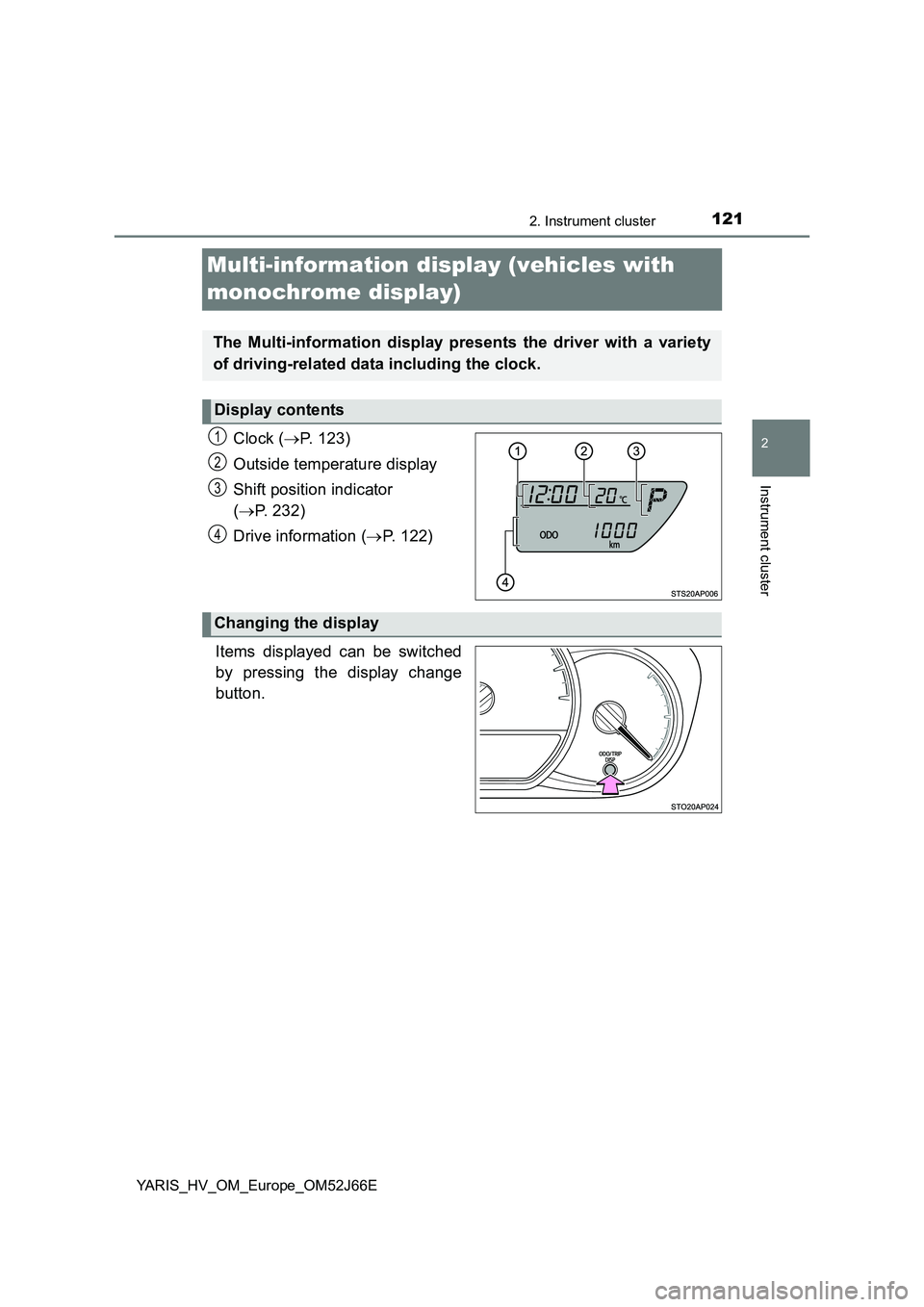
Multi-information display (vehicles with
monochrome display)
Clock ( P. 123)
Outside temperature display
Shift position indicator
( P. 232)
Drive information ( P. 122)
Items displayed can be switched
by pressing the display change
button.
The Multi-information display presents the driver with a variety
of driving-related data including the clock.
Display contents
1
2
3
4
Changing the display
Page 122 of 632
1222. Instrument cluster
YARIS_HV_OM_Europe_OM52J66E
■Odometer
Displays the total distance the vehicle has been driven.
■Trip meter
Displays the distance the vehicle has been driven since the meter
was last reset. Trip meters A and B can be used to record and dis-
play different distances independently.
Press and hold the button for longer than 1 second to reset. Pressing and
holding the button while the trip meter is displayed will reset the trip meter
to “0”.
■Instantaneous fuel consumption
Displays the instantaneous of fuel consumption.
Use the displayed instantaneous fuel consumption as a reference.
■Average fuel consumption
Displays the average rate of fuel consumption.
• The function can be reset by pressing the button for longer than 1 sec-
ond when the average fuel consumption is displayed.
• Use the displayed average fuel consumption as a reference.
■Driving range
Displays the estimated maximum distance that can be driven with
the quantity of fuel remaining.
• This distance is computed based on your average fuel consumption. As
a result, the actual distance that can be driven may differ from that dis-
played.
• When only a small amount of fuel is added to the tank, the display may
not be updated.
When refueling, turn the power switch to the “LOCK” position (vehicles
without a smart entry & start system) or off (vehicles with a smart entry &
start system). If the vehicle is refueled without turning the power switch to
the “LOCK” position or off, the display may not be updated.
■Average vehicle speed
Displays the average vehicle speed since the hybrid system was
last started.
Drive information
Page 123 of 632
1232. Instrument cluster
2
Instrument cluster
YARIS_HV_OM_Europe_OM52J66E
EV indicator can be activated or deactivated by pressing the display
change button when the EV indicator customization display is dis-
played.
To change the EV indicator customization display, display the odometer
and press and hold the display change button until the display changes.
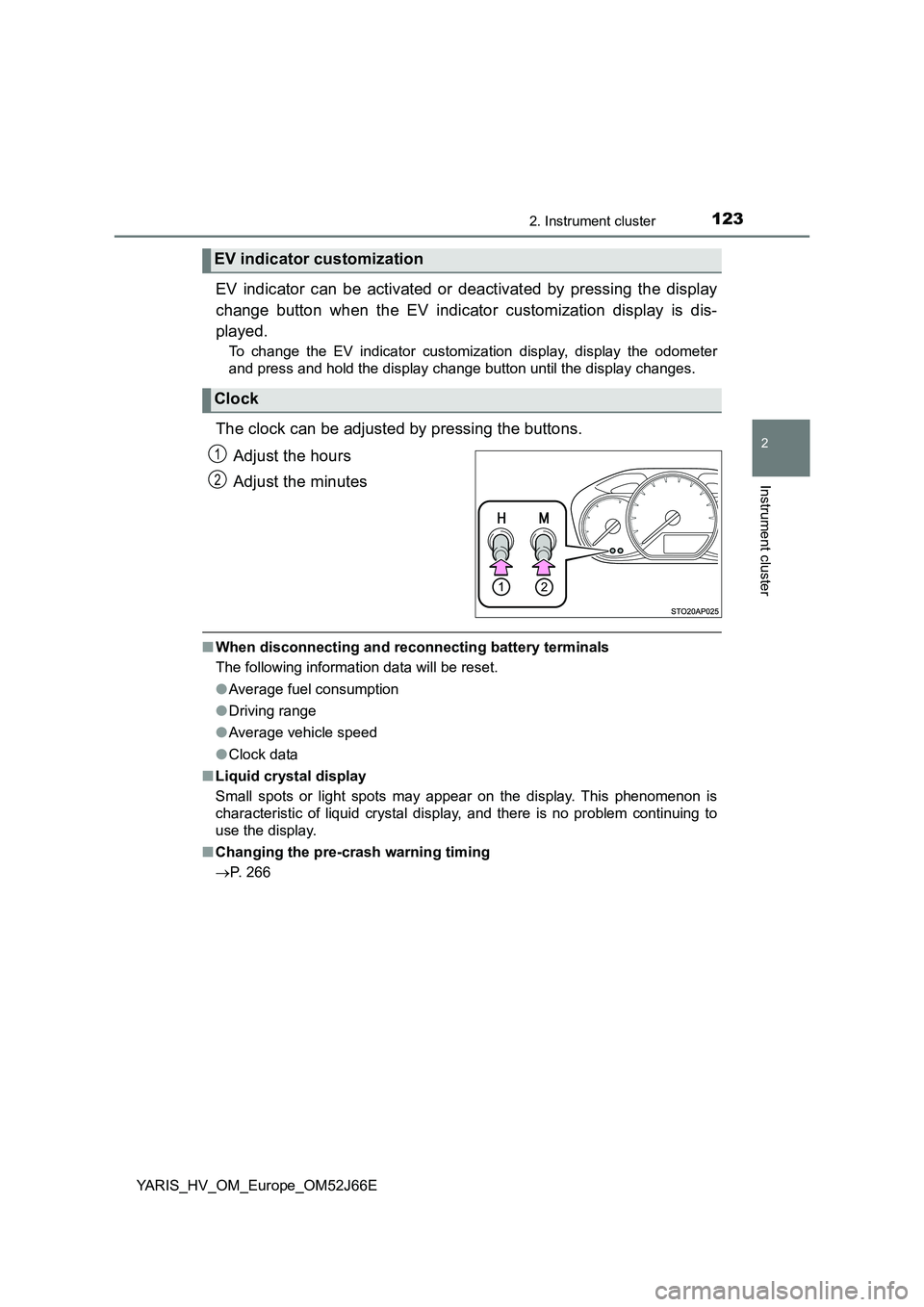
The clock can be adjusted by pressing the buttons.
Adjust the hours
Adjust the minutes
■ When disconnecting and reconnecting battery terminals
The following information data will be reset.
● Average fuel consumption
● Driving range
● Average vehicle speed
● Clock data
■ Liquid crystal display
Small spots or light spots may appear on the display. This phenomenon is
characteristic of liquid crystal display, and there is no problem continuing to
use the display.
■ Changing the pre-crash warning timing
P. 266
EV indicator customization
Clock
1
2
Page 129 of 632
1292. Instrument cluster
2
Instrument cluster
YARIS_HV_OM_Europe_OM52J66E
●Clock
Adjusts the hour and minute, and switches between 12-hour and
24-hour display of the clock. ( P. 130)
● Settings
Select the menu to set up the following items.
• Language
Select to change the language on the display.
•Units
Select to change the unit of measure for the multi-information display.
• (EV indicator) setup
Select to activate/deactivate the EV indicator on/off.
• Drive information
Select to select up to 2 items that will be displayed on a Drive informa-
tion screen.
• Pop-up display
Select to set the pop-up displays*2, which may appear in some situa-
tions, on/off.
• Default settings
Registered or changed meter settings will be deleted or returned to their
default setting.
*1: If equipped
*2: Incoming call display of the hands-free phone system (if equipped).
Page 130 of 632
1302. Instrument cluster
YARIS_HV_OM_Europe_OM52J66E
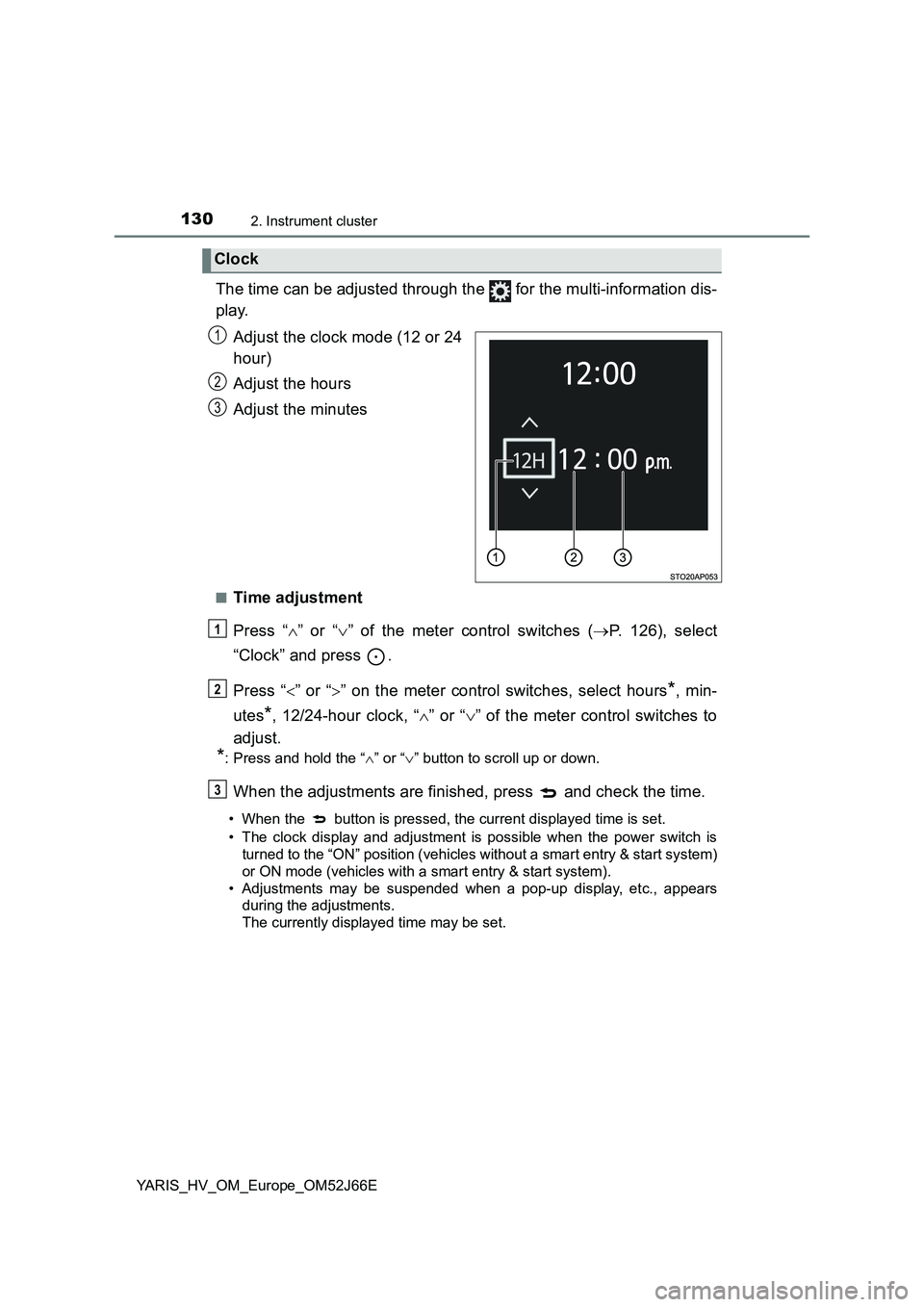
The time can be adjusted through the for the multi-information dis-
play.
Adjust the clock mode (12 or 24
hour)
Adjust the hours
Adjust the minutes
■Time adjustment
Press “ ” or “” of the meter control switches (P. 126), select
“Clock” and press .
Press “ ” or “” on the meter control switches, select hours*, min-
utes*, 12/24-hour clock, “ ” or “” of the meter control switches to
adjust.
*: Press and hold the “ ” or “” button to scroll up or down.
When the adjustments are finished, press and check the time.
• When the button is pressed, the current displayed time is set.
• The clock display and adjustment is possible when the power switch is
turned to the “ON” position (vehicles without a smart entry & start system)
or ON mode (vehicles with a smart entry & start system).
• Adjustments may be suspended when a pop-up display, etc., appears
during the adjustments.
The currently displayed time may be set.
Clock
1
2
3
1
2
3