lock TOYOTA YARIS 2018 Owner's Guide
[x] Cancel search | Manufacturer: TOYOTA, Model Year: 2018, Model line: YARIS, Model: TOYOTA YARIS 2018Pages: 632, PDF Size: 44.1 MB
Page 131 of 632
1312. Instrument cluster
2
Instrument cluster
YARIS_HV_OM_Europe_OM52J66E
■Pop-up display
In some situations, such as when a switch operation is performed, a pop-up
display will be temporarily display ed on the multi-information display.
The pop-up display function can be set on/off.
■ Setting display automatic cancelation
“Settings” item in settings display is not selectable during driving and cannot
be operated.
Also, the settings screen is temporarily canceled in the following situations.
● A warning message is displayed.
● The vehicle starts off.
■ Liquid crystal display
Small spots or light spots may appear on the display. This phenomenon is
characteristic of liquid crystal displays, and there is no problem continuing to
use the display.
■ When disconnecting and reconnecting 12-volt battery terminals
The drive information and clock data will be reset.
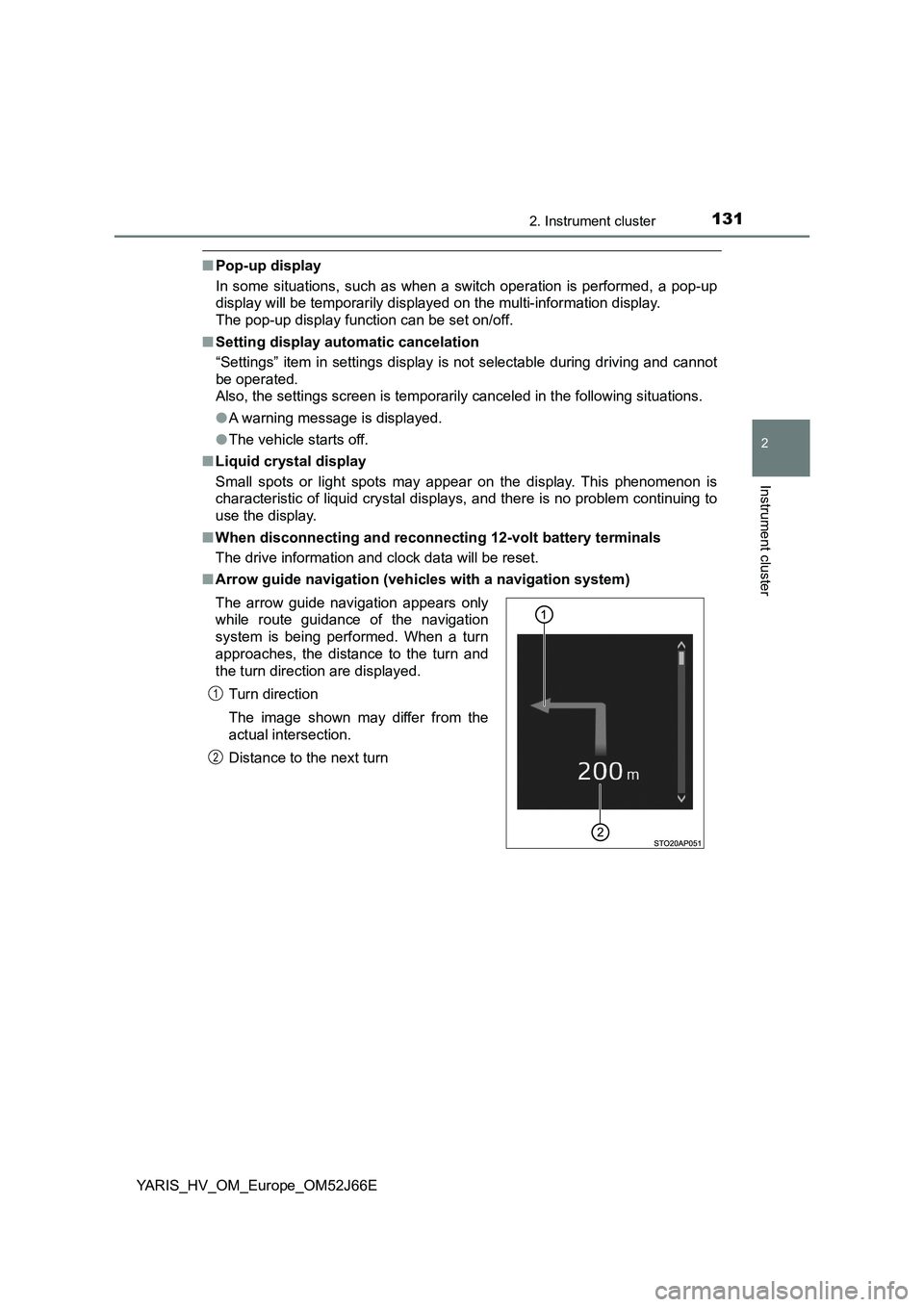
■ Arrow guide navigation (vehicles with a navigation system)
The arrow guide navigation appears only
while route guidance of the navigation
system is being performed. When a turn
approaches, the distance to the turn and
the turn direction are displayed.
Turn direction
The image shown may differ from the
actual intersection.
Distance to the next turn
1
2
Page 139 of 632
139
3
Operation of
each component
YARIS_HV_OM_Europe_OM52J66E
3-1. Key information
Keys ................................... 140
3-2. Opening, closing
and locking the doors
Side doors.......................... 152
Back door........................... 159
Smart entry &
start system ..................... 164
3-3. Adjusting the seats
Front seats ......................... 182
Rear seats ......................... 184
Head restraints .................. 188
3-4. Adjusting the steering
wheel and mirrors
Steering wheel ................... 191
Inside rear view mirror ....... 193
Outside rear view mirrors... 196
3-5. Opening and closing
the windows
Power windows .................. 199
Page 141 of 632
1413-1. Key information
3
Operation of each component
YARIS_HV_OM_Europe_OM52J66E
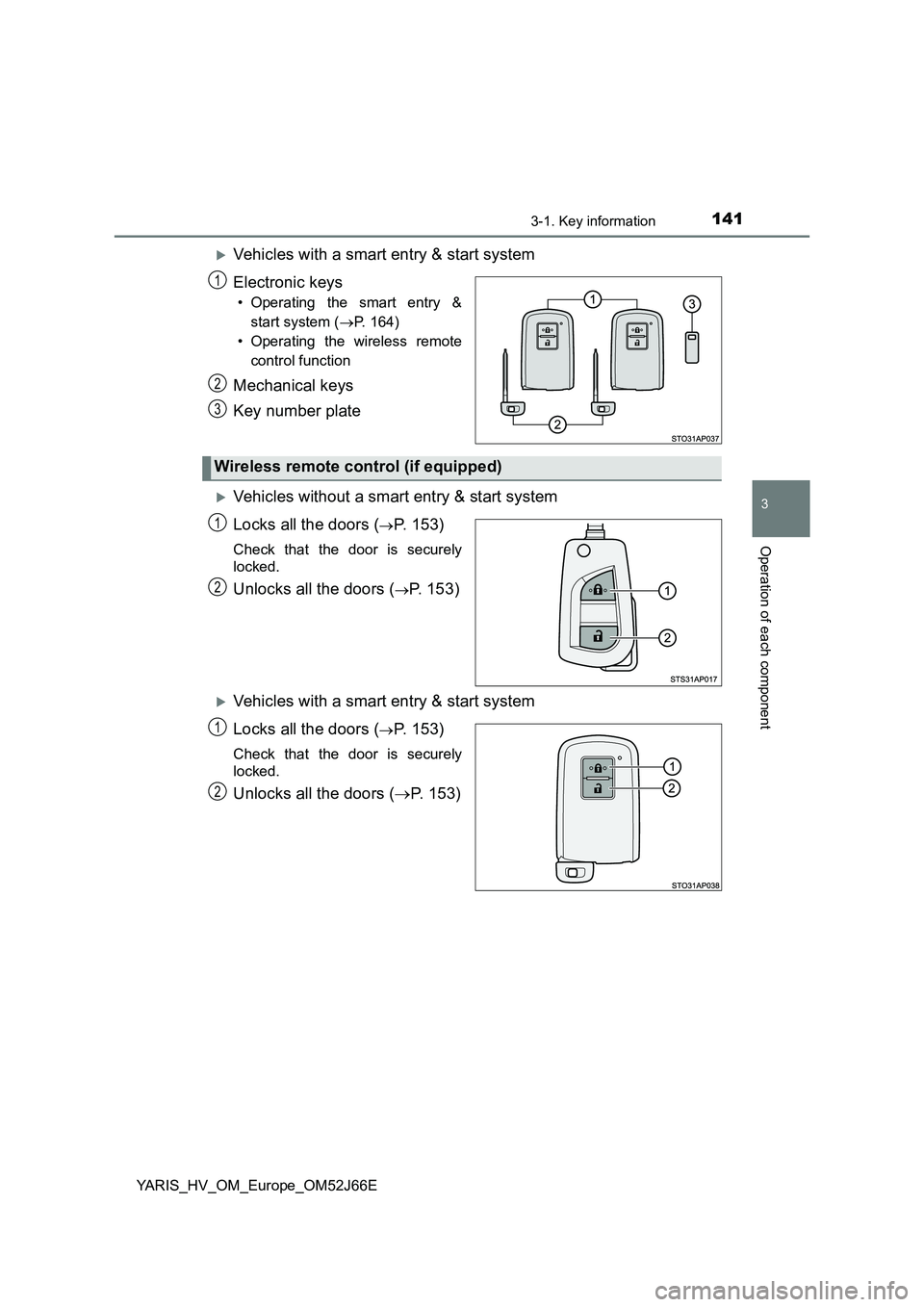
Vehicles with a smart entry & start system
Electronic keys
• Operating the smart entry &
start system ( P. 164)
• Operating the wireless remote
control function
Mechanical keys
Key number plate
Vehicles without a smart entry & start system
Locks all the doors (P. 153)
Check that the door is securely
locked.
Unlocks all the doors (P. 153)
Vehicles with a smart entry & start system
Locks all the doors (P. 153)
Check that the door is securely
locked.
Unlocks all the doors ( P. 153)
1
2
3
Wireless remote control (if equipped)
1
2
1
2
Page 142 of 632
1423-1. Key information
YARIS_HV_OM_Europe_OM52J66E
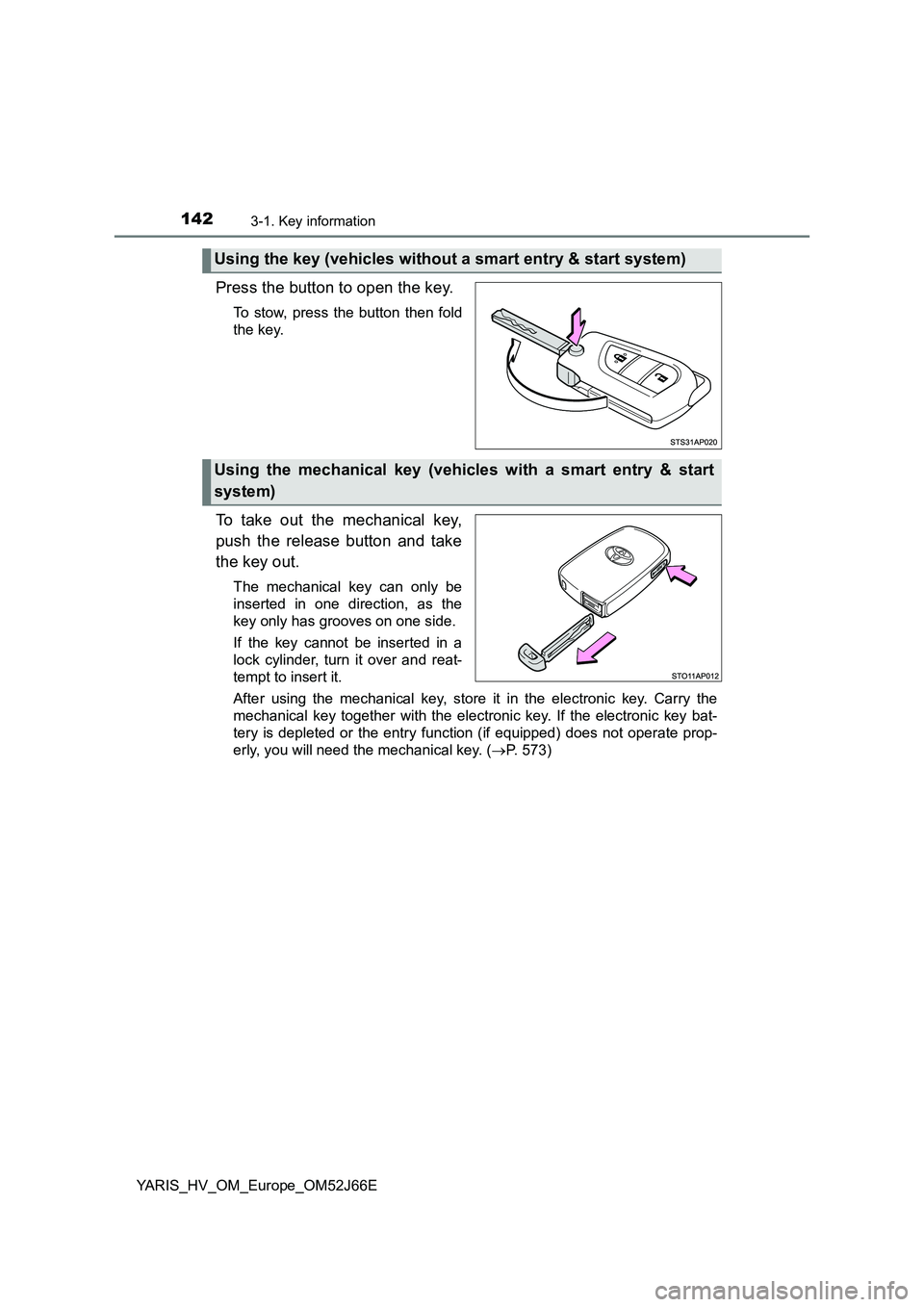
Press the button to open the key.
To stow, press the button then fold
the key.
To take out the mechanical key,
push the release button and take
the key out.
The mechanical key can only be
inserted in one direction, as the
key only has grooves on one side.
If the key cannot be inserted in a
lock cylinder, turn it over and reat-
tempt to insert it.
After using the mechanical key, store it in the electronic key. Carry the
mechanical key together with the electronic key. If the electronic key bat-
tery is depleted or the entry function (if equipped) does not operate prop-
erly, you will need the mechanical key. ( P. 573)
Using the key (vehicles without a smart entry & start system)
Using the mechanical key (vehicles with a smart entry & start
system)
Page 152 of 632
1523-2. Opening, closing and locking the doors
YARIS_HV_OM_Europe_OM52J66E
Side doors
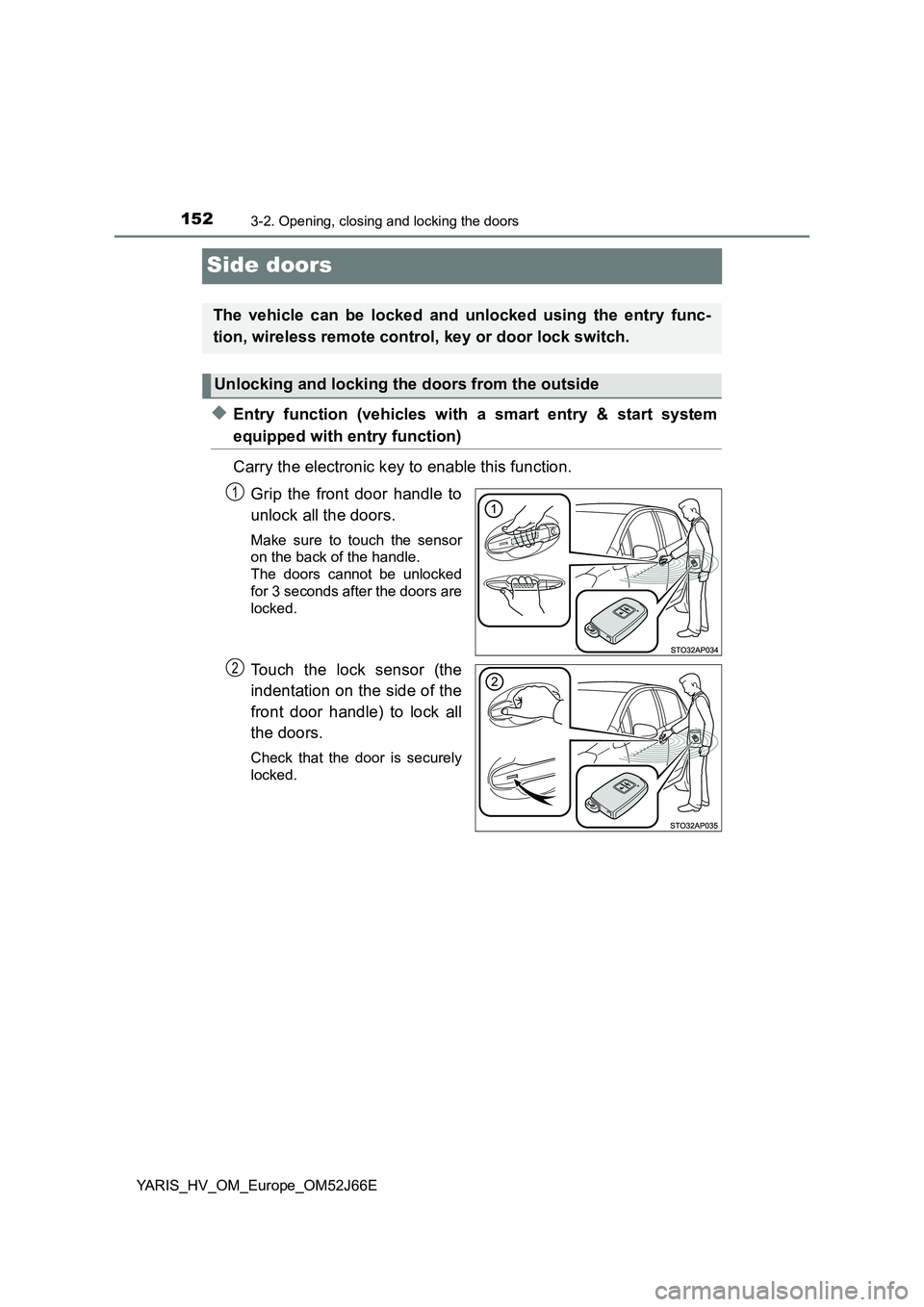
◆Entry function (vehicles with a smart entry & start system
equipped with entry function)
Carry the electronic key to enable this function.
Grip the front door handle to
unlock all the doors.
Make sure to touch the sensor
on the back of the handle.
The doors cannot be unlocked
for 3 seconds after the doors are
locked.
Touch the lock sensor (the
indentation on the side of the
front door handle) to lock all
the doors.
Check that the door is securely
locked.
The vehicle can be locked and unlocked using the entry func-
tion, wireless remote control, key or door lock switch.
Unlocking and locking the doors from the outside
1
2
Page 153 of 632
1533-2. Opening, closing and locking the doors
3
Operation of each component
YARIS_HV_OM_Europe_OM52J66E
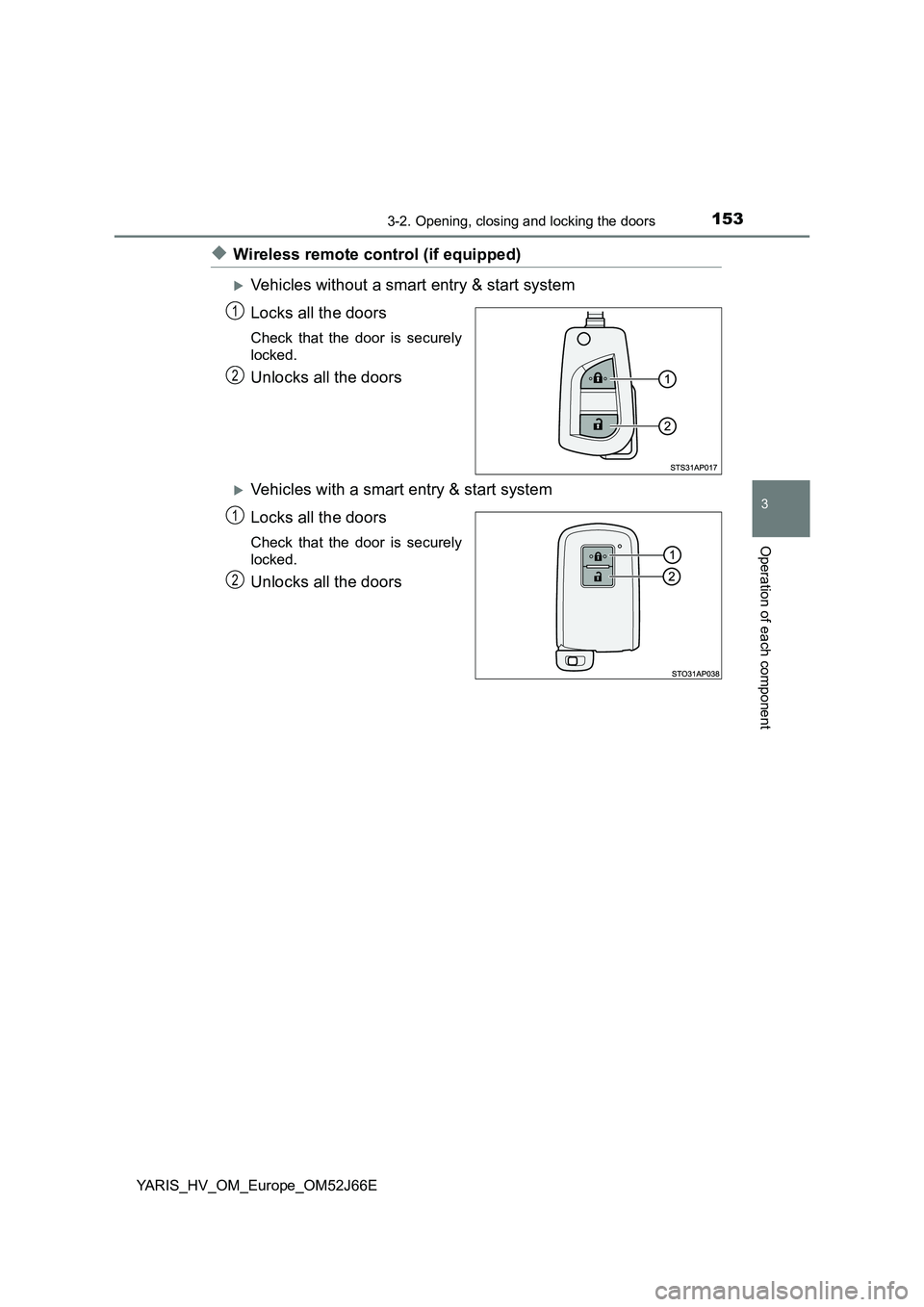
◆Wireless remote control (if equipped)
Vehicles without a smart entry & start system
Locks all the doors
Check that the door is securely
locked.
Unlocks all the doors
Vehicles with a smart entry & start system
Locks all the doors
Check that the door is securely
locked.
Unlocks all the doors
1
2
1
2
Page 154 of 632
1543-2. Opening, closing and locking the doors
YARIS_HV_OM_Europe_OM52J66E
◆Keys
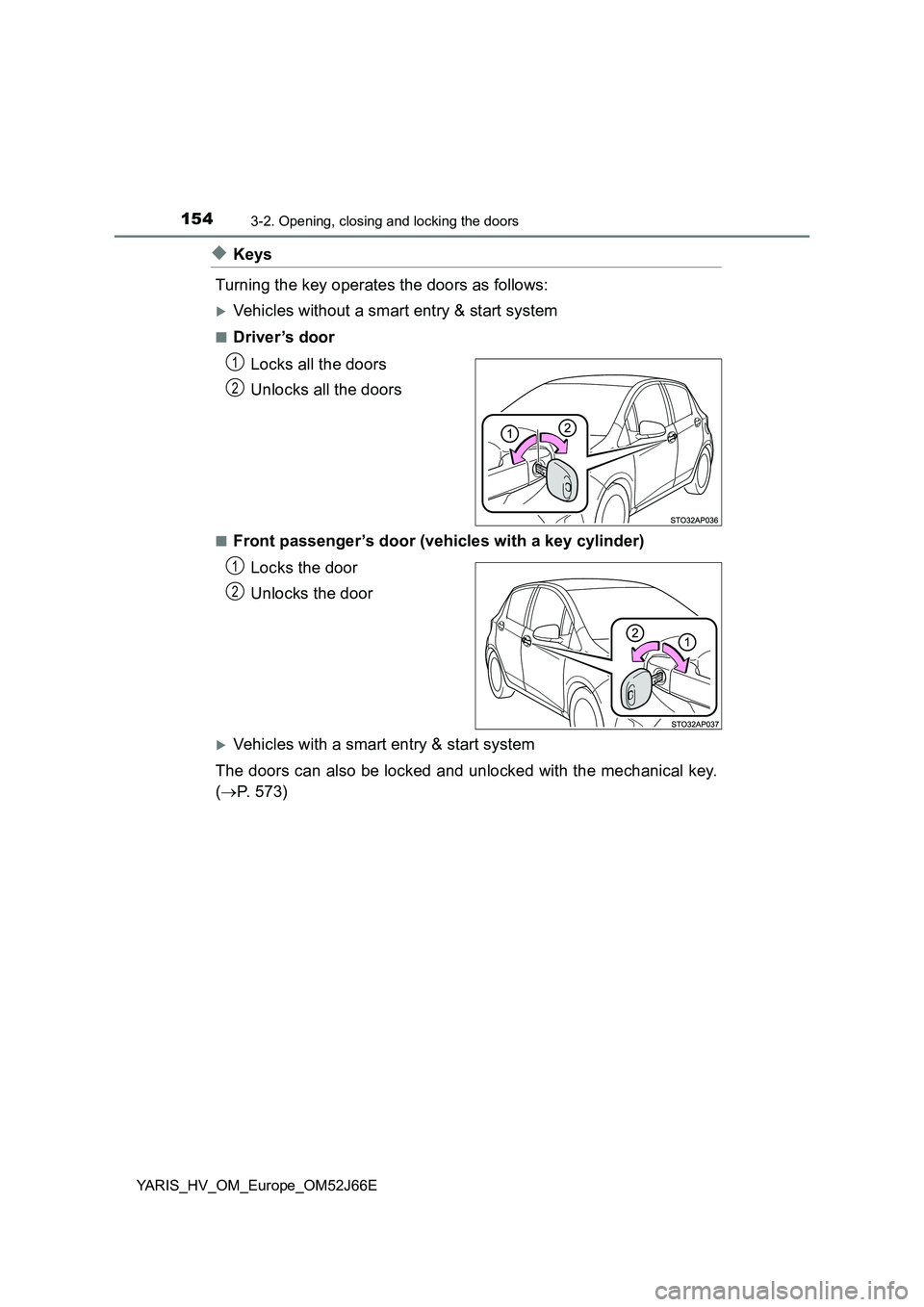
Turning the key operates the doors as follows:
Vehicles without a smart entry & start system
■Driver ’s door
Locks all the doors
Unlocks all the doors
■Front passenger’s door (vehicles with a key cylinder)
Locks the door
Unlocks the door
Vehicles with a smart entry & start system
The doors can also be locked and unlocked with the mechanical key.
( P. 573)
1
2
1
2
Page 155 of 632
1553-2. Opening, closing and locking the doors
3
Operation of each component
YARIS_HV_OM_Europe_OM52J66E
■Operation signals (vehicles with an entry function or wireless remote
control)
The emergency flashers flash to indicate that the doors have been locked/
unlocked. (Locked: once; Unlocked: twice)
■ Security feature (wireless remote control)
Vehicles without a smart entry & start system
If a door is not opened within approximately 30 seconds after the vehicle is
unlocked, the security feature automatically locks the vehicle again.
Vehicles with a smart entry & start system
If a door is not opened within approximately 30 seconds after the vehicle is
unlocked, the security feature automatically locks the vehicle again. (How-
ever, depending on the location of the electronic key, the key may be
detected as being in the vehicle. In this case, vehicle may be unlocked.)
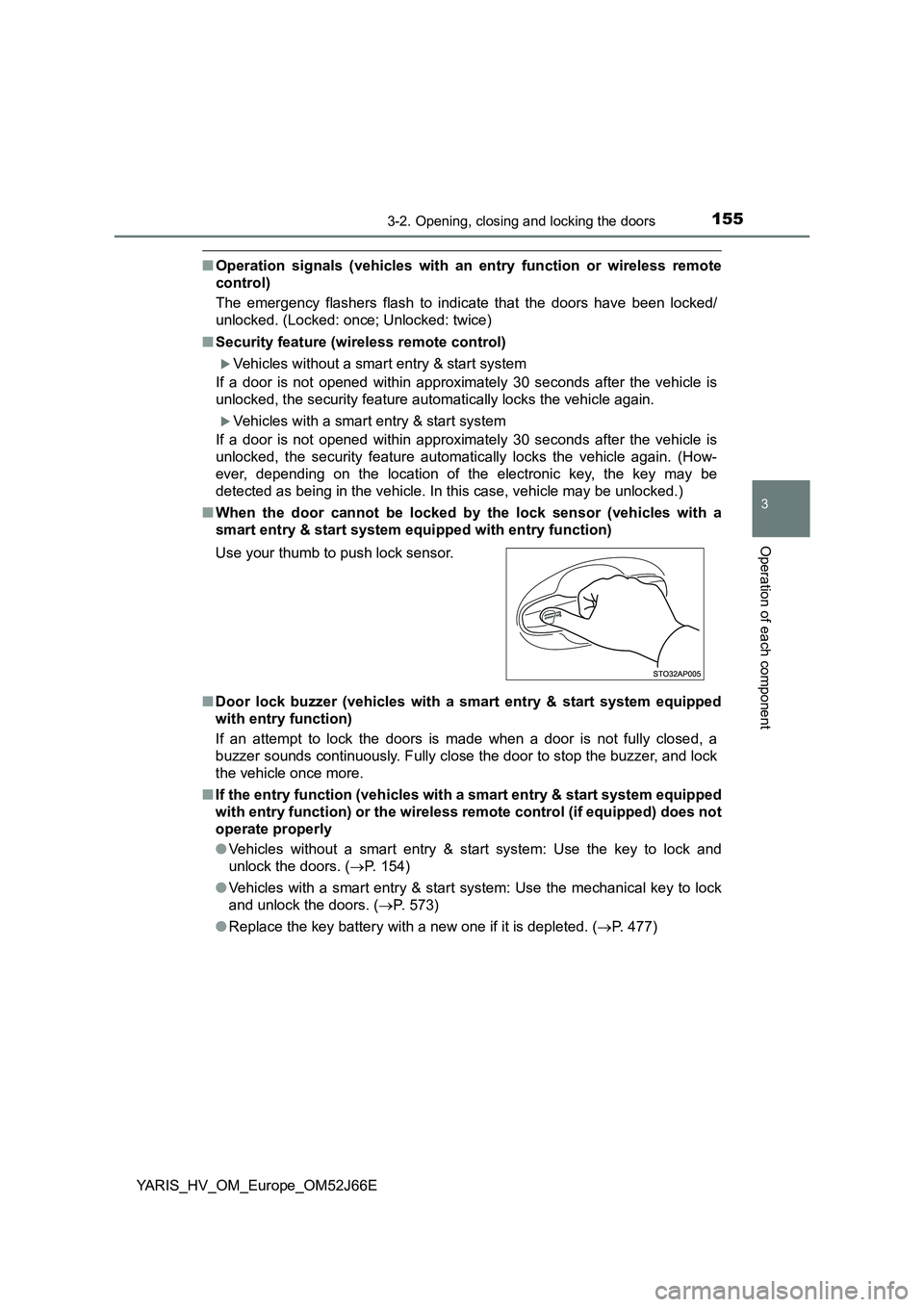
■ When the door cannot be locked by the lock sensor (vehicles with a
smart entry & start system equi pped with entry function)
■ Door lock buzzer (vehicles with a smart entry & start system equipped
with entry function)
If an attempt to lock the doors is made when a door is not fully closed, a
buzzer sounds continuously. Fully close the door to stop the buzzer, and lock
the vehicle once more.
■ If the entry function (vehicles with a smart entry & start system equipped
with entry function) or the wireless remote control (if equipped) does not
operate properly
● Vehicles without a smart entry & start system: Use the key to lock and
unlock the doors. ( P. 154)
● Vehicles with a smart entry & start system: Use the mechanical key to lock
and unlock the doors. ( P. 573)
● Replace the key battery with a new one if it is depleted. (P. 477)
Use your thumb to push lock sensor.
Page 156 of 632
1563-2. Opening, closing and locking the doors
YARIS_HV_OM_Europe_OM52J66E
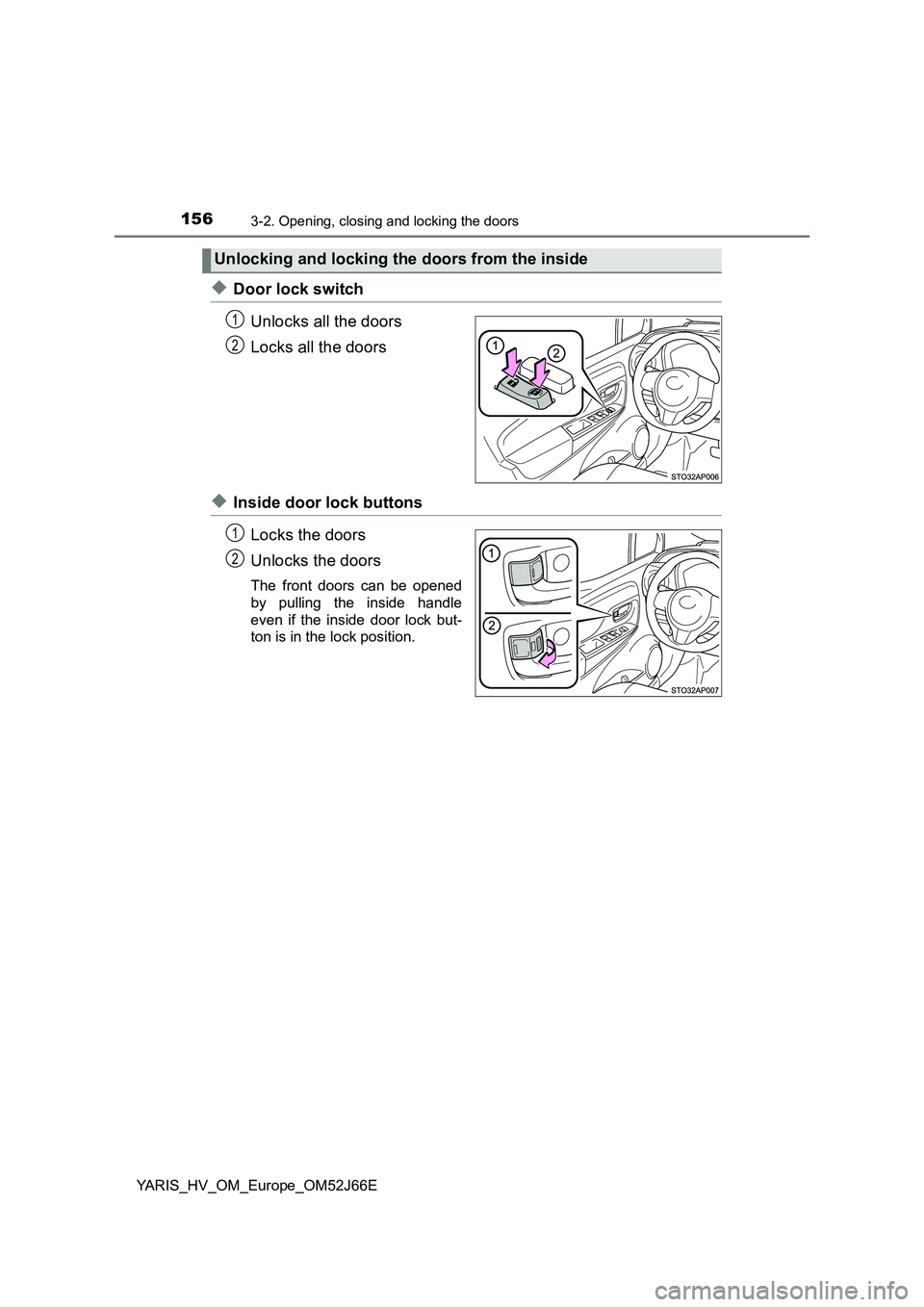
◆Door lock switch
Unlocks all the doors
Locks all the doors
◆Inside door lock buttons
Locks the doors
Unlocks the doors
The front doors can be opened
by pulling the inside handle
even if the inside door lock but-
ton is in the lock position.
Unlocking and locking the doors from the inside
1
2
1
2
Page 157 of 632
1573-2. Opening, closing and locking the doors
3
Operation of each component
YARIS_HV_OM_Europe_OM52J66E
Move the inside lock button to the lock position.
Close the door while pulling the door handle.
Vehicles without a smart entry & start system
The door cannot be locked if the key is in the power switch.
Vehicles with a smart entry & start system
The door cannot be locked if the power switch is in ACCESSORY or
ON mode, or the electronic key is left inside the vehicle. However, the
key may not be detected correctly and the door may be locked.
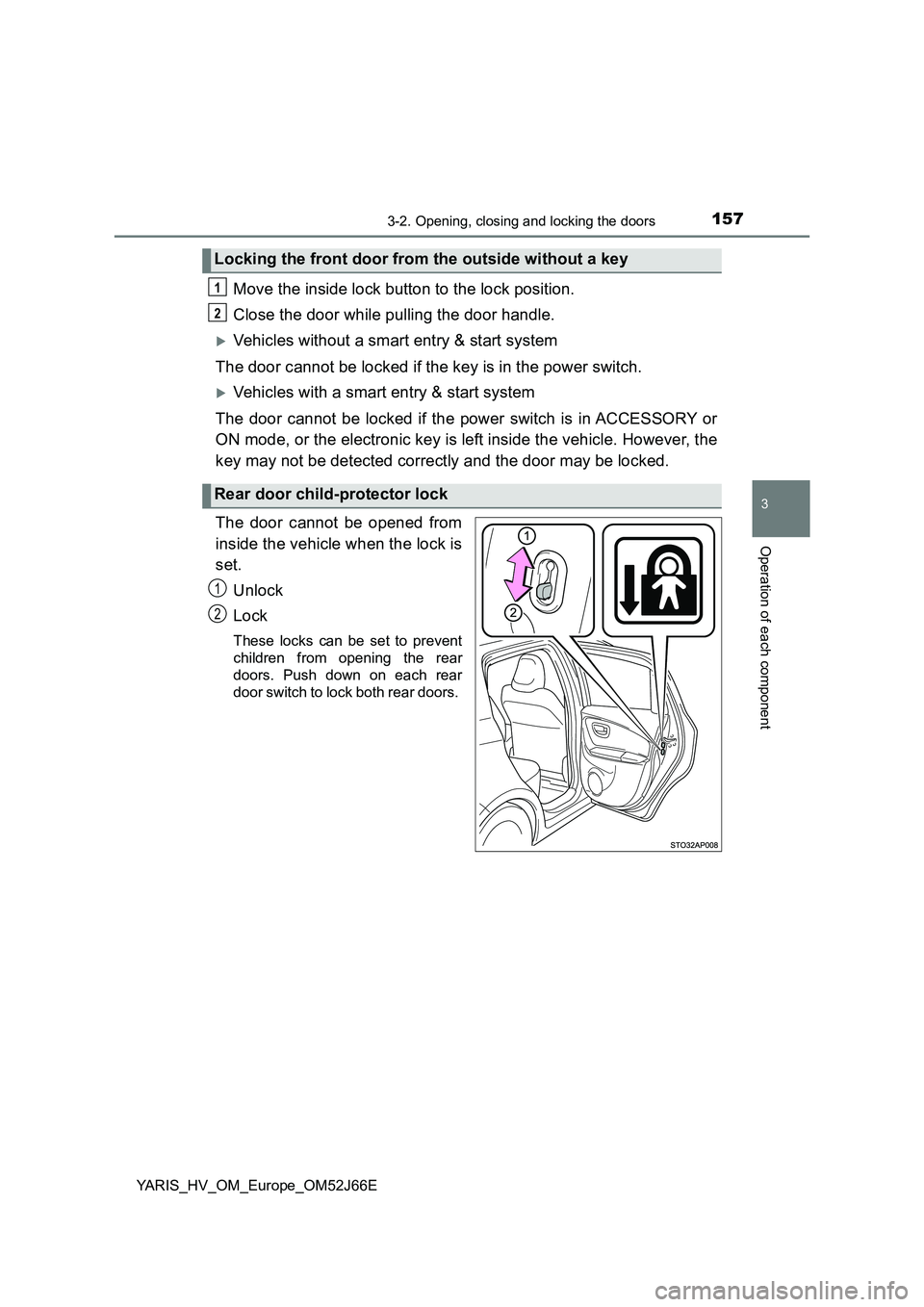
The door cannot be opened from
inside the vehicle when the lock is
set.
Unlock
Lock
These locks can be set to prevent
children from opening the rear
doors. Push down on each rear
door switch to lock both rear doors.
Locking the front door from the outside without a key
Rear door child-protector lock
1
2
1
2