display TOYOTA YARIS 2018 Service Manual
[x] Cancel search | Manufacturer: TOYOTA, Model Year: 2018, Model line: YARIS, Model: TOYOTA YARIS 2018Pages: 632, PDF Size: 44.1 MB
Page 158 of 632
1583-2. Opening, closing and locking the doors
YARIS_HV_OM_Europe_OM52J66E
■Open door warning buzzer
If a door or the back door is not fully closed, a buzzer will sound when the
vehicle speed reaches 5 km/h (3 mph).
Vehicles with color display only: T he open door(s) or back door is indicated
on the multi-information display.
■ Conditions affecting the operation
Vehicles without a smart entry & start system
P. 143
Vehicles with a smart entry & start system
P. 168
■ If the smart entry & start system has been deactivated in a customized
setting (vehicles with a smart entry & start system)
Use the wireless remote control or mechanical key. ( P. 153, 573)
WARNING
■To prevent an accident
Observe the following precautions while driving the vehicle.
Failure to do so may result in a door opening and an occupant falling out,
resulting in death or serious injury.
● Always use a seat belt.
● Ensure that all the doors are properly closed.
● Do not pull the inside handle of the doors while driving.
The doors may be opened and the passengers are thrown out of the vehi-
cle and it may result in serious injury or death.
Be especially careful for the front doors, as the doors may be opened
even if the inside lock buttons are in locked position.
● Set the rear door child-protector locks when children are seated in the rear
seats.
Page 161 of 632
1613-2. Opening, closing and locking the doors
3
Operation of each component
YARIS_HV_OM_Europe_OM52J66E
■Operation signals (vehicles with an entry function or wireless remote
control)
The emergency flashers flash to indicate that the doors have been locked/
unlocked. (Locked: once; Unlocked: twice)
■ Open door warning buzzer
If a door or the back door is not fully closed, a buzzer will sound when the
vehicle speed reaches 5 km/h (3 mph).
Vehicles with color display only: T he open door(s) or back door is indicated
on the multi-information display.
■ Luggage compartment light
The luggage compartment lights turn on when the back door is opened.
WARNING
■ Caution while driving
● Keep the back door closed while driving.
If the back door is left open, it may hit near-by objects while driving or lug-
gage may be unexpectedly thrown out, causing an accident.
In addition, exhaust gases may enter the vehicle, causing death or a seri-
ous health hazard. Make sure to close the back door before driving.
● Before driving the vehicle, make sure that the back door is fully closed. If
the back door is not fully closed, it may open unexpectedly while driving,
causing an accident.
● Never let anyone sit in the luggage compartment. In the event of sudden
braking or a collision, they are susceptible to death or serious injury.
■ When children are in the vehicle
Observe the following precautions.
Failure to do so may result in death or serious injury.
● Do not allow children to play in the luggage compartment.
If a child is accidentally locked in the luggage compartment, they could
have heat exhaustion or other injuries.
● Do not allow a child to open or close the back door.
Doing so may cause the back door to move unexpectedly, or cause the
child’s hands, head, or neck to be caught by the closing back door.
Page 165 of 632
1653-2. Opening, closing and locking the doors
3
Operation of each component
YARIS_HV_OM_Europe_OM52J66E
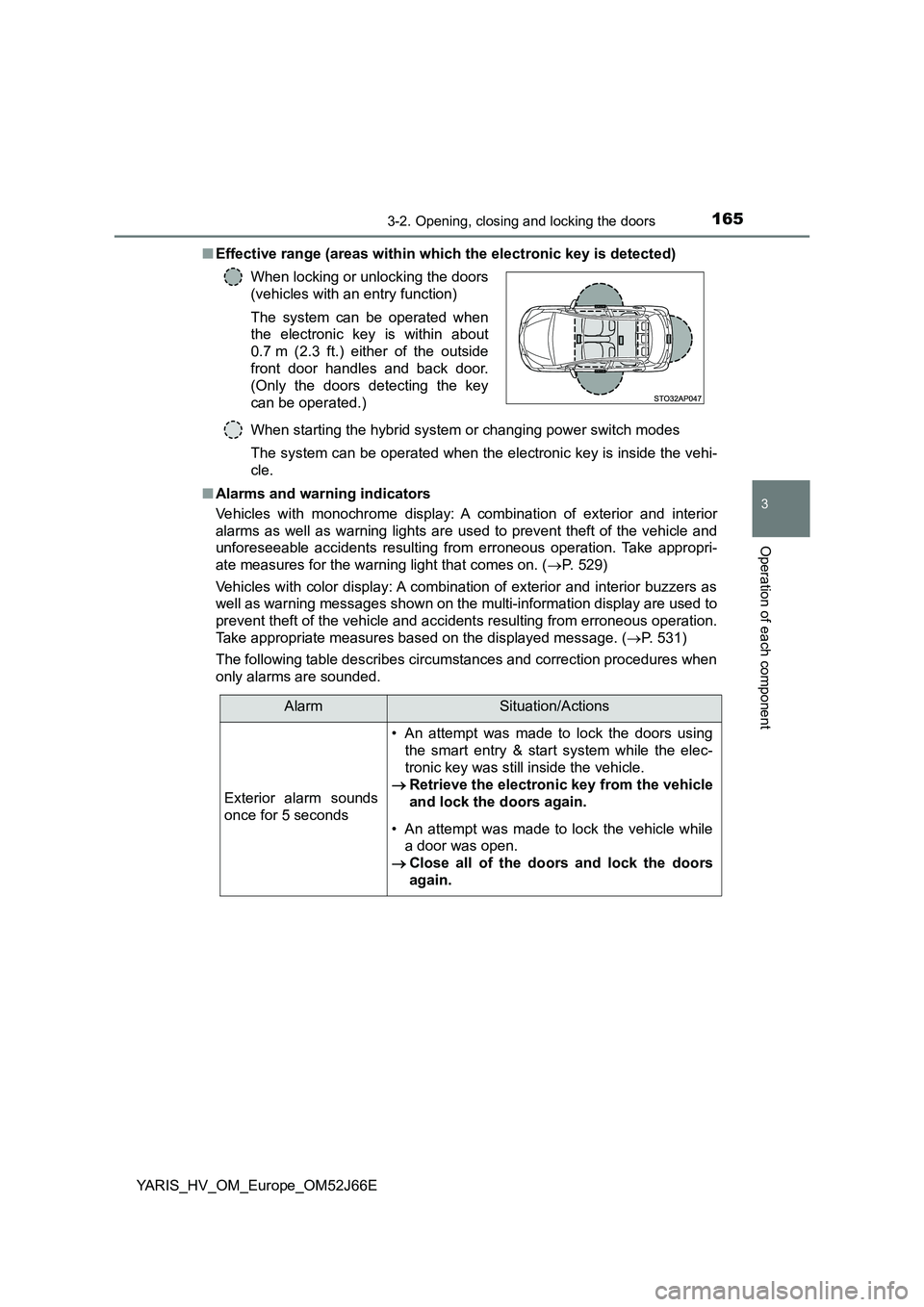
■ Effective range (areas within which the electronic key is detected)
When starting the hybrid system or changing power switch modes
The system can be operated when the electronic key is inside the vehi-
cle.
■ Alarms and warning indicators
Vehicles with monochrome display: A combination of exterior and interior
alarms as well as warning lights are used to prevent theft of the vehicle and
unforeseeable accidents resulting from erroneous operation. Take appropri-
ate measures for the warning light that comes on. ( P. 529)
Vehicles with color display: A combination of exterior and interior buzzers as
well as warning messages shown on the multi-information display are used to
prevent theft of the vehicle and accidents resulting from erroneous operation.
Take appropriate measures based on the displayed message. ( P. 531)
The following table describes circumstances and correction procedures when
only alarms are sounded.
When locking or unlocking the doors
(vehicles with an entry function)
The system can be operated when
the electronic key is within about
0.7 m (2.3 ft.) either of the outside
front door handles and back door.
(Only the doors detecting the key
can be operated.)
AlarmSituation/Actions
Exterior alarm sounds
once for 5 seconds
• An attempt was made to lock the doors using
the smart entry & start system while the elec-
tronic key was still inside the vehicle.
Retrieve the electronic key from the vehicle
and lock the doors again.
• An attempt was made to lock the vehicle while
a door was open.
Close all of the doors and lock the doors
again.
Page 166 of 632
1663-2. Opening, closing and locking the doors
YARIS_HV_OM_Europe_OM52J66E
*: Vehicles with monochrome display
■ When the smart entry & start system indicator flashes in yellow (vehicles
with monochrome display) or “Check entry & start system.” is displayed
on the multi-information displ ay (vehicles with color display)
The system may be malfunctioning. Have the vehicle inspected by any autho-
rized Toyota retailer or Toyota authorized repairer, or any reliable repairer
immediately.
Interior alarm pings
once and exterior alarm
sounds once for 5 sec-
onds
An attempt was made to lock either front door by
opening a door and putting the inside lock button
into the lock position, then closing the door by
pulling on the outside door handle with the elec-
tronic key still inside the vehicle.
Retrieve the electronic key from the vehicle
and lock the doors again.
Interior alarm pings
once and exterior alarm
sounds once for 5 sec-
onds (on some models)
An attempt was made to lock the doors other
than using the smart entry & start system while
the electronic key was still inside the vehicle.
Retrieve the electronic key from the vehicle
and lock the doors again.
Interior alarm sounds
continuously
The power switch was turned to ACCESSORY
mode while the driver’s door was open (or the
driver’s door was opened while the power switch
was in ACCESSORY mode).
Turn the power switch off and close the
driver’s door.
Interior alarm sounds
continuously*
The driver’s door was opened while any shift
position other than P was selected without turn-
ing off the power switch.
Shift the shift lever to P.
AlarmSituation/Actions
Page 170 of 632
1703-2. Opening, closing and locking the doors
YARIS_HV_OM_Europe_OM52J66E
● When the lock operation is performed using the lock sensor, recognition sig-
nals will be shown up to two consecutive times. After this, no recognition
signals will be given.
● If the door handle becomes wet while the electronic key is within the effec-
tive range, the door may lock and unlock repeatedly. In that case, follow the
following correction procedures to wash the vehicle:
• Place the electronic key in a location 2 m (6 ft.) or more away from the
vehicle. (Take care to ensure that the key is not stolen.)
● Vehicles with monochrome display: If the electronic key is inside the vehicle
and a door handle becomes wet during a car wash, a buzzer will sound out-
side the vehicle. To turn off the alarm, lock all the doors.
● Vehicles with color display: If the electronic key is inside the vehicle and a
door handle becomes wet during a car wash, a message may be shown on
the multi-information display and a buzzer will sound outside the vehicle. To
turn off the alarm, lock all the doors.
● The lock sensor may not work properly if it comes into contact with ice,
snow, mud, etc. Clean the lock sensor and attempt to operate it again.
● A sudden handle operation or a handle operation immediately after entering
the effective range may prevent the doors from being unlocked. Touch the
door unlock sensor and check that the doors are unlocked before pulling the
door handle again.
● If there is another electronic key in the detection area, it may take slightly
longer to unlock the doors after the door handle is gripped.
■ When the vehicle is not driven for extended periods
● To prevent theft of the vehicle, do not leave the electronic key within 2 m
(6 ft.) of the vehicle.
● The smart entry & start system can be deactivated in advance. (P. 603)
Page 220 of 632
2204-2. Driving procedures
YARIS_HV_OM_Europe_OM52J66E
Power (ignition) switch (vehicles with a
smart entry & start system)
Check that the parking brake is set.
Check that the shift lever is in P.
Vehicles with monochrome display
Firmly depress the brake pedal.
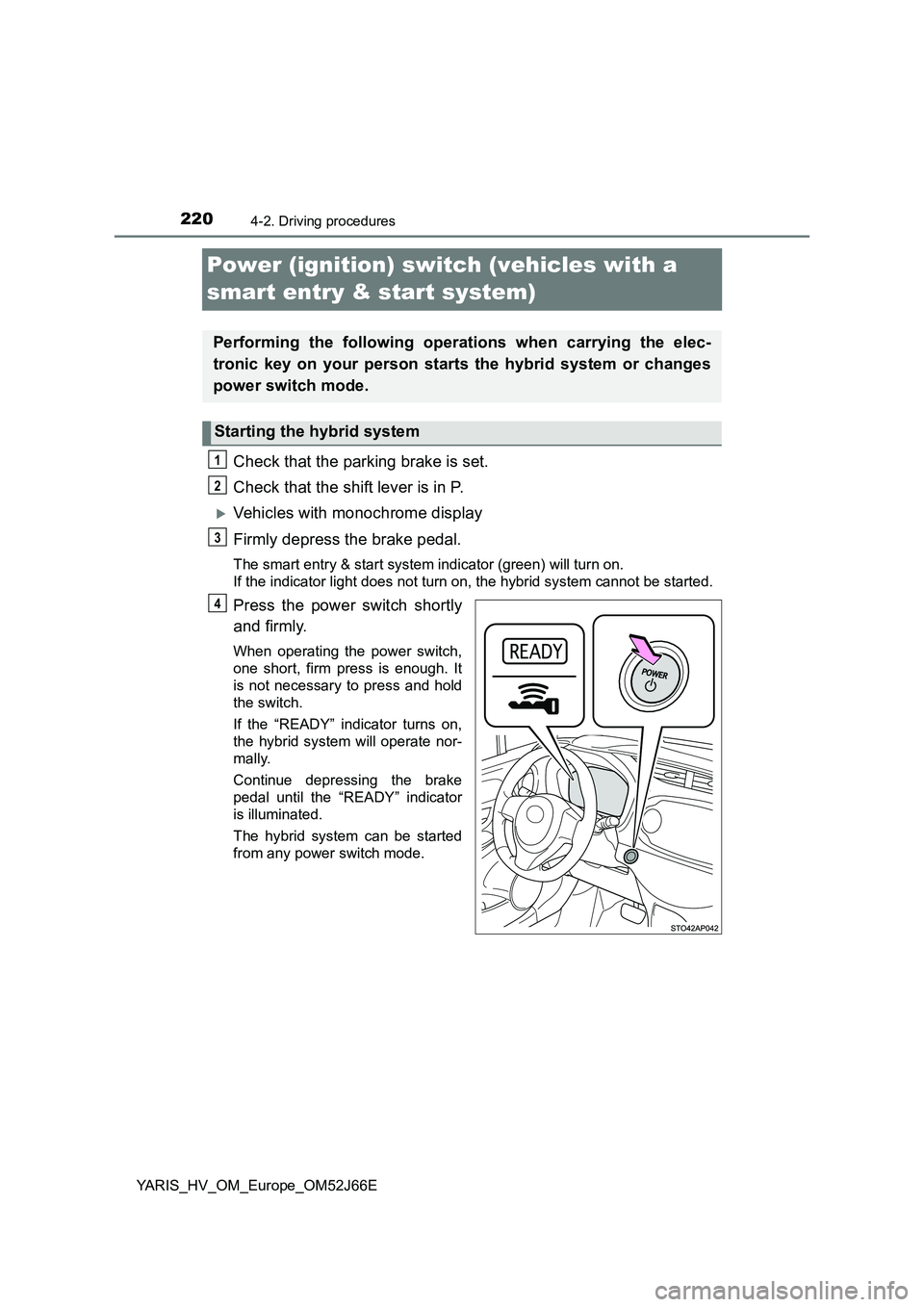
The smart entry & start system indicator (green) will turn on.
If the indicator light does not turn on, the hybrid system cannot be started.
Press the power switch shortly
and firmly.
When operating the power switch,
one short, firm press is enough. It
is not necessary to press and hold
the switch.
If the “READY” indicator turns on,
the hybrid system will operate nor-
mally.
Continue depressing the brake
pedal until the “READY” indicator
is illuminated.
The hybrid system can be started
from any power switch mode.
Performing the following operations when carrying the elec-
tronic key on your person starts the hybrid system or changes
power switch mode.
Starting the hybrid system
1
2
3
4
Page 221 of 632
2214-2. Driving procedures
4
Driving
YARIS_HV_OM_Europe_OM52J66E
Vehicles with color display
Firmly depress the brake pedal.
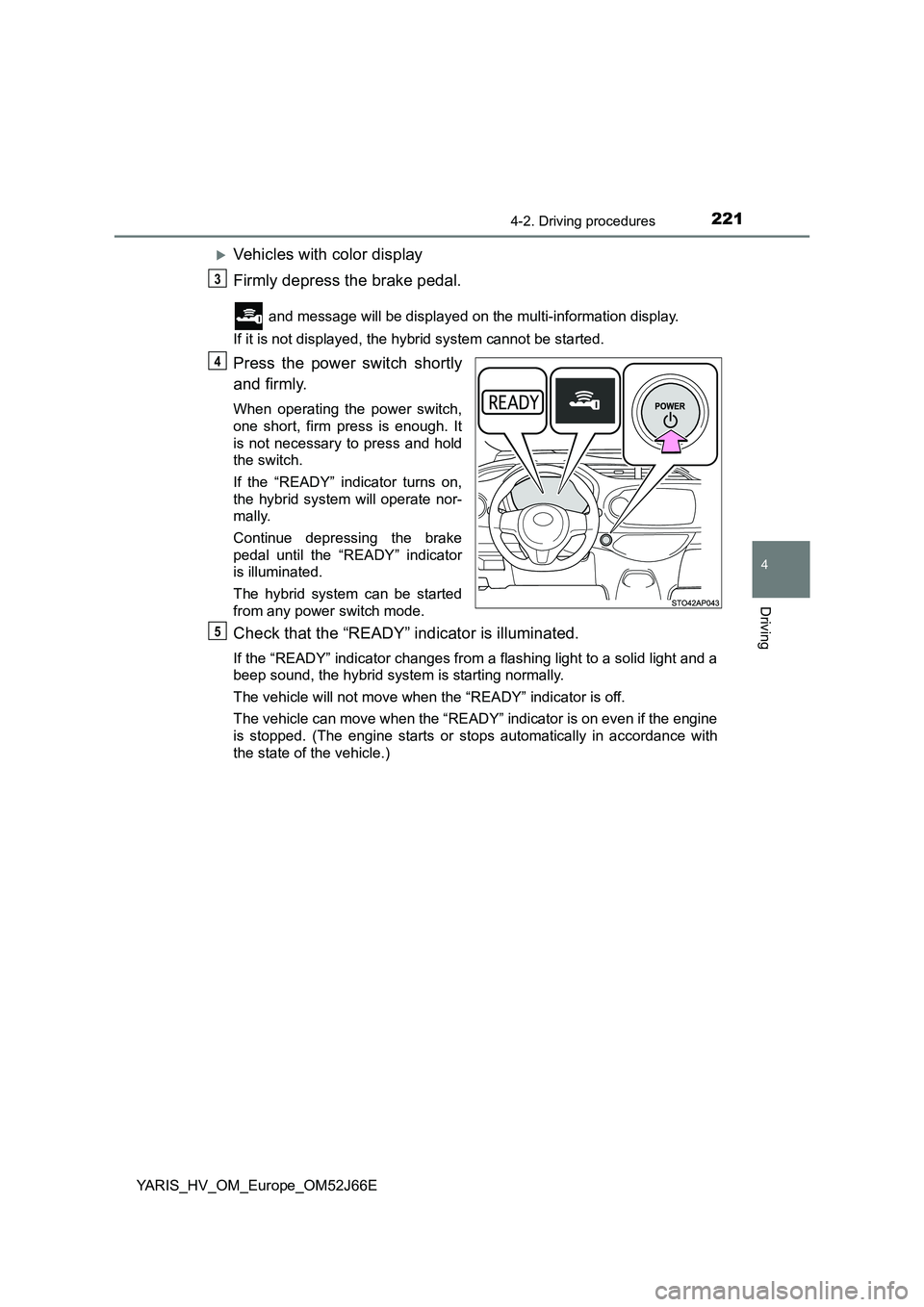
and message will be displayed on the multi-information display.
If it is not displayed, the hybrid system cannot be started.
Press the power switch shortly
and firmly.
When operating the power switch,
one short, firm press is enough. It
is not necessary to press and hold
the switch.
If the “READY” indicator turns on,
the hybrid system will operate nor-
mally.
Continue depressing the brake
pedal until the “READY” indicator
is illuminated.
The hybrid system can be started
from any power switch mode.
Check that the “READY” indicator is illuminated.
If the “READY” indicator changes from a flashing light to a solid light and a
beep sound, the hybrid system is starting normally.
The vehicle will not move when the “READY” indicator is off.
The vehicle can move when the “READY” indicator is on even if the engine
is stopped. (The engine starts or stops automatically in accordance with
the state of the vehicle.)
3
4
5
Page 222 of 632
2224-2. Driving procedures
YARIS_HV_OM_Europe_OM52J66E
Stop the vehicle.
Set the parking brake ( P. 237), and shift the shift lever to P.
Press the power switch.
Vehicles with monochrome display: Release the brake pedal and
check that the smart entry & start system indicator (green) is off.
Vehicles with color display: Release the brake pedal and check that
“Power on” on the multi-information display is off.
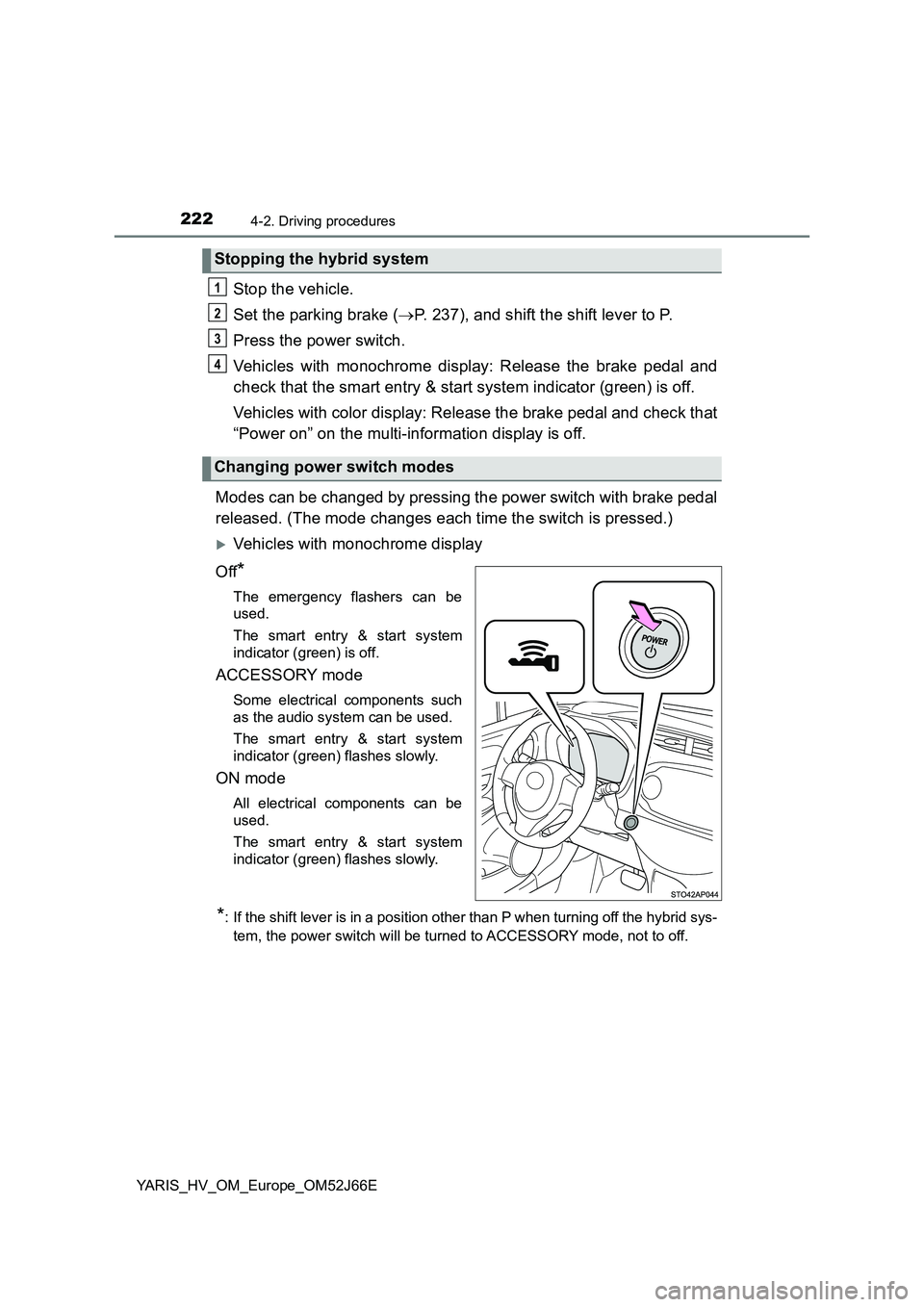
Modes can be changed by pressing the power switch with brake pedal
released. (The mode changes each time the switch is pressed.)
Vehicles with monochrome display
Off*
The emergency flashers can be
used.
The smart entry & start system
indicator (green) is off.
ACCESSORY mode
Some electrical components such
as the audio system can be used.
The smart entry & start system
indicator (green) flashes slowly.
ON mode
All electrical components can be
used.
The smart entry & start system
indicator (green) flashes slowly.
*: If the shift lever is in a position other than P when turning off the hybrid sys-
tem, the power switch will be turned to ACCESSORY mode, not to off.
Stopping the hybrid system
Changing power switch modes
1
2
3
4
Page 223 of 632
2234-2. Driving procedures
4
Driving
YARIS_HV_OM_Europe_OM52J66E
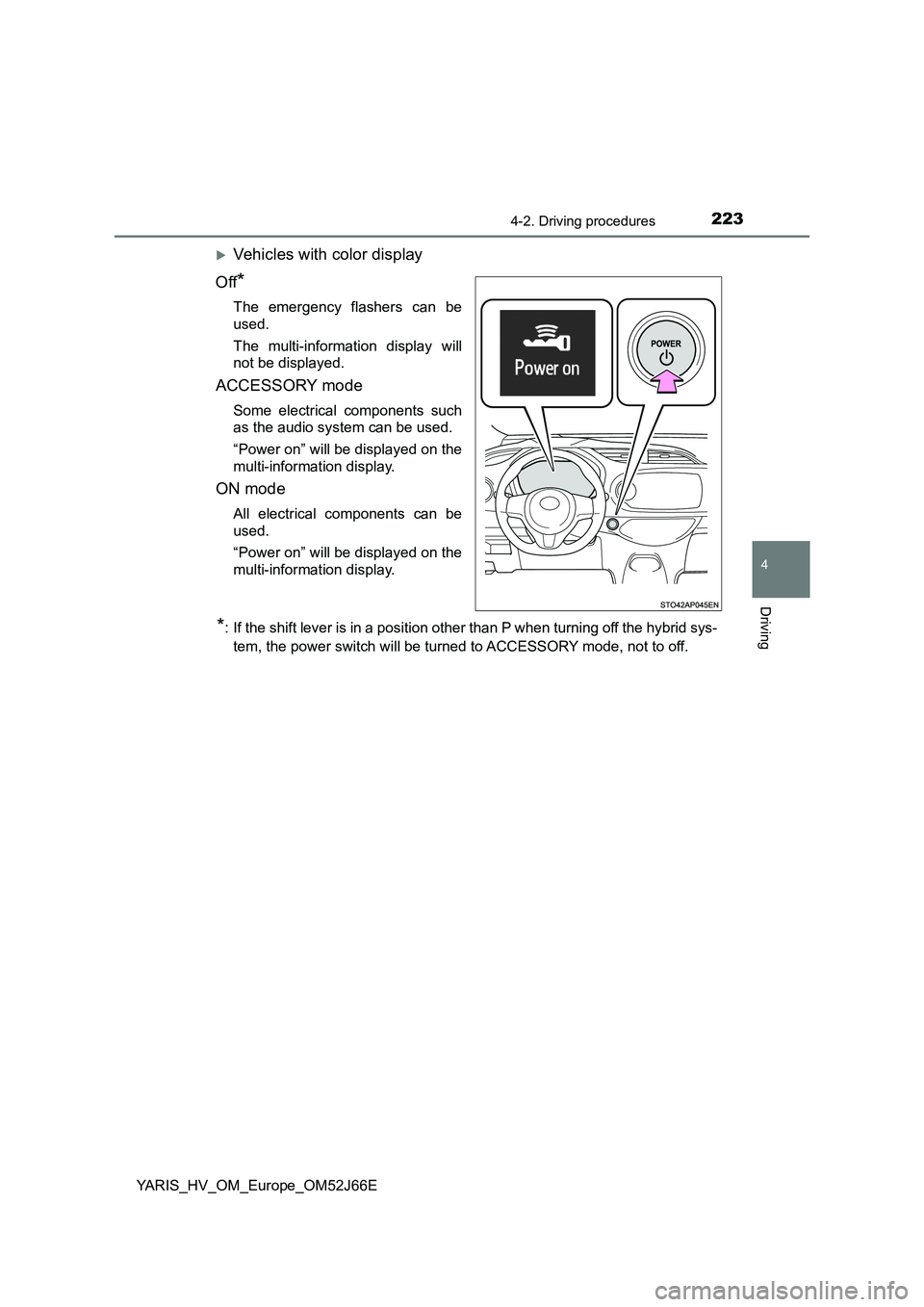
Vehicles with color display
Off*
The emergency flashers can be
used.
The multi-information display will
not be displayed.
ACCESSORY mode
Some electrical components such
as the audio system can be used.
“Power on” will be displayed on the
multi-information display.
ON mode
All electrical components can be
used.
“Power on” will be displayed on the
multi-information display.
*: If the shift lever is in a position other than P when turning off the hybrid sys-
tem, the power switch will be turned to ACCESSORY mode, not to off.
Page 224 of 632
2244-2. Driving procedures
YARIS_HV_OM_Europe_OM52J66E
If the hybrid system is stopped with the shift lever in a position other
than P, the power switch will not be turned off but instead be turned to
ACCESSORY mode. Perform the following procedure to turn the
switch off:
Check that the parking brake is set.
Shift the shift lever to P.
Vehicles with monochrome display
Check that the smart entry & start system indicator (green) flashes
slowly and then press the power switch once.
Check that the smart entry & start system indicator (green) is off.
Vehicles with color display
Check that “Power on” and “Turn power OFF.” are displayed alter-
nately on the multi-information display and then press the power
switch once.
Check that “Power on” and “Turn power OFF.” on the multi-informa-
tion display are off.
When stopping the hybrid system with the shift lever in a posi-
tion other than P
1
2
3
4
3
4