ECO mode TOYOTA YARIS 2018 Owners Manual
[x] Cancel search | Manufacturer: TOYOTA, Model Year: 2018, Model line: YARIS, Model: TOYOTA YARIS 2018Pages: 632, PDF Size: 44.1 MB
Page 8 of 632
8
YARIS_HV_OM_Europe_OM52J66E
For your information
Please note that this manual applies to all models and explains all equipment,
including options. Therefore, you may find some explanations for equipment
not installed on your vehicle.
All specifications provided in this manual are current at the time of printing.
However, because of the Toyota policy of continual product improvement, we
reserve the right to make changes at any time without notice.
Depending on specifications, the vehicle shown in the illustrations may differ
from your vehicle in terms of equipment.
Both genuine Toyota and a wide variety of other spare parts and accessories
for Toyota vehicles are currently avai lable in the market. Should it be deter-
mined that any of the genuine Toyota parts or accessories supplied with the
vehicle need to be replaced, Toyota recommends that genuine Toyota parts
or accessories, be used to replace them. Other parts or accessories of
matching quality can also be used. Toyota cannot accept any liability or guar-
antee spare parts and accessories which are not genuine Toyota products,
nor for replacement or installation involving such parts. In addition, damage
or performance problems resulting from the use of non-genuine Toyota spare
parts or accessories may not be covered under warranty.
Main Owner’s Manual
Accessories, spare parts and modification of your Toyota
Page 20 of 632
20Pictorial index
YARIS_HV_OM_Europe_OM52J66E
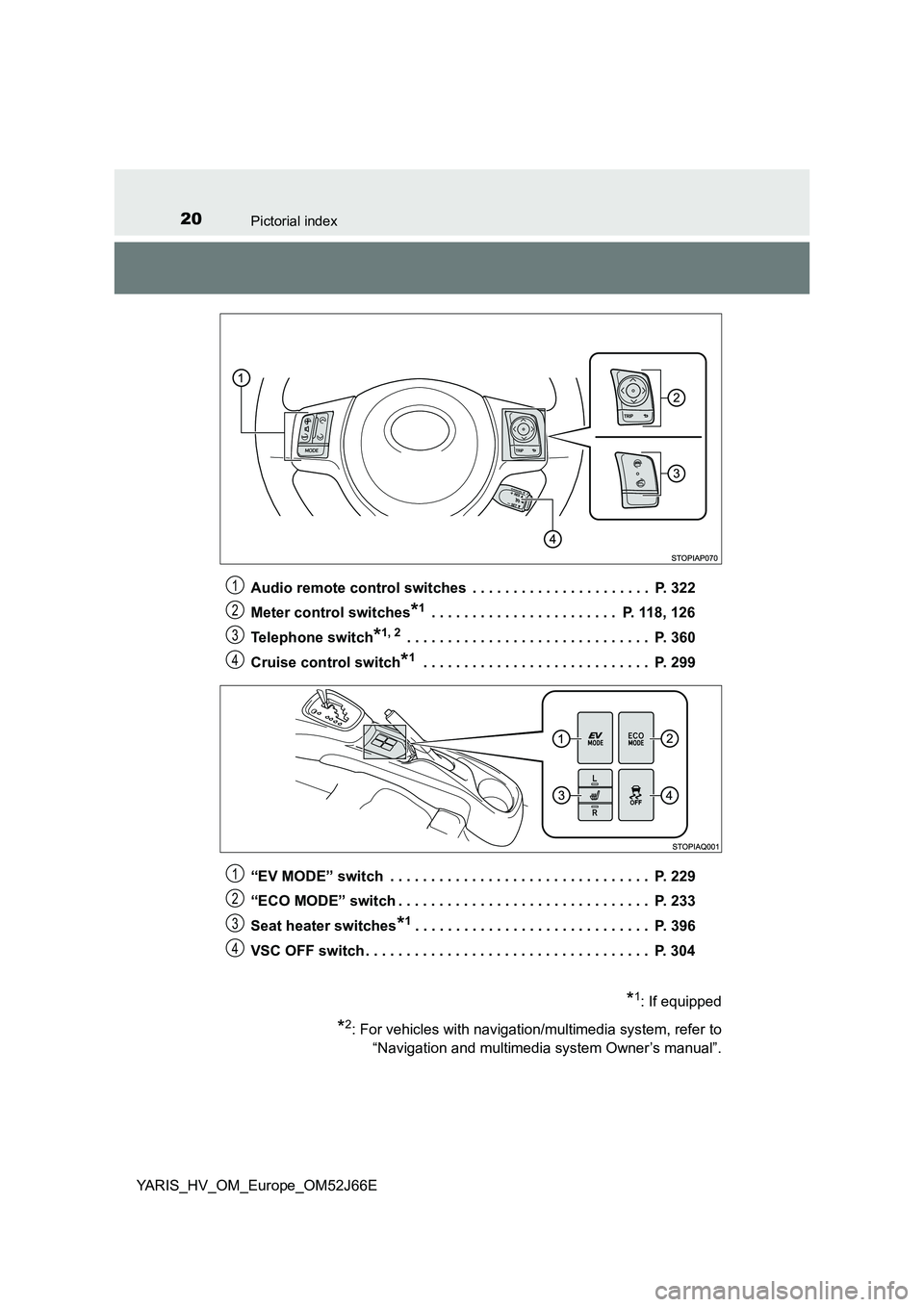
Audio remote control switches . . . . . . . . . . . . . . . . . . . . . . P. 322
Meter control switches*1 . . . . . . . . . . . . . . . . . . . . . . . P. 118, 126
Telephone switch*1, 2 . . . . . . . . . . . . . . . . . . . . . . . . . . . . . . P. 360
Cruise control switch*1 . . . . . . . . . . . . . . . . . . . . . . . . . . . . P. 299
“EV MODE” switch . . . . . . . . . . . . . . . . . . . . . . . . . . . . . . . . P. 229
“ECO MODE” switch . . . . . . . . . . . . . . . . . . . . . . . . . . . . . . . P. 233
Seat heater switches*1. . . . . . . . . . . . . . . . . . . . . . . . . . . . . P. 396
VSC OFF switch . . . . . . . . . . . . . . . . . . . . . . . . . . . . . . . . . . . P. 304
1
2
3
4
*1: If equipped
*2: For vehicles with navigation/multimedia system, refer to
“Navigation and multimedia system Owner’s manual”.
1
2
3
4
Page 27 of 632
27Pictorial index
YARIS_HV_OM_Europe_OM52J66E
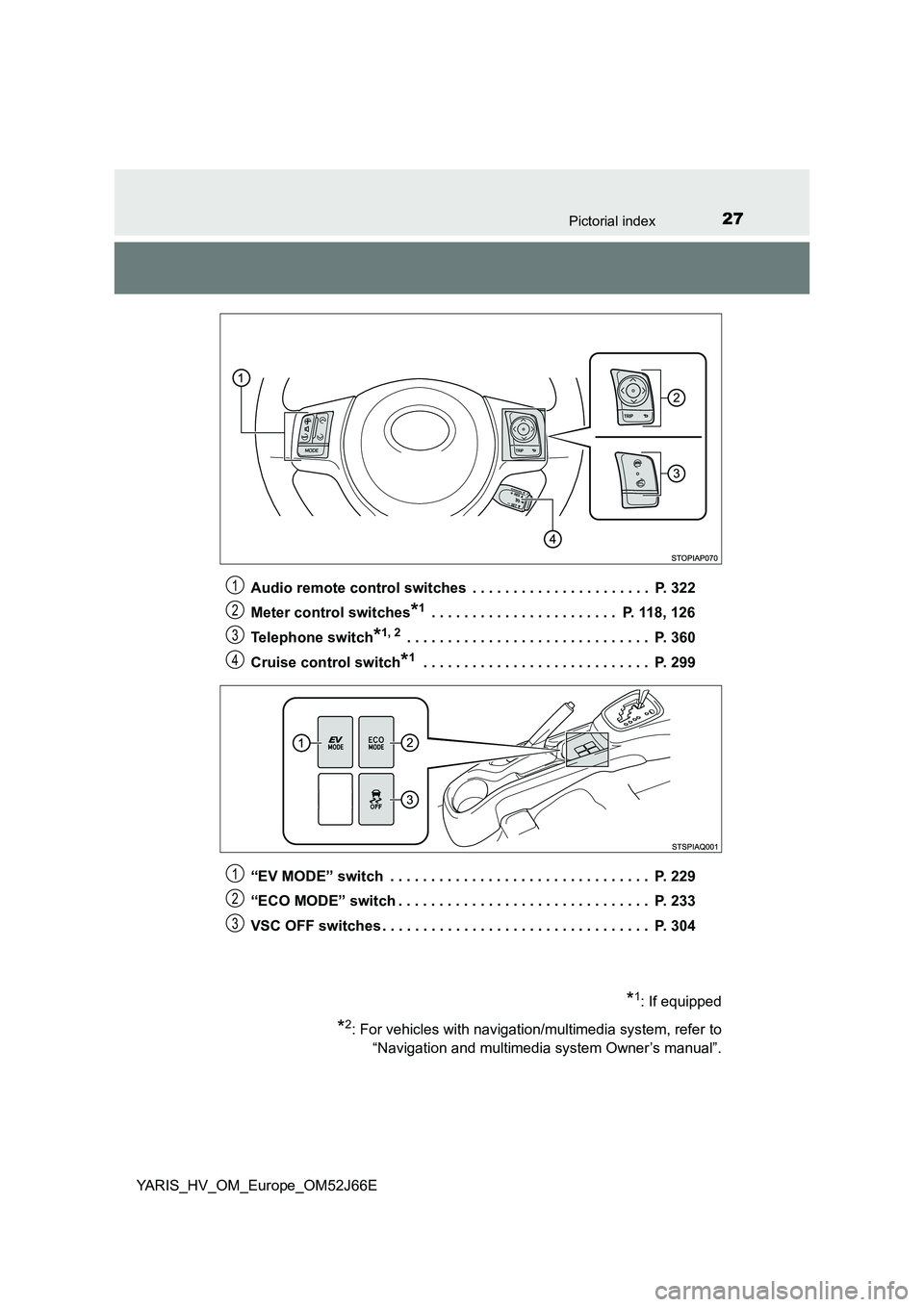
Audio remote control switches . . . . . . . . . . . . . . . . . . . . . . P. 322
Meter control switches*1 . . . . . . . . . . . . . . . . . . . . . . . P. 118, 126
Telephone switch*1, 2 . . . . . . . . . . . . . . . . . . . . . . . . . . . . . . P. 360
Cruise control switch*1 . . . . . . . . . . . . . . . . . . . . . . . . . . . . P. 299
“EV MODE” switch . . . . . . . . . . . . . . . . . . . . . . . . . . . . . . . . P. 229
“ECO MODE” switch . . . . . . . . . . . . . . . . . . . . . . . . . . . . . . . P. 233
VSC OFF switches . . . . . . . . . . . . . . . . . . . . . . . . . . . . . . . . . P. 304
1
2
3
4
*1: If equipped
*2: For vehicles with navigation/multimedia system, refer to
“Navigation and multimedia system Owner’s manual”.
1
2
3
Page 33 of 632
331-1. For safe use
1
For safety and security
YARIS_HV_OM_Europe_OM52J66E
WARNING
Observe the following precautions.
Failure to do so may cause the driver’s floor mat to slip, possibly interfering
with the pedals while driving. An unexpectedly high speed may result or it may
become difficult to stop the vehicle. This could lead to an accident, resulting in
death or serious injury.
■ When installing the driver’s floor mat
● Do not use floor mats designed for other models or different model year
vehicles, even if they are Toyota Genuine floor mats.
● Only use floor mats designed for the driver’s seat.
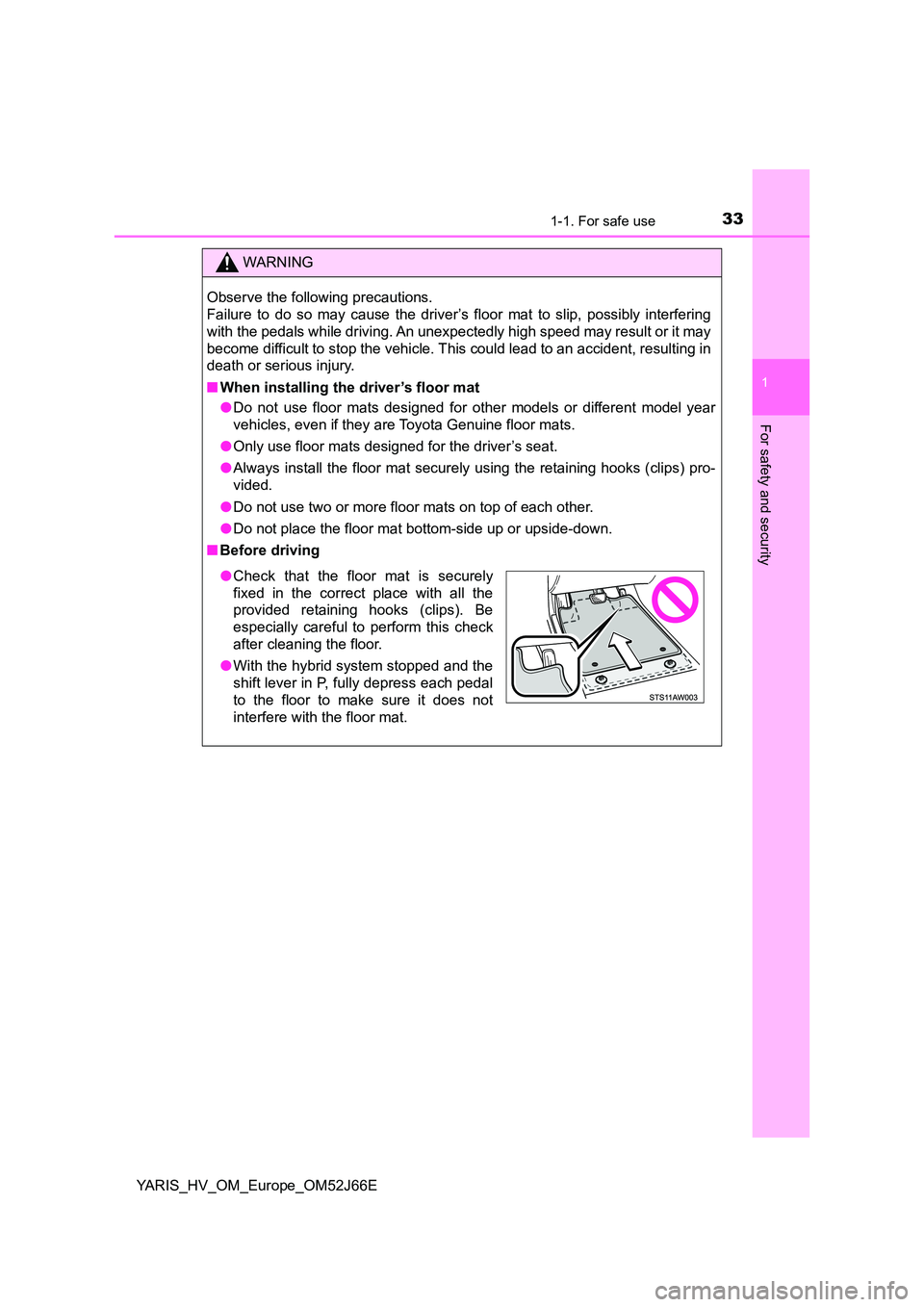
● Always install the floor mat securely using the retaining hooks (clips) pro-
vided.
● Do not use two or more floor mats on top of each other.
● Do not place the floor mat bottom-side up or upside-down.
■ Before driving
●Check that the floor mat is securely
fixed in the correct place with all the
provided retaining hooks (clips). Be
especially careful to perform this check
after cleaning the floor.
● With the hybrid system stopped and the
shift lever in P, fully depress each pedal
to the floor to make sure it does not
interfere with the floor mat.
Page 112 of 632
1122. Instrument cluster
YARIS_HV_OM_Europe_OM52J66E
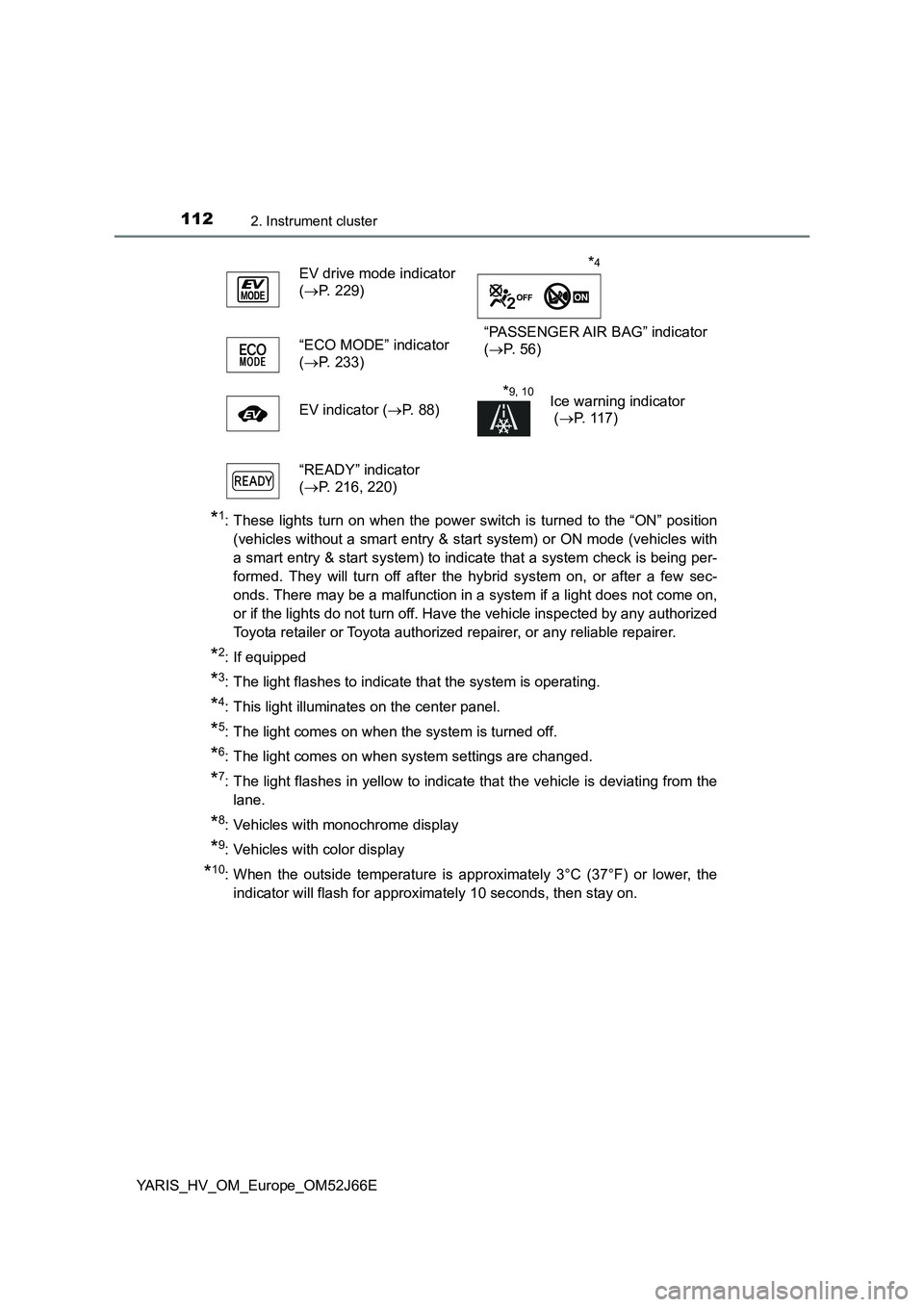
*1: These lights turn on when the power switch is turned to the “ON” position
(vehicles without a smart entry & start system) or ON mode (vehicles with
a smart entry & start system) to indicate that a system check is being per-
formed. They will turn off after the hybrid system on, or after a few sec-
onds. There may be a malfunction in a system if a light does not come on,
or if the lights do not turn off. Have the vehicle inspected by any authorized
Toyota retailer or Toyota authorized repairer, or any reliable repairer.
*2: If equipped
*3: The light flashes to indicate that the system is operating.
*4: This light illuminates on the center panel.
*5: The light comes on when the system is turned off.
*6: The light comes on when system settings are changed.
*7: The light flashes in yellow to indicate that the vehicle is deviating from the
lane.
*8: Vehicles with monochrome display
*9: Vehicles with color display
*10: When the outside temperature is approximately 3°C (37°F) or lower, the
indicator will flash for approximately 10 seconds, then stay on.
EV drive mode indicator
( P. 229)
“PASSENGER AIR BAG” indicator
( P. 5 6 ) “ECO MODE” indicator
( P. 233)
EV indicator ( P. 88)
*9, 10Ice warning indicator
( P. 117)
“READY” indicator
( P. 216, 220)
*4
Page 115 of 632
1152. Instrument cluster
2
Instrument cluster
YARIS_HV_OM_Europe_OM52J66E
The brightness of the instrument cluster lights (when the headlight
switch is on and the surrounding area is dark) can be adjusted.
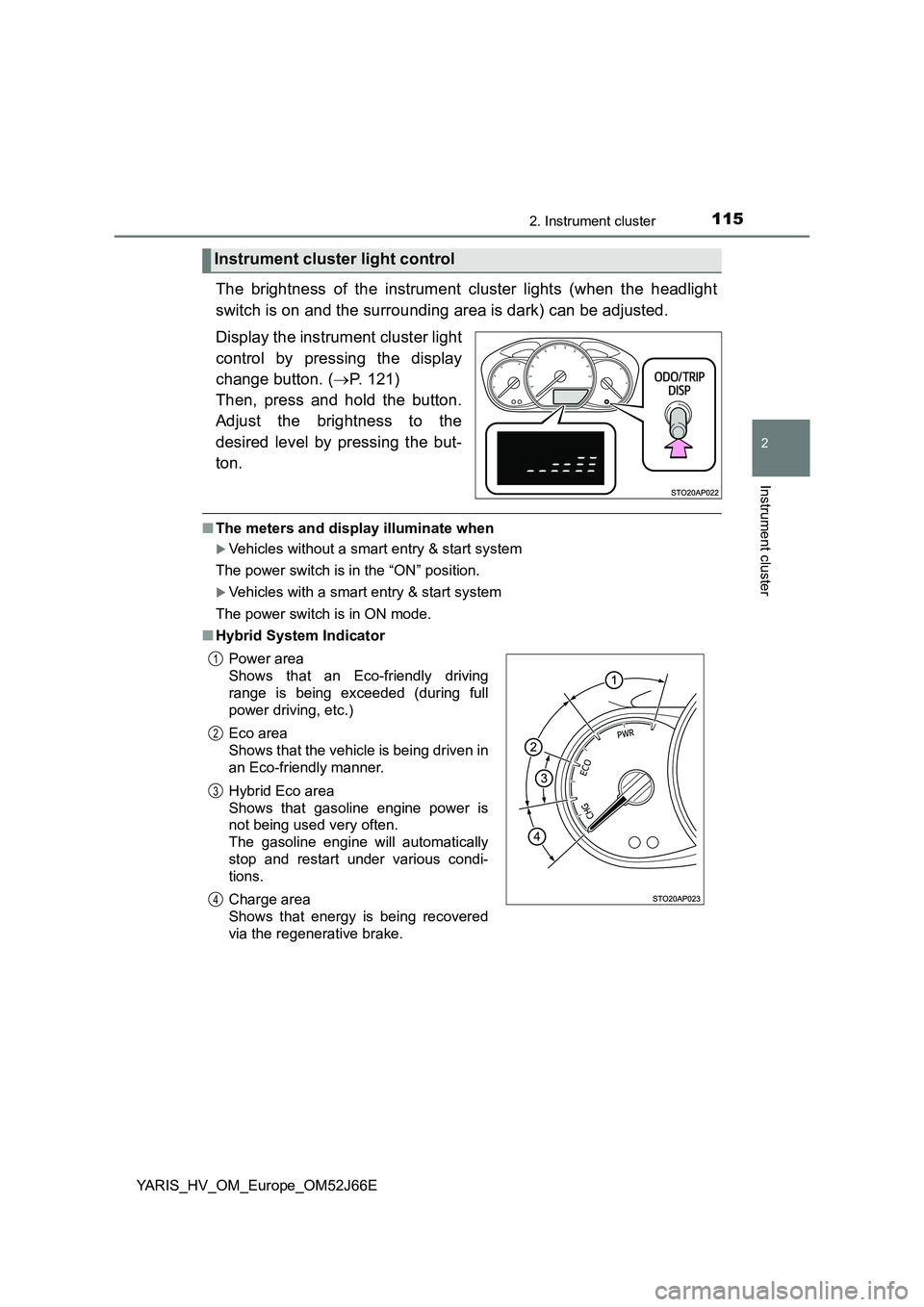
Display the instrument cluster light
control by pressing the display
change button. ( P. 121)
Then, press and hold the button.
Adjust the brightness to the
desired level by pressing the but-
ton.
■ The meters and display illuminate when
Vehicles without a smart entry & start system
The power switch is in the “ON” position.
Vehicles with a smart entry & start system
The power switch is in ON mode.
■ Hybrid System Indicator
Instrument cluster light control
Power area
Shows that an Eco-friendly driving
range is being exceeded (during full
power driving, etc.)
Eco area
Shows that the vehicle is being driven in
an Eco-friendly manner.
Hybrid Eco area
Shows that gasoline engine power is
not being used very often.
The gasoline engine will automatically
stop and restart under various condi-
tions.
Charge area
Shows that energy is being recovered
via the regenerative brake.
1
2
3
4
Page 119 of 632
1192. Instrument cluster
2
Instrument cluster
YARIS_HV_OM_Europe_OM52J66E
■The meters and display illuminate when
Vehicles without a smart entry & start system
The power switch is in the “ON” position.
Vehicles with a smart entry & start system
The power switch is in ON mode.
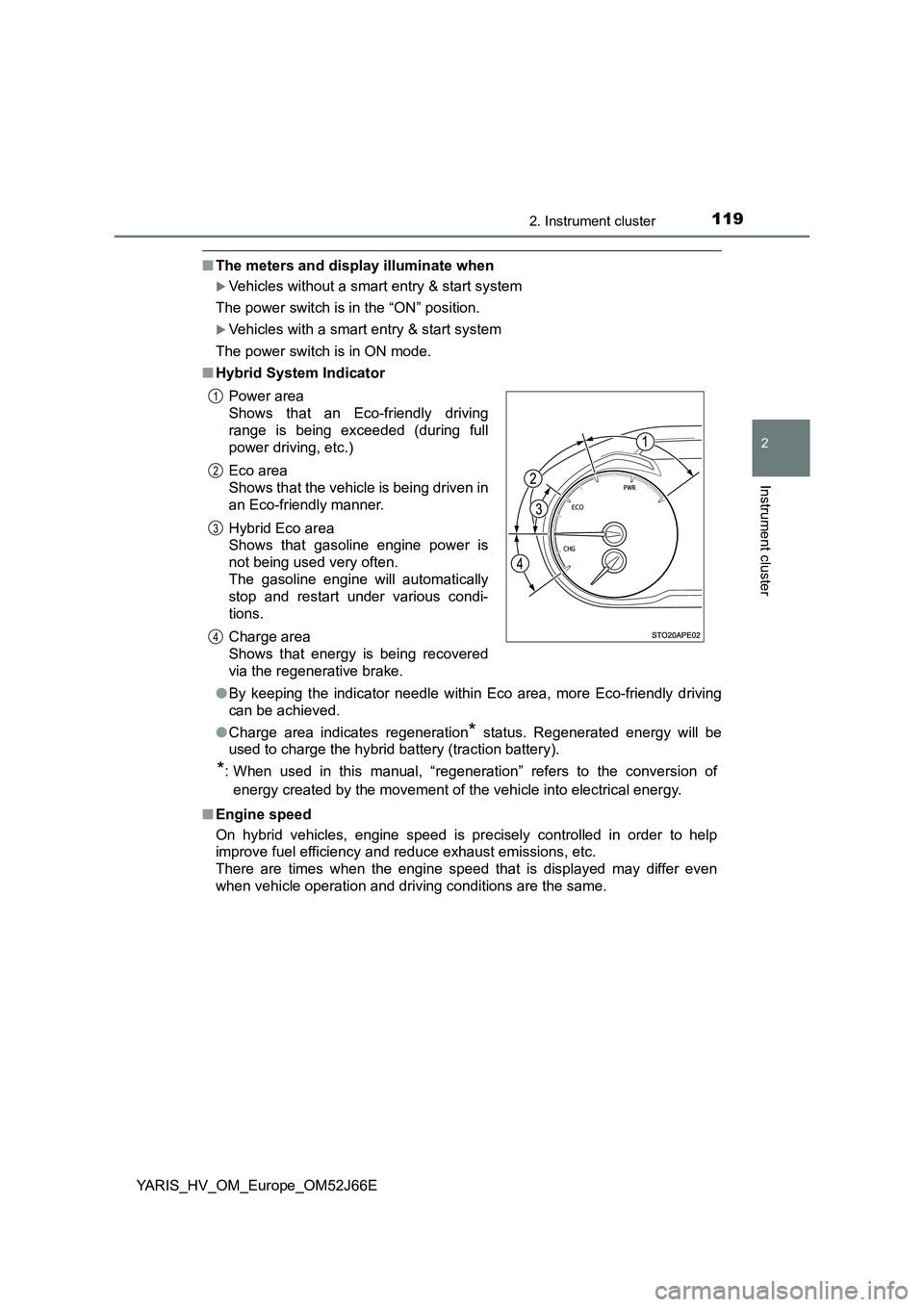
■ Hybrid System Indicator
● By keeping the indicator needle within Eco area, more Eco-friendly driving
can be achieved.
● Charge area indicates regeneration* status. Regenerated energy will be
used to charge the hybrid battery (traction battery).
*: When used in this manual, “regeneration” refers to the conversion of
energy created by the movement of the vehicle into electrical energy.
■ Engine speed
On hybrid vehicles, engine speed is precisely controlled in order to help
improve fuel efficiency and reduce exhaust emissions, etc.
There are times when the engine speed that is displayed may differ even
when vehicle operation and driving conditions are the same.
Power area
Shows that an Eco-friendly driving
range is being exceeded (during full
power driving, etc.)
Eco area
Shows that the vehicle is being driven in
an Eco-friendly manner.
Hybrid Eco area
Shows that gasoline engine power is
not being used very often.
The gasoline engine will automatically
stop and restart under various condi-
tions.
Charge area
Shows that energy is being recovered
via the regenerative brake.
1
2
3
4
Page 144 of 632
1443-1. Key information
YARIS_HV_OM_Europe_OM52J66E
■ Key battery depletion
Vehicles without a smart entry & start system
If the wireless remote control function does not operate, the battery may be
depleted. Replace the battery when necessary. ( P. 477)
Vehicles with a smart entry & start system
● The standard battery life is 1 to 2 years.
● If the battery becomes low, an alarm will sound in the cabin when the hybrid
system stops. ( P. 477)
● As the electronic key always receives radio waves, the battery will become
depleted even if the electronic key is not used. The following symptoms indi-
cate that the electronic key battery may be depleted. Replace the battery
when necessary. ( P. 477)
• The smart entry & start system or the wireless remote control does not
operate.
• The detection area becomes smaller.
• The LED indicator on the key surface does not turn on.
● To avoid serious deterioration, do not leave the electronic key within 1 m
(3 ft.) of the following electrical appliances that produce a magnetic field:
•TVs
• Personal computers
• Cellular phones, cordless phones and battery chargers
• Recharging cellular phones or cordless phones
• Induction cookers
• Table lamps
■ Replacing the battery
P. 477
■ Confirmation of the registered key number (vehicles with a smart entry &
start system)
The number of keys already registered to the vehicle can be confirmed. Ask
any authorized Toyota retailer or Toyota authorized repairer, or any reliable
repairer for details.
■ If a wrong key is used
On some models, the key cylinder rotates freely to isolate inside mechanism.
■ Customization
Settings (e.g. wireless remote control system) can be changed.
(Customizable features: P. 603)
Page 165 of 632
1653-2. Opening, closing and locking the doors
3
Operation of each component
YARIS_HV_OM_Europe_OM52J66E
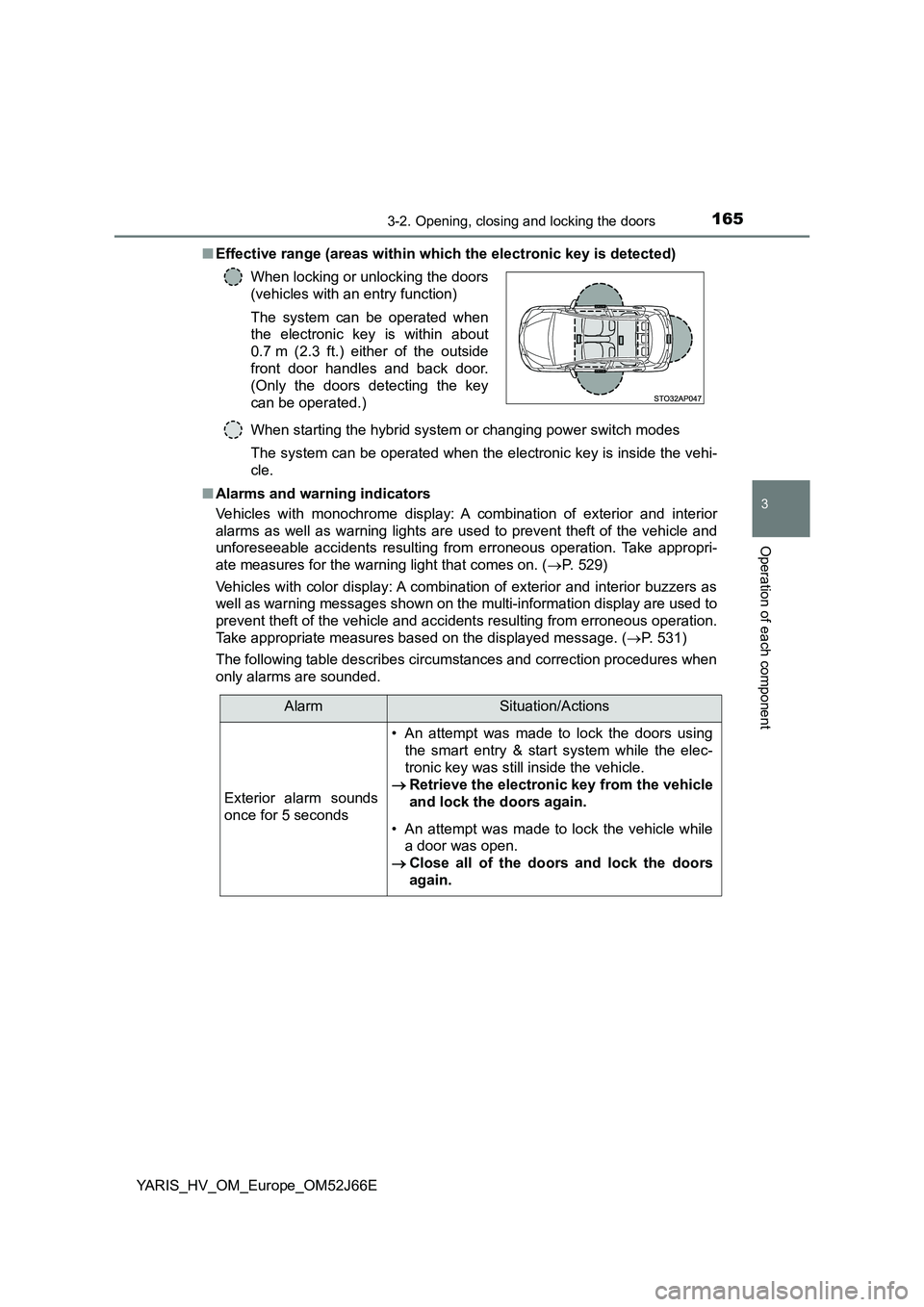
■ Effective range (areas within which the electronic key is detected)
When starting the hybrid system or changing power switch modes
The system can be operated when the electronic key is inside the vehi-
cle.
■ Alarms and warning indicators
Vehicles with monochrome display: A combination of exterior and interior
alarms as well as warning lights are used to prevent theft of the vehicle and
unforeseeable accidents resulting from erroneous operation. Take appropri-
ate measures for the warning light that comes on. ( P. 529)
Vehicles with color display: A combination of exterior and interior buzzers as
well as warning messages shown on the multi-information display are used to
prevent theft of the vehicle and accidents resulting from erroneous operation.
Take appropriate measures based on the displayed message. ( P. 531)
The following table describes circumstances and correction procedures when
only alarms are sounded.
When locking or unlocking the doors
(vehicles with an entry function)
The system can be operated when
the electronic key is within about
0.7 m (2.3 ft.) either of the outside
front door handles and back door.
(Only the doors detecting the key
can be operated.)
AlarmSituation/Actions
Exterior alarm sounds
once for 5 seconds
• An attempt was made to lock the doors using
the smart entry & start system while the elec-
tronic key was still inside the vehicle.
Retrieve the electronic key from the vehicle
and lock the doors again.
• An attempt was made to lock the vehicle while
a door was open.
Close all of the doors and lock the doors
again.
Page 169 of 632
1693-2. Opening, closing and locking the doors
3
Operation of each component
YARIS_HV_OM_Europe_OM52J66E
■ Notes for the entry function (vehicles with an entry function)
● Even when the electronic key is within the effective range (detection areas),
the system may not operate properly in the following case:
• The electronic key is too close to the window or outside door handle, near
the ground, or in a high place w hen the doors are locked or unlocked.
• The electronic key is near the ground or in a high place, or too close to
the rear bumper center when the back door is opened.
• The electronic key is on the instrument panel, luggage cover (if equipped)
or floor, or in the door pockets, glove box, accessory box of the instru-
ment panel, or in/near the front cup holder when the engine is started or
engine switch modes are changed.
● Do not leave the electronic key on top of the instrument panel or near the
door pockets when exiting the vehicle. Depending on the radio wave recep-
tion conditions, it may be detected by the antenna outside the cabin and the
door will become lockable from the out side, possibly trapping the electronic
key inside the vehicle.
● As long as the electronic key is within the effective range, the doors may be
locked or unlocked by anyone.
● Even if the electronic key is not inside the vehicle, it may be possible to start
the engine if the electronic key is near the window.
● The doors may unlock if a large amount of water splashes on the door han-
dle, such as in the rain or in a car wash when the electronic key is within the
effective range. (The door will automatically be locked after approximately
30 seconds if the doors are not opened and closed.)
● If the wireless remote control is used to lock the doors when the electronic
key is near the vehicle, there is a possibility that the door may not be
unlocked by the entry function. (Use the wireless remote control to unlock
the doors.)
● Touching the door lock or unlock sensor while wearing gloves may prevent
lock or unlock operation.