ECO mode TOYOTA YARIS 2021 User Guide
[x] Cancel search | Manufacturer: TOYOTA, Model Year: 2021, Model line: YARIS, Model: TOYOTA YARIS 2021Pages: 568, PDF Size: 110.34 MB
Page 145 of 568
145
4
YARIS(HB) Owner's Manual_Europe_MK0001_en
4-1. Before driving
Driving
Manual transmission
1While depressing the clutch
pedal, depress the brake pedal.
2Set the parking brake. (→P.171)
Check that the parking brake indicator
is illuminated.
3Shift the shift lever to N.
(→P.168)
If parking on a hill, shift the shift lever to
1 or R and block the wheels as needed.
4Turn the engine switch to OFF
to stop the engine.
5Slowly release the brake pedal.
6Lock the door, making sure that
you have the key on your per-
son.
■Starting off on a steep uphill
Multidrive
1Make sure that the parking
brake is set and shift the shift
lever to D.
2Gently depress the accelerator
pedal.
3Release the parking brake.
Manual transmission
1Make sure that the parking
brake is set and shift the shift
lever to 1.
2Lightly depress the accelerator
pedal at the same time as grad-
ually releasing the clutch pedal.
3Release the parking brake.
■Driving in the rain
●Drive carefully when it is raining,
because visibility will be reduced, the windows may become fogged-up, and
the road will be slippery.
●Drive carefully when it starts to rain,
because the road surface will be
especially slippery.
●Refrain from high speeds when driv-
ing on an expressway in the rain,
because there may be a layer of water
between the tires and the road sur-
face, preventing the steering and
brakes from operating properly.
■Engine speed while driving (vehi-
cles with a Multidrive)
In the following conditions, the engine
speed may become high while driving.
This is due to automatic up-shifting con-
trol or down-shifting implementation to
meet driving conditions. It does not indi-
cate sudden acceleration.
●The vehicle is judged to be driving
uphill or downhill
●When the accelerator pedal is
released
●When the brake pedal is depressed
while power mode is selected
■Restraining the engine output
(Brake Override System)
●When the accelerator and brake ped-
als are depressed at the same time,
the engine output may be restrained.
●A warning message is displayed on
the multi-information display while the
system is operating.
■Restraining sudden start (Drive-
Start Control [vehicles with a Multi-
drive])
●When the following unusual operation
is performed, the engine output may
be restrained.
• When the shift lever is shifted from R
to D, D to R, N to R, P to D, or P to R
(D includes M) with the accelerator
pedal depressed, a warning message
appears on the multi-information dis-
play. If a warning message is shown
on the multi-information display, read
the message and follow the instruc-
tion.
Page 159 of 568
159
4
YARIS(HB) Owner's Manual_Europe_MK0001_en
4-2. Driving procedures
Driving
Some electrical components such as
the audio system can be used.
3 ON (“ON” position)
All electrical components can be used.
4START (“START” position)
For starting the engine.
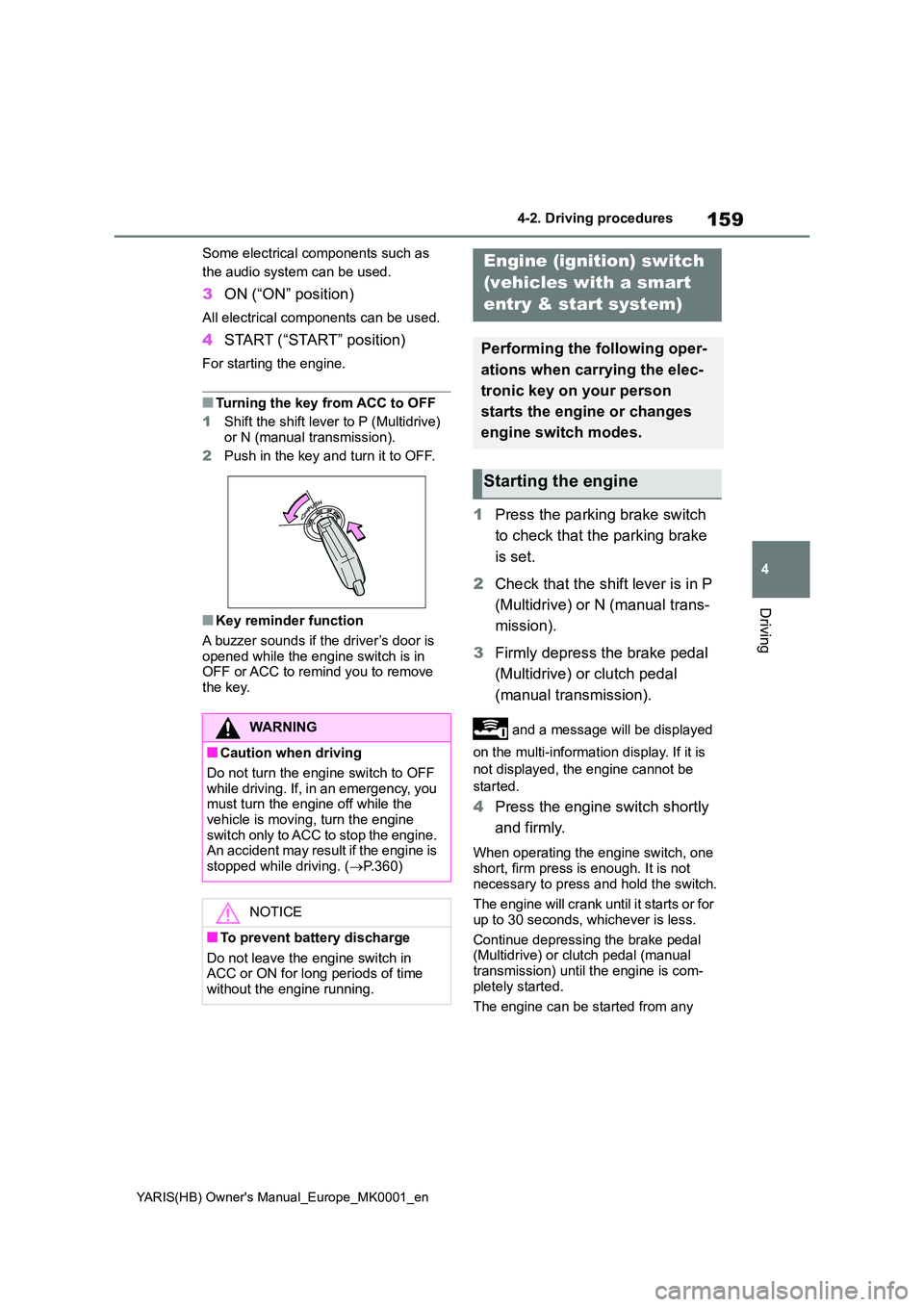
■Turning the key from ACC to OFF
1 Shift the shift lever to P (Multidrive)
or N (manual transmission).
2 Push in the key and turn it to OFF.
■Key reminder function
A buzzer sounds if the driver’s door is opened while the engine switch is in OFF or ACC to remind you to remove
the key.
1 Press the parking brake switch
to check that the parking brake
is set.
2 Check that the shift lever is in P
(Multidrive) or N (manual trans-
mission).
3 Firmly depress the brake pedal
(Multidrive) or clutch pedal
(manual transmission).
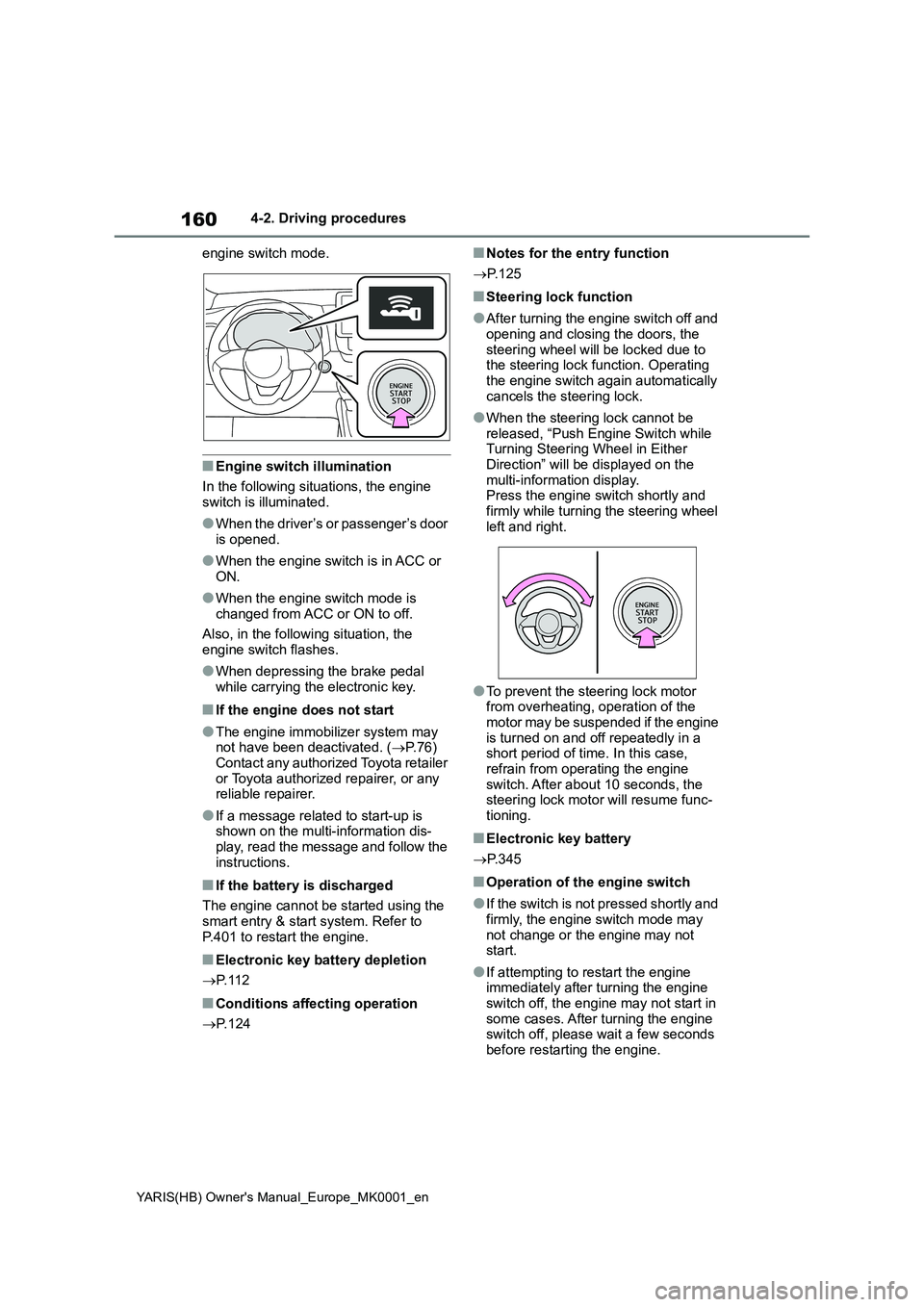
and a message will be displayed
on the multi-information display. If it is
not displayed, the engine cannot be
started.
4 Press the engine switch shortly
and firmly.
When operating the engine switch, one
short, firm press is enough. It is not necessary to press and hold the switch.
The engine will crank until it starts or for
up to 30 seconds, whichever is less.
Continue depressing the brake pedal (Multidrive) or clutch pedal (manual
transmission) until the engine is com- pletely started.
The engine can be started from any
WARNING
■Caution when driving
Do not turn the engine switch to OFF while driving. If, in an emergency, you must turn the engine off while the
vehicle is moving, turn the engine switch only to ACC to stop the engine. An accident may result if the engine is
stopped while driving. ( →P.360)
NOTICE
■To prevent battery discharge
Do not leave the engine switch in ACC or ON for long periods of time without the engine running.
Engine (ignition) switch
(vehicles with a smart
entry & start system)
Performing the following oper-
ations when carrying the elec-
tronic key on your person
starts the engine or changes
engine switch modes.
Starting the engine
Page 160 of 568
160
YARIS(HB) Owner's Manual_Europe_MK0001_en
4-2. Driving procedures
engine switch mode.
■Engine switch illumination
In the following situations, the engine
switch is illuminated.
●When the driver’s or passenger’s door
is opened.
●When the engine switch is in ACC or
ON.
●When the engine switch mode is
changed from ACC or ON to off.
Also, in the following situation, the
engine switch flashes.
●When depressing the brake pedal
while carrying the electronic key.
■If the engine does not start
●The engine immobilizer system may
not have been deactivated. (→P.76)
Contact any authorized Toyota retailer
or Toyota authorized repairer, or any
reliable repairer.
●If a message related to start-up is
shown on the multi-information dis-
play, read the message and follow the
instructions.
■If the battery is discharged
The engine cannot be started using the
smart entry & start system. Refer to
P.401 to restart the engine.
■Electronic key battery depletion
→P. 1 1 2
■Conditions affecting operation
→P. 1 2 4
■Notes for the entry function
→P. 1 2 5
■Steering lock function
●After turning the engine switch off and
opening and closing the doors, the
steering wheel will be locked due to
the steering lock function. Operating
the engine switch again automatically
cancels the steering lock.
●When the steering lock cannot be
released, “Push Engine Switch while
Turning Steering Wheel in Either
Direction” will be displayed on the
multi-information display.
Press the engine switch shortly and
firmly while turning the steering wheel
left and right.
●To prevent the steering lock motor
from overheating, operation of the
motor may be suspended if the engine
is turned on and off repeatedly in a
short period of time. In this case,
refrain from operating the engine
switch. After about 10 seconds, the
steering lock motor will resume func-
tioning.
■Electronic key battery
→P. 3 4 5
■Operation of the engine switch
●If the switch is not pressed shortly and
firmly, the engine switch mode may
not change or the engine may not
start.
●If attempting to restart the engine
immediately after turning the engine
switch off, the engine may not start in
some cases. After turning the engine
switch off, please wait a few seconds
before restarting the engine.
Page 161 of 568
161
4
YARIS(HB) Owner's Manual_Europe_MK0001_en
4-2. Driving procedures
Driving
■Customization
If the smart entry & start system has been deactivated in a customized set-ting, refer to P.399.
Multidrive
1 Stop the vehicle completely.
2 Set the parking brake (→P.171),
and shift the shift lever to P.
Check the parking brake indicator is
illuminated.
3 Press the engine switch.
The engine will stop, and the meter dis- play will be extinguished.
4 Release the brake pedal and
check that “ACCESSORY” or
“IGNITION ON” is not shown on
the multi-information display.
Manual transmission
1 Stop the vehicle completely.
2 If the parking brake is in manual
mode, set the parking brake.
( →P.171)
Check the parking brake indicator is illuminated.
3 Shift the shift lever to N.
( →P.168)
4 Press the engine switch.
The engine will stop, and the meter dis-
play will be extinguished.
5 Release the brake pedal and
check that “ACCESSORY” or
“IGNITION ON” is not shown on
the multi-information display.
WARNING
■When starting the engine
Always start the engine while sitting in the driver’s seat. Do not depress the
accelerator pedal while starting the engine under any circumstances.Doing so may cause an accident
resulting in death or serious injury.
■Caution while driving
If engine failure occurs while the vehi- cle is moving, do not lock or open the doors until the vehicle reaches a safe
and complete stop. Activation of the steering lock in this circumstance may lead to an accident, resulting in death
or serious injury.
NOTICE
■When starting the engine
●Do not race a cold engine.
●If the engine becomes difficult to start or stalls frequently, have your vehicle checked by any authorized
Toyota retailer or Toyota authorized repairer, or any reliable repairer immediately.
■Symptoms indicating a malfunc-tion with the engine switch
If the engine switch seems to be oper- ating somewhat differently than usual, such as the switch sticking slightly,
there may be a malfunction. Contact any authorized Toyota retailer or Toyota authorized repairer, or any reli-
able repairer immediately.
Stopping the engine
Page 162 of 568
162
YARIS(HB) Owner's Manual_Europe_MK0001_en
4-2. Driving procedures
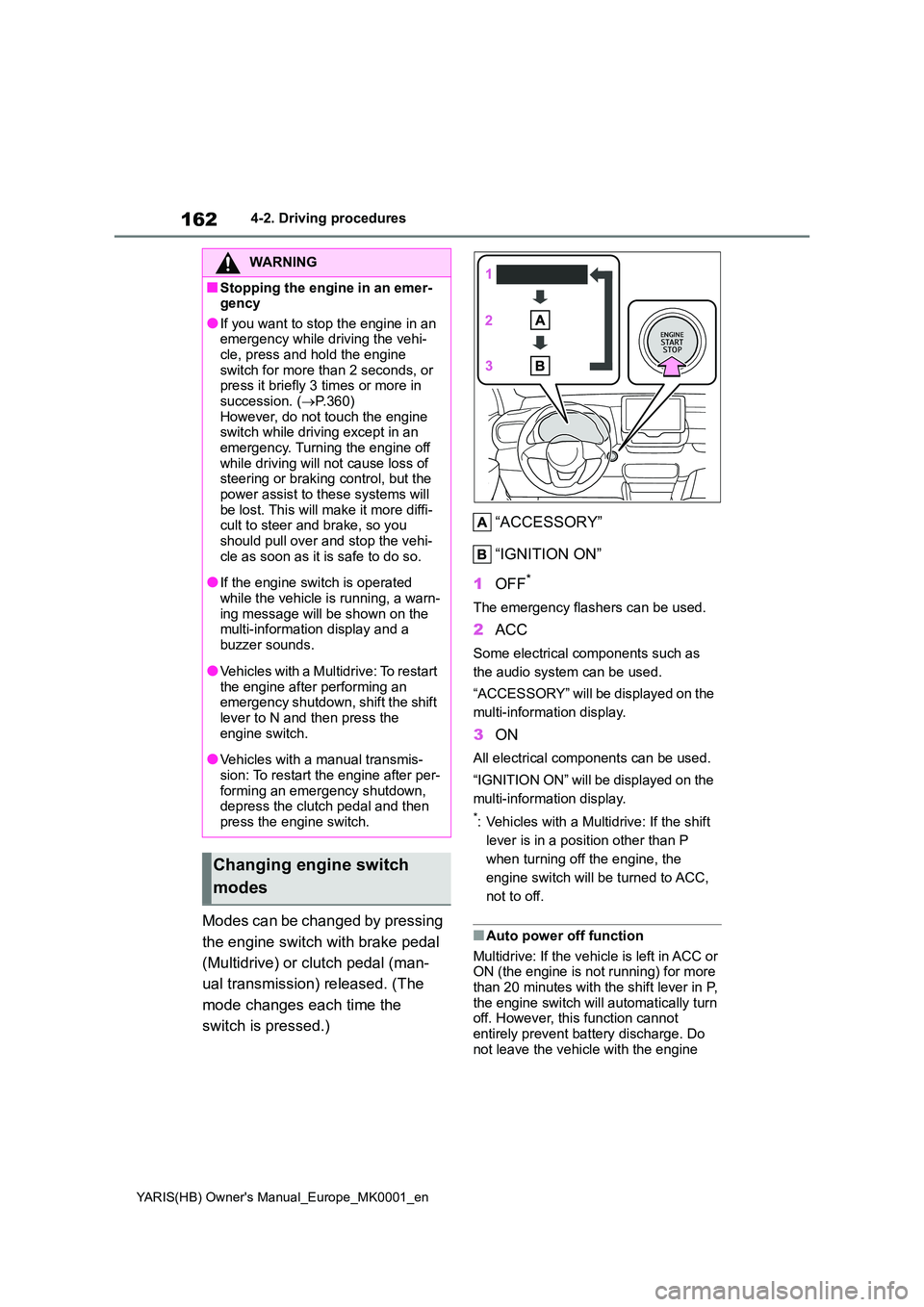
Modes can be changed by pressing
the engine switch with brake pedal
(Multidrive) or clutch pedal (man-
ual transmission) released. (The
mode changes each time the
switch is pressed.)
“ACCESSORY”
“IGNITION ON”
1 OFF*
The emergency flashers can be used.
2ACC
Some electrical components such as
the audio system can be used.
“ACCESSORY” will be displayed on the
multi-information display.
3 ON
All electrical components can be used.
“IGNITION ON” will be displayed on the
multi-information display.
*: Vehicles with a Multidrive: If the shift
lever is in a position other than P
when turning off the engine, the
engine switch will be turned to ACC,
not to off.
■Auto power off function
Multidrive: If the vehicle is left in ACC or ON (the engine is not running) for more than 20 minutes with the shift lever in P,
the engine switch will automatically turn off. However, this function cannot entirely prevent battery discharge. Do
not leave the vehicle with the engine
WARNING
■Stopping the engine in an emer- gency
●If you want to stop the engine in an emergency while driving the vehi-cle, press and hold the engine
switch for more than 2 seconds, or press it briefly 3 times or more in succession. ( →P.360)
However, do not touch the engine switch while driving except in an emergency. Turning the engine off
while driving will not cause loss of steering or braking control, but the power assist to these systems will
be lost. This will make it more diffi- cult to steer and brake, so you should pull over and stop the vehi-
cle as soon as it is safe to do so.
●If the engine switch is operated
while the vehicle is running, a warn- ing message will be shown on the multi-information display and a
buzzer sounds.
●Vehicles with a Multidrive: To restart
the engine after performing an emergency shutdown, shift the shift lever to N and then press the
engine switch.
●Vehicles with a manual transmis-
sion: To restart the engine after per- forming an emergency shutdown, depress the clutch pedal and then
press the engine switch.
Changing engine switch
modes
Page 164 of 568
164
YARIS(HB) Owner's Manual_Europe_MK0001_en
4-2. Driving procedures
*: If equipped
*: To improve fuel efficiency and reduce
noise, shift the shift lever to D for nor-
mal driving.
■To protect the Multidrive
If the Multidrive fluid temperature is
high, “Transmission Oil Temp. High Stop
in a safe place and See owner’s man-
ual” will be displayed on the multi-infor-
mation display and the vehicle will go
into transmission protection mode auto-
matically. Have the vehicle inspected by
any authorized Toyota retailer or Toyota
authorized repairer, or any reliable
repairer.
■Multidrive fail-safe control
The system detects malfunctioning parts
targeted (all of the solenoids that per-form the shifting function) by the On-
Board Diagnostics, and performs fail-
safe mechanisms, such as restricting
the shifting function or transmission ratio
control. In this event, the malfunction
indicator lamp turns on.
■When driving with dynamic radar
cruise control activated (if
equipped)
Even when switching the driving mode
to power mode with the intent of
enabling engine braking, engine braking
will not occur because dynamic radar
cruise control will not be canceled.
(→P.266)
■Restraining sudden start (Drive-
Start Control)
→P. 1 4 5
■AI-SHIFT
AI-SHIFT automatically selects the suit-
able gear step according to driver per-
formance and driving conditions. AI-
SHIFT automatically operates when the
driving mode is set to Normal mode with
the shift lever in D. (Shifting the shift
lever to M cancels the function.)
■G AI-SHIFT
G AI-SHIFT automatically selects a suit-
able gear for sporty driving according to
driver’s input and driving conditions. G
AI-SHIFT operates automatically when
the shift lever is in D and power mode is
selected for the driving mode. (Selecting
other than power mode or shifting the
shift lever to the other position cancels
this function)
■After recharging/reconnecting the
battery
→P. 4 0 3
Multidrive*
Select the shift position
depending on your purpose
and situation.
Shift position purpose and
functions
Shift posi-
tionObjective or function
PParking the vehicle/start-
ing the engine
RReversing
N
Neutral
(Condition in which the
power is not transmitted)
DNormal driving*
M
10-speed sport sequen-
tial shiftmatic mode driving
(→P.167)
Page 183 of 568
183
4
YARIS(HB) Owner's Manual_Europe_MK0001_en
4-3. Operating the lights and wipers
Driving
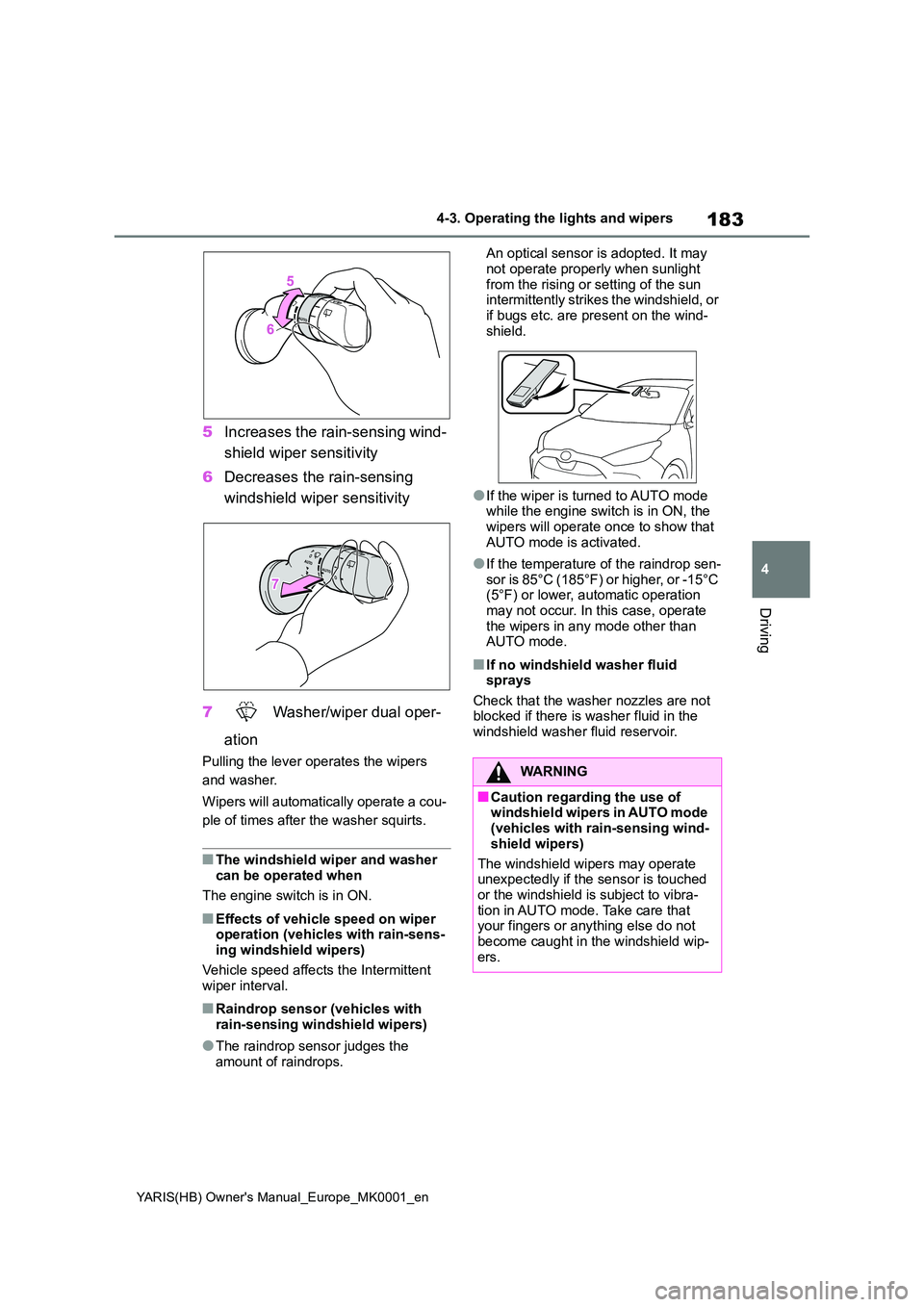
5Increases the rain-sensing wind-
shield wiper sensitivity
6 Decreases the rain-sensing
windshield wiper sensitivity
7 Washer/wiper dual oper-
ation
Pulling the lever operates the wipers
and washer.
Wipers will automatically operate a cou-
ple of times after the washer squirts.
■The windshield wiper and washer can be operated when
The engine switch is in ON.
■Effects of vehicle speed on wiper operation (vehicles with rain-sens-ing windshield wipers)
Vehicle speed affects the Intermittent wiper interval.
■Raindrop sensor (vehicles with rain-sensing windshield wipers)
●The raindrop sensor judges the amount of raindrops.
An optical sensor is adopted. It may
not operate properly when sunlight from the rising or setting of the sun intermittently strikes the windshield, or
if bugs etc. are present on the wind- shield.
●If the wiper is turned to AUTO mode while the engine switch is in ON, the wipers will operate once to show that
AUTO mode is activated.
●If the temperature of the raindrop sen-
sor is 85°C (185°F) or higher, or -15°C (5°F) or lower, automatic operation may not occur. In this case, operate
the wipers in any mode other than AUTO mode.
■If no windshield washer fluid sprays
Check that the washer nozzles are not blocked if there is washer fluid in the windshield washer fluid reservoir.
WARNING
■Caution regarding the use of windshield wipers in AUTO mode (vehicles with rain-sensing wind-
shield wipers)
The windshield wipers may operate unexpectedly if the sensor is touched
or the windshield is subject to vibra- tion in AUTO mode. Take care that your fingers or anything else do not
become caught in the windshield wip- ers.
Page 211 of 568
211
4
YARIS(HB) Owner's Manual_Europe_MK0001_en
4-5. Using the driving support systems
Driving
This function operates when all of the
following conditions are met.
• Setting for “Sway Warning” in of
the multi-information display is set to
“ON”. (→P.422)
• Vehicle speed is approximately 50
km/h (32 mph) or more.
• Width of traffic lane is approximately 3
m (9.8 ft.) or more.
• No system malfunctions are detected.
(→P.212)
●Lane centering function
This function operates when all of the
following conditions are met.
• LTA is turned on.
• Setting for “Lane Center” in of the
multi-information display are set to
“ON” (→P.422)
• This function recognizes white (yel-
low) lane lines or the position of a pre-
ceding vehicle (except when the
preceding vehicle is small, such as a
motorcycle).
• The dynamic radar cruise control is
operating in vehicle-to-vehicle dis-
tance control mode.
• Width of traffic lane is approximately 3
to 4 m (10 to 13 ft.).
• Turn signal lever is not operated.
• Vehicle is not being driven around a
sharp curve.
• No system malfunctions are detected.
(→P.212)
• Vehicle does not accelerate or decel-
erate by a fixed amount or more.
• Steering wheel is not operated with a
steering force level suitable for chang-
ing lanes.
• ABS, VSC, TRC and PCS are not
operating.
• TRC or VSC is not turned off.
• Hands off steering wheel warning is
not displayed. (→P.212)
• The vehicle is being driven in the
center of a lane.
• Steering assist function is not operat-
ing.
■Temporary cancelation of functions
●When operation conditions are no lon-
ger met, a function may be temporar-
ily canceled. However, when the
operation conditions are met again,
operation of the function is automati-
cally restored. (→P.210)
●If the operation conditions (→P.210)
are no longer met while the lane cen-
tering function is operating, the steer-
ing wheel may vibrate and the buzzer
may sound to indicate that the func-
tion has been temporarily canceled.
However, if the alert types customiza-
tion setting is set to steering wheel
vibration, the system will notify the
driver by vibrating the steering wheel
instead of sounding the buzzer.
■Steering assist function/lane cen-
tering function
●Depending on the vehicle speed, lane
departure situation, road conditions,
etc., the driver may not feel the func-
tion is operating or the function may
not operate at all.
●The steering control of the function is
overridden by the driver’s steering
wheel operation.
●Do not attempt to test the operation of
the steering assist function.
■Lane departure alert function
●The warning buzzer may be difficult to
hear due to external noise, audio play-
back, etc. Also, it may be difficult to
feel steering wheel vibrations due to
the road conditions, etc.
●If the edge of the course* is not clear
or straight, the lane departure alert
function may not operate.
●Vehicle with BSM: It may not be possi-
ble for the system to determine if there
is a danger of a collision with a vehicle
in an adjacent lane.
●Do not attempt to test the operation of
the lane departure alert function.
*: Boundary between asphalt and the
side of the road, such as grass, soil,
Page 216 of 568
216
YARIS(HB) Owner's Manual_Europe_MK0001_en
4-5. Using the driving support systems
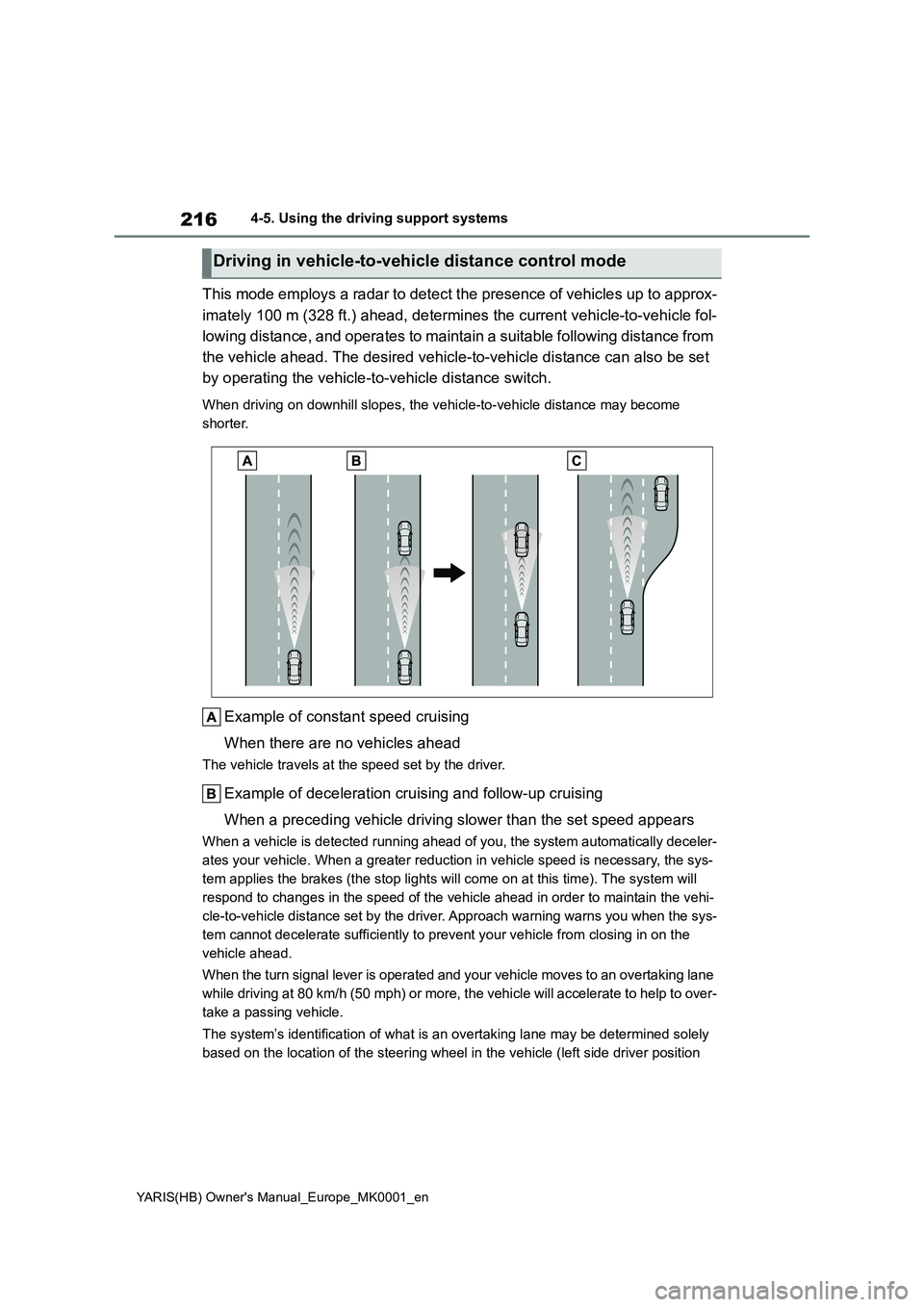
This mode employs a radar to detect the presence of vehicles up to approx-
imately 100 m (328 ft.) ahead, determines the current vehicle-to-vehicle fol-
lowing distance, and operates to maintain a suitable following distance from
the vehicle ahead. The desired vehicle-to-vehicle distance can also be set
by operating the vehicle-to-vehicle distance switch.
When driving on downhill slopes, the vehicle-to-vehicle distance may become
shorter.
Example of constant speed cruising
When there are no vehicles ahead
The vehicle travels at the speed set by the driver.
Example of deceleration cruising and follow-up cruising
When a preceding vehicle driving slower than the set speed appears
When a vehicle is detected running ahead of you, the system automatically deceler-
ates your vehicle. When a greater reduction in vehicle speed is necessary, the sys-
tem applies the brakes (the stop lights will come on at this time). The system will
respond to changes in the speed of the vehicle ahead in order to maintain the vehi-
cle-to-vehicle distance set by the driver. Approach warning warns you when the sys-
tem cannot decelerate sufficiently to prevent your vehicle from closing in on the
vehicle ahead.
When the turn signal lever is operated and your vehicle moves to an overtaking lane
while driving at 80 km/h (50 mph) or more, the vehicle will accelerate to help to over-
take a passing vehicle.
The system’s identification of what is an overtaking lane may be determined solely
based on the location of the steering wheel in the vehicle (left side driver position
Driving in vehicle-to-vehicle distance control mode
Page 217 of 568
217
4
YARIS(HB) Owner's Manual_Europe_MK0001_en
4-5. Using the driving support systems
Driving
versus right side driver position.) If the vehicle is driven to a region where the over-
taking lane is on a different side from where the vehicle is normally driven, the vehi-
cle may accelerate when the turn signal lever is operated in the opposite direction to
the overtaking lane (e.g., if the driver normally operates the vehicle in a region
where the overtaking lane is to the right but then drives to a region where the over-
taking lane is to the left, the vehicle may accelerate when the right turn signal is acti-
vated).
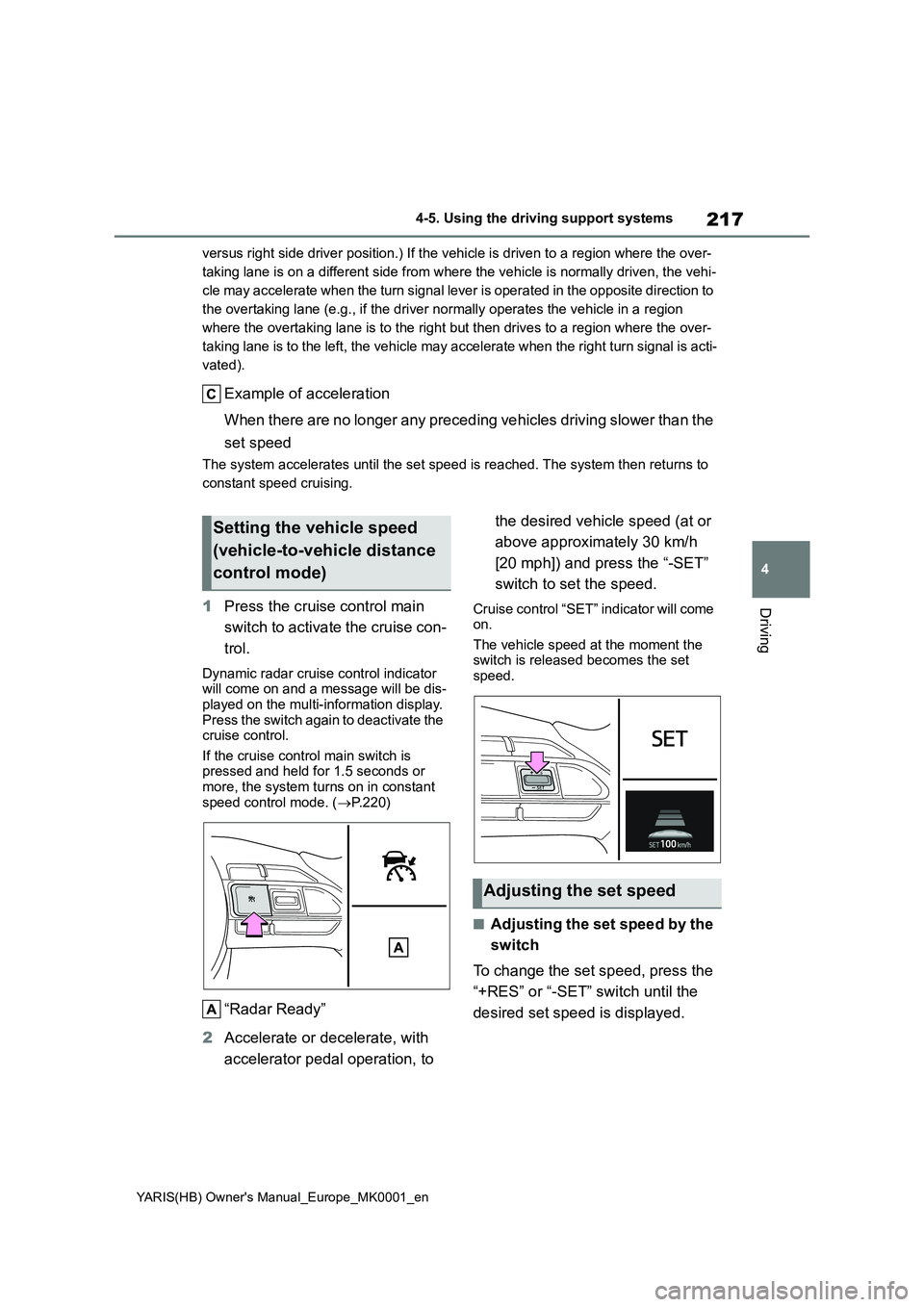
Example of acceleration
When there are no longer any preceding vehicles driving slower than the
set speed
The system accelerates until the set speed is reached. The system then returns to
constant speed cruising.
1 Press the cruise control main
switch to activate the cruise con-
trol.
Dynamic radar cruise control indicator will come on and a message will be dis-
played on the multi-information display. Press the switch again to deactivate the cruise control.
If the cruise control main switch is pressed and held for 1.5 seconds or more, the system turns on in constant
speed control mode. ( →P.220)
“Radar Ready”
2 Accelerate or decelerate, with
accelerator pedal operation, to
the desired vehicle speed (at or
above approximately 30 km/h
[20 mph]) and press the “-SET”
switch to set the speed.
Cruise control “SET” indicator will come on.
The vehicle speed at the moment the switch is released becomes the set speed.
■Adjusting the set speed by the
switch
To change the set speed, press the
“+RES” or “-SET” switch until the
desired set speed is displayed.
Setting the vehicle speed
(vehicle-to-vehicle distance
control mode)
Adjusting the set speed