audio TOYOTA YARIS 2021 Owner's Manual
[x] Cancel search | Manufacturer: TOYOTA, Model Year: 2021, Model line: YARIS, Model: TOYOTA YARIS 2021Pages: 568, PDF Size: 110.34 MB
Page 235 of 568
235
4
YARIS(HB) Owner's Manual_Europe_MK0001_en
4-5. Using the driving support systems
Driving
→If the difference between the set tem-
perature and cabin temperature
becomes small, the system will be
enabled.
• The windshield defogger is on.
●When the engine automatically
restarts while stopped by the Stop &
Start system
“In Preparation”
*
• The brake pedal has been depressed
further or pumped.
→The system will be enabled after the
engine runs and the brake booster vac-
uum reaches a predetermined level.
*: Vehicles with a Multidrive
“For Climate Control”
• The air conditioning system has been
turned on or is being used.
• The windshield defogger has been
turned on.
“Battery Charging”
• The battery charge may be low.
→The engine is restarted to prioritize
battery charging. After the engine runs
for a certain amount of time, the system
will be enabled. (vehicle with a Manual
Transmission)
→The system will be enabled after the
engine runs to sufficiently charge the
battery. (vehicle with a Multidrive)
●When the engine cannot be restarted
by the Stop & Start system
“Shift to N and Press Clutch to Restart”
*
→When the engine is stopped by the
Stop & Start system, the shift lever was
moved to a position other than N without
depressing the clutch pedal.
*: Vehicles with a manual transmission
■When a buzzer sounds (vehicles
with a Multidrive)
If the driver’s door is opened when the
engine is stopped by the Stop & Start
system and the shift lever is in D, a
buzzer will sound and the Stop & Start
system indicator will flash. To stop the
buzzer, close the driver’s door.
■The Stop & Start system protection
function
●When the volume of the audio system
is excessively high, sound output from
the audio system may suddenly be cut
off in order to reduce battery con-
sumption. To prevent the audio sys-
tem from being cut off, keep the
volume of audio system at a moderate
level. If the audio system has been cut
off, turn the engine switch off, wait for
3 seconds or more and then turn it to
ACC or ON to re-enable the audio
system.
●The audio system may not be acti-
vated if the battery terminals are dis-
connected and then reconnected. If
this occurs, turn the engine switch off
and then repeat the following opera-
tion twice to activate the audio system
normally.
• Turn the engine switch to ON and
then to off.
■Replacing the battery
→P. 4 0 4
■If the Stop & Start cancel indicator
flashes continuously
The system may be malfunctioning.
Have the vehicle inspected by any
authorized Toyota retailer or Toyota
authorized repairer, or any reliable
repairer.
■If “Stop & Start System Malfunction
Visit Your Dealer” is displayed on
the multi-information display
The system may be malfunctioning.
Have the vehicle inspected by any
authorized Toyota retailer or Toyota
authorized repairer, or any reliable
repairer.
Page 245 of 568
245
4
YARIS(HB) Owner's Manual_Europe_MK0001_en
4-5. Using the driving support systems
Driving
●There will be a short delay between
object detection and display. Even at low speeds, there is a possibility that the object will come within the sen-
sor’s detection areas before the dis- play is shown and the warning beep sounds.
●It might be difficult to hear the buzzer due to the volume of the audio system
or air flow noise of the air conditioning system.
●It may be difficult to hear the buzzer if buzzers for other systems are sound-ing.
■Conditions under which the func-
tion may not function correctly
Certain vehicle conditions and the sur- rounding environment may affect the
ability of a sensor to correctly detect objects. Particular instances where this may occur are listed below.
●There is dirt, snow, water drops or ice on a sensor. (Cleaning the sensors
will resolve this problem.)
●A sensor is frozen. (Thawing the area
will resolve this problem.) In especially cold weather, if a sensor is frozen the sensor display may be
displayed abnormally, or objects, such as a wall, may not be detected.
●A sensor is covered in any way.
●When a sensor or the area around a
sensor is extremely hot or cold.
●On an extremely bumpy road, on an
incline, on gravel, or on grass.
●The vicinity of the vehicle is noisy due
to vehicle horns, motorcycle engines, air brakes of large vehicles, or other loud noises producing ultrasonic
waves.
●There is another vehicle equipped
with parking assist sensors in the vicinity.
●A sensor is coated with a sheet of spray or heavy rain.
●If a sensor is hit by a large amount of water, such as when driving on a
flooded road.
●If the vehicle is significantly tilted.
●The vehicle is approaching a tall or curved curb.
●If objects draw too close to the sensor.
■Objects which may not be properly detected
The shape of the object may prevent the
sensor from detecting it. Pay particular attention to the following objects:
●Wires, fences, ropes, etc.
●Cotton, snow and other materials that
absorb sound waves
●Sharply-angled objects
●Low objects
●Tall objects with upper sections pro- jecting outwards in the direction of your vehicle
People may not be detected if they are wearing certain types of clothing.
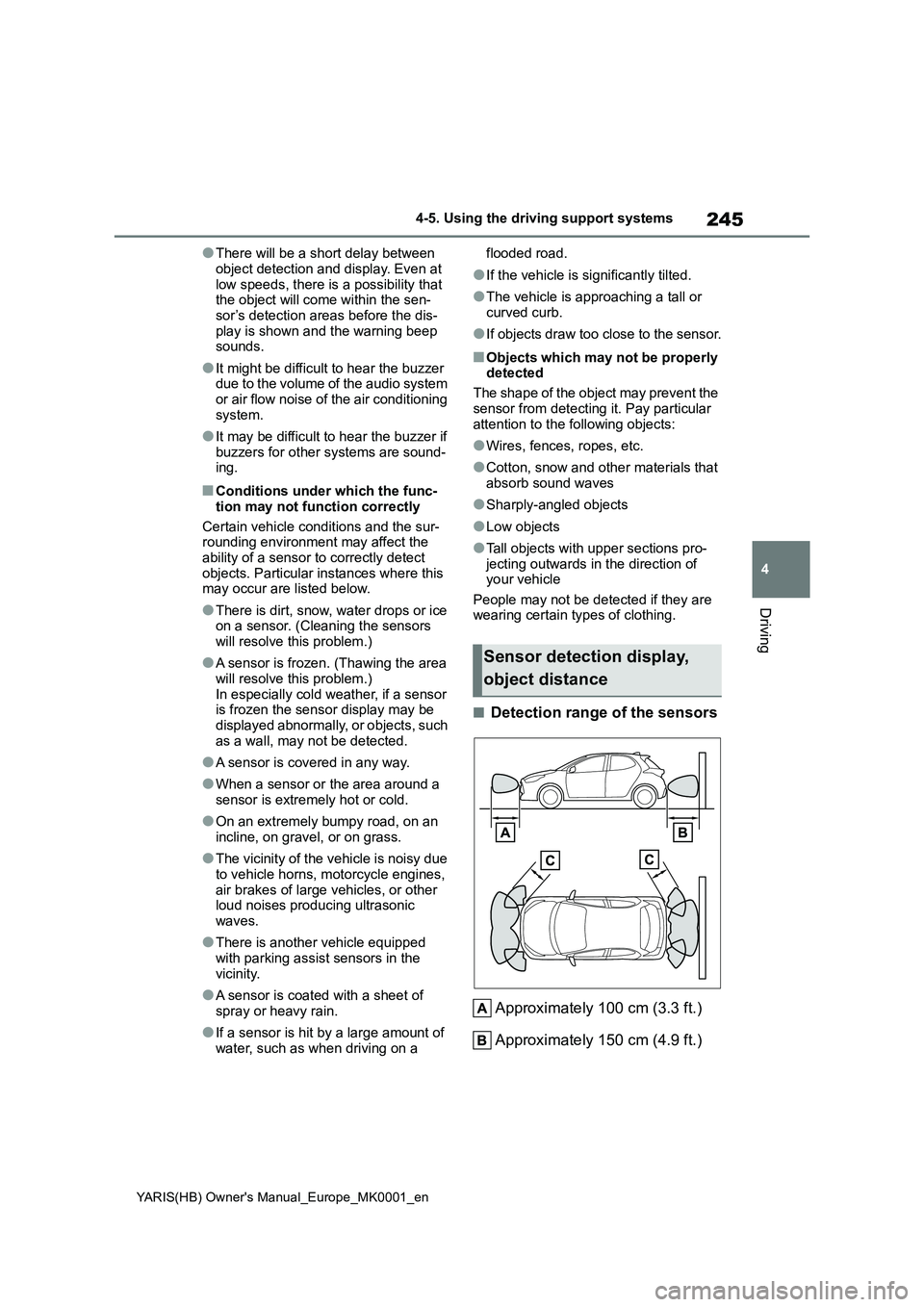
■Detection range of the sensors
Approximately 100 cm (3.3 ft.)
Approximately 150 cm (4.9 ft.)
Sensor detection display,
object distance
Page 248 of 568
248
YARIS(HB) Owner's Manual_Europe_MK0001_en
4-5. Using the driving support systems
Meter control switches
Turning the RCTA function on/off.
Outside rear view mirror indica-
tors
When a vehicle approaching from the
right or left at the rear of the vehicle is
detected, both outside rear view mirror
indicators will flash.
RCTA buzzer
If a vehicle approaching from the right
or left at the rear of the vehicle is
detected, a buzzer will sound.
Use the meter control switches to
turn on/off the function. (→P.94,
100)
1Press / (vertical display)
or / (horizontal display)
of the meter control switch to
select .
2Press / (vertical display)
or / (horizontal display)
of the meter control switch to
select “RCTA” and then press
.
When the RCTA function is disabled,
the RCTA OFF indicator (→P.84) illumi-
nates. (Each time the engine switch is
turned off then changed to ON, the
RCTA function will be enabled automat-
ically.)
■Outside rear view mirror indicator
visibility
When under strong sunlight, the outside
rear view mirror indicator may be difficult
to see.
■Hearing the RCTA buzzer
The RCTA buzzer may be difficult to
hear over loud noises, such as if the
audio system volume is high.
■When “Rear Cross Traffic Alert
Unavailable See Owner’s Manual”
is shown on the multi-information
display
The sensor voltage has become abnor-
mal, or water, snow, mud, etc., may be
built up in the vicinity of the sensor area
of the position above the rear bumper.
(→P.238)
Removing the water, snow, mud, etc.,
from the vicinity of the sensor area
should return it to normal. Also, the sen-
sor may not function normally when
used in extremely hot or cold weather.
■When “Rear Cross Traffic Alert Mal-
function Visit Your Dealer” is
shown on the multi-information
display
There may be a sensor malfunction of
misaligned. Have the vehicle inspected
by any authorized Toyota retailer or
Toyota authorized repairer, or any reli-
able repairer.
■Rear side radar sensors
→P. 2 3 8
■Operation of the RCTA func-
tion
The RCTA function uses rear side
radar sensors to detect vehicles
approaching from the right or left at
the rear of the vehicle and alerts
the driver of the presence of such
Turning the RCTA function
on/off
RCTA function
Page 312 of 568
312
YARIS(HB) Owner's Manual_Europe_MK0001_en
6-1. Maintenance and care
zRemove dirt using a water-
dampened soft cloth or synthetic
chamois.
z Wipe the surface with a dry, soft
cloth to remove any remaining
moisture.
■Cleaning the areas with satin-finish
metal accents
The metal areas use a layer of real metal for the surface. It is necessary to
clean them regularly. If dirty areas are left uncleaned for long periods of time, they may be difficult to clean.
z Remove dirt and dust using a
vacuum cleaner.
z Wipe off any excess dirt and dust
with a soft cloth dampened with
diluted detergent.
Use a diluted water solution of approxi-
mately 5% neutral wool detergent.
z Wring out any excess water from
the cloth and thoroughly wipe off
all remaining traces of detergent.
NOTICE
●Do not use a polish wax or polish cleaner. The instrument panel’s or
other interior part’s painted surface may be damaged.
■Preventing damage to leather surfaces
Observe the following precautions to
avoid damage to and deterioration of leather surfaces:
●Remove any dust or dirt from
leather surfaces immediately.
●Do not expose the vehicle to direct
sunlight for extended periods of time. Park the vehicle in the shade, especially during summer.
●Do not place items made of vinyl, plastic, or containing wax on the
upholstery, as they may stick to the leather surface if the vehicle interior heats up significantly.
■Water on the floor
Do not wash the vehicle floor with
water. Vehicle systems such as the audio system may be damaged if water
comes into contact with electrical components such as the audio sys-tem above or under the floor of the
vehicle. Water may also cause the body to rust.
■When cleaning the inside of the windshield (vehicles with Toyota Safety Sense)
Do not allow glass cleaner to contact the lens. Also, do not touch the lens. ( →P.188)
●Be careful not to scratch or damage the heater wires or antenna.
■Cleaning the inside of the rear window
●Do not use glass cleaner to clean
the rear window, as this may cause damage to the rear window defog-ger heater wires or antenna. Use a
cloth dampened with lukewarm water to gently wipe the window clean. Wipe the window in strokes
running parallel to the heater wires or antenna.
Cleaning the areas with
satin-finish metal accents
Cleaning the leather areas
Page 374 of 568
374
YARIS(HB) Owner's Manual_Europe_MK0001_en
7-2. Steps to take in an emergency
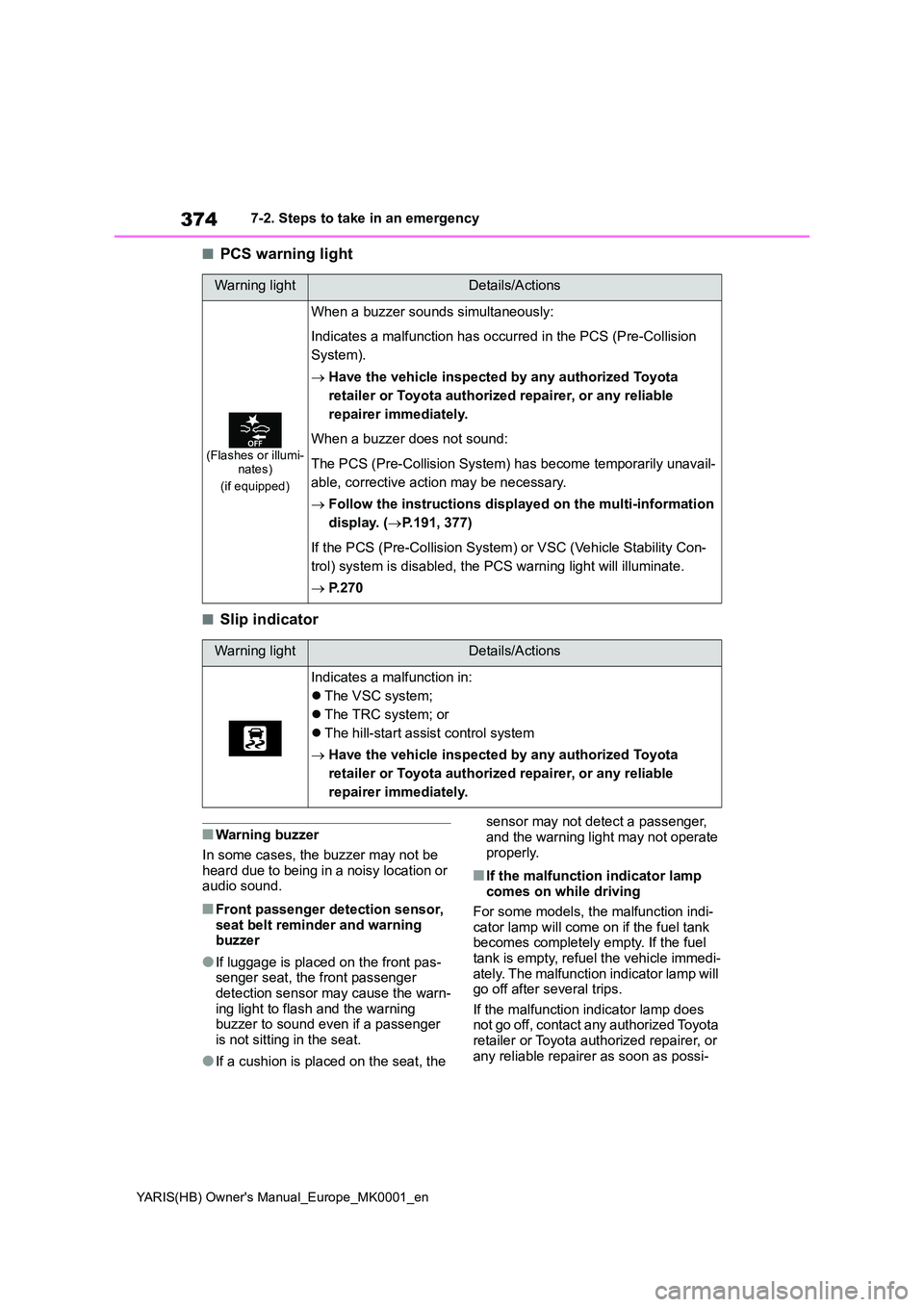
■PCS warning light
■Slip indicator
■Warning buzzer
In some cases, the buzzer may not be heard due to being in a noisy location or audio sound.
■Front passenger detection sensor,
seat belt reminder and warning buzzer
●If luggage is placed on the front pas-senger seat, the front passenger detection sensor may cause the warn-
ing light to flash and the warning buzzer to sound even if a passenger is not sitting in the seat.
●If a cushion is placed on the seat, the
sensor may not detect a passenger,
and the warning light may not operate properly.
■If the malfunction indicator lamp comes on while driving
For some models, the malfunction indi- cator lamp will come on if the fuel tank becomes completely empty. If the fuel
tank is empty, refuel the vehicle immedi- ately. The malfunction indicator lamp will go off after several trips.
If the malfunction indicator lamp does not go off, contact any authorized Toyota retailer or Toyota authorized repairer, or
any reliable repairer as soon as possi-
Warning lightDetails/Actions
(Flashes or illumi- nates)
(if equipped)
When a buzzer sounds simultaneously:
Indicates a malfunction has occurred in the PCS (Pre-Collision
System).
→ Have the vehicle inspected by any authorized Toyota
retailer or Toyota authorized repairer, or any reliable
repairer immediately.
When a buzzer does not sound:
The PCS (Pre-Collision System) has become temporarily unavail-
able, corrective action may be necessary.
→ Follow the instructions displayed on the multi-information
display. ( →P.191, 377)
If the PCS (Pre-Collision System) or VSC (Vehicle Stability Con-
trol) system is disabled, the PCS warning light will illuminate.
→ P. 2 7 0
Warning lightDetails/Actions
Indicates a malfunction in:
z The VSC system;
z The TRC system; or
z The hill-start assist control system
→ Have the vehicle inspected by any authorized Toyota
retailer or Toyota authorized repairer, or any reliable
repairer immediately.
Page 377 of 568
377
7
YARIS(HB) Owner's Manual_Europe_MK0001_en
7-2. Steps to take in an emergency
When trouble arises
■Warning messages
The warning messages explained below
may differ from the actual messages according to operation conditions and vehicle specifications.
■Warning buzzer
A buzzer may sound when a message is displayed.The buzzer may not be audible if the
vehicle is in a noisy location or if the audio system volume is high.
■If “Engine Oil Level Low Add or Replace” is displayed
The engine oil level is low. Check the
level of the engine oil, and add if neces-
sary.
This message may appear if the vehicle is stopped on a slope. Move the vehicle
to a level surface and check to see if the message disappears.
■If “Engine Stopped Steering Power Low” is displayed
This message is displayed if the engine is stopped while driving.
When steering wheel operations are
heavier than usual, grip the steering wheel firmly and operate it using more force than usual.
■If “Auto Power OFF to Conserve
Battery” is displayed
Power was cut off due to the automatic power off function. Next time when start-
ing the engine, increase the engine speed slightly and maintain that level for approximately 5 minutes to recharge the
battery.
■If “Headlight System Malfunction Visit Your Dealer” is displayed
The following systems may be malfunc-
tioning. Have the vehicle inspected by any authorized Toyota retailer or Toyota authorized repairer, or any reliable
repairer immediately.
●The LED headlight system (if
equipped)
●Automatic High Beam (if equipped)
■If “Front Camera Out of Tempera-
ture Range Unavailable Wait until Normal Temperature”, “Front Cam-era Low Visibility Unavailable See
Owner’s Manual” or “Front Camera Unavailable See Owner’s Manual” is displayed
The following systems may be sus- pended until the problem shown in the message is resolved. ( →P.191, 368)
●PCS (Pre-Collision system) (if equipped)
●LTA (Lane Tracing Assist) (if equipped)
●Automatic High Beam (if equipped)
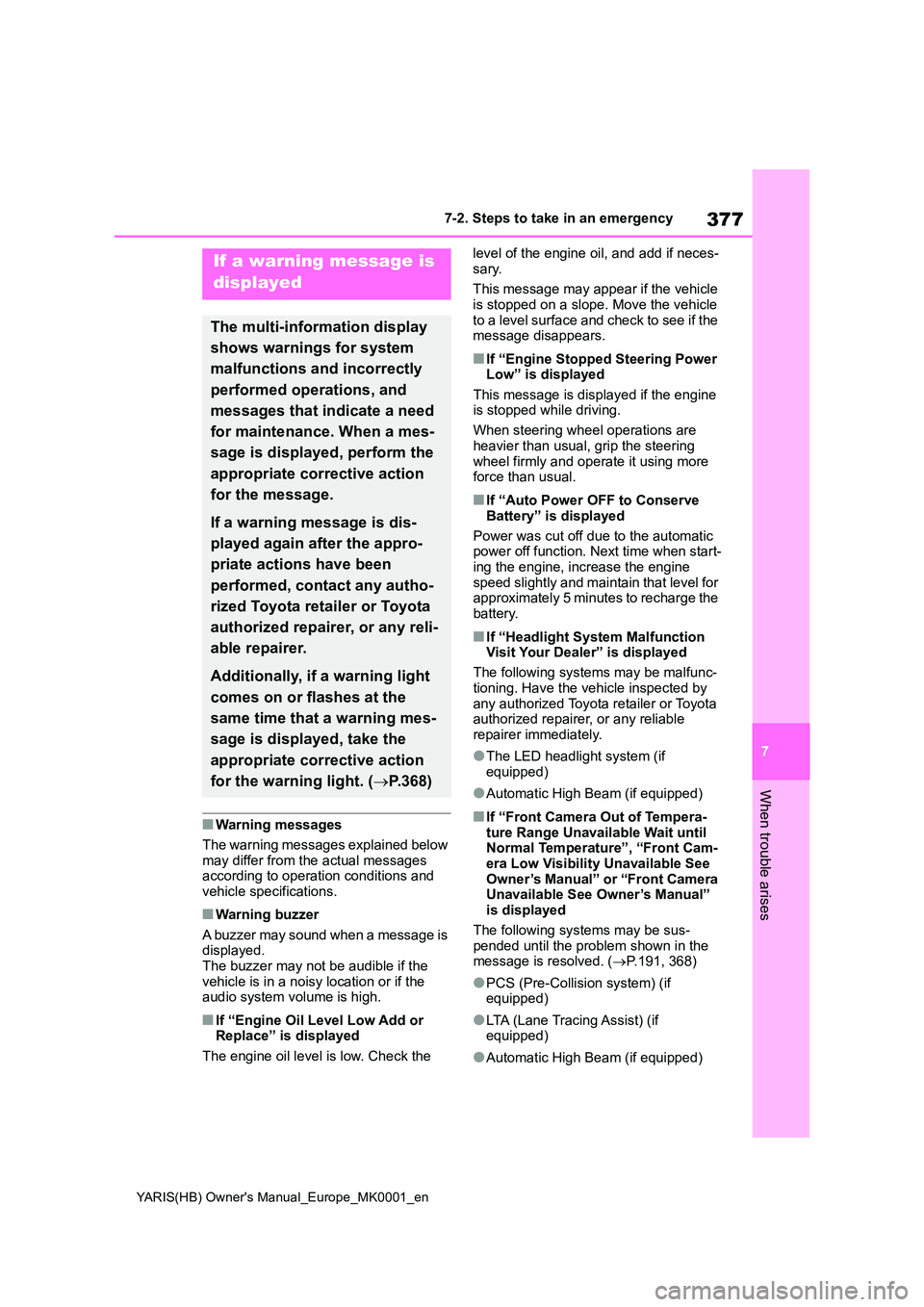
If a warning message is
displayed
The multi-information display
shows warnings for system
malfunctions and incorrectly
performed operations, and
messages that indicate a need
for maintenance. When a mes-
sage is displayed, perform the
appropriate corrective action
for the message.
If a warning message is dis-
played again after the appro-
priate actions have been
performed, contact any autho-
rized Toyota retailer or Toyota
authorized repairer, or any reli-
able repairer.
Additionally, if a warning light
comes on or flashes at the
same time that a warning mes-
sage is displayed, take the
appropriate corrective action
for the warning light. ( →P.368)
Page 403 of 568
403
7
YARIS(HB) Owner's Manual_Europe_MK0001_en
7-2. Steps to take in an emergency
When trouble arises
Solid, stationary, unpainted metallic point away from the battery and any
moving parts as shown in the illustration
4 Start the engine of the second
vehicle. Increase the engine
speed slightly and maintain at
that level for approximately 5
minutes to recharge the battery
of your vehicle.
5 Vehicles with a smart entry &
start system: Open and close
any of the doors of your vehicle
with the engine switch OFF.
6 Maintain the engine speed of
the second vehicle and start the
engine of your vehicle by turning
the engine switch to ON.
7 Once the vehicle’s engine has
started, remove the jumper
cables in the exact reverse
order from which they were con-
nected.
Once the engine starts, have the
vehicle inspected at any autho-
rized Toyota retailer or Toyota
authorized repairer, or any reliable
repairer as soon as possible.
■Starting the engine when the bat- tery is discharged
The engine cannot be started by push-
starting.
■To prevent battery discharge
●Turn off the headlights and the audio
system while the engine is stopped.
●Turn off any unnecessary electrical
components when the vehicle is run- ning at a low speed for an extended period, such as in heavy traffic.
■When the battery is removed or dis-charged
●Information stored in the ECU is cleared. When the battery is depleted, have the vehicle inspected at any
authorized Toyota retailer or Toyota authorized repairer, or any reliable repairer.
●Some systems may require initializa-tion. ( →P.431)
■When removing the battery termi-
nals
When the battery terminals are removed, the information stored in the
ECU is cleared. Before removing the battery terminals, contact any autho-rized Toyota retailer or Toyota autho-
rized repairer, or any reliable repairer.
■Charging the battery
The electricity stored in the battery will discharge gradually even when the vehi-
cle is not in use, due to natural dis- charge and the draining effects of certain electrical appliances. If the vehi-
cle is left for a long time, the battery may discharge, and the engine may be unable to start. (The battery recharges
automatically during driving.)
■When recharging or replacing the battery (vehicles with a smart entry & start system)
●In some cases, it may not be possible to unlock the doors using the smart
entry & start system when the battery is discharged. Use the wireless remote control or the mechanical key
to lock or unlock the doors.
●The engine may not start on the first
attempt after the battery has recharged but will start normally after the second attempt. This is not a mal-
function.
●The engine switch mode is memo-
rized by the vehicle. When the battery is reconnected, the system will return
Page 423 of 568
423
8
YARIS(HB) Owner's Manual_Europe_MK0001_en
8-2. Customization
Vehicle specifications
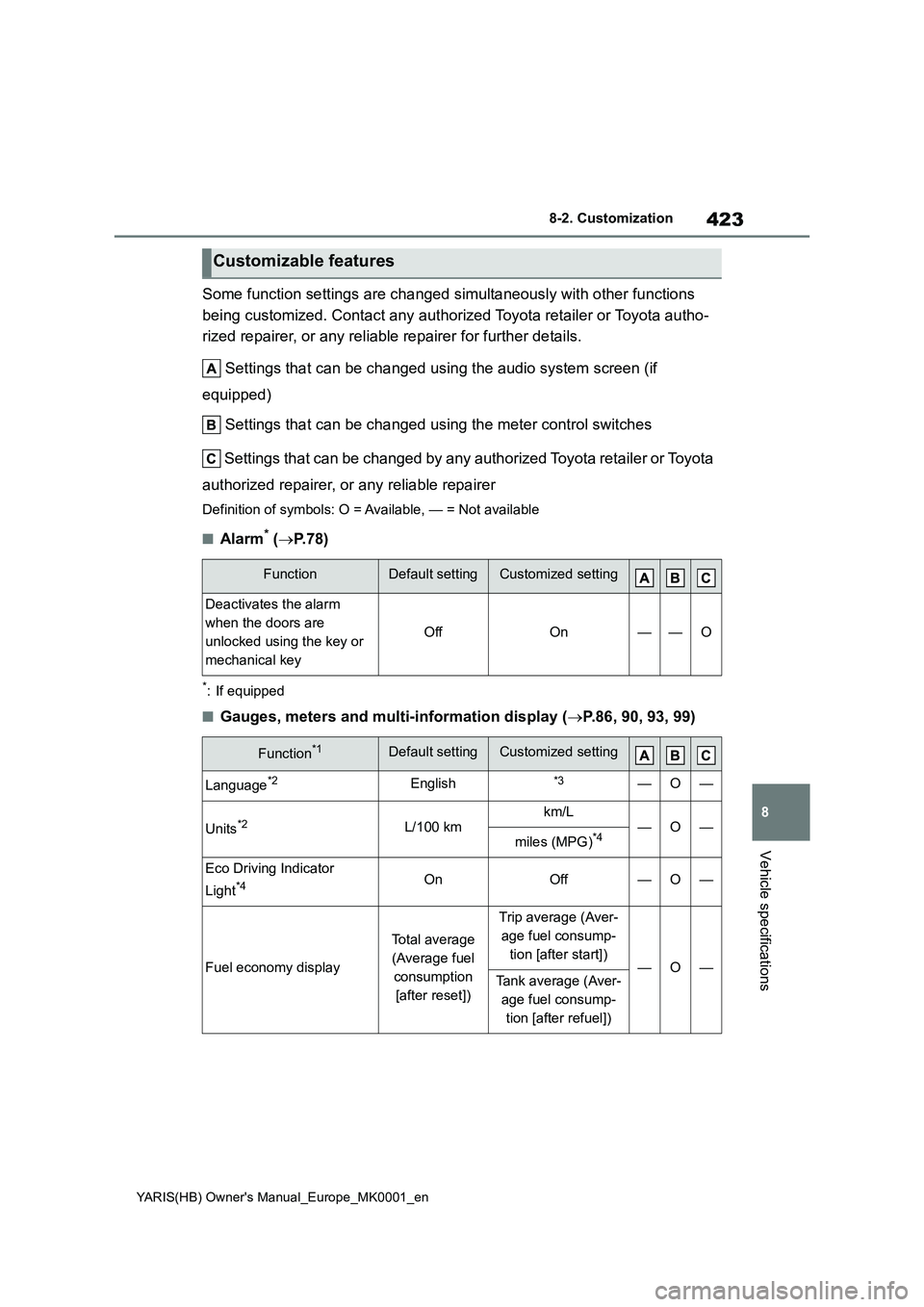
Some function settings are changed simultaneously with other functions
being customized. Contact any authorized Toyota retailer or Toyota autho-
rized repairer, or any reliable repairer for further details.
Settings that can be changed using the audio system screen (if
equipped)
Settings that can be changed using the meter control switches
Settings that can be changed by any authorized Toyota retailer or Toyota
authorized repairer, or any reliable repairer
Definition of symbols: O = Available, — = Not available
■Alarm* (→P.78)
*: If equipped
■Gauges, meters and multi-information display (→P.86, 90, 93, 99)
Customizable features
FunctionDefault settingCustomized setting
Deactivates the alarm
when the doors are
unlocked using the key or
mechanical key
OffOn——O
Function*1Default settingCustomized setting
Language*2English*3—O—
Units*2L/100 kmkm/L—O—miles (MPG)*4
Eco Driving Indicator
Light
*4OnOff—O—
Fuel economy display
Total average
(Average fuel
consumption
[after reset])
Trip average (Aver-
age fuel consump-
tion [after start])
—O—Tank average (Aver-
age fuel consump-
tion [after refuel])
Page 424 of 568
424
YARIS(HB) Owner's Manual_Europe_MK0001_en
8-2. Customization
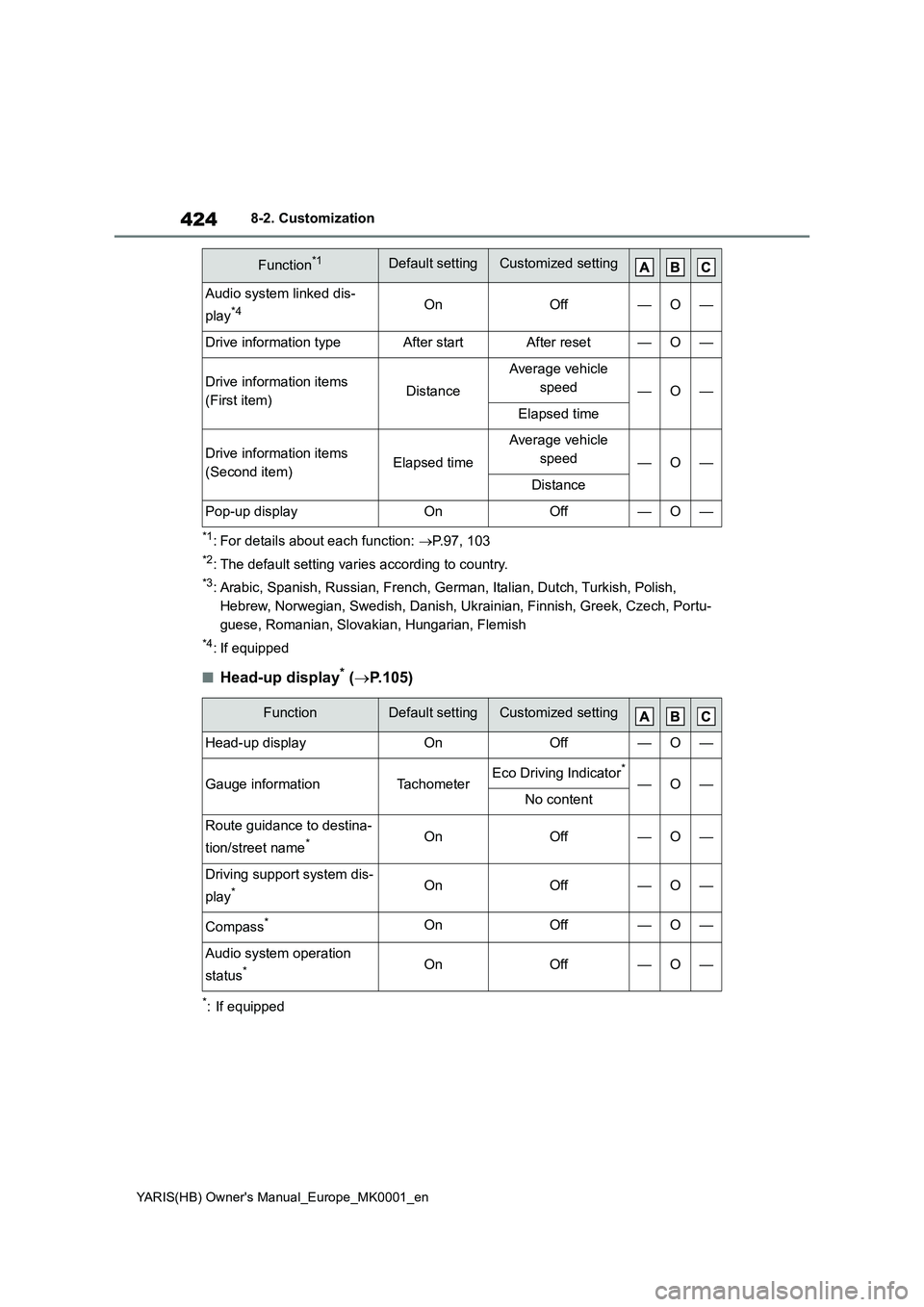
*1: For details about each function: →P.97, 103
*2: The default setting varies according to country.
*3: Arabic, Spanish, Russian, French, German, Italian, Dutch, Turkish, Polish,
Hebrew, Norwegian, Swedish, Danish, Ukrainian, Finnish, Greek, Czech, Portu-
guese, Romanian, Slovakian, Hungarian, Flemish
*4: If equipped
■Head-up display* (→P.105)
*: If equipped
Audio system linked dis-
play
*4OnOff—O—
Drive information typeAfter startAfter reset—O—
Drive information items
(First item)Distance
Average vehicle
speed
—O—
Elapsed time
Drive information items
(Second item)Elapsed time
Average vehicle
speed
—O—
Distance
Pop-up displayOnOff—O—
FunctionDefault settingCustomized setting
Head-up displayOnOff—O—
Gauge informationTachometerEco Driving Indicator*
—O—No content
Route guidance to destina-
tion/street name
*OnOff—O—
Driving support system dis-
play
*OnOff—O—
Compass*OnOff—O—
Audio system operation
status
*OnOff—O—
Function*1Default settingCustomized setting
Page 555 of 568
555
YARIS(HB) Owner's Manual_Europe_MK0001_en
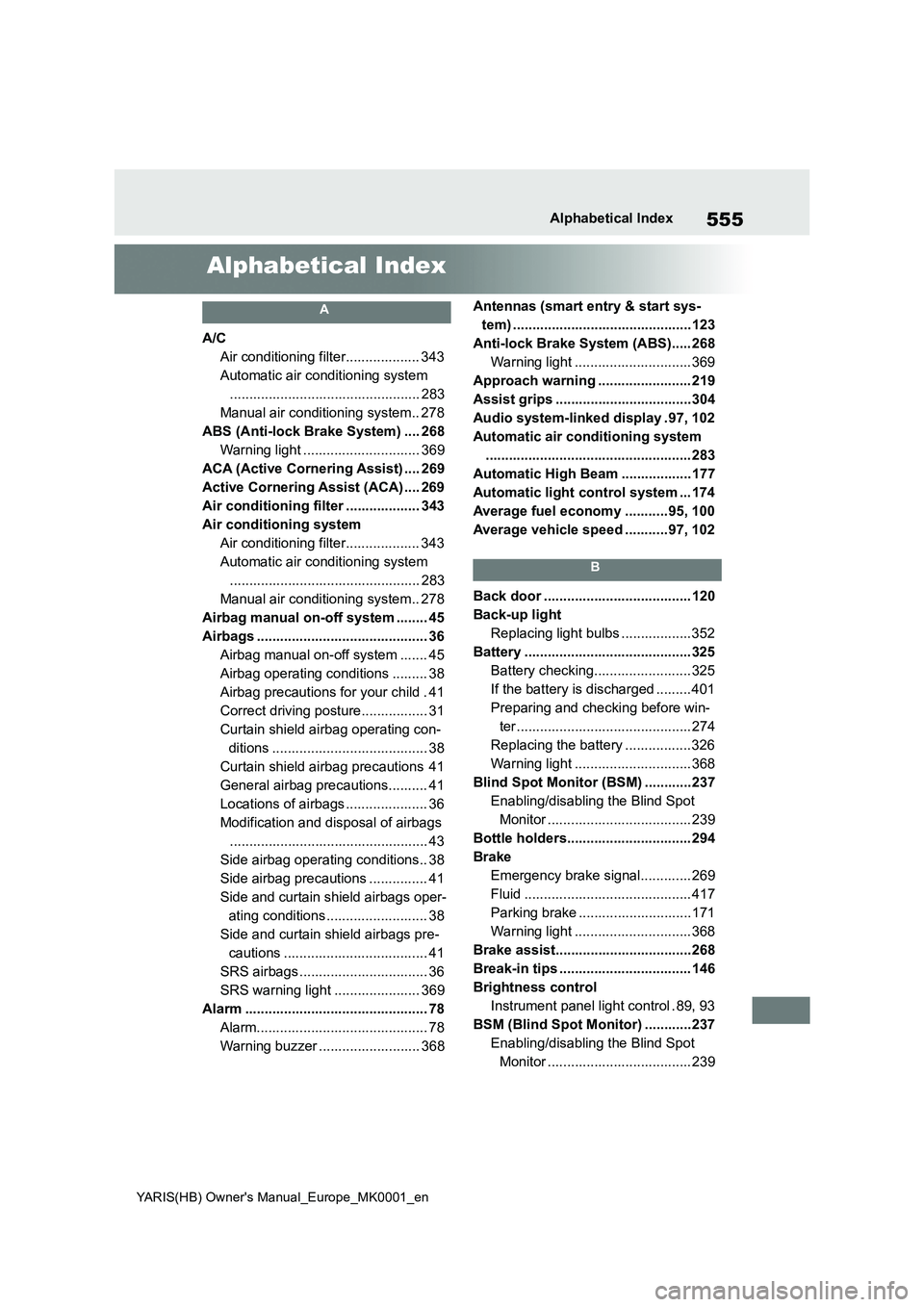
Alphabetical Index
Alphabetical Index
A
A/C
Air conditioning filter................... 343
Automatic air conditioning system
................................................. 283
Manual air conditioning system.. 278
ABS (Anti-lock Brake System) .... 268
Warning light .............................. 369
ACA (Active Cornering Assist) .... 269
Active Cornering Assist (ACA) .... 269
Air conditioning filter ................... 343
Air conditioning system
Air conditioning filter................... 343
Automatic air conditioning system
................................................. 283
Manual air conditioning system.. 278
Airbag manual on-off system ........ 45
Airbags ............................................ 36
Airbag manual on-off system ....... 45
Airbag operating conditions ......... 38
Airbag precautions for your child . 41
Correct driving posture................. 31
Curtain shield airbag operating con-
ditions ........................................ 38
Curtain shield airbag precautions 41
General airbag precautions.......... 41
Locations of airbags ..................... 36
Modification and disposal of airbags
................................................... 43
Side airbag operating conditions.. 38
Side airbag precautions ............... 41
Side and curtain shield airbags oper-
ating conditions.......................... 38
Side and curtain shield airbags pre-
cautions ..................................... 41
SRS airbags ................................. 36
SRS warning light ...................... 369
Alarm ............................................... 78
Alarm............................................ 78
Warning buzzer .......................... 368Antennas (smart entry & start sys-
tem) ..............................................123
Anti-lock Brake System (ABS)..... 268
Warning light .............................. 369
Approach warning ........................ 219
Assist grips ...................................304
Audio system-linked display .97, 102
Automatic air conditioning system
..................................................... 283
Automatic High Beam ..................177
Automatic light control system ... 174
Average fuel economy ...........95, 100
Average vehicle speed ...........97, 102
B
Back door ...................................... 120
Back-up light
Replacing light bulbs ..................352
Battery ........................................... 325
Battery checking......................... 325
If the battery is discharged ......... 401
Preparing and checking before win-
ter ............................................. 274
Replacing the battery ................. 326
Warning light .............................. 368
Blind Spot Monitor (BSM) ............237
Enabling/disabling the Blind Spot
Monitor ..................................... 239
Bottle holders................................ 294
Brake
Emergency brake signal............. 269
Fluid ........................................... 417
Parking brake .............................171
Warning light .............................. 368
Brake assist...................................268
Break-in tips .................................. 146
Brightness control
Instrument panel light control . 89, 93
BSM (Blind Spot Monitor) ............237
Enabling/disabling the Blind Spot
Monitor ..................................... 239